
Summarize this article with AI
In Brief
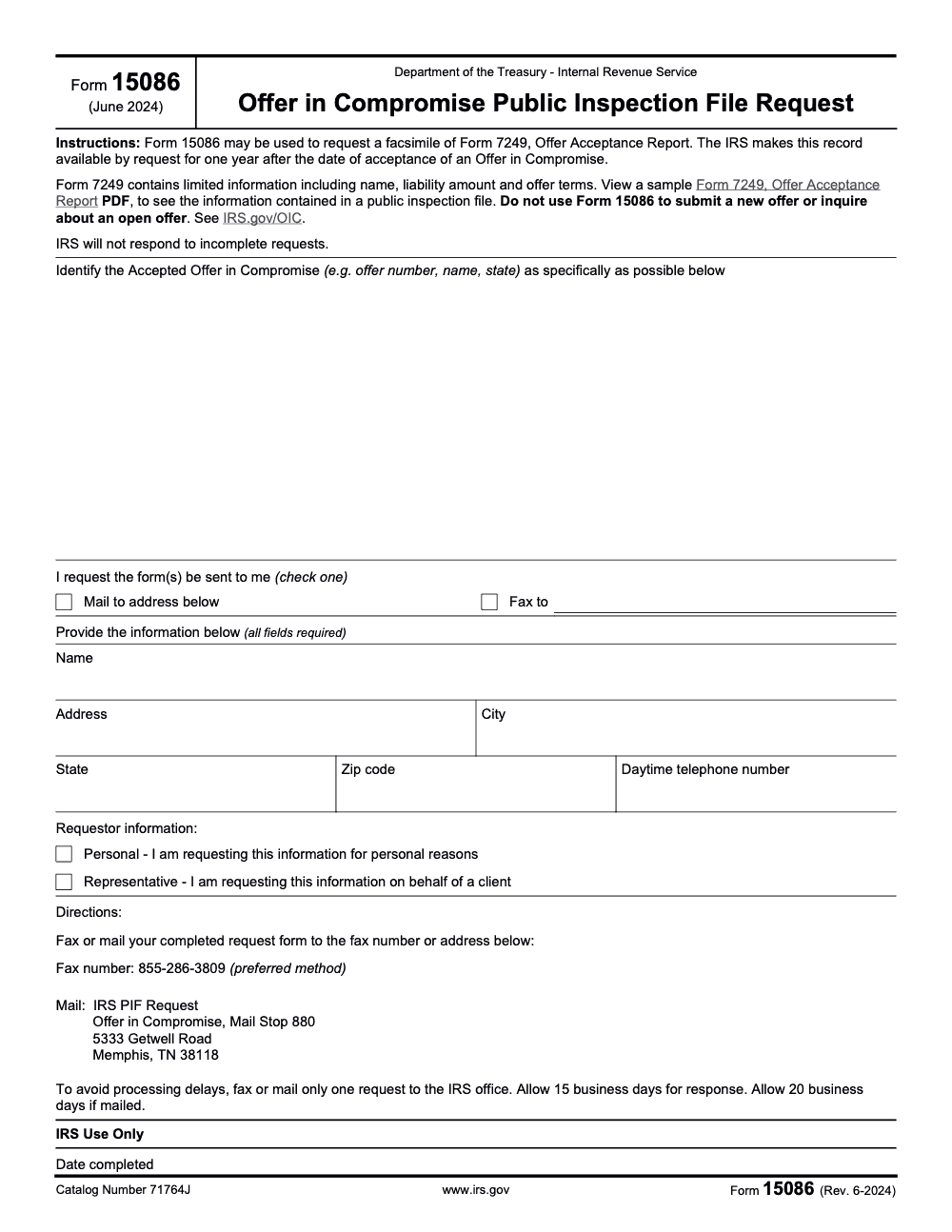
Form 15086 requests a facsimile of Form 7249, the Offer Acceptance Report from the IRS Offer in Compromise public inspection file (per Form 15086, Rev. 6-2024). The copy lists only the taxpayer name, liability amount, and offer terms, and the IRS makes it available by request for one year after the offer is accepted. Fax the completed form to 855-286-3809 (the IRS-preferred channel, about 15 business days) or mail it to the dedicated PIF unit in Memphis (about 20 business days), and send one request only. This form does not file or settle an offer; that work runs through our tax services, not Form 15086.
People assume Form 15086 pulls the full file behind an accepted Offer in Compromise, but what you get back is a copy of Form 7249 showing only the taxpayer name, the liability amount, and the offer terms.
The IRS keeps that record available for one year after the offer is accepted. You can fax the completed form to 855-286-3809, the preferred channel that runs about 15 business days, or mail it to the public inspection file unit in Memphis, which runs closer to 20 business days. Send a single request and identify the offer clearly so the IRS can find the right Form 7249.
Key Takeaways
- Form 15086 is the request for the Offer in Compromise Public Inspection File, which is a copy of Form 7249 for an accepted offer. It shows the taxpayer’s name and location, liability amount, and offer terms, nothing more. Available for one year after acceptance.
- This form is not how you apply for an OIC. To apply, use Form 656‑B with Forms 433‑A(OIC) or 433‑B(OIC), or file through your Online Account.
- You can submit Form 15086 by electronic request, fax, or mail. The IRS targets a response in about 15 business days, and asks you not to send duplicate requests. Fax is preferred.
- Requests must identify the accepted offer clearly, for example the offer number or name and state, so the IRS can locate the correct Form 7249.
- If the offer was accepted more than one year ago, the public inspection copy is no longer required to be available. You may try a FOIA request, but availability is not guaranteed.
What Form 15086 Actually Is
Form 15086 is the IRS’s official way to request a public inspection copy of Form 7249, the Offer Acceptance Report, for a specific accepted Offer in Compromise. The copy is a redacted, limited snapshot, not a full case file. By law and internal policy, the IRS makes Form 7249 available for one year after acceptance, which is why speed and specificity matter.
What you can expect to receive on Form 7249: the taxpayer’s name, city and state, the amount of liability, and the terms of the accepted offer. That is it. If you need more detail than Form 7249 contains, you will need different authority or a separate disclosure path.
When You Should Use It, And When You Should Not
Use Form 15086 when you need the public inspection copy tied to a specific accepted OIC, for example to verify that an offer was accepted or to confirm accepted terms for research and reporting. The form is not used to submit an OIC, to check the status of an open OIC, or to obtain complete case workpapers. For applying or managing an offer, rely on Form 656‑B and the IRS Online Account workflow. For broad records outside the one‑year window, consider FOIA.
If your goal is to file an OIC, you will instead assemble Form 656 and the correct financial statement, then submit by mail or electronically where offered. The IRS now supports eligibility checks and online filing for individuals through the Online Account and the Pre‑Qualifier tool, which helps you size a preliminary offer.
Who Can Request The Public Inspection File
Anyone may request a copy of Form 7249 within that one‑year availability period, because it is a public inspection record. You do not need to state a public interest purpose, although you do need to be specific enough for the IRS to locate the correct accepted offer. If you are acting for a client and want to communicate with the IRS about their account, use Form 2848, not Form 8821, since 8821 does not authorize representation in collection matters.
Common Scenarios
- You need to confirm whether an offer was accepted and on what terms for a case study or internal control review.
- A journalist or researcher is analyzing acceptance patterns and wants a sample of accepted offers.
- A firm wants quick confirmation for a legacy engagement before closing files for the year.
If the accepted offer is older than one year, the public inspection copy is no longer required to be available. You may pursue a FOIA request through your local IRS office. Results will vary, and response time can be longer.
How To Submit Form 15086, Step By Step
- Identify the accepted offer precisely. Include the offer number or, at minimum, the taxpayer name and state, so the IRS can match the correct Form 7249.
- Choose how you want the agency to send the copy, by mail or by fax, then complete your requestor information and daytime phone, since the IRS will not respond to an incomplete request and will not follow up to ask for the missing details.
- Submit electronically, fax the form, or mail it. Do not send duplicate requests. Plan for about 15 business days for a response, and add a few days if you mail.
In my experience, the fastest path is electronic request or fax, since the Public Inspection File unit treats fax as preferred intake. Keep a single packet and note the date submitted, so you do not clog the queue with duplicates, which can slow everyone down.
Where To Send It, Current Details For 2025
You have three practical options. Pick one, then stick with it.
- Electronic request, the IRS mobile friendly submission, available from the public inspection page. The form lets you submit and download a PDF for your records.
- Fax, preferred by the IRS for these requests. Current number, 855‑286‑3809.
- Mail, addressed to the dedicated Public Inspection File unit, not a general IRS service center: IRS PIF Request, Offer in Compromise, Mail Stop 880, 5333 Getwell Road, Memphis, TN 38118. Allow extra days for mail handling.
Timing you can plan around, IRS guidance as of May 5, 2025, says they will respond in about 15 business days, and asks you not to send duplicate requests. Add about five business days if you mail instead of fax or electronic.
What To Include So It Moves Fast
- The accepted offer identifier, ideally the offer number. If you do not have it, give the taxpayer name and state.
- Your delivery preference, fax or mail, and complete contact details.
- One request only, since duplicates can delay your own response.
What You Do Not Need
- You do not need to attach a power of attorney just to request the public inspection copy. If you plan to speak to the IRS about the taxpayer’s account or a collection matter, then you need Form 2848.
- You do not need to list income, deductions, or compute AGI. That belongs to OIC applications, not this request.
Form 15086 vs OIC Applications vs FOIA
Use the right tool so you do not waste cycles.
| Purpose | Use This | What You Get | Processing Notes |
| Confirm details of an accepted OIC | Form 15086 | Redacted copy of Form 7249 with basic acceptance details | One year availability, aim for about 15 business days to respond |
| Apply for an Offer in Compromise | Form 656‑B package with Forms 433‑A(OIC) or 433‑B(OIC) | A complete application to settle a debt for less than the full amount | Online Account filing for individuals, eligibility tools available |
| Seek broader records after one year or outside 7249 scope | FOIA request | Whatever records the IRS can release under FOIA rules | Response times vary, not guaranteed to include 7249 after one year |
Sources, IRS public inspection page, OIC program page, IRM 5.8.8 on the one year window.
Common Misconceptions, Cleared Up
- “There is a 30‑day levy deadline tied to Form 15086.” That deadline belongs to levy and collection actions, not to the public inspection process. There is no statutory filing deadline for Form 15086, but availability is limited to one year after acceptance, so act quickly.
- “Form 15086 is how I apply for an OIC.” Applications use Form 656‑B and financial statements, not Form 15086.
- “I can get the entire case file through the public inspection request.” You will receive only a copy of Form 7249 with limited fields.
What About Older Cases
If an offer was accepted more than one year ago, the IRS no longer has to keep Form 7249 ready for public inspection. You may submit a FOIA request, typically through your local IRS office. Understand that FOIA has its own rules and timelines, and the agency may not be able to provide what you want.
A Clean, Real‑World Request Example
Here is the style we use in practice, with identifying details removed.
- Accepted Offer details, “Offer number OIC‑2024‑XX‑12345, John Q. Taxpayer, Phoenix, AZ.”
- Delivery preference, “Please fax a copy of Form 7249 to 6025551234.”
- Requestor information, “Jane Smith, CPA, contact 4805559876.
One submission only, we keep the confirmation sheet and wait the fifteen business days before any follow up.
A single, specific request reduces back and forth and keeps your team out of repeated status calls that do not move the ball.
If You Actually Need To Submit Or Review An OIC
Many teams reach for Form 15086 when the real need is to evaluate or file an offer. If you are settling a balance, go to the OIC program page, check eligibility in the Pre‑Qualifier, then prepare the package in Form 656‑B. Individuals can start and even file through their Online Account as of 2025.
Quick OIC Eligibility Highlights
- All required returns are filed and estimated payments are current.
- You are not in an open bankruptcy.
- You provide financials on Form 433‑A(OIC) or 433‑B(OIC), and submit the application fee and initial payment unless you meet the low income certification.
The IRS may take months to complete an investigation, and the public inspection copy becomes available only if your offer is accepted, after which it remains available for one year.
Processing Time, What To Expect
For Form 15086, the IRS targets a response in about 15 business days. If you mail, add several days for transit and intake. If you fax or submit electronically, keep the confirmation, then wait through the target window before following up. The IRS specifically asks you not to send duplicate requests, since they slow processing for everyone, including you.
For OIC applications, timelines are different. The full investigation can run up to 24 months in some cases, and if the IRS does not make a determination within two years of receipt, an offer is deemed accepted by statute, subject to exceptions. That is about OICs themselves, not public inspection requests.
Quality Tips So Your Request Never Bounces
- Be precise about the accepted offer you want. Offer number beats a name alone, and a name plus city or state is better than a name alone.
- Pick one submission channel. If you sent an electronic request today, do not mail or fax a duplicate tomorrow.
- Use a firm fax line or secure inbox that can actually receive the file without size limits.
- Calendar 15 business days from submission, then follow up once, with the original confirmation handy.
Pro move, assign a single intake owner for these requests. One person logs requests, stores confirmations, and tracks the one year availability window, so you do not miss your shot. That simple discipline prevents most chases and rework.
Security And Professionalism Notes
The public inspection copy is, by definition, public. Even so, treat it with the same care you give any sensitive record. Store it in your DMS with role‑based access, avoid local desktop saves, and keep a chain of custody note in the engagement file. When you publish or share research, confirm that you have not combined public details in a way that exposes private information.
A brief word on operations, then we will get you back to work. If OIC requests and other compliance tasks are piling up, your real constraint may be workflow discipline, not raw capacity. At Accountably, we integrate trained offshore teams inside your templates and systems, with SOPs and layered review, so routine requests stop turning into review bottlenecks. Use us when delivery needs capacity without chaos, not just extra resumes. Keep reading for the step‑by‑step.
Step‑By‑Step, Filling And Sending Form 15086
- Download or open the 15086 request. The IRS hosts a mobile friendly version where you can submit electronically or download a PDF.
- Identify the accepted offer. Enter the offer number, or the taxpayer name and state, so the IRS can locate the correct Form 7249.
- Choose delivery, mail or fax, and enter your complete contact details and a daytime phone (all requestor fields, including the daytime telephone number, are required).
- Submit one request only. Save the submission confirmation or a fax success sheet. Plan for 15 business days before a follow up.
- If you mail, address it to the IRS PIF unit in Memphis and give yourself an extra week for transit and intake.
Sample Cover Note You Can Adapt
Re, Form 15086, Public Inspection File Request Requesting Form 7249 for Accepted OIC OIC‑20XX‑XX‑12345, Jane Q. Taxpayer, Denver, CO. Please fax to 3035557788. Contact, Alex Rivera, CPA, 7205551122,. One submission only, thank you for your help.
Troubleshooting And Edge Cases
- If your fax fails repeatedly, confirm the number and try during off‑peak hours. The IRS lists 855‑286‑3809 for these requests.
- If you never received a response and your calendar shows the fifteen business day mark has passed, call once with your confirmation details ready, or submit a fresh request if the first one clearly failed.
- If you do not know the offer number, provide the best identifiers you have, name and state at minimum, and be clear that the offer was accepted in a given month and year, if known.
Field note, our team has seen the fastest turnarounds when the offer number is included. If you are missing it, scan your acceptance letter or internal CRM notes first, since the number is often there.
How Operations Discipline Keeps You Out Of The Weeds
The request itself is simple. What burns time is the hunt for identifiers, duplicate submissions, and scattered follow ups. If your firm’s delivery model is already stretched, these small tasks multiply into review bottlenecks. Accountably builds offshore delivery that works inside your systems with SOPs, structured workpapers, and layered review, so tasks like Form 15086 requests, transcript pulls, and SALT notices stop hijacking partner time. Use us when you need capacity that respects quality, security, and control, not a stack of resumes.
Compliance Note And Sources
This guide is based on IRS sources reviewed in 2024 and 2025. For this topic, the key pages are the IRS’s public inspection page, the current Form 15086 wizard with mailing and fax details, the Offer in Compromise program page, and IRM 5.8.8 on acceptance processing and the one year public inspection window. Always check the IRS pages for updates before you submit.
Summary, Do This Next
- Confirm that the offer was accepted within the last year.
- Complete Form 15086 with a precise identifier, ideally the offer number.
- Submit once, electronically or by fax, then wait 15 business days.
- If you actually need to apply for an offer, use Form 656‑B or the Online Account path.
If you want a checklist you can paste into your practice management system, here is the short version.
- Gather acceptance letter, offer number, taxpayer name, and state.
- Submit a single Form 15086 request, keep the confirmation.
- Update your tracking board for fifteen business days.
- File the received Form 7249 in your DMS with a consistent naming convention.
- If the acceptance is older than one year, consider FOIA, then set expectations accordingly.
Our commitment, we write guides like this to save you time and protect your client relationships. If you need disciplined help with delivery so partners can focus on advisory, our team at Accountably is ready to plug into your workflow.
Common Mistakes We See Every Season
The same handful of slips bounce these requests back, and every one of them is avoidable. Here is what we flag before a Form 15086 ever leaves the office.
Reusable Checklists
Drop these straight into your engagement SOP. Each step keeps a Form 15086 request clean enough that it never bounces back.
Pre-request identification packet
- Confirm the Offer in Compromise was accepted, not merely pending.
- Pull the offer number from the acceptance letter or CRM, since it beats a name alone.
- Note the taxpayer name and state as backup identifiers.
- Verify the acceptance date falls inside the one-year availability window.
- Decide Personal or Representative requestor type before drafting.
Submission review before it leaves
- Complete all six requestor fields: name, address, city, state, ZIP code, and daytime telephone number.
- Check exactly one delivery method, fax or mail.
- Choose one channel only and do not duplicate by fax and mail.
- Fax to 855-286-3809, or mail to IRS PIF Request, Offer in Compromise, Mail Stop 880, 5333 Getwell Road, Memphis, TN 38118.
- Save the fax confirmation or mailing record to the engagement file.
Response tracking and follow-up
- Calendar 15 business days from a faxed request, 20 from a mailed one.
- Assign one intake owner to log the request and store the confirmation.
- Wait through the full window before any follow-up call.
- If the window passes with no response, follow up once with the confirmation in hand.
- If the acceptance is older than one year, switch to a FOIA request instead.
Keep 15086 Season From Stalling
Form 15086 has no annual deadline, which is exactly why it slips. A request only stays available for one year after an Offer in Compromise is accepted, and the IRS allows about 15 business days to respond to a fax and roughly 20 to a mailed request (per Form 15086, Rev. 6-2024). When these one-off requests sit in an inbox between bigger engagements, the window quietly closes.
The fix is not more staff; it is a defined intake path so every request goes out complete the first time. Treat the Offer Acceptance Report retrieval like any other tracked deliverable, with a named owner, a checklist, and a follow-up date on the calendar.
- Log the acceptance date as soon as it lands, so the one-year availability window is visible to whoever handles the request.
- Standardize on the offer number as the primary identifier, with taxpayer name and state as backups, before the form is drafted.
- Default to fax at 855-286-3809 for the faster response, and never duplicate the request across channels.
- Confirm all six requestor fields and a single checked delivery method, since the IRS will not follow up on an incomplete request.
- Store every fax confirmation and acceptance copy in the document system with role-based access, not on a local desktop.
That kind of intake discipline is what we build into client workflows. Accountably integrates trained, U.S.-led offshore teams into your systems with documented SOPs and layered review, so administrative requests like this clear on the first pass instead of bouncing back. See how that runs across our tax services when routine compliance work is crowding out higher-value tasks.
FAQs
For one year after the date an offer is accepted, the IRS makes a copy of Form 7249 available for public inspection. After that, it is no longer required to be available.
A redacted copy of Form 7249 that lists the taxpayer’s name, city and state, the liability amount, and the offer terms. It is a limited record, not a full case file.
You can try a FOIA request. The IRS may or may not be able to provide what you seek, and timelines differ from the public inspection process.
No. Anyone can request the public inspection copy within the one year window. If you want to represent a taxpayer in a collection matter or discuss their account details, use Form 2848, not Form 8821.
The IRS aims to respond in about 15 business days, longer if you mailed your request. Avoid duplicates, since they slow the response.
No. Use Form 656‑B with the required financial statements, or file through your Online Account if you are eligible.
Other forms this guide names
- Form 656-B: OIC Guide, Low-Income, Fees, Addresses
- Form 433-A: IRS Collection Information Statement Guide
- Form 433-B: Business IRS Guide, Requirements & How to File
- Form 656: How to File an Offer in Compromise, Requirements and Checklist
- Form 2848: Guide to Line 3, Filing, and Rules
- Form 8821: Tax Information Authorization
Summarize this article with AI
About this guide
Accountably helps US CPA, EA, and accounting firms hire trained accountants and tax preparers in India.
About us Reviewed byJugal Thacker, CPAFounder and CEO at Accountably
A US-licensed CPA with 7+ years inside US firms – PwC, a real-estate tax practice, then a full-service firm, rising from reviewer to manager to advisory. This article was reviewed against current IRS guidance for the 2025 tax year and updated for filers preparing late returns, amendments, and 2026 estimates.
View profile →How we research, review, and update this guide
Every Accountably guide is researched against primary IRS sources, reviewed by a U.S. CPA, and refreshed as guidance evolves. Read our Editorial Guidelines to see how we source, fact-check, and update our content.




