
Summarize this article with AI
In Brief
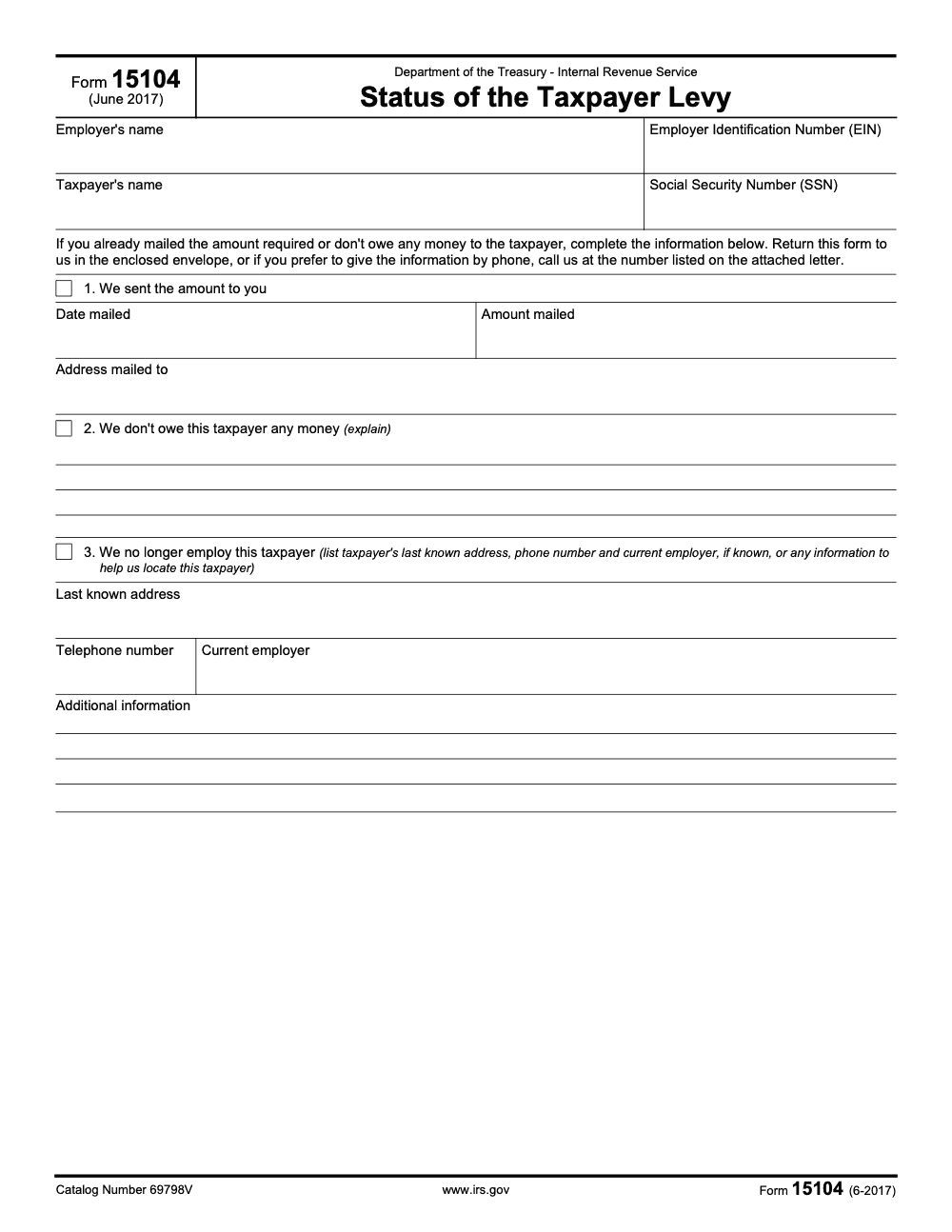
Form 15104, Status of the Taxpayer Levy, is a one-page status-response form returned to the IRS by the third-party levy recipient (typically an employer, bank, or payor) – not by the taxpayer being levied. Three checkboxes cover the common outcomes (amount already sent, no money owed, taxpayer no longer employed), the form asks for the responding employer's EIN and the taxpayer's SSN, and per the IRS Form 15104 PDF (June 2017 revision) it may be returned either by mail in the enclosed envelope or by phone using the number on the attached IRS letter. See our IRS Forms library for related levy forms.
Form 15104 is not a taxpayer self-check. It is the one-page status reply the levy recipient, typically an employer, bank, or payor, sends back to the IRS to report where things stand. The taxpayer being levied does not file it.
Three checkboxes carry the common outcomes: the amount was already sent, no money is owed, or the taxpayer is no longer employed. The form asks for the responding employer's EIN and the taxpayer's SSN, and you usually return it to the channel on the levy follow-up notice, for example an LP59, within the stated window, often 30 days. Keep proof of mailing.
Key Takeaways
- Form 15104, Status of the Taxpayer Levy, is a one page reply used by employers and other payors who received an IRS levy to report status back to the IRS, not a taxpayer request form.
- The form supports three common outcomes, payment already mailed, no money owed to the taxpayer, or the taxpayer is no longer employed, plus space for additional details.
- You typically return Form 15104 to the address or reply channel on the levy follow up notice, for example LP59, within the stated response window, often 30 days. Keep proof of mailing.
- The current revision shows June 2017 and remains posted on IRS.gov. As of January 14, 2026, the IRS forms index still lists Form 15104.
- Wage levies use Form 668 W and bank or receivable levies use Form 668 A. Releases use Form 668 D. Publication 1494 provides the exempt wage tables you must apply when a wage levy hits payroll.
What Form 15104 Actually Does
Form 15104 is a status postcard for the IRS. It is pre titled “Status of the Taxpayer Levy” and it asks for the employer’s name and EIN plus the taxpayer’s name and SSN. Then it gives you three checkable paths. say when and how much you already mailed, explain that you do not owe the taxpayer any money, or confirm the person is no longer employed and share the last known address and any forwarding details you have. It is short by design, which is why accuracy matters.
This is the form the IRS often wants when you get a follow up LP59 notice, which says the IRS sent you a levy and did not receive a response. If you already remitted proceeds or the levy does not apply, you complete Form 15104 and send it back with the LP59 stub to the address on the notice within 30 days. That fast, clean response helps you avoid personal liability and the separate 50 percent penalty the Code allows when a levy recipient refuses to surrender property.
Who Should Use IRS Form 15104
Employers and Other Payors Who Received a Levy
If your company was served a levy, for example Form 668 W for wages or Form 668 A for a bank account or receivable, and you later get an LP59 follow up, Form 15104 is how you give the IRS a concise status. Payroll teams use it when deductions already started, AP teams use it when no payment is due, and banks or payors use it when funds were remitted.
Not For Taxpayers To “Request Levy Status”
This point is easy to get wrong. The Form 15104 PDF itself is addressed to employers, it is not a taxpayer form for checking on the IRS. If the taxpayer needs payoff details or status, they must contact the IRS directly or work through their representative. That information is not released to the employer.
Why Accounting Firms Care
If you run a CPA, EA, or CAS practice, your team might be the one routing levy mail, coordinating with payroll providers, or answering client questions. A crisp 15104 process reduces review loops and protects client relationships. In my experience working with firm ops leaders, the teams that document a one page SOP for 15104 avoid the last minute scrambles that derail busy season.
Practical rule, as soon as an LP59 arrives, assign an owner, confirm whether money was sent or owed, complete Form 15104, return it with the notice stub, and save a dated copy with proof of mailing.
Note on trust and accuracy, the IRS still lists Form 15104 with a June 2017 revision, and because the form has no thresholds, dollar amounts, or rate tables, it is not affected by annual inflation adjustments or legislation like OBBBA. Always download the current file directly from IRS.gov before you complete it.
When To Use Form 15104
You Already Mailed Levy Proceeds
Check box 1 and enter the date, amount, and mailing address used. This closes the loop for the IRS unit that issued or is monitoring the levy. Keep a copy of your check, EFT trace, or other proof in your records. If the levy was on wages, confirm that Publication 1494 was applied correctly to calculate the exempt amount for the pay period.
You Do Not Owe The Taxpayer Money
Check box 2, explain clearly, and include any document that supports your position. Examples, the vendor invoice was voided, the employee did not earn wages in the covered period, or the customer credit memo offset the balance. This prevents unnecessary follow ups and avoids being treated as non compliant under IRC 6332.
You No Longer Employ The Taxpayer
Check box 3 and provide the taxpayer’s last known address, phone, any new employer if known, and any other facts that can help the IRS locate current payors. This is specifically requested on the form and it is better to be precise than brief.
How Form 15104 Fits With Levy Mechanics
- Wage levies are served on employers using Form 668 W. Employers must compute the exempt wage amount per Publication 1494 using the employee’s statement of dependents and filing status that accompanies the levy. The employee has three days to complete that statement.
- Bank, merchant account, and receivable levies are generally served using Form 668 A. Banks must observe the 21 day hold before remitting funds.
- Levy releases are issued using Form 668 D. When the underlying balance is paid or other arrangements are made, the IRS will send a release.
Knowing which form does what keeps your replies clean and your records audit ready.
Download Options For IRS Form 15104
You should always use the official PDF. As of January 14, 2026, Form 15104 remains posted on IRS.gov with a June 2017 revision. Download the file directly and save it to your case folder before you type.
| Source | What You Get | Cost |
| IRS.gov PDF | Current official Form 15104, one page fillable | Free |
| Mirrors or libraries | Convenience copies of the same PDF, verify the revision matches IRS.gov | Free or free to view |
Note, some libraries mirror the file and label it valid for certain tax years. The authoritative source is IRS.gov, and the IRS forms list confirms the current product details.
Step By Step, Completing IRS Form 15104
- Identify yourself Enter the employer or payor legal name and EIN. Enter the taxpayer’s legal name and SSN exactly as shown on the levy notice. Accuracy here speeds the IRS lookup. (Non-employer levy recipients without an EIN, such as individuals holding funds owed to the taxpayer, should follow the response channel and identifier format on the accompanying levy notice letter rather than simply leaving the EIN field blank.)
- Choose the right status path
- Box 1, money already sent. Provide the date, amount, and address where you mailed payment.
- Box 2, you do not owe the taxpayer money. Briefly explain why.
- Box 3, the person is no longer employed. Give last known address, phone, current employer if known, and any helpful locator info.
- Add notes that prevent callbacks Use the additional information space for reference numbers, contact names, remittance traces, or to point to prior correspondence. Clear notes reduce follow ups.
- Return it the right way LP59 instructs you to mail the detachable stub with the completed Form 15104 to the address on the notice within 30 days. Use certified mail and keep the receipt. (Mail is not the only option, the form also authorizes returning the same information by phone using the number on the attached IRS letter.)
- Save the paper trail Keep copies of the form, the notice, your proof of mailing, and any remittance evidence in a single folder. If a release, Form 668 D, arrives later, file that in the same place.
Quick Prep Checklist
- Exact legal names and IDs match the levy notice
- Correct status box selected with complete details
- Attach the LP59 stub if instructed
- Certified mail receipt saved and scanned
- Publication 1494 applied for wage levies, if relevant
Common Filing Errors And How To Avoid Them
- Vague explanations in Box 2 “Nothing owed” without context invites a callback. Write one clear sentence, for example, “No payment due, the invoice was voided on October 3, 2025, credit memo CM 1184 attached.”
- Missing dates or dollar amounts in Box 1 If you already mailed proceeds, the IRS needs the date, amount, and where you sent it. Add the check number or EFT trace in the notes. This closes the loop faster.
- Not coordinating with payroll on wage exemptions If a wage levy is active, confirm that your payroll team used the correct year of Publication 1494. The tables update annually and the IRS lists 2025 as the current edition.
- Mailing to a general IRS address LP59 tells you to return the stub and Form 15104 to the address on the detachable notice. Do not guess. Use certified mail and save the receipt.
- Treating Form 15104 like a taxpayer status request The form is the payor’s status reply. If the taxpayer wants payoff figures or case status, they must contact the IRS or their assigned revenue officer. Employers will not receive taxpayer payoff information.
Where To Send Form 15104
Send Form 15104 exactly where the notice tells you to send it. With an LP59, mail the notice stub and your completed 15104 in the enclosed envelope to the address printed on the detachable stub within 30 days of the notice date. If the notice came with other return instructions, follow them. When in doubt, use the contact details on the notice to confirm the correct address before you mail.
Smart Delivery Habits
- Use certified mail with return receipt
- Scan the signed 15104, the notice, and the mailing receipt into your case file
- Add a calendar reminder to check for an IRS reply in 30 to 45 days
After You File, Timelines And Follow Up
There is no published processing timeline for Form 15104. What you can control is responsiveness and documentation. For wage levies, remember that a levy can run until the balance is paid or the IRS issues a release, Form 668 D, or the taxpayer makes other arrangements. For bank levies, banks hold funds for 21 days before remitting. Stay organized, because each of those steps can trigger notices that expect a quick reply.
A Simple Follow Up Plan
- Day 0, mail the 15104 and stub, save proof.
- Day 7 to 10, confirm delivery through USPS tracking.
- Day 30, if you have not seen a response and an LP59 gave you a 30 day window, call the number on the notice to confirm the IRS has your reply. Document the call with name, ID, and date.
For Wage Levies, Check The Exempt Amount Annually
The IRS updates Publication 1494 each year. If a wage levy spans calendar years, payroll should apply the current year table once the employee returns a new statement of filing status and dependents. This is separate from the employee’s W 4 and follows the levy package rules.
Toolbox, Forms That Travel With 15104
- Form 668 W, wage levy notice to employers
- Form 668 A, levy for bank accounts and receivables
- Form 668 D, release of levy
- Publication 1494, exempt wage tables for the year of service
If you run firm operations, put these form numbers in your intake SOP, it helps your admin team triage levy mail on day one.
Operations Tip For CPA And CAS Teams
If your firm handles payroll coordination for clients, treat levy mail like you treat statutory notices, with a clock and a checklist. Assign a single owner, load a standard 15104 template, and require a second set of eyes before anything is mailed. Where it fits, your offshore team can prepare the draft 15104 and assemble attachments, while a U.S. reviewer signs off and sends. That split reduces partner review time without giving up control.
Form 15104 Versus Other Ways To Communicate Levy Status
| Situation | Best Path | Why |
| You received LP59 after a levy | Return LP59 stub with completed Form 15104 | Creates a clear written record the IRS asks for, often within 30 days. |
| Wage levy is active, need exempt tables | Publication 1494 and the employee’s filing status statement from the levy packet | Correctly figures the exempt amount each pay period. |
| Bank levy funds on hold | Follow the 21 day hold, then remit unless released | Banks must observe the hold window before payment. |
| Levy needs to be released | Watch for Form 668 D or contact IRS about resolution | 668 D is the release form for levies. |
Phone calls with the IRS can help clarify, but calls alone do not create the standardized paper trail that a completed 15104 and stub provide. When the IRS specifically instructs you to return the form, reply in writing.
Conclusion
Form 15104 is short, and it matters. When the IRS sends a follow up like LP59, it is your chance to state clearly what happened, money sent, nothing owed, or no longer employed, and to give the IRS the details they need. Download the current PDF from IRS.gov, fill it carefully, return it to the address on your notice within the stated window, and keep the paper trail. For wage levies, apply Publication 1494 for the year served. For bank levies, respect the 21 day hold. When the balance is resolved, expect a Form 668 D release. Handle those steps well and your team will protect clients, meet deadlines, and keep penalties out of the conversation.
Compliance Note
This article reflects IRS pages reviewed or updated between December 16, 2025 and January 14, 2026. Always confirm the latest PDFs and instructions on IRS.gov before filing.
Quick Links
- Form 15104 PDF, Status of the Taxpayer Levy
- Understanding your LP59 notice
- IRM, Serving and Releasing Levies
- Publication 1494, 2025 tables for exempt wages
Common Mistakes We See Every Season
From my side of the desk, the same Form 15104 mistakes resurface every time payroll or AP routes a levy reply without a one-page SOP. The form is short, which is why small omissions create big cleanup.
Reusable Checklists
These checklists are copy-paste ready for firm SOPs. Each one maps to a specific Form 15104 response path so payroll, AP, and CAS owners can hand off cleanly without rebuilding the workflow each time a levy reply hits the desk.
Day-zero levy intake (any Form 15104 reply)
- Log the levy notice receipt date, sender unit, and any accompanying IRS letter reference in your case tracker.
- Confirm the responding employer's legal name and EIN match how the taxpayer's employer is recorded with the IRS.
- Confirm the taxpayer's legal name and SSN match the levy notice exactly.
- Identify which of the three Form 15104 status paths applies: amount sent, no money owed, or no longer employed.
- Assign a single owner (payroll, AP, or CAS lead) and a second reviewer before any reply is sent.
- Download the June 2017 revision of Form 15104 directly from IRS.gov to the case folder.
- Calendar the response window stated on the accompanying IRS letter and a follow-up check to confirm IRS receipt.
Box 1 reply packet (amount already sent to the IRS)
- Pull the remittance evidence: check number, EFT trace, or wire confirmation matched to the levy.
- Record on Form 15104 the date mailed, amount mailed, and address mailed to (per the form's Box 1 required fields).
- Attach a copy of the cleared check or EFT confirmation in the case file.
- Decide the return channel: mail in the IRS-enclosed envelope or phone using the number on the IRS letter (both are authorized by Form 15104).
- If mailing, use a tracked method and save the receipt scan with the case file.
- If calling, log the IRS agent's name, badge ID, and the substance of the call; follow with the form by mail for the paper trail.
Box 3 reply packet (no longer employ this taxpayer)
- Pull the separated employee record: termination date, last role, and HRIS contact details.
- Capture the taxpayer's last known address and telephone number from the HRIS.
- Note any current-employer information you have (rollover paperwork, reference requests, COBRA elections).
- Write a one-line note in the Additional Information field describing how you know what you know.
- Confirm all Box 3 required fields are present: last known address, telephone number, current employer, additional information.
- Return Form 15104 by mail or phone per the accompanying IRS letter, and save a dated copy of what you sent.
Keep 15104 Season From Stalling
Form 15104 never queues neatly. Levy mail arrives off-cycle, the response window on the accompanying IRS letter is short, and each of the three status paths on the form demands a different attachment packet. Payroll, AP, and CAS teams that batch levy mail with their other notices tend to miss the small details that turn a one-page reply into a multi-week follow-up loop. Per the IRS Form 15104 PDF (June 2017 revision), the form expects the responding employer's EIN, the taxpayer's SSN, and a complete data set for whichever checkbox applies, which sounds simple until the package crosses three desks.
The fix is to treat Form 15104 as a tiny but high-stakes workflow with its own SOP, owners, and review gate, not a side task squeezed between busier returns.
- Pre-build three reply templates, one per checkbox path: Box 1 (date mailed, amount mailed, address mailed to), Box 2 (one-sentence written explanation plus supporting documents), and Box 3 (last known address, telephone number, current employer if known, additional information).
- Assign a single owner per case at intake and route Form 15104 mail away from the general notices queue so it does not lose its response window.
- Require a second-set-of-eyes review on Box 2 explanations and Box 3 locator notes before anything is mailed, since vague entries trigger callbacks.
- Decide channel by case profile: use the IRS phone number on the attached letter for straightforward Box 1 confirmations under tight timing, and reserve mail for cases that need the paper trail.
- Save a dated case folder containing the levy notice, the completed Form 15104, the mailing or call evidence, and any follow-up correspondence from the IRS.
If your team is stretched, our offshore tax operations build and run exactly this kind of small-form SOP inside your existing workflow, with a U.S. reviewer signing off before anything leaves the firm. See our taxation services for how the multi-layer review handoff works.
FAQs
No. The IRS PDF is free to download and there is no processing fee to return the form with your notice. Use the address and instructions on your notice.
No. The form is written to the levy recipient, for example an employer or payor. Taxpayers seeking payoff figures or status must contact the IRS directly or work through their representative. Employers do not receive taxpayer payoff details.
Use the official IRS PDF and return it only to the address or reply channel on the notice. Limit data to what the form asks for and keep a secure copy of what you send. The IRS sites and notices explain contact and mailing options for the unit that issued your levy.
Recheck the year specific Publication 1494, confirm the employee’s filing status statement from the levy package, and correct going forward. If the levy crosses calendar years, move to the current year table.
A continuous wage levy can remain in effect until the balance is paid, a release is issued, or other arrangements are made. Watch for Form 668 D to confirm a release.
About this guide
Accountably helps US CPA, EA, and accounting firms hire trained accountants and tax preparers in India.
About us Reviewed byJugal Thacker, CPAFounder and CEO at Accountably
A Washington-licensed CPA with 7+ years inside US firms – PwC, a real-estate tax practice, then a full-service firm, rising from reviewer to manager to advisory. This article was reviewed against current IRS guidance for the 2025 tax year and updated for filers preparing late returns, amendments, and 2026 estimates.
View profile →How we research, review, and update this guide
Every Accountably guide is researched against primary IRS sources, reviewed by a U.S. CPA, and refreshed as guidance evolves. Read our Editorial Guidelines to see how we source, fact-check, and update our content.




