
Summarize this article with AI
In Brief
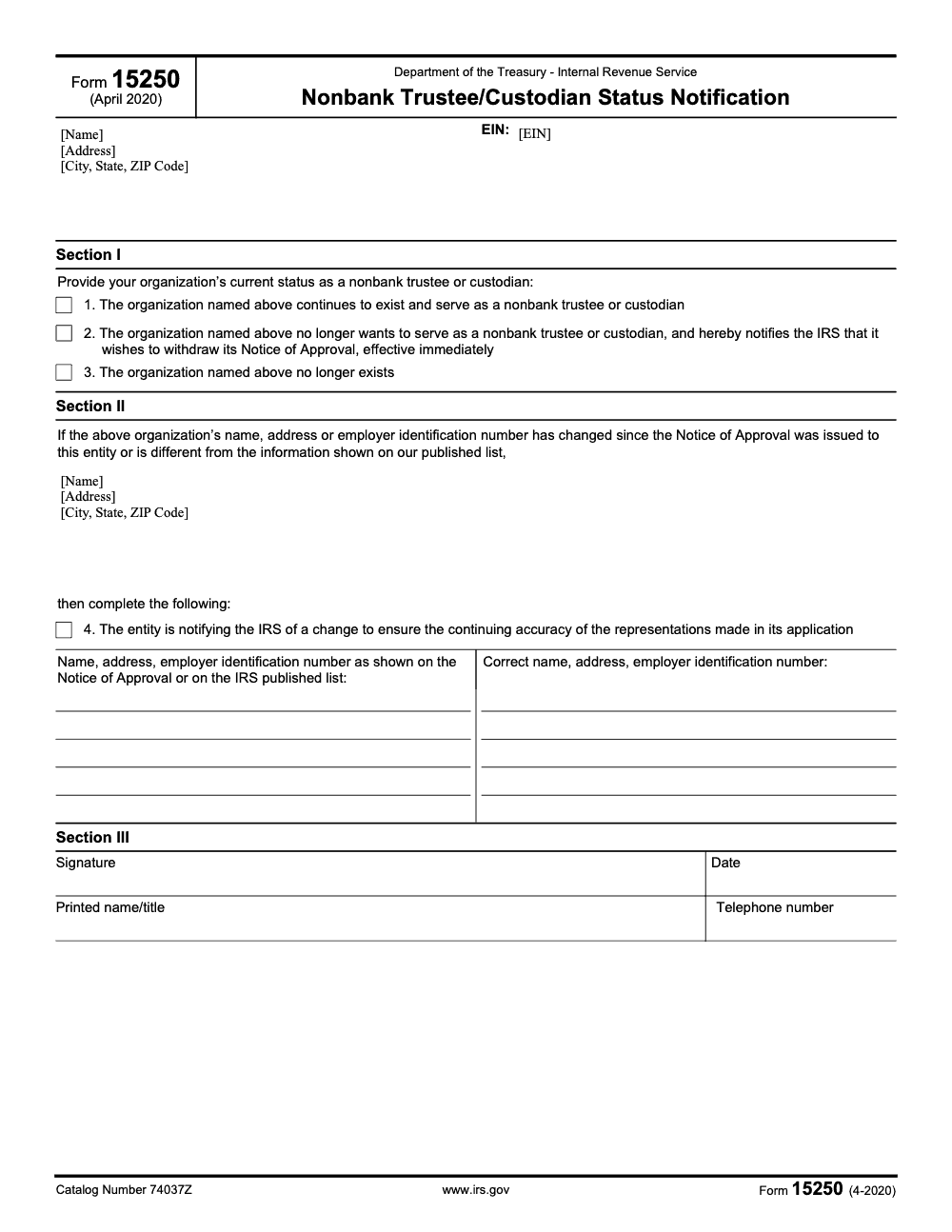
Form 15250 is the IRS Nonbank Trustee/Custodian Status Notification (Rev. 4-2020), catalog number 74037Z. The one-page form is used by already-approved entities to confirm continuing status, withdraw a Notice of Approval (effective immediately), report dissolution, or update name, address, or EIN. To become an approved nonbank trustee in the first place, file a written application under Treasury Regulation 1.408-2(e) and Revenue Procedure 2025-4 (see our U.S. tax compliance services for the production workflow that sits behind the approval).
A small trust company finds Form 15250 on a third-party site, fills it in, and thinks it just became an IRS-approved nonbank trustee. That is the misread we see most. The one-page form is a status-update notice for entities that are already approved, not the application that gets you approved.
Approval is a separate written step under Treasury Regulation 1.408-2(e) and Revenue Procedure 2025-4. Only after that does Form 15250 (Rev. 4-2020, catalog 74037Z) come into play, when an approved entity needs to confirm continuing status, withdraw a Notice of Approval, report dissolution, or update its name, address, or EIN. Pull the form from IRS.gov and treat any other copy as unverified.
Key Takeaways
- Form 15250 (Rev. 4-2020, catalog 74037Z) is the IRS Nonbank Trustee/Custodian Status Notification. It is a one-page status-update form, not the application to become an approved nonbank trustee or custodian.
- Becoming an approved nonbank trustee or custodian is a separate step. You apply in writing under Treasury Regulation 1.408‑2(e) and Revenue Procedure 2025‑4; Form 15250 only comes into play after that approval.
- Already-approved entities use Form 15250 to confirm continuing status, withdraw a Notice of Approval, report dissolution, or update name, address, or EIN.
- Application packages are mailed to IRS EP Letter Rulings in Kentucky, with a user fee set by Rev. Proc. 2025‑4. Addresses are provided below.
- Download Form 15250 only from IRS.gov. Treat any “fillable Form 15250” on a third‑party site as non‑authoritative and verify against the official version. Accuracy and recordkeeping matter.
What Form 15250 Is Not, And What To Do Instead
Form 15250 is a real one-page IRS form, the Nonbank Trustee/Custodian Status Notification (Rev. 4-2020). What it is not is the way you become approved in the first place. There is no application form for that. To become approved, you must submit a written application that demonstrates, item by item, how your organization meets the requirements in Treasury Regulation 1.408‑2(e), with a user fee and supporting documentation.
Here is the plain‑English version of the IRS position:
- The IRS approves nonbank trustees and custodians based on a comprehensive written submission that proves you meet experience, continuity, location, financial responsibility, bonding, and net worth expectations under Reg. 1.408‑2(e).
- If approved, you appear on the IRS list of approved nonbank trustees and custodians. If your name, address, or other facts change, you must notify the IRS in writing.
Form 15250 is a status-update form, not a path to approval. To get approved, build a complete written application that tracks Regulation 1.408‑2(e), then mail it with the appropriate user fee. Reserve Form 15250 for status updates after approval.
The Nonbank Trustee Path In 2025, At A Glance
- Regulation anchor: Treasury Regulation 1.408‑2(e) lists the standards for nonbank trustees and custodians. Your application must address each standard directly.
- How to apply: Prepare a written application following Revenue Procedure 2025‑4 and mail it to IRS EP Letter Rulings in Kentucky. Courier and PO Box addresses appear below.
- User fee: Required. Amounts are set in Rev. Proc. 2025‑4, Appendix A, under Employee Plans letter rulings. Include proof of payment per the revenue procedure.
- After approval: The IRS adds you to the approved list. If anything material changes, send a written update to the address the IRS provides for list corrections and change notices.
Myth vs. Fact
| Myth | Fact |
| “IRS Form 15250 is the official approval form.” | Form 15250 is a real IRS form, but it is a status notification, not an approval application. To become approved you submit a written application under Reg. 1.408‑2(e) and Rev. Proc. 2025‑4; Form 15250 is used only after approval. |
| “Once approved, we are done.” | You must notify the IRS in writing if your entity name, address, or other representations change, and the IRS maintains a public list. |
| “A template site PDF is fine.” | Only IRS instructions on IRS.gov control. Treat third‑party PDFs as non‑authoritative. |
Up next, I will walk you through the exact contents of a successful nonbank trustee application package, mailing details, update mechanics, and a clean internal checklist you can hand to your team.
How To Build A Winning Nonbank Trustee or Custodian Application In 2025
You will save hours by mapping your file to the regulation before you write a single paragraph. Use the IRS headings as your outline and attach evidence behind each claim.
Core Standards You Must Address
Below are the key areas the IRS expects you to prove, summarized in practical terms. Your submission should cite Reg. 1.408‑2(e) and present clear, labeled exhibits.
- Continuity and governance Show uninterrupted fiduciary capacity regardless of owner changes. Document ownership, management independence, and governance practices that withstand personnel transitions.
- Established U.S. location Provide a physical U.S. street address open during business days. Include photos, lease, and mail controls if relevant.
- Fiduciary experience Demonstrate hands‑on experience, staff qualifications, and supervisory review practices for IRA, HSA, 403(b)(7), and similar accounts. Include org chart, resumes, and training logs.
- Financial responsibility Provide audited financials that show solvency and liquidity. Include policies for asset valuation cadence, trust record segregation, legal counsel access, and internal audits.
- Fidelity bond and net worth Prove adequate employee bonding and at least $250,000 in net worth based on your most recent audited statements. Include bond certificates and coverage schedules.
Practical tip: Organize each section as a short narrative followed by numbered exhibits. Use a simple file map at the front so reviewers can reach any proof in two clicks.
Mailing Addresses And User Fee
When your package is ready:
- Mail written applications to IRS EP Letter Rulings, P.O. Box 12192, TE/GE Stop 31A Team 105, Covington, KY 41012‑0192. Use the Florence, KY street address for courier shipments.
- Include the correct user fee per Rev. Proc. 2025‑4, Appendix A. Keep your proof of payment with the transmittal.
After Approval, Keep Your IRS Record Current
The IRS maintains a public list of approved nonbank trustees and custodians. If your name, address, or employer identification number changes – even an address relocation alone triggers a filing, not just a formal legal-name change – notify the IRS in writing at the address indicated for list corrections and status updates. Staying current is not optional.
Application Package Blueprint
| Section | What You Prove | Evidence You Attach |
| Cover letter and index | You are applying under Reg. 1.408‑2(e) and Rev. Proc. 2025‑4 | Transmittal, table of contents |
| Corporate existence and continuity | Long‑term viability and governance that survives ownership changes | Articles, bylaws, ownership cap tables, board minutes |
| U.S. location | Physical presence and access during business days | Lease, photos, mail procedures |
| Fiduciary experience | Capability to perform trustee or custodial duties | Org chart, resumes, training program, SOP excerpts |
| Financial responsibility | Solvency, liquidity, and disciplined controls | Audited financials, internal audit plan, counsel engagement letter |
| Fidelity bond | Adequate bonding for involved employees | Bond certificate, coverage schedule |
| Net worth | At least $250,000 net worth | Audited balance sheet and footnotes |
| Operational controls | Separate trust records, valuation cadence, review protocols | Policies, screenshots, control matrices |
Notes in plain language keep your reviewer oriented. Avoid jargon. Label every exhibit consistently, for example NBT‑Exhibit‑05‑Bond‑Certificate.pdf.
Common Mistakes That Trigger Back‑and‑Forth
- Treating this like a form rather than a demonstration file.
- Missing audited financials or bond evidence.
- Vague statements about experience with no supporting SOPs or work samples.
- No plan for annual valuations or record segregation.
- Inconsistent entity names across exhibits.
Each of these causes avoidable delays. Anchor every claim with proof.
Internal Checklist You Can Hand To Your Team
Use this lightweight checklist to run your internal pre‑flight:
- Confirm entity name, EIN, legal address, and contact details match across all exhibits.
- Verify audited financials are the most recent year available.
- Attach fidelity bond evidence with coverage details.
- Include org chart and resumes for key fiduciary roles.
- Insert SOP excerpts for account opening, valuation cadence, records segregation, and review.
- Prepare a clean cover letter that lists each regulation clause and the exhibit that proves it.
- Bundle the user fee proof and print a hard copy for the shipped package.
- Keep a dated PDF of the entire submission and a shipping receipt.
This is where structure pays off. If your in‑house team is at capacity, you can assign the packaging, naming logic, and QC to an external operations partner, then keep the regulatory narrative in house. That split preserves control and saves partner hours.
Where This Gets Confused With The Form 15250 Notification
Form 15250 is the status notification you use after approval, not the approval mechanism itself. Relying on it as your route to approval can mislead internal stakeholders. Always map your application process to the IRS guidance and the current revenue procedure, and download the form only from IRS.gov.
Simple Action Plan You Can Run This Week
- Assign ownership. Name one person to own the application narrative, one to own exhibits, and one to run QC.
- Create your exhibit map. Mirror the regulation headings and label exhibits consistently.
- Close the gaps. Gather audited financials, bond certificates, SOP excerpts, and valuation policies.
- Draft, review, and ship. Use a short narrative plus exhibits, verify the user fee, print a clean hard copy, and ship with tracking to the IRS address.
- Calendar maintenance. Set a recurring task to check your listing and send written updates if details change.
Light Touch From Accountably
If your firm is stretched thin during peak cycles, you can offload the packaging and documentation grunt work to a controlled offshore delivery team while you retain final technical review. That is the kind of narrow, practical support Accountably teams provide for operations projects, without changing your approval strategy or introducing resume roulette. Use it only if it saves partner time and keeps reviewers focused on substance.
Compliance Note And Sources
This guide is educational and not legal or tax advice. For entity‑specific decisions, consult qualified counsel. Always verify current IRS procedures before filing.
- IRS application procedures for nonbank trustees and custodians, addresses, and fee references, reviewed May 8, 2025.
- IRS list of approved nonbank trustees and custodians and change‑notification expectations, reviewed May 8, 2025.
- Form 15250 (Rev. 4-2020), Nonbank Trustee/Custodian Status Notification, catalog number 74037Z.
Common Mistakes We See Every Season
These are the patterns I see on Form 15250 every time a nonbank trustee scrambles to get its IRS record back in order. Each one is avoidable with a 10-minute internal control baked into your SOP library.
Reusable Checklists
These checklists are copy-paste ready for your firm's SOP library. Each step is keyed to a Form 15250 box, an IRS application requirement under Reg. 1.408-2(e), or a maintenance task you should automate so the IRS published list never drifts.
Nonbank trustee application packet (Reg. 1.408-2(e))
- Confirm entity name, EIN, legal address, and contact details match across all exhibits.
- Attach the most recent audited financial statements that demonstrate solvency, liquidity, and the net worth threshold under Reg. 1.408-2(e).
- Include a current fidelity bond certificate and coverage schedule for involved employees.
- Insert org chart, key-personnel resumes, and training logs proving fiduciary experience.
- Attach SOP excerpts for account opening, annual valuations, trust record segregation, and internal audit.
- Draft a cover letter that maps each Reg. 1.408-2(e) standard to a labeled exhibit.
- Calculate the user fee per Revenue Procedure 2025-4, Appendix A, and include proof of payment.
- Mail the package to IRS EP Letter Rulings, P.O. Box 12192, Covington KY 41012-0192, with tracking.
- Save a dated PDF of the entire submission plus the shipping receipt in the entity's permanent file.
Form 15250 Section II change-notification SOP
- Identify the triggering change: name, address, or EIN.
- Pull the entity's name, address, and EIN as shown on the original Notice of Approval or the current IRS published list.
- Draft both the "as shown" and "corrected" values side by side before transcribing.
- Check Section II box 4 to represent that the update preserves the accuracy of the original application.
- Complete Section III in full: signature, date, printed name and title, and contact telephone number.
- Mail Form 15250 to the address the IRS designates for list corrections and status updates.
- Calendar a 60-day follow-up to confirm the IRS published list reflects the change.
- Archive a copy of the filed form with the original Notice of Approval in the entity's compliance file.
Annual IRS approved-list reconciliation
- Download the current IRS list of approved nonbank trustees and custodians.
- Reconcile entity name, mailing address, and EIN against your live records.
- Verify the listed contact information still reaches an active fiduciary officer.
- Flag any mismatch as an immediate Section II trigger, including a simple suite-number change.
- Confirm your audited financials still demonstrate the Reg. 1.408-2(e) net worth threshold for the most recent year.
- Re-validate that the fidelity bond is current and adequate for covered employees.
- File a Section I option 1 confirmation if your in-house policy requires a periodic continuing-status affirmation.
- Document the reconciliation in the compliance file with the reviewer's signature and date.
Keep 15250 Season From Stalling
Form 15250 is not a calendar-driven filing the way 1040 or 941 are. The pressure shows up the moment a nonbank trustee makes a structural change: a relocation, a merger, an EIN reassignment, or a board decision to exit the custody business. When the operations team is mid-transition and the compliance team is short-staffed, the Section II notification slips to the bottom of the list, and the IRS published list of approved nonbank trustees drifts out of sync with the live entity.
The fix is to treat Form 15250 as an SOP trigger inside the broader change-management process, not as a one-off compliance chore. Every time the entity touches a regulated field – name, address, EIN, or fiduciary status – the form should auto-spawn as a task with a defined owner and deadline.
- Tie Section II filings to your corporate-secretary workflow so any change to name, address, or EIN routes through a Form 15250 review before the change is announced externally.
- Treat Section I option 1 (continuing status) as an annual internal affirmation, useful evidence that the trustee role is still being actively performed even though the IRS does not require it on a fixed cadence.
- Build a "two-column draft" template for Section II that forces both the as-shown and corrected values to be populated before sign-off.
- Add a Section III completeness gate that blocks the package from leaving the office until signature, date, printed name and title, and telephone number are all filled.
- Reconcile against the IRS published list of approved nonbank trustees at least annually, and treat any mismatch as an immediate Section II trigger.
If the in-house team is stretched between custody operations and the broader compliance calendar, route the packaging, exhibit naming, and QC work to a structured offshore delivery team while the reviewer keeps final sign-off. That is the lane our U.S. tax compliance services are built for: documented SOPs, multi-layer review, and turnaround SLAs that keep the trustee record current without burning partner hours.
FAQs
Yes, but not as an approval form. Form 15250 (Rev. 4-2020), catalog number 74037Z, is the IRS Nonbank Trustee/Custodian Status Notification. It is used by already-approved entities to confirm continuing status, withdraw a Notice of Approval, report dissolution, or update name, address, or EIN. To become an approved nonbank trustee in the first place, file a written application under Treasury Regulation 1.408‑2(e), following Revenue Procedure 2025‑4.
Mail your package to IRS EP Letter Rulings in Kentucky. Use the Florence address for courier delivery. A user fee applies per Rev. Proc. 2025‑4, Appendix A.
Send a written notification to the IRS if your entity name, address, or other represented facts change. The IRS maintains a public list of approved entities and gives an address for list corrections and updates.
Provide audited financial statements showing at least $250,000 net worth and proof of adequate fidelity bonding for involved employees, along with controls for record segregation and annual valuations.
About this guide
Accountably helps US CPA, EA, and accounting firms hire trained accountants and tax preparers in India.
About us Reviewed byJugal Thacker, CPAFounder and CEO at Accountably
A Washington-licensed CPA with 7+ years inside US firms – PwC, a real-estate tax practice, then a full-service firm, rising from reviewer to manager to advisory. This article was reviewed against current IRS guidance for the 2025 tax year and updated for filers preparing late returns, amendments, and 2026 estimates.
View profile →How we research, review, and update this guide
Every Accountably guide is researched against primary IRS sources, reviewed by a U.S. CPA, and refreshed as guidance evolves. Read our Editorial Guidelines to see how we source, fact-check, and update our content.




