
Summarize this article with AI
In Brief
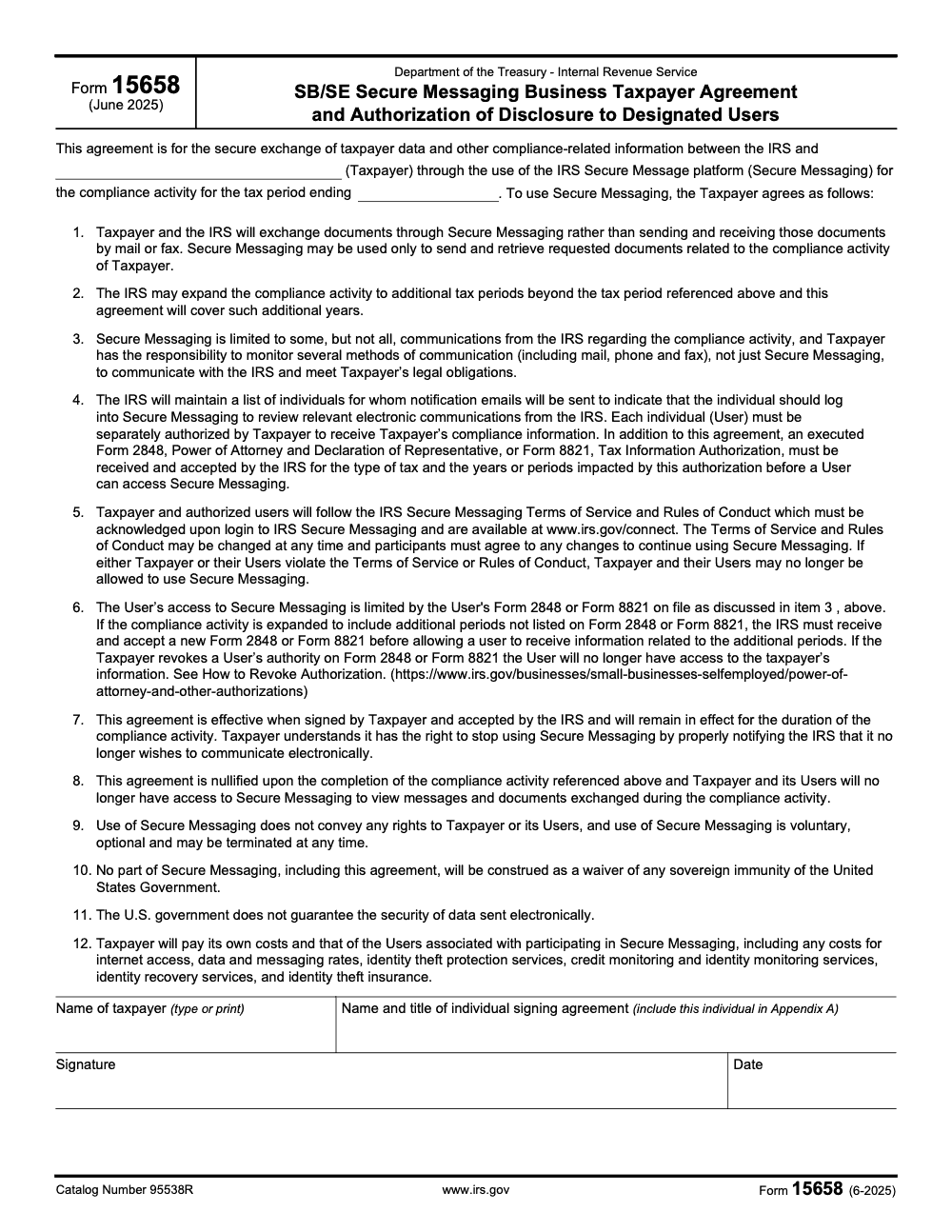
IRS Form 15658 is the SB/SE Secure Messaging Business Taxpayer Agreement and Authorization of Disclosure to Designated Users (Rev. June 2025, Catalog Number 95538R). A business taxpayer with an EIN signs it to exchange documents tied to a specific IRS compliance activity through Secure Messaging and may list up to 5 Users in Appendix A. Each User still needs an accepted Form 2848 (POA) or Form 8821 (TIA) on file before access begins (per IRS Form 15658, June 2025).
It looks like a California form to some readers, and it is not. Form 15658 is the IRS SB/SE Secure Messaging Business Taxpayer Agreement and Authorization of Disclosure to Designated Users (Rev. June 2025, Catalog Number 95538R), which a business with an EIN signs to exchange documents tied to one specific compliance activity through Secure Messaging.
The trap is treating it as standalone access. Each User you list in Appendix A still needs an accepted Form 2848 or Form 8821 on file before access begins, and Appendix A tops out at five Users. The agreement takes effect only when the taxpayer signs it and the IRS accepts it, and it is nullified when the compliance activity is completed.
Key Takeaways
- Form 15658 is the IRS SB/SE Secure Messaging Business Taxpayer Agreement (Rev. June 2025, Catalog Number 95538R) that a business taxpayer with an EIN signs to exchange compliance-activity documents with the IRS through Secure Messaging. Each User listed on Appendix A also needs an accepted Form 2848 (POA) or Form 8821 (TIA) on file before access begins.
- It is scoped to one specific compliance activity and tax period. Secure Messaging may be used only to send and retrieve documents related to that activity, not as a general IRS inbox or account access.
- The agreement carries 12 numbered terms. Among them, the taxpayer must keep monitoring mail, phone, and fax, the U.S. government does not guarantee the security of data sent electronically, and the taxpayer pays its own and its Users' costs.
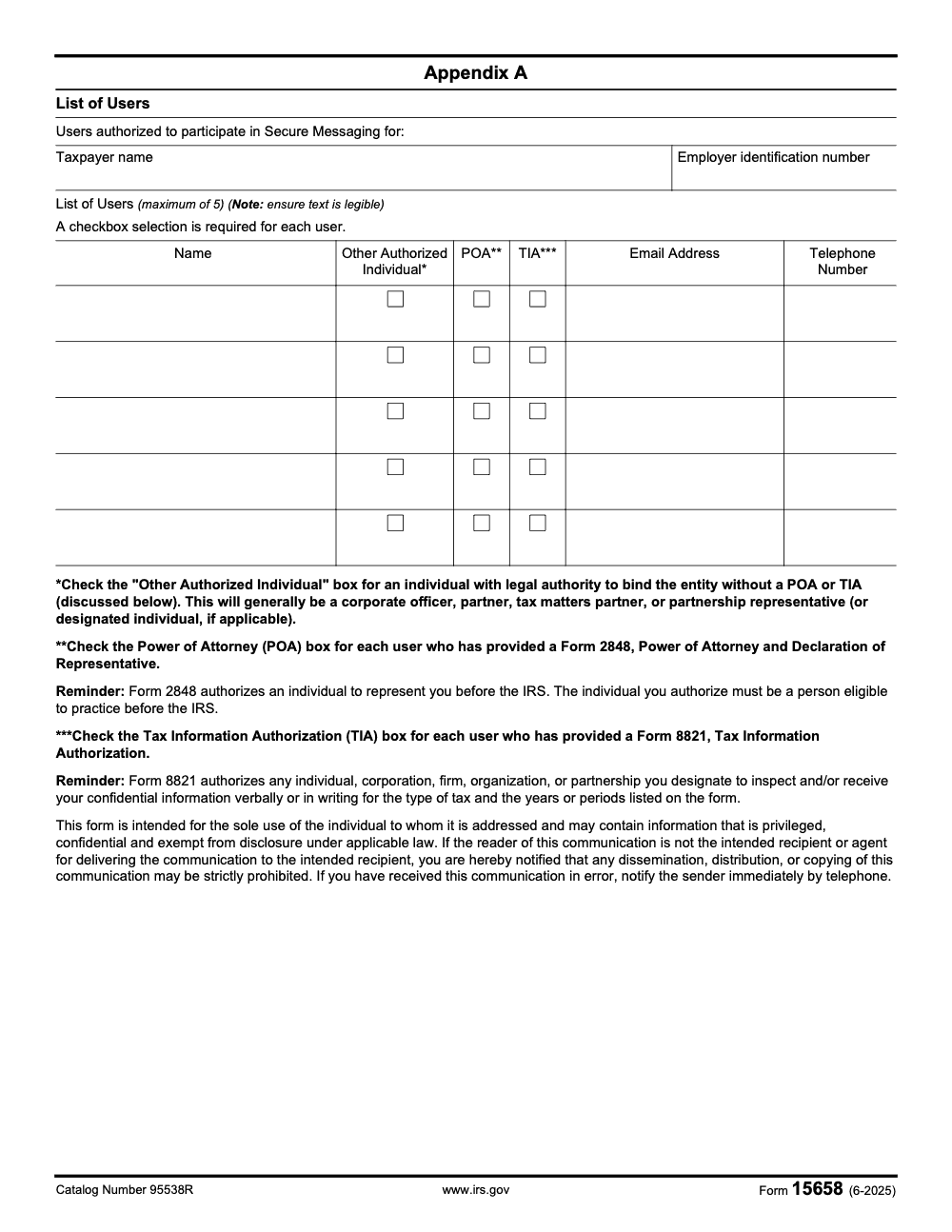
- Appendix A lists a maximum of 5 Users, each in one of three categories: Other Authorized Individual, POA (Form 2848), or TIA (Form 8821). Exactly one category box is required per User, and the signer must also appear in Appendix A.
- The agreement takes effect only when the taxpayer signs it and the IRS accepts it, and it is nullified when the compliance activity is completed, ending access to the messages and documents exchanged.
What “Form 15658” Actually Covers
Form 15658 sets up two things. First, it records the business taxpayer and the tax period for one specific IRS compliance activity. Second, it lists the Users the taxpayer wants to authorize for Secure Messaging in Appendix A. Beyond those two functions, the agreement carries 12 numbered terms the taxpayer agrees to, and Secure Messaging may be used only to send and retrieve documents related to that one compliance activity. It takes effect only once the taxpayer signs it and the IRS accepts it, and it is nullified when the compliance activity is completed. If you keep those guardrails in mind, you will complete the correct form and send it to the right place.
Quick mental model, “Form 15658 is the IRS agreement that opens Secure Messaging, and each User’s Form 2848 or Form 8821 is what actually unlocks their access.”
The Required Fields At A Glance
The form itself is short. Here is what you fill in, working top to bottom:
- The taxpayer name and the tax period ending date in the agreement opening, naming the one compliance activity it covers.
- The 12 numbered terms the taxpayer agrees to (no fields to complete, but read them with the client).
- The name of the taxpayer and the name and title of the individual signing, who must also be listed in Appendix A.
- The signature and date on the signature line.
- Appendix A: the taxpayer name, Employer Identification Number, and up to 5 Users with one category box checked each, plus each User's email and telephone.
Who Counts As A User
Appendix A recognizes three User categories, and exactly one box must be checked per row:
- Other Authorized Individual for someone with legal authority to bind the entity without a POA or TIA, generally a corporate officer, partner, tax matters partner, or partnership representative.
- POA for a User who has provided an accepted Form 2848 and is eligible to practice before the IRS.
- TIA for a User who has provided an accepted Form 8821, which grants information access only, not representation.
How To Complete And Submit Form 15658
I advise teams to treat this as a short, repeatable routine so nothing stalls while an exam clock runs.
- Confirm you have the right form for the right party.
- Verify the taxpayer is a business with an EIN; Form 15658 is the SB/SE business form and Appendix A requires an EIN.
- Confirm the IRS examiner has opened a compliance activity, because the agreement is scoped to that one activity and tax period.
- Fill in the agreement opening and read the terms.
- Enter the taxpayer name and the tax period ending date.
- Walk the client through all 12 numbered terms, especially the cost and no-security-guarantee provisions.
- Complete Appendix A carefully.
- List no more than 5 Users, each with name, email, and telephone, and confirm every entry is legible.
- Check exactly one category box per User: Other Authorized Individual, POA, or TIA.
- Make sure the individual signing the agreement is also listed in Appendix A.
- Line up each User's separate authorization.
- Match every POA box to an accepted Form 2848 and every TIA box to an accepted Form 8821 covering the right tax type and periods.
- Return the signed agreement to the IRS through the channel the examiner specifies. Access begins only after the IRS accepts it.
When Access Begins And Ends
| Stage | What Triggers It | Practical Effect |
| Effective | Taxpayer signs and the IRS accepts the agreement | Secure Messaging opens for the named compliance activity; signature alone is not enough |
| User access | An accepted Form 2848 or Form 8821 is on file for that User | The listed User can log in, limited to the tax type and periods on the authorization |
| Nullified | The compliance activity is completed | The taxpayer and Users lose access to the messages and documents exchanged |
Use of Secure Messaging is voluntary and optional, conveys no rights, and may be terminated at any time. The taxpayer can also stop using it by properly notifying the IRS that it no longer wishes to communicate electronically.
Authorizing Users: Form 2848 vs Form 8821
This is where most access problems start. Listing a User on Appendix A is not the same as authorizing them. Item 4 of the agreement requires that, in addition to Form 15658, an executed Form 2848 or Form 8821 be received and accepted by the IRS for the relevant tax type and periods before that User can access Secure Messaging. The two forms are not interchangeable.
Form 2848, Power of Attorney and Declaration of Representative, authorizes an individual to represent the taxpayer before the IRS, and that individual must be eligible to practice before the IRS. Form 8821, Tax Information Authorization, authorizes any individual, corporation, firm, organization, or partnership the taxpayer designates to inspect and receive confidential information, but it grants no representation rights. So check the POA box only for Form 2848 holders, and the TIA box only for Form 8821 designees.
What The 12 Numbered Terms Commit You To
The body of Form 15658 is a list of 12 terms the taxpayer agrees to. They are worth reading in full with the client, but here are the ones that surprise people most often:
- Documents will be exchanged through Secure Messaging rather than mail or fax, but Secure Messaging carries only some, not all, IRS communications, so the taxpayer must keep monitoring mail, phone, and fax.
- The IRS may expand the compliance activity to additional tax periods, and this same agreement automatically covers those periods.
- Each User must be separately authorized, and a User's access is limited by the Form 2848 or Form 8821 on file.
- The agreement is effective only when signed and accepted, remains in effect for the duration of the activity, and is nullified when the activity is completed.
- Use is voluntary and conveys no rights; nothing waives the sovereign immunity of the United States.
- The U.S. government does not guarantee the security of data sent electronically, and the taxpayer pays its own and its Users' costs, including internet, data, identity-theft protection, and credit monitoring.
A Simple Workflow To Stay Clean
- Tag every engagement to the one compliance activity and tax period named on the agreement.
- Keep a running map of each Appendix A User to their accepted Form 2848 or Form 8821 and the periods it covers.
- Re-check that map every time the IRS adds tax periods, since the agreement rolls forward but the User authorizations do not.
Appendix A Field Checklist For Your Team
Print this and keep it next to the agreement when you build Appendix A.
- Taxpayer name and Employer Identification Number at the top of Appendix A.
- Each User's full name, exactly as it should read for the IRS.
- Exactly one category box per User: Other Authorized Individual, POA, or TIA.
- Each User's email address and telephone number.
- No more than 5 Users total.
- The individual who signs the agreement appears as one of the listed Users.
- For every POA box, an accepted Form 2848 on file; for every TIA box, an accepted Form 8821 on file, both matching the tax type and periods.
- Every entry legible, since the form asks specifically for legible text.
POA vs TIA, Quick Compare
| Field | POA, Form 2848 | TIA, Form 8821 |
| What it grants | Authority to represent the taxpayer before the IRS | Authority to inspect and receive confidential information only |
| Who can be named | An individual eligible to practice before the IRS | Any individual, corporation, firm, organization, or partnership |
| Appendix A box | Check the POA box | Check the TIA box |
| Access scope | Limited to the tax type and periods on the accepted form | Limited to the tax type and periods on the accepted form |
Common Mistakes That Slow Down Case Triage
Most of the trouble I see with Form 15658 comes from treating it like a master key to the taxpayer's IRS account. It is not. It opens one narrow channel for one compliance activity, and these are where teams trip.
Expanded Periods And Ending Access
Two events during the activity catch teams off guard. First, the IRS may expand the compliance activity to additional tax periods. The Form 15658 agreement rolls forward to cover them automatically, but a User's access does not. If the added periods are not on that User's Form 2848 or Form 8821, the IRS must receive and accept a new or updated authorization before the User can see the new-period documents. Build that re-check into your routine every time periods are added.
Revoking A User And Closing Out
If the taxpayer revokes a User's authority on Form 2848 or Form 8821, that User loses access to the taxpayer's information. Revocation has to follow IRS procedures; simply asking the User to stop logging in does not revoke access. When the compliance activity is completed, the agreement is nullified and everyone loses access to the messages and documents exchanged, so download and save anything you need before the activity closes.
When you are handling sensitive taxpayer data, confirm scope and authorization every time. A short check beats discovering a gap mid-exam.
Real World Tips From The Operations Side
- Pre build a packet. Keep a current Form 15658, a one page Appendix A checklist, and a User-to-authorization map in a shared secure folder.
- Confirm acceptance, not just signing. Track the date the IRS accepts the agreement, because that is when access can begin, not the signature date.
- Train for handoffs. If your point person is out, the next teammate should be able to update Appendix A and the matching 2848 or 8821 without guessing.
- Log everything. Save the accepted agreement and each User's authorization in the case file so scope is easy to audit.
- Do a two minute scope check. Ask, does every Appendix A box match an accepted form covering the right tax type and periods, and is the signer listed.
How we work matters as much as what we send. The right party, the right boxes, the right authorizations, every time.
One Page Reference, Who Goes In Which Column
| The User is | Appendix A box | Authorization on file | Keep in mind |
| A corporate officer, partner, tax matters partner, or partnership representative | Other Authorized Individual | None required for the box itself; they bind the entity by legal authority | Use only for individuals who can bind the entity |
| A representative authorized to act before the IRS | POA | Accepted Form 2848 | Must be eligible to practice before the IRS |
| A designee allowed to receive information only | TIA | Accepted Form 8821 | No representation rights; may be an individual or an entity |
Appendix A holds a maximum of 5 Users, exactly one box per User, and the signer of the agreement must be one of them.
A Short Word On Process Discipline
You already run a busy operation, maybe a finance team, a tax practice, or a compliance function inside a larger organization. Managing an exam is detailed and time sensitive, so a little structure pays off. Keep SOPs for the agreement and Appendix A, standardize filenames, and use version control so reviewers can follow the trail. That way, when the agreement and authorizations leave your desk, they read clean, complete, and easy to audit.
If you work with outside partners, expect the same discipline. At Accountably, we obsess over documentation clarity, file naming, and review checklists for regulated work, because they cut review time and prevent rework. The same habits keep Secure Messaging enrollment moving. Mentioning this here is not about selling you anything, it is about building a repeatable process that keeps your team steady under an exam clock.
Final Checklist Before You Submit
- Taxpayer confirmed as a business with an EIN.
- Taxpayer name and tax period ending date entered; the one compliance activity is named.
- All 12 terms read with the client, including cost and no-security-guarantee provisions.
- Appendix A lists no more than 5 Users, each with exactly one category box.
- Every POA box matches an accepted Form 2848, every TIA box an accepted Form 8821.
- The signer appears in Appendix A.
- All names, emails, and telephone numbers legible.
- You will track the IRS acceptance date, since access begins only after acceptance.
You keep an exam moving when the agreement and authorizations are clean and complete. The form gives you the structure. Your process turns it into action.
Sources And Freshness
This guide reflects federal IRS guidance for Form 15658 reviewed on October 30, 2025. We relied on IRS Form 15658, the SB/SE Secure Messaging Business Taxpayer Agreement (Rev. June 2025, Catalog Number 95538R), and the IRS Secure Messaging Terms of Service and Rules of Conduct published at www.irs.gov/connect. We also referenced the IRS guidance on Form 2848, Power of Attorney and Declaration of Representative, and Form 8821, Tax Information Authorization, for the User-authorization requirements. Always confirm details against the current IRS instructions for your facts.
Reusable Checklists
These are copy-paste ready for your firm SOPs. Each item maps to a line on Form 15658 or its Appendix A, so a reviewer can work straight down the list.
Before the taxpayer signs Form 15658
- Confirm the taxpayer is a business with an EIN; Form 15658 is the SB/SE business form and Appendix A requires an EIN.
- Enter the taxpayer name and the tax period ending date in the agreement opening.
- Name the specific compliance activity the agreement covers.
- Confirm the individual signing is also listed in Appendix A as a User.
- Read all 12 numbered terms with the client, including the cost and no-security-guarantee provisions.
- Remember the IRS must accept the agreement before access begins; the signature alone does not activate it.
Appendix A User list review
- List no more than 5 Users; confirm with the examiner before you need a sixth.
- Check exactly one category box per User: Other Authorized Individual, POA, or TIA.
- Match every POA box to an accepted Form 2848 and every TIA box to an accepted Form 8821 for the right tax type and periods.
- Use Other Authorized Individual only for officers, partners, tax matters partners, or partnership representatives who can bind the entity.
- Confirm every name, email, and telephone entry is legible.
Secure Messaging hygiene during the activity
- Keep monitoring mail, phone, and fax; Secure Messaging does not carry every IRS communication.
- Re-file or update each User's Form 2848 or Form 8821 whenever the IRS adds tax periods.
- Revoke a User's authorization through IRS procedures, not by asking them to stop logging in, when access should end.
- Download and save every exchanged document before the compliance activity is completed.
Keep 15658 Season From Stalling
When a client lands in an SB/SE compliance activity, the pressure is to stand up secure document exchange fast. Form 15658 sets up the entity-level agreement, but per the form (June 2025) it is only the start: it carries 12 numbered terms, caps the User list at 5, and leaves each representative's access dependent on a separate Form 2848 or Form 8821 already accepted by the IRS.
The fix is to treat Form 15658 enrollment as a short, repeatable workflow rather than a one-time signature, so nothing stalls while an exam clock runs.
- Confirm the signer also appears in Appendix A with the correct category box before routing the agreement for signature.
- Tie every Appendix A User to an accepted Form 2848 or Form 8821 that matches the exact tax type and periods under exam.
- Re-check User authorizations each time the IRS expands the activity to new periods, since the agreement rolls forward but the 2848 or 8821 scope does not.
- Keep the client's mail and phone monitoring running, because Secure Messaging does not replace statutory notices.
- Archive every exchanged document before the activity closes, since access ends when the agreement is nullified.
This is the kind of structured, checklist-driven execution we build for clients through Accountably's tax services, so compliance activities move without missed authorizations or last-minute scrambles.
FAQs
Form 15658 is the IRS SB/SE Secure Messaging Business Taxpayer Agreement and Authorization of Disclosure to Designated Users (Rev. June 2025, Catalog Number 95538R). A business taxpayer with an EIN signs it to exchange documents tied to a specific IRS compliance activity through Secure Messaging, and may list up to 5 Users in Appendix A.
Not by itself. Listing a person in Appendix A only tells the IRS who the taxpayer wants to authorize. Each User also needs an executed Form 2848 (Power of Attorney) or Form 8821 (Tax Information Authorization) that the IRS has received and accepted for the right tax type and periods before that User can access Secure Messaging.
No. Form 15658 is the SB/SE business form. Appendix A requires an Employer Identification Number, so it is intended for business taxpayers under an IRS compliance activity, not individual filers.
No. Item 3 of the agreement states Secure Messaging is limited to some, but not all, IRS communications. The taxpayer must keep monitoring mail, phone, and fax to meet its legal obligations, because statutory notices can still arrive through those channels.
Appendix A allows a maximum of 5 Users and provides five rows. Each row needs exactly one category box checked: Other Authorized Individual, POA, or TIA. The individual who signs the agreement must also be listed in Appendix A.
Item 8 nullifies the agreement when the compliance activity is completed. The taxpayer and its Users then lose access to view the messages and documents exchanged during it, so download and save anything important before the activity closes.
Other forms this guide names
Summarize this article with AI
About this guide
Accountably helps US CPA, EA, and accounting firms hire trained accountants and tax preparers in India.
About us Reviewed byJugal Thacker, CPAFounder and CEO at Accountably
A US-licensed CPA with 7+ years inside US firms – PwC, a real-estate tax practice, then a full-service firm, rising from reviewer to manager to advisory. This article was reviewed against current IRS guidance for the 2025 tax year and updated for filers preparing late returns, amendments, and 2026 estimates.
View profile →How we research, review, and update this guide
Every Accountably guide is researched against primary IRS sources, reviewed by a U.S. CPA, and refreshed as guidance evolves. Read our Editorial Guidelines to see how we source, fact-check, and update our content.




