
Summarize this article with AI
In Brief
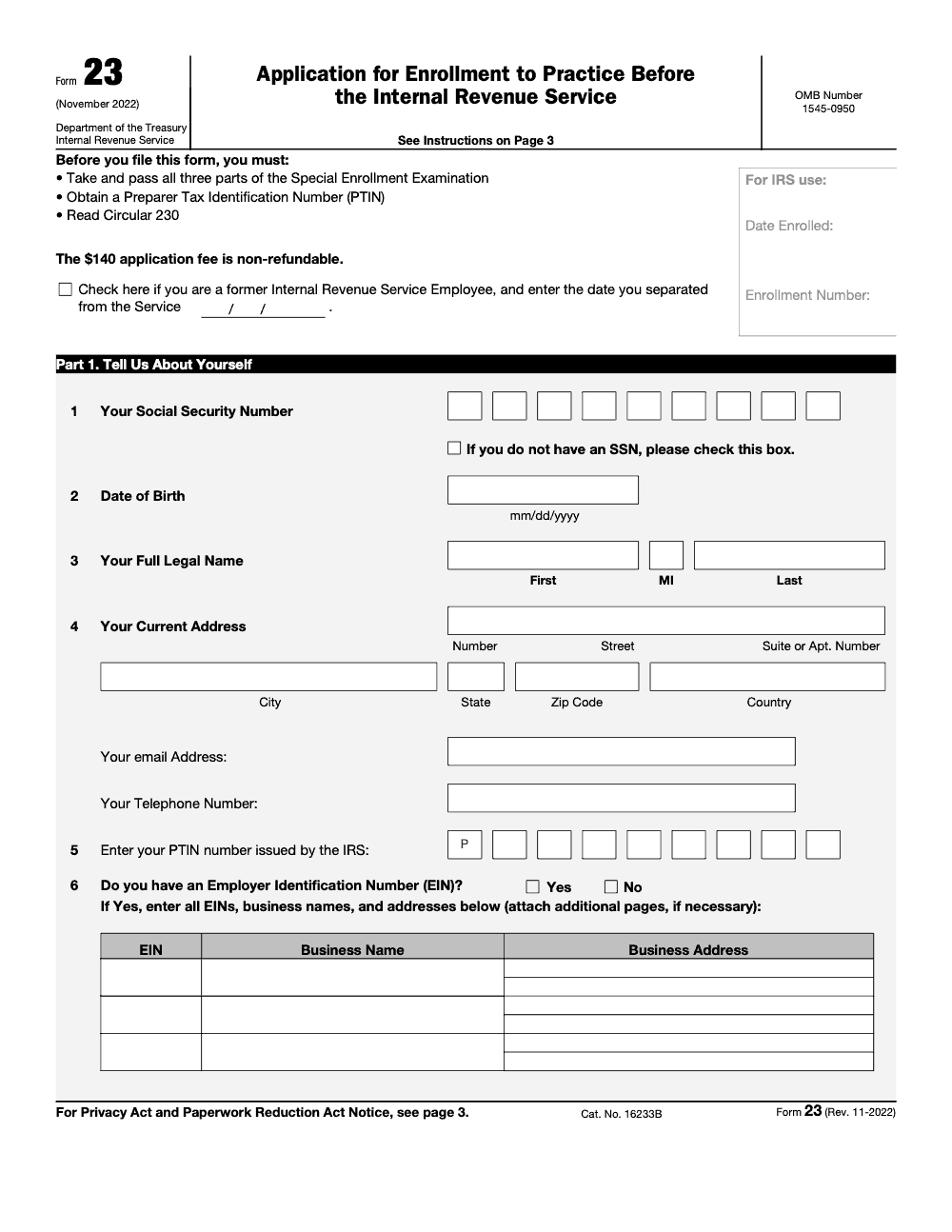
Form 23 is the Application for Enrollment to Practice Before the Internal Revenue Service (Rev. 11-2022), the form you file to earn Enrolled Agent status after passing all three parts of the Special Enrollment Examination (per the IRS Form 23 instructions). The application fee is $140 and non-refundable, you can pay it on Pay.gov, and a complete SEE-based application targets about 60 days to process. If that window passes with no decision, contact the IRS Enrolled Agent Policy & Management office at 1-855-472-5540 before assuming anything went wrong. Practitioners who handle U.S. tax preparation at volume often pursue the EA credential to expand their representation rights.
A candidate passes all three parts of the Special Enrollment Examination, celebrates, then lets the application sit for weeks because the Pay.gov screen looks intimidating. The actual filing takes about fifteen minutes, which is roughly what the IRS estimates on the form itself. That gap between passing and filing is where good candidates lose momentum.
Form 23 is the application that converts exam success into official Enrolled Agent status. The fee is $140 and non-refundable, you pay it on Pay.gov, and a complete SEE-based application targets about 60 days to process. You need a PTIN and clean answers to the compliance questions, and you must apply within one year of passing your third SEE part.
Key Takeaways
- Form 23 is the IRS application that turns your exam success into official Enrolled Agent status. You submit it on Pay.gov or by mail and the current fee is $140, as of January 3, 2026.
- Your application triggers a suitability and background check, then moves in a first in, first out queue. The standard goal for SEE passers is about 60 days, while former IRS employees typically see about 3 months.
- You need a PTIN, your legal name and contact details, and clear answers to compliance questions. Apply within one year of passing your third SEE part.
- Former IRS employees may request a SEE waiver, but they must prove qualifying experience and may receive limited enrollment if experience is narrow. Reviews usually take longer.
- If you do not hear back after the target window, contact the Office of Enrollment at 855‑472‑5540 during posted hours.
What Form 23 Is, And Who Needs It
Form 23 is the Application for Enrollment to Practice Before the Internal Revenue Service. Filing it is how you officially ask to become an Enrolled Agent (Form 23 is the initial enrollment application; use Form 8554 instead to renew an existing enrollment). You can submit it online through Pay.gov with a $140 non refundable fee that the IRS keeps even if your application is denied or you withdraw, or you can mail a paper form with a check for the same amount. Either route starts your suitability review and background check.
If you passed all three parts of the Special Enrollment Examination, Form 23 is your next and final step. The IRS goal is about 60 days from receipt for straightforward SEE based applications, and the agency processes applications in the order received.
There is also a path for certain former IRS employees. If you have the required technical experience, you can request a waiver of the SEE, still using Form 23. This path often takes longer because the IRS must verify the scope and depth of your experience before granting full or limited enrollment.
If you passed your last SEE part, file Form 23 within one year to stay on track. Waiting beyond that window can force extra steps you do not need.
Eligibility Paths
If You Passed The SEE
You qualify to file Form 23 once you have passing scores on all three SEE parts within a three year testing window. Apply on Pay.gov, pay the $140 fee, and be ready for the suitability check that reviews your tax compliance and criminal background. The IRS targets about 60 days to finish straightforward cases.
If You Are A Former IRS Employee
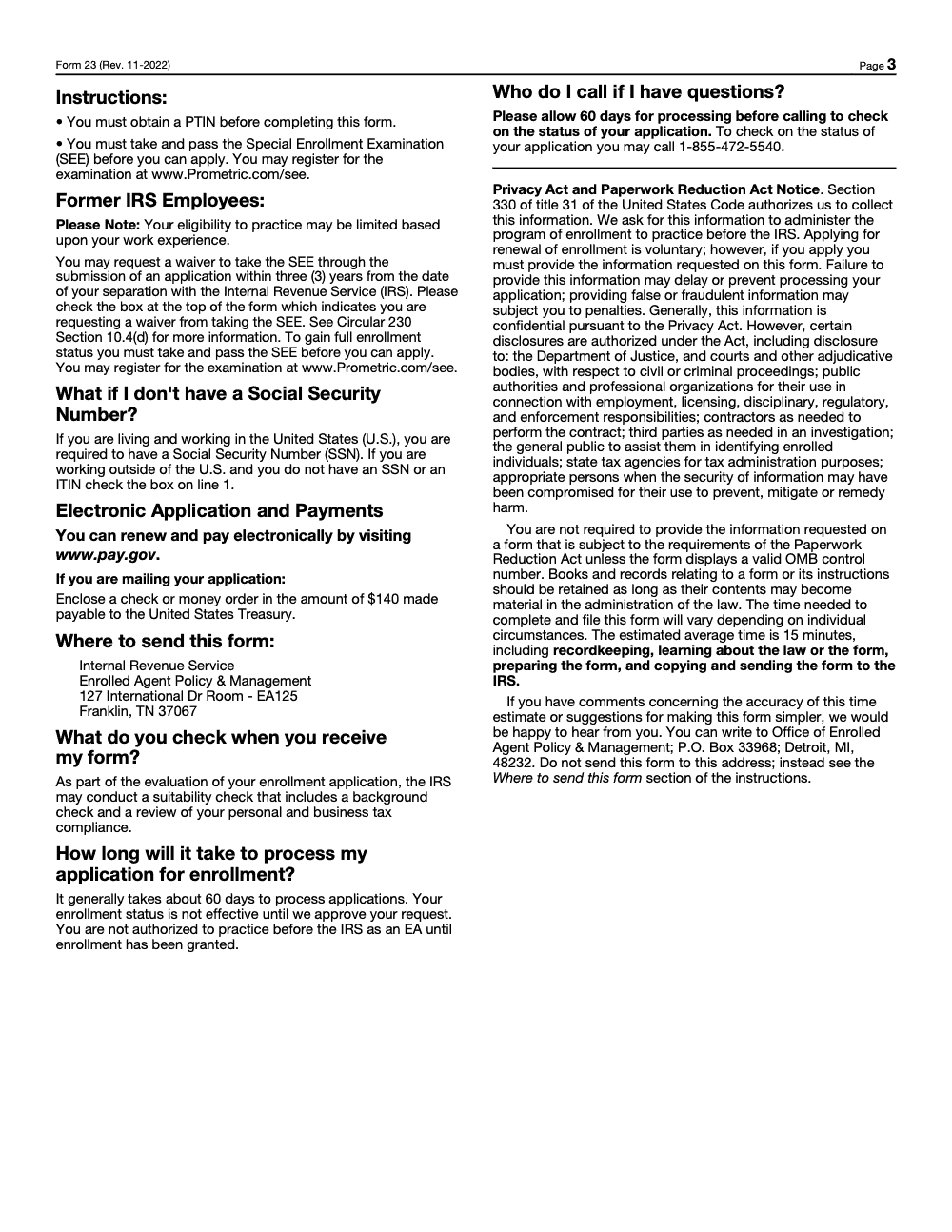
Some former IRS employees can request a SEE waiver. In general, you need at least five years of qualifying technical IRS roles, and three of those years must fall within the five years just before you separated. You must also apply within three years of leaving the IRS. If your experience is narrower than the full EA scope, the IRS may grant a limited enrollment. Expect a longer review, often about three months on average.
What You Need To File
Have these items ready before you open Pay.gov.
- Your PTIN (you must already have one from the IRS PTIN system before filing, since it is not issued as part of EA enrollment), legal name, mailing address, phone, and email.
- SSN, or note if you do not have one (the no-SSN box on line 1 is only valid if you live and work outside the U.S. and have neither an SSN nor an ITIN; U.S.-based applicants must provide an SSN).
- Any CAF number, EIN, or employer details that apply.
- Clear, concise explanations for any compliance or conduct question that requires detail.
- Payment method for the $140 fee, ACH, debit, or credit online, or a check if you mail the form.
If you are requesting a SEE waiver, also attach documents that prove your technical background, for example duty statements, resumes, training records, licenses, or non IRS experience that supports the scope you want.
Step By Step, Completing Form 23 On Pay.gov
- Create or sign in to your Pay.gov account. Search for Application for Enrollment to Practice Before the IRS, Form 23. Open the form while signed in.
- Complete Part 1 with your legal name, SSN if applicable, PTIN, address, phone, and email. Include CAF or EIN details if you have them.
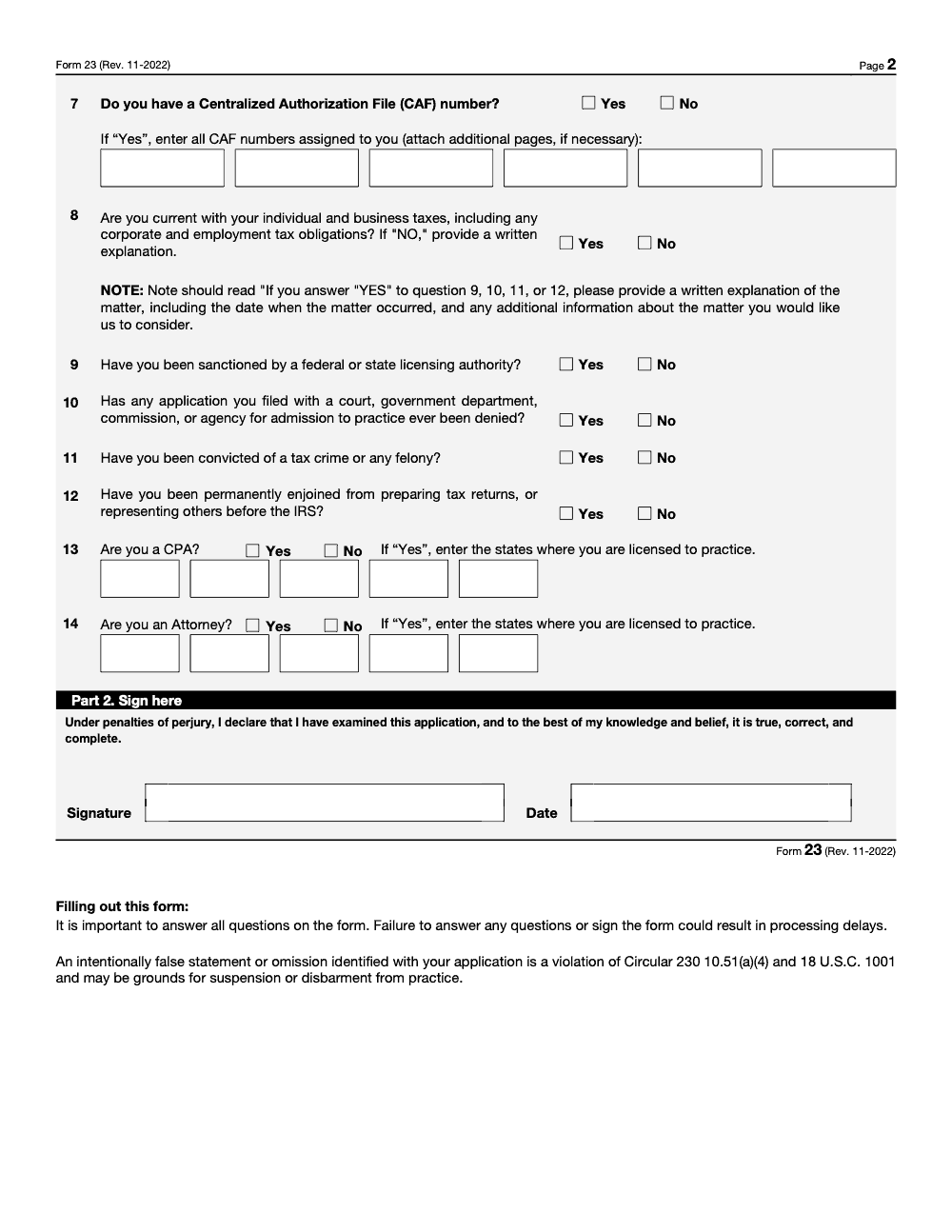
- Answer background and eligibility questions. Where the form asks for details, attach short written explanations. Keep each explanation specific and factual.
- Pay the $140 non refundable fee. Save the Pay.gov confirmation number.
- Review every field for accuracy, then electronically sign the declaration under penalties of perjury (an intentionally false statement or omission here violates Circular 230 section 10.51(a)(4) and 18 U.S.C. 1001 and can be grounds for suspension or disbarment). Submit and save a copy of your completed form and attachments.
Tip, if you prefer paper, you can mail Form 23 with a check for $140, made payable to the United States Treasury rather than the IRS, to the address on the form, but online filing is faster for most applicants.
Processing, Background Check, And Timelines
Once submitted, your application enters a first in, first out queue. The IRS runs a suitability check that looks at both your personal and business tax compliance (an unfiled personal return or unpaid personal tax can derail an application just as much as a business issue) and any criminal background issues that could affect your ability to practice. Keep your Pay.gov confirmation and a copy of everything you sent.
Here is what typical timing looks like.
| Path | What to expect | Typical timeframe |
| SEE passer, complete submission | Standard queue and suitability review | Goal about 60 days |
| Former IRS employee, SEE waiver | Additional evidence review and possible scope limits | Often about 3 months |
| Any path with missing info | IRS requests more documents, the clock pauses until you reply | Varies |
These timelines come from current IRS guidance and are still the best rule of thumb as of January 3, 2026. Applications are processed in the order received.
Status Checks And Who To Contact
If 60 days have passed for a SEE based application, or about 90 days for a former IRS employee case, you can contact the Office of Enrollment. Use 855‑472‑5540 during posted hours, 7 a.m. to 5 p.m. Central Time. You can also mail the Office of Enrollment in Detroit if needed. Have your name, address, and the SSN used on your application ready, and include your Pay.gov confirmation if you filed online.
Quick script you can use, I filed Form 23 on Month Day, Year, Pay.gov confirmation ending in 1234. Could you confirm my status and whether any additional documents are needed.
Typical IRS Email Status Language
If you hear from the Office of Enrollment, the wording may look like these internal templates. Examples include, Application Status, Form 23 Received, please allow 60 days for processing, or Application Status, Form 23 Approved, allow 10 to 14 business days for your enrollment package. These are standard descriptors used by the enrollment team.
Special Considerations For Former IRS Employees
If you are requesting a SEE waiver, think like a reviewer. Map your roles to real tax work.
- Show at least five years in qualifying technical roles, for example revenue agent, appeals officer, settlement officer, special agent, tax specialist, or tax law specialist.
- Ensure three of those five years fall within the five years before you separated.
- Apply within three years of separation.
- Explain how your experience equals the scope and depth of the SEE. If your work focused on a narrow area, the IRS may grant limited enrollment that matches that scope.
Attach a clear resume, duty statements with dates, and any supporting education or licenses. This makes your review smoother and helps avoid back and forth requests that add weeks. The IRS notes that former employee reviews add substantial time, so plan for about three months on average.
After You Submit, What Approval Looks Like
Approval arrives as an enrollment letter mailed to you with your EA enrollment number. Keep that letter with your records, update your PTIN profile, and only hold yourself out as an Enrolled Agent after you have the letter in hand. If more information is needed, respond quickly, since the review pauses until your documents arrive.
Quick Checklist For The Waiting Period
- Watch for emails or letters from the Office of Enrollment.
- Reply promptly to any request for education, training, or experience proof.
- Keep your Pay.gov receipt and a PDF of your full submission.
- Do not represent taxpayers as an EA until your approval letter and number arrive.
Common Mistakes That Slow Everything Down
These are the snags I see derail otherwise-clean Form 23 applications, and most of them add weeks of delay for no good reason.
Reusable Checklists
Drop these into your firm's onboarding SOP so every new Enrolled Agent files Form 23 the same way, every time.
Before you open Pay.gov
- Passing scores on all three SEE parts confirmed and on record.
- PTIN active in the IRS PTIN system, ready for line 5.
- Legal name, mailing address, phone, and email ready for lines 3 and 4.
- SSN ready for line 1, or the outside-the-U.S. exception documented.
- Any CAF number and EIN details gathered for lines 6 and 7.
- Written, dated explanations drafted for any YES on questions 9 to 12 or NO on question 8.
- $140 payment method ready (ACH, debit, or credit on Pay.gov).
- Personal and business tax returns filed and balances current for the suitability check.
Final review before you submit
- Every numbered question in Part 1 answered, none left blank.
- Explanations attached wherever a trigger answer requires one.
- Part 2 signature completed under penalties of perjury.
- Pay.gov $140 fee paid and the confirmation number saved.
- A full PDF copy of the form and attachments saved to the staff file.
- If mailing instead, check payable to United States Treasury and addressed to Franklin, TN.
While you wait
- Diary the 60-day processing window from the submission date.
- Watch for letters or messages from the Office of Enrollment.
- Reply the same week to any IRS request for more documents.
- Do not represent taxpayers as an EA until the enrollment letter and number arrive.
- After 60 days with no decision, call Enrolled Agent Policy & Management at 1-855-472-5540.
Keep 23 Season From Stalling
Form 23 has no annual deadline, but it carries a bottleneck that hits firms every hiring cycle. When a staff member finally passes all three SEE parts, the firm wants them representing clients quickly, yet the IRS goal is about 60 days from receipt for a complete application (per the IRS Form 23 instructions), and waiver cases for former IRS employees take longer to review. A single missing PTIN or a blank explanation on question 9 can push that window out further.
The fix is to treat enrollment like any other production workflow, with a defined sequence and a reviewer, rather than leaving each new EA to navigate Pay.gov alone. Most of the delay is avoidable, the 15-minute filing the IRS estimates only holds when the inputs are ready before someone opens the form.
- Gate the filing on three confirmations: passing SEE scores, an active PTIN on line 5, and a clean answer to the tax-compliance question on line 8.
- Pre-draft the explanations for questions 9 through 12 so a YES answer never stalls at a blank field.
- Standardize the payment step: $140 on Pay.gov with the confirmation number logged, or a check to the United States Treasury if mailing.
- Diary the 60-day window and assign one person to call Enrolled Agent Policy & Management at 1-855-472-5540 if the date passes.
That is the kind of structured, reviewer-backed execution we build for every engagement. If your team is carrying tax production while it waits on credentials, our U.S. tax services can absorb the prep and review work so capacity does not stall while applications clear.
FAQs
It is the IRS application that grants you Enrolled Agent status. You can file online through Pay.gov or by mailing a completed form with payment. The fee is $140 as of January 3, 2026, and filing starts your suitability and background check.
For SEE passers, the current goal is about 60 days from receipt. Former IRS employee cases average about three months. Delays happen if the IRS asks for more information and you reply later.
Yes. You must apply within one year of the date you passed your third SEE part. File sooner rather than later so your records and PTIN are current.
If the target window has passed, contact the Office of Enrollment at 855‑472‑5540, Monday through Friday, 7 a.m. to 5 p.m. Central Time. Have your name, address, and your application details ready.
Some can. You must prove qualifying technical experience, usually five years in specific roles with recency rules, and you must apply within three years of separation. The IRS may limit your enrollment if your experience is narrow.
Summarize this article with AI
About this guide
Accountably helps US CPA, EA, and accounting firms hire trained accountants and tax preparers in India.
About us Reviewed byJugal Thacker, CPAFounder and CEO at Accountably
A US-licensed CPA with 7+ years inside US firms – PwC, a real-estate tax practice, then a full-service firm, rising from reviewer to manager to advisory. This article was reviewed against current IRS guidance for 2026 and updated for SEE passers and former IRS employees applying for Enrolled Agent enrollment on Form 23.
View profile →How we research, review, and update this guide
Every Accountably guide is researched against primary IRS sources, reviewed by a U.S. CPA, and refreshed as guidance evolves. Read our Editorial Guidelines to see how we source, fact-check, and update our content.




