
Summarize this article with AI
In Brief
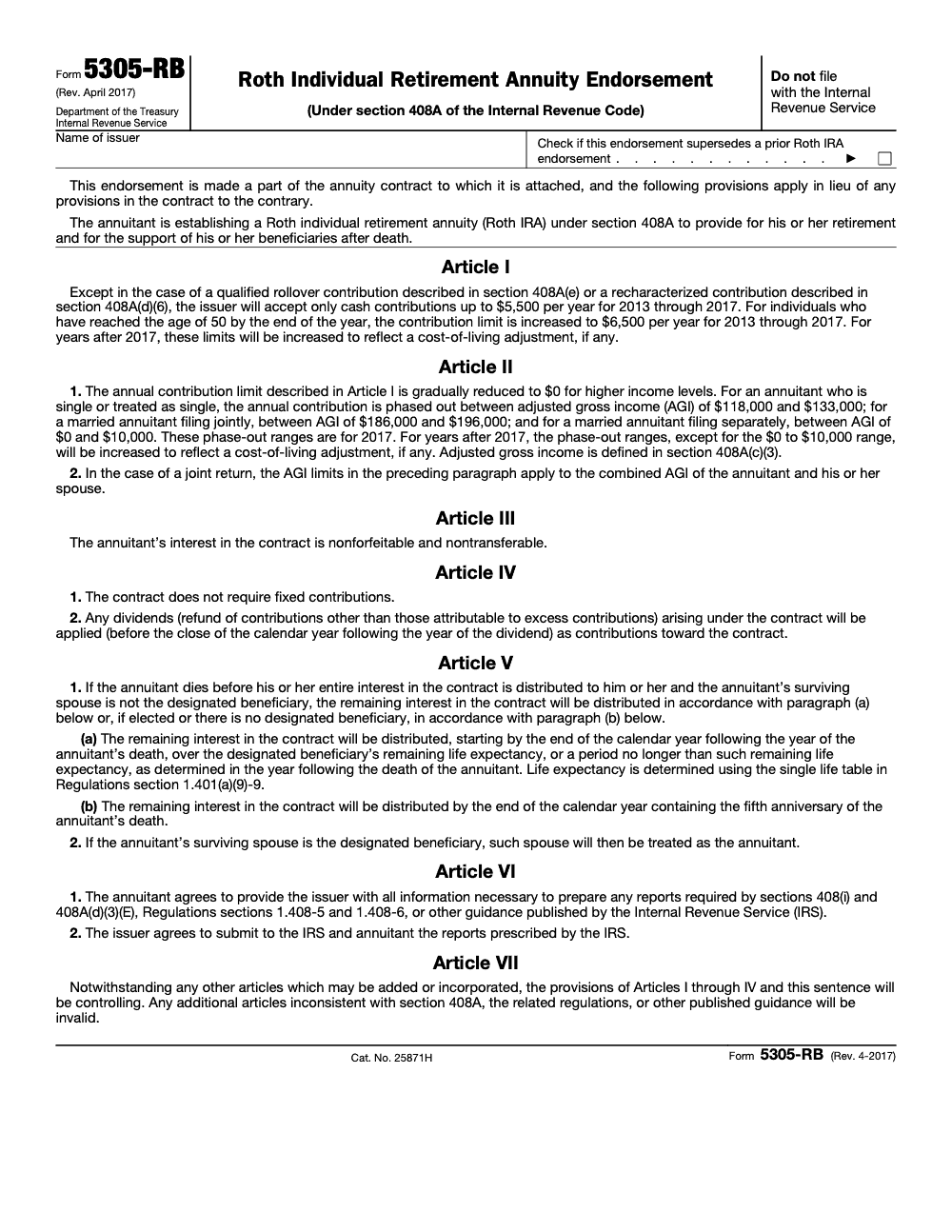
Form 5305-RB is the IRS model endorsement for a Roth Individual Retirement Annuity under IRC §408A (Cat. No. 25871H, last revised April 2017). Do NOT file it with the IRS – the annuitant and the issuing insurance company sign it and retain it as part of the annuity contract records. For tax year 2025, the Roth IRA contribution limit is $7,000 ($8,000 for age 50+) per IRS Notice 2024-80, with regular contributions due by the original (unextended) tax return due date.
A client forwards an annuity packet, asks whether the Roth IRA inside it is real, and a staffer has already typed back yes because the cover sheet says Roth. Open the file and the endorsement is often Form 5305-R, the trust version, when an insurance-company annuity contract calls for Form 5305-RB instead. The misread is quiet until a beneficiary distribution runs through that paperwork and someone has to untangle which model actually governed the account.
An insurance company issuing a Roth Individual Retirement Annuity uses Form 5305-RB, the IRS model endorsement, still current in its April 2017 revision. Two things age out of the printed form quickly: the dollar figures and the article structure people lean on. Articles I through VIII carry IRS-reviewed language, anything you add under Article IX does not, and the contribution numbers on the page no longer match the current limit of $7,000, or $8,000 once the annuitant reaches age 50.
Key Takeaways
- Form 5305‑RB is the IRS model endorsement for a Roth Individual Retirement Annuity, the annuity flavor of a Roth IRA under section 408A. It is current in the April 2017 revision as of January 29, 2026, but the dollar contribution limits and phase‑out ranges printed on the 2017 form are stale, so use the current Pub 590‑A tables for live client work.
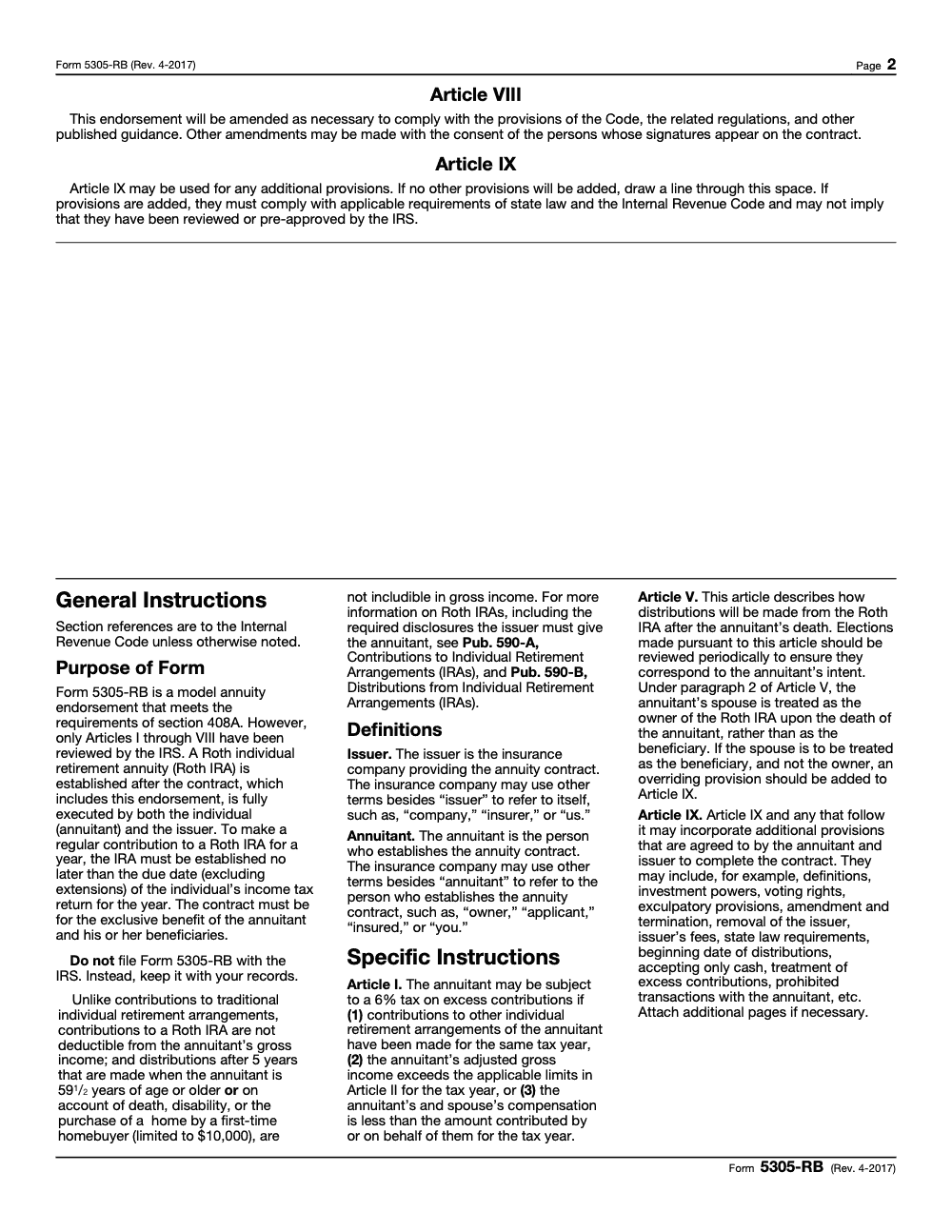
- Articles I through VIII of the model are IRS‑reviewed language. Any extra provisions you add, often labeled Article IX, are not reviewed by the IRS and should not be presented as approved. The form itself shows this structure.
- You and the issuer must execute the endorsement to establish the Roth IRA annuity. The form is a model contract endorsement, not a filing. The PDF states, “Do not file with the Internal Revenue Service.” Keep dated copies and beneficiary data in your records.
- Use 5305‑RB for annuity‑based Roth IRAs. Use 5305‑R or 5305‑RA for trust or custodial Roth IRAs.
- Contributions for a tax year can be made up to the tax return due date, not including extensions. For example, most 2024 contributions were due by April 15, 2025, and the same due‑date rule applies each year.
What Form 5305‑RB actually does
In plain terms, Form 5305‑RB is a template that, once signed by the annuitant and the issuer, turns an annuity contract into a Roth IRA annuity under section 408A. It is the annuity endorsement, not a trust or custodial agreement, and it is not filed with the IRS. Your goal is simple, create a clean evidence trail that the Roth IRA annuity exists and follows the IRS‑reviewed language in Articles I through VIII.
Think of it as your quality gate. When your team uses the IRS model, you reduce interpretation errors, you align contract terms with the Code, and you make reviews faster because preparers, reviewers, and partners are all reading the same standardized clauses.
Who uses it in practice
- Insurers and financial institutions, to standardize their Roth IRA annuity paperwork with section 408A.
- CPA firms and EAs, to confirm a client’s annuity contract is actually a Roth IRA annuity, establish recordkeeping, and avoid rework in busy season.
- Operations leads, to tighten SOPs around account opening, signatures, and document storage.
As of today, the latest listed IRS revision for 5305‑RB remains April 2017. The IRS catalog pages confirm the title and revision date, which is why many firms still rely on this version and layer their own Article IX terms when needed.
Scope of IRS review, and where firms slip
Here is the boundary line that keeps audits and client disputes out of your inbox. The IRS reviews the model language in Articles I through VIII. Your additions, often housed in Article IX, are yours to own. They can clarify processes or add business terms, however they are not IRS‑approved, so label and store them clearly. The common miss, someone merges custom terms into the core articles, then staff assume everything carries IRS blessing. Keep the pre‑approved articles intact, then attach additions in a separate, clearly labeled section.
Practical tip, treat Article IX like an addendum, not a rewrite. Separate file names, version control, and reviewer sign‑off save time in March.
5305‑RB vs 5305‑R vs 5305‑RA
Use the right tool for the right account structure.
- 5305‑RB, Roth Individual Retirement Annuity Endorsement, for annuity‑based Roth IRAs.
- 5305‑R, Roth Individual Retirement Trust Account, for trust‑based Roth IRAs.
- 5305‑RA, Roth Individual Retirement Custodial Account, for custodial Roth IRAs.
In busy season, this is where production bottlenecks start. Someone uploads the wrong model form to your portal, a reviewer flags it late, and now you are burning hours. Standardize intake. If it is an annuity, your SOP should expect the 5305‑RB endorsement, signed by both the annuitant and the issuer, and stored with beneficiary info and the execution date. The 5305‑series PDFs themselves help with titles and revision confirmation, which is useful for training new staff.
A quick word on dates, deadlines, and contribution context
Your team should anchor on two durable rules. First, contributions for a year can be made up to the return due date for that year, not including extensions. Second, IRA contribution limits and income phaseouts change over time, so your templates and client comms should reference the current Pub 590‑A tables each season. For 2025, the IRS confirms the IRA contribution limit remains $7,000, with a $1,000 catch‑up for those age 50 or older, and the single and married‑filing‑jointly Roth income phaseouts rise modestly (the married‑filing‑separately phase‑out range stays permanently at $0 to $10,000 and is not inflation‑adjusted). Use the current Pub 590‑A page when preparing client notices.
Keep this line in your SOP, “Confirm current Pub 590‑A before sending any Roth IRA limit email.” It prevents stale numbers from slipping into client deliverables.
How to establish a Roth IRA annuity with Form 5305‑RB
Here is a repeatable checklist you can plug into your workflow. It keeps partners out of review loops and preserves audit‑ready files.
- Confirm the account type
- Verify the product is an annuity, not a custodial account or trust. If it is an annuity, require the 5305‑RB model endorsement. If it is custodial or trust, route to 5305‑RA or 5305‑R.
- Use the correct revision and label files
- Use the April 2017 5305‑RB revision. Name files with revision tag and client name. Example, “5305‑RB_Rev‑Apr‑2017_[Client]_Executed_YYYY‑MM‑DD.pdf.” The IRS listings confirm the 2017 revision is current.
- Execute the endorsement
- The annuitant and the issuer sign. Include the execution date, any account number fields, and beneficiary designation records in the same packet. The form is not filed with the IRS, it is your contract evidence.
- Keep Articles I–VIII untouched
- Store Article IX additions separately. Use version control and reviewer initials. Train staff that Article IX is not IRS‑reviewed language.
- Align with contribution timing
- Remind staff that regular Roth IRA contributions for a given tax year can be made up to the return due date, not including extensions, and that IRA limits and phaseouts should be checked against the current Pub 590‑A tables before any client email.
The April 2017 update, what changed and why it matters
The April 2017 revision aligned the Roth IRA model language across the 5305 series, clarified eligibility and conversion language, and standardized identification fields, including the account number box on some model forms. For your reviewers, the practical outcome is fewer wording discrepancies and less rework when comparing client paperwork to IRS‑reviewed articles. The IRS catalogs show that 5305‑RB’s April 2017 revision is the one in use today, which is why you will still see it in insurer packets.
Quick confidence check, if a packet claims a newer “IRS‑approved” 5305‑RB template, ask for the IRS link that lists that revision. As of August 6, 2025 page review, the IRS still lists April 2017 for 5305‑RB.
Contribution and conversion points your staff should know
- Conversions to a Roth IRA are separate from annual contributions. The 10 percent early distribution penalty does not apply to the conversion itself when properly executed, however withdrawals of converted amounts within five years can trigger the penalty unless an exception applies. Train staff on the two different five‑year clocks.
- Always tie operational deadlines to the return due date for the year, not including extensions. This is the clean rule from Pub 590‑A, and it prevents date drift in client messaging.
Side‑by‑side comparison, pick the right model
| Form | Structure | Use case | Who signs | Filed with IRS |
| 5305‑RB | Roth Individual Retirement Annuity endorsement | When the Roth IRA is an annuity contract | Annuitant and issuer | No, it is a contract endorsement |
| 5305‑R | Roth Individual Retirement Trust Account | Trust‑based Roth IRA | Grantor and trustee | No |
| 5305‑RA | Roth Individual Retirement Custodial Account | Custodial Roth IRA | Depositor and custodian | No |
| Sources, see the IRS retirement forms catalog listings. |
Quality control, the delivery system that prevents rework
Firms do not stall because they cannot sell. They stall because execution breaks when work spikes. Here is a lightweight control set you can bake into your workflow without slowing teams down.
- SOP‑driven intake, if annuity then 5305‑RB. Store in a standard folder with the execution date in the filename.
- Structured workpapers, one checklist for signatures, one for Articles I–VIII intact, one for Article IX review.
- Layered review, preparer initials, then senior, then partner only for exceptions.
- Turnaround SLAs, set a predictable target for endorsement checks so packets do not age in review.
- Escalation flags, if the issuer cannot produce a clean 5305‑RB, escalate early.
- Recordkeeping, retain signed endorsements and beneficiary data with the client’s Roth IRA annuity record.
If you want help installing this discipline without turning your calendar upside down, Accountably can integrate checklist‑driven document control and versioning inside your existing systems, so reviewers find what they need in seconds. Use us sparingly, for the delivery plumbing you do not want to rebuild.
For compliance facts, keep Pub 590‑A for contributions and Pub 590‑B for distributions in your bookmarks. Both are updated regularly and answer threshold questions fast.
Common mistakes we see, and the fix
The same misses surface every season, almost always when an insurer’s packet lands late and a preparer is matching it against a generic Roth IRA checklist. Worth a slow read before you build your SOP around this form.
Final checklist for your workflow
- Confirm account type, annuity, custodial, or trust.
- Pull the correct model form, confirm “Rev. April 2017” for 5305‑RB.
- Execute with both signatures, capture date and beneficiary details.
- Keep Articles I–VIII intact, store Article IX as a clear addendum.
- Train staff on contribution timing and keep Pub 590‑A handy.
- For distributions, five‑year rules, and penalties, use Pub 590‑B.
Reusable Checklists
Copy these into your firm SOP or paste them into Karbon, TaxDome, or whichever workflow tool runs your Roth IRA annuity reviews. Each item is one decision a preparer or reviewer can confirm in seconds.
Roth IRA annuity account-opening review
- Confirm product is an annuity (not custodial, not trust). If custodial, route to Form 5305-RA; if trust, route to Form 5305-R.
- Verify endorsement is Form 5305-RB, Rev. April 2017, Cat. No. 25871H.
- Confirm both signatures: annuitant and issuing insurance company.
- Capture execution date and beneficiary designation in the same packet.
- Confirm Articles I through VIII are intact and unmodified.
- Store any Article IX additions as a separately labeled addendum with version control.
- Confirm contributions are cash only (qualified rollovers under §408A(e) and recharacterizations under §408A(d)(6) are the only non-cash exceptions).
- File the executed endorsement in the client’s annuity record. Do NOT queue it for IRS filing.
2025 contribution eligibility check
- Pull current Pub 590-A before quoting any limit.
- Confirm filer’s MAGI against 2025 phaseouts: Single $150,000 to $165,000, MFJ $236,000 to $246,000 (per IRS Notice 2024-80).
- For MFS filers, apply the fixed $0 to $10,000 range (not inflation-adjusted).
- Verify contribution is cash and within the 2025 limit: $7,000 regular, $8,000 if age 50 or older.
- Confirm contribution timing: regular contributions must be made by the original (unextended) return due date.
- Confirm aggregate across all IRAs of the same annuitant for the tax year does not exceed the limit.
- Flag any excess for withdrawal by the return due date (including extensions) to avoid the 6% excise tax under IRC §4973.
Qualified distribution two-step check
- Check 1: Has the 5-year holding period been met?
- Check 2: Is at least one qualifying event present (age 59½, death, disability, or first-time home purchase up to the $10,000 lifetime cap)?
- Both yes = qualified, excluded from gross income.
- One or both no = non-qualified. Apply earnings-vs-basis ordering rules per Pub 590-B.
- For early distributions of earnings, confirm whether an IRC §72(t) exception applies before assuming the 10% additional tax.
- For death distributions, default to current Pub 590-B and the SECURE Act 10-year rule (most non-spouse beneficiaries) instead of the 2017 form text.
- For a surviving spouse who is the designated beneficiary, confirm Article V(2) default treatment (spouse treated as annuitant/owner) unless an Article IX override designates beneficiary treatment instead.
Keep 5305-RB Season From Stalling
Roth IRA annuity packets do not arrive on a single deadline. They drip in across the year as insurers open new contracts, beneficiaries change, and clients convert from traditional plans. The chokepoint is review consistency: when one preparer treats a 5305-RB the same as a 5305-RA, or quotes the 2017 form face instead of the live Pub 590-A limits, the cleanup lands on a senior reviewer in March. The 2017 dollar amounts on the form ($5,500 regular contribution, $6,500 catch-up, $118,000-$133,000 single phaseout) have nothing to do with what your 2025 client deliverable should say, since IRS Notice 2024-80 set the 2025 limits at $7,000 / $8,000 and the single phaseout at $150,000-$165,000.
The fix is to lock the discipline at the intake step, not at the review step, so partners are never the first set of eyes catching a model-form mismatch or a stale contribution limit.
- Standardize file naming so every executed packet ends with “5305-RB_Rev-Apr-2017_[Client]_Executed_YYYY-MM-DD.pdf,” which makes a wrong model form obvious in the folder listing.
- Maintain a single Pub 590-A reference sheet that lists the current-year contribution limits ($7,000 / $8,000 for 2025) and phaseouts ($150,000-$165,000 single, $236,000-$246,000 MFJ, $0-$10,000 MFS fixed), and refresh it whenever the annual IRS COLA notice drops.
- Treat Article IX as a separate addendum with its own version-control trail; never let an issuer’s custom provisions migrate into the IRS-reviewed Articles I through VIII.
- Build a death-distribution playbook that defaults to current Pub 590-B and the SECURE Act 10-year rule for most non-spouse beneficiaries instead of the 2017 Article V text.
- Anchor every contribution deadline to the original (unextended) return due date and surface that rule on the client-comms template, since filing extensions do not extend the contribution window.
If you want the intake, version control, and reviewer routing installed without rebuilding your workflow from scratch, Accountably can integrate a structured Roth IRA annuity review track inside your existing systems. See our taxation delivery services for how that runs.
FAQs
Form 5305 is the umbrella code for the IRS model IRA agreements. For Roth IRAs, 5305‑RB covers annuity endorsements, 5305‑R covers trust accounts, and 5305‑RA covers custodial accounts. None of these are filed with the IRS, they are model agreements you execute and retain.
The annuitant and the issuer sign the endorsement. Execute it as part of opening the Roth IRA annuity, keep the execution date and beneficiary data in your record, and remember the contribution timing rule, up to the return due date for that year, not including extensions.
A conversion itself is not hit with the 10 percent early distribution penalty when done correctly. The risk appears if you withdraw converted amounts within five years and you are under age 59½, unless an exception applies, Pub 590‑B explains the two five‑year rules.
Roth IRA contributions are made with after‑tax dollars, so there is no deduction. Annual limits and income phaseouts apply, and they are updated in Pub 590‑A. For 2025, the IRA contribution limit remains $7,000, plus $1,000 if age 50 or older.
Different topic, but here is the short version. 5304‑SIMPLE lets employees pick the institution, 5305‑SIMPLE designates one institution for everyone. Your SIMPLE plan choice does not change Roth IRA rules.
Other forms this guide names
- Form 5305‑RA: Roth IRA Guide, Limits & Rules (2025-2026)
- Form 5305-R: Roth IRA Trust Account Setup Guide
- Form 5305: Traditional IRA Trust Account Setup Guide
Summarize this article with AI
About this guide
Accountably helps US CPA, EA, and accounting firms hire trained accountants and tax preparers in India.
About us Reviewed byJugal Thacker, CPAFounder and CEO at Accountably
A US-licensed CPA with 7+ years inside US firms – PwC, a real-estate tax practice, then a full-service firm, rising from reviewer to manager to advisory. This article was reviewed against current IRS guidance for the 2025 tax year and updated for filers preparing late returns, amendments, and 2026 estimates.
View profile →How we research, review, and update this guide
Every Accountably guide is researched against primary IRS sources, reviewed by a U.S. CPA, and refreshed as guidance evolves. Read our Editorial Guidelines to see how we source, fact-check, and update our content.




