
Summarize this article with AI
In Brief
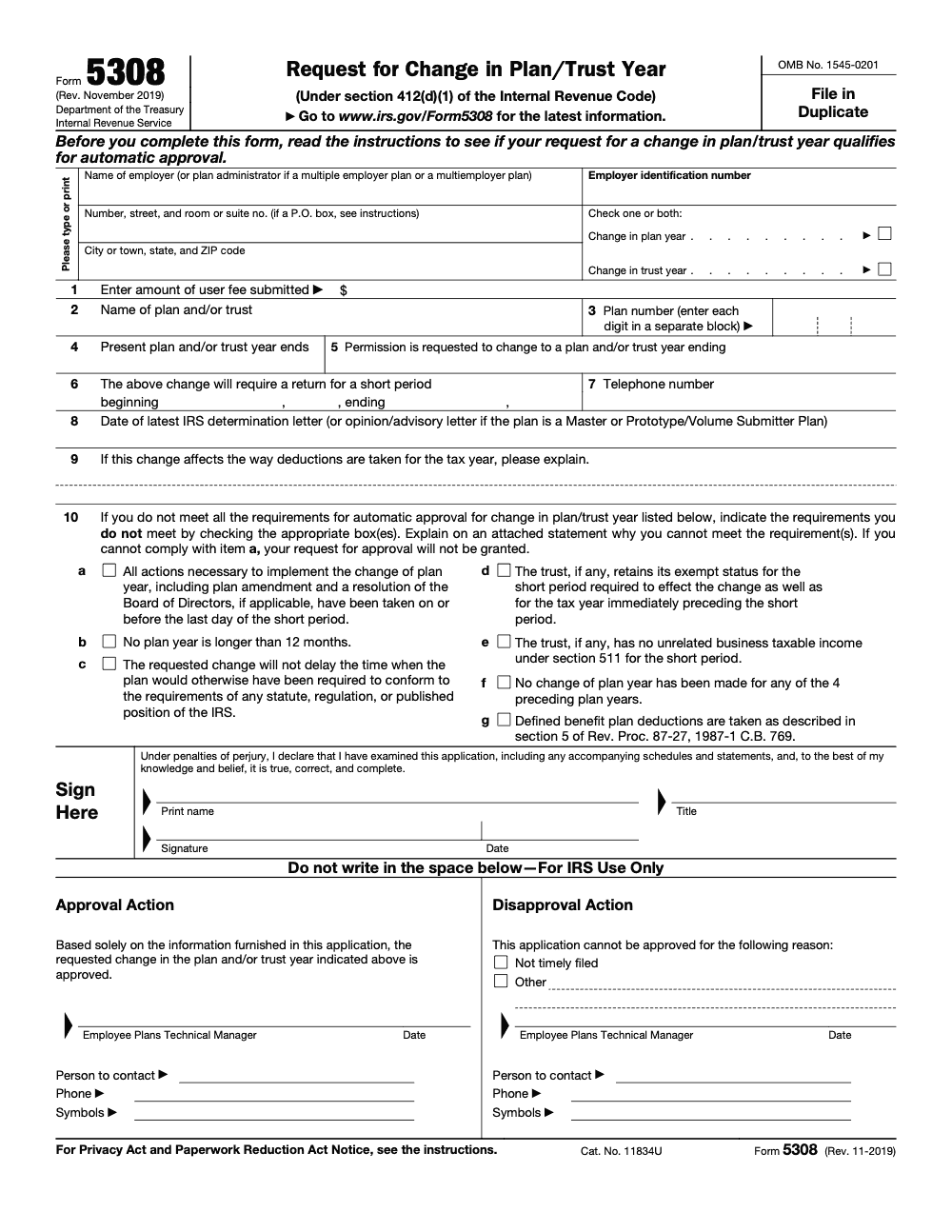
Form 5308 requests IRS approval to change the plan year or trust year of certain employee retirement plans subject to IRC §412 minimum funding standards (defined benefit, money purchase pension, and target benefit plans), plus any qualified-plan employees' trust. The form (Rev. 11-2019) must be filed in duplicate with EP Letter Rulings on or before the last day of the short period, with the user fee from the current annual EP revenue procedure (according to the Form 5308 instructions).
A partner once helped a plan sponsor file Form 5308 to move a defined benefit plan to a new year-end and treated the four-year lookback as the whole test, when Rev. Proc. 87-27 sets seven automatic-approval conditions. Item (a) on Line 10, every implementing action taken by the last day of the short period, is a hard prerequisite that turns into a per se denial when it is missed.
The request itself, Form 5308, asks the IRS to change a retirement plan or trust year under IRC §412(d)(1), and it is filed in duplicate with EP Letter Rulings on or before the last day of the short period. Some plan types are categorically exempt and never file it at all, profit-sharing and stock bonus plans among them, so read the exemptions before you build a package. The form is the November 2019 revision, the mailing destinations are in Kentucky, and the user fee comes from the current EP revenue procedure.
Key Takeaways
- Form 5308 is the IRS request to change a retirement plan or trust year under IRC §412(d)(1). Approval is required for many plans before the new year applies.
- You file by the end of the short plan year, include a clear business reason, and attach supporting plan documents and actuarial information where relevant.
- Mail the package to IRS EP Letter Rulings in Kentucky, with different addresses for USPS and private delivery services.
- Some plan types are categorically exempt and do not need to file Form 5308 at all – for example profit‑sharing plans and stock bonus plans – regardless of the Rev. Proc. 87-27 automatic-approval conditions. Separately, plans that meet all seven Rev. Proc. 87-27 conditions can rely on automatic approval without filing.
- As of December 3, 2025, the IRS “About Form 5308” page confirms the form’s purpose and current availability. There is no public online status tracker for this filing. Use EP Customer Account Services for status questions.
What Form 5308 Does
Form 5308, Request for Change in Plan/Trust Year, is how you ask the IRS to approve a change in a plan year or a related trust year. You use it when a plan subject to the minimum funding standards, or a plan trust, needs an off‑cycle start or end date, often after a merger, fiscal year realignment, or a cleanup of past errors. The form is short, but it is a formal request that can be approved or denied, and it carries a user fee.
When you do not need to file
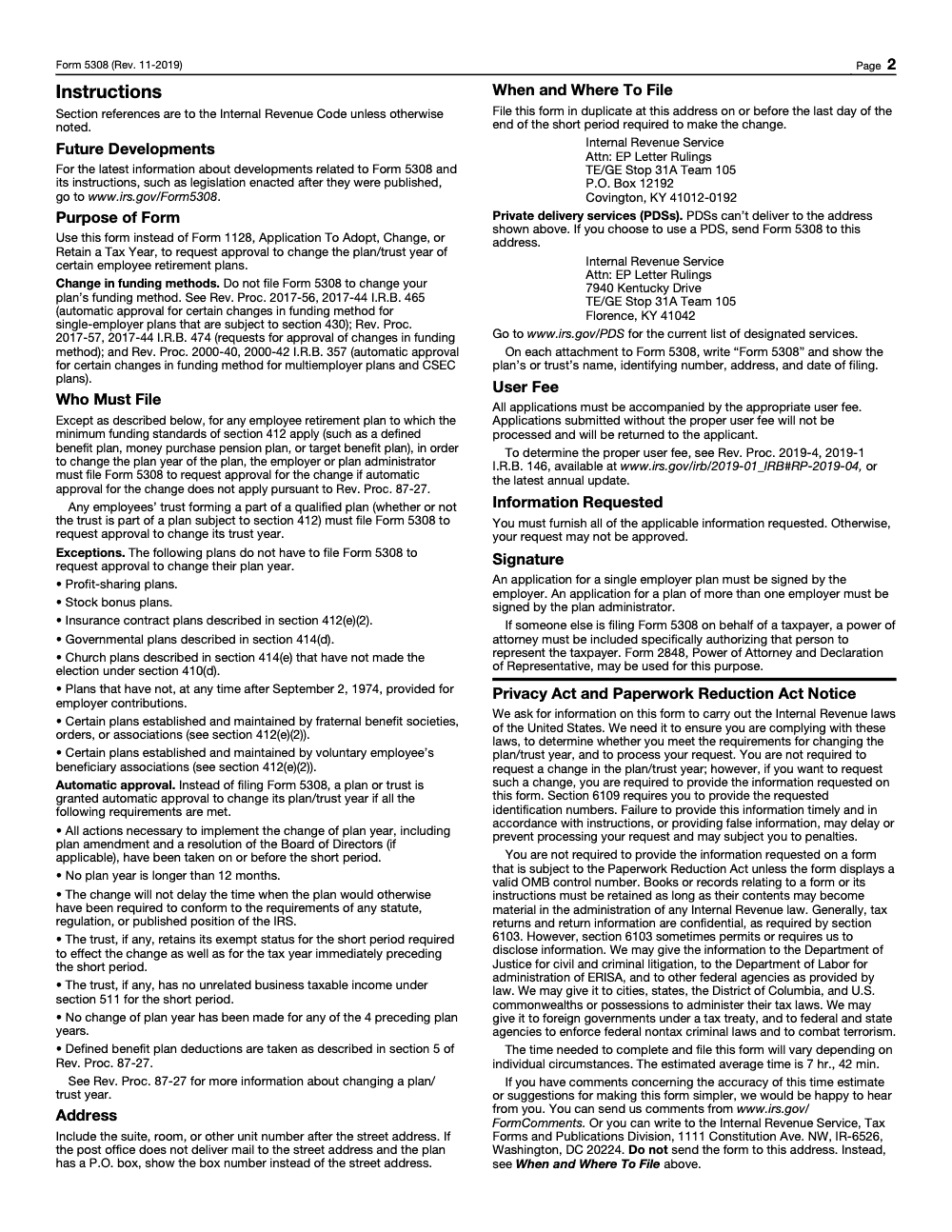
The official instructions carve out several exceptions. Profit‑sharing plans, stock bonus plans, certain insurance contract plans, governmental plans, and nonelecting church plans do not have to file Form 5308 to change the plan year. The trust still may need approval if its year is changing, and all automatic approval conditions must be met. Always confirm you qualify before skipping the form.
Why firms trip up on this filing
If you run a CPA or EA firm, you already know the pattern. The challenge is rarely finding a reason to change the plan year, it is executing cleanly without surprises. Common pain points include missing the short‑year deadline, thin documentation for the business reason, unclear workpapers, and slow coordination with the actuary. Those are delivery problems, not sales problems, and they are solvable with a disciplined workflow.
A change in plan year or funding method takes effect only if approved by the Secretary. Treat it as a controlled process with artifacts, not a casual form.
Who typically files Form 5308
Plans subject to IRC §412 minimum funding standards, for example single‑employer defined benefit, money purchase, and target benefit plans, generally must seek approval unless automatic approval applies. Any employees’ trust that is part of a qualified plan needs approval to change its trust year. This is why you will often file two boxes on the form, one for plan year and one for trust year.
Real‑world triggers
- Mergers or acquisitions that force one calendar across entities
- Sponsor changes in taxable year that make a short plan year logical
- ESOP adoption or termination with timing adjustments
- Correcting an incorrect plan year set long ago
When you describe the reason, stick to the business reality and avoid language that suggests you are chasing a funding or PBGC premium outcome. IRS guidance cautions that using a plan year change to delay the effect of a statute will not qualify for automatic approval and is scrutinized on review.
Where this lives on Accountably.com
This guide is part of Accountably’s IRS Form 5308 content, written for practitioners who want clear steps, predictable timing, and tidy files. We reference Accountably only where useful, because the priority is your compliance. If you need help building the disciplined workpapers that make IRS reviews faster, our teams can integrate with your systems without adding chaos to your calendar.
How to decide, Do you qualify for automatic approval or do you need IRS consent?
Start here, because it drives your timeline and workload.
- Automatic approval, You can avoid filing if you meet every condition in Rev. Proc. 87‑27, including that no plan year is longer than 12 months, no plan year change occurred in the prior four plan years, and the change does not delay the time the plan must conform to any statute or IRS position (Rev. Proc. 87‑27 actually has seven conditions, all of which must be met, the other four cover implementing actions taken on or before the short period, the trust retaining exempt status, no unrelated business taxable income for the short period, and DB plan deductions taken per section 5 of Rev. Proc. 87‑27). If you qualify, do not submit Form 5308. Keep your board resolution and amendment on file.
- IRS consent, If any condition is not met, or your plan type requires consent, file Form 5308 with the user fee and full support.
Quick rule of thumb, if you are not sure you meet every automatic‑approval condition, treat it as a consent filing and prepare the package.
Filing calendar and destination
- Deadline, File by the last day of the short plan year, for example if your short year ends December 31, 2025, your package must arrive by December 31, 2025.
- Where to send, Use the EP Letter Rulings addresses.
- USPS, Internal Revenue Service, Attn, EP Letter Rulings, TE/GE Stop 31A Team 105, P.O. Box 12192, Covington, KY 41012‑0192.
- Private delivery, Internal Revenue Service, Attn, EP Letter Rulings, 7940 Kentucky Drive, TE/GE Stop 31A Team 105, Florence, KY 41042.
- Copies, The 11‑2019 form says “File in Duplicate.” More recent EP procedures generally require one copy unless specific conditions apply, but for Form 5308 follow the form’s instruction unless an IRS specialist directs otherwise.
User fee and payment
- User fee, the Form 5308 instructions do not name a fixed dollar amount and instead direct filers to the latest annual EP user-fee revenue procedure (the 20YY-4 series, currently rooted in Rev. Proc. 2019-4 with annual updates) to determine the proper fee. Applications submitted without the proper user fee will not be processed and will be returned to the applicant.
- How to pay, EP user fees are governed by the annual revenue procedure. Determination letter user fees often run through Pay.gov, while letter rulings may be paid per instructions in the current revenue procedure. Coordinate with your EP specialist if you want to use Pay.gov or must include a check.
What to include in your package
The form itself is brief. The quality of your attachments is what speeds approval.
- Core details, employer and plan identifiers, plan number, current and proposed year ends, short year dates, contact info.
- Statement of reasons, clear business explanation for the change, not just a result you hope to achieve. IRS expects a bona fide operational need.
- Board resolution and plan amendment, adopted on or before the end of the short period.
- Actuarial materials for DB plans, valuation report references, minimum required contribution impact, deduction discussion if applicable, and confirmation you will follow the funding method and deduction rules.
- Prior year history, note any plan year changes within the last four plan years.
- Trust year details, if the trust year changes, include trust documents and exempt status confirmations.
Documentation table you can mirror
| Item | Include | Why it matters |
| Identification | Plan name and number, EIN, contact | Ensures EP can locate and log your case |
| Dates | Current and proposed year ends, short year dates | Drives deadlines and testing periods |
| Authority | Board resolution, plan amendment | Proves actions were adopted on time |
| Business reason | Merger alignment, fiscal year change | Shows bona fide need, not outcome shopping |
| Actuarial impact | Short year funding, MRC, deductions | Confirms compliance for DB plans |
| History | Prior changes in last 4 years | Automatic approval condition check |
| Trust items | Trust agreement, exemption status | Required if the trust year changes |
Step‑by‑step, from decision to submission
- Confirm whether automatic approval applies. If not, plan for a consent filing.
- Draft the statement of reasons and assemble supporting facts.
- Coordinate early with the actuary to map valuation date, MRC, testing, and notices for a short year.
- Adopt the plan amendment and board resolution on or before the end of the short period.
- Complete Form 5308, add the user fee, and prepare duplicate copies.
- Ship to the correct EP address with tracking and keep proof of delivery.
Pro tip, put “Form 5308,” plan or trust name, identifying number, address, and date of filing on each attachment so nothing gets separated in processing (per the instructions, all four elements – name, identifying number, address, and filing date – are required on every attachment).
Processing times and status checks
There is no public online tracker specific to Form 5308. Expect mailed acknowledgment and follow‑ups by letter. Processing can run from a few weeks to several months depending on complexity and workload. For status checks, call Employee Plans Customer Account Services at 877‑829‑5500. If you filed with a cover letter, keep the correspondence number handy.
If you do not receive an acknowledgment within 60 to 90 days, send a written inquiry to the same EP address you used for filing and retain delivery proof. If you use a private delivery service, make sure you used the Florence, KY street address, not the P.O. box.
Practitioners with proper authorization can also use the IRS Practitioner Priority Service for account‑related questions, though EP Customer Account Services is the primary line for retirement plan submissions. PPS operates at 866‑860‑4259, weekdays, with published hours.
How a plan year change affects funding, testing, and operations
Changing the plan year is not just a form, it shifts your entire compliance calendar.
- Funding and deductions, DB plans must align MRC and deduction timing with the short period, and the form asks you to explain deduction effects if applicable.
- Valuation date and audits, your actuary and auditor may need to adjust procedures and system timing to the new year.
- Participant notices and PBGC, deadlines shift with the plan year. Avoid aiming at PBGC premium timing, since IRS says automatic approval is not available if the change delays the effect of a statute like PBGC premium increases.
A simple short‑year timeline you can adapt
- Week 1 to 2, confirm automatic approval versus consent and draft the reason statement.
- Week 3 to 6, actuary models funding and testing for the short year, you update the amendment and board resolution.
- Week 7 to 8, finalize Form 5308, attach support, cut the user fee, and ship with tracking.
- Weeks 10 to 16, watch for acknowledgment by mail, respond quickly to any IRS information requests.
- Close of short year, ensure contributions, notices, and filings reflect the new year and short period where required.
Sample “statement of reasons” outline
Use this structure and keep it factual.
- Business context, “On October 1, 2025, Sponsor acquired ABC Inc. and consolidated finance calendars to December 31.”
- Plan administration, “Payroll, audit, and actuarial processes are now aligned to the new fiscal cycle.”
- Prior changes, “No plan year change occurred in the prior four plan years.”
- Short period, “The plan will have a short year from July 1, 2025 to December 31, 2025.”
- Funding and testing, “The actuary has adjusted valuation and MRC for the short period and will complete testing on the short‑year basis.”
- Trust year, “The trust year will change to match the plan year, trust remains exempt and has no UBTI for the short period.”
- Contacts, name, title, phone, and email for the preparer.
Common pitfalls and how to avoid them
- Thin documentation, send a clear business reason and the right attachments.
- Late adoption, adopt the plan amendment and board resolution by the short‑period end (this is Line 10 item (a) and it is uniquely fatal, if implementing actions are not completed by the last day of the short period, the IRS instructions state the request cannot be approved).
- Wrong address, use Covington for USPS and Florence for private delivery.
- Chasing outcomes, do not frame the change as a way to delay statutory impacts such as PBGC premiums.
- Fee mistakes, confirm the current user fee before you send payment.
How disciplined delivery shortens review time
Clean workpapers, consistent file names, and clear version control make reviews faster, especially when IRS asks follow‑up questions. If you run a growing firm, keep a standard 5308 packet template with labeled exhibits. That way, anyone on your team can assemble a submission that passes an internal checklist before it goes out.
We have seen the fastest turnarounds when the “reason” statement is one page, the amendment and resolution are dated, the actuarial memo is concise, and every attachment is labeled with the plan name, EIN, and “Form 5308.”
Compliance checklist you can copy
- Confirm whether automatic approval applies to your plan type and facts.
- Draft a one‑page, business‑focused reason for the change.
- Coordinate with your actuary for valuation, MRC, and testing in the short year.
- Adopt the plan amendment and board resolution by the short‑period end.
- Complete Form 5308, include the user fee, and file at the correct address by the short‑year end.
- Track acknowledgment and respond quickly to any IRS letters. Use EP Customer Account Services for status.
Where Accountably fits, only if you need it
If your team is buried in production work, plan year changes can feel risky. Accountably builds disciplined, U.S.‑led offshore delivery that keeps workpapers tight and review‑ready inside your own systems. When your files are standardized, IRS reviews tend to move faster, and partners spend less time in the review loop. Use us for capacity without chaos, or take the checklist above and run it in‑house, either way the goal is your compliance.
Closing thoughts
You can absolutely manage a plan year change with confidence. Keep your reason tight, adopt changes by the short‑period end, coordinate with your actuary, and file cleanly to the right address with the correct fee. Use the status resources the IRS provides, and build a repeatable template so the next change is even smoother. That is how you turn a technical compliance step into a predictable process.
Common Mistakes We See Every Season
Across the plan-year changes my team has reviewed, the same handful of errors keep surfacing. Each one delays approval or kicks the package back unprocessed, so we sign off against this list before any Form 5308 leaves the queue.
Reusable Checklists
These checklists are copy-paste ready for firm SOPs. Drop them into the engagement template and use them as sign-off gates before any Form 5308 package leaves the queue.
Automatic-approval eligibility scan (Rev. Proc. 87-27)
- All implementing actions taken on or before the last day of the short period (item a, hard prerequisite).
- No plan year longer than 12 months.
- The change does not delay any required IRS or statutory conformity.
- The trust retains exempt status for the short period and the preceding tax year.
- No unrelated business taxable income under IRC §511 for the short period.
- No change of plan year in any of the 4 preceding plan years.
- Defined benefit plan deductions are taken per Section 5 of Rev. Proc. 87-27.
Form 5308 filing package contents
- Two complete copies of Form 5308 (Rev. 11-2019), each a stapled set.
- Top-of-form checkbox marked: change in plan year, change in trust year, or both.
- Line 1: user fee amount per the current EP and EO annual revenue procedure (20YY-4 series).
- Lines 2 through 6: plan or trust name, plan number, present and requested year-end, short-period start and end dates.
- Line 8: date of the latest IRS determination, opinion, or advisory letter.
- Line 9: clear explanation of how the change affects the way deductions are taken.
- Line 10: every item (a) through (g) certified, or flagged with an attached explanation where allowed.
- Each attachment labeled "Form 5308" with plan or trust name, identifying number, address, and date of filing.
- Check or money order for the user fee, in the amount listed in the current EP user-fee revenue procedure.
- Form 2848 power of attorney if a third party files on behalf of the taxpayer.
Mailing and post-filing handoff
- USPS package addressed to IRS, Attn: EP Letter Rulings, TE/GE Stop 31A Team 105, P.O. Box 12192, Covington, KY 41012-0192.
- Private delivery service package addressed to IRS, Attn: EP Letter Rulings, 7940 Kentucky Drive, TE/GE Stop 31A Team 105, Florence, KY 41042.
- Current designated PDS list cross-checked at www.irs.gov/PDS before labeling.
- Tracking number captured in the engagement file with the mail date.
- Signed copy of Form 5308 retained for as long as the contents may be material under any Internal Revenue law.
- Calendar reminders set for periodic status follow-up with EP Customer Account Services.
Keep 5308 Season From Stalling
Form 5308 is a low-volume filing that arrives at inconvenient times, usually as a side workflow inside a broader plan amendment or actuarial restatement. The IRS estimates roughly 7 hours and 42 minutes per filing per the Form 5308 instructions, but the calendar pressure is what stalls teams: the package must hit EP Letter Rulings on or before the last day of the short period, and every supporting workpaper (Lines 2 through 10, attachments, user fee, POA) has to align with the plan amendment effective date.
The fix is to treat the plan-year change as a packaged engagement with a fixed handoff checklist rather than a one-off question routed to whoever is free. Short-period math, item (a) certification, and user-fee currency are the three points where most filings slip.
- Map the short period on day one: present plan year-end (Line 4), requested year-end (Line 5), short-period start and end (Line 6). Every other date in the package keys off these.
- Treat Line 10 item (a) as a hard go or no-go gate. If implementing actions cannot be locked by the short-period end date, pause the package; per the Form 5308 instructions, non-compliance with item (a) is a per se denial.
- Confirm the user fee against the current EP and EO annual revenue procedure (the 20YY-4 series) before the check is cut. A stale fee from the prior year's rev. proc. is returned unprocessed.
- Match Line 9 deduction-method explanations to Section 5 of Rev. Proc. 87-27 for defined benefit plans, and route any funding-method change to Rev. Proc. 2017-56, 2017-57, or 2000-40 as appropriate (Form 5308 itself does not cover funding-method changes).
- Stage two complete signed copies in one envelope; route USPS to the Covington P.O. Box and any PDS shipment to the Florence street address.
This is the kind of work that scales cleanly when the SOP carries the deadline math instead of the partner's memory. Our U.S.-led offshore tax delivery teams run the line-by-line build, the short-period reconciliation, and the package QC, so partner-level review becomes a sign-off rather than a rebuild.
FAQs
No. Some plan changes qualify for automatic approval under Rev. Proc. 87‑27 if every condition is met, and some plan types, like profit‑sharing plans, do not need to file Form 5308 to change the plan year. If in doubt, review the Form 5308 instructions and the revenue procedure before you assume you are exempt.
Use EP Letter Rulings in Kentucky. USPS mail goes to the Covington P.O. Box. Private delivery services must use the Florence street address. The IRS reconfirmed these addresses, and the form’s instructions list both.
No public tracker is available. Expect mailed acknowledgment and letters for information requests. For status, call EP Customer Account Services at 877‑829‑5500 and keep your plan name, EIN, and filing date ready.
The Form 5308 instructions do not name a fixed dollar amount; they direct filers to the latest annual EP user-fee revenue procedure (the 20YY-4 series) for the current letter-ruling fee. Confirm the current schedule before you file – applications without the proper user fee are returned unprocessed.
File Form 5308 to change the plan year of any employee retirement plan subject to the minimum funding standards of IRC §412, such as a defined benefit, money purchase pension, or target benefit plan, and to change the trust year of any qualified-plan trust. Profit‑sharing plans, stock bonus plans, §412(e)(2) insurance contract plans, §414(d) governmental plans, and §414(e) church plans that have not made the §410(d) election do not have to file.
Automatic approval under Rev. Proc. 87‑27 lets you change the plan or trust year without filing only if all seven conditions are met, including no plan year longer than 12 months and no change of plan year in any of the 4 preceding plan years. Miss even one condition and you must file. The fatal item is Line 10(a): if every action needed to implement the change is not taken on or before the last day of the short period, approval is denied.
File Form 5308 in duplicate at the EP Letter Rulings address on or before the last day of the short period. Every application must include the appropriate user fee, set by the latest annual EP user-fee revenue procedure (the 20YY‑4 series); applications submitted without the proper fee are returned unprocessed. USPS mail goes to the Covington P.O. Box; private delivery services must use the Florence street address.
No. Form 5308 only requests approval to change the plan year or trust year; it is not the vehicle for a funding-method change. Funding-method changes are governed by separate revenue procedures, Rev. Proc. 2017‑56, Rev. Proc. 2017‑57, and Rev. Proc. 2000‑40. Form 5308 also replaces Form 1128 for covered retirement plans, so do not use the general tax-year-change form here.
Other forms this guide names
- Form 1128: How to Adopt or Change a Tax Year
Summarize this article with AI
About this guide
Accountably helps US CPA, EA, and accounting firms hire trained accountants and tax preparers in India.
About us Reviewed byJugal Thacker, CPAFounder and CEO at Accountably
A US-licensed CPA with 7+ years inside US firms – PwC, a real-estate tax practice, then a full-service firm, rising from reviewer to manager to advisory. This article was reviewed against current IRS guidance for the 2025 tax year and updated for filers preparing late returns, amendments, and 2026 estimates.
View profile →How we research, review, and update this guide
Every Accountably guide is researched against primary IRS sources, reviewed by a U.S. CPA, and refreshed as guidance evolves. Read our Editorial Guidelines to see how we source, fact-check, and update our content.




