
Summarize this article with AI
In Brief
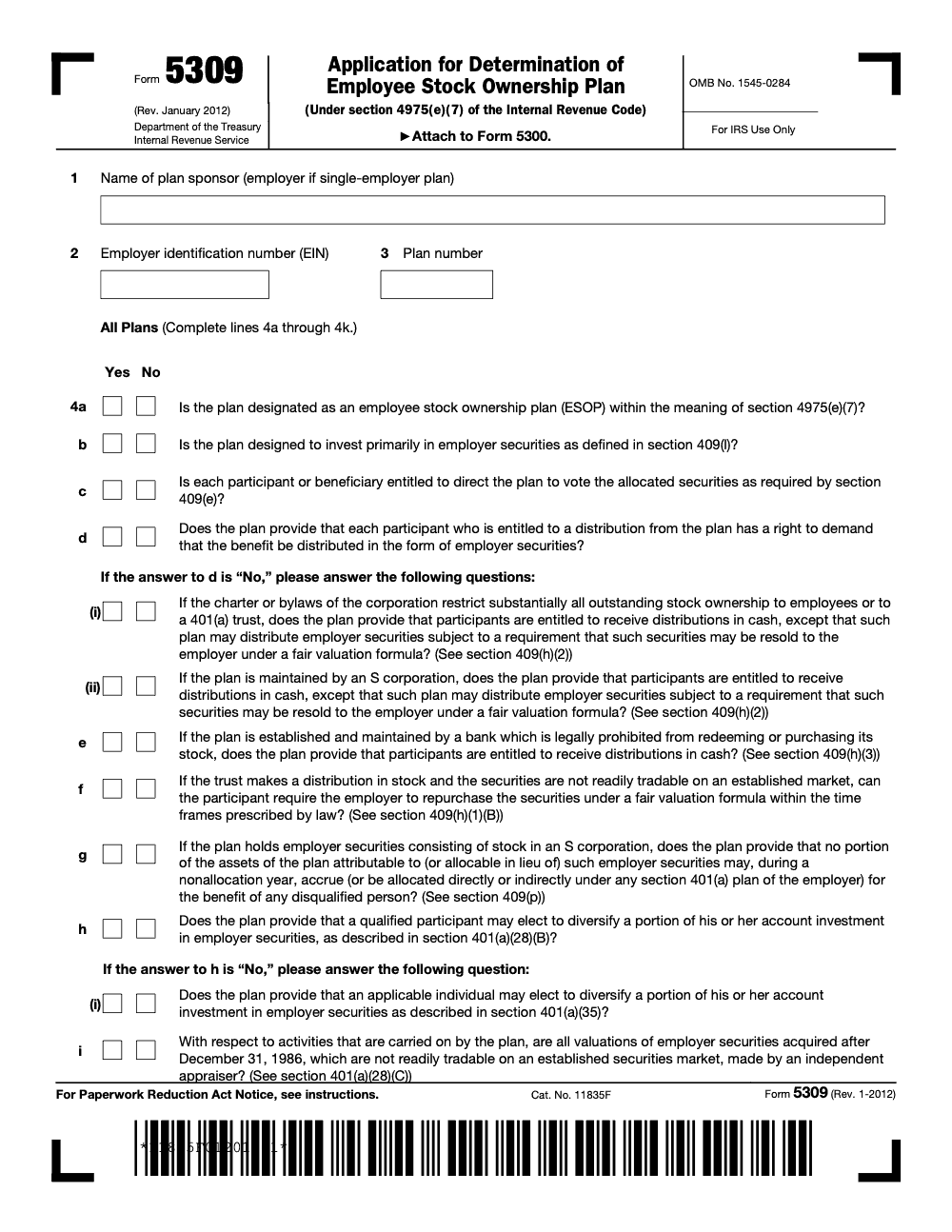
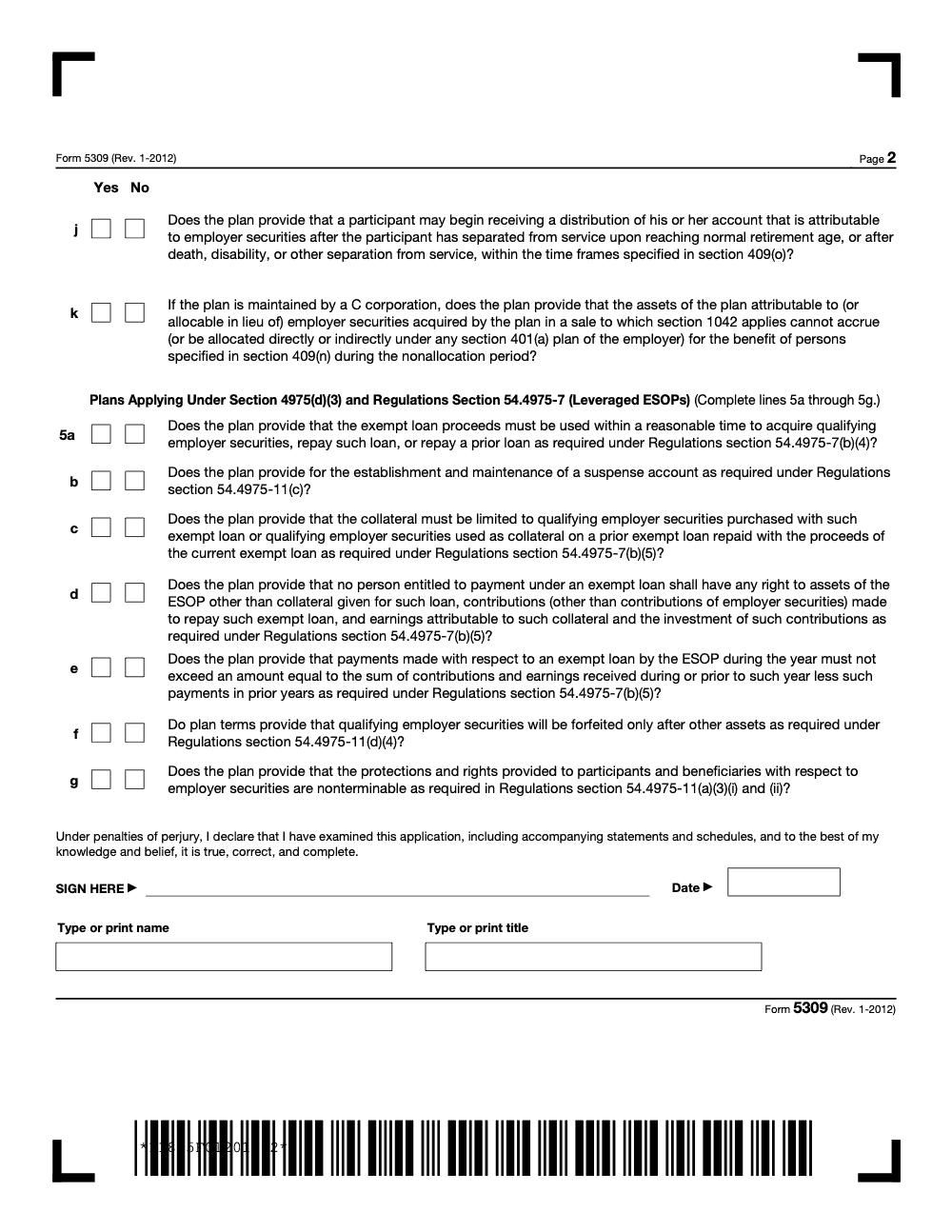
Form 5309 is the ESOP determination-letter application attachment filed with Form 5300 on Pay.gov to confirm the plan meets IRC §4975(e)(7) (per IRS Form 5309 instructions, Rev. January 2012). It covers 11 all-plans questions on lines 4a–4k plus 7 leveraged-ESOP questions on lines 5a–5g, must be signed by a principal officer, and rejects stamped signatures.
Form 5309 rarely travels alone, and that is the detail people miss. It is the ESOP qualifier you attach to Form 5300 when you want an IRS determination that the plan meets IRC §4975(e)(7). Since July 1, 2022, Form 5300 is filed on Pay.gov, which accepts only one uploaded PDF up to 15 MB, so the completed and signed Form 5309 has to consolidate into that single file with the rest of your exhibits.
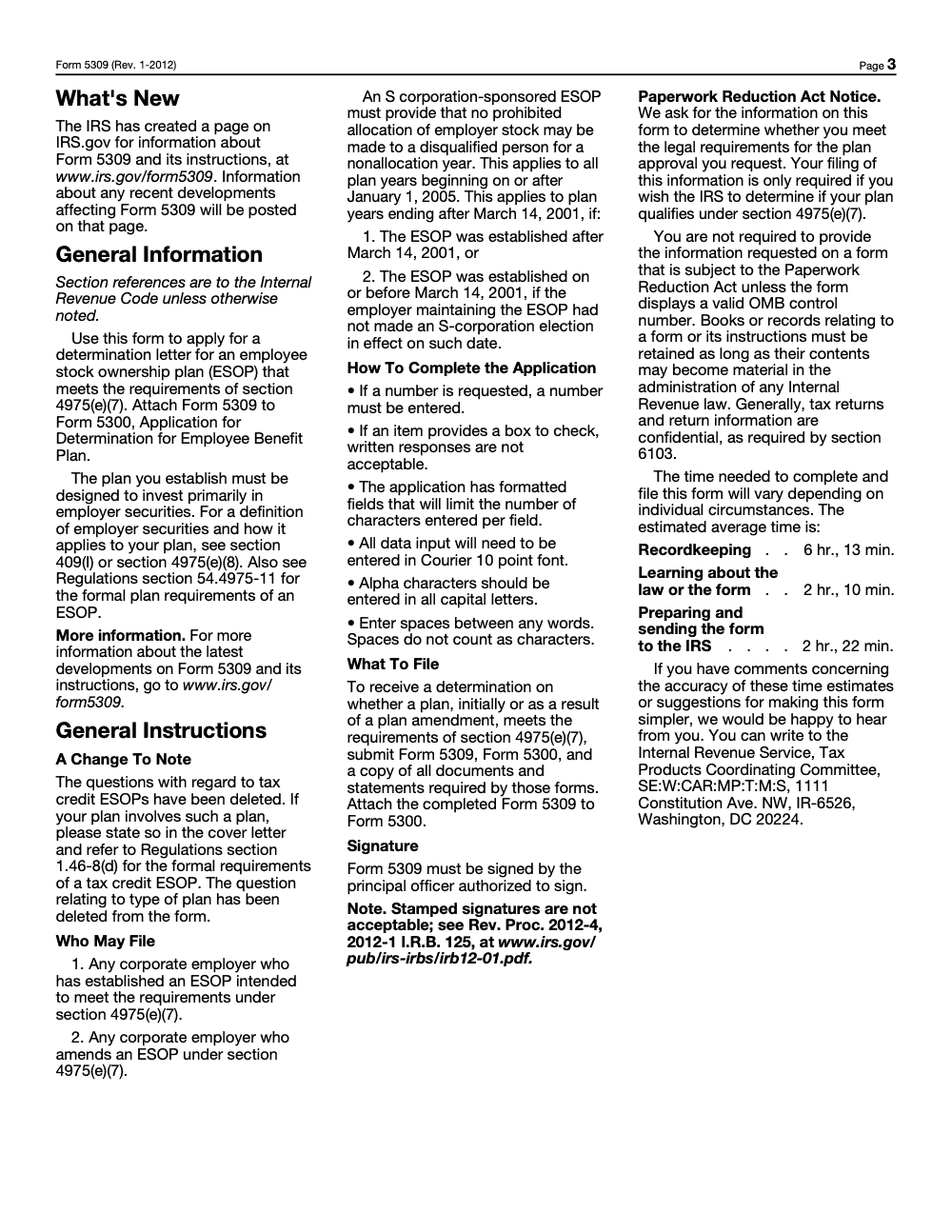
The current Form 5309 is still the Rev. January 2012 PDF, and it is particular about how you fill it in: data in Courier 10-point, all caps, check boxes and numeric fields rather than narratives, and a principal officer's signature with no stamps accepted. It runs 11 all-plans questions on lines 4a through 4k plus 7 leveraged-ESOP questions on lines 5a through 5g. If the ESOP holds S corporation stock, watch the nonallocation rules under IRC §409(p) before you sign.
Key Takeaways
- Form 5309 is the add‑on you attach to Form 5300 when you want an IRS determination that your ESOP meets IRC section 4975(e)(7). It is the ESOP qualifier in the determination letter package.
- As of July 1, 2022, Form 5300 is filed electronically on Pay.gov, and Pay.gov accepts only one uploaded PDF attachment, up to 15 MB, so you must consolidate exhibits, including your completed and signed Form 5309.
- The current Form 5309 remains the Rev. January 2012 PDF. It still instructs you to enter data in Courier 10‑point, all caps, and to use check boxes or numeric fields, not narratives. It also requires a principal officer’s signature, with stamped signatures not allowed.
- ESOPs must be designed to invest primarily in employer securities to qualify as ESOPs under Treas. Reg. §54.4975‑11 (a foundational design-and-purpose standard at inception, not just an average-composition test). Your plan document should say this plainly.
- If your ESOP holds S corporation stock, watch the nonallocation rules under IRC §409(p). A nonallocation year and disqualified person issues can derail qualification, so confirm your design and testing approach before you file.
- The IRS Form 5300 page and the Form 5309 page are your “source of truth” for the latest process notes, signatures, and packaging order. Both pages were reviewed in January 2026.
Who This Guide Is For
If you lead an accounting or tax practice, manage plan compliance, or sit in the ESOP sponsor seat, this is built for you. You want speed without risking accuracy. You want your partners out of endless review loops. You want a package that clears intake on the first pass.
- You are adopting a new ESOP or amending one and need a determination letter.
- You are coordinating documents across counsel, valuation, and plan operations.
- You want a ready checklist your team can follow under deadline pressure.
What Form 5309 Actually Does
Think of Form 5309 as the ESOP attestation that rides along with your Form 5300. You are telling the IRS, in a structured, yes‑or‑no format, that your plan is an ESOP and that it is built to invest primarily in employer securities, with participant rights, diversification, valuation, and, if applicable, 409(p) protections all in place. The IRS “About Form 5309” page is short and direct, and the PDF itself, Rev. January 2012, includes the operational checkpoints you will be asked to confirm.
For S corporations, this is where you show the plan includes the 409(p) nonallocation protections. If your design fails those rules, an S corp ESOP can run into a nonallocation year, which is painful and avoidable with the right testing. The IRS keeps an up‑to‑date Issue Snapshot on preventing nonallocation years. Share it with your reviewer so everyone aligns on thresholds before filing.
When You Must File Form 5309
You attach Form 5309 to Form 5300 when you are:
- Adopting an ESOP and asking for an initial determination letter.
- Amending an existing ESOP and seeking a determination.
- Filing for an S corporation ESOP where 409(p) must be shown.
- Filing a legacy tax credit ESOP, with a brief cover letter that cites Treas. Reg. §1.46‑8(d). The 2012 instructions note that tax credit questions were removed, and they direct you to include a cover letter if applicable.
A quick reality check on filing mechanics. Form 5300 is electronic only on Pay.gov, which means your Form 5309, signed by the principal officer, becomes one of the attachments inside your single consolidated PDF. Build the package with that 15 MB limit in mind, or call the IRS number in the instructions for help sending overflow items.
Tip I share with teams, build a “clean room” PDF for Pay.gov submissions, one file, bookmarked, with a cover sheet index that mirrors the IRS packaging order. It cuts intake questions and speeds reviews.
How Form 5309 Fits Into Your Pay.gov Submission
Here is the high‑level flow your team can follow without reinventing the wheel.
- Confirm your filing posture. New ESOP or amendment, and identify if you are an S corporation subject to §409(p). If S corp, confirm testing approach and draft the internal memo that explains how participants avoid disqualified person status. Use the IRS snapshot as your north star.
- Gather documents. Pull your current ESOP plan document, trust, any executed amendments, the most recent valuation, and any compliance statements. The Form 5300 instructions set the package expectations and require an original signature on the application. For Pay.gov, that signature is captured in process, and any officer‑signed attachments, like Form 5309, should be included in your PDF.
- Prepare Form 5309. Use the 2012 PDF and follow its formatting rules, Courier 10 point, all caps, numbers where requested, and check boxes only. The form requires the principal officer’s signature, and it says stamped signatures are not acceptable, which aligns with procedural guidance. Scan to PDF for your consolidated attachment.
- Build the consolidated PDF. Pay.gov accepts only one uploaded PDF, max 15 MB. Bookmark the file. Put your power of attorney or authorization, prior determination letter, cover letter, amendments, and current plan document in a logical order that mirrors current procedural guidance in the Internal Revenue Bulletin.
- Submit on Pay.gov. Create or sign into your Pay.gov account, search for “5300,” complete the online form, pay the fee in the workflow, and upload your consolidated PDF. If a payment is returned, the IRS requires a resubmission with the new fee, so watch for system emails.
Why the “Primarily Invest in Employer Securities” Statement Matters
Treas. Reg. §54.4975‑11 requires that an ESOP is designed to invest primarily in qualifying employer securities. That statement should live in your plan text, not in a side letter, and your 5309 yes‑or‑no responses should line up with the plan’s exact language on distributions in stock or cash, put rights, voting, diversification, valuation, and leveraged loan mechanics if you have an exempt loan.
S Corporation ESOPs, Avoiding a Nonallocation Year
If you sponsor an S corporation, take §409(p) seriously. A nonallocation year occurs when disqualified persons own, or are deemed to own, at least 50 percent of the S corporation shares, including synthetic equity like options or certain rights. There is no prescribed correction method, which makes prevention the only winning strategy. Align your cap table, allocations, and any awards that could be synthetic equity before you file.
What About Tax Credit ESOPs
Form 5309 deleted tax credit ESOP questions years ago. If you maintain a legacy tax credit ESOP, the instructions still tell you to include a cover letter that references Treas. Reg. §1.46‑8(d). Keep it tight and factual, then make sure your plan language still supports qualification today.
The Quick‑Start Checklist Your Reviewer Will Appreciate
- Confirm eligibility to request a DL for your facts under current revenue procedures and instructions.
- Validate ESOP design language aligns with §54.4975‑11 and your 5309 answers.
- If S corp, run §409(p) testing and document disqualified person analysis, including synthetic equity.
- Assemble all plan documents, amendments, valuation, and any compliance statements noted in the 5300 instructions.
- Complete Form 5309 using Courier 10 point, all caps, numbers and check boxes only, then obtain officer signature.
- Consolidate everything into one bookmarked PDF under 15 MB for Pay.gov, then submit and pay the fee online.
Field note, create a one‑page “cover index” that mirrors the IRS packaging order. It saves time when a specialist opens your file and reduces back‑and‑forth.
Completing Form 5309, Line‑By‑Line Priorities
You have the form open. Here is how to move through it with confidence.
The “All Plans” Section
- 4a and 4b confirm ESOP status and the “primarily invest” standard. The plan should say exactly that it is designed to invest primarily in employer securities. If your plan uses a combined stock bonus format, confirm the ESOP designation is explicit.
- 4c and 4d address voting rights and the right to receive distributions in employer securities. If distributions are in cash due to charter or S corporation rules, confirm the required fair valuation repurchase right.
- 4g is the S corporation 409(p) control. Make sure the plan states that no assets attributable to S corp employer securities accrue, directly or indirectly under any §401(a) plan of the employer, for disqualified persons during a nonallocation year.
- 4h and 4h(i) cover diversification rights, including §401(a)(35) where applicable for publicly traded employer securities, and 4i covers independent appraisals for non‑public stock acquired after December 31, 1986. Tie your answers to the plan and valuation practice.
Leveraged ESOP Items
If you have an exempt loan, complete line 5 items. Confirm the suspense account usage, collateral limits, nonrecourse requirements, and participant protections. These line items flow directly from the ESOP regulations.
Formatting And Signature
Form 5309 still expects Courier 10 point, all caps, numbers where requested, and check boxes only. It requires the principal officer’s signature, and stamped signatures are not acceptable. When you file on Pay.gov, include a signed PDF of Form 5309 inside your single consolidated attachment.
Packaging Your Pay.gov Attachment, A Practical Order
Use this order to help your package clear intake on the first try, then bookmark each section in your single PDF.
| Section | What To Include | Source alignment |
| 1 | Form 2848 or 8821, if used | Current procedural guidance |
| 2 | Prior determination or opinion letters, if any | IRB packaging order |
| 3 | Penalty of perjury statement, if the Pay.gov form is not signed by the plan sponsor | Current revenue procedure |
| 4 | Cover letter that maps your exhibits, mention tax credit ESOP if applicable under §1.46‑8(d) | Form 5309 instructions |
| 5 | Executed amendments and restatements | Form 5300 instructions |
| 6 | Current ESOP plan document and trust | Form 5300 instructions |
| 7 | Completed and signed Form 5309 | Form 5309 PDF |
| 8 | Valuation report and related schedules, if referenced | ESOP practice |
This order follows current Internal Revenue Bulletin packaging logic and the Form 5300 instructions for electronic submissions on Pay.gov. Keep your entire attachment under 15 MB or contact the IRS for instructions on overflow items.
Common Mistakes That Trigger Delays
Most Form 5309 returns to sender are not about new rules. They are about packaging gaps the IRS reviewer spots on intake. Below are the patterns I see most often and the SOP fixes that keep ESOP determination-letter submissions moving.
Where To File, Fees, And Timing
- Where to file, Form 5300 is electronic only on Pay.gov. There is no paper option. You pay the user fee inside the Pay.gov workflow. If a payment is returned, resubmit the application with the new fee.
- File content, follow the Form 5300 instructions and revenue procedures that govern the DL program, and remember that the IRS updates these procedures annually. The Internal Revenue Manual references the current revenue procedure each year. Check dates before you file.
Timelines And Expectations
Determination letter timelines vary with IRS workload and case complexity. You can reduce friction by following the Pay.gov attachment rule, using bookmarks, and matching every Form 5309 answer to a specific plan provision. The IRS also provides tips pages and internal manual notes that align with what specialists look for at intake.
ESOP Design Details That Often Need A Second Look
- Voting and distribution rights, confirm consistency between 5309 answers and plan text on voting, distribution in stock or cash, and put rights.
- Diversification rights and valuation, check §401(a)(28) and independent appraisal requirements for non‑public stock.
- Leveraged ESOP mechanics, confirm suspense account, collateral limits, and nonrecourse structure match the ESOP regulations.
- S corporation nonallocation rules, confirm your design and testing avoid a nonallocation year and disqualified person allocations.
Light Compliance And Process Disclaimers You Can Reuse
- This guide is general information for plan sponsors and advisors. It is not legal, tax, or valuation advice for your specific facts. Always consult the current IRS instructions and revenue procedures before you file.
- Use the IRS “About Form 5300” and “About Form 5309” pages for last‑minute checks, both were reviewed in January 2026.
Where A Partner Might Lean On Accountably
If your internal team is buried in peak season and you want clean, consistent ESOP filing workpapers, a disciplined offshore delivery model can help. The key is structure, not resumes, standardized workpapers, multi‑layer review, and predictable turnarounds. That is how we operate at Accountably. We work inside your systems and templates, so your partners stay focused on strategy while delivery stays on time, at quality, and at scale.
I keep this mention brief on purpose. The point is not a pitch. It is that a repeatable packaging process, clear SOPs, and accountable review layers are what keep determination letter submissions from bouncing. If you need a hand with documentation discipline, we can help you build it without sacrificing control.
Final Checklist Before You Hit Submit
- Your plan text states the ESOP is designed to invest primarily in employer securities, and every 5309 answer ties to a provision.
- For S corps, your 409(p) memo is complete, and your plan language bars accruals for disqualified persons in a nonallocation year.
- Form 5309 is in Courier 10 point, all caps, signed by a principal officer, and scanned for inclusion.
- Your Pay.gov attachment is a single, bookmarked PDF under 15 MB, with the order and items the IRS expects.
If you want a second set of eyes on packaging, or you are building disciplined SOPs so your team never scrambles at the deadline, we can help. We keep the work inside your systems, documented and review‑ready, so you do not lose control.
Reusable Checklists
These checklists are copy-paste ready for your firm's ESOP determination-letter SOP. They track the points the IRS reviewer hits first and reflect the current Form 5309 instructions (Rev. January 2012).
Pre-submission Form 5309 review
- Line 1 plan sponsor name, line 2 EIN, and line 3 plan number reconcile to the plan document and prior filings.
- Line 4a designates the plan as an ESOP within the meaning of IRC §4975(e)(7).
- Line 4b confirms the plan is designed to invest primarily in employer securities under §409(l).
- Line 4c covers participant voting direction for allocated securities under §409(e).
- Lines 4d, 4d(i), and 4d(ii) match the actual stock-or-cash distribution rights in plan text, with put-option language for non-readily-tradable securities (§409(h)).
- Line 4i references an independent appraiser for non-readily-tradable stock acquired after December 31, 1986.
- Form is typed in Courier 10 point, all caps, with check boxes (not narrative) in every Yes/No field.
- Principal officer wet signature is on the final page; no signature stamps.
S-corporation §409(p) scan
- Identify all disqualified persons under IRC §409(p) for the plan year.
- Test direct and deemed ownership across the controlled group.
- Confirm no allocation is scheduled for a nonallocation year.
- Cross-check accruals under every §401(a) plan of the employer, not just the ESOP.
- Document the §409(p) test memo with sign-off from plan counsel.
- Confirm plan text bars accruals to disqualified persons during a nonallocation year (Line 4g).
- Save the memo as a bookmarked exhibit inside the Pay.gov attachment.
Leveraged ESOP exempt-loan review
- Loan proceeds were used within a reasonable time to acquire qualifying employer securities, repay the loan, or repay a prior loan (Line 5a, Reg §54.4975-7(b)(4)).
- Suspense account is established and maintained per Reg §54.4975-11(c) (Line 5b).
- Collateral is limited to the qualifying employer securities purchased with the loan (Line 5c, Reg §54.4975-7(b)(5)).
- Lender's recourse is limited to collateral, repayment contributions, and earnings on those amounts (Line 5d).
- Annual payments respect the Reg §54.4975-7(b)(5) cap (Line 5e).
- Forfeiture order exhausts other assets before employer securities (Line 5f, Reg §54.4975-11(d)(4)).
- Participant rights and protections in employer securities are nonterminable (Line 5g, Reg §54.4975-11(a)(3)(i) and (ii)).
Keep 5309 Season From Stalling
ESOP determination-letter cycles do not look like a quarterly return. They land when a plan sponsor formalizes a new design or amends an existing plan, then sit on a Pay.gov queue whose turn-around shifts with IRS workload. The Form 5309 instructions themselves estimate roughly 10 hours, 45 minutes of total burden per filing (per IRS Form 5309 instructions, Rev. January 2012), but the real time sink is the back-and-forth when packaging is loose.
The fix is not more horsepower. It is a packaging discipline that pre-empts the questions reviewers ask on intake, so each Form 5309 + Form 5300 package looks the same when the case opens.
- Lock the line-4 answer set to plan text in a side-by-side memo before anyone opens Pay.gov. Lines 4a through 4k must each map to a plan provision, and gaps surface fast in review.
- Pre-stage the leveraged-ESOP exhibits (loan agreement, suspense-account schedule, collateral confirmation) for lines 5a through 5g so they assemble in the same order each filing.
- Run the §409(p) disqualified-person test before line 4g is checked. That single step saves a round-trip on most S-corporation ESOP packages.
- Confirm the appraiser-independence file for any non-readily-tradable stock acquired after December 31, 1986 before signing line 4i.
- Build the Pay.gov PDF with bookmarks and compress exhibits before payment so the package fits the Pay.gov attachment cap on the first try.
When the calendar fills with ESOP design work, a documented packaging SOP keeps determination-letter submissions from stalling out. That is the kind of structured execution we build through tax outsourcing and review: trained offshore preparers, multi-layer review, and reusable workpapers that make every Form 5309 + Form 5300 package look the same when the IRS reviewer opens it.
FAQs
Not always. The determination letter program has specific eligibility rules and windows, and the IRS issues DLs on the qualified status of ESOPs under §401(a), §409, and §4975(e)(7). Review the current revenue procedure for eligibility, then decide whether a DL adds certainty for your facts.
Form 5309 still requires the principal officer’s signature and does not permit stamped signatures. Complete and sign 5309, then include the signed PDF inside your single Pay.gov attachment for Form 5300. The 5300 application itself is signed in the Pay.gov flow.
You must keep the attachment within 15 MB. If you cannot, remove items and call the IRS number listed in the instructions for directions on submitting overflow items. Bookmarking and compressing exhibits usually brings you under the limit.
Yes. The current 5309 PDF, Rev. January 2012, still instructs you to enter text in Courier 10 point, all caps, use spaces between words, and use only numeric fields and check boxes where provided. Follow the form’s own instructions.
A nonallocation year occurs when disqualified persons own, or are deemed to own, at least 50 percent of the S corporation shares, including synthetic equity. Because there is no prescribed correction, prevention through design and testing is essential.
Use the IRS “About Form 5300” page for Pay.gov specifics and the “About Form 5309” page for the current form. Check the Internal Revenue Bulletin for the annual revenue procedure that governs submissions. Do this check right before you file.
Form 5309 asks you to confirm independent appraisals for non‑public stock. If you reference a valuation in your plan or 5300 responses, include it in the consolidated PDF so the reviewer can trace your answers to support.
Other forms this guide names
- Form 5300: Filing Guide, Fees, Timeline, and Tips
Summarize this article with AI
About this guide
Accountably helps US CPA, EA, and accounting firms hire trained accountants and tax preparers in India.
About us Reviewed byJugal Thacker, CPAFounder and CEO at Accountably
A US-licensed CPA with 7+ years inside US firms – PwC, a real-estate tax practice, then a full-service firm, rising from reviewer to manager to advisory. This article was reviewed against current IRS guidance for the 2025 tax year and updated for filers preparing late returns, amendments, and 2026 estimates.
View profile →How we research, review, and update this guide
Every Accountably guide is researched against primary IRS sources, reviewed by a U.S. CPA, and refreshed as guidance evolves. Read our Editorial Guidelines to see how we source, fact-check, and update our content.




