
Summarize this article with AI
In Brief
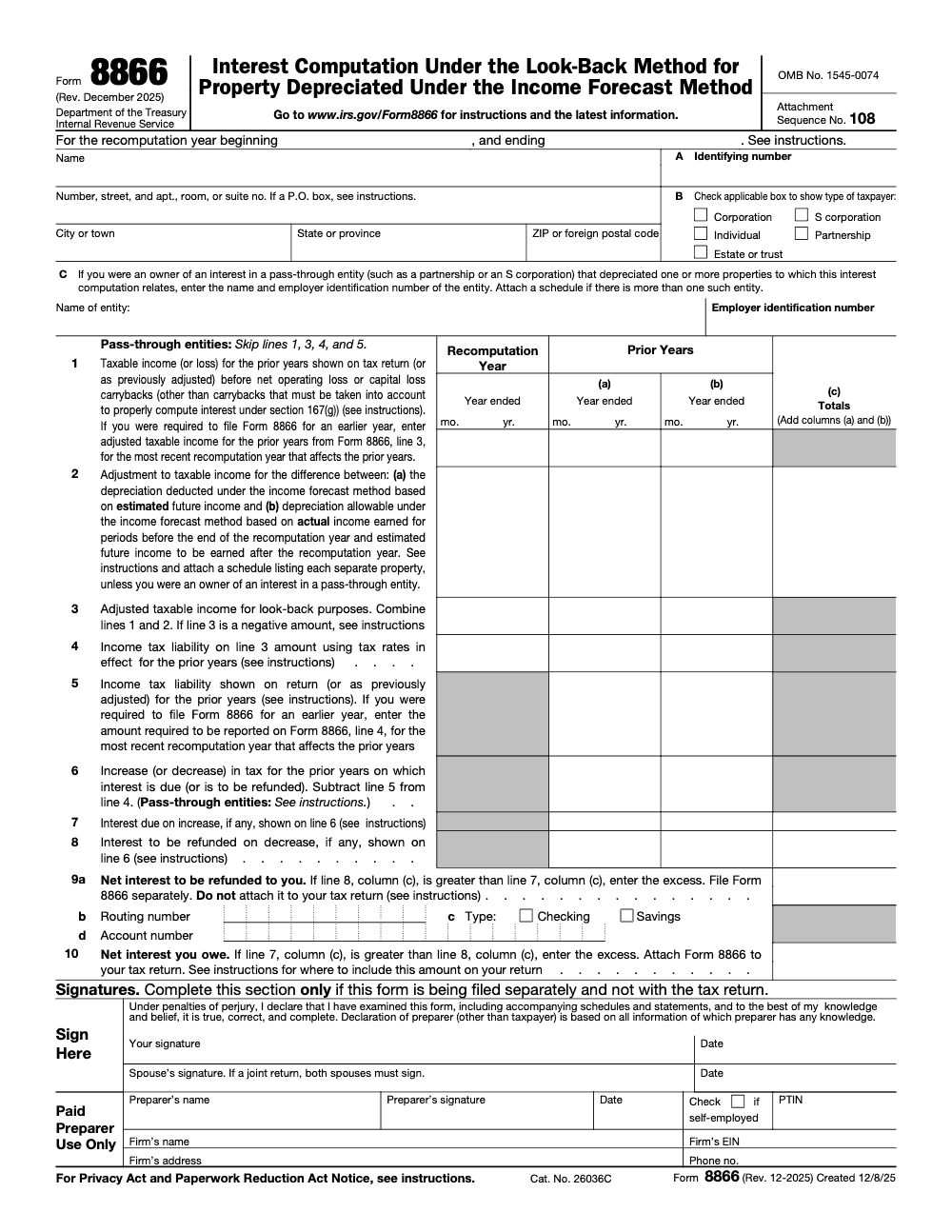
Form 8866 computes the interest you owe or are refunded under the look-back method for property depreciated under the income forecast method – motion pictures, sound recordings, copyrights, books, and patents under IRC section 167(g) (per the IRS Form 8866 instructions, Rev. December 2025). You recompute prior-year tax across lines 1 through 6, then report one net figure: interest you owe on line 10, or interest to be refunded on line 9a. Our tax preparation support keeps that multi-year math tied to its schedules.
Form 8866 tends to surface late in a return cycle, when a client finally tells you that a film library or patent they have been depreciating under the income forecast method earned far more, or far less, than the forecast used years ago. The form itself is short. The work behind it, recomputing prior-year tax across two or more year columns and proving every figure, is where the hours go.
It computes the interest you owe or are refunded under the look-back method for property under IRC section 167(g), motion pictures, sound recordings, copyrights, books, and patents. You work lines 1 through 6, then report one net number, interest you owe on line 10 or interest to be refunded on line 9a. A clean recomputation can still stall in review when the recomputation year at the top does not match the column dates underneath, so check that alignment before anything else. There is also a practical out: the method does not apply to property with an unadjusted basis of 100,000 or less at the end of the recomputation year.
Key Takeaways
- Form 8866 is used to compute interest due or refundable under the look‑back method for assets depreciated under the income‑forecast method, generally for media, copyrights, books, and patents placed in service after September 13, 1995.
- You file it by the due date of the return for your recomputation year. If you owe interest, attach it to the return. If you are due an interest refund, mail it separately to the IRS at the address the instructions specify.
- The IRS requires daily compounding and uses rates under section 6621. For tax years ending after August 5, 1997, use the rate applicable on the first day of each one‑year accrual period.
- There is a practical exception, the look‑back method does not apply to property with an unadjusted basis of 100,000 or less at the end of the recomputation year.
- Pass‑through owners may need to file, and in some cases the entity must apply look‑back at the entity level. Your Schedule K‑1, or a statement, should provide the data you need.
What Form 8866 Is and Why It Exists
When you use the income‑forecast method, you line up depreciation with expected revenue for assets like films, TV rights, audio catalogs, books, and patents. Actual income rarely matches the forecast. The look‑back system fixes the timing by recalculating prior‑year tax using actuals, then computing interest on the difference. That interest, not the recomputed tax itself, is what you report and pay or claim on Form 8866. The IRS page for the form confirms this purpose, scope, and the income‑forecast property types.
Two things often surprise people. First, the look‑back method has been around a while, and for income‑forecast depreciation it applies to property placed in service after September 13, 1995. Second, while the form is short, the calendar math can be detailed, since the interest rules point you to rates under section 6621 with daily compounding and a one‑year accrual‑period approach after August 5, 1997.
Which Assets Typically Use Income‑Forecast Depreciation
You will see income‑forecast most with assets whose earnings rise and fall with audience or user demand, rather than following a fixed recovery period.
- Entertainment media, films, TV program rights, video libraries, and sound recordings.
- Literary and artistic works, copyrights and book rights.
- Patents and certain exclusive licenses tied to product or royalty receipts.
These categories track the IRS instructions, which name motion picture films, video tapes, sound recordings, copyrights, books, and patents.
Quick Eligibility Snapshot
| Asset type | Typically eligible under income‑forecast | Notes |
| Motion picture, TV, streaming rights | Yes | Revenue driven by windows and platforms |
| Sound recordings, catalogs | Yes | Receipts vary by release cycles |
| Books, copyrights | Yes | Income spikes near launch, then tails |
| Patents, exclusive licenses | Often | Royalty profiles can be uneven |
The method makes sense when revenue is project‑specific and irregular. It is not a fit for assets with steady lives. When you do use it, expect a look‑back check‑in and possible interest calculation on Form 8866.
The Recomputation Year, The Anchor Date You Cannot Miss
Think of the recomputation year as the checkpoint where you compare forecasts to actual receipts, then adjust prior years. The IRS instructions describe the recomputation year framework and, in general, identify it by rule, with exceptions when actual income stayed within a tight band of estimates. The instructions also carve out property with an unadjusted basis of 100,000 or less from the look‑back requirement. These details matter because they drive your filing date and which prior years go into the columns on the form.
Practical workflow:
- Enter the recomputation year month and year at the top of the form, and as the header for the recomputation column.
- List the ending month and year for each affected prior tax year in columns a and b, and add extra forms if more years are hit.
- File by the return due date for your recomputation year, extensions included.
If you manage a busy team, set a simple trigger, any time a property crosses a meaningful variance from forecast, flag it for a look‑back review so you are not doing calendar math at the last minute.
How Form 8866 Works, A Simple Map Before You Start
Form 8866 looks small, yet it pulls data from several places. You set up the header, pick the recomputation year, lay out up to two prior years in columns, then run a three‑part flow. First, you restate taxable income for each column. Second, you recompute tax using the rates that applied in those prior years. Third, you compute interest on the difference with daily compounding and quarter‑by‑quarter rates.
Think of it as three layers, income, tax, then interest. If you keep those layers clean and documented, reviews run faster and signoff is calmer.
The body of the form uses three columns through Lines 1 to 8. Columns a and b capture the affected prior years, and column c holds the totals, equal to columns a plus b. Lines 9 and 10 only use column c to show your final net interest refund or amount owed. If more than two prior years are affected, you attach additional Forms 8866 and carry totals to column c on the first form.
Get The Header Right, Then The ID Lines
Header Setup
- Enter the month and year of the recomputation year at the top and in the main column header.
- For each prior year you are adjusting, enter the ending month and year in columns a and b.
- If you need more than two prior years, prepare extra forms and keep all totals on the lead form.
Name, TIN, And Filing Boxes
- Use the exact legal name that appears on the related federal return.
- Individuals list an SSN. Entities list an EIN.
- Check the correct filer box, individual, C corporation, S corporation, partnership, or estate or trust. If the filer is a partnership or S corporation, skip Lines 1, 3, 4, and 5, since the income tax liability is figured at the owner level, not at the entity level.
- If you mail the form separately from your return, include your mailing address. A P.O. box is fine where that is how you receive mail; if you use a P.O. box, follow the Form 8866 instructions for proper formatting.
Pass‑Through Information
If your Line 2 adjustment includes items from a partnership, S corporation, or trust, enter the entity’s name and EIN. When multiple entities are involved, attach a schedule that shows each entity, its EIN, tax year, and your share of the Line 2 adjustment. If you are filing multiple copies of Form 8866 because more than two years are affected, put your name and ID on each copy and sign only the first.
Lines 1 To 3, Recomputed Income And Depreciation Adjustment
These first lines translate the income‑forecast recalculation into each year’s income base.
Line 1, Baseline Income
Pull each affected year’s taxable income or loss before any NOL or capital loss carrybacks (except for carrybacks that must be taken into account to properly compute interest under section 167(g), which do stay in the Line 1 figure) and before reductions for net section 1256 contract loss. Use the original return amounts unless those years were formally changed by the IRS or an amended filing that is now final. If you were required to file Form 8866 for an earlier year, enter adjusted taxable income for the prior years from Form 8866, line 3, for the most recent recomputation year that affects the prior years.
Line 2, Depreciation Adjustment
This is the heart of the look‑back. Enter the difference between depreciation you actually deducted and the amount allowable under the income‑forecast method using actual receipts. Include reasonable ripple effects that tie directly to the property, for example revised royalty allocations or distribution fees. For pass‑throughs, rely on the Schedule K‑1 or the entity’s statement. When multiple pass‑throughs roll up, attach a schedule that nets them and shows the detail by entity.
Line 3, Sum And Sign
Add Lines 1 and 2. If Line 3 is negative for a year, treat that result under the rules for look‑back net operating losses and carrybacks or carryforwards where applicable. Note that this line is the income base you will tax under the year‑specific rules on Line 4.
Quick Walkthrough Example
Here is a tiny version to show the flow. Say your studio capitalized 600,000 of costs on a limited series placed in service in 2022. Forecasts suggested most revenue would land in 2023 and 2024. Actuals arrived faster than expected in 2023, and slower in 2024. In 2025, you do the recomputation.
- 2023 original taxable income was 900,000. Your Line 2 adjustment is plus 120,000 because allowable depreciation should have been lower.
- 2024 original taxable income was 300,000. Your Line 2 adjustment is minus 70,000 because allowable depreciation should have been higher.
- Line 3 for 2023 becomes 1,020,000. Line 3 for 2024 becomes 230,000.
Next, you will tax Line 3 using the rates that applied in those years, then subtract the original tax to get Line 6. After that, you will compute interest for each year separately and combine them on Lines 7 and 8.
Workflow Tips That Save Time In Review
Standardize Workpapers
Use a simple, repeatable folder structure for every property, for example 10 Admin, 20 Basis, 30 Forecasts, 40 Actuals, 50 Look‑Back, 60 Interest. Within 50 Look‑Back, include a summary tab that maps each Line 2 change to the property schedule or K‑1 that supports it. Reviewers should be able to open two files and see the logic in under five minutes.
Document The Calendar
Interest is daily and quarter‑based. On each project tab, add a small calendar block that states the due date of the original return for each prior year, the recomputation year due date, and the payment date if tax was paid early. Reviewers routinely send files back because those anchor dates are missing.
Keep A One‑Page Assumptions Sheet
When rates, NOL timing, or credits are in play, write it down on one page. Note the rate set used for each year, whether any carrybacks were triggered, and how you handled pass‑through percentages. That one page prevents long back‑and‑forth emails and gives you audit readiness without drama.
Lines 4 To 6, Recomputed Tax Versus Original Tax
Now you convert the income change into a tax delta for each affected year. The rule of thumb is straightforward. Recompute tax for the year using the law and rates that applied to that year, reduce that recomputed tax by the nonrefundable credits that would have applied under those rules, then compare to the original or adjusted tax for that year.
Line 4, Recompute The Prior‑Year Tax
- Apply the tax rates that were in effect for the specific prior year.
- If Line 3 produced an NOL for that year, run the carrybacks or carryforwards that the rules for that year require before you reduce by nonrefundable credits.
- For pass‑through owners, do not retax the entire return. Multiply your share of the Line 2 depreciation adjustment by the applicable regular rate for that year for the type of pass‑through interest you hold. Keep your rate table in your assumptions sheet.
Line 5, Original Or Adjusted Tax
Enter the tax from the original return for that year unless it was later changed by the IRS or by a filed and processed amendment. If you already filed a prior Form 8866 for the same property and year, use the most recent recomputed Line 4 from that prior filing as your Line 5 reference.
Line 6, The Difference That Drives Interest
Compute Line 6 as Line 4 minus Line 5. Positive numbers usually point to interest you will owe. Negative numbers usually point to interest that may be refunded. This is still not money you pay or receive. It is the base that will feed the interest calculation on Lines 7 and 8.
Lines 7 And 8, Interest With Daily Compounding
This is where calendar discipline pays off. You compute interest separately for each prior year column using daily compounding and the IRS quarterly rates that were in effect during each slice of time. The period usually runs from the due date of the affected prior year’s return, without extensions, to the earlier of the recomputation year due date or the date you paid the tax. Carrybacks have their own start date rule. When a carryback is involved, interest starts on the due date of the return for the year that produced the carryback.
Column‑By‑Column Method
- Compute interest on the Line 6 amount in column a using the correct start date and quarter rates, then repeat for column b.
- Sum those results into column c and post to Lines 7 and 8.
- Line 7 is interest you owe. Line 8 is interest to be refunded to you.
Tiny Example Continued
Using the limited series example, suppose the 2023 Line 6 is positive 42,000. The 2024 Line 6 is negative 18,000. You would compute interest on 42,000 from the 2023 return due date to the earlier of the 2025 recomputation year due date or payment date. Then compute interest on negative 18,000 over the 2024 period. Sum the interest results to column c. The net will flow to Line 9 or Line 10 in the next step.
Practical Guardrails For Accurate Interest
- Build a small rate table for the affected quarters and lock it to a source note.
- Reconcile the number of days in each quarter slice. Daily compounding is unforgiving when a date is off by even a week.
- If you paid tax before the recomputation year due date, cap the interest period for that portion at the payment date.
- Use a worksheet that flags when a carryback changes the start date so you do not start the clock on the wrong year.
The fastest way to fix look‑back work is to prevent review questions. Clear dates, clear rates, and clear math get you there.
Lines 9 and 10, Report One Net Interest Number
You have done the heavy lifting. Lines 9 and 10 ask for one clean result after you total column c.
- If Line 8c is larger than Line 7c, put the difference on Line 9, this is net interest refunded.
- If Line 7c is larger than Line 8c, put the difference on Line 10, this is net interest owed.
- Corporations, other than S corporations, may deduct interest they pay or incur. Individuals generally cannot, so make that clear in your memo and client letter.
Keep the final number simple and well supported. Your reviewer should see Line 6 drivers, interest clocks, and quarter rates at a glance.
Special Rules For Pass‑Through Owners
If your depreciation change comes through a partnership, S corporation, or trust, you still need to translate Line 2 into a tax effect for each prior year. The cleanest way to do this is to multiply your share of the Line 2 adjustment by the applicable regular rate for that year.
A Practical Rate Map
To speed review, keep a one‑line note for each affected year that states the rate used and why. Typical patterns many firms apply when owners hold interests directly include:
- Individual top rates in effect for that year, for example 35 percent in 2003 to 2012, 39.6 percent in some pre‑2018 years, and 37 percent in many post‑2017 years.
- For entity level recomputations on pass‑throughs, 35 percent for many pre‑2018 years and 21 percent for many post‑2017 years.
Document which case fits your facts, do not guess. When in doubt, cite the entity type, ownership mix, and year.
K‑1s And Multiple Entities
If your Line 2 amount includes more than one pass‑through, attach a schedule that:
- Lists each entity’s name, EIN, tax year, and your share of the Line 2 change.
- Nets the total by year so your column entries tie to the support.
- Notes whether the entity applied look‑back at its level.
Do not recreate property‑level detail if the entity already supplied it, attach their statement and reference it.
What To Attach, Exactly
Strong attachments are the reason your file flies through review.
Required Schedules
- A property‑level schedule that reconciles the Line 2 depreciation change, with cross‑references to basis, forecasts, and actual receipts.
- A pass‑through schedule when more than one entity is involved, showing name, EIN, tax year, and your share.
- Additional Forms 8866 if more than two prior years are affected, complete Lines 1 to 8 on each, and report totals only in column c on the first form.
- A one‑page assumptions sheet with rate sets, carryback notes, and any credit handling.
Signature Rules
- Married filing jointly, both spouses sign, and note that you complete the signature section only when Form 8866 is filed separately from the return; when it is attached to a signed tax return, that return’s signature already covers it.
- Paid preparers complete the preparer section when applicable.
- If multiple Forms 8866 are attached, sign only the first.
Review‑Ready Checklist You Can Paste Into Your Workflow
Use this every time you touch Form 8866. It keeps partners out of review loops and stops rework before it starts.
- Header complete, recomputation year month and year match the column label.
- Prior years listed with ending month and year, more than two years use extra forms.
- Line 1 ties to the original return numbers before carrybacks and section 1256 adjustments.
- Line 2 reconciles to a property‑level schedule or K‑1 detail, totals agree.
- Line 3 is correct and flagged if negative, NOL handling documented.
- Line 4 uses the correct law and rates for that year, credit handling noted.
- Line 5 matches original or adjusted tax, prior Form 8866 references noted.
- Line 6 equals Line 4 minus Line 5, signs make sense.
- Lines 7 and 8 show daily interest with quarter rates and dates, carryback timing checked.
- Line 9 or 10 has one net number, no mismatched signs.
- Attachments present, signatures set, mailing or e‑file path chosen.
- Folder includes calendar block, rate table, and assumptions sheet.
When teams follow one checklist and one folder structure, reviews shrink from hours to minutes, even in peak season.
Where To File, How To File, And Who Signs
Form 8866 follows a simple rule. If Line 10 shows an amount you owe, attach the form to your income tax return and file by the return due date, extensions included. If you are due an interest refund on Line 9, do not attach it to an e‑filed return, mail the signed form separately.
Mailing Logic In Plain English
- If you owe interest, attach Form 8866 to the return for the recomputation year.
- If you expect a refund and no amount is owed, mail the standalone form to the IRS address that applies to you.
- Enter a complete mailing address on the form when you mail it separately. Keep a copy for your records.
Addresses At A Glance
| Filer type | Address when mailing Form 8866 separately |
| Individuals | Philadelphia, PA 19255‑0001 |
| All other taxpayers | Cincinnati, OH 45999‑0001 |
Always match your filing action to Line 10. Reviewers reject a fair number of files simply because the team attached a refund claim to the e‑file instead of mailing it.
Using Tax Software Without Creating A Bottleneck
Most suites do not generate Form 8866 by themselves, so plan your workflow.
Practical Software Steps
- Pick the recomputation year in the software and confirm where look‑back interest lands in the current year return.
- Enter the prior‑year columns and Lines 1 to 6 in your workbook, not just in the software, so your reviewer can validate the math.
- Input the net interest numbers from Lines 7 to 10 into the software so the return reflects what you owe or what you will claim.
- If Line 10 shows you owe interest, attach a completed PDF to the e‑file package. If Line 9 shows a refund, do not attach it, mail the signed form.
File Hygiene For Busy Teams
- Lock your worksheets when reviewed, then export a final PDF that mirrors the form layout for easy tie‑out.
- Name files consistently, for example 50 Look‑Back 2025 Form 8866, 51 Interest Schedules, 52 Rate Table.
- Use version control, and keep audit logs of changes during final week edits.
Filing Scenarios You Will See
You Owe Interest
Line 10 shows an amount owed. You attach the form to the recomputation year return and e‑file with the PDF attached. When Form 8866 is attached to a signed tax return, that return’s signature already covers it, so you complete the separate signature section only when you file the form separately. Your payment covers the interest.
You Expect A Refund
Line 9 shows a refund. You do not attach the form to the return. You mail the signed Form 8866 to the correct IRS center. Your cover note cites the property or K‑1 sources and the dates used for interest. Keep tracking to confirm receipt.
Multiple Pass‑Throughs Or Years
You attach extra Forms 8866, each with Lines 1 to 8 completed, and you report totals only in column c on the first form. You sign only the first form. Your pass‑through schedule lists each entity and EIN so the math rolls up cleanly.
Quality And Control, Why This Matters For Firms
Bottlenecks on Form 8866 are rarely about tax knowledge. They happen when teams lack structure, clear workpapers, and predictable turnaround. If you lead a firm and want fewer late nights in March and September, give your team a disciplined template, rate tables by year, and a short review checklist. If you are scaling and your in‑house team is already at capacity, a structured offshore delivery model can handle the repeatable steps, while your seniors keep control of assumptions, rates, and signoff.
The goal is simple, accurate math, clean support, on‑time delivery, and calm reviewers. Structure gets you there.
Common Form 8866 Errors And How To Avoid Them
- Missing recomputation year at the top or mismatched dates in the column header. Fix with a header check before review.
- Column c totals do not equal columns a plus b. Add a simple SUM check with a red flag if totals do not match.
- Line 2 lacks a property‑level schedule or K‑1 tie‑out. Require a support link on every Line 2 entry.
- Prior‑year rates applied incorrectly for pass‑through owners. Keep a rate map and cite it in assumptions.
- Interest period starts on the wrong date, especially when a carryback is involved. Add a carryback question to your checklist.
- Refund claims attached to e‑filed returns instead of mailed. Route all Line 9 cases to a mail checklist.
- Signatures missing on joint returns or on the first copy when multiple forms are attached. Add a signature gate before finalization.
A Short Closing Checklist For Your Next Filing
- Confirm the recomputation year in the header.
- Tie Line 2 to schedules or K‑1s, with entity names and EINs when relevant.
- Use the correct prior‑year rates and document credits or NOL handling.
- Compute interest with daily compounding and quarter rates, date blocks shown.
- Report one net figure on Line 9 or Line 10.
- Attach or mail based on that result, and collect all required signatures.
Common Mistakes We See Every Season
Every season the same handful of Form 8866 errors come back, and each one traces to a rule that is easy to skim past. Here are the ones my team flags first.
Reusable Checklists
These checklists are copy-paste ready for your firm SOP. Drop them into your Form 8866 workpaper template and tick each item as you go.
Scope and header setup
- Confirm the property is depreciated under the income forecast method (motion pictures, sound recordings, copyrights, books, patents).
- Confirm this is a depreciation matter, not a long-term contract that belongs on Form 8697.
- Enter the identifying number in Box A (SSN for individuals, EIN for entities).
- Check one taxpayer type in Box B (Corporation, Individual, Estate or trust, S corporation, or Partnership).
- Enter the recomputation year beginning and ending dates at the top of the form.
Line-by-line tie-out
- Line 1 ties to prior-year taxable income before NOL and capital loss carrybacks, with required section 167(g) carrybacks included.
- Line 2 has a schedule listing each property depreciated under the income forecast method.
- Line 3 combines lines 1 and 2; flag it and follow the instructions if it is negative.
- Line 4 applies the prior-year rates; line 5 matches the tax shown on the return.
- Line 6 equals line 4 minus line 5, and column (c) equals columns (a) plus (b).
- Pass-through filers skip lines 1, 3, 4, and 5 and follow the special line 6 instructions.
File and sign
- Net interest owed appears on line 10; net interest to be refunded appears on line 9a.
- If line 10 applies, attach Form 8866 to the recomputation-year return.
- If line 9a applies, file Form 8866 separately and complete the signature section.
- On a separately filed form tied to a joint return, both spouses sign.
- Complete the paid preparer block (PTIN, firm name, firm EIN, phone) when applicable.
- For a refund by direct deposit, capture the routing number (9b), account type (9c), and account number (9d).
Keep 8866 Season From Stalling
Form 8866 rarely lands on a clean schedule. It surfaces during the recomputation-year return cycle, often beside a dozen other deadlines, and it carries detail that does not fit a standard depreciation workpaper: prior-year columns, recomputed tax on lines 4 and 5, and an interest figure that has to be proven line by line. The current revision (Rev. December 2025) keeps the income forecast method scope narrow, so this is low-volume, high-precision work, and when interest is owed the form attaches to a paper return as attachment sequence 108 (per the IRS Form 8866 instructions).
The bottleneck is rarely tax knowledge. It is structure: one template, one folder, and a review path that catches a mismatched recomputation year before it ever reaches a partner.
- Lock the recomputation-year dates against the column (a) and (b) year labels before anyone starts the math.
- Require a property schedule behind every line 2 entry so the depreciation adjustment ties to actual receipts.
- Map the prior-year rates once for lines 4 and 5, then reuse that map across every affected year.
- Route each file by outcome: line 10 owed to the attach-to-return path, line 9a refund to the separate-filing-and-signature path.
- Flag pass-through returns so the preparer skips lines 1, 3, 4, and 5 and applies the special line 6 rule.
When look-back volume outpaces in-house bandwidth, our tax preparation and review teams run the repeatable steps, the recomputation columns, the property schedules, and the interest math, while your seniors keep control of rates, assumptions, and final signoff.
FAQs
It calculates interest under the look‑back method when you have used the income‑forecast method for depreciation and actual receipts differ from forecasts. You recompute prior‑year tax, then compute interest on the difference, and either attach the form to your return if you owe or mail it if you expect a refund.
You must file if you used the income‑forecast method for qualifying property and a recomputation changes prior‑year depreciation. File by the recomputation year return due date. Attach the form if you owe interest, mail it separately if you expect a refund.
Often yes. If your Schedule K‑1 or an attached statement reports income‑forecast depreciation adjustments, apply the pass‑through rules, multiply by the applicable regular rate for the year, and include schedules when multiple entities are involved.
Individuals mail to Philadelphia, PA 19255‑0001. All other taxpayers mail to Cincinnati, OH 45999‑0001. If you owe interest, attach the form to your return instead of mailing it.
Wrong dates, wrong rates, missing support, and attaching refund claims to e‑files. Prevent all four by using a short checklist, a rate map by year, and a clear rule on mailing versus attaching.
Other forms this guide names
- Form 8697: Look-Back Interest Guide
About this guide
Accountably helps US CPA, EA, and accounting firms hire trained accountants and tax preparers in India.
About us Reviewed byJugal Thacker, CPAFounder and CEO at Accountably
A Washington-licensed CPA with 7+ years inside US firms – PwC, a real-estate tax practice, then a full-service firm, rising from reviewer to manager to advisory. This article was reviewed against current IRS guidance for the 2025 tax year and updated for filers preparing late returns, amendments, and 2026 estimates.
View profile →How we research, review, and update this guide
Every Accountably guide is researched against primary IRS sources, reviewed by a U.S. CPA, and refreshed as guidance evolves. Read our Editorial Guidelines to see how we source, fact-check, and update our content.




