
Summarize this article with AI
In Brief
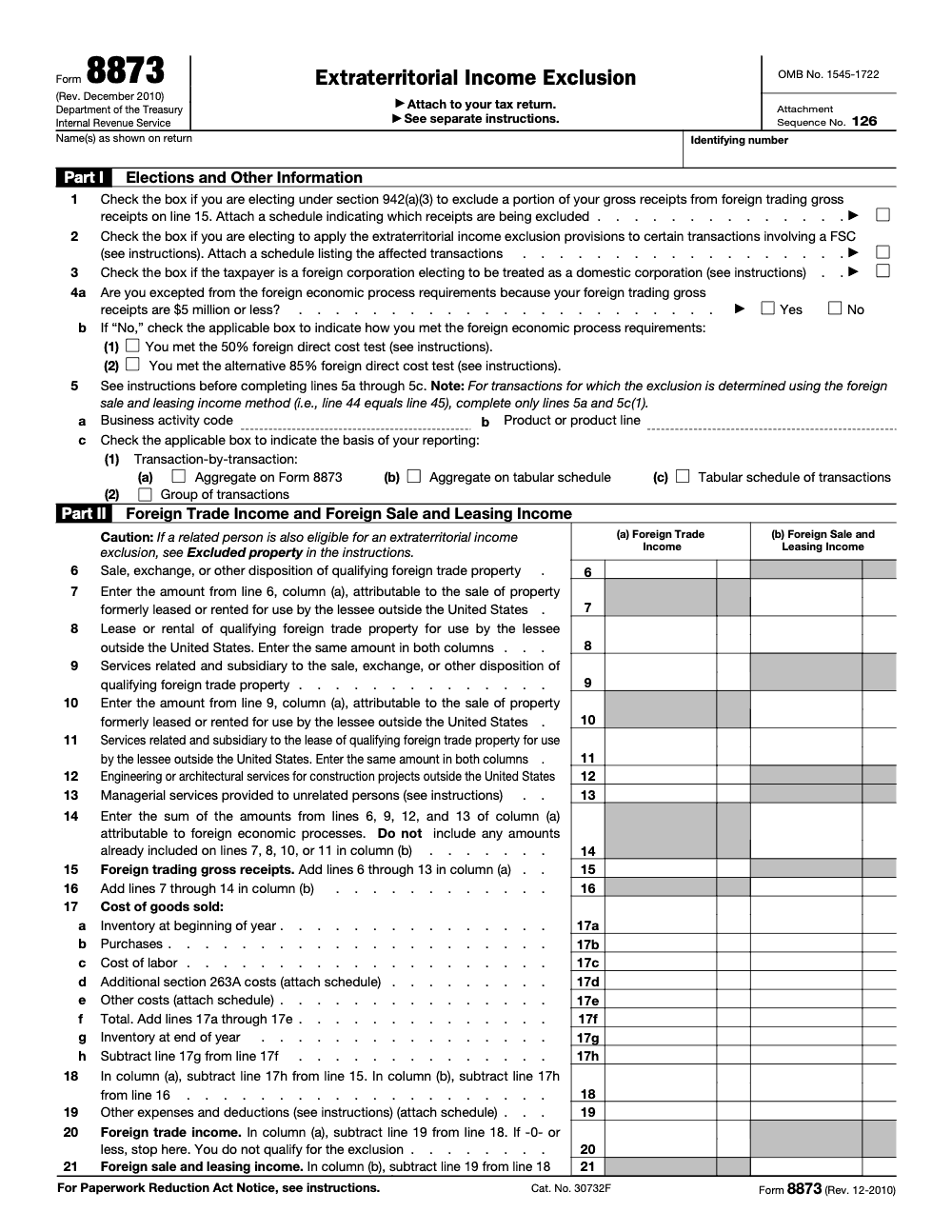
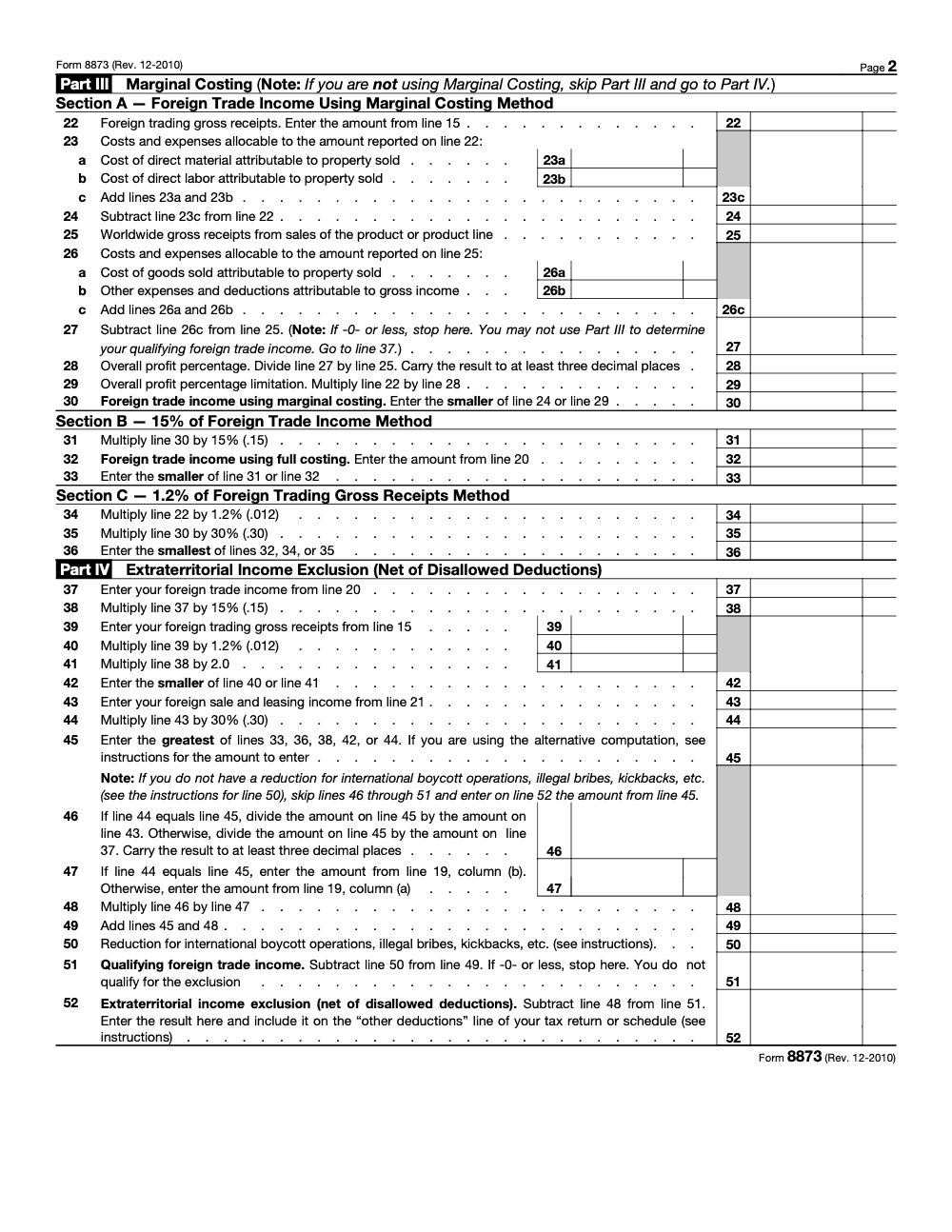
Form 8873 computes the extraterritorial income exclusion (ETI), a deduction attached to the underlying tax return rather than filed on its own, with the final amount carried to line 52 and reported on the return's other deductions line, not as a credit. The ETI regime was repealed by the American Jobs Creation Act of 2004, so for tax year 2025 the form generally appears only on amended or late prior-year returns; current export incentives run through the FDII deduction under IRC section 250 on Form 8993 (per the IRS Instructions for Form 8873). If a legacy ETI claim surfaces during diligence, our tax preparation team can handle the computation and tie-out.
Form 8873 almost never lands on a current-year return. The last time it surfaced for my team, we were cleaning up an exporter's books during diligence and found an old binding-contract sale that had never been run through the extraterritorial income exclusion. The question was whether an amended return was worth the effort, and answering it meant rebuilding the Part II income breakout from scratch.
That is the reality of this form today. The ETI regime was repealed by the American Jobs Creation Act of 2004, so most current work is amended or late prior-year filings rather than fresh ones. You attach the form to the return for the applicable tax year, carry the final amount to line 52, and report it on the return's other deductions line, never as a credit.
Key Takeaways
- Form 8873 is used to compute the extraterritorial income exclusion, and you attach it to the return for the applicable tax year, not as a stand‑alone filing. Download the current form and instructions from IRS.gov and match the revision to the year you are filing.
- The ETI regime is largely historical, having been repealed by the American Jobs Creation Act of 2004. It generally applied to transactions after September 30, 2000 and before January 1, 2005, with narrow transition relief tied to binding contracts that can reach into tax years beginning before May 18, 2006. If you are working on a current‑year return, you are usually dealing with an amended or late prior‑year situation.
- Complete Part I to make elections and align entity details, use Part II for foreign trade, sale, and leasing income, and use Part III only if you elect marginal costing. The instructions remain your source of truth for line‑by‑line rules.
- Tie totals to the return and place the exclusion amount where the instructions direct (the exclusion is a deduction reported on the “other deductions” line of the underlying return, not a tax credit). IRS internal guidance still references line 52 outcomes and processing steps, so accuracy and placement matter if a service center touches your file.
- Keep supporting schedules, election statements, and any transition evidence, for example binding contract documentation, in indexed, searchable PDFs. This speeds reviews and exams.
What Form 8873 Is, In Plain English
Form 8873 helps you calculate the portion of extraterritorial income that is excluded from gross income for the relevant tax year. You attach it to the return that reports the underlying transactions. The IRS still hosts the form and a current “About Form 8873” page with links to the PDF and instructions, so you can always pull the latest revision and confirm applicability to your client’s facts.
From a workflow perspective, think of Form 8873 as a computation plus disclosure. Part I locks in who you are and which elections apply. Part II is where you compute foreign trade income and break out foreign sale and leasing income. Part III is conditional, you complete it only if you use marginal costing. The instructions also spell out where the exclusion flows on the return so your tie‑out is clean.
When You Should Still Use Form 8873
If you are filing for a tax year that falls inside the historical ETI window, or you are working under the transition rules for binding contracts, Form 8873 can still be required. IRS operational manuals continue to reference how service centers handle returns with an extraterritorial income exclusion, which is your clue that the pipeline for legacy filings still exists.
The Short Version Of The Timeline
- ETI generally applies to transactions after 9‑30‑2000 and before 1‑1‑2005.
- Transition relief can apply to certain binding contracts, potentially affecting tax years beginning before 5‑18‑2006. Keep the contract, the dates, and any amendments on file.
- Today, Form 8873 is commonly seen in amended returns, late filings for older years, or specialized clean‑ups where historical transactions surface during diligence.
If your facts land outside those windows, you likely do not file Form 8873. Confirm with the official instructions and the “About” page each time, since the IRS posts revision dates and cross‑references there.
Who Files, And Who Does Not
Eligible filers historically included individuals, corporations, S corporations, partnerships, and trusts with qualifying foreign trade income. That list still frames who would complete the form for legacy years, provided the transactions fall in the applicable period or meet transition criteria. If no ETI applies for the tax year, you do not attach Form 8873.
Practical tip, before you spin cycles on the worksheet, confirm two things, the tax year and whether any binding contract or FSC‑related transition rules apply. Ten minutes of fact checking here can save an hour of rework later.
Quick Download And Version Check
Pull the current “Form 8873 PDF” and the “Instructions for Form 8873” from IRS.gov. Verify the revision year and the OMB control number header so you attach the correct version for the year in question. This habit prevents mismatch notices and keeps your archive tidy.
Applicability By Tax Year, What To Use And When
Use this table to orient quickly, then confirm details in the IRS instructions and internal manuals.
| Tax year context | Do ETI rules apply? | Typical Form 8873 use today | Notes and sources |
| Transactions after 9‑30‑2000 and before 1‑1‑2005 | Often yes | Original or amended returns for those years | Window noted in IRS manuals. |
| Binding contract transition, taxable years beginning before 5‑18‑2006 | Possibly, facts needed | Amended returns or late filings where contract evidence exists | Keep the executed contract and continuous‑effect proof. |
| Transactions in years after 2006 with no transition tie | Generally no | Do not file Form 8873 | Confirm with IRS “About” page and instructions. |
Bottom line, Form 8873 is not a routine 2025 or 2026 filing for most taxpayers. It is a legacy computation for specific years and circumstances; for transactions occurring today, U.S. export-related incentives are claimed under other regimes, such as the foreign-derived intangible income (FDII) deduction under IRC section 250 on Form 8993, not on Form 8873. When it does apply, precision on dates and documents is everything.
How To Attach Form 8873 Correctly
You attach Form 8873 to the income tax return for the applicable year. Placement rules vary by software, but the principle is the same, the form accompanies the return, it is not mailed or transmitted on its own. The IRS “About Form 8873” page reiterates that you attach the form to your return, and IRS internal processing instructions still describe how centers handle the exclusion amount when they see it.
E‑File Steps
- Add Form 8873 to the return package in your tax software.
- Ensure the PDF, if required by your vendor, is in the correct attachment slot and labeled consistently.
- Run a diagnostics check, verify acceptance, and archive the software confirmation and your PDF workpapers together.
Paper Filing Steps
- Print the correct revision of Form 8873 for the tax year.
- Attach it behind the main return in the order your software or the instructions specify.
- Label and index the supporting schedules so a reviewer can trace each number fast.
Reviewer note, place the exclusion where the instructions direct on the base return or schedule, and make sure your workpapers point to that exact line. IRS internal manuals still flag line 52 outcomes and related processing, which is your hint to be exact.
What Part I, Part II, And Part III Actually Do
Think of the three parts like a simple story, who you are and which elections apply, what income qualifies, and, only if chosen, how marginal costing affects the math.
Part I, Elections And Other Information
- Confirm legal name and TIN exactly as shown on the return.
- Review the elections on lines 1 and 2 as described in the instructions, including the FSC‑related choice where applicable. Attach the required statements that list affected transactions.
- Enter the business activity code and product line where instructed, then confirm any foreign economic process requirements noted by the instructions are met before you move on (a filer with foreign trading gross receipts of $5 million or less is excepted from these requirements, and a filer that is not excepted meets them by satisfying either the 50% foreign direct cost test or the alternative 85% test, not both).
Part II, Foreign Trade, Sale, And Leasing Income
- Identify qualifying transactions, then separate foreign sale income from foreign leasing income.
- Enter amounts in the correct columns and lines. Keep invoices, contracts, and ledgers ready to trace each figure.
- Reconcile totals to your return and to your workpapers so your tie‑out is airtight.
Part III, Marginal Costing, Only If Elected
- Use marginal costing when the instructions allow and you have elected it, then include only direct production costs for the qualifying transactions.
- Tie Part III to your worksheets and reconcile back to Part II so the flow is consistent.
- Document assumptions in a short memo, this prevents back‑and‑forth during review.
A Simple Review Checklist You Can Reuse
If you are like me, you want a repeatable list you can run every time. Here is a practical checklist your team can follow before anyone hits file.
Pre‑Filing Readiness
- Confirm the tax year is within the historic ETI window or qualifies under a permitted transition rule. If it does not, stop and remove Form 8873 from the package.
- Pull the current Form 8873 PDF and instruction PDF from IRS.gov, then confirm the revision year matches your filing year.
- Make sure the entity name, TIN, and period ending in Part I match the return exactly, character for character.
- Decide on elections in Part I, attach the required statements, and reference them in your binder index.
- Identify each qualifying transaction, then separate foreign sale income from foreign leasing income for Part II.
- If you use marginal costing, prepare the Part III worksheet and a short memo describing the inputs and method.
- Tie all totals to the return and to your workpapers so a reviewer can trace the numbers in under two minutes.
- Run diagnostics in your software, fix any attachment naming issues, and save a final PDF set to your archive.
Tie‑Out Map, From Form To Return
Use this map to speed your review. The exact line destinations vary by form type and revision, so follow the instruction PDF for your year.
| Form 8873 section | What you confirm | Where it flows |
| Part I, Elections | Elections checked, statements attached, TIN matches | See instruction section for placement notes |
| Part II totals | Column math, category accuracy, support attached | Cross‑reference to return schedule lines for excluded income |
| Part III, if used | Direct cost inputs, method memo, trace to Part II | Carryover to exclusion computation per instructions |
| Final exclusion | Agrees to return and workpapers | Matches return line for the year and entity type |
Review tip, read the instruction cross‑references for your specific year before you sign off. It is five minutes now, or thirty minutes later when a notice shows up.
Build A Clean PDF Binder That Cuts Review Time
I aim for a binder that any reviewer can grasp in one glance. Borrow this folder structure and adapt it to your templates.
- 00 Cover, scope, version, and filing year
- 01 Facts, contracts, and support for eligibility or transition
- 02 Form 8873 draft and the instruction PDF for that revision
- 03 Part I statements and elections
- 04 Part II schedules, sales and leasing breakouts, GL tie‑outs
- 05 Part III worksheets and marginal costing memo, if used
- 06 Reconciliation to return, with page numbers and line references
- 07 Final e‑file package or paper set, with a checksum text file
Use consistent file names, for example 04a_PartII_Sales.xlsx and 04b_PartII_Leasing.xlsx, so reviewers know where to look without clicking around.
Common Errors And How To Avoid Them
- Names and TINs do not match the return, which can stall processing. Copy the header exactly.
- Using the wrong revision of the form or instructions. Always confirm the year in the header.
- Mixing foreign sale income and foreign leasing income in the same column. Keep them separate.
- Forgetting to attach election statements listed in Part I. If it is checked, it needs a supporting statement.
- Marginal costing includes fixed overhead. Part III is for direct production costs only, per the instructions.
- Final totals do not match the return. Run a fresh tie‑out after any change, even small edits.
A Quick Quality Control Flow That Works
Here is a light version of the multi‑layer review flow many high‑performing firms use.
- Preparer, completes Parts I to III, labels attachments, and drafts a one‑page summary.
- Senior, rechecks eligibility, math, and tie‑out, then adds review notes.
- Quality control, spot checks workpapers, confirms the correct revision, and signs off on naming and indexing.
- Partner, glances at the summary, confirms the exclusion ties to the return, and approves filing.
If your firm struggles with bottlenecks, build this flow into your checklist app and keep the steps short, clear, and consistent. The goal is predictable delivery, not heroic last‑minute saves.
Elections, Statements, And Proof You Will Want On File
Elections live or die on paperwork. Treat Part I like a contract with the instructions, say what you are electing, attach the statement the instructions call for, and reference the affected transactions clearly.
What A Good Election Statement Includes
- The exact election you are making, with the form and line reference.
- The tax year, entity name, and TIN exactly as on the return.
- A short description of the transactions covered by the election.
- Any dates that matter, for example binding contract dates if you are under a transition rule.
- A signature or preparer ID if your firm policy requires it.
Save the statement as a separate PDF and index it in 03 Part I Statements. Add page numbers so your reviewer can cite it quickly.
Marginal Costing, A Step‑By‑Step Walkthrough
You only complete Part III if you elect marginal costing and your transactions qualify. Keep it simple and disciplined.
Step 1, Define The Transaction Set
List the sales or leases you are including, with invoice numbers and dates. Exclude anything that does not meet the form’s definitions for foreign sale or foreign leasing income.
Step 2, Pull Direct Production Costs
Grab only direct costs tied to the goods for those transactions. Think materials and direct labor for the units sold, not general factory overhead. Create a short worksheet that shows the items, amounts, and source documents.
Step 3, Enter Part III And Reconcile To Part II
Post your marginal cost figures into Part III, then confirm that the totals reconcile back to the Part II amounts for the same transaction set. The two parts should speak to each other, so a reviewer can see the flow without guessing.
Step 4, Write A 5‑Line Method Memo
I like a fast memo that covers the date, the election, the data sources, the definition of direct cost used, and a one‑line conclusion. This memo is your memory six months from now when someone asks “why did we include this item.”
A Mini Example You Can Adapt
Let us say you have three qualifying sales that fall within the relevant year. Your ledger shows $1,200,000 in revenue for those transactions. Your direct production costs for those units are $780,000, and there is $60,000 of plant overhead you are tempted to include. Do not include the overhead in marginal costing. You would list the three sales in Part II, enter the revenue and any required computation lines per the instructions, then in Part III you would show the $780,000 in direct costs and keep the overhead out. Your worksheet references the invoices and the labor reports. Your summary memo explains that fixed overhead was excluded under the instructions for marginal costing.
The math is not complicated, the discipline is. Clean lists, clean costs, clean tie‑outs.
Recordkeeping That Survives A Review
The safest approach is to keep everything you would need to prove eligibility, elections, and math, then keep it for at least the time your statute window remains open for that year, plus a practical buffer per your firm’s policy.
What To Keep
- The executed contracts and any amendments that support eligibility or transition treatment.
- Sales and lease documents, invoices, bills of lading, and bank traces.
- Part I election statements and the instruction PDF for the revision you used.
- Part II schedules, GL tie‑outs, and reconciliation to the return.
- Part III marginal costing worksheets, the 5‑line memo, and source reports.
- A final signed copy of the return package with Form 8873 attached.
Security And Access
Protect client data with role‑based access, zero local storage, and encrypted file exchange. Keep audit logs for who accessed the binder and when. These controls are table stakes now, and they make your next review faster because the trail is already there.
Official Resources You Should Bookmark
- IRS, About Form 8873 page, for the current form and instruction links.
- The Form 8873 PDF for the correct revision, saved to your binder.
- The Instructions for Form 8873, kept alongside your worksheets.
- Your firm’s review checklist and naming standards, stored in your knowledge base.
Pull these directly from IRS.gov, avoid third‑party summaries for the computation itself, and always double‑check the revision header.
Common Mistakes We See Every Season
The errors we see on Form 8873 cluster around two things, treating a repealed regime as if it were current and rushing the computation lines that the instructions flag for precision. Here are the ones that cost the most rework.
Reusable Checklists
These checklists are copy-paste ready for a firm SOP, so a preparer can run the same steps every time Form 8873 surfaces. Adapt the wording to your binder and tax software.
Eligibility and version check
- Confirm the transactions fall after September 30, 2000 and before January 1, 2005, or qualify under a binding-contract transition rule.
- Rule out current-year applicability; for transactions today, point the client to the FDII deduction under IRC section 250 on Form 8993.
- Pull the current Form 8873 PDF and the Instructions for Form 8873 from IRS.gov and confirm the revision and OMB control number 1545-1722.
- Verify the entity name, TIN, and period in Part I match the underlying return character for character.
- Document the tax year and any transition facts before opening the worksheet.
Part I to Part IV computation
- Make the line 1 section 942(a)(3) election only with an attached receipts schedule, and the line 2 FSC election with its statement.
- Confirm the foreign economic process tests: either receipts of $5 million or less, or the 50% or alternative 85% foreign direct cost test.
- Stop if foreign trade income on line 20 is zero or less; the taxpayer does not qualify.
- Carry the line 28 overall profit percentage and the line 46 allocation ratio to at least three decimal places.
- Compute the exclusion as the greatest of the three Part IV methods, with the 1.2% of foreign trading gross receipts method capped at twice the 15% method.
- Apply any line 50 reduction for boycott operations, illegal bribes, or kickbacks before finalizing line 52.
Attachment and archive
- Attach Form 8873 to the underlying return; it is never transmitted on its own.
- Post the line 52 exclusion to the other deductions line of the return and tie it to your workpapers.
- Run software diagnostics, confirm acceptance, and label every PDF attachment consistently.
- Save Part I election statements, the marginal costing memo, and any binding-contract evidence in an indexed binder.
- Retain the package for the open statute window for that year plus your firm's buffer.
Keep 8873 Season From Stalling
Form 8873 does not have a busy season in the ordinary sense. It surfaces unpredictably, during acquisition diligence, a late prior-year cleanup, or a refund claim tied to transactions from the historic extraterritorial income window. Because the American Jobs Creation Act of 2004 repealed the ETI regime, and the transitional benefit dropped to 60% for tax years beginning in 2006 and zero after that, the work that remains is concentrated, technical, and easy to misjudge against a 2025 frame of reference.
The risk is not volume, it is rust. A team that touches this form once every couple of years has to relearn the Part II income breakout, the marginal costing rules in Part III, and the three-method comparison in Part IV each time. A documented workflow removes that relearning cost and keeps a rare engagement from stalling a return that is otherwise ready to file.
- Standardize the eligibility gate so the transaction window and any binding-contract transition are confirmed at intake, before anyone opens the worksheet.
- Template the Part I elections, the line 1 section 942(a)(3) schedule and the line 2 FSC statement, so the supporting attachments are never an afterthought.
- Lock the precision-sensitive cells, line 28 and line 46 at three decimal places, in a reusable worksheet to prevent silent rounding.
- Script the Part IV comparison so the greatest of the three methods, with the 1.2% method capped at twice the 15% result, is computed the same way every time.
- Keep a tie-out map from line 52 to the return's other deductions line, with binder index references a reviewer can follow in minutes.
When a legacy ETI claim lands on a desk that is already full, a structured second team can carry the computation and the workpapers without pulling senior reviewers off current work. That is the model behind our offshore tax preparation services: documented SOPs, multi-layer review, and a clean handoff so a rare form like 8873 gets the same discipline as a routine return.
FAQs
Usually no. Form 8873 is a legacy computation used for specific earlier years or narrow transition cases. Confirm the year and facts before you include it.
Individuals, corporations, partnerships, S corporations, and trusts may file it for eligible years, provided their transactions meet the form’s definitions and timing.
Follow the instruction PDF for your revision year. The destination lines differ across form types and years, so do not assume last year’s placement is still right.
Make sure the name, TIN, and period ending in Part I match the return, and confirm you used the correct revision of both the form and the instructions.
Use the definitions in the instruction PDF for your year. Keep separate schedules for sales and leasing, then post each to the correct Part II column.
Only when you elect it and your transactions qualify under the instructions. Include direct production costs, exclude fixed or allocated overhead.
Attach it within your software’s return package, label the PDF clearly, and run diagnostics so you see a clean acceptance report.
Keep everything needed to prove eligibility, elections, and math for at least as long as the statute window for that year remains open, with added buffer per your firm policy.
Other forms this guide names
- Form 8993: Section 250 FDII & GILTI Guide
Summarize this article with AI
About this guide
Accountably helps US CPA, EA, and accounting firms hire trained accountants and tax preparers in India.
About us Reviewed byJugal Thacker, CPAFounder and CEO at Accountably
A Washington-licensed CPA with 7+ years inside US firms – PwC, a real-estate tax practice, then a full-service firm, rising from reviewer to manager to advisory. This article was reviewed against current IRS guidance for the 2025 tax year and updated for filers preparing late returns, amendments, and 2026 estimates.
View profile →How we research, review, and update this guide
Every Accountably guide is researched against primary IRS sources, reviewed by a U.S. CPA, and refreshed as guidance evolves. Read our Editorial Guidelines to see how we source, fact-check, and update our content.




