
Summarize this article with AI
In Brief
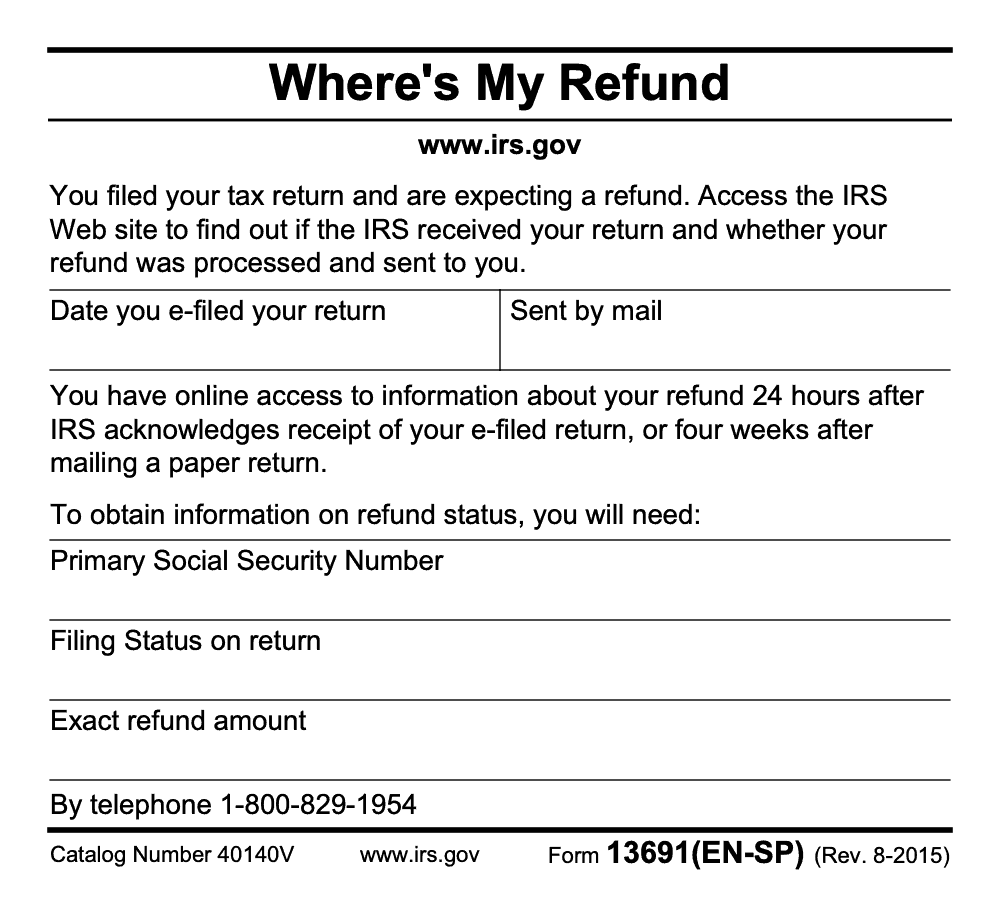
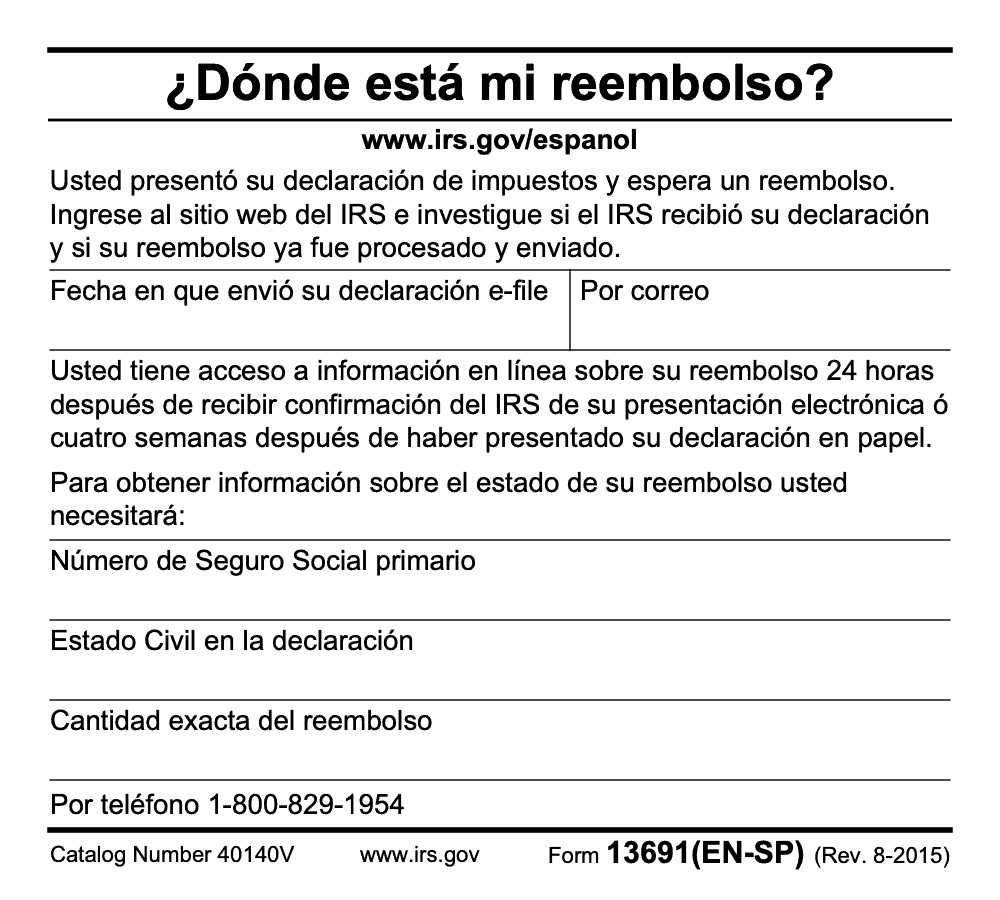
Form 13691 (EN-SP) is a bilingual Where's My Refund informational card, not a filed return, schedule, or claim form. The card directs taxpayers to check status online or by phone using three exact items from the return: the primary SSN, the filing status, and the exact whole-dollar refund amount (per IRS Form 13691, EN-SP, Rev. 8-2015). Status appears 24 hours after the IRS acknowledges an e-filed return, or four weeks after a paper return is mailed. If the refund is shown sent but never arrived, switch to Form 3911 for a refund trace.
A client calls a week after filing, sure the deposit should already be in the bank, and another calls six weeks later swearing the IRS lost a refund that Where's My Refund says was sent. Form 13691 (EN-SP) is built for the first conversation. It is a bilingual leave-behind card the IRS prints in English and Spanish, not a return, not a claim, and not something you mail in.
The card just lists the three items you need to check status: the primary filer's SSN, the filing status, and the exact whole-dollar refund amount. Online status appears 24 hours after an e-filed return is acknowledged, or four weeks after a paper return is mailed. When a refund shows sent but never lands, that is where Form 3911 and a trace come in, which is a different conversation entirely.
Key Takeaways
- IRS Form 13691 is a short, free, bilingual handout, English and Spanish, that tells you how to check your refund on IRS.gov. It is not a claim form and it is not a substitute for filing a tax return.
- To check refund status online, you will need three things, the primary filer's SSN (the card's printed field is 'Primary Social Security Number'), your filing status, and the exact refund amount you claimed, in whole dollars for the online tool. Updates typically appear once per day.
- There is no public “DHS Form 13691.” People mix it up with Executive Order 13691, which deals with cybersecurity information sharing, not tax refunds.
- If a mailed or direct‑deposit refund goes missing, the IRS uses Form 3911 for a refund trace. Timeframes are about 6 weeks for paper checks and up to 120 days for direct deposits after the IRS receives your 3911.
- Identity theft or refund fraud is handled through IRS channels like Form 14039 and the Identity Theft Central pages, not through DHS or ISAOs.
What Form 13691 actually is
Form 13691, labeled “Where’s My Refund?” EN‑SP, is a two‑page bilingual IRS handout. It explains when refund information becomes available and lists the three data points you will need to check status, your primary Social Security Number, your filing status, and your exact refund amount. You do not mail this handout and you do not upload it. Its job is to point you to the official status channels and help you bring the right info to the screen.
Form 13691 has been around for years, and while the flyer says “exact refund amount,” the current Where’s My Refund page asks for the exact whole‑dollar amount. If you are checking online, use whole dollars, not cents. The system refreshes once a day, usually overnight, so checking more than once a day will not produce new information.
Who should use it
- You filed a federal individual return and want a quick, bilingual reference for checking status.
- You prefer having a printable explainer for clients, clinics, or intake packets, especially for English and Spanish readers.
- You want to gather the three identifiers before you open the IRS website or app.
If you need a real‑time status, skip straight to Where’s My Refund on IRS.gov or use IRS2Go. The flyer is just a guide.
What it covers, at a glance
- When status becomes available, about 24 hours after the IRS acknowledges an e‑filed return (the clock starts at IRS acknowledgement, not at the moment you click submit), or about 4 weeks after you mail a paper return.
- What to have ready, the primary filer's SSN (the card's printed field is 'Primary Social Security Number'), filing status, and refund amount.
- Where to check, IRS.gov and IRS2Go, plus a phone line for status if you cannot go online.
Eligibility, summarized
| Who uses the guidance | Requirement | Notes |
| Individual filers | Primary SSN | Must match the primary filer line on the filed return (the card's printed field is 'Primary Social Security Number'). |
| Individual filers | Filing status | Use the exact status on your return. |
| Individual filers | Exact refund amount | For the online tool, enter whole dollars. |
Why “DHS Form 13691” keeps popping up online
Every season someone asks about a “DHS Form 13691.” That is not a refund form. The number 13691 is the same number as a White House Executive Order from 2015 about cybersecurity information sharing through ISAOs. It is unrelated to taxes and unrelated to the IRS refund process. The EO tasked DHS with coordinating voluntary standards for ISAOs through a non‑government standards body led by UTSA, LMI, and R‑CISC. Helpful for cyber teams, yes, but not how you check a refund.
If you run a firm and your client mentions “13691” in a cybersecurity context, they likely mean the Executive Order or ISAO resources hosted by CISA and UTSA, not a DHS form you need to file. Keep refund questions on IRS rails, Where’s My Refund, IRS2Go, or when appropriate, a Form 3911 trace.
Bottom line, there is one 13691 you need for refunds, the IRS flyer that points you to the official tool. The other 13691 lives in the cybersecurity world.
Exactly what you will need before you check status
Think of this like packing your bag before a flight. You only need three items, and if one is wrong, you will not get through the gate.
Your SSN or ITIN
Enter the nine digits for the primary filer, no hyphens or spaces. If you filed jointly, use the primary filer’s SSN, then follow the tool prompts (the secondary spouse’s SSN will not retrieve refund status, even on a joint return). A single transposed digit will block the lookup. Use official IRS channels to protect your identity, not screenshots or unencrypted email.
Your filing status
Choose the status exactly as it appears on your filed return, Single, Married Filing Jointly, Married Filing Separately, Head of Household, or Qualifying Widow(er). A mismatch here will stop the tool from matching your record.
Your refund amount
Use the exact refund amount you claimed on the return. For the online tool, enter the whole‑dollar amount (rounded or approximate amounts will not return a match). If you filed jointly, use the total refund from the joint return. Keep a copy of your filed return handy so you are not guessing.
Pro tip: if you changed your bank after filing, do not try to “update” the deposit details in the tool. Wait for IRS guidance, then start a trace if needed.
How to check your refund, step by step
You only need a few minutes to get a reliable update. Grab your return, then follow this simple flow.
Online, the fastest path
- Go to the official IRS Where’s My Refund page.
- Enter the primary filer’s SSN or ITIN, your filing status, and your refund amount in whole dollars.
- Review the status message, it will tell you one of three stages, return received, refund approved, or refund sent.
- Check once per day. The system updates overnight, so more frequent checks will show the same result.
If you filed a paper return, give it more time, usually about 4 weeks after mailing before status appears. If you amended your return, use the separate “Where’s My Amended Return” tool, because amended returns follow a different timeline.
Using the IRS2Go app
Prefer your phone instead of a browser, use IRS2Go. The app asks for the same three data points, then shows your status in the same way as the website. Keep your device updated and use a passcode or biometrics so your tax info stays private.
Phone, if you cannot get online
If the website is not an option, you can call the IRS automated refund hotline (the number on Form 13691 (EN-SP) is the refund-status line only, not the IRS general-assistance line). Have your SSN or ITIN, filing status, and refund amount ready. Expect identity verification questions. If the system cannot match your details, ask what to fix before you call again.
Security tip, type your data directly into IRS tools, do not email your SSN or refund amount to anyone, even your preparer, without using a secure portal or encrypted method.
Common mistakes that block refund checks, and easy fixes
The same handful of stumbles block refund lookups every season. None of them are exotic, they are small data mismatches that compound into long phone calls.
What happens after you check status or start a trace
Here is what to expect, from the moment you hit submit to the day your refund lands.
Normal processing
- E‑filed returns usually show up within 24 hours of IRS acceptance (the clock starts when the IRS acknowledges the return, which can itself lag your submission, especially during peak filing season), with status updates once a day.
- Paper returns take longer to appear, give it about 4 weeks from mailing.
- Once the refund is approved, the system posts an expected deposit date or confirms a mailed check.
If your refund is not received
- Direct deposit rejected, the IRS typically mails a paper check to your last known address. If you moved, update your address with the IRS so the check is not delayed.
- Paper check never arrives, you can start a refund trace with Form 3911 after the posted waiting period for your method of refund. Keep your bank’s non‑receipt confirmation if a deposit was routed to a closed account.
If the IRS needs more info
- Identity verification, look for an official letter with a specific website or phone number. Bring your photo ID, return details, and prior year information.
- Document requests, send only what the letter requests, not your entire return binder. Use the address or upload portal in the notice, and keep proof of delivery.
- Adjustments, if the IRS corrects math or credits, watch for a notice that explains the change, the updated amount, and any next steps.
Keep a simple file, return copy, W‑2s or 1099s, ID verification letters, proof of mailing or upload, and notes from any phone calls. A tidy paper trail shortens every follow up.
Secure submission and privacy basics, for taxpayers and firms
You are sharing sensitive identifiers, so treat them like keys to your house.
Do this
- Use IRS.gov, IRS2Go, or an authorized e‑file provider with two‑factor authentication.
- Store PDFs in a secure client portal or encrypted drive, not on a shared desktop.
- Use long, unique passwords, then add an authenticator app for your email and tax software.
- Delete local files from public or shared devices.
- For firms, set role‑based access so only the people who need tax data can see it, then keep audit logs.
Avoid this
- Sending SSNs by regular email or chat.
- Uploading to portals you do not recognize.
- Clicking refund links from texts or DMs, even if they look official.
- Sharing screenshots that show full SSNs or account numbers.
A quick note for firm leaders, if your team is slammed every February and March, create a lightweight refund‑status SOP. Standardize the three data points needed, point clients to the official tools, centralize notices, and assign one person to open and track mail. This simple structure keeps calls short and clients calm. If you partner with an offshore team, insist they work inside your systems, use your templates, and follow your security policies. That is the difference between control and chaos. Accountably supports firms this way, trained teams, SOC 2 aligned controls, and documented workflows that protect client data while keeping work moving. Use that model whether you build in‑house or get help.
When to use Form 3911, and when to stick with Form 13691 + Where’s My Refund
Think of Form 13691 as your quick reference to check status, and Form 3911 as the backup plan when a refund has gone missing after the IRS says it was issued.
A simple decision path
- If the IRS has not yet shown “refund approved,” keep using Where’s My Refund.
- If the IRS shows “refund sent,” but nothing arrived after the posted window, start a refund trace with Form 3911.
- If you see a notice about identity verification or an adjustment, pause and follow that letter first. A trace will not finish until those items are resolved.
What Form 3911 does for you
Form 3911 authorizes the IRS to trace a refund that was issued but not received, for example a paper check that never arrived or a direct deposit that bounced. You will confirm your mailing address or bank information, then sign. If a check was never cashed, the IRS can reissue. If it was cashed by someone else, the IRS investigates and tells you next steps.
Tip for firm owners, keep a short 3911 playbook. One page, who fills it, how to verify the address on file, how to save proofs, and where to store confirmations.
Identity theft or refund fraud, the right next move
If you suspect someone filed a return in your name, focus on IRS identity‑theft steps, not a DHS or cybersecurity form. The IRS has an Identity Theft Affidavit and a central hub that explains when to file it, what documents you will need, and how to verify your identity. Keep any IRS notice that references an identity check. Save copies of your return and your driver’s license or other ID so you can move quickly when a letter arrives.
Secure handling for individuals and firms, made practical
You are protecting three critical data points, the primary filer's SSN (the card's printed field is 'Primary Social Security Number'), filing status, and refund amount. Treat them like house keys.
A lightweight security routine that works
- Only enter refund information on IRS.gov, the IRS2Go app, or a known e‑file portal with two‑factor authentication.
- Never send SSNs in plain email or chat. If you must send documents, use a portal or encrypted delivery and remove them from shared devices afterward.
- Keep a one‑page privacy notice for your household or your firm so everyone follows the same guardrails.
- If you are a firm, restrict refund‑status work to a role, and keep an audit trail of who looked up what and when.
For busy firms, a refund‑status SOP you can copy
- Intake, collect the three data points plus a copy of the filed return.
- Verification, confirm the filer identity and match the exact whole‑dollar amount to the return.
- Status check, use Where’s My Refund once per day, then log the stage and any IRS messages.
- Notices, open same day, assign, and track responses with due dates.
- Trace, if a refund is shown as issued and the waiting window has passed, prepare and submit Form 3911, then note the confirmation.
- Closeout, confirm receipt, store confirmations, and mark the client’s file complete.
Keep this SOP in your practice management system so it lives where work happens, not in a forgotten binder.
How Accountably fits, only when it helps
If you run a multi‑partner firm, refund follow‑ups can overwhelm your front desk in peak season. The fix is not more email, it is structure. Accountably’s delivery approach, trained offshore teams, documented workflows, and role‑based access, helps firms standardize intake, follow IRS timelines, and keep identity data inside your systems. Teams work in your software stack and templates, so your partners stay out of review loops and clients get timely updates. If you already have an internal team, use this same model for consistency.
Real‑world scenarios and how to handle each
“The tool says approved, but my bank shows nothing”
- Wait for the posted deposit window. Banks sometimes post late in the day.
- If the deposit fails, the IRS usually mails a check to your last known address.
- If nothing arrives within the mailed‑check window, start a 3911 trace and note the date.
“Paper return, no status yet”
- Allow several weeks after mailing before status appears.
- If you used certified mail, keep the receipt and scan it to your records.
- Once status shows “received,” watch for “approved,” then “sent.”
“We got a letter asking us to verify identity”
- Follow the letter’s website or phone instructions, not a link from email or text.
- Bring your photo ID, last year’s return, this year’s return, and any W‑2s or 1099s.
- After verification, check the tool daily. Do not submit duplicates unless the IRS instructs you to do so.
“Client insists on cents, the tool wants whole dollars”
- Use the flyer to confirm the three required items, then remind them that the online tool accepts whole dollars only.
- Match to the return, not to a bank statement or an estimate written on a sticky note.
- Log the result and set a reminder to check again the next day if processing is still underway.
What‑How‑Wow summary for skimmability
- What, Form 13691 is a bilingual handout that tells you how to check refund status.
- How, use Where’s My Refund or IRS2Go with SSN or ITIN, filing status, and the exact refund amount in whole dollars, then act on any IRS letters.
- Wow, with a simple SOP and a secure workflow, you save hours per week in peak season, your clients get predictable answers, and your partners stop living in review purgatory.
You do not need more drama, you need a calmer process. Start with the three identifiers, check once daily, and keep a clean paper trail. That is how refunds stop eating your calendar.
Reusable Checklists
Copy these into your firm's practice-management system so refund-status work follows the same path every time.
Before opening Where's My Refund
- Pull the filed return for the tax year in question.
- Confirm the primary SSN or ITIN from the top line of the return.
- Note the filing status exactly as filed (Single, MFJ, MFS, HOH, or QW).
- Read the exact whole-dollar refund amount from the return, not from a bank statement.
- For e-filed returns, confirm the IRS acknowledgement timestamp is at least 24 hours old.
- For paper returns, confirm at least four weeks have passed since the mailing date.
- Open IRS.gov or IRS2Go on a trusted device with two-factor authentication.
Form 3911 trace prep (refund shown sent, not received)
- Confirm Where's My Refund shows "refund sent" and the posted delivery window has passed.
- For direct deposit, get a non-receipt confirmation from the client's bank.
- Verify the mailing address on file matches the address on the filed return.
- Confirm no separate IRS notice is open that would pause a trace.
- Complete Form 3911 with the original refund amount and method.
- Submit per the address or fax on the form, then save the submission confirmation.
- Diary about six weeks for paper checks and up to 120 days for direct deposits after IRS receipt of the 3911.
Firm refund-status SOP
- Intake: capture the three identifiers (primary SSN, filing status, refund amount) plus a copy of the filed return.
- Verification: match the refund amount to the return line, not to a client estimate.
- Status check: run Where's My Refund once per day and log the stage.
- Notice handling: open IRS letters the same day, scan, and assign with a due date.
- Trace: if eligible, complete Form 3911 and store the confirmation in the client file.
- Closeout: confirm receipt with the client and mark the engagement complete.
- Audit trail: keep a one-line log entry for every status check, including who ran it.
Keep 13691 (EN-SP) Season From Stalling
Refund-status work spikes the same weeks every year, from early February through mid-April, when the bulk of individual returns are being processed and clients want to know exactly when the deposit lands. The Form 13691 (EN-SP) card itself names three identifiers and two waiting windows (24 hours after IRS acknowledgement of an e-file, four weeks after mailing a paper return, per IRS Form 13691, EN-SP, Rev. 8-2015), but those numbers only protect a workflow that has structure around them. For most firms, the inbound volume arrives without warning and without billing leverage.
The fix is not more headcount on the front desk. It is a tight script and a clean intake, so a single team member can clear thirty status checks an hour instead of eight.
- Standardize the three required lookup items at intake: the primary filer's SSN (the card's printed field is 'Primary Social Security Number'), filing status, and the exact whole-dollar refund amount from the filed return.
- Hold the 24-hour-after-acknowledgement and four-week-after-mailing rules as gating checks, so no one runs a lookup that is mathematically guaranteed to fail.
- Log every status check in the practice-management system with timestamp, stage shown, and any IRS message, so the next call inherits context.
- Route any "refund sent but not received" case into a Form 3911 trace queue with a defined follow-up cadence (about six weeks for paper checks, up to 120 days for direct deposits after IRS receives the 3911).
- Keep a one-page client handout in English and Spanish that mirrors the Form 13691 (EN-SP) script, so clients arrive with their three identifiers ready.
Accountably's U.S.-led tax delivery teams build this refund-status workflow inside the firm's existing systems and templates, with SOC 2-aligned controls and documented SOPs so identity data never leaves your stack.
FAQs
No. People sometimes confuse the number with a cybersecurity Executive Order and related resources. For taxes and refunds, focus on IRS tools and forms only.
No. Treat it as a quick, bilingual guide. The actual status check happens on IRS.gov or in the IRS2Go app using the primary filer's SSN (the card's printed field is 'Primary Social Security Number'), filing status, and refund amount.
Wait until the IRS shows “refund sent” and the posted delivery window has passed. If a check or deposit still has not arrived, start a trace and save your confirmation.
It usually means the IRS is reviewing or offsetting your refund. Watch your mail for a notice that explains what changed and what you can do next.
You need Form 8889 if you had HSA contributions or took distributions for the year. If you did not have HSA activity, you do not file it.
You can if you included the split on your original return using the IRS split‑refund form. If you did not set that up at filing time, you cannot change it through the status tool.
Use the primary filer’s SSN or ITIN (the secondary spouse’s SSN will not retrieve status, even on a joint return) and the exact whole‑dollar refund amount from the joint return. Keep the filed return on hand to avoid guesswork.
Re‑enter the data straight from your return. If it still does not match, wait a day and try again, then call the IRS if the issue persists or you receive a letter.
Other forms this guide names
Summarize this article with AI
About this guide
Accountably helps US CPA, EA, and accounting firms hire trained accountants and tax preparers in India.
About us Reviewed byJugal Thacker, CPAFounder and CEO at Accountably
A US-licensed CPA with 7+ years inside US firms – PwC, a real-estate tax practice, then a full-service firm, rising from reviewer to manager to advisory. This article was reviewed against current IRS guidance for the 2025 tax year and reflects the Rev. 8-2015 Form 13691 (EN-SP) card content; the card has no monetary thresholds or year-specific values.
View profile →How we research, review, and update this guide
Every Accountably guide is researched against primary IRS sources, reviewed by a U.S. CPA, and refreshed as guidance evolves. Read our Editorial Guidelines to see how we source, fact-check, and update our content.




