
Summarize this article with AI
In Brief
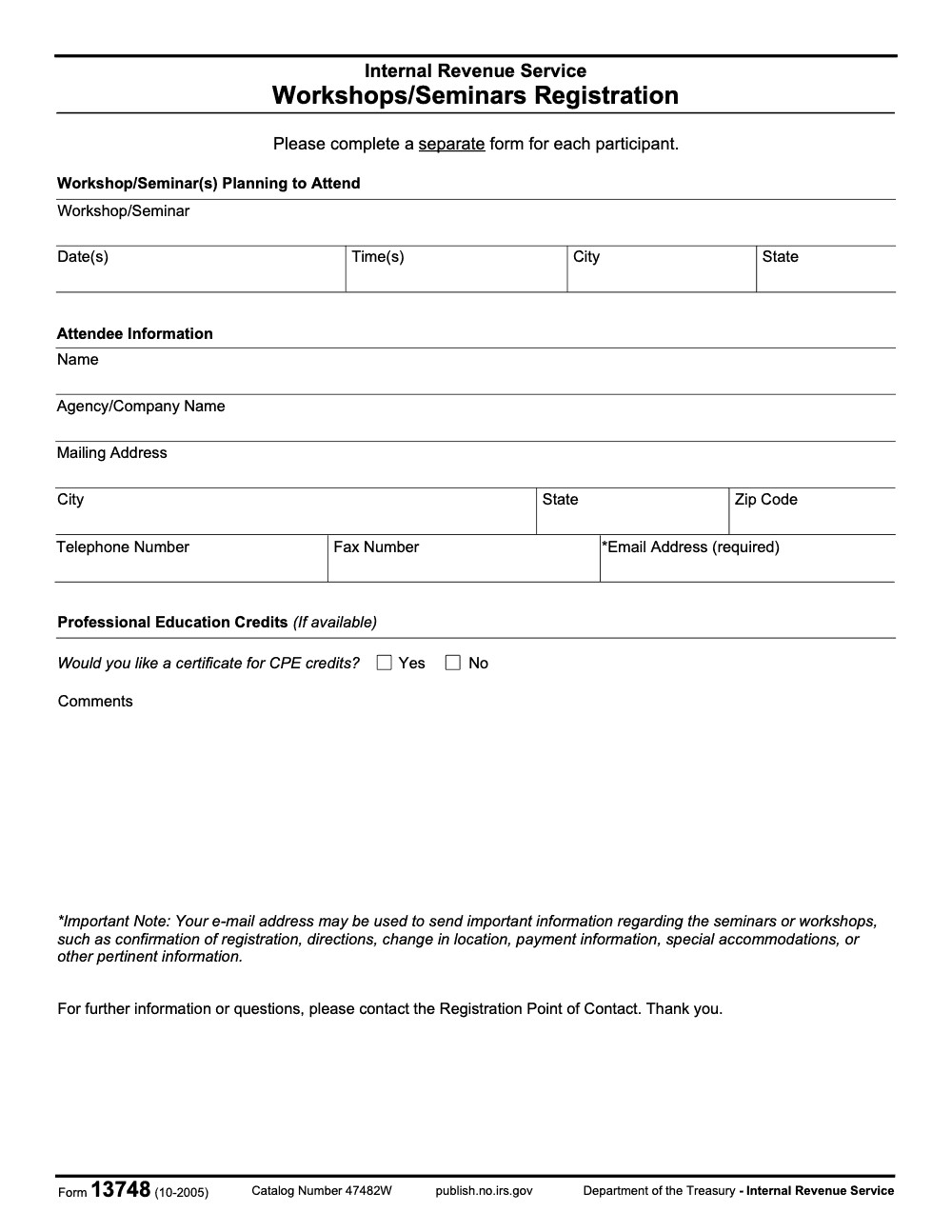
Form 13748 is the IRS Workshops/Seminars Registration form (Catalog Number 47482W, last revised October 2005, per the form face). One form is required per participant; the email address is the only explicitly required field; and no tax-filing deadline applies because this is an administrative registration form, not a tax return.
Treat Form 13748 like a quick admin checkbox and a team's seats can disappear before anyone notices. One form is required per participant, so a six-person team needs six forms, and if you batch them late the registration window can close on some of those seats. This is the IRS Workshops and Seminars Registration form, an administrative registration, not a tax return.
On the form itself, the email address is the only field carrying the explicit required marker, and it doubles as where confirmation lands. Fees, refunds, dates, and submission methods are set by the event organizer, not by the form, so the deadlines that actually bind you live on the event page. Keep the confirmation email and any receipt, and if confirmation does not arrive in the stated window, contact the event's Registration Point of Contact.
Key Takeaways
- Form 13748 is a one page, fillable registration form the IRS uses for workshops and seminars, including events that offer CPE certificates.
- Always download the official IRS PDF or confirm any copy against the IRS version. Third party sites host the file, however the IRS source is the one to trust.
- Typical fields include your name, company, mailing address, phone, email, and the workshop or seminar details you plan to attend (only the email field carries the explicit "(required)" marker on the form; the rest are operationally needed but not flagged required). There is no SSN or EIN field on the IRS PDF.
- Fees, refunds, dates, and submission methods are set by the event organizer, not by the form itself. Watch for instructions and deadlines on the event page.
- Keep your confirmation email and any payment receipt. If you do not receive confirmation within the stated window, contact the event’s registration point of contact shown on the form or the event page.
What Is IRS Form 13748 And Who Uses It
Form 13748 is the IRS Workshops or Seminars Registration form – an administrative event-registration form, not a tax return, so it has no statutory filing deadline or penalty regime under the Internal Revenue Code. It lets you register a single participant for an IRS hosted or IRS partnered event, and it includes a yes or no checkbox for a CPE certificate if credits are available. The IRS file currently posted shows revision “10, 2005,” and the content remains active on IRS.gov, which means organizers may still reference it for current events.
You will see simple sections, workshops or seminars planning to attend, attendee information, contact details, and a note that your email may be used for confirmations, directions, changes, or payment information. Many IRS related workshops are run with partners such as SBDCs or SCORE, which is why registration logistics differ by event. The IRS keeps state by state workshop pages and partners often publish dates on their own calendars.
Who typically uses the form, accounting firm staff seeking CPE, small business owners, bookkeepers, payroll admins, and educators who need IRS led or IRS partnered training. If you manage a firm calendar, this is the kind of admin task that benefits from a short SOP and a checklist. That way, anyone on your team can register attendees without rework.
What The Official PDF Looks Like
If you open the IRS file, you will notice a clean layout with fillable fields, no fee table, and no SSN or EIN field. You will find lines to type the workshop title, date, time, city, state, your name, your company or agency, mailing address, phone, and email. There is also a note about how your email will be used to communicate logistics, which is why you should always type an inbox you monitor daily.
- Title the exact workshop as shown on the event page.
- Copy the date, time, city, and state verbatim.
- Use a firm email, not a personal inbox, if multiple people need access to confirmations.
- Check the CPE certificate box when that option is offered on the event.
Where This Form Fits In Your Planning
Think of Form 13748 as the RSVP. It does not replace the event page rules, payment instructions, or refund policy. Some IRS workshops are free, while others are paid or capacity limited. Many events are listed on partner sites such as SBDCs and then cross linked from the IRS state pages. If you register a team, confirm the organizer allows substitutions and how to request them.
Accountably tip, create a short internal template that mirrors the IRS fields, then attach the official PDF. Have your admin paste the event title and date exactly as published and store the confirmation in a shared folder. This small habit reduces misses and keeps your CPE tracking clean.
How To Access And Download Form 13748 Safely
Here is the fastest, safest path to the official file.
- Start at IRS Forms and Publications, then search “Form 13748.” You may not see a detailed HTML page, however you will find the official PDF hosted on IRS.gov. Open the file, confirm “Form 13748 (10, 2005)” in the header, and save a local copy.
- If you land on a third party copy, compare it against the IRS version before you type anything. Look for the same title, the same sections, and the same revision reference. When in doubt, default to the IRS PDF.
Best practice, download from the IRS first, then work from that file for every registration you submit.
About Third Party Copies
You will see Form 13748 hosted on template libraries. That can be convenient, especially if they provide quick fill and sign tools, however they are not authoritative. Treat them like mirrors, helpful only after you have verified the content matches the IRS source. Many of these sites clearly state that their information is educational and that you should confirm details with the IRS or the event organizer.
Make The PDF Fillable On Your Device
The IRS file is already fillable. Open it in a trusted PDF reader, for example Adobe Acrobat or your browser’s PDF viewer. Type directly into the fields, save the file with a clear name like “Form_13748_YourName_EventDate.pdf,” and keep a copy in your firm’s shared folder so someone else can find it if you are out.
Quick Reference Table
| What you need | Where to get it | Why it matters |
| Official IRS Form 13748 PDF | Download the file hosted on IRS.gov | Ensures you use the correct, fillable version that organizers expect. |
| Event details | The organizer’s event page or IRS state workshop page | Accurate title, date, time, and location prevent mismatches and delays. |
| Submission instructions | The organizer’s page or email confirmation | Tells you whether to upload, email, or mail, and what to expect for timing. |
| Fee and refund policy | The organizer’s page | Rules vary by event, especially for substitutions, cancellations, and cutoffs. |
| CPE details | Event description or agenda | Confirms whether the CPE certificate box on the form applies to your session. |
What If You Cannot Find The Form On A Specific Event Page
Some organizers describe registration steps without linking the actual PDF. If the event is clearly IRS hosted or IRS partnered and references Form 13748, use the IRS PDF, then follow the submission method shown on the event page. Many events list a registration email or portal and identify a point of contact for questions.
If an event page asks for a different registration method, follow that method. Form 13748 is a tool, not a universal rulebook.
Short Disclaimer
Policies change, and event pages can update close to the date. The information in this guide is based on official IRS sources available on January 18, 2026. Always verify deadlines and instructions on the event listing before you submit.
What You Need To Complete Form 13748
Gather your information before you type. You will move faster and avoid typos.
- Your full name as you want it to appear on the roster and any CPE certificate.
- Agency or company name.
- Mailing address, city, state, and ZIP code.
- Telephone number and an email address you monitor.
- The exact workshop or seminar title, date, time, city, and state.
Note what you will not need on the IRS PDF, there is no SSN or EIN field on Form 13748. If an organizer requires additional information for payment or verification, they will request it separately. Only share sensitive data through the organizer’s stated secure channel.
Step By Step, Filling The Form
- Enter the workshop or seminar you plan to attend. Use the title and date exactly as published.
- Complete the attendee information section with your name and company exactly as you want it shown.
- Add your mailing address and contact details. Double check the email since confirmations go there (the form's Important Note scopes email use to event-operational messages – confirmations, directions, location changes, payment information, and special accommodations – not general IRS marketing).
- If the event offers CPE, select whether you want a certificate (checking "Yes" is a request, not a guarantee – CPE is issued only when the specific workshop is structured to grant credits, which is why the section is labeled "If available").
- Use the comments box for access needs, dietary notes for in person events, or a short question the organizer should know in advance.
- Save a copy with a clear file name and follow the submission instructions on the event page.
Small habit, copy and paste the event title, date, and time from the event page to avoid transcription errors. It saves the organizer from clarifying emails and keeps you off the waitlist.
Fees, Payments, And Refunds
Form 13748 does not contain a payment section. Fees and refunds are set by the organizer, for example an SBDC, a college partner, or the IRS Tax Forum. Read the event page for payment links, refund deadlines, and substitution rules. If CPE is involved, expect details on how credits are reported and how you receive your certificate.
Group Registrations And Substitutions
If you are registering several people, the form itself requires one Form 13748 per attendee (the printed instruction reads "Please complete a separate form for each participant"), so this is the form's rule, not the organizer's preference. Others let you submit a spreadsheet or use a portal. Check whether substitutions are allowed and what the deadline is. Keep written confirmations so you can audit attendance and CPE later.
A Quick SOP You Can Borrow
- Create a shared folder called “IRS Workshops.”
- Save a blank copy of Form 13748 from IRS.gov inside it.
- Add a one page SOP, where to find the form, how to name files, who approves registrations, and where to store confirmations.
- Track registrations on a simple sheet, attendee name, event title, date, submission date, confirmation received, CPE needed, CPE received.
Accountably tip, standardizing small tasks like this protects your time. Our team often sees firms lose hours chasing confirmations because a single field was mistyped or a deadline was missed. A 10 minute SOP and a checklist usually fixes that.
How And Where To Submit Form 13748
Submit exactly as the event page instructs, upload through a portal, email the PDF to the listed address, or mail it if requested. Pay close attention to time zones and cutoff times. Many partners confirm within one to three business days. If you do not see a confirmation, check your spam folder, then contact the listed registration point of contact.
The IRS PDF itself says to reach out to the Registration Point of Contact for further information or questions. That line is your green light to contact the organizer when you need help, not the general IRS taxpayer help line at 1-800-829-1040, which cannot answer workshop registration questions.
Change Or Cancel Your Registration
Plans change. Look up the event’s change window and fees before you submit your form. Many events allow substitutions within a stated timeline. If a fee applies, the organizer will specify who must request the change, the original registrant or an admin. Keep emails and receipts so you have a clear trail.
Who To Contact, IRS Or The Organizer
Start with the organizer listed on the event page or your confirmation. They can confirm capacity, waitlists, payment status, and substitution policy. The IRS publishes state workshop pages and national events like the Nationwide Tax Forum, however registration logistics often run through partners. Use the organizer’s contact first. For general IRS questions, use IRS.gov resources for small business workshops in your state.
Final Notes And A Simple CTA
You now have everything you need to handle IRS Form 13748 with confidence. Download the official PDF, copy the exact event details from the listing, and submit the form by the stated deadline. Keep confirmations and any CPE records for your files.
If you lead a firm and want a short SOP, a master checklist, and consistent naming for form files so your team never misses a seat again, our team at Accountably can share a lightweight template we use internally. It is the same documentation discipline we bring to client delivery, scaled down for event tasks. Use it, save time, and get back to work that moves the needle.
Common Mistakes We See Every Season
Form 13748 is short, but the same handful of registration errors come back every workshop cycle. Quick rule you can copy into your SOP: treat each attendee as a separate filing, confirm the one explicitly required field, and route every registration question to the event Point of Contact.
Reusable Checklists
These three checklists are copy-paste ready for your firm's training-intake SOP. Each list focuses on one stage of the Form 13748 lifecycle so the work can be split across roles.
Pre-registration packet
- Confirm the workshop or seminar is one the firm wants the attendee at this quarter.
- Pull the latest Form 13748 (rev. 10-2005) from IRS.gov and save a blank master copy in the training-intake folder.
- Capture the Workshop or Seminar name, date(s), time(s), city, and state from the event organizer.
- Save the Registration Point of Contact name, email, and phone from the workshop invitation before any form goes out.
- Verify each attendee's full mailing address and the work email they actively monitor.
- Note any special accommodation, dietary, or accessibility need so it can be recorded in the Comments field.
- Confirm whether the session offers CPE credit before deciding what to mark on the CPE certificate question.
Per-participant form review
- One Form 13748 per attendee, no exceptions.
- Workshop or Seminar(s) Planning to Attend section complete: name, date(s), time(s), city, and state.
- Attendee Information section complete: name, agency or company, mailing address, telephone, fax (if used), and email.
- Email field complete and double-checked, the only explicitly required field on the form.
- CPE certificate question answered Yes or No based on the event's actual CPE status, not a default assumption.
- Comments field used for any accommodation request the Point of Contact needs to see.
- Catalog Number 47482W on the footer matches the form being submitted, confirming the correct revision is in use.
Post-submission tracking
- Log the submission date and method (email or fax to the Registration Point of Contact) in the attendee's training record.
- Watch the attendee's inbox for the confirmation message from the event Point of Contact.
- Flag any change-in-location, payment, or accommodation update against the attendee's calendar.
- If a substitution or cancellation becomes necessary, route it through the same Registration Point of Contact, not the general IRS taxpayer line.
- After the event, save the CPE certificate (if issued) to the attendee's continuing-education file.
- Close the intake item only after confirmation, attendance, and any CPE documentation are filed together.
Keep 13748 Season From Stalling
Form 13748 is not driven by a tax-filing calendar, but firms still hit predictable bottlenecks every time they send a group of staff to an IRS workshop or seminar. Per the form face, the only revision on record is October 2005, and Catalog Number 47482W has been stable since. That means the friction is not in the form changing year over year, it is in the operational mechanics of preparing one clean submission per participant and tracking each one through to confirmation.
The fix is to treat workshop registration like any other production intake: named roles, a standard checklist, and a single source of truth for the event details. Small admin work, handled by the wrong person at the wrong time, still creates lost seats and unhappy attendees.
- Treat the Workshop or Seminar(s) Planning to Attend section as the master event record (name, dates, times, city, and state) before any attendee information is entered.
- Run a one-form-per-participant rule, with each attendee's submission stored as a separate item in the training-intake folder.
- Verify the email address on every Attendee Information block, the only field the form explicitly marks as required and the channel the IRS uses for confirmation, directions, location changes, payment information, and accommodation details.
- Capture special accommodation, accessibility, or dietary needs in the Comments field at submission time, not in a follow-up email to the Registration Point of Contact.
- Only check Yes on the CPE certificate question after confirming in writing that the session offers CPE credit, the section header itself is qualified with the phrase If available.
This is the kind of operational discipline our team brings to every training-intake workflow we run for clients on Accountably's taxation services, so admin work like Form 13748 does not pull senior preparers off billable production.
FAQs
No. The IRS PDF does not include SSN or EIN fields. If an event needs additional information, they will ask for it through their own secure process.
Check the event description. If CPE is available, Form 13748 includes a checkbox to request a certificate, and the organizer will explain how credits are reported.
Usually yes, if the organizer allows substitutions and you meet the deadline. Follow the instructions on the event page and keep written confirmation of the change.
Organizers will email new dates and instructions. Watch your inbox, confirm your availability, and ask about refund or transfer options if you cannot attend the new time.
You can use a third party to fill and sign, however verify the form matches the IRS PDF before you type. When possible, complete and save the official IRS file locally, then send it to the organizer as instructed.
About this guide
Accountably helps US CPA, EA, and accounting firms hire trained accountants and tax preparers in India.
About us Reviewed byJugal Thacker, CPAFounder and CEO at Accountably
A Washington-licensed CPA with 7+ years inside US firms – PwC, a real-estate tax practice, then a full-service firm, rising from reviewer to manager to advisory. This article was reviewed against current IRS guidance for the 2025 tax year and updated for filers preparing late returns, amendments, and 2026 estimates.
View profile →How we research, review, and update this guide
Every Accountably guide is researched against primary IRS sources, reviewed by a U.S. CPA, and refreshed as guidance evolves. Read our Editorial Guidelines to see how we source, fact-check, and update our content.




