
Summarize this article with AI
In Brief
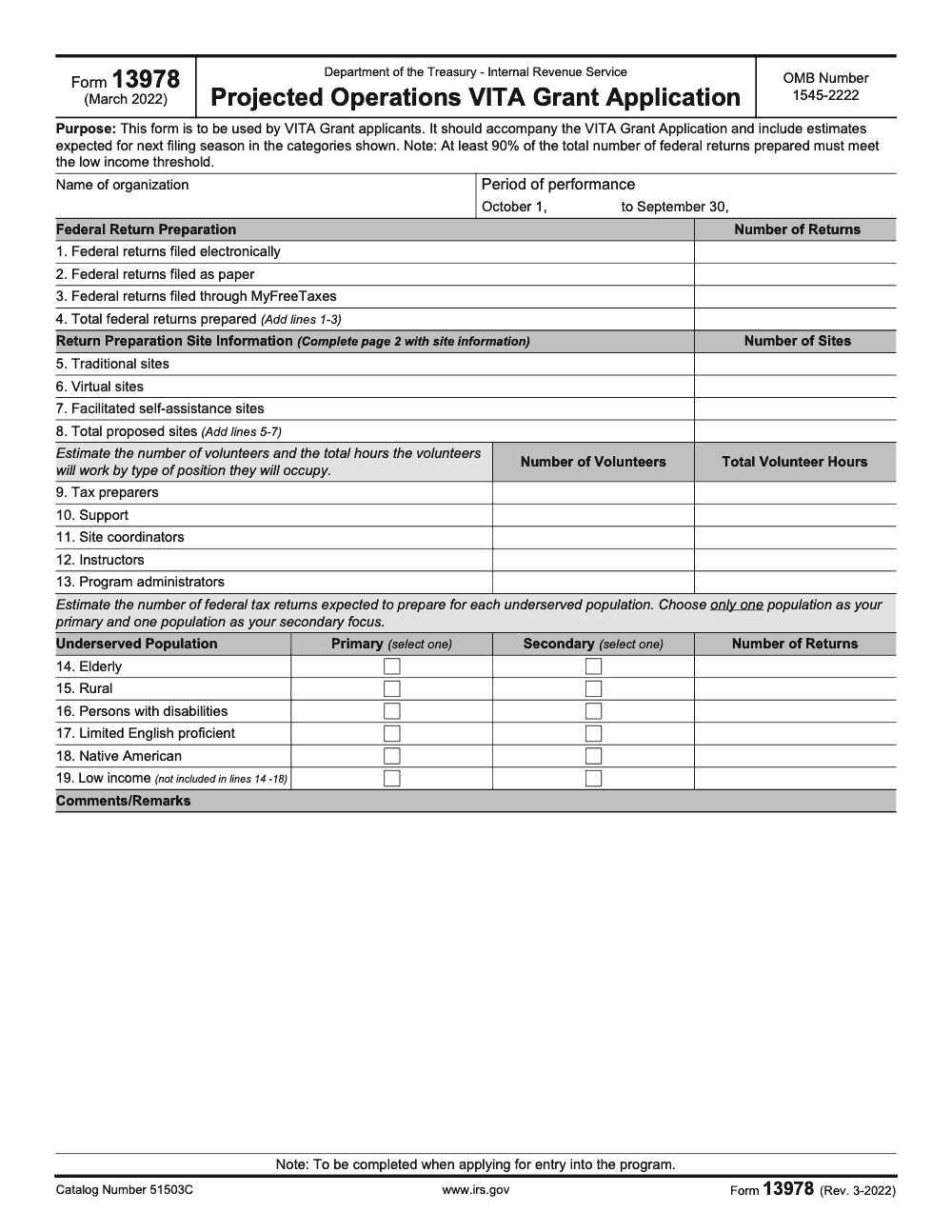
Form 13978 is the Projected Operations VITA Grant Application – the supplemental form VITA Grant applicants file alongside the main grant package, projecting returns, sites, EFINs and SIDNs, and underserved populations for the next filing season (per IRS Form 13978 instructions, Rev. 3-2022, OMB 1545-2222). At least 90% of projected federal returns must meet the low income threshold, the period of performance runs October 1 to September 30, and line 4 equals the sum of lines 1 through 3. For ongoing tax production support, see our taxation services.
Form 13978 is where a VITA grant applicant commits to next season on paper: how many returns, at which sites, under which EFINs and SIDNs, and for which underserved populations. It rides alongside the main grant package rather than standing alone, and reviewers read it against your SF-424 and Grants.gov materials expecting the numbers to agree.
Two figures anchor the whole projection. At least 90% of the total federal returns you project have to meet the IRS low income threshold, a mandatory floor rather than a goal, and the period of performance runs October 1 to September 30 with the application window typically open May 1 to May 31. Line 4 equals the sum of lines 1 through 3, the form shows Rev. 3-2022 under OMB 1545-2222, and Publication 4671 is the companion you keep open while you finalize.
Key Takeaways
- Form 13978 is the IRS Projected Operations VITA Grant Application that records your next filing season estimates, including sites, EFINs, SIDNs, return volumes, and underserved population plans. The IRS lists it as Rev. 3‑2022 with OMB 1545‑2222.
- At least 90% of the total federal returns you project must meet the IRS low income threshold (this is a mandatory program floor, not a target, and falling below it threatens VITA grant eligibility). Build your site plan and outreach around that standard.
- The VITA and TCE grant application window typically runs May 1 to May 31, with performance from October 1 to September 30 the following year. Always confirm the current year’s notice and page updates.
- Publication 4671 outlines the VITA grant application process and program rules. Treat it as your companion reference when finalizing projections and attachments.
- You can submit Form 13978 electronically through the IRS web form, then download a PDF for your records. Keep your package consistent with Grants.gov SF‑424 materials.
What Form 13978 Does For You
Form 13978 standardizes how you explain your expected footprint and throughput, so reviewers can compare apples to apples. You will enter return volume estimates, the share filed electronically versus on paper, site information with EFIN and SIDN, and details about the populations you plan to serve. The form sits alongside your application in Grants.gov, and it focuses specifically on projected operations for the next filing season.
The IRS maintains a consistent VITA and TCE grants timeline. Applications open in May, selections occur around October 1, and the period of performance runs from October 1 to September 30 (confirm the application window and selection date against the current year's IRS VITA and TCE grants notice). Use this timeline to reverse plan your volunteer recruiting, training waves, and quality review coverage, then lock those inputs into Form 13978.
If you want a simple litmus test, ask yourself, can a reviewer track my projected returns, sites, and underserved outreach without opening any other document, and do my other forms, SF‑424 and attachments, match these numbers. If the answer is yes, you are ready to proceed.
The 90% Low Income Rule
The 90% rule is easy to overlook when you are juggling budgets and site logistics. The IRS notes that at least 90% of federal returns you project must be for low income taxpayers. Keep that constraint visible in your modeling, since it shapes both site placement and outreach.
How To Use Form 13978, A Field‑By‑Field View
Here is the practical flow most teams follow when they complete Form 13978. The IRS web form provides sections for organization details, period of performance, return volumes, site information, and underserved populations, and it lets you submit electronically or download a PDF for your files.
- Organization and period of performance, enter your legal name, then set the start year of October 1 and end year of September 30 to align with the grant cycle.
- Federal Award Identification Number, follow the IRS format example, for instance 23VITA1234, where the first two digits match the end of the performance year.
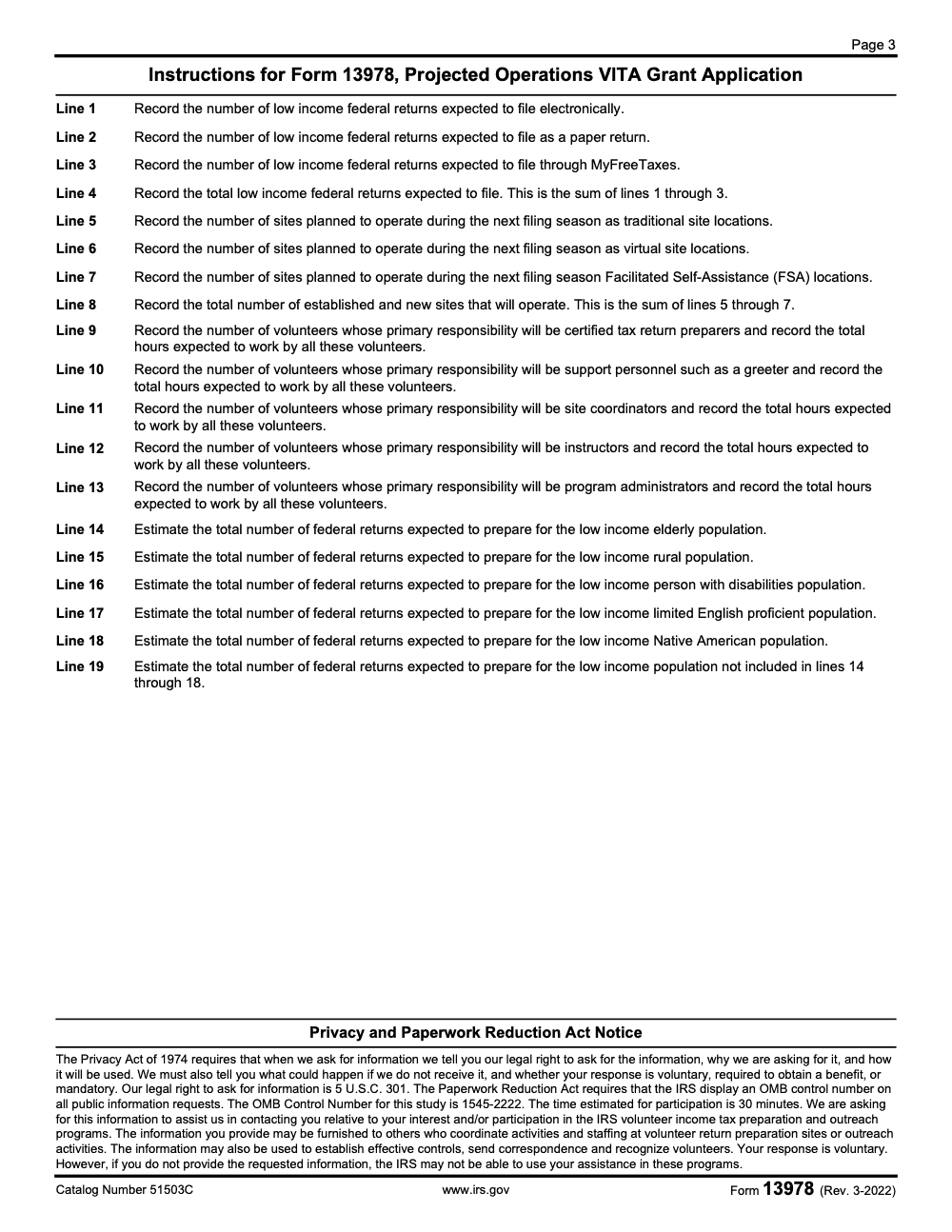
- Projected federal returns, split totals into electronic and paper returns (lines 1, 2, and 3 record only low income federal returns, not all returns prepared, and line 4 is the sum of those three), and keep the 90% low income threshold in mind as you finalize counts.
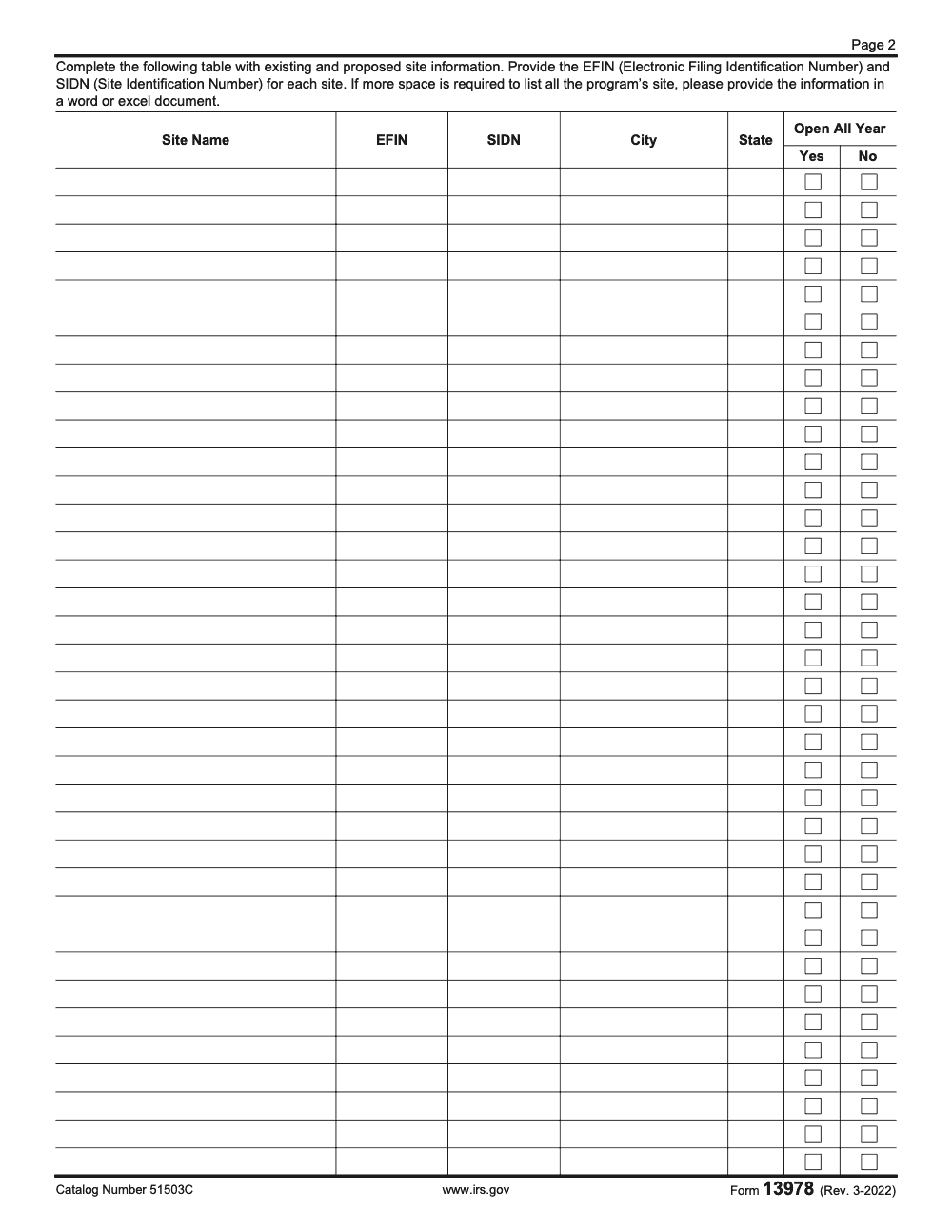
- Site information, list each location with EFIN and SIDN, city and state, and whether the site operates all year. If the page 2 site table runs out of space, list the additional sites in a separate Word or Excel document.
- Underserved population and comments, describe reach and access, for example language support, disability access, or rural coverage, and tie this directly to your volume assumptions.
Tip, finalize your internal working spreadsheet first, then enter clean values into Form 13978, since the form is the official record reviewers will use to understand your scale and focus.
Quick Mapping Table
| Section on 13978 | What You Enter | Practical Notes |
| Organization and Period | Legal name, Oct 1 start, Sep 30 end | Mirror Grants.gov dates and legal name exactly. |
| FAIN | FAIN pattern, for example 23VITA1234 | Match IRS format to avoid validation issues. |
| Federal Returns | E‑file count, paper count | Keep ≥ 90% low income. |
| Site Details | EFIN, SIDN, city, state, all‑year flag | Prepare a site list template to prevent typos. |
| Underserved Populations | Languages, access, outreach | Align outreach with your volumes and sites. |
Current Validity, Versioning, And The OMB Control Number
The IRS presents Form 13978 as Rev. 3‑2022 with OMB number 1545‑2222 and Catalog Number 51503C on the IRS web form. You can submit the form electronically or download a PDF for records. Always check the current IRS VITA and TCE grants page during the May application window, then confirm the OMB number on the form you submit.
Under the Paperwork Reduction Act, IRS information collection forms include a valid OMB control number, and IRS internal guidance notes that OMB numbers and expiration dates appear on these documents. If a future revision updates the burden or content, expect the OMB details to reflect that change.
Timeline You Can Trust
The IRS VITA and TCE grants page outlines the annual rhythm, application May 1 to May 31, evaluation June through September, notifications around October 1, and period of performance that runs October 1 to September 30 (only the Oct 1-Sep 30 period of performance is locked on the form itself; confirm the application and evaluation windows against the current year's IRS VITA and TCE grants notice). Keep your Form 13978 numbers anchored to that schedule, then mirror them across SF‑424 and your budget narrative.
Step‑By‑Step Completion Workflow That Prevents Rework
Here is a streamlined process that keeps your numbers consistent and your review cycles short.
- Build your projections workbook
- Tab 1, return volumes, split by e‑file and paper, then by site.
- Tab 2, site roster with EFIN, SIDN, address, days, hours, and a yes or no for all‑year operation.
- Tab 3, underserved populations and outreach plan, language support, disability access, and transportation notes.
- Tab 4, quality review coverage and training cadence, especially for peak weeks.
- Tab 5, crosswalk to budget and SF‑424 so every number matches. Lock these tabs before you touch the IRS form.
- Complete the IRS web form Enter organization, period of performance, and FAIN. Input your e‑file and paper projections, then paste your site list into the Form 13978 site fields. If the page 2 site table runs out of space, list the additional sites in a separate Word or Excel document. Save and submit electronically, then download the PDF for your records.
- Validate across the package Open Publication 4671 for requirements and cross check your 13978 numbers against SF‑424, budget details, and key contacts. Do a final pass for the 90% low income requirement and naming consistency across documents.
Pro move, hold a 20 minute huddle where someone reads Form 13978 numbers aloud while another person checks the same values inside SF‑424 and your budget tab. You will catch most mismatches in one pass.
Common Field Issues And Easy Fixes
- FAIN format errors, follow the IRS example, the first two digits match the end of the performance year, then VITA, then four digits.
- EFIN or SIDN typos, keep a master list and paste values, not manual retyping.
- Site overflow, if the page 2 site table runs out of space, list the extra sites in a separate Word or Excel document.
- Low income threshold misses, solve by rebalancing outreach and appointment capacity across sites that serve your core target.
Grants.gov And SF‑424, Make It All Line Up
Your Form 13978 lives alongside Grants.gov materials. The IRS VITA and TCE grants guidance points applicants to Grants.gov, and IRS pages for multiyear recipients highlight Standard Form 424 as required. Create a simple crosswalk so SF‑424 and attachments reflect the same totals and site counts you entered on 13978. Build in a final validation pass inside Grants.gov Workspace before you lock and route.
Attachments And References To Keep Handy
- Publication 4671, VITA Grant Program Overview and Application Instructions
- Form 14335 for key contacts, if you need to update grant contact information later
- IRS VITA and TCE grants page for the yearly calendar and status updates Keep these open while you finalize Form 13978 and your budget narrative.
Build A Defensible Projection, What, How, And Wow
- What, your projection is your promise. It explains how many returns, who you will serve, and where capacity sits.
- How, tie site hours, volunteer certification waves, and quality review coverage to the volumes on Form 13978.
- Wow, add unique access moves, for example language support, mobile days, rural pop‑ups, and disability friendly layouts that match your underserved population claims on the form.
A One‑Page Projection Narrative Framework
- Who you serve, define your low income focus and any priority populations.
- Where you serve, list your cities or counties and how sites map to need.
- How you staff, describe recruiting, training, and layered review.
- When you operate, show appointment windows and surge plans for February and March.
- What you expect, summarize e‑file and paper volumes, and the share at or above 90% low income.
Budget And Narrative Alignment Without The Headache
While Form 13978 is about operations, your Grants.gov budget and narrative must make those operations real. Anchor personnel, training, equipment, and outreach to the exact activities that drive the projections on 13978. Pull definitions and expectations from Publication 4671 so your language matches IRS expectations.
If a reviewer can draw a straight line from a budget line to a site hour to a projected return on Form 13978, you are doing it right.
Quick Budget Crosswalk
| Budget Element | What To Explain | Tie Back To 13978 |
| Personnel | Roles, percent effort, and seasonal coverage | Site operating hours and review layers |
| Training | Volunteer certification cadence, materials | Accuracy rates and peak week readiness |
| Technology | Laptops, secure access, EFIN support | E‑file share and site throughput |
| Outreach | Channels and languages | Underserved population goals |
| Travel | Purpose, frequency, cost basis | Rural or mobile site access |
After You Are Awarded, Do Not Lose The Thread
If you are selected, plan for reporting and closeout, not just launch. IRS guidance for VITA grant recipients includes the final report deadline, currently due by January 28, which is 120 days after the September 30 end of the performance period. Bake that into your calendar now, since it influences how you track volumes and spending against plan.
Quality Control, Compliance, And OMB Details
The IRS internal manual explains that forms subject to the Paperwork Reduction Act carry an OMB control number and expiration date. On Form 13978, you will see OMB number 1545‑2222 on the IRS page. Confirm this detail before you submit, and keep a copy of your downloaded PDF with the OMB number visible for your records.
Simple rule, if a number appears on 13978, the same number must appear in SF‑424 and your budget. If a site appears on 13978, it must exist with the same EFIN and SIDN in your internal roster.
The Mistakes We See Most
- Numbers drift between 13978 and SF‑424, fix by assigning a single owner for the master spreadsheet and locking cells once reviewed.
- FAIN format does not match the IRS example, double check the two digit year at the front.
- Low income share falls under 90%, move capacity to sites that serve your core population and update outreach plans.
- Site list exceeds the page 2 table but no overflow attachment provided, list the extra sites in a separate Word or Excel document.
Practical Ops Tips From The Field
- Use short weekly check‑ins during May, keep projections current as volunteer availability firms up.
- Confirm accessibility, languages, and transit notes in your site details. This supports your underserved population section and shapes outreach.
- Track return mix in season, after award, this helps you meet any Minimum Returns Expected goals and prepares you for final reporting.
When To Ask For Help
If you want an extra set of hands to tighten documentation, set up SOPs for site data, or shorten review loops, you can bring in outside support. At Accountably, we focus on structured delivery, documentation discipline, and review protection for accounting teams. For VITA teams, the same mindset applies, consistent templates, clear roles, and early escalation save you from last minute scrambles. Use help sparingly and keep control close, your name is on the grant.
Common Mistakes We See Every Season
The same patterns surface every VITA application cycle. Catch these early and the reviewer never has to send the package back.
Reusable Checklists
Copy these into your firm SOPs and rerun them every application cycle. The page saves your checked items locally, so a partial review can resume where you left off.
Pre-submission Form 13978 package check
- Legal name and address on Form 13978 match the SF-424 exactly.
- Period of performance set to October 1 start and September 30 end.
- Federal Award Identification Number follows the IRS pattern (for example 23VITA1234).
- Line 4 equals lines 1 plus 2 plus 3, and the sum represents low income returns only.
- Projected low income share is at or above 90% of total federal returns.
- Line 8 equals lines 5 plus 6 plus 7 (traditional, virtual, and FSA sites).
- Each volunteer is allocated to exactly one of lines 9 through 13, with both headcount and projected hours filled.
- Exactly one primary and one secondary population are marked on lines 14 through 19.
Site data validation
- Every site row has EFIN, SIDN, city, state, and the open-all-year Yes or No flag.
- EFINs match the IRS e-file application of record for each site.
- SIDNs reconcile against the most recent SPEC site list.
- Sites beyond the page 2 grid are listed in a separate Word or Excel attachment.
- Each site is classified as traditional (line 5), virtual (line 6), or facilitated self-assistance (line 7).
- Accessibility, language support, and transit notes are captured for the underserved population section.
Post-award handoff to operations
- Notification of award and FAIN saved to the program file with date received.
- Volunteer roster aligned with line 9 through 13 projections, with onboarding dates set.
- Quality review cadence assigned for each site (preparer, reviewer, escalation).
- Mid-season checkpoint scheduled to compare actual return mix against the line 4 projection and the 90% threshold.
- Final report due date (within 120 days of the September 30 close) added to the firm calendar.
Keep 13978 Season From Stalling
The VITA application window is short. The IRS typically opens the cycle on May 1 and closes May 31, leaving teams roughly four weeks to assemble projections, reconcile them against last season's actuals, and align Form 13978 with the SF-424 package. Most stalls come from late-arriving site rosters or volunteer commitments that shift the line 4 projection in the final week, and Publication 4671 reinforces that documentation discipline is what separates a clean submission from a kicked-back one.
The fix is to treat Form 13978 as the single source of truth for projected operations and force every other document to match it, not the other way around. When the form drives the workpaper rather than the workpaper driving the form, the May 31 deadline stops being a scramble.
- Build a shared projection worksheet that feeds lines 1, 2, 3, and 4 directly, with low income returns flagged in a separate column so non-qualifying returns never get pulled in by mistake.
- Maintain a master site list with EFIN, SIDN, and the open-all-year flag, ready to paste into the page 2 table and to an overflow attachment if the count exceeds the printed grid.
- Lock volunteer counts and projected hours by role (lines 9 through 13) two weeks before the deadline so primary-responsibility assignments do not drift in the last week.
- Hold the low income share at an internal floor of 92 to 93% so the program-required 90% threshold survives any in-season drift.
- Run a final cross-check the week of May 24, confirming Form 13978 numbers reconcile to the SF-424 budget narrative and to Publication 4671 program rules.
If projections, site data, and volunteer rosters are getting reworked in the last week of May, the work is the symptom and the workflow is the cause. Accountably builds structured review and documentation systems for tax and accounting teams, including the multi-source reconciliation that VITA grant packages demand. Explore our taxation services for ongoing production support that keeps senior reviewers out of final-week scrambles.
FAQs
It is the Projected Operations VITA Grant Application. You use it to report next filing season estimates for returns, sites, EFINs and SIDNs, and underserved populations. The IRS page shows Rev. 3‑2022 with OMB number 1545‑2222, and the form can be submitted electronically or downloaded as a PDF.
The IRS timeline shows application May 1 to May 31, review June through September, notification near October 1, and a performance period of October 1 to September 30. Always check the current year’s page during May.
At least 90% of all federal returns you project must be for low income taxpayers. Plan sites, appointments, and outreach so your volumes meet this threshold.
Use Publication 4671 for the VITA grant program overview and application instructions. It supports how you structure your package while you finalize 13978.
IRS guidance for grant recipients notes the final report is due by January 28, which is 120 days after the September 30 end of the performance period. Track against your 13978 plan during the season so the final report is easier.
Summarize this article with AI
About this guide
Accountably helps US CPA, EA, and accounting firms hire trained accountants and tax preparers in India.
About us Reviewed byJugal Thacker, CPAFounder and CEO at Accountably
A US-licensed CPA with 7+ years inside US firms – PwC, a real-estate tax practice, then a full-service firm, rising from reviewer to manager to advisory. This article was reviewed against current IRS guidance for the 2025 tax year and updated for filers preparing late returns, amendments, and 2026 estimates.
View profile →How we research, review, and update this guide
Every Accountably guide is researched against primary IRS sources, reviewed by a U.S. CPA, and refreshed as guidance evolves. Read our Editorial Guidelines to see how we source, fact-check, and update our content.




