
Summarize this article with AI
In Brief
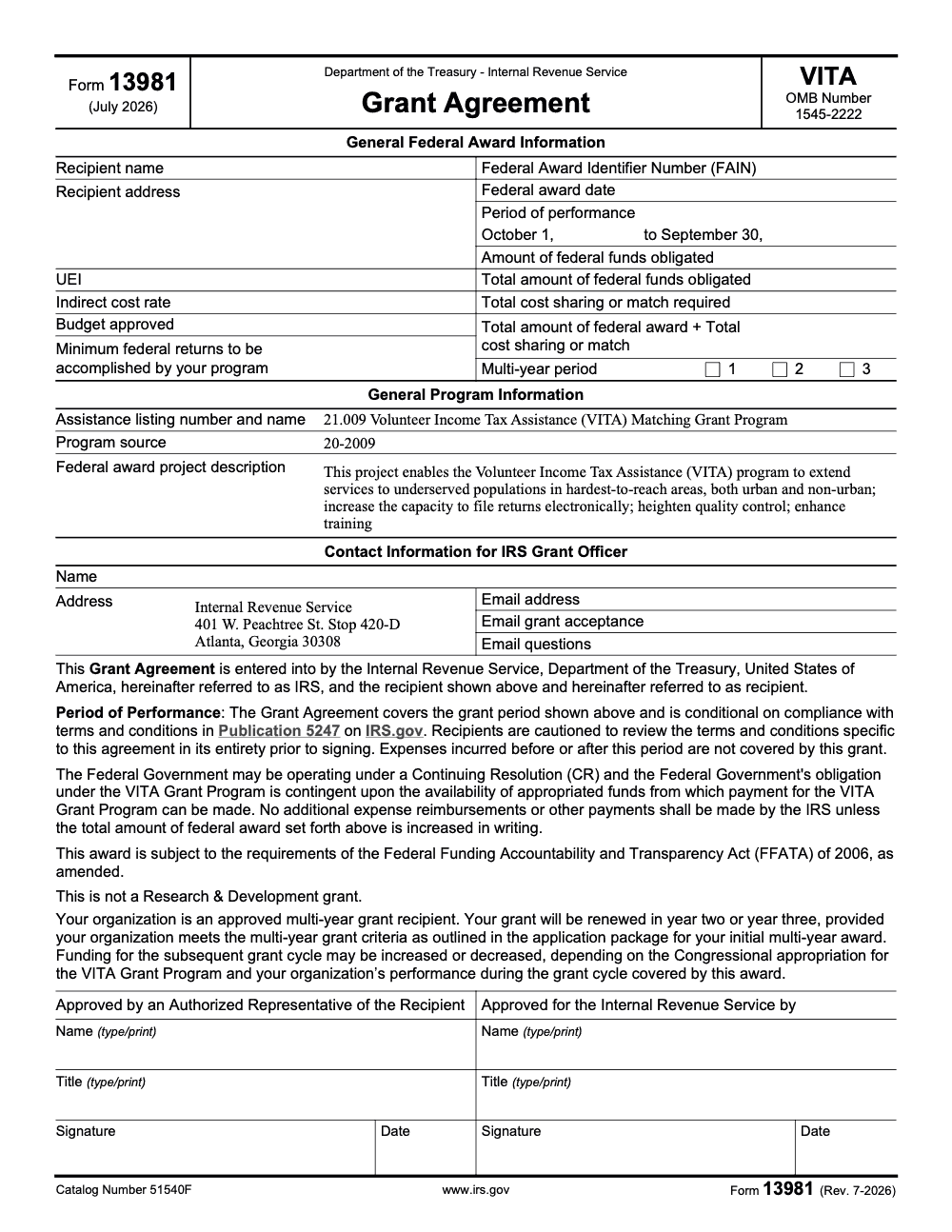
Form 13981 is the IRS VITA Grant Agreement (Rev. June 2025, OMB Control Number 1545-2222), the contract that sets a VITA program's award amount, required match, and period of performance, which runs October 1 to September 30 per the form. It is governed by the terms and conditions in IRS Publication 5247 and takes effect only when both the recipient's Authorized Representative and the IRS approver sign, so it is not a taxpayer authorization tool. For taxpayer-level access, see the related IRS forms covered below.
A lead running a VITA program sometimes reaches for Form 13981 thinking it lets a preparer pull a client's transcripts or talk to the IRS on their behalf, but it carries no such authority. This is the VITA Grant Agreement, the contract that sets your award amount, your required match, and your period of performance, and it takes effect only when both your Authorized Representative and the IRS approver sign it.
For client-by-client authority you reach for something else entirely: the Third-Party Designee on the return, Form 8821 for tax information, Form 2848 for representation, or Form 8879 for e-file signature. Form 13981 governs the grant itself, with a performance window that runs October 1 to September 30 under Publication 5247, and final reporting due 120 days after September 30, which lands on January 28. Costs incurred before or after that window are not covered, so the dates on your own agreement are the ones that bind.

Key Takeaways
- Form 13981 is the IRS VITA Grant Agreement, it defines your award, period of performance, and terms, typically October 1 through September 30. Expenses incurred before or after that period are not covered by the grant.
- It does not authorize transcript access or e‑file actions for individual taxpayers. Use the Third‑Party Designee on the tax return, Form 8821, Form 2848, or Form 8879, depending on what you need.
- The “Third‑Party Designee” on many IRS returns uses a name, phone, and any five‑digit PIN that the designee selects, and it expires automatically, usually one year after the return due date. This is for basic processing questions, not representation.
- If you use the IP PIN program, you can choose continuous enrollment or a one‑time year, and voluntary participants can opt out in their Online Account. Victims of identity theft are generally required to remain in the program. Allow about 72 hours after opting out before e‑filing without an IP PIN.
- VITA grantees have acceptance steps and reporting tied to the grant cycle, including final reporting 120 days after September 30, which lands on January 28. Keep your grant documents, agreements, and performance reports tight.
What Form 13981 Actually Does
Form 13981 memorializes your VITA grant award. It identifies your organization, the Federal Award Identifier Number, award dates, total federal funds, matching expectations, and the performance period. It is signed by both parties, and it references the minimum returns expected under the award. This is the contractual anchor for your VITA funding year.
The IRS maintains a public index that lists Form 13981 as the “VITA Grant Agreement,” with the current revision date shown as June 2025. If you are double‑checking that you have the right PDF for your binder or internal wiki, confirm that label and revision date.
If you are new to VITA grants, also bookmark the IRS VITA Grant Program page and the VITA grant recipient hub. These pages outline application windows, acceptance steps, terms, and final reporting dates, including the January 28 deadline for the final report after the project period ends on September 30.
What Form 13981 Does Not Do
Here is where most confusion creeps in during busy season.
- It does not let a preparer or site volunteer access taxpayer transcripts. That control lives with the taxpayer through the Third‑Party Designee on a filed return or through an authorization like Form 8821, and for representation through Form 2848.
- It does not authorize e‑file signatures. Use Form 8879 for the 1040 series and follow the identity verification rules your ERO software enforces.
- It is not a way to manage IP PIN participation. IP PIN enrollment and opt out choices now happen through the taxpayer’s Online Account, with continuous and one‑time enrollment options.
Quick Orientation For Busy Leads
When you are onboarding volunteers or coaching new staff, ground them in a simple message. Form 13981 is your grant contract, the VITA “terms and dates” document. If you need to handle taxpayer‑level authorizations, use the right tool for the job, the return’s Third‑Party Designee for basic processing questions, Form 8821 for information access, Form 2848 for representation, and Form 8879 for e‑signature.
In my experience working with teams during January onboarding, the fastest way to reduce errors is to keep a one‑page routing sheet in your shared drive that maps “purpose” to “form,” then link each item to the most current IRS page. It saves hours, reduces rework, and keeps your program audit ready. For the authoritative references, you will find the IRS pages linked in the citations throughout this guide.
Choose The Right Authorization, Every Time
What Each Form Really Covers
Use this table to match your need to the correct IRS mechanism.
| Purpose | Use this | What it allows | Key limits | Where to find it |
| Let a named person answer basic IRS processing questions about a filed return | Third‑Party Designee on the return | IRS may speak to the designee, designee picks any five‑digit PIN | Basic processing help only, expires automatically, typically one year after due date | 1040, 941, 943, 945 instructions explain name, phone, PIN fields |
| Let a firm or person receive tax information or transcripts | Form 8821, Tax Information Authorization | Inspect and receive confidential tax information for listed years and types of tax | No representation rights, consider 120‑day signature rule when not for an IRS matter | IRS “About Form 8821” and instructions |
| Let a qualified individual represent the taxpayer before the IRS | Form 2848, Power of Attorney | Advocate, negotiate, receive information, do actions listed on the form | Representative must be eligible to practice, scope is limited to listed years and matters | IRS “About Form 2848,” IRM on representation |
| Capture taxpayer’s e‑signature for e‑filed 1040 series returns | Form 8879 | Authorizes ERO to enter or generate PIN as signature | Identity verification rules apply, keep signed 8879 per e‑file handbook | IRS “About Form 8879,” e‑file FAQs |
| Document your VITA grant award and performance period | Form 13981, VITA Grant Agreement | Terms, award amounts, period of performance, minimum returns | Not a taxpayer authorization tool | IRS forms index and OMB PDF |
Third‑Party Designee, The Five‑Digit PIN People Ask About
On many returns, the IRS allows a Third‑Party Designee. You enter a specific name, phone number, and any five‑digit PIN that the designee chooses. This PIN is not an IP PIN and not the taxpayer’s e‑file signature PIN. It simply authenticates the designee when calling the IRS about processing questions for that return. The authority expires automatically, usually one year after the return due date, and it does not create representation rights.
When You Actually Need Transcripts Or Account Data
If you need transcripts for a mortgage verification, a cleanup project, or to resolve an account issue, use Form 8821. It authorizes the IRS to share confidential information for specific years and tax types, and it can enable online transcript delivery to the authorized party. Do not use 8821 if you need to advocate or sign agreements, that is Form 2848 territory.
For context on transcript timing, the IRS notes that wage and income transcripts for the current processing year typically post by late March. If you are planning early season work that depends on those files, build that date into your timeline.
E‑Signature Rules That Still Trip People Up
Form 8879 is the e‑file signature authorization. The ERO can enter or generate the taxpayer’s PIN if the taxpayer authorizes it, and identity verification rules apply. If a taxpayer has an IP PIN, that six‑digit number must be included when filing or the return will be rejected or delayed.
IP PIN Enrollment And Opt‑Out, Updated For 2025
The IRS expanded IP PIN options. You can enroll through Online Account and choose continuous enrollment, which keeps you in the program automatically, or a one‑time enrollment that ends at year end. If you voluntarily enrolled and you are not an identity theft victim, you can opt out in your Online Account. After opting out, allow up to about 72 hours before you can e‑file without the IP PIN, and the same wait applies before opting back in.
Identity theft victims are generally auto‑enrolled and will not be permitted to opt out while the IRS still sees risk on the account, which is why the opt‑out gate is not available in those cases. If Online Account is not an option, the IRS still supports alternatives like Form 15227 for eligible incomes or an in‑person TAC appointment to get or maintain an IP PIN.
Practical tip, if a taxpayer insists on leaving the program mid‑season, explain the tradeoff clearly. IP PINs stop a lot of low‑effort fraud. If they opt out, you lose that match check at filing.
Working With Form 13981, From Award To Closeout
Your Timeline, At A Glance
- Period of performance, October 1 to September 30. Keep that window front and center in your internal calendar.
- Acceptance steps, follow the IRS grant recipient resource guide for actions within the initial acceptance window after award notice. Review the Terms and Conditions before signing.
- Final report, due 120 days after the project period ends, January 28. Assign a single owner for this date and back‑plan deliverables with at least two internal checkpoints.
What To Check Before You Sign
- Confirm entity legal name, UEI, address, and banking details match SAM and your internal records.
- Verify the minimum returns expected and your multi‑year status if applicable, the agreement language explicitly references both.
- Read Publication 5247, Terms and Conditions, alongside your grant agreement so your finance and operations leads know what they are signing up to deliver.
Keep Your Grant Files Audit Ready
Create a single digital folder structure, for example 00 Agreement, 01 Budget and Match, 02 Staffing and Training, 03 Reporting, 04 Closeout. Store Form 13981, budget narratives, performance measures, site lists, ethics training logs, and final reports here. If you change site coordinators or add a new sub‑award, update the folder the same day.
From experience, the friction is rarely the work itself, it is hunting for the right version. Good file hygiene saves hours in March.
Common Mistakes And How To Avoid Them
Most Form 13981 problems are not filing errors, they are assumptions about what the grant agreement covers and how it can change once it is signed. Here are the patterns I see most often with VITA grant recipients.
Quick Checklists You Can Use Today
These checklists are copy-paste ready for your grant SOP folder. Work the first one before you sign Form 13981, then keep the others open as you run the grant cycle.
Before You Sign Form 13981
- Confirm the recipient name, recipient address, and UEI match your SAM.gov record.
- Verify the indirect cost rate and budget approved figures against your application.
- Check the minimum federal returns to be accomplished by your program.
- Reconcile the amount of federal funds obligated, total cost sharing or match required, and the combined total.
- Read IRS Publication 5247, the VITA grant terms and conditions, in full before signing.
- Confirm your multi-year period box (1, 2, or 3) is correctly checked.
- Confirm both signature blocks, recipient Authorized Representative and IRS approver, are ready to complete with printed name, printed title, signature, and date.
Working the Grant Cycle
- Pin the period of performance, October 1 to September 30, to your program calendar.
- Send your signed acceptance to the dedicated ‘Email grant acceptance’ address, not the general inbox.
- Log every program expense with its incurred date so nothing falls outside the performance period.
- Require a written federal award modification before approving any spend above the obligated amount.
- Track performance measures against your minimum federal returns commitment all season.
- Back-plan your closeout reporting ahead of the September 30 period end with at least two internal checkpoints.
Authorization Routing
- For basic IRS processing questions on a filed return, use the Third-Party Designee on the return.
- For transcript or account access for listed years, use Form 8821.
- For representation before the IRS, use Form 2848.
- For e-file signature on 1040-series returns, use Form 8879.
- Never use Form 13981 to authorize any taxpayer-level access.
- Keep a one-page purpose-to-form matrix in your shared drive and link it to the current IRS pages.
Deadlines And Reference Table
| Item | What it is | Key timing or rule | Source |
| Form 13981 | VITA Grant Agreement | Period of performance, October 1 to September 30 | IRS forms index, OMB PDF |
| Final report | Closeout reporting | Due 120 days after project period ends, January 28 | VITA grant recipient page |
| Third‑Party Designee | On many returns | Name, phone, any five‑digit PIN, authority typically expires one year after due date | IRS “Power of Attorney and other authorizations” and return instructions |
| Form 8821 | Tax Information Authorization | Grants information access for listed years and taxes | About Form 8821 |
| Form 2848 | Power of Attorney | Grants representation and information rights within listed scope | About Form 2848, IRM 13.1.23 |
| Form 8879 | e‑file Signature Authorization | Authorizes ERO to enter or generate PIN, identity verification applies | About Form 8879, e‑file FAQs |
| IP PIN program | Identity protection | Continuous or one‑time enrollment, voluntary opt‑out for non‑victims via Online Account, allow about 72 hours to take effect | IP PIN FAQs and IRM |
Final Notes And A Simple Way To Stay Clean
If you run VITA work inside a broader firm, your risk is not lack of good people, it is lack of clear guardrails. Keep a one‑page matrix for authorizations, keep your Form 13981 and Terms and Conditions in a shared folder with due dates pinned, and train to the differences between Third‑Party Designee, 8821, 2848, and 8879.
If you want help tightening the delivery side, especially with SOPs, structured workpapers, and review checklists that catch missing authorizations before transmission, our team at Accountably can help you implement a disciplined, low‑friction workflow. We focus on capacity without chaos, workflow discipline, and review protection, so your team can ship on time without burnout.
Keep 13981 Season From Stalling
VITA grant work runs on a tight calendar. Your period of performance is fixed at October 1 to September 30 per Form 13981 (Rev. June 2025), and the compliance load – signed agreement, budget and match tracking, performance measures, and closeout reporting – lands on the same lean teams that are also preparing free returns during the filing-season crunch.
The programs that stay clean treat the grant as an operating system, not a once-a-year signature. They build the agreement terms into a repeatable workflow so nothing slips between award and closeout.
- Map the period of performance (October 1 to September 30) into a shared calendar with a named owner for each milestone.
- Reconcile the budget approved, indirect cost rate, and required match against actuals monthly, not at year-end.
- Hold every expense to the obligated federal award amount and flag anything that needs a written modification early.
- Keep Form 13981, the Publication 5247 terms, your signed acceptance, and performance reports in one versioned folder.
- Separate grant compliance from taxpayer authorization routing so volunteers always reach for the right form.
This is the kind of structure we build every day. If your team is stretched between grant compliance and return production, our tax delivery team can stand up the SOPs, structured workpapers, and review checks that keep your VITA season moving without the last-minute scramble.
FAQs
Form 13981 is the grant agreement for your organization’s award, not a site‑by‑site authorization. Your sites, targets, and minimum return expectations flow from the award and your application package, and they are reflected in your reporting.
No. Use the Third‑Party Designee on the taxpayer’s return for basic processing questions, or use Form 8821 for transcript and account access for specific years. For representation, use Form 2848.
It depends on context. On many returns, the Third‑Party Designee chooses any five‑digit PIN that the IRS uses to verify the designee. Separately, taxpayers use a five‑digit PIN as an electronic signature when filing. These are different from the six‑digit IP PIN used for identity protection.
If the taxpayer voluntarily enrolled and is not a confirmed identity theft victim, they can opt out in their Online Account. The change takes about 72 hours to flow before e‑filing without an IP PIN.
The IRS indicates that current year wage and income transcripts typically become available by late March, which matters if you rely on them for early season cleanup or verification.
Confirm your process uses Form 8879 correctly, that your software’s identity checks are enabled, and that IP PINs are entered when required. If an IP PIN is missing on an account that has one, the return will reject or be delayed.
Other forms this guide names
Summarize this article with AI
About this guide
Accountably helps US CPA, EA, and accounting firms hire trained accountants and tax preparers in India.
About us Reviewed byJugal Thacker, CPAFounder and CEO at Accountably
A US-licensed CPA with 7+ years inside US firms – PwC, a real-estate tax practice, then a full-service firm, rising from reviewer to manager to advisory. This article was reviewed against current IRS guidance for the 2025 tax year and updated for filers preparing late returns, amendments, and 2026 estimates.
View profile →How we research, review, and update this guide
Every Accountably guide is researched against primary IRS sources, reviewed by a U.S. CPA, and refreshed as guidance evolves. Read our Editorial Guidelines to see how we source, fact-check, and update our content.




