
Summarize this article with AI
In Brief
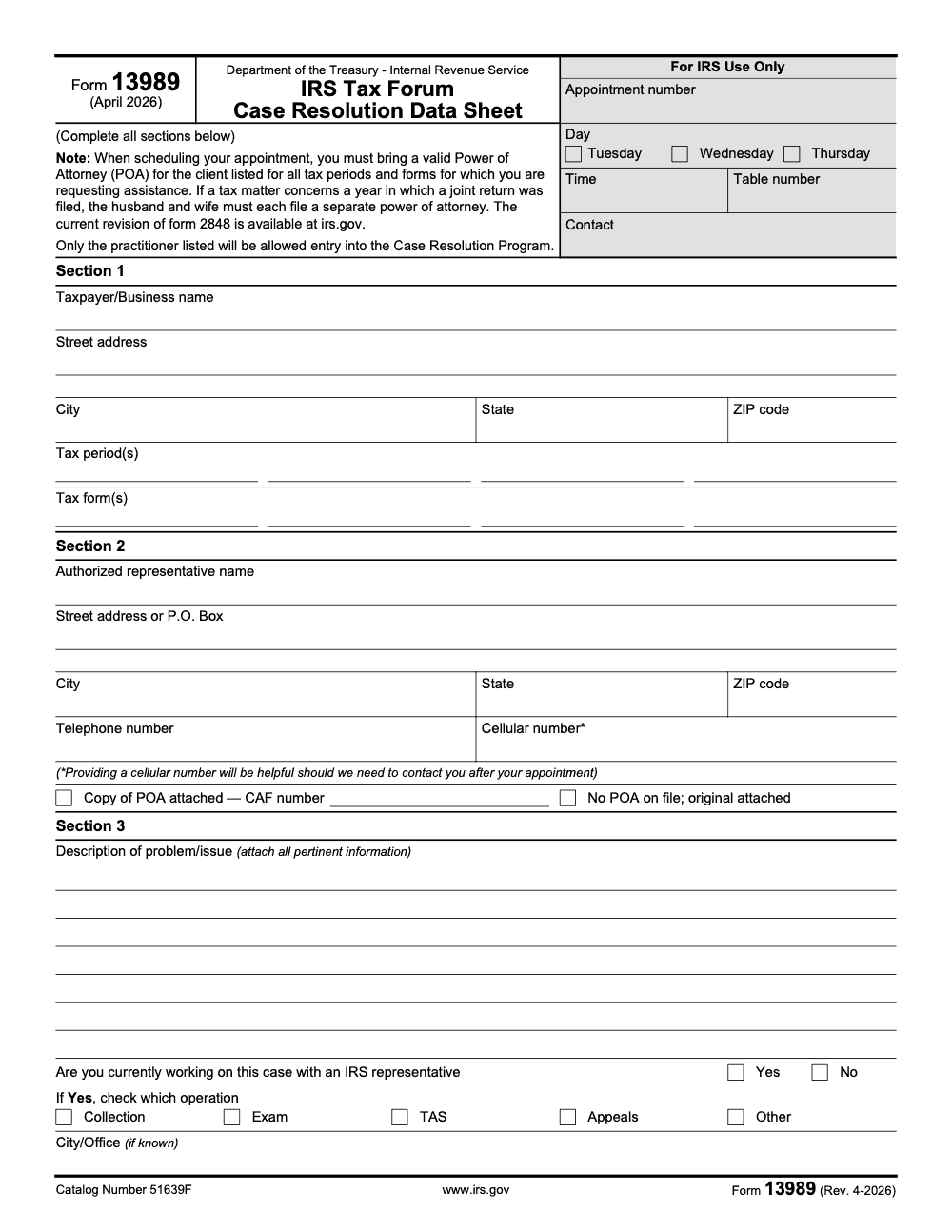
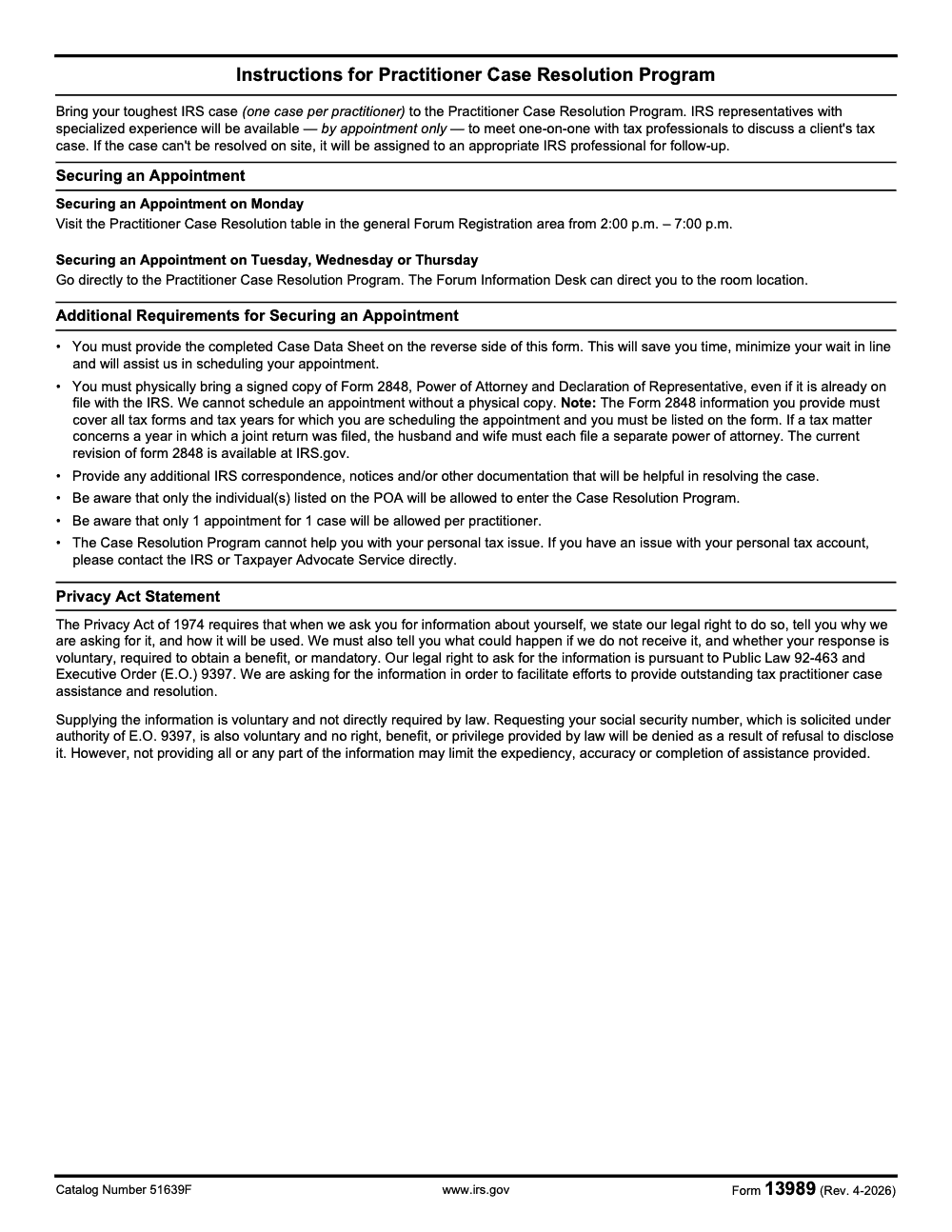
Form 13989 is the IRS Case Resolution Data Sheet – a three-section intake form practitioners complete in advance to secure one Case Resolution Program appointment for one tough client case at an IRS Nationwide Tax Forum (per Form 13989, Rev. April 2026, catalog number 51639F, as published on IRS.gov). To lock in a slot, bring the completed sheet plus a physical signed Form 2848 that covers every tax year and every form in scope, then visit the Practitioner Case Resolution table in the general Forum Registration area Monday between 2:00 p.m. and 7:00 p.m., or the Case Resolution Program room itself Tuesday, Wednesday, or Thursday.
An IRS Nationwide Tax Forum books one Case Resolution appointment per practitioner per event, and that single slot is one of the most underused tools available to anyone carrying a stubborn client case. A multi-year payroll matter that had bounced between Collection and Exam for eighteen months once moved further in twenty-eight minutes at that table than it had in all the phone calls before it. Form 13989 is the data sheet that makes the appointment possible.
It is a three-section intake sheet you complete in advance, not something filed with the IRS, and it only works paired with a physical signed Form 2848 covering every tax year and every form in scope. Some information-only situations use Form 8821 instead, but 8821 does not authorize representation, so most Forum work still needs 2848. Bring the sheet, the authorization, and a folder of notices indexed in date order, and the room can actually research and resolve rather than just listen.
Key Takeaways
- Form 13989 is a two‑page Case Resolution Data Sheet used at IRS Nationwide Tax Forums to organize a taxpayer’s issue for expert review. It is not filed with the IRS, it is used to standardize intake at the Forum.
- You are limited to one case per practitioner per event, so prepare your single strongest matter and package it well.
- Bring valid authority, usually a signed Form 2848. Some information‑only situations use Form 8821, but 8821 does not authorize representation, so most Forum case work still requires 2848.
- Submit your completed Form 13989 and supporting files as early as your confirmation allows, then bring a printed copy to the room. Early submission helps the team triage and research before you arrive.
- If your issue cannot be resolved on site, the case will be assigned to an appropriate IRS professional for follow up – which may include the Taxpayer Advocate Service.
What Form 13989 is, and who needs it
Form 13989, titled IRS Tax Forum Case Resolution Data Sheet, captures the essentials of your case in a compact, reviewer‑friendly format. You will enter the taxpayer’s identifiers, tax periods and forms, a concise description of the issue, prior IRS contact, and the specific action you seek. It is designed for the Forum’s Case Resolution program so IRS specialists can scan, route, and prepare quickly.
Who uses it. Practitioners who book a Case Resolution appointment at an IRS Nationwide Tax Forum, typically EAs, CPAs, and attorneys handling notices, account issues, exam items, or collection problems that benefit from an on‑site discussion with an IRS specialist. The form standardizes intake so the right people review the right documents without guesswork.
Why it matters. The Case Resolution room runs on time, documentation, and authority. A clean 13989 plus a tight packet reduces back‑and‑forth, protects your limited appointment window, and increases the odds of leaving with next steps that actually move the file. The IRS created the data sheet to make that possible.
Note on freshness. Forum locations and operational details update each year. Always check your city’s event page and your confirmation email for the current submission steps and on‑site instructions.
When to use it at the Forum
Use Form 13989 twice, first when you schedule, and again when you arrive. After you book your slot, follow the confirmation email to upload the completed form and your supporting PDFs, then bring a printed copy to the appointment. Submitting early lets the team triage and start research so your on‑site time goes to decisions, not data chase.
On‑site logistics. The Forum typically opens in‑person scheduling on Monday afternoon at the Practitioner Case Resolution table in the general Forum Registration area, not at the program room itself, then runs Case Resolution check‑in during conference hours on Tuesday, Wednesday, and Thursday. Exact times can vary by city and year, so rely on your confirmation and on‑site signage. The legacy Form 13989 instructions show Monday afternoon setup and reinforce the one‑case rule, which still applies.
Pro tip. Bring two printed copies of Form 13989 and a table of contents for your packet. One copy stays with intake, one rides with you for reference during review. It sounds simple, and it saves minutes you cannot spare.
Check eligibility and required authorization
Before you touch the booking form, confirm you meet three basics.
- You are registered for the same city where you want the appointment. That is your ticket into the Case Resolution room.
- You have authority in hand. The program expects a signed Form 2848 that covers the exact tax periods and forms on your case. Bring the signed original or a signed copy, even if there is already a POA on file in the CAF, because the Case Resolution desk verifies it on the spot, and the IRS will not schedule the appointment without a physical copy.
- You understand what 8821 can and cannot do. Form 8821 authorizes disclosure of information, not representation. It can be useful for transcripts or information‑only matters, however it will not let you advocate or consent on the client’s behalf. When you expect negotiation or agreement, use 2848.
Quick rule: if you need to speak and act for the taxpayer, bring 2848, not 8821. If you only need the IRS to share information, 8821 can work.
Schedule your Case Resolution appointment
Online pre‑booking steps
- Register for your Forum city and pre‑book a Case Resolution slot as early as possible, popular times go fast.
- Use your confirmation email to upload a signed 2848, or 8821 if appropriate, along with your completed Form 13989 and key supporting documents. Follow file‑naming and size limits exactly, the desk relies on these files for pre‑work.
- Respect the one‑case‑per‑practitioner limit, then choose the case where a targeted IRS conversation can create immediate movement, for example, identity theft holds cleared with proof, credit misapplication fixed with transcripts, or exam items closed with missing schedules supplied.
On‑site setup hours
If you still need an appointment, you can usually schedule on Monday afternoon at registration, then at the Case Resolution table during conference hours on Tuesday, Wednesday, and Thursday. Exact hours are announced for each city, so double‑check the posted times and your confirmation. Arrive with the same signed authorization you uploaded to avoid a last‑minute scramble.
Compliance note. If your client filed a joint return for a year in scope, each spouse must have a separate 2848 for that year. Intake will look for that detail, and missing spousal authority is a common reason appointments stall.
Gather your documents, then build a clean packet
Here is the checklist I recommend for a smooth intake. Tailor it to your case so every page earns its spot.
- Signed 2848 that matches tax periods and forms in scope, or 8821 if you only need disclosure.
- Form 13989, completed and signed.
- IRS notices with numbers and dates, for example CP2000, LT11, Letter 525. Put the most recent on top.
- Transcripts, account and wage‑income as relevant, annotated where the issue appears.
- Filed returns and amended returns in scope, with key schedules tabbed.
- Proof, such as canceled checks, bank statements, 1099 corrections, ID theft affidavits, or employer letters.
- Prior contact log, names, dates, and what happened.
File‑naming recipe. Use TaxpayerName_TaxYear_DocumentType, for example, Rivera_2022_AccountTranscript or Rivera_2021_Letter525. Keep names short, consistent, and searchable. Intake teams and reviewers appreciate predictable labels.
Small wins that save minutes:
- Index the packet by year and document type.
- Highlight amounts in dispute in yellow with a pen, not just in your narrative.
- Add a one‑page timeline with dates, notice numbers, and who did what, so reviewers can track the story at a glance.
Accountably perspective. Many firms already build standardized workpapers for tax prep and reviews. The same structure helps here, you reduce reviewer time when your packet mirrors your internal SOPs, for example, uniform naming, checklists, and version control. If your team needs help standardizing files for events like the Forum, Accountably can set up templates and QC steps that your staff and offshore teams can follow without drift.
Complete Form 13989, line by line
Section 1, taxpayer and case identifiers
Enter the legal name, street address, city, state, ZIP code, tax periods, and tax forms exactly as IRS records show. Do not abbreviate names, and do not round periods. Matching IRS data avoids avoidable validation questions at intake.
Section 2, your authority and contact
List your contact details and indicate whether a copy of your 2848 is attached. If your CAF already shows an authorization, you still bring a signed copy to the appointment. Intake will check that the listed representative matches the case and that the periods and forms align with what you request, and only individuals named on the Form 2848 will be allowed entry, so an unlisted colleague, assistant, or client cannot attend.
Section 3, description of problem and requested action
Write a tight, factual summary. Aim for five to eight sentences that answer four questions.
- What happened, include notice numbers and dates.
- Which years and forms are affected, include dollars where relevant.
- What has been tried, calls, letters, IDRs, or appeals.
- What you want the IRS to do next, release a hold, correct a misapplied credit, adjust a penalty, close an exam item.
Keep opinions out, let documents carry weight. Use the packet to prove each fact you assert.
2848 vs 8821, quick comparison
| Item | Form 2848, Power of Attorney | Form 8821, Tax Information Authorization |
| What it permits | Representation, speak and act for taxpayer within scope | Receive and inspect tax information |
| Best for | Advocacy and resolution at Case Resolution | Gathering records and transcripts |
| Signature rules | Taxpayer and representative sign | Taxpayer signs |
| Common pitfall | Periods and forms do not match the case | Assumed to allow representation, it does not |
Most Case Resolution conversations benefit from 2848, because you are asking the IRS to take action. Use 8821 when you only need access to information.
Submit and confirm, then bring paper
After you verify names, TINs, periods, and signatures, upload your Form 13989 and supporting files using the secure link from your confirmation. Follow the file‑type and size guidance to avoid rejections. Then bring a printed copy of Form 13989 and your signed 2848 or 8821 to the room. The desk will use your uploads for pre‑work, and they will rely on your printed packet during review.
Quality check before you click submit:
- Compare every notice number on your form to the PDFs in your packet.
- Confirm your requested action appears in both your narrative and your supporting evidence.
- Make sure your 2848 covers every period and form you list, joint years need separate spousal POAs.
What to expect at the appointment, and after
On arrival, staff will confirm your registration and authority, then an IRS or TAS specialist will review your form and packet, ask clarifying questions, and conduct on‑site research where possible. If your issue can be resolved on site, they will document the outcome and next steps. If not, they will record findings and assign the case to an appropriate IRS professional for follow up, which may include opening a Taxpayer Advocate Service case. You will leave with your notes and, if applicable, a TAS case number.
TAS follow up. If your case is referred, expect periodic updates from your assigned advocate. TAS provides phone and local office options if you need to check in. Their main public number is 877‑777‑4778, and you can also request help with Form 911 when appropriate.
Note on timelines. Response times can vary with volume and the complexity of your issue. TAS publishes updates about caseload and expected contact windows, so set your client’s expectations with those realities in mind.
A quick workflow you can copy
- Pick your single strongest case for this city.
- Pull transcripts and notices, then write a 1‑page timeline.
- Draft your Form 13989 narrative, five to eight sentences, facts first.
- Confirm your 2848 covers every period and form, joint years need separate spousal POAs.
- Name and index files using a clear pattern.
- Upload everything through the confirmation email link, then bring a printed copy to the room.
If you run a firm, build this into your SOPs
You will feel the difference when intake is muscle memory for your team. Standard checklists, file naming, and review notes shorten appointments and reduce rework later. If you want outside help to standardize workpapers or to prep clean Form 13989 packets at scale, Accountably can integrate trained offshore staff into your workflow, your systems, and your templates so your team walks into the room organized and confident. Mention this requirement to your delivery partner before peak travel so capacity is reserved for Forum season.
Common Mistakes We See Every Season
Most Case Resolution appointments that under-deliver fail in prep, not in the room. The same handful of mistakes show up every Forum season, and each one quietly costs the practitioner a slot, a signature, or a workable conversation.
Reusable Checklists
These three checklists are copy-paste ready for the firm SOP file. Treat them as the minimum bar for any Forum appointment your team prepares.
Single-case selection
- Confirm the case is for a client, not the practitioner's own tax account.
- Pick the case where an on-site conversation can move the file further than normal channels.
- Note the IRS function already touching the case (Collection, Exam, TAS, Appeals, or Other) so Section 3 can name it.
- Capture the city or office working the case for the Section 3 disclosure.
- Get written client consent to discuss the matter at the Forum.
Form 2848 packet
- Use the current revision of Form 2848 available on IRS.gov.
- List the practitioner's name exactly as it appears on Forum registration.
- Cover every tax year identified in Section 1 of Form 13989.
- Cover every tax form identified in Section 1 of Form 13989.
- Print and sign a separate Form 2848 for each spouse on any joint return year in scope.
- Bring a signed paper copy even if the POA is already on the CAF.
- Confirm that only practitioners listed on the Form 2848 plan to enter the appointment.
Appointment-day packet
- Form 13989 fully completed across Sections 1, 2, and 3, signed and printed.
- Physical signed Form 2848 covering every period and form in scope.
- Indexed IRS notices and correspondence in date order.
- Most recent account transcripts for every period in scope.
- One-page case summary keyed to the Section 3 problem description.
- Cellular number entered in Section 2 so the IRS can follow up after the appointment.
- Monday securing: head to Forum Registration between 2:00 p.m. and 7:00 p.m. Tuesday, Wednesday, or Thursday: go directly to the program room.
Keep 13989 Season From Stalling
The bottleneck for Forum season is rarely the appointment itself, it is everything that happens in the two weeks before the practitioner walks into Registration. Per Form 13989 (Rev. April 2026), each practitioner gets one appointment for one case, and the Monday securing window is compressed into the 2:00 p.m. to 7:00 p.m. block at the Practitioner Case Resolution table inside general Forum Registration. That is a thin window to land travel, a printed Form 2848, a completed three-section data sheet, and an indexed notice packet all at once.
The fix is to treat Forum prep as a small production run rather than a one-off scramble. Standardize the packet, standardize the review, and tag the case from the moment the team picks it.
- Build a Section 1 intake template that captures taxpayer name, full address, every tax period in scope, and every tax form at issue, so the same fields can mirror straight onto Form 2848.
- Lock a Section 2 representative block that pulls the practitioner's CAF number, cellular number, and address from a master record, so nothing gets mistyped under deadline.
- Standardize the Section 3 problem description to a fixed shape: factual summary, current IRS operation (Collection, Exam, TAS, Appeals, or Other), the city or office working the case, and the specific decision needed from the Case Resolution rep.
- Run a two-stage internal review on every packet, preparer assembles and senior signs off, before the Form 2848 is printed and the file is stapled.
- Calendar the Monday 2:00 p.m. to 7:00 p.m. securing window the moment travel is booked, and assign a backup practitioner for the slot in case of flight delays.
If your team carries multiple Forum cases across the summer schedule, this is the kind of standardized intake we run inside Accountably's outsourced tax services. Trained offshore staff handle the data sheet, the POA, and packet assembly to your templates, so the practitioner walks into the room with a clean file and the real conversation can start on time.
FAQs
No. Form 13989 is a two‑page data sheet used inside the IRS Nationwide Tax Forum Case Resolution program. You use it to standardize your case intake so IRS experts can triage and research. It is not filed with a tax return.
If you plan to advocate or consent on the taxpayer’s behalf, bring Form 2848 that matches the years and forms in scope. Form 8821 only authorizes disclosure of information, which can be fine for transcripts or simple account checks. Many Case Resolution matters still require 2848.
No. The program allows one appointment for one case per practitioner at each event. Choose the case where an on‑site conversation can create the biggest movement.
As soon as you receive your confirmation email with the secure upload instructions. Early submission speeds triage and improves on‑site results, and you should still bring a printed copy.
The team will document findings and next steps. If the case cannot be resolved on site, it will be assigned to an appropriate IRS professional for follow up – which may include the Taxpayer Advocate Service. If a TAS case is opened, you will receive a case number. You can check eligibility for TAS help and contact your local office if needed.
The IRS publishes upcoming locations and dates on its Nationwide Tax Forum page, and the Forum site posts save‑the‑date details and registration windows. Check both for the latest.
Other forms this guide names
About this guide
Accountably helps US CPA, EA, and accounting firms hire trained accountants and tax preparers in India.
About us Reviewed byJugal Thacker, CPAFounder and CEO at Accountably
A Washington-licensed CPA with 7+ years inside US firms – PwC, a real-estate tax practice, then a full-service firm, rising from reviewer to manager to advisory. This article was reviewed against current IRS guidance for the 2025 tax year and updated for filers preparing late returns, amendments, and 2026 estimates.
View profile →How we research, review, and update this guide
Every Accountably guide is researched against primary IRS sources, reviewed by a U.S. CPA, and refreshed as guidance evolves. Read our Editorial Guidelines to see how we source, fact-check, and update our content.




