
Summarize this article with AI
In Brief
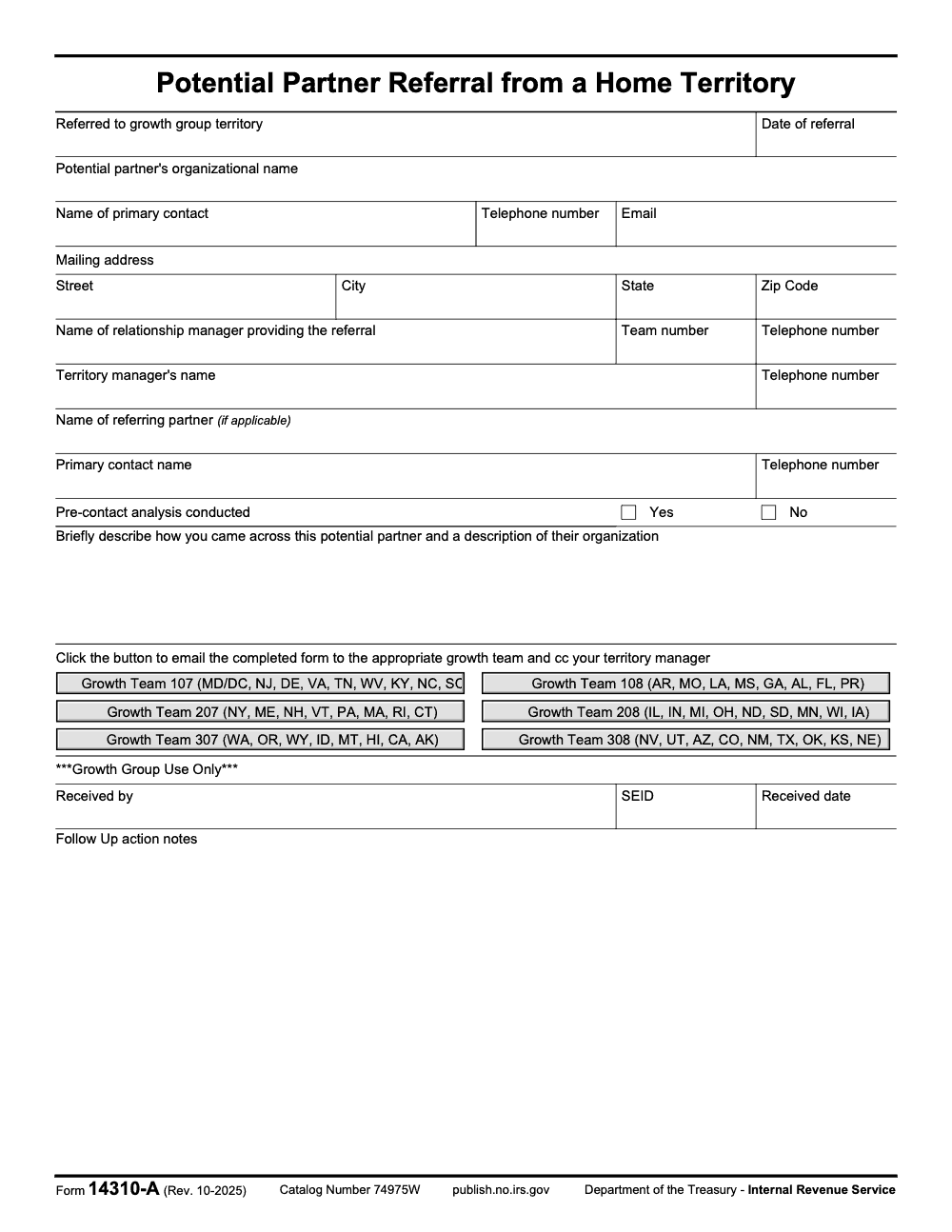
Form 14310-A (Rev. 10-2025) is the IRS Potential Partner Referral from a Home Territory form, completed by an IRS relationship manager to route a potential VITA or TCE partner organization to one of six geographic growth teams – 107, 108, 207, 208, 307, or 308 – chosen by the partner's state or territory. Every submission email must CC the referrer's territory manager, and there is no annual filing deadline and no IRC §6651 penalty regime, per the form footer published by the Department of the Treasury, Internal Revenue Service.
Two forms with nearly identical numbers do different jobs, and circulating the wrong one costs weeks during peak recruiting. Form 14310-A is the Potential Partner Referral from a Home Territory, completed by an IRS relationship manager to route a candidate VITA or TCE organization to a geographic growth team. Form 14310, by contrast, is how individuals and organizations sign up to volunteer.
The current revision is Rev. 10-2025. A 14310-A submission routes the organization to one of six geographic growth teams, 107, 108, 207, 208, 307, or 308, chosen by the partner's state or territory, and every submission email must CC the referrer's territory manager. If your goal is adding a hosting organization, use 14310-A; if it is recruiting preparers or reviewers, use 14310.
Key Takeaways
- Form 14310-A is for potential partner referrals across IRS territories. Latest revision is Oct 2025.
- Form 14310 is for volunteer and partner sign up inquiries from individuals or organizations, routed by the IRS for local follow up. Latest revision is Oct 2025.
- If your goal is to add a new hosting organization, use 14310-A. If your goal is to recruit preparers, greeters, reviewers, or instructors, use 14310.
- Expect the 14310-A basics to include items like referral date, organization name, primary contact, phone, email, and mailing address, which are common across public templates. Verify fields against the current IRS PDF before you submit.
- Always download or open the most recent IRS form, not an old copy in your share drive. The IRS forms index lists current titles and revision dates.
What Form 14310-A is and how it fits into VITA/TCE outreach
- What it is: a short referral form that lets an IRS home territory share a potential community partner with the IRS growth group or another territory. It does not replace the volunteer sign up or the grant application workflow, and it is not itself a taxpayer-facing return, schedule, or election. Form 14310-A is an internal IRS administrative referral form (it carries no income, deduction, credit, payment, or taxpayer-signature fields) and is not filed by taxpayers.
- Who uses it: IRS territory staff and program partners who are passing along a qualified lead, usually a nonprofit, library, school, city office, or faith-based group willing to sponsor, host, or support a free tax prep site. The form itself is completed and submitted only by the IRS relationship manager in the home territory (the name captured in 'Name of relationship manager providing the referral'); external partners and the potential partner organization do not fill it out themselves.
- When to use it: when an organization expresses interest in partnering and you need IRS routing to the correct geography, especially outside your immediate territory.
- What happens after: the growth group or receiving territory follows up, discusses capacity, training, and site setup, and may point the organization’s people to the volunteer and partner sign up form for individual contacts.
How Form 14310-A differs from Form 14310
Side by side, in words
- Form 14310-A, Potential Partner Referral from a Home Territory Purpose, move a partner lead to the right IRS territory. Primary data, organization details and a main contact. Audience, IRS program and outreach staff plus coordinators managing leads.
- Form 14310, Partner and Volunteer Sign Up Purpose, capture interest from prospective volunteers and organizations, then route for local follow up. Primary data, individual contact details, location, roles, languages, and related preferences. Audience, the general public and partners.
If you only need individuals to raise their hand, send Form 14310. If you discovered a new host site and need IRS to route the opportunity, complete 14310-A.
What you will typically gather for 14310-A
While the official IRS PDF should be your source of truth, public editors that mirror IRS forms show common fields such as the date of referral, the territory to which the lead is being referred, the potential partner’s organization name, the primary contact’s name, telephone, email, and mailing address. Use these as a working checklist, then confirm against the current IRS PDF before you submit or circulate internally.
- Organization legal name and DBA if different
- Primary contact full name and title
- Phone number, email, and mailing address
- City, state, and ZIP for the service area
- Brief note on interest, for example hosting, staffing, or outreach
- Any timing constraints, for example evenings only or weekends only
A quick reality check helps. If you are collecting information inside a document editor, lock in version control and add a short internal note that your team is using the Oct 2025 revision for both 14310-A and 14310. That single line prevents most “which form” headaches later.
How to complete Form 14310-A online, step by step
You can fill Form 14310-A with any modern PDF editor. Many coordinators use cloud editors to reduce email back and forth. If you choose a third‑party editor, confirm you are loading the current IRS PDF and not a vendor’s recreated version. When in doubt, grab the latest title and revision date from the IRS forms index first, then upload that file into your editor.
Before you start
- Confirm the form title reads Potential Partner Referral from a Home Territory and the revision shows Oct 2025.
- Gather the partner’s legal name, main contact, phone, email, and mailing address.
- Note which IRS territory should receive the referral, routed to one of six geographic growth teams (107, 108, 207, 208, 307, 308) based on the potential partner's state or territory. There is no single national mailbox; routing is geographic. If you are unsure which team applies, your IRS SPEC relationship manager will advise.
Open, verify, and prepare
- Open your editor of choice and create a new file from the official IRS PDF.
- Verify the fields you see match the IRS version. If a web template shows extra fields you do not recognize, delete them or switch to the official PDF.
- Turn on autosave and keep the filename simple, for example IRS-Form-14310-A-Referral-2025-OrgName.pdf.
Complete the core fields
Based on widely used templates that mirror IRS form layouts, expect to enter the following items. Use this list as a guide, then check your PDF to confirm field names exactly as they appear.
| Field you will see | What to enter, and tips |
| Date of referral | Use a clear format, for example 2025-11-03. |
| Referred to growth group or territory | Enter the receiving territory, which maps to one of six geographic growth teams listed on the form: Team 107 (MD/DC, NJ, DE, VA, TN, WV, KY, NC, SC), 108 (AR, MO, LA, MS, GA, AL, FL, PR), 207 (NY, ME, NH, VT, PA, MA, RI, CT), 208 (IL, IN, MI, OH, ND, SD, MN, WI, IA), 307 (WA, OR, WY, ID, MT, HI, CA, AK), or 308 (NV, UT, AZ, CO, NM, TX, OK, KS, NE). Note that MD and DC share Team 107 and Puerto Rico routes to Team 108 (not its own team). If unknown, add a short note for SPEC to route. |
| Potential partner’s organization name | Use the legal name. Include DBA in parentheses if used publicly. |
| Primary contact | First and last name, plus title if helpful. |
| Telephone number | Include area code. Use digits only, for example 5551234567. |
| Enter a monitored inbox, not a generic no‑reply address. | |
| Mailing address | Street, city, state, ZIP. Use the location for official correspondence. |
Pro tip, add a one‑line summary such as Interested in hosting two evenings per week, bilingual staff on site. It speeds the first call.
Save, share, and track
- Save a clean PDF and a working copy.
- Share securely with your IRS SPEC contact using your organization’s approved channel. If you are using a cloud editor that advertises e‑signing and link sharing, remember that 14310-A is a referral document, not a contract. Keep access tight and use expiring links when available.
- Keep a short internal log that lists the referral date, who received it, and when you expect a reply. IRS public guidance suggests follow up happens after you submit the volunteer and partner sign up for individuals, so plan outreach steps and onboarding conversations in parallel.
What if my use case is individual volunteer sign up?
If you are recruiting people rather than organizations, point them to Form 14310, Partner and Volunteer Sign Up. The IRS volunteer page links directly to the sign up and explains what happens next, including training and local coordinator contact. Using the proper form helps the IRS route your interest to the right sponsoring organization.
- Primary details to gather for individuals include name, email, phone, city, state, ZIP, roles of interest, and languages, all captured on the sign up.
- The IRS indicates that volunteers are routed to local programs and invited to a virtual orientation after submitting interest. Timelines vary by season.
Security and privacy basics you should not skip
- Always use the current IRS form and avoid storing personal details in old drafts. The IRS index is the most reliable place to confirm titles and revision dates.
- Limit access to the referral file to a small group until contact is established.
- Redact sensitive notes that are not needed by the receiving territory.
- Maintain a simple record of when and how you transmitted the referral for audit readiness.
At Accountably, we care a lot about controlled delivery structure and secure workflows. If you manage a tax or accounting operation alongside VITA or TCE volunteering, the same discipline applies here, keep version control tight, set clear owners, and track handoffs without flooding inboxes.
Common scenarios, which form to use, and what to do next
You discovered a new host site
- Scenario, a library branch manager offers space two nights per week from February to April.
- Use, Form 14310-A to share the lead with the correct IRS territory, then introduce the branch staff to the volunteer and partner sign up for individual contacts.
Your nonprofit wants to co‑sponsor and staff a site
- Scenario, a community nonprofit wants to provide volunteers and outreach but cannot host in their building.
- Use, Form 14310-A to refer the organization as a partner candidate, then share Form 14310 with individual volunteers to capture their roles and locations.
You are running volunteer recruitment only
- Scenario, your goal is 50 preparers and 15 greeters across three locations.
- Use, Form 14310 for all individual sign ups. Do not use 14310-A unless you are forwarding a partner organization lead between territories.
Checklist for clean, fast referrals
- Verify title and revision dates, 14310-A and 14310 are Oct 2025 revisions.
- Confirm the receiving territory. If in doubt, ask your IRS SPEC contact.
- Use official PDFs, then upload to your editor if needed.
- Fill core contact fields accurately. Avoid placeholder emails or shared inboxes that are not monitored.
- Save and share with version control and expiring links where possible.
- Track the referral date and expected follow up window in your intake log.
Training and next steps after referrals
Once the partner lead is routed, the receiving territory helps the organization understand training, certification, and site operations. The IRS points volunteers to Link & Learn Taxes for self‑paced training and certification paths, while site coordinators rely on the coordinator corner and volunteer resources. Share these resources early so partners know what will be expected.
- Link & Learn Taxes, self‑paced e‑learning and certification paths.
- IRS Tax Volunteers hub, program overview, recruiting cycle, and resource links.
- Partner resource center, background on roles, VITA grants, and SPEC contacts.
A small head start goes a long way. Share training links with your prospective partner while the referral is processing so they can line up internal champions and calendar time.
What not to do
- Do not reuse an outdated version from last year’s folder. Pull the Oct 2025 revision.
- Do not send individual volunteers to 14310-A. Use 14310 for people and keep 14310-A for partner referrals.
- Do not attach sensitive internal budget or donor data to the referral. Keep it lean, contact‑first.
- Do not assume the receiving territory knows local constraints. Add a one‑liner about space, hours, or language access to set expectations.
Final pointers for coordinators and partners
- Keep it simple. Accurate contact info and the correct territory are what matter most.
- Keep it current. Validate title and revision dates before you circulate any form.
- Keep momentum. Share training links with the partner while the referral is in flight so onboarding starts sooner.
If you run a tax or accounting team and care about disciplined delivery, you already know the value of clean intake and clear handoffs. That mindset is what turns a good partner lead into a productive VITA or TCE site. When your firm needs that same operational discipline at scale, Accountably places trained offshore preparers inside your workflow with multi-layer review that protects quality, security, and deadlines.
Common Mistakes We See Every Season
Form 14310-A breakdowns usually trace to one of three errors: confusing the referral form with a taxpayer return, skipping the territory manager CC, or routing to the wrong growth team. The same patterns surface every VITA and TCE recruiting cycle.
Reusable Checklists
The checklists below are copy-paste ready for SOPs and intake folders. Each one maps to a step that fails most often in 14310-A submissions, based on the form's documented fields and submission rule.
Pre-submission checklist
- Form footer reads "Form 14310-A (Rev. 10-2025)" with Cat. No. 74975W
- Partner's state or territory mapped to the correct growth team (107, 108, 207, 208, 307, or 308)
- Organization legal name entered, with DBA in parentheses if used publicly
- Primary contact name, telephone, and email captured; no shared no-reply inbox
- Mailing address split across Street, City, State, and Zip Code sub-fields
- Pre-contact analysis marked Yes or No (not left blank)
- Narrative field describes both how you discovered the partner and the organization profile
- Name of referring partner left blank unless an external partner sourced the lead
Routing and CC verification
- Email is addressed to the in-form button for the correct growth team only
- Territory manager's email is on the CC line, not BCC
- Subject line includes the form name and partner organization name for retrieval
- Attached PDF is the completed referral, not a draft template
- Growth Group Use Only block stays blank: Received by, SEID, Received date, Follow Up action notes
- Send confirmation logged in your intake tracker with date and time
Post-submission tracking
- Referral date and partner name added to your intake log
- Receiving growth team and CC'd territory manager noted in the log
- Expected follow-up window communicated to the partner organization
- Form 14310 link shared with partner staff who want to volunteer individually
- Training resources (Link & Learn, partner resource page) sent to the partner's program lead
- Calendar reminder set for a status check if no growth-team response within the agreed window
Keep 14310-A Season From Stalling
VITA and TCE partner intake stalls when referrals sit in the wrong inbox or miss the carbon-copy step. The Oct 2025 revision of Form 14310-A routes potential partners across six geographic growth teams – 107, 108, 207, 208, 307, and 308 – and every email must CC the referring territory manager, per the submission instruction printed by the Department of the Treasury, Internal Revenue Service.
The fix is procedural, not heroic. Lock the routing call before the email goes out, keep the Growth Group Use Only block blank at referral time, and treat the form's narrative field as a real intake brief rather than a one-line stub.
- Verify the partner's state maps to the correct growth team; MD and DC share Team 107, and Puerto Rico routes to Team 108 rather than a separate team
- CC the territory manager named in the form's Territory manager's name field (a separate field from the optional Name of referring partner block); the CC is documented procedure, not optional
- Leave the four Growth Group Use Only fields (Received by, SEID, Received date, Follow Up action notes) blank at referral; the receiving Growth Group completes them on receipt
- Confirm the footer reads "Rev. 10-2025" before circulating; older revisions may carry different growth-team groupings
- Use the narrative field to capture both how you discovered the partner and a description of the organization; both elements are required, not one or the other
At Accountably, we build the same kind of routing discipline into U.S. tax and accounting delivery, with clear handoffs, named owners, and documented carbon-copy rules that hold under peak load.
FAQs
It is the IRS Potential Partner Referral from a Home Territory form. It helps route an interested organization to the proper IRS growth group or territory for follow up about VITA or TCE partnership. It is not the volunteer sign up.
Individuals use Form 14310, Partner and Volunteer Sign Up. That form collects personal details, roles, location, and language preferences and is routed for local follow up and training invitations.
Check the IRS Forms, Instructions and Publications index. It lists both Form 14310-A and Form 14310 with titles and the latest revision dates, currently Oct 2025. Use those dates to confirm you have the correct files.
Public editors that mirror IRS forms show fields like date of referral, the territory being referred to, the organization’s legal name, and a primary contact’s name, phone, email, and mailing address. Always validate your working copy against the current IRS PDF.
No. It is a referral tool for potential partners. Grants are a separate program with its own timeline and application. You can review IRS updates about VITA and TCE grants on the IRS newsroom and program pages.
Timelines vary by season and territory. The IRS indicates that, for individual volunteer sign ups, follow up often includes a virtual orientation invite within roughly two weeks. For partner referrals, your SPEC contact or receiving territory will set expectations during the first exchange.
Send both when appropriate. Use 14310-A to route the organization lead to the correct territory and share Form 14310 with the organization’s staff who want to volunteer. That parallel path speeds training, site planning, and communications.
Use your IRS SPEC territory contact or the Partner resource page for direction. If you are unsure whom to ask, the partner page lists how to get started and how to connect with IRS outreach.
Other forms this guide names
- Form 14310: How to Complete the 2025 IRS VITA/TCE Sign Up
About this guide
Accountably helps US CPA, EA, and accounting firms hire trained accountants and tax preparers in India.
About us Reviewed byJugal Thacker, CPAFounder and CEO at Accountably
A Washington-licensed CPA with 7+ years inside US firms – PwC, a real-estate tax practice, then a full-service firm, rising from reviewer to manager to advisory. This article was reviewed against current IRS guidance for the 2025 tax year and updated for filers preparing late returns, amendments, and 2026 estimates.
View profile →How we research, review, and update this guide
Every Accountably guide is researched against primary IRS sources, reviewed by a U.S. CPA, and refreshed as guidance evolves. Read our Editorial Guidelines to see how we source, fact-check, and update our content.




