
Summarize this article with AI
In Brief
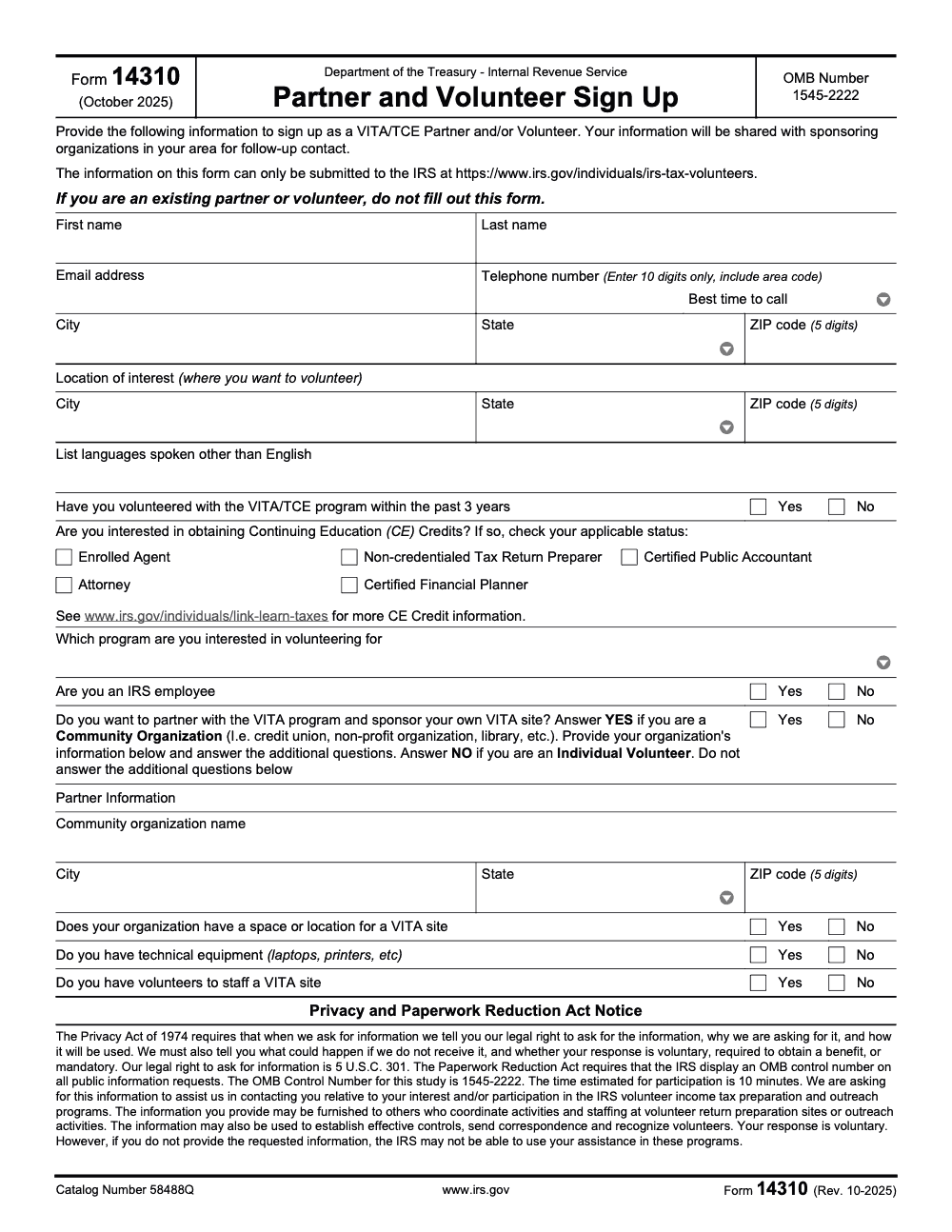
Form 14310 is the IRS VITA/TCE Partner and Volunteer Sign Up, not a tax return or refund form. The current revision is Form 14310 (Rev. 10-2025), OMB Control Number 1545-2222, and the IRS estimates completion takes about 10 minutes (per the Paperwork Reduction Act Notice printed on the form). It can only be submitted online at the IRS Tax Volunteers page; there is no mail or fax channel. Existing VITA/TCE partners and volunteers should not refile, see our other IRS form guides for the form your situation actually needs.
A common mix-up is reaching for Form 14310 expecting something tied to a refund or a return. It is neither. Form 14310 is the IRS VITA/TCE Partner and Volunteer Sign Up, the way community organizations and individuals raise their hand for those programs. The current edition is Rev. 10-2025, and the IRS estimates it takes about 10 minutes.
Providing the information is voluntary, and you submit through the IRS volunteer page rather than by mail or fax. A few formatting rules trip people up: the telephone field wants 10 digits, the ZIP field wants 5 digits, and the form asks about volunteer history over a 3-year lookback. Partner applicants answer 3 additional Yes/No questions beyond the individual volunteer fields.
Key Takeaways
- Form 14310, Partner and Volunteer Sign Up, is how community organizations and individuals express interest in the IRS VITA and TCE programs. The current edition is Rev. 10-2025.
- Providing the information is voluntary. The IRS estimates it takes about 10 minutes to complete.
- Submit your details through the IRS volunteer page at irs.gov/individuals/irs-tax-volunteers so your inquiry routes to local sponsoring organizations.
- The telephone number field requires 10 digits and the ZIP code field requires 5 digits. The form asks about prior volunteer history over a 3-year lookback.
- Partner applicants (community organizations) answer 3 additional Yes/No questions beyond the individual volunteer fields.
- For CE Credit details, VITA and TCE volunteers can review the Link & Learn Taxes page at irs.gov/individuals/link-learn-taxes. The form lists 5 credentialed-professional statuses eligible for optional CE Credits.
Step by step, complete Form 14310 without second guessing
Keep your ID nearby, have your calendar open, and if you maintain a PTIN for your paid practice, note it for CE posting later in Link & Learn. Then follow this short flow.
- Open the current PDF and confirm the header shows Rev. 10‑2025.
- Review the fields, jot best time to call, list any languages, and decide your location of interest.
- Submit your details through the IRS volunteer page so your inquiry routes to local sponsors.
- Watch for your coordinator’s email with orientation steps and your Link & Learn training path.
Version control in plain English
Always match the year and revision in the header. If your file shows 2015 or 2020, replace it with the October 2025 edition. On the public forms listing, Form 14310 shows an October 2025 revision, which aligns with the current PDF.
Where your information goes
The IRS shares your inquiry with sponsoring organizations near you. They will contact you with training links, scheduling options, and whether the site is in person, virtual, or hybrid. This centralized intake is why Form 14310 works, your single form reaches the right local sponsors without guesswork.
CE credits, PTINs, and your training path
If you want CE credit, plan to certify in Link & Learn Taxes and complete minimum service hours in an eligible role such as preparer, quality reviewer, or instructor. The IRM explains the program clearly, volunteers can earn up to 18 hours when a specialty course is included, typically 14 hours for Advanced plus 4 for a specialty. SPEC reports CE for volunteers who request it and have a valid PTIN in Link & Learn.
If you only volunteer and receive no compensation, you do not need a PTIN to prepare returns at a VITA or TCE site. PTINs are for compensated preparers. If you want your CE to post to a PTIN account, add a valid PTIN in your Link & Learn profile. Attorneys and CPAs can earn SPEC CE without a PTIN, and if they provide one, their PTIN account reflects hours.
Your certification checklist
- Volunteer Standards of Conduct, score 80 or higher.
- Intake, Interview and Quality Review test, score 80 or higher.
- Advanced tax law certification, score 80 or higher.
- Generate and sign Form 13615 in Link & Learn and provide it to your coordinator.
Keep your CE certificates and attendance records, then confirm hours with your coordinator so reporting does not lag.
The documents you will rely on at the site
You will see three pillars at every site, certified training and testing in Link & Learn Taxes, standardized intake with Form 13614‑C, and a required quality review for every return. Coordinators also collect the current Form 13615 that Link & Learn generates after you certify. Current listings show Form 13614 C and Form 13615 updated in October 2025.
Why the intake sheet matters
Form 13614 C is not paperwork for paperwork’s sake. It drives a consistent conversation, it documents scope, and it gives the reviewer a clean starting point. Sites use it with every return because it is the simplest way to keep accuracy high when many volunteers rotate through busy shifts.
A quick word on scope and smart handoffs
When someone can self file comfortably, a two minute handoff to Free File can save you half an hour. For tax year 2024, the guided software options are available to filers with AGI of 84,000 or less, which frees your table for cases that truly need a certified preparer.
Start them at the IRS Free File page, that ensures they pick a true Free File offer and not a lookalike site.
Field by field coaching you can trust
Contact and location
Enter your legal first and last name, an email you actually check, and a 10 digit phone number, digits only (always include the area code – 7-digit local numbers do not meet the form's format requirement). Add your city, state, and 5 digit ZIP. If your preferred volunteer site is in another part of town, use the separate “location of interest” line to say so. These small details speed placement.
Experience and language
Answer whether you volunteered within the past three years. Then list languages you speak other than English, even if you are conversational. Coordinators really search on this field, and it helps match you with taxpayers quickly.
CE credit interest
If you want CE, check your applicable status from the five eligible credentials: EA, non credentialed preparer, CPA, attorney, or CFP (CE through VITA/TCE is limited to these five categories – volunteers outside these credential groups cannot earn CE through the program). Expect Advanced certification, minimum service hours, and, if you want hours posted to a PTIN account, a valid PTIN in Link & Learn.
IRS employment status
Select Yes or No. Your coordinator will confirm any placement notes if you are current or former IRS staff, then assign you to a role that fits.
Partner organizations
If you represent a community group, provide your organization’s name and whether you have space, equipment, and volunteers. This is the starting point for a sponsor conversation about hosting a site.
Avoiding delivery bottlenecks during filing season
Once you are placed, success comes down to structure. Keep your intake complete, standardize where you save documents, and follow the quality review script. Sites that run a tight intake and review can handle weekend spikes without burning out their teams, and that consistency is why the network handles about 3.5 million returns a year across 11,000 sites.
Security, privacy, and good habits from day one
Do not add Social Security numbers anywhere in Form 14310, and do not email filled PDFs to random addresses. Your sponsor will tell you how they want documents shared. If your site supports remote service, you will present the virtual consent and follow the site’s data handling steps before work begins.
For coordinators and firm leaders hosting a “VITA day”
If you run a firm hosted VITA day, standardize intake and certification early. Confirm every volunteer passed VSC, Intake and Quality Review, and Advanced, then collect a signed Form 13615 before they sit with taxpayers. Keep a one page triage at check in and a clear handoff to Free File for those who can self file.
If you are a CPA firm leader, borrow the site playbook, clear SOPs, consistent workpapers, and a layered review. This keeps reviews fast and protects quality when the lobby fills.
Mini guide, matching revision to year
Identify the current revision in the header
Look for “Form 14310 (Rev. 10 2025)” near the top of the PDF. That header stamp is your quick check that you are using the current edition for the 2025 recruiting season.
Submit in the right place
Even if you previewed or printed the PDF, you still submit your details through the IRS volunteer page (there is no mail-in or fax submission channel – Form 14310 is online-intake only). That is how your information reaches local sponsors for follow up.
Keep a copy
Save a copy with the revision date visible in case your coordinator asks which version you used. It makes intake conversations shorter and clearer.
Final checklist before you click submit
- Confirm the header shows Rev. 10‑2025.
- Proof your name, email, and 10 digit phone number.
- Add language skills and best time to call.
- Mark CE interest accurately, keep your PTIN handy only if you want hours posted to a PTIN account.
- If you represent an organization, confirm space, equipment, and volunteers are realistic.
- Submit through IRS.gov and watch for your coordinator’s message.
After you submit, what happens next
Your details route to sponsoring organizations in your area. Expect an invite with Link & Learn setup, training dates, and site options that fit your schedule. Sites are typically open nights and weekends, with virtual or hybrid roles available in many locations.
When you start, you will use the current Form 13614 C for every taxpayer and complete a required quality review before any return goes out. This structure is how programs handle millions of returns each season with consistent accuracy.
Helping taxpayers who can self file
Some visitors will not need a full appointment. If they are comfortable filing on their own and meet the AGI limit, point them to IRS Free File. For tax year 2024, guided software is available to filers with AGI of 84,000 or less. Starting from the IRS Free File page is important because that is where the true partner offers live.
A quick handoff to Free File opens a seat for a neighbor who really needs a certified preparer this week. That is smart triage in a busy lobby.
Light brand note for readers on Accountably.com
You came here for Form 14310, and you have everything you need to get started. If you run a CPA firm and plan a community VITA day, you can reuse the same habits your team already knows, SOPs, tidy workpapers, and a clear review path. That simple structure keeps quality high and prevents late night crunches, even when demand spikes. Mentioning it once is enough here, the focus is your Form 14310 and your first shift.
Closing thoughts
You are signing up to meet people at a stressful moment and make it manageable. The process is clear, the training is thorough, and the work is rewarding. Your single form gets you to the starting line, then your team and your training carry you the rest of the way. As of October 30, 2025, the steps above and the links cited are current. Check the form header and the IRS volunteer page again if you are reading this later in the season.
Resources
- Form 14310, Partner and Volunteer Sign Up, Rev. 10 2025.
- IRS Tax Volunteers, training, resources, and the online sign up.
- IRM 22.30.1, Link & Learn certification, CE rules, and roles.
- Form 13614 C, Intake and Quality Review, current listing.
- Form 13615, Volunteer Standards of Conduct Agreement, current listing.
- IRS Free File, AGI limit $84,000 for TY 2024 guided software.
Common Mistakes We See Every Season
The same five or six mistakes show up every season on Form 14310, and almost all of them come from treating it like a tax form instead of an intake form. Quick scan to keep your sign-up clean.
Reusable Checklists
These checklists are copy-paste ready for your firm's SOP binder or your VITA/TCE site's onboarding folder. Treat them as the floor, then layer site-specific items on top as your program grows.
Individual volunteer sign-up packet
- Confirm you are a new volunteer (existing volunteers do not refile).
- Pick the program: VITA or TCE, via the program dropdown.
- Enter a 10-digit phone with area code and pick a Best Time to Call.
- Enter home City, State, and 5-digit ZIP.
- Enter a separate Location of Interest City, State, and ZIP if it differs from home.
- List languages other than English if you can support bilingual filers.
- Answer the IRS employee disclosure Yes or No.
- Answer No to the partner question and skip the partner block.
- Select CE Credit only if you hold one of the five listed credentials (Enrolled Agent, Non-credentialed Tax Return Preparer, CPA, Attorney, CFP).
- Submit at the IRS Tax Volunteers page and save a confirmation screenshot.
Community organization partner intake
- Answer Yes to the partner question to open the partner block.
- Enter the organization's legal name, address, and 5-digit ZIP.
- Confirm you can provide site space for return preparation.
- Confirm you have the technical equipment needed to run the site.
- Confirm you have volunteers available to staff the site.
- Pick the program (VITA or TCE) you intend to host.
- Enter a single point-of-contact phone with area code and Best Time to Call.
- Note for your file: data may be shared with the local sponsoring organization for coordination.
- Log the OMB Control Number 1545-2222 and the form revision (Rev. 10-2025) in your records.
- Submit at the IRS Tax Volunteers page and route confirmation to your compliance lead.
Coordinator pre-season onboarding review
- Pull the latest list of new sign-ups from the sponsor portal.
- Confirm each new volunteer used Form 14310 (Rev. 10-2025), not an older revision.
- Reach out within your callback SLA using the Best Time to Call field.
- Verify Link & Learn Taxes account setup for anyone who requested CE credits.
- Match Location of Interest entries to open site slots.
- Route IRS employee disclosures to your compliance lead.
- Flag returning volunteers who refiled by mistake and restore their prior placement.
- Confirm any partner organizations have signed sponsor agreements before assigning volunteers.
- Log the OMB Control Number 1545-2222 in your audit file for the season.
Keep 14310 Season From Stalling
VITA and TCE sign-up season is a coordination problem, not a filing problem. Per the Paperwork Reduction Act Notice on Form 14310 (Rev. 10-2025), the IRS estimates the form takes about 10 minutes to complete, but the real bottleneck is what happens after the submission: routing new sign-ups to a sponsor, confirming credentials, and getting people trained on Link & Learn Taxes before the first return rolls in.
The fix is treating volunteer intake like a new-client onboarding pipeline. Stage every step, name an owner for each, and run the same checklist for every new sign-up so nothing slips between the IRS portal and your first VITA day.
- Triage new submissions by program (VITA vs. TCE) and Location of Interest so coordinators only see volunteers they can place.
- Route partner sign-ups separately so the three partner-only Yes/No fields (site space, equipment, available volunteers) get reviewed for site readiness before assignments go out.
- Open a Link & Learn Taxes account for any volunteer requesting CE credits, and confirm a valid PTIN before training opens (per IRS Link & Learn guidance, CE is limited to the five listed credential categories).
- Flag returning volunteers who refiled by mistake and restore their prior placement, since Form 14310 is for new sign-ups only.
- Set a callback SLA off the Best Time to Call field so sponsors do not lose hot leads to silence.
This is the same structured-intake discipline we use across our taxation delivery work: documented SOPs, an owner per step, and a checklist that runs the same way for every new sign-up.
FAQs
Form 14310, Rev. 10 2025, is the IRS sign up for new VITA and TCE partners and volunteers. Use it to submit your interest through the IRS volunteer page so a local sponsor can contact you with training and scheduling details.
No. Volunteers who prepare returns without compensation do not need a PTIN. PTINs are for paid preparers. If you want CE credits posted to a PTIN account, you must have a valid PTIN in Link & Learn.
Volunteers who certify at the Advanced level and serve in eligible roles can earn up to 18 hours when a specialty course is included. SPEC reports credits for those who request CE and provide a valid PTIN in Link & Learn.
No. The form says existing partners or volunteers should not complete it again. Work with your site coordinator to update your training and schedule for this season.
Many sponsors support virtual options, including document exchange and remote quality review when needed. Your coordinator will explain which tools your site uses and how to obtain the required consents.
Other forms this guide names
- Form 13615: IRS VITA/TCE Volunteer Standards & Requirements
About this guide
Accountably helps US CPA, EA, and accounting firms hire trained accountants and tax preparers in India.
About us Reviewed byJugal Thacker, CPAFounder and CEO at Accountably
A Washington-licensed CPA with 7+ years inside US firms – PwC, a real-estate tax practice, then a full-service firm, rising from reviewer to manager to advisory. This article was reviewed against current IRS guidance for the 2025 tax year and updated for filers preparing late returns, amendments, and 2026 estimates.
View profile →How we research, review, and update this guide
Every Accountably guide is researched against primary IRS sources, reviewed by a U.S. CPA, and refreshed as guidance evolves. Read our Editorial Guidelines to see how we source, fact-check, and update our content.




