
Summarize this article with AI
In Brief
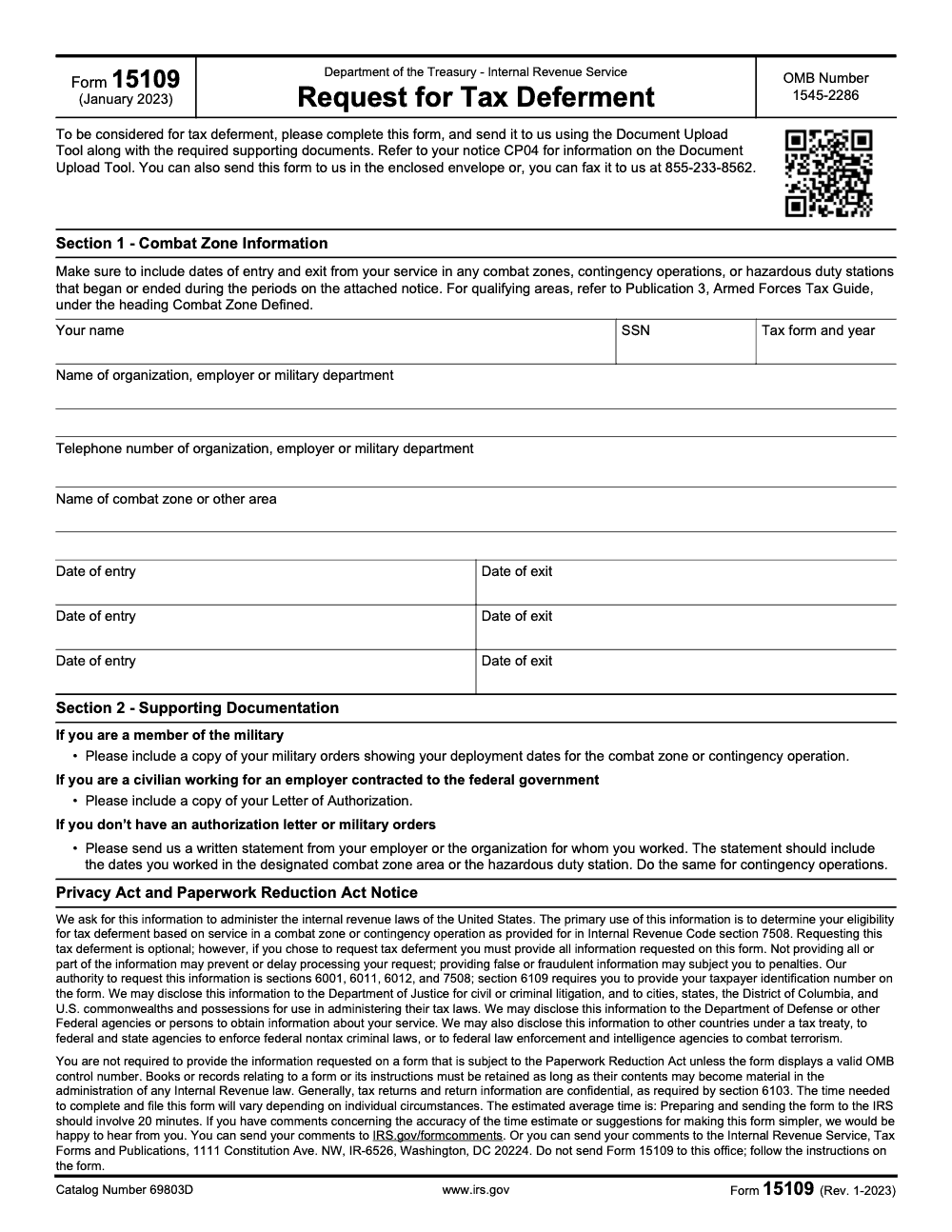
Form 15109, Request for Tax Deferment (January 2023 revision), is the IRS response form for combat-zone, contingency-operation, and hazardous-duty postponements under IRC §7508 – submit it after you receive Notice CP04 via the IRS Document Upload Tool, the envelope enclosed with the notice, or fax to 855-233-8562. Section 2 proof must come from one of three sources: military orders, a civilian Letter of Authorization, or an employer/organization statement listing the exact dates worked in the IRS-recognized area per Publication 3, "Combat Zone Defined." For the underlying tax return work, normal filing rules resume once the postponement period closes.
A client opens Notice CP04, sees a short due date at the top, and forwards a stack of LES pages, partial orders, and a screenshot from the personnel system, hoping something in there counts. The hard part is never the paperwork itself. It is that Section 1 of Form 15109 only holds three entry and exit date ranges, and each one has to line up exactly with the source you attach.
Form 15109 is the request you send for combat-zone deadline relief under IRC §7508, the provision that generally postpones your timelines during qualifying service and for the next 180 days after. Get the dates and the named area right and a single CP04 closes; get them loose and the same notice turns into round after round of follow-up letters.
Key Takeaways
- Form 15109 is the IRS’s request form that helps you secure combat zone deadline relief under IRC §7508, which generally extends timelines during qualifying service and for the next 180 days.
- You will provide your legal name, SSN, the tax form and year, your employer or military branch, the qualifying area, and up to three precise entry and exit date ranges.
- Acceptable proof includes deployment orders, LES, and, when orders do not list the zone, a command or employer letter. Civilians supporting the Armed Forces in a combat zone may qualify, but civilian employees of contractors outside the zone do not.
- If you received Notice CP04, you can use the IRS Document Upload Tool with the access code on your notice. If you cannot upload, fax to the number on the form or mail to the address on your notice.
- Always use the IRS list of current recognized combat zones to name the area exactly, and make sure your dates match your documents.
What Form 15109 Does, In Plain English
Form 15109 helps the IRS verify that you were in a qualifying location so the clock on filing, paying, and other tax actions is paused while you serve. The postponement applies to many actions, including filing returns, paying tax, claiming refunds, and even Tax Court deadlines. The period covers your time in the qualifying area, any continuous qualified hospitalization from service injuries, and then the next 180 days. Spouses also receive relief in most situations.
Form 15109 is not a replacement for filing your return, and it is not a general filing extension like Form 4868 – it is specifically the IRS response form for the combat-zone tax deferment authorized by IRC §7508. Think of it as the documentation package that tells the IRS, here are my dates, here is where I served, here is the proof.
Who Qualifies For This Relief
- Members of the U.S. Armed Forces serving in an IRS recognized combat zone or a qualified hazardous duty area.
- Individuals serving in support of the Armed Forces in a combat zone, including certain civilians, when they meet the IRS’s criteria.
- Those deployed outside the United States in a Secretary of Defense designated contingency operation also fall under §7508’s postponement rules.
Two important clarifications that trip people up:
- Civilian employees of defense contractors do not receive the postponement simply because their work relates to a combat zone. They must themselves be serving in a combat zone in support of the Armed Forces to qualify.
- The IRS can already have your account flagged through DoD data, but they often ask you to confirm dates. That is where CP04 and Form 15109 come in.
Where And How To File Right Now
If you received Notice CP04, the IRS prefers that you sign in with your access code and use the Document Upload Tool to submit Form 15109 and your supporting documents by the due date printed on the notice. If upload is not possible, follow your notice to either fax to the number shown on Form 15109 or mail the package to the address on your CP04 (do not mail your completed form to the Tax Forms and Publications office at 1111 Constitution Ave. NW, Washington, DC – that address only accepts comments about the form, not deferment requests).
Some taxpayers also notify the IRS of combat zone status through the IRS combat zone notification channel listed on IRS.gov. If you use that channel, do not include SSNs, and attach a document that shows your area or operation, for example a letter of authorization or a command letter. Notification is useful for account flagging, but it does not replace submitting Form 15109 when the IRS requests it.
Small but helpful detail about faxing, the Form 15109 package has historically used an IRS fax ending in 855-233-8562. Always rely on the number printed on your current form or notice, since numbers can change.
The What, How, Wow Framework For Accuracy And Speed
What, The pieces the IRS expects
- Your legal name and SSN exactly as shown on your tax return.
- The tax form and year, for most people this is Form 1040 for a calendar year.
- Your employer or branch, plus a phone number.
- The official name of the combat zone, contingency operation, or hazardous duty area. Use the IRS’s list and name it exactly.
- Up to three sets of entry and exit dates tied to those areas.
- Evidence that proves presence, for example orders, LES, a command statement, or for civilians, a letter of authorization or employer letter that includes the employer’s EIN.
How, Steps that prevent rework
- Gather records, orders, LES, command letters, and any travel or personnel system screenshots with dates.
- Match dates to the official area names exactly as the IRS lists them, do not use nicknames or unit shorthand.
- Complete Form 15109 with up to three precise periods, no date ranges that blend multiple areas.
- Submit through your CP04 Document Upload Tool, fax to the form’s number, or mail with tracking, then retain confirmation.
Wow, A small tip that saves weeks
If orders do not list the specific zone or your orders changed mid‑tour, add a short signed statement from your command or employer that clearly states the IRS named area and the exact dates. This one page often prevents a second IRS request for clarification, which can add months to processing.
Step By Step, Filling Form 15109 Without Mistakes
Section 1, Get the combat zone information perfect
- Enter your legal name and SSN exactly as they appear on your return.
- Identify the official combat zone or qualifying area. Use the IRS’s current recognized list and copy the name exactly, for example Arabian Peninsula area or Kosovo area.
- Record up to three distinct entry and exit date periods. Use precise calendar dates tied to when you were physically in the qualifying area, or when you were deployed outside the United States in a designated contingency operation.
- Specify the tax form and tax year. For most individuals this is Form 1040 for the relevant year, but remember, §7508 postponement applies to estate, gift, employment, and excise returns as well.
- Employer field, service members list their branch. DoD civilians or qualifying civilians list their employer organization and a phone number.
Quality control tip, check every date against orders, LES, or employer statements. If your deployment crossed designations, list each area separately with its own dates.
Section 2, Attach documents that actually prove it
Attach documents that make the IRS reviewer’s job easy:
- Deployment orders showing dates and location.
- Leave and Earnings Statement pages that line up with the dates.
- A command or supervisor statement if orders do not name the zone.
- For civilians, a letter of authorization or an employer letter, include the employer’s EIN, the designated area, and the precise dates.
When orders are unavailable, a short signed written statement from your employer or the organization that engaged you (self-attestation alone is not accepted – the statement must come from the employer or organization, not from you) with employer name, EIN if applicable, the IRS named area, and exact dates can work. Back it with any records you have.
Dates, how the 180 day rule fits your calendar
Your postponement window includes the period you served in the qualifying area or contingency operation, any continuous qualified hospitalization from service injuries, plus the next 180 days. That paused time applies to many tax actions, for example filing and paying. Spouses also receive relief in most cases, which is helpful for joint filers.
Filing methods that work in 2025
- If you received CP04, use the Document Upload Tool with your access code, or follow your notice to fax or mail. The IRS warns that if they do not receive your completed Form 15109 by the date on the notice, you will not receive deferment.
- If you are notifying the IRS outside of a CP04 process, you can email without SSNs, include your name, stateside address, date of birth, date of deployment, and attach an official document that shows your area or operation. Civilians typically provide a Letter of Authorization or an employer letter.
Quick table, your submission checklist
| Document | When to use | What it should show |
| Deployment orders | Always include when available | Name, unit, operation, IRS named area, dates |
| LES pages | When orders lack detail | Month by month presence that aligns with dates |
| Command or employer letter | When orders do not show the zone, or you are a civilian | IRS named area, exact dates, employer name and EIN |
| CP04 notice | When you received one | Access code, mailing address, and due date |
| Signed statement | When orders are missing | Employer, EIN if any, area, entry and exit dates |
Common pitfalls that trigger a second IRS letter
- Area names that do not match the IRS list. Fix by copying the official name.
- Date ranges that blend multiple areas. Split them into separate periods.
- Missing employer details for civilians. Include employer name and EIN.
- No proof attached. Add orders, LES, or a command or employer letter.
- Submitting after the CP04 due date. Calendar it and submit early.
Advisory note for tax pros and firms
If your team handles many Form 15109 submissions during peak season, standardize your workpapers and naming. Use a single template for Section 1 dates, a labeled PDFs folder for orders and LES, and a QA checklist. If you need extra capacity, disciplined offshore delivery can help you keep deadlines without sacrificing control. At Accountably, we integrate trained offshore teams into your workflow with SOP driven execution, layered reviews, and strict documentation standards, so your partners are not trapped in last minute review loops. Use it only where it adds value, the process still lives in your systems and standards.
Eligibility Deep Dive, Combat Zones, Contingency Operations, And Civilians
Naming the zone correctly
Use the IRS’s current recognized list. For example, the Arabian Peninsula area includes Iraq, Kuwait, Saudi Arabia, Oman, Bahrain, Qatar, the UAE, plus certain waters and airspace, and additional countries certified for direct support like Jordan and Lebanon. Kosovo and Afghanistan areas remain recognized, with specific support countries listed. Names and coverage can change, so check the IRS page date, which, at the time of writing, is updated through September 10, 2025.
Civilians and contractors, who actually qualifies
Civilians serving in support of the Armed Forces in a combat zone can be covered, but not every contractor employee qualifies. If you are stateside supporting a contractor, you do not receive the postponement. If you are physically serving in the combat zone in support of the Armed Forces, then you may qualify. The IRS’s own Q&A makes this distinction clear.
The Internal Revenue Manual adds examples of civilian roles in support, for instance merchant mariners under DoD operational control, Red Cross personnel, accredited correspondents, and civilian personnel acting under the direction of the Armed Forces. These examples are not exhaustive, but they show how the IRS interprets “serving in support.”
Spouses and hospitalization rules
Relief generally applies to the spouse of a qualifying individual. If the service member is hospitalized from an injury related to qualifying service, the postponement continues through qualified hospitalization, then adds the 180 day period. The spouse does not receive the hospitalization extension, but does receive the rest of the relief.
Timelines, Deadlines, And What Actually Gets Postponed
Under §7508, the IRS disregards time while you serve in a combat zone, a qualified hazardous duty area, or a Secretary of Defense designated contingency operation, plus 180 days after, for many tax actions. This includes filing returns, paying tax, filing claims for refund, and even Tax Court deadlines. It also applies to estate, gift, employment, and excise tax returns in the circumstances the IRS outlines.
A practical example helps. Suppose you entered a recognized combat zone on April 1, 2025, exited on October 15, 2025, and were not hospitalized. Your disregard period runs April 1 through October 15, plus the next 180 days. Any deadlines that fall inside that window are postponed. File Form 15109 so the IRS updates your account and applies the postponement correctly.
CP04, What To Do When The IRS Writes To You
CP04 means the IRS spotted combat zone or qualifying service on your return and is asking you to confirm dates. The notice walks you to the Document Upload Tool and gives an access code. Upload a completed Form 15109 with your proof by the due date. If you cannot upload, follow the notice to fax, or mail with tracking. If you miss the CP04 deadline, the IRS warns that you will not receive deferment.
If you need to notify the IRS outside of CP04, the agency allows email notifications. Provide your name, stateside address, date of birth, deployment date, and a document that identifies your area or operation. Do not include SSNs by email.
Tools And Sources You Can Trust
- IRS Combat Zones page for official area names.
- IRS CP04 explainer for current submission options and deadlines.
- IRS news Q&A on combat zone deadline extensions and civilian scenarios.
- IRC §7508 for the law itself, including the 180 day rule and covered acts.
- IRM 25.6.1 for who is covered, spouse rules, and account indicators.
Small housekeeping note, the IRS periodically refreshes forms and submission methods. The agency’s listings show Form 15109 as an active IRS form, and CP04 now points many taxpayers to the Document Upload Tool. Always check the date at the bottom of any IRS page you rely on.
Final Checklist And Pro Tips
- Confirm you were in an IRS recognized area and copy the official name.
- Record up to three entry and exit date periods, with precise calendar dates.
- Attach proof, orders, LES, command or employer letters with EIN for civilians.
- If you received CP04, submit by the deadline through the Document Upload Tool, or use the fax number on Form 15109 or the mailing address on your notice.
- Keep copies, fax confirmations, and tracking. Calendar a follow up two weeks later.
For Accounting Firms, Keep The Work Moving
When your team handles dozens of Form 15109 cases each season, bottlenecks show up in review and documentation. This is where a disciplined operating model pays off. If you need help with structured workpapers, standardized naming, and reliable production capacity, Accountably can slot trained offshore teams into your systems, with SOP driven execution, layered review, and continuity plans that cut rework and protect deadlines. Use this sparingly, only where it supports your client’s outcome, and always keep control inside your firm.
Conclusion
You now have a clear plan to complete Form 15109, confirm your area and dates, attach clean proof, and submit through CP04’s upload, fax, or mail. Double check names, SSNs, and dates, then file once, cleanly. If anything is uncertain, revisit the IRS combat zone list and your orders or LES, and add a short command or employer statement to close any gaps. With a tidy packet, the IRS can update your account promptly, and you can focus on what matters while the clock stays paused.
Common Mistakes We See Every Season
These show up every time a CP04 notice lands on a peer's desk and the response gets rushed. None of them are exotic – they come from intake gaps, not from any debate over IRC §7508.
Reusable Checklists
Lift these straight into a firm SOP or a shared workpaper template. Each step is written in plain instruction form so a new preparer can run it without extra commentary.
CP04 intake packet
- Date-stamp the CP04 notice the day it arrives and calendar the due date printed on the notice.
- Capture the access code from the CP04 envelope and store it in the secure client file, not in email.
- Confirm the taxpayer (or spouse) actually served in a qualifying area for the dates on the notice before opening the file.
- Pull the January 2023 revision of Form 15109 from IRS.gov; do not reuse a prior-year PDF from internal storage.
- Open a documents folder named with the taxpayer's SSN last four and the CP04 notice date.
- Record the chosen submission channel (Document Upload Tool, CP04 envelope, or fax 855-233-8562) on the engagement summary.
- Note the IRS-estimated 20-minute preparation baseline, and flag any file that crosses 60 minutes as a review trigger.
Section 1 dates and area validation
- Copy the taxpayer's legal name and SSN from the most recent return, not from CP04, to avoid character mismatches.
- Pull the area name from Publication 3, Armed Forces' Tax Guide, under "Combat Zone Defined" and paste it verbatim into Section 1.
- List every entry and exit date that falls inside the CP04 notice period, up to the three row pairs the form provides.
- Cross-check each date pair against military orders, LES, or the employer's deployment record before entering it.
- Note the tax form and year being deferred so the IRS posts the deferment to the right account module.
- For service members, list the branch and a phone number for the unit administrative office; for civilians, list the employer name, EIN, and contact number.
- If the deployment spans more than three periods, prepare an attached schedule with the same column structure and reference it in Section 1.
Section 2 proof packet
- For active-duty service members, attach a copy of military orders showing the qualifying area and deployment dates.
- For federal-contract civilians, attach the Letter of Authorization showing the contract, the area, and the dates worked.
- For everyone else, attach a written statement from the employer or organization listing the employer name, EIN, the IRS-named area, and exact entry and exit dates.
- Add LES pages or pay records that corroborate the date range whenever orders alone leave any month unclear.
- Number each attachment and reference the number next to the corresponding date pair in Section 1.
- Save the Document Upload Tool receipt or the fax transmission report alongside the workpaper as proof of timely filing.
- Calendar a 14-day follow-up to verify the IRS account reflects the postponement before closing the engagement.
Keep 15109 Season From Stalling
Form 15109 work doesn't run on a calendar – it runs on the CP04 clock and the realities of military deployment cycles. When a service member's notice arrives, the response window is short and the supporting documents (orders, LES pages, command letters) often sit across three different systems. The IRS estimates the form itself at about 20 minutes per Form 15109 instructions, but the gathering and verification work behind it can stretch across weeks when intake is loose.
The fix is intake discipline and a single source of truth for the dates. Every Form 15109 file should pass through the same three-checkpoint sequence: dates against orders, area name against the IRS recognized list per Publication 3, and submission method against what the CP04 notice instructs. The form itself has room for only three entry/exit date pairs on the page, so multi-deployment cases need an attached schedule from day one rather than a fix at final review.
- Build a one-page intake sheet capturing legal name, SSN, tax form and year, branch or employer, contact phone, and each entry/exit pair with the IRS-recognized area name spelled exactly as Publication 3, "Combat Zone Defined" lists it.
- Confirm the CP04 submission path on file (Document Upload Tool access code, the CP04 envelope, or fax to 855-233-8562) before drafting, since picking the wrong channel costs days.
- For multi-deployment cases, pre-build a Section 2 schedule listing every entry/exit pair beyond the three rows on the form, with the matching supporting document referenced row by row.
- For civilian filers, gate the file on receipt of a Letter of Authorization or an employer statement with EIN, designated area, and exact dates; self-attestation alone does not clear under the form's instructions.
- Calendar a two-week follow-up after submission and retain the fax confirmation or Document Upload Tool receipt with the workpapers.
When 15109 volume is growing and senior reviewers are spending hours matching dates instead of catching real errors, our tax services team runs this kind of structured intake and review work end-to-end, with documented SOPs and a multi-layer review queue that keeps the CP04 response window from closing.
FAQs
Form 15109, Request for Tax Deferment, is how you document your qualifying service and dates so the IRS can apply postponements under IRC §7508. It supports combat zone, hazardous duty, and contingency operation relief, and it is often requested through Notice CP04.
Yes. The postponement generally applies to the spouse of a qualifying individual. Hospitalization extensions do not apply to the spouse, but the standard postponement period does.
If you are physically serving in a combat zone in support of the Armed Forces, you may qualify. Civilian employees of defense contractors who are not serving in the combat zone do not receive the postponement.
The IRS disregards the time you serve in the qualifying area, any continuous qualified hospitalization for service injuries, and the next 180 days. That paused time applies to many tax actions, including filing and paying.
If you received CP04, use the Document Upload Tool with your access code, or follow your notice to fax to the number on Form 15109 or mail to the address on the notice. Keep your fax confirmation or tracked mail receipt.
Include LES pages and attach a short command or employer statement naming the IRS recognized area and the exact dates. The IRS also accepts notifications with supporting letters, but still follow CP04 instructions if you received a notice.
Yes. Form 15109 does not replace filing your tax return. It pauses deadlines while you serve and for a period after, then normal rules resume.
Other forms this guide names
About this guide
Accountably helps US CPA, EA, and accounting firms hire trained accountants and tax preparers in India.
About us Reviewed byJugal Thacker, CPAFounder and CEO at Accountably
A Washington-licensed CPA with 7+ years inside US firms – PwC, a real-estate tax practice, then a full-service firm, rising from reviewer to manager to advisory. This article was reviewed against current IRS guidance for the 2025 tax year and updated for filers preparing late returns, amendments, and 2026 estimates.
View profile →How we research, review, and update this guide
Every Accountably guide is researched against primary IRS sources, reviewed by a U.S. CPA, and refreshed as guidance evolves. Read our Editorial Guidelines to see how we source, fact-check, and update our content.




