
Summarize this article with AI
In Brief
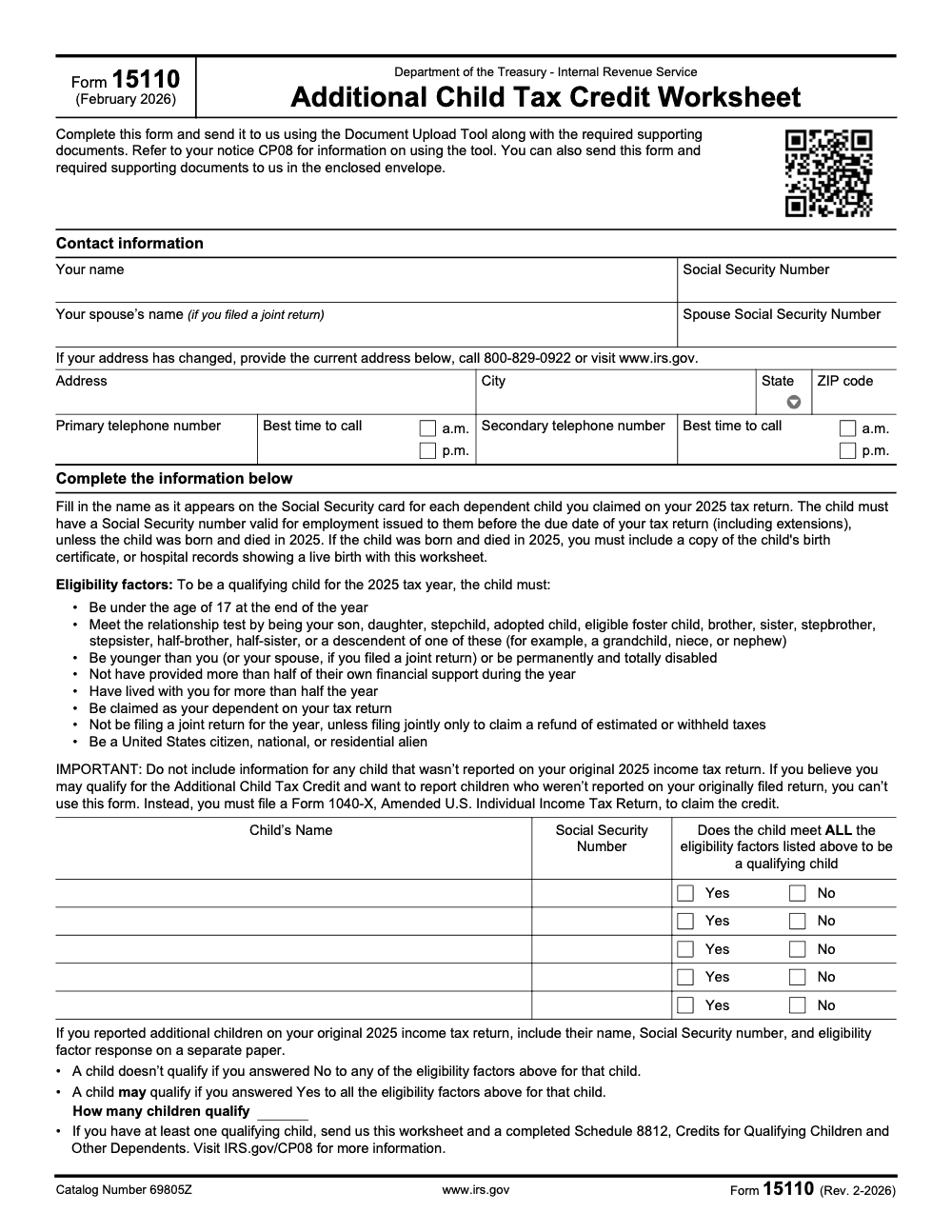
Form 15110 is the Additional Child Tax Credit Worksheet the IRS encloses with notice CP08 when its records show you may have skipped the refundable Additional Child Tax Credit on your 2025 return. Confirm each child was under 17 at year-end and held a Social Security number valid for employment issued by your return due date, including extensions, then return the worksheet with a completed Schedule 8812 if at least one child qualifies (per the Form 15110 worksheet, Rev. February 2026, and IRS.gov/CP08).
A CP08 notice almost never means a return was filed wrong. It means the IRS sees earned income, sees children who look eligible, and notices that nobody claimed the refundable Additional Child Tax Credit. People read it as the IRS clawing money back, when it is closer to the IRS pointing at money left on the table.
Form 15110 is the worksheet you send back to confirm the children you already reported, and it does not claim the credit on its own. If at least one child qualifies, it travels with a completed Schedule 8812, where the credit is actually computed. The rules behind each Yes or No box decide whether a child counts, and the form cannot add a child who was not on your original return. For a new qualifying child you file Form 1040-X instead.
Key Takeaways
- Form 15110, Additional Child Tax Credit Worksheet, is the one-page worksheet you send to respond to IRS notice CP08. It verifies the qualifying children you already reported, it does not claim the credit by itself.
- If at least one child qualifies, send Form 15110 together with a completed Schedule 8812, Credits for Qualifying Children and Other Dependents. The credit is computed on Schedule 8812, not on Form 15110.
- To be a qualifying child for 2025, the child must be under age 17 at year-end, live with you more than half the year, not provide more than half of their own support, and be claimed as your dependent.
- Each child must have a Social Security number valid for employment, issued before the due date of your return (including extensions). The only exception is a child born and died in 2025, which requires a birth certificate or hospital live-birth record.
- A single No on any eligibility factor disqualifies that child. Answering Yes to all factors means the child may qualify, pending IRS review, not an automatic approval.
- Form 15110 cannot add children who were not on your original 2025 return. To report a new qualifying child, file Form 1040-X instead. Submit by mail or through the Document Upload Tool referenced on your CP08 notice.
What Form 15110 actually does
Form 15110 confirms facts about each child you already claimed on your original return, including full name, Social Security number, relationship to you, age test, and U.S. status. If your answers show at least one qualifying child, the IRS asks you to attach Schedule 8812 to compute the credit. This is not a second chance to add new dependents, it is a verification of what you already filed. If you need to add a dependent you did not include originally, amend your return instead of using Form 15110.
Why you got CP08 in the first place
CP08 fires when the IRS’s systems see signs you might be eligible for the refundable Additional Child Tax Credit but did not claim it. The agency will not pay the refund without your confirmation, so it prompts you to complete Form 15110 and, if a child qualifies, Schedule 8812. Respond within 30 days by mail or with the secure upload link and access code listed in your notice.
The 2025 numbers you should know
For 2025 tax returns, the maximum Child Tax Credit is up to 2,200 per qualifying child, and the refundable Additional Child Tax Credit is up to 1,700 per child, subject to income limits. As in prior years, the refundable portion is calculated on Schedule 8812. The familiar phaseout thresholds of 200,000 single, 400,000 married filing jointly still apply unless the IRS publishes a change. Always use the instructions for the specific tax year you are filing.
Note for accuracy and timing
- Each qualifying child must have an SSN that is valid for employment and issued by the due date of your original return, including extensions. If the SSN was issued after the due date, that child does not qualify for CTC or ACTC for that year.
What, how, wow
- What: Form 15110 verifies your qualifying children for the refundable credit after CP08.
- How: Fill the child details exactly as filed, confirm all eight eligibility factors, then complete Schedule 8812 if at least one child qualifies, and return everything in 30 days by mail or upload.
- Wow: Two small updates help in 2025, the maximum CTC increases to 2,200, and Internal Revenue Manual guidance confirms there is no signature requirement on Form 15110 for tax years 2022 and later, which removes a common processing snag.
Who this guide is for
- Parents and caregivers who received CP08 and want a clean, fast response.
- Tax pros who need a tight checklist to keep refunds moving.
- Firm owners who want consistent handling across teams, especially during peak season when CP08 letters stack up.
In our work supporting busy accounting teams, the biggest slowdowns are simple, missing SSN issue dates, sending the wrong year’s worksheet, or skipping Schedule 8812 when a child does qualify. A few minutes of structure up front saves weeks of back and forth later.
Step by step, completing Form 15110
Start with exact taxpayer info
- Enter your legal name and SSN exactly as they appear on your original Form 1040.
- If you filed jointly, include your spouse’s name and SSN exactly as filed.
- Use the same mailing address you used on the return, or submit an address change before responding if you have moved.
- Include a daytime phone number in case the IRS needs a quick clarification.
- Per current IRS procedures, Form 15110 does not require a signature for tax years 2022 and later, which helps prevent a common reject.
List children and confirm SSN rules
- List only the children you claimed on your original return.
- Enter each child’s full name and SSN, and confirm that the SSN was valid for employment and issued by the due date of your original return, including extensions.
- Children with only ITINs do not qualify for CTC or ACTC, though they may qualify for the Credit for Other Dependents, which is separate from this process.
Pro tip for speed If you are uploading, include a clear scan of each child’s Social Security card as supporting proof. The CP08 page does not list required documents, but practitioners routinely include this to avoid a second request. Use legible PDFs.
Apply the qualifying child tests
For each child, the worksheet runs through eight eligibility factors, and all must be yes. The key tests to confirm:
- Relationship, your son, daughter, stepchild, eligible foster child, sibling, or a descendant of any of these.
- Age, under 17 at the end of the tax year (a child who turns 17 on or before the last day of the year does not qualify for this credit, though they may qualify for the Credit for Other Dependents on Schedule 8812).
- Status and residency, U.S. citizen, U.S. national, or U.S. resident alien, who lived with you for more than half the year. Also confirm the SSN rule above.
Shared custody notes
- Keep school or medical records handy to document days lived with you.
- For temporary absences, like college or medical care, count them as time lived with you if the child would have lived with you otherwise. See the Schedule 8812 instructions for details by year.
When to complete Schedule 8812
If at least one child qualifies on Form 15110, complete Schedule 8812 to compute both the nonrefundable CTC and any refundable ACTC. For 2025 returns, the maximum CTC is up to 2,200 per child, with up to 1,700 refundable, subject to income limits and earned income thresholds. If you or your spouse file Form 2555, you cannot claim the ACTC. Follow the line‑by‑line instructions for the correct year.
If you need to add a dependent
Form 15110 is verification, not an amendment. If you must add a dependent you did not claim on the original return, file Form 1040‑X for the year in question, then follow the CP08 directions. The CP08 help page focuses on verification, so handle amendments separately to prevent delays.
How and where to submit
You have two options, mail or the IRS Document Upload Tool. Use only the address shown on the top left of your CP08 if you mail it. If you upload, use the secure link and access code from your notice, or scan the QR code, both route your response to the proper IRS unit.
Mail vs. upload, quick comparison
| Method | Best for | What to include | Speed and tracking |
| Mail to the address on CP08 | If you prefer paper or cannot scan documents | Form 15110, Schedule 8812 if required, copy of CP08, copies of SSN proof | Delivery time varies, no on‑screen confirmation, keep postal receipt |
| Document Upload Tool | If you want faster routing and an on‑screen confirmation | Form 15110 PDF, Schedule 8812 PDF, copy of CP08, supporting proof in PDF, JPG, or PNG | Immediate upload confirmation, routes directly to IRS correspondence systems via your access code |
Use one method, not both, within 30 days. Multiple submissions can slow processing.
Light ops note for firms If your team handles multiple CP08s at once, save a stamped checklist, it should show the CP08 notice number, access code, taxpayer name and SSN masked, forms included, and who uploaded or mailed the packet. This kind of basic workflow discipline prevents misses during peak weeks.
Timelines, refunds, and status checks
Once the IRS receives your Form 15110 and Schedule 8812, it reviews your entries and either approves the credit or sends a letter explaining why it was denied. If no other balances are due, you should see a refund in roughly 8 to 10 weeks. If you have not heard back after that window, call 800‑829‑1954 with your CP08 and access code handy.
Helpful habits
- Save a full PDF of what you submitted, including the CP08 notice and upload confirmation page if you used the tool.
- If you mailed your response and lost the original envelope, use any envelope but only the address printed on the top left of your CP08. Using a different address can delay processing.
Common mistakes that slow refunds
Most CP08 responses stall for the same handful of reasons, and every one is avoidable. Here are the misreads I see most often, with a fix you can drop straight into your tax review process.
Practical examples
- Example 1, SSN timing: You filed your 2024 return on April 10, 2025. Your younger child’s SSN was issued on May 5, 2025. That child does not qualify for 2024 CTC or ACTC because the SSN was not issued by the 2024 return due date, including extensions.
- Example 2, 2025 amounts: You have two qualifying children on your 2025 return. Your CTC can be up to 2,200 per child, and if your tax is reduced to zero, your refundable ACTC can be up to 1,700 per child, subject to earned income and limits on Schedule 8812.
- Example 3, Form 2555: You worked abroad in 2025 and file Form 2555. You cannot claim the Additional Child Tax Credit, even if you have qualifying children.
For CPA firms and tax teams, keep delivery disciplined
When CP08 responses pile up, bottlenecks come from inconsistent workpapers, unclear review steps, and missing documentation. A tight delivery system fixes that.
- Use a standard CP08 response packet with a cover sheet listing the notice number, access code, tax year, and what is enclosed.
- Keep structured naming, like “YYYY‑Taxpayer‑CP08‑15110‑Schedule8812.pdf” for every upload.
- Build a multi‑layer review, preparer checks SSN and tests, reviewer verifies Schedule 8812 math, final reviewer confirms the right IRS address or the correct upload link and code.
- Track SLAs, intake to send date, send date to IRS receipt, receipt to decision.
Where Accountably fits, lightly If your firm is short on capacity during peak season, Accountably can deploy trained offshore teams inside your workflow to assemble CP08 packets, standardize workpapers, and close review loops without slowing partners. We integrate to your systems, follow your templates, and work under your review protections so you keep control of quality and timing. Use us when you want structured help, not resumes.
Final checklist before you send
- Form 15110 completed for the correct tax year, names and SSNs match your original return.
- SSNs valid for employment and issued by the return due date for that year.
- Schedule 8812 attached when at least one child qualifies, using the year’s limits and instructions.
- Packet sent within 30 days, by mail to the CP08 address on the notice, or uploaded with your access code.
Compliance and currency note Tax rules, amounts, and forms vary by year. The sources named above reflect current IRS guidance and the Internal Revenue Bulletin as of November 1, 2025. Always match your response to the tax year on your CP08 and the latest IRS instructions.
Reusable Checklists
These checklists are copy-paste ready for a firm SOP or a solo filer’s desk. Work top to bottom before anything leaves your hands.
Qualifying child eligibility review
- The child was under 17 at the end of 2025, meaning age 16 or younger on December 31.
- The child is your son, daughter, stepchild, foster child, sibling, or a descendant of any of them.
- The child is younger than you, or your spouse on a joint return, or is permanently and totally disabled.
- The child did not provide more than half of their own support during the year.
- The child lived with you for more than half the year.
- The child is claimed as your dependent on the 2025 return.
- The child is not filing a joint return, unless only to claim a refund of withheld or estimated tax.
- The child is a U.S. citizen, U.S. national, or U.S. resident alien.
- The child has a Social Security number valid for employment, issued by the return due date including extensions.
CP08 response packet
- Form 15110 completed for tax year 2025, with names and SSNs matching the original return.
- Schedule 8812 completed and attached when at least one child qualifies.
- Any children beyond the five pre-printed rows listed on a separate sheet with names, SSNs, and factor answers.
- Birth certificate or hospital live-birth records included for any child born and died in 2025.
- A copy of the CP08 notice kept with the packet for reference.
- Current address, primary and secondary phone numbers, and best times to call entered on the form.
- Address change, if any, noted on the form or reported by calling 800-829-0922.
Pre-send quality check
- Every eligibility factor answered with a clear Yes or No, no blanks.
- Any child with a single No removed from the qualifying count.
- One submission method chosen, either mail to the address on CP08 or the IRS Document Upload Tool, not both.
- If you submit online, the upload details from your CP08 notice are ready.
- A full PDF of the packet saved, including the upload confirmation if you used the tool.
Keep 15110 Season From Stalling
CP08 notices do not follow a tidy quarterly calendar. They arrive whenever the IRS finishes matching a return, so a packet can reach a client months after filing with a short response window attached. Each one carries its own tax year and its own set of qualifying children to verify, and the Form 15110 worksheet runs every child through eight eligibility factors with only five pre-printed rows on the page (per the Form 15110 worksheet, Rev. February 2026, Catalog Number 69805Z).
The fix is not more hours, it is a repeatable response system so every CP08 is handled the same way regardless of when it shows up. Standardize how the packet is built, reviewed, and sent, and the unpredictability stops costing you rework.
- Verify each child against all eight factors before marking the worksheet, since a single No on any factor disqualifies that child.
- Confirm every Social Security number is valid for employment and was issued by the return due date, including extensions.
- Attach Schedule 8812 whenever a child qualifies, and list any children beyond five on a separate sheet.
- Choose one submission path, mail to the CP08 address or the IRS Document Upload Tool, and log the date sent.
- Track each notice from intake to IRS receipt so nothing slips past its response window.
When CP08 volume spikes and your team is already stretched, this is the kind of structured, repeatable work a delivery partner can absorb. Accountably’s tax preparation and review teams assemble CP08 packets, verify eligibility, and close review loops inside your workflow, so responses go out on time without pulling senior reviewers off higher-value work.
FAQs
It is the worksheet the IRS asks you to complete after a CP08 letter to confirm that the children you claimed meet the rules for the refundable Additional Child Tax Credit. If at least one child qualifies, attach Schedule 8812 and return both within 30 days by mail or through the IRS upload link with your access code.
For 2025 returns, the maximum Child Tax Credit is up to 2,200 per qualifying child. The refundable portion, the Additional Child Tax Credit, is up to 1,700 per child, calculated on Schedule 8812, and subject to income limits. Always use the instructions for the correct tax year when you prepare the form.
Most decisions or refunds are issued within 8 to 10 weeks after the IRS receives your response. If you have not heard anything by then, call 800‑829‑1954 with your CP08 notice nearby.
The Internal Revenue Manual notes no signature requirement for Form 15110 for tax years 2022 and later. That said, complete every field accurately and include Schedule 8812 when a child qualifies.
Yes. Use the Document Upload Tool link and your unique access code shown on CP08, or scan the QR code on the notice. Uploading routes your response directly to the IRS correspondence system and gives you an on‑screen confirmation.
No for that year. For CTC or ACTC, the child must have an SSN that is valid for employment and issued by the tax return due date, including extensions. If the SSN came later, the child may qualify in a future year if all other tests are met.
Do not use Form 15110 to add dependents. File Form 1040‑X to amend your return, then follow the CP08 instructions. Using the wrong process can slow your case.
If you, or your spouse on a joint return, file Form 2555, you cannot claim the Additional Child Tax Credit, even if you have qualifying children. Check the year‑specific Schedule 8812 instructions before filing.
Other forms this guide names
- Form 1040‑X: How to Amend Your Tax Return in 2025
- Form 2555: Foreign Earned Income Exclusion & Housing
Summarize this article with AI
About this guide
Accountably helps US CPA, EA, and accounting firms hire trained accountants and tax preparers in India.
About us Reviewed byJugal Thacker, CPAFounder and CEO at Accountably
A US-licensed CPA with 7+ years inside US firms – PwC, a real-estate tax practice, then a full-service firm, rising from reviewer to manager to advisory. This article was reviewed against current IRS guidance for the 2025 tax year and updated for filers preparing late returns, amendments, and 2026 estimates.
View profile →How we research, review, and update this guide
Every Accountably guide is researched against primary IRS sources, reviewed by a U.S. CPA, and refreshed as guidance evolves. Read our Editorial Guidelines to see how we source, fact-check, and update our content.




