
Summarize this article with AI
In Brief
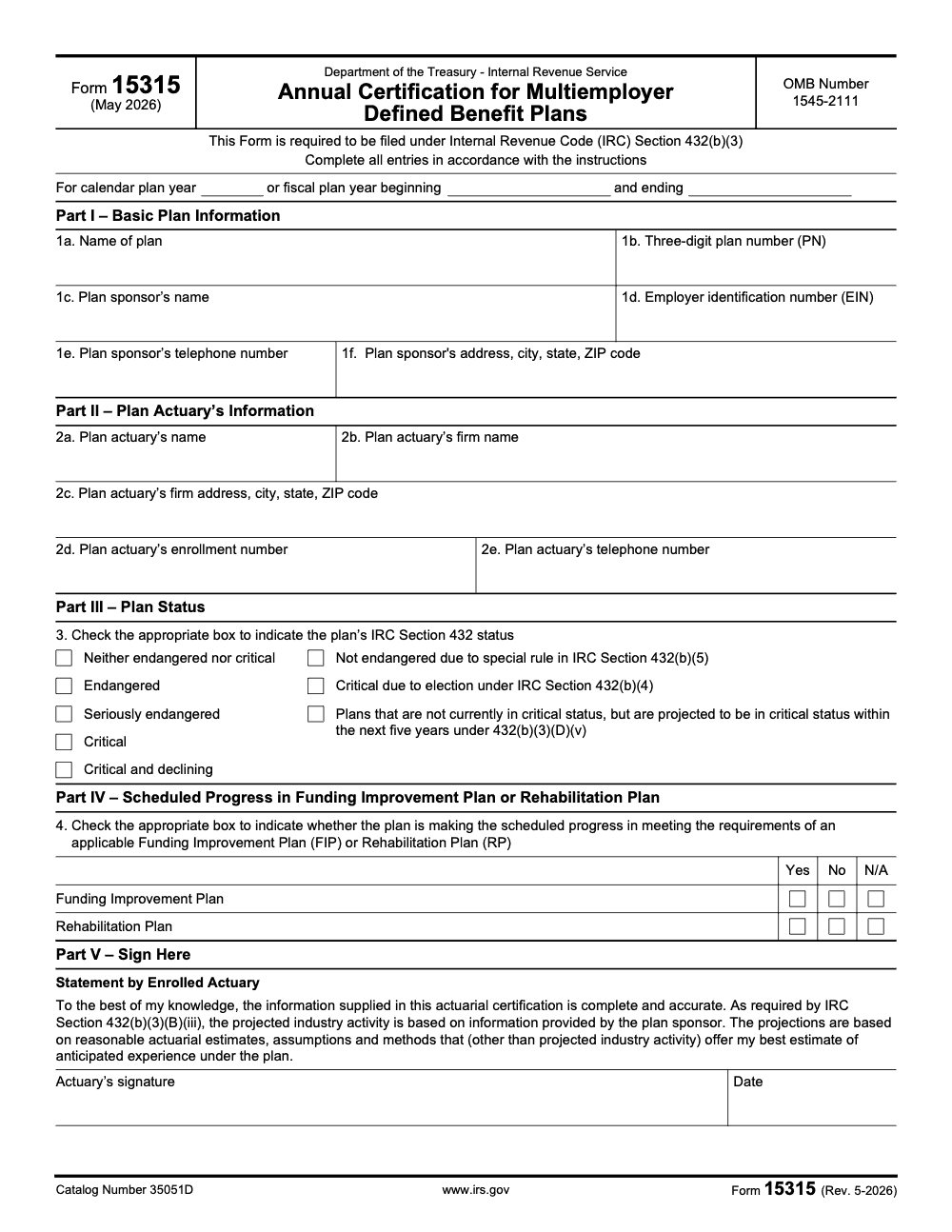
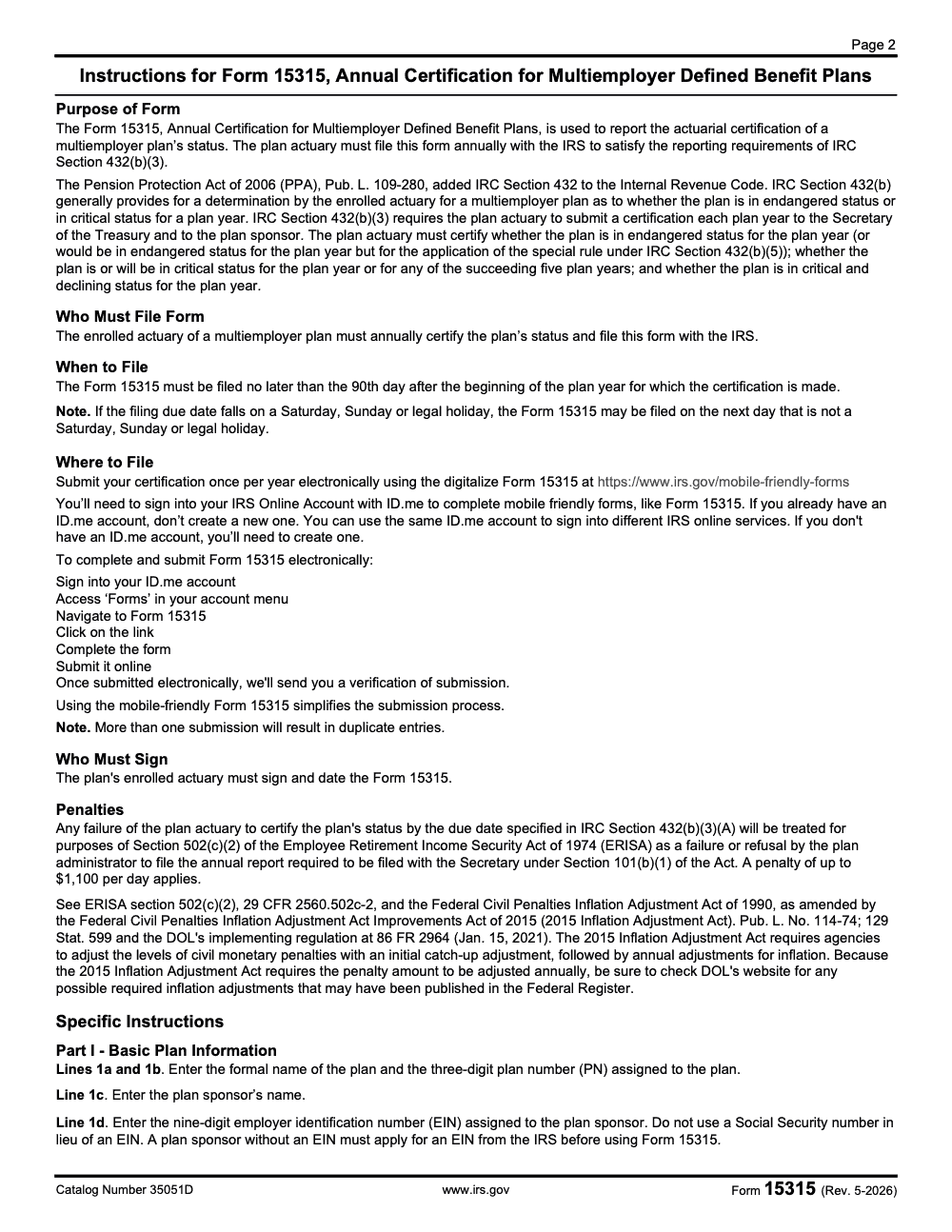
Form 15315 is the Annual Certification for Multiemployer Defined Benefit Plans, filed by the plan's enrolled actuary to report zone status under IRC Section 432(b)(3) (per the Form 15315 instructions, Rev. 4-2025). It is due the 90th day after the plan year begins, which works out to March 31, 2025 for a calendar-year plan, with the zone status reported on Line 3 and Funding Improvement Plan or Rehabilitation Plan progress on Line 4.
A multiemployer pension plan's zone status has to reach the IRS on the actuary's certification, and the day it is due sneaks up faster than most plan sponsors expect. Form 15315 carries that certification, filed by the plan's enrolled actuary to report zone status under IRC Section 432(b)(3).
It is due the 90th day after the plan year begins, which for a calendar-year plan lands on March 31, 2025. File it electronically through the IRS forms portal, signed in through your IRS Online Account with ID.me, report the zone status on Line 3 and any Funding Improvement Plan or Rehabilitation Plan progress on Line 4, and send only the completed form, no actuarial reports or extra letters attached.
Key Takeaways
- Form 15315 is the IRS filing that transmits your plan actuary’s annual certification of zone status for a multiemployer defined benefit plan.
- Form 15315 is filed electronically through the IRS mobile-friendly forms portal, signed in with your IRS Online Account through ID.me. The current instructions describe no paper, email, or fax filing option.
- Send only the completed Form 15315. Do not attach actuarial reports or extra letters when you submit.
- Filing deadline is 90 days after the start of the plan year. For a calendar year plan, that is March 31. Once you submit electronically, the IRS sends a verification of submission, which you should keep with your plan records.
- For account‑specific questions, contact Employee Plans Customer Account Services at 877‑829‑5500.
What Form 15315 does, and who files it
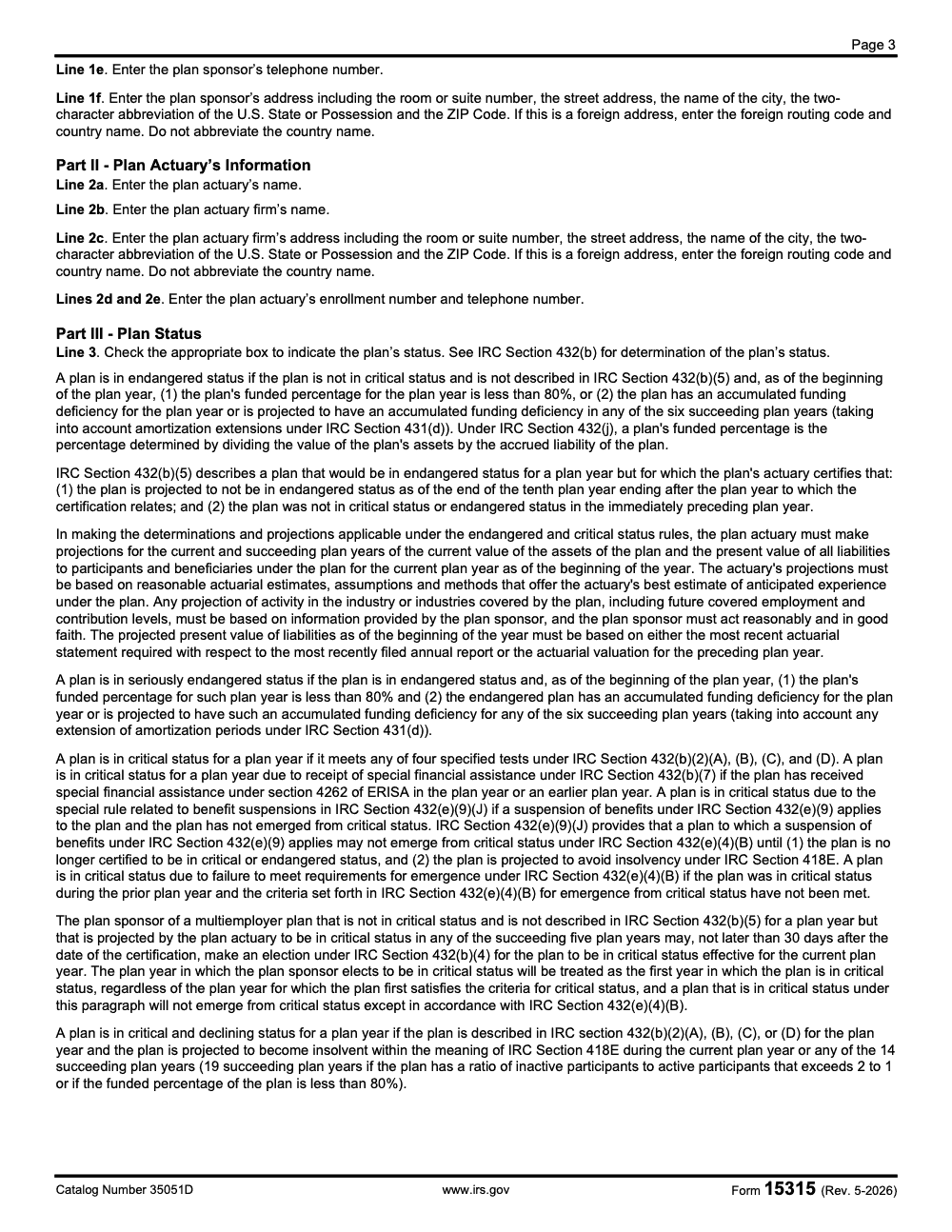
Form 15315 is the IRS’s digital cover for your plan actuary’s annual certification of funding status. You use it to report whether the plan is endangered, critical, or critical and declining, which then drives notices, funding improvement or rehabilitation steps, and other statutory actions for the year. For multiemployer plans, this certification is not optional, it is a yearly requirement under IRC Section 432, which the Pension Protection Act of 2006 added to the Code. Filing is due within 90 days after the plan year begins, and for a calendar year plan that means March 31.
Form 15315 is the official transmission to the IRS (note that the form’s instructions require the plan’s enrolled actuary, not the sponsor or administrator, to sign and file the certification). Keep the actuarial report and worksheets in your files, but do not send them with the form unless the IRS asks later.
How Form 15315 is filed
The current instructions describe a single submission path. You file the mobile-friendly Form 15315 electronically at irs.gov/mobile-friendly-forms, signed in with your IRS Online Account through ID.me. There is no paper, email, or fax filing option described in the current instructions.
| Step | What it involves |
| Sign in | Access your IRS Online Account, authenticated through ID.me. If you already have an ID.me account, use it; do not create a new one. |
| Complete the form | Enter the Part I plan information, Part II actuary information, Part III status, and Part IV progress fields. No additional attachments or letters are required. |
| Submit once | Submit the certification once per plan year. More than one submission will result in duplicate entries. |
| Save the verification | Once submitted electronically, the IRS sends a verification of submission. Keep it with your plan records. |
Because filing is electronic only, the enrolled actuary should work the submission through the IRS Online Account well before the 90th-day deadline rather than treating it as a deadline-day task.
The filing deadline and what “on time” looks like
- Due date is 90 days after the plan year starts.
- For a calendar year plan, target March 31 (if that date falls on a Saturday, Sunday, or legal holiday, the deadline moves to the next non-holiday weekday; fiscal year plans count 90 days from their own plan year start, not March 31).
- Once you submit electronically, the IRS sends a verification of submission. Keep that confirmation with your plan records.
If you need to ask about account status or a specific submission, use the Employee Plans Customer Account Services line at 877‑829‑5500. They can help with account‑level questions and basic information, but they will not provide legal advice.
Quick note on proof. Once you submit electronically, the IRS sends a verification of submission. Save that verification with your actuarial workpapers for the plan year, so your file copy ties the certification to a confirmed filing date.
Step‑by‑step, how to file Form 15315 in 2025
There is one path. File electronically using the mobile-friendly Form 15315 on IRS.gov, signed in with your IRS Online Account through ID.me. The current instructions describe no email, fax, or mail alternative.
Filing through the Mobile Friendly Forms page
- Confirm you are within 90 days of the plan year start.
- Gather plan identifiers, including plan name, EIN, and plan number.
- Validate the certification date and zone status with your enrolled actuary.
- Sign in to your IRS Online Account through ID.me. If you already have an ID.me account, use it rather than creating a new one.
- Complete Form 15315 online, enter only what the form asks, then submit once.
- Save the verification of submission the IRS sends after you file, and keep it with your records.
Keep your actuarial report and worksheets in your files. Do not attach them to the IRS submission. No additional attachments or letters are required other than the information in the form.
If the portal does not accept an entry
The current Form 15315 instructions describe electronic filing only, through the mobile-friendly form signed in with your IRS Online Account via ID.me. They do not describe email, fax, or mail as filing alternatives.
- Double-check that each identifier matches the actuary's signed certification, since a mismatch is the most common reason an entry is rejected.
- Confirm you are using your existing ID.me account and that your IRS Online Account session is active.
- If a field still will not accept a valid value, contact Employee Plans Customer Account Services at 877‑829‑5500 for account-level help before the 90th-day deadline.
- Submit a single electronic certification; do not file the same certification more than once, as that creates duplicate entries.
What to enter, and what to leave out
- Enter the Part I plan information, including the plan name, three-digit plan number, plan sponsor name, and nine-digit EIN.
- Enter the Part II actuary information, including the enrolled actuary's name, firm, and enrollment number.
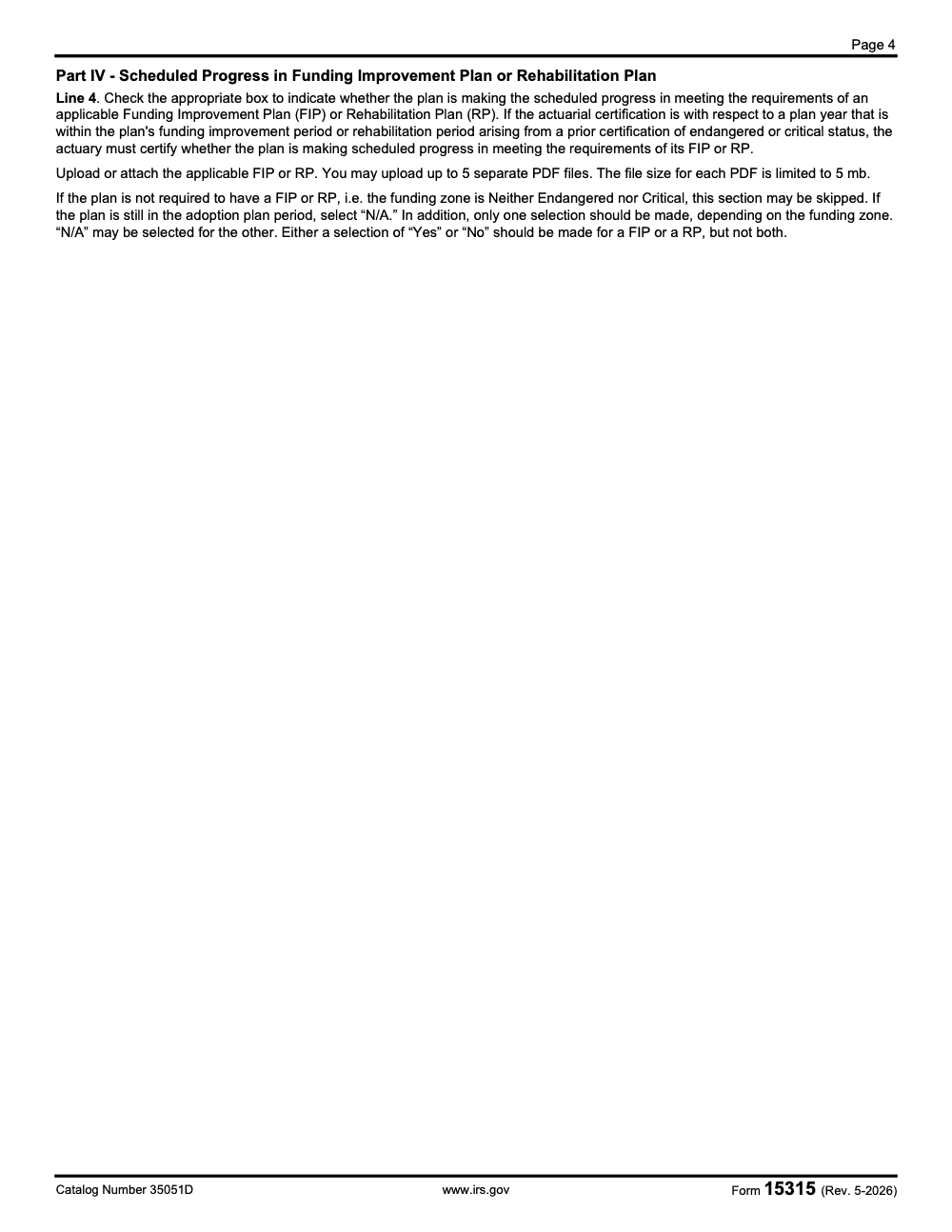
- Check the plan's status on Line 3 and answer Line 4 progress only on the applicable row.
- Do not attach letters or exhibits. The mobile-friendly form is self-contained.
Controls that keep you audit‑ready
A little structure keeps reviews short and stops rework. Here is a simple control set that works for most plans.
| Step | What to check | Your control |
| Pre‑entry | You have an active IRS Online Account through ID.me | File electronically through the mobile-friendly Form 15315, signed in with your IRS Online Account via ID.me. |
| Data input | All identifiers and the zone status match the actuary’s certification | Cross‑check against the signed actuarial memo and your plan master data. |
| Submission | Evidence of timely filing is captured | Save the IRS verification of submission you receive after filing electronically. |
| Retention | Workpapers reconcile to the filed form | Maintain assumptions, schedules, and notes in your plan’s records. Provide only if the IRS requests. |
Reminder, once you submit electronically the IRS sends a verification of submission. Keep that confirmation, and build your evidence trail as part of your process, not after the fact.
Due dates and zone status, in plain language
- Due within 90 days after the plan year begins.
- Calendar year plan example, due March 31.
- The enrolled actuary certifies status such as endangered, critical, or critical and declining under IRC Section 432, which the Pension Protection Act of 2006 added to the Code. These statuses guide funding improvement or rehabilitation steps and related notices.
If you need to talk to someone about an account or a submission question, call Employee Plans Customer Account Services at 877‑829‑5500. They can answer account‑specific and procedural items.
Where Accountably fits, when delivery pressure hits
If delivery bottlenecks are the real risk, not the rulebook, add structure before the next deadline. Accountably is an offshore accounting and tax staffing company built for CPA, EA, and accounting firms that builds controlled offshore delivery for teams that need clean workpapers, reliable turnaround, and review protection, especially when compliance work piles up. We work inside your systems, we follow your templates, and we reinforce documentation discipline so filings like Form 15315 do not slip. Use us when your team is buried in production and you need stable capacity without chaos.
Sources, dates, and a quick compliance note
- Form 15315 (Rev. 4-2025) and its instructions: electronic filing only through the mobile-friendly form on IRS.gov, signed in with an IRS Online Account via ID.me.
- Filing deadline (90th day after the plan year begins) and the IRS verification of submission sent after electronic filing, per the Form 15315 instructions.
- Employee Plans Customer Account Services contact, page last reviewed August 26, 2025.
This article is for general guidance. Always confirm the latest IRS instructions before you file, since procedures can change.
Final checklist you can copy
- Confirm the due date, the 90th day after the plan year starts.
- File through the mobile-friendly Form 15315, signed in with your IRS Online Account via ID.me. This is the only filing channel in the current instructions.
- Enter only the information the form asks for, with no extra letters or exhibits.
- Have the enrolled actuary, not the sponsor or administrator, sign and file the certification.
- Submit a single certification per plan year to avoid duplicate entries.
- Save the IRS verification of submission in the plan’s records with the actuarial certification.
Common Mistakes We See Every Season
Most Form 15315 problems are not actuarial, they are filing-process problems. Here are the ones my team sees most often on multiemployer certifications, and the controls that prevent them.
Reusable Checklists
These are copy-paste ready for your plan-compliance SOP. Drop them into your workpaper templates so every multiemployer certification runs the same way.
Pre-filing data check
- Confirm you are within 90 days of the plan year start.
- Gather the plan name, plan sponsor name, and sponsor address for Line 1.
- Verify the nine-digit EIN on Line 1d and the three-digit plan number on Line 1b.
- Confirm the enrolled actuary's name, firm, and enrollment number for Line 2.
- Lock the zone status with the actuary before checking a box on Line 3.
- Confirm whether Line 4 needs a Funding Improvement Plan or Rehabilitation Plan answer.
- Have the enrolled actuary, not the sponsor, ready to sign Part V.
Electronic filing steps
- Sign in to your IRS Online Account through ID.me, reusing an existing ID.me account if you have one.
- Open the mobile-friendly Form 15315; this is the only filing channel in the current instructions.
- Enter only the information the form asks for, with no extra letters or exhibits.
- Submit a single certification per plan year to avoid duplicate entries.
Filing-proof retention
- Save the verification of submission that the IRS sends after you file electronically, as part of your file copy.
- Note the submission date so it ties to the 90th-day deadline for the plan year.
- Reconcile the actuarial workpapers and assumptions to the filed form.
- Keep the actuarial report and worksheets in the plan file, ready only if the IRS requests them.
- Submit only once per plan year to avoid duplicate IRS entries.
Keep 15315 Season From Stalling
Form 15315 carries an unusual pressure profile. The certification is due just 90 days after the plan year starts, filing is electronic only through the IRS Online Account, and a late or missing certification is treated as a failure to file the annual report under ERISA Section 502(c)(2), exposing the plan to a civil penalty of up to $1,100 per day (per the Form 15315 instructions, with that amount adjusted annually for inflation by the Department of Labor).
When a plan office is juggling actuarial sign-off, identifier checks, and a short window, the work stalls in the wrong place. The fix is a repeatable filing process that submits early rather than on deadline day.
- Calculate the 90-day due date from each plan's own year start, then set an internal target two weeks earlier.
- Build the filing process around the electronic mobile-friendly Form 15315, accessed through your IRS Online Account via ID.me, so submission does not become a deadline-day scramble.
- Cross-check the Line 1b plan number, the Line 1d EIN, and the Line 3 zone status against the signed actuarial memo before submission.
- Route Part V to the enrolled actuary for signature, since the sponsor or administrator cannot sign in the actuary's place.
- Keep the verification of submission the IRS sends after you file electronically with your plan records.
That is the documentation discipline we build into client workflows. Accountably runs structured offshore tax and compliance delivery with multi-layer review, so recurring filings like Form 15315 stay on schedule and audit-ready even when the production load peaks.
FAQs
The plan’s enrolled actuary – not the plan administrator – files and signs Form 15315 to transmit the annual certification for a multiemployer defined benefit plan. File within 90 days after the start of the plan year, for example March 31 for a calendar year plan.
Form 15315 is filed electronically through the IRS mobile-friendly forms portal, signed in with your IRS Online Account through ID.me. The current instructions describe no paper, email, or fax filing option. Submit only once to avoid duplicate entries, and the IRS will send a verification of submission.
No. Send only the completed Form 15315. Keep your actuarial report, worksheets, and assumptions in your records for possible IRS requests.
Yes. Once you submit Form 15315 electronically, the IRS sends you a verification of submission. Keep that confirmation with your plan records.
Use Employee Plans Customer Account Services at 877‑829‑5500. They handle account questions and basic information about retirement plan forms and statuses.
Treat your evidence like part of the filing, not an afterthought.
- Save the IRS verification of submission you receive after filing electronically, with the submission date noted.
- Organize actuarial workpapers, assumptions, and schedules in the plan’s files so they match the filed form.
- Keep the actuarial report ready in the plan file, but submit only the completed Form 15315.
This simple discipline shortens your internal reviews and gives you confidence if the IRS asks later.
- Letting the sponsor or administrator sign. The enrolled actuary is the required signer of the certification.
- Sending extra attachments. The IRS wants the form only. Extra files can trigger handling delays.
- Submitting more than once. Multiple submissions create duplicate entries in IRS systems, so file a single electronic certification and keep the IRS verification of submission as your proof.
About this guide
Accountably helps US CPA, EA, and accounting firms hire trained accountants and tax preparers in India.
About us Reviewed byJugal Thacker, CPAFounder and CEO at Accountably
A Washington-licensed CPA with 7+ years inside US firms – PwC, a real-estate tax practice, then a full-service firm, rising from reviewer to manager to advisory. This article was reviewed against current IRS guidance for the 2025 tax year and updated for filers preparing late returns, amendments, and 2026 estimates.
View profile →How we research, review, and update this guide
Every Accountably guide is researched against primary IRS sources, reviewed by a U.S. CPA, and refreshed as guidance evolves. Read our Editorial Guidelines to see how we source, fact-check, and update our content.




