
Summarize this article with AI
In Brief
Form 4506-B requests copies of an exempt organization's exemption application or determination/affirmation letter from the IRS, covering Forms 1023, 1023-EZ, 1024, and 1024-A. For determination letters issued in 2014 or later, check the IRS Tax Exempt Organization Search (TEOS) portal at irs.gov/teos first; reserve Form 4506-B for pre-2014 letters, full application files, and items TEOS does not surface. For returns or notices, see the related IRS forms library – Form 4506-A is the correct route, not 4506-B (per current IRS Form 4506-B instructions, Rev. 5-2024).
People reach for Form 4506-B expecting a hard process, usually because a grant committee or a board just asked for the organization's official IRS determination letter and nobody can find the original in the file. The fix is often simpler than the request. For determination letters issued in 2014 or later, the letter is generally a free download from the IRS Tax Exempt Organization Search portal, so check there before filling out a single line.
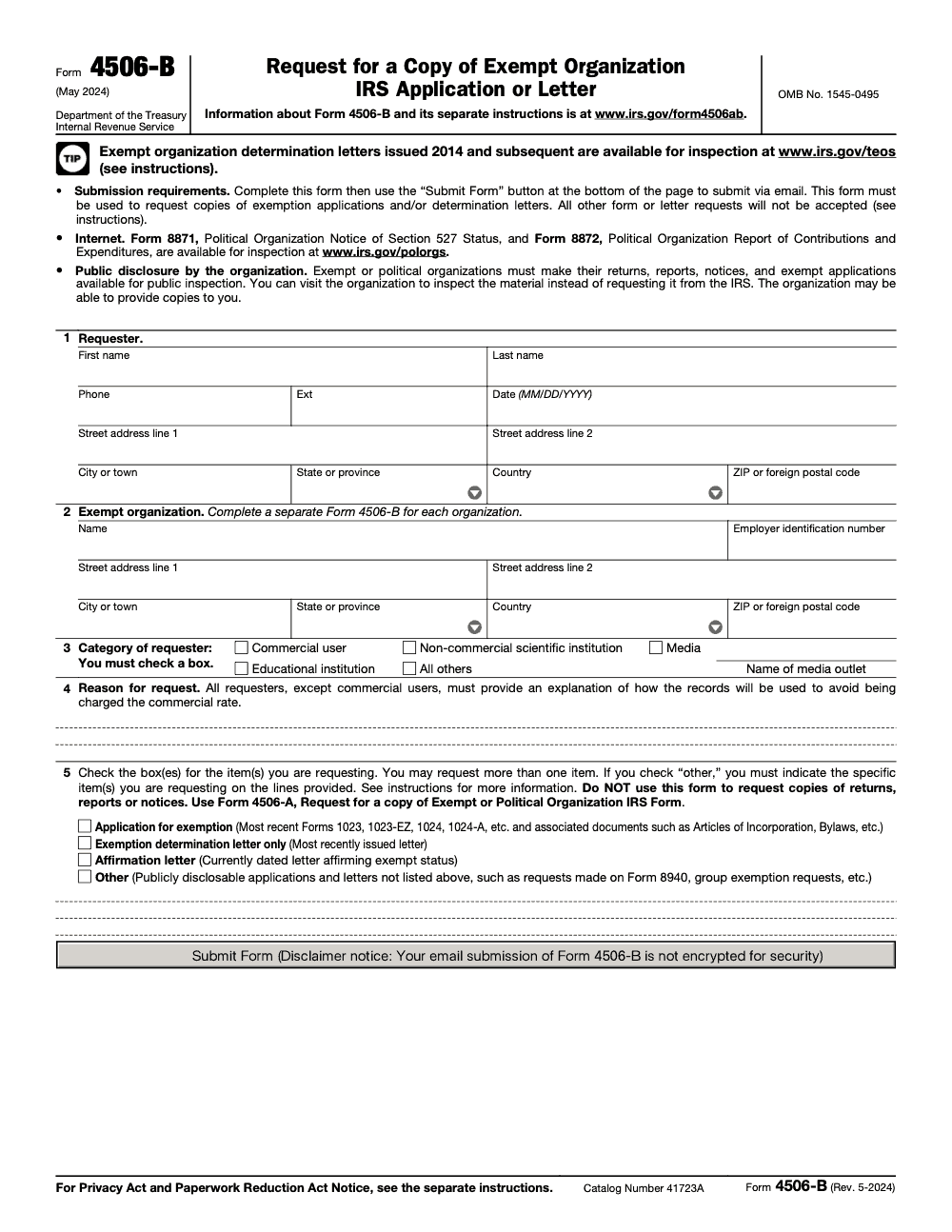
When TEOS does not have it, Form 4506-B is the right tool for pre-2014 letters, full exemption application files covering Forms 1023, 1023-EZ, 1024, and 1024-A, and items the portal does not surface. A separate form is required for each organization, every requester checks one Line 3 category, and the completed PDF goes out through the embedded Submit Form button by email, which is not encrypted. For returns or notices instead of letters, Form 4506-A is the correct route.
Key Takeaways
- Form 4506-B requests copies of an exempt organization's exemption application (Forms 1023, 1023-EZ, 1024, 1024-A) or determination/affirmation letter; it cannot be used for returns, reports, or notices (use Form 4506-A for those).
- The current revision is May 2024 (Rev. 5-2024); the form is not tax-year-specific, so the same revision is used for all 2025 filings.
- For determination letters issued in 2014 or later, check the IRS Tax Exempt Organization Search portal at irs.gov/teos first – the letter is usually available for free download without filing 4506-B.
- A separate Form 4506-B is required for each exempt organization; combined requests on a single form are not accepted.
- Every requester must check one Line 3 category (Commercial user, Non-commercial scientific institution, Media, Educational institution, or All others); non-commercial requesters must explain on Line 4 how the records will be used to avoid commercial-rate fees.
- The completed PDF is submitted via the embedded Submit Form button (email submission, not encrypted); Forms 8871 and 8872 for political organizations are inspected directly at irs.gov/polorgs, not via 4506-B.
What Form 4506‑B Does, And When You Should Use It
Think of 4506‑B as your path to official IRS‑file copies. You can request the organization’s exemption application, such as Forms 1023, 1023‑EZ, 1024, or 1024‑A, the actual determination letter, or an affirmation letter that verifies current exemption. You will complete the PDF, choose what you need in clear terms, and send it electronically. This is especially helpful for due diligence, audits, large grants, or when historic records are missing from internal files.
If a determination letter was issued on or after January 1, 2014, go to the IRS Tax Exempt Organization Search first. Downloading there is free and instant, which saves you weeks. If TEOS does not show the letter, or if you need the underlying application packet, go ahead and file 4506‑B.
What TEOS Can And Cannot Do
- TEOS hosts determination letters issued in 2014 or later, plus many returns, and it offers bulk data.
- TEOS will not provide older determination letters or full application files, those require Form 4506‑B.
Who Should File 4506‑B
You should file if you are responsible for confirming status or reviewing the exemption application history and TEOS does not have what you need. That includes nonprofit leaders, accountants, grantmakers, researchers, and journalists. Commercial users typically pay standard duplication fees, while non‑commercial requesters may qualify for reduced charges.
Requester Categories And Why They Matter
- Commercial requester: You pay duplication fees, generally $0.20 per page. Search and review fees can apply under FOIA guidelines.
- Media, educational, or non‑commercial scientific: The first 100 pages are free, then $0.20 per page.
- All others, non‑commercial personal use: Similar free‑page threshold, then standard per‑page rates. Large requests over $250 may trigger an advance bill before release.
Short on time in peak season? Document your intended non‑commercial use clearly on the form to avoid being billed at commercial rates.
When You Can Skip The Form And Download The Letter
If the determination letter was issued on or after January 1, 2014, use TEOS to download a PDF immediately. Search by legal name or EIN, then save the file for your grantor, lender, or auditor. If no letter appears, or the organization’s approval predates 2014, proceed with Form 4506‑B.
Quick Scenario Guide
| Scenario | What you do |
| Post‑2014 determination letter | Download from TEOS, no 4506‑B needed. |
| Pre‑2014 letter or missing on TEOS | File Form 4506‑B. |
| You only need official current‑status proof | Request an affirmation letter via 4506‑B. |
| You need the exemption application file | Request it via 4506‑B. |
This TEOS‑first approach trims weeks off your timeline, which is helpful when a grant cycle or audit date is closing in.
When An Affirmation Letter Is The Right Move
Some funders only want current proof that donations are deductible, not the original letter from years ago. In those cases, request an affirmation letter. It confirms the organization’s present exemption and usually satisfies grantors and donors. If the group is part of a group exemption, you may also need verification from the central organization, since the IRS letter does not prove subordinate status by itself. Plan for a 60‑day window, and avoid duplicate submissions while you wait.
I encourage clients to keep both files on hand, the affirmation letter for everyday requests and the historic determination letter for deeper due diligence. It saves time later.
What You Can Request With 4506‑B
You can ask for the organization’s exemption application and supporting correspondence, the determination letter (note: a Line 5 “Exemption determination letter only” request returns the most recently issued letter per current IRS Form 4506-B instructions, not necessarily the original), an affirmation letter, group exemption materials, and other publicly disclosable rulings, such as certain items formerly requested via Form 8940. When scope is wide, expect higher page counts and possible advance billing.
Accountably note, if your accounting or finance team is buried during busy season, organize a short intake checklist for each request. Clear scope and dates reduce back‑and‑forth with the IRS and keep your projects on schedule.
Costs, Billing, And How Fees Work
Let’s get money out of the way first so you can budget time and cost. When you request public records with Form 4506‑B, the IRS applies its FOIA fee rules. The headlines are simple, commercial requesters pay duplication and may pay search and review, while non‑commercial categories get the first 100 pages free for paper copies, and scanning of the first 1,000 pages free when the IRS has to convert paper to electronic. If expected fees are above $250, the IRS will send an advance bill, you do not prepay with the form. No fee is charged if the total is $25 or less.
Requester Categories And Typical Charges
| Requester type | What you usually pay | Notes |
| Commercial | $0.20 per page for duplication, plus potential search and review at $50 per hour | No free page allowance for paper, search and review can apply. |
| Media, Educational, Non‑commercial scientific | First 100 pages free for paper, then $0.20 per page. Scanning hardcopy is $30 per hour, first 1,000 pages scanned free | Explain your non‑commercial use in Part 4 to qualify. |
| All other non‑commercial | Same as above, first 100 pages free, then $0.20 per page for paper. Scanning rules match | Individuals seeking records for personal, non‑commercial use. |
Do not include a check with your request. If the IRS expects charges to exceed your limit or $250, they will contact you to approve or modify the request, or to collect an advance payment.
Practical ways to keep fees low
- Ask only for the items you truly need, for example the determination letter and the original Form 1023, not “all correspondence for 20 years.”
- State a page cap you are willing to pay, then the IRS can pause and ask before going past it.
- Pull what you can from TEOS first, it is free and fast.
Prep Checklist Before You Fill The Form
A little prep saves weeks. Match IRS records exactly and set a narrow scope.
- Exact legal name and EIN for the exempt organization, as shown in IRS systems.
- Current mailing address that the IRS should use for delivery.
- What you need, determination letter, exemption application (Form 1023, 1023‑EZ, 1024, or 1024‑A), or an affirmation letter.
- Date or year of the determination, and any group exemption context if the organization is a subordinate.
- Confirm on TEOS whether a post‑2013 determination letter is already downloadable. If yes, skip the form.
Quick rule, one organization per form, and use the current 4506‑B revision (Rev. 5‑2024 for filings made in 2025; the form is not tax‑year‑specific, so do not hunt for a ‘2025’ version). Requests that use outdated PDFs or list multiple EINs stall.
Part 1, Requester Information
Fill Part 1 with the person the IRS should contact. Use a direct phone number and the mailing address where you want delivery.
- Your full name, phone, and complete address for correspondence.
- The date you submit the request.
- Keep a saved PDF of what you sent, plus the email confirmation after using the Submit button.
Tip, if someone else might follow up with the IRS, keep your Part 1 info consistent across related requests so the service rep recognizes the trail. In my experience, this cuts minutes off every status call.
Part 2, Exempt Organization Information
This is where most delays happen. Enter the organization’s legal name and EIN exactly as the IRS has it. If the group has moved, use the current address, the IRS will still match by name and EIN first.
- One EIN per 4506‑B, do not combine multiple organizations.
- Use the precise legal name and nine‑digit EIN.
- If there is group exemption history, note that you may also need proof of subordinate status from the central organization. The affirmation letter alone does not establish membership in the group.
What‑How‑Wow, A Simple Way To Scope Your Ask
- What, identify the exact items, for example “Original Form 1023 filed in 2010” and “Determination letter dated March 2011.”
- How, state that you are non‑commercial and explain the use if you qualify, for example “grant due diligence for a public charity.”
- Wow, add one line that saves time for everyone, for example “If page count will exceed 150, please notify me first.”
Accountably perspective, when we build intake checklists for clients, we prefill the What‑How‑Wow prompts in the request template. Teams move faster, and requests come back cleaner during deadlines. We only mention this because a simple checklist is often the difference between a 2‑week turnaround and a 3‑month loop of corrections.
When You Can Skip 4506‑B Entirely
Check TEOS first. Determination letters issued on or after January 1, 2014 are usually ready to download at no cost. Search by legal name or EIN, open the organization profile, and look for a Determination Letter in the documents list. You can also ask the organization directly, since exempt organizations must make their exemption application and disclosable letters available for public inspection, which is often faster and free. If it is missing or older than 2014, use Form 4506‑B.
Quick Flow
- Search TEOS by EIN or exact legal name.
- Download the letter if the approval date is 2014 or later.
- If no PDF appears, request the letter or the application via 4506‑B.
I keep a short screen recording for clients on this step. Once a controller does this once, they stop emailing auditors for copies and pull the file in under a minute. It is the fastest win in this whole process.
Parts 3–5, Category, Reason, And What You Are Asking For
These three parts decide your fees and your scope. Take a minute to be precise.
- Part 3, pick the correct requester category. This box is mandatory, so a request submitted without a category selection will not be processed. Commercial users should expect duplication, search, and review charges. Media, educational, and non‑commercial scientific requesters get the first 100 pages free for paper, and the first 1,000 pages of scanning free. Other non‑commercial requesters have the same free allowances.
- Part 4, if you are non‑commercial, include a clear explanation of how you will use the records, for example “university research,” “news reporting,” or “private due diligence for a gift.” This is what qualifies you for the reduced fee treatment, and skipping it triggers the commercial rate by default even for genuine non‑commercial requesters.
- Part 5, list the exact items, the exemption application, the determination letter, an affirmation letter, and any follow‑up rulings you need for a complete file. Use a separate form per EIN.
Common Items To Request In Part 5
- Original Form 1023, 1023‑EZ, 1024, or 1024‑A and supporting exhibits.
- Determination letter, original and any subsequent updates (note: a Line 5 "Exemption determination letter only" request returns the most recently issued letter per current IRS Form 4506-B instructions; if you need the historical original, request the full application file alongside it).
- Affirmation letter, suitable when the original letter is pre‑2014 and a current status confirmation will satisfy a grantor.
- Group exemption documents where relevant. If the organization is a subordinate, you may also need to get separate confirmation from the central organization.
How To Submit The Form
The IRS wants Form 4506‑B submitted electronically using the Submit Form button inside the current PDF. Do not mail or fax this form. Be aware that this email submission is not encrypted, so do not pad the form with sensitive personal information beyond what the fields ask for. Complete all fields first, then click Submit Form so the email packages correctly. If the button does not work in your environment, call 877‑829‑5500 for instructions.
Submission checklist
- Use the current revision, the IRS states that only the current 4506‑B will be processed.
- Open the PDF in Adobe Acrobat Reader, not in a browser viewer.
- Do not include attachments in the email with your form, extra attachments can delay processing.
- Keep a copy of the sent email and the completed PDF for your files.
Small but important, many firms accidentally send the form from a shared mailbox that blocks the auto‑reply. Use a team member’s inbox or a monitored alias, then you will not miss follow ups.
Processing Times And What To Expect
Plan for about 60 days before you follow up. If the IRS cannot fill the request within that window, they may notify you that an additional 60 days is needed. If it has been more than 60 days since submission and you have not heard back, call 877‑829‑5500 for a status check. Do not send duplicates, second requests can slow things down.
Status realities
- If estimated costs exceed $250, the IRS pauses to send an advance bill. Processing resumes after payment.
- Requests that list the wrong EIN or an outdated form revision are often rejected with a letter that explains how to fix and resubmit.
- TEOS keeps improving, so always recheck there if a funder will accept a 2014 or later letter. You might not need to wait at all.
When An Affirmation Letter Is The Better Choice
If a donor, bank, or grantor only needs current confirmation, request an affirmation letter in Part 5. It serves the same purpose for many third parties as the original letter, and you avoid digging through decades of files. For group exemptions, still get subordinate confirmation from the central organization, since the IRS letter by itself does not prove membership.
I suggest keeping both on hand once you receive them, the affirmation letter for everyday asks, the older determination letter and application for deep diligence. Your future self will thank you during audit season.
Tips To Avoid Delays And Common Errors
- Match the legal name and EIN to IRS records exactly, one organization per form.
- Use the current 4506‑B revision and submit via the PDF’s Submit Form button.
- Explain non‑commercial use in Part 4 if you want the free‑page allowance.
- Set a page cap you are willing to pay and note it on the form.
- Do not send duplicate requests within 60 days. If in doubt, call 877‑829‑5500.
- Start with TEOS for any letter issued 2014 or later, it is instant and free.
Handy Mini‑Checklist For Busy Weeks
- TEOS check complete
- Current 4506‑B downloaded and opened in Acrobat Reader
- Parts 1 and 2 verified against IRS records
- Part 3 category correct
- Part 4 non‑commercial statement added if applicable
- Part 5 items listed precisely
- Page cap noted
- Submit Form button used, confirmation saved
Putting It All Together
Here is the fastest path we use with clients. Check TEOS first for any determination letter from 2014 forward, download it, and you are done. If not available, complete the current 4506‑B, pick the right requester category, and describe your non‑commercial use when it applies. List the precise items in Part 5, set a page cap, submit electronically, and wait 60 days before following up at 877‑829‑5500. This simple flow removes guesswork and keeps funders, lenders, and auditors happy.
Where Accountably Can Help, Briefly
If your firm is slammed during peak season, we can slot this into a checklist so it runs smoothly. We standardize the TEOS pre‑check, fill the current 4506‑B, and track 60‑day follow ups so partners and controllers do not get stuck in email loops. That structure is optional, it just saves time when your team is deep in production.
Editor’s Note
This guide reflects IRS pages reviewed or updated between July 17, 2025 and October 9, 2025, including TEOS availability of post‑2013 determination letters, current submission rules for Form 4506‑B, customer service contact, and FOIA fee schedules. Always confirm the latest IRS page dates before you file.
Common Mistakes We See Every Season
The same handful of mistakes keep showing up across 4506-B submissions, and each one either delays the response or routes the request to the wrong office entirely.
Reusable Checklists
These checklists are written to drop directly into a firm SOP or a client packet – they cover the prep, the submission review, and the follow-up for a clean 4506-B request.
Pre-file prep packet
- Confirm the request is for an exemption application or letter (use 4506-B), not a return or notice (use Form 4506-A).
- Run the organization through irs.gov/teos to confirm the determination letter is not already available for immediate download.
- Capture the exempt organization's legal name and Employer Identification Number (Line 2 requires both).
- Decide which Line 3 category applies: Commercial user, Non-commercial scientific institution, Media, Educational institution, or All others.
- Draft the Line 4 reason statement (mandatory for every requester except commercial users; if Media, note the outlet name).
- Identify each Line 5 item being requested: Application for exemption, Exemption determination letter only, Affirmation letter, and/or Other (with description).
- Download the current Rev. 5-2024 PDF from irs.gov/form4506ab.
Submission review
- Line 1 requester information is complete, including phone, address, and the MM/DD/YYYY date.
- Line 2 lists exactly one exempt organization, with EIN and current mailing address.
- Exactly one Line 3 category box is checked; if Media is selected, the outlet name is filled in.
- Line 4 reason is written, or the requester is genuinely commercial and willing to be billed at the commercial rate.
- Line 5 boxes match the items being requested; if Other is checked, the specific item is described on the lines provided.
- Personally identifiable information is limited to what the form actually requires – the email submission channel is not encrypted.
- The PDF is submitted via the embedded Submit Form button (not faxed, not mailed).
Post-submit follow-up
- Log the submission date in the client file and set a follow-up reminder on the calendar.
- Save a copy of the submitted PDF locally; the email channel does not produce a confirmation copy back to the requester.
- If no response arrives within the IRS's stated processing window, call IRS Customer Service before resending – duplicate filings push the request to the back of the queue.
- On receipt, file the response with the organization's exempt-status records and update the EIN file.
- If the response returned an affirmation letter and the grantor wants the original determination letter (or vice versa), file a second 4506-B with the correct Line 5 box checked.
Keep 4506-B Season From Stalling
Form 4506-B does not have a quarterly or annual deadline like payroll or 1040 work, but the requests still pile up – usually right when grant cycles open, board reviews start, or a 990 cleanup turns up a missing determination letter. Since 2014 the IRS Tax Exempt Organization Search portal (per IRS guidance on irs.gov/teos) has surfaced new determination letters for free download, so the residual 4506-B workload now skews toward pre-2014 letters, full application packages, and edge cases TEOS does not cover.
The stalling pattern is the same across requests: each one looks small, the lookup steps are easy to skip, and small skipped steps add up to weeks of avoidable wait. Treating every 4506-B as a tiny project – with a documented scope, a TEOS-first decision, and a follow-up calendar – turns a noisy intake stream into something a single staff member can run cleanly.
- Build a one-page intake script that asks the requester whether they need an exemption application, the original determination letter, an affirmation letter, or some combination, so Line 5 is decided before the PDF is opened.
- Standardize a TEOS-first check on irs.gov/teos and record the result in the client file before any 4506-B is drafted; pre-2014 letters and full application packages are the only routine 4506-B workload left.
- Maintain a template Line 4 reason library by requester category (educational, media, non-commercial scientific, all others) so non-commercial requesters never default into commercial-rate fees.
- File one 4506-B per organization, even for affiliated nonprofits under a group exemption – a separate form per entity is required by the current Rev. 5-2024 instructions.
- Track every submission in a shared log with the submission date, items requested on Line 5, and a follow-up reminder, since duplicate filings are the most common self-inflicted delay.
Where this gets heavy – multiple grant rounds, 990 cleanup at scale, or due-diligence backlogs spanning dozens of organizations – Accountably can run the intake, TEOS check, form prep, and follow-up cycle inside your existing workflow through our U.S. tax execution service, so the production work clears without pulling reviewers off higher-value engagements.
FAQs
It is the way to ask the IRS for official, public‑inspection copies of an exempt organization’s exemption application or letter, including an affirmation letter. It is different from 4506‑A, which handles returns like Form 990, and different from 4506, which handles copies of tax returns.
The IRS targets about 60 days. If they need longer, they may notify you that another 60 days is required. After 60 days with no update, call 877‑829‑5500 for status, and do not send a duplicate request.
No. Use the electronic Submit Form button in the current PDF. If the button does not work in your environment, call Customer Service for help.
Do not include attachments with the email generated by the Submit Form button. Attachments can delay processing. Put the details inside the form itself.
Some grantors want the original, others accept a current affirmation letter. If the organization is part of a group exemption, you also need verification from the central organization to prove subordinate status.
Internal guidance notes that some copy requests can be described in writing, however, public guidance for exempt organizations now says the IRS will only process requests submitted on the current Form 4506‑B. Use the current form and email it to avoid rejection.
Other forms this guide names
- Form 990: Nonprofit Tax Return Filing Guide 2025
- Form 4506-A: Request IRS 990 Copies Fast via TEOS or Mail
- Form 1024-A: 501(c)(4) Application Guide for Pay.gov Filing
- Form 1023-EZ: Streamlined 501(c)(3) Application Guide
- Form 8872: Compliance Checklist: Schedules A/B, E-file, 2026 Deadlines
About this guide
Accountably helps US CPA, EA, and accounting firms hire trained accountants and tax preparers in India.
About us Reviewed byJugal Thacker, CPAFounder and CEO at Accountably
A Washington-licensed CPA with 7+ years inside US firms – PwC, a real-estate tax practice, then a full-service firm, rising from reviewer to manager to advisory. This article was reviewed against current IRS guidance for the 2025 tax year and updated for filers preparing late returns, amendments, and 2026 estimates.
View profile →How we research, review, and update this guide
Every Accountably guide is researched against primary IRS sources, reviewed by a U.S. CPA, and refreshed as guidance evolves. Read our Editorial Guidelines to see how we source, fact-check, and update our content.




