
Summarize this article with AI
In Brief
Form 4506-A requests public inspection copies of exempt or political organization filings from the IRS, most often 990, 990-EZ, 990-PF, and 990-T returns. Filings received in 2017 or later are usually free through the IRS Tax Exempt Organization Search (TEOS), so submit Form 4506-A only when TEOS does not have the year or item (per Form 4506-A instructions, Rev. March 2026, OMB 1545-0495). File one form per organization, check exactly one of five requester categories on Line 3, and expect up to 60 days from receipt. See our U.S. tax outsourcing services for ongoing nonprofit production support.
A grant reviewer asks your nonprofit client for an official copy of a few years of 990 filings, and the team starts drafting a request to the IRS before checking anything. Most of the time that request is unnecessary. For 990, 990-EZ, 990-PF, and eligible 990-T filings received in 2017 or later, the documents are usually sitting in the IRS Tax Exempt Organization Search portal for free, and pulling them there beats waiting on mail.
Form 4506-A earns its place when TEOS does not have the year or the specific item you need, or when only an official IRS copy will do. You file one form per organization, check exactly one of five requester categories on Line 3, mail or fax it to the RAIVS Unit in Ogden, and plan for IRS processing of up to 60 days. Get the requester category and the organization details right the first time, because a bounced request restarts that clock.
Key Takeaways
- Form 4506-A requests IRS-held copies of exempt or political organization filings that are open to public inspection under IRC §6104. That primarily means the 990 series and related notices.
- For most 2017 and later 990, 990‑EZ, 990‑PF, and eligible 990‑T filings, you can download them free in the IRS Tax Exempt Organization Search (TEOS). Start there, it is faster than mail.
- Use 4506-A when TEOS does not have what you need, for example older filings, specific items not posted, or when an official copy from the IRS is required. Typical IRS processing is up to 60 days.
- Where to send 4506-A, mail or fax to the IRS RAIVS Unit in Ogden, Utah, and keep proof of submission.
- If you need the organization’s exemption application or a copy of its determination letter that is not on TEOS, use Form 4506-B. 2014 and later determination letters are on TEOS, and 4506‑B is submitted by email using the built in Submit Form button.
What Form 4506-A Is and When You Need It
Form 4506-A is the IRS request form for public inspection copies of exempt or political organization filings. In practice, you use it when you need an IRS-source copy of a Form 990, 990‑EZ, 990‑PF, or eligible 990‑T and the document is not available online, or a counterparty asks for a copy sourced directly from the IRS. The IRS confirms that 2017 and later 990 series are available through TEOS, which is why many requests can be solved in minutes without a paper request.
If you manage nonprofit clients, this matters for audits, grant diligence, lender requests, M&A involving exempt entities, or tie out workpapers during cleanup. Your goal is speed with control, so you document the source, keep a copy, and move on without dragging a partner into a review loop.
TEOS First, Then 4506-A
- TEOS hosts 990, 990‑EZ, 990‑PF, 990‑T for 501(c)(3) organizations, and 990‑N images for filings received in 2017 or later. You can search by name or EIN, and you can download bulk data.
- Determination letters issued in 2014 or later are also on TEOS. If the letter year you need is there, you can download it immediately.
- If a document is not on TEOS, send Form 4506‑A, the IRS will mail or fax copies depending on the request type, and processing may take up to 60 days.
A Note About Media and Storage Updates
The IRS no longer provides exempt organization returns on DVD. That policy update pushed users toward online access and 4506‑A for items not posted, which is why your workflow should always start with TEOS.
Why This Matters For Firm Delivery
If you run an accounting firm, the real constraint is rarely sales. It is delivery, especially during peak. Requests for nonprofit filings seem small, yet they create context switching, lost time looking for the right year, and back and forth on what counts as an official copy. A clear SOP that says check TEOS, download what you can, request the rest with 4506‑A, and save proof to the engagement folder, protects your margins and your team’s focus.
At Accountably, we see firms stall when small retrieval tasks pile up across dozens of clients. A disciplined workflow with TEOS checks and correctly completed 4506‑A requests reduces review interruptions and keeps production moving. We mention this only because structure, not heroics, prevents deadline risk.
TEOS vs Form 4506-A, Which One Should You Use Today
| Action | Use Case | Speed | Source and Authority |
| TEOS search and download | You need 2017 and later 990‑series filings, 990‑N images, or 2014 and later determination letters | Immediate | Direct from IRS TEOS, free download |
| Form 4506‑A request | You need an IRS mailed copy when TEOS does not host the record or a counterparty requires IRS supplied copies | 30 to 60 days | IRS RAIVS fulfills the request |
| Form 4506‑B request | You need exemption applications or determination letters not on TEOS, or you need an affirmation letter | Often faster than mail, submitted by email | IRS responds with the requested public inspection documents |
The table mirrors current IRS guidance, including TEOS coverage and the 4506‑B email submission method. Keep this simple decision path in your procedures.
Exactly What You Can Request With Form 4506-A
You can request copies of returns, reports, or notices that are open to public inspection for exempt or political organizations. That typically means:
- Form 990, 990‑EZ, 990‑PF, and public inspection versions of 990‑T for 501(c)(3) organizations, subject to what the IRS holds.
- Certain related public notices, for example items the IRS lists under exempt organization public disclosure.
Remember the scope, 4506‑A is about public inspection copies. If an officer needs the organization’s own complete return with nonpublic attachments, the IRS directs that request to Form 4506, with the applicable fee, not 4506‑A. Set this expectation with clients to avoid rework.
Years Covered
- TEOS hosts 990‑series filings received in 2017 or later, plus determination letters from 2014 forward. Use that first.
- If you need pre‑2017 returns or items not posted, file Form 4506‑A and list the exact tax years, one form per EIN. The IRS instructs that incomplete forms are rejected, so fill in every required field.
Political Organization Filings
For political organizations, TEOS and the Political Organization Filing and Disclosure site cover many items, and 4506‑A is still available when online access does not satisfy the request. The IRS maintains separate access pages for section 527 filings.
TEOS, Your Fastest Route For 2017 and Later
Here is a quick TEOS checklist you can save into your SOP.
- Search by EIN first for precise matching.
- Verify the determination letter if the grantor asked for proof of status, most letters dated 2014 or later are available.
- Download the Form 990 for each year requested, name the files consistently, then place them in your workpaper index.
- Use the bulk data sets when you need to analyze multiple organizations at once.
TEOS is updated on an ongoing basis, the IRS confirms that 2017 and later 990 series and 2014 and later determination letters are available, which often removes the need to mail a request.
How To Complete Form 4506-A Without Rework
If TEOS does not have the year or item you need, complete 4506‑A carefully. Small errors cause rejections and delays.
The Essentials You Must Enter
- Organization legal name and EIN, exactly as recognized by the IRS.
- Mailing address.
- Your requester information and a contact person.
- The exact form type and each tax year you are requesting.
- Your requester category and reason for request, the IRS uses this to determine any copy charges.
Who Signs And Why That Matters
Public inspection requests do not require the organization’s officer to sign. However, your firm should still designate an internal owner to sign the request as the requester, then retain a copy in the engagement binder. This keeps accountability in your workflow.
Use Adobe Acrobat Reader For Forms
Open the official PDF in Adobe Acrobat Reader, not a browser viewer, so fields, barcodes, and the built in submission features on related forms work correctly. The IRS specifically advises using Adobe Reader rather than a browser PDF viewer when submitting or printing. That prevents corrupted fields and missing data.
Where And How To Submit Form 4506-A
Send the completed 4506‑A by mail or fax to the IRS RAIVS Unit. As of the current instructions, the mailing address is:
- Internal Revenue Service, RAIVS Unit MS 6716, Ogden, UT 84201
- Fax 855‑653‑9144
Always keep a dated copy and proof of mailing or fax transmission in your workpapers. The instructions state that processing may take up to 60 days. Plan your client timeline with that window in mind.
What If You Need An Exemption Application Or Letter
- Do not use 4506‑A for exemption applications or determination letters. Use Form 4506‑B, which the IRS now accepts by email using the Submit Form button. If the determination letter was issued in 2014 or later, check TEOS first because you might not need to request it at all.
Processing Times, Fees, And Practical Tips
How Long It Takes
The IRS notes that it may take up to 60 days to process a 4506‑A request. During peak seasons or when forms are incomplete, expect longer timelines. Your best hedge is accuracy and using TEOS to eliminate mail where possible.
Fees You Might See
- Inspection at an IRS office is free.
- Paper copy charges can apply. Under the FOIA fee schedule, non-commercial requesters get the first 100 pages free, then $0.10 per page for black-and-white photocopies ($0.20 per page for color) (but only if they explain on Line 4 how the records will be used – the category checkbox alone is not enough, and a missing explanation means you pay the commercial rate even after checking a non-commercial box). If the cost exceeds $250, the IRS asks for payment in advance. The IRS will bill for photocopying, do not send checks unless asked.
- For digital data covering specific older years, the IRS previously offered USB for certain sets, not for individual organizations. The agency also announced it no longer provides returns on DVD, pushing users toward online access. Check the most recent IRS page if you plan a bulk historical pull.
Submission Proof And Tracking
- Use certified mail or a fax confirmation page to prove submission.
- File your copy and proof under a workpaper reference, for example A‑8 EO Docs.
- Calendar follow up at 30 days and 60 days. If there is no response after 60 days, call the TE/GE customer line. The IRS publishes 877‑829‑5500 for exempt organization customer service and references that contact for status checks tied to application and letter requests.
Step By Step, Your 4506-A SOP
- Verify TEOS first for the requested years and forms, save downloads with a consistent file name. Example, EIN_YYYY_Form990.pdf.
- If TEOS does not have the item, complete 4506‑A in Adobe Reader, include the organization’s legal name, EIN, exact form type, and list each year.
- Check your requester category and include a brief, plain reason to avoid commercial rate charges if you qualify.
- Print, sign, and submit by mail to Ogden, UT, or fax as listed. Keep proof.
- Note a 30 to 60 day processing window. Follow up if needed.
Naming And Workpaper Hygiene
- Use a standard file naming pattern and a single folder for EO source documents.
- Add a one page cover sheet that states the source, TEOS or IRS RAIVS, and the date retrieved.
- During review, your manager needs to see exactly where the copy came from with one click.
Common Pitfalls We See And How To Avoid Them
- Requesting with the wrong EIN or a nickname for the entity. Always use the IRS official name, then validate the EIN on TEOS.
- Forgetting to list each tax year separately, which slows processing.
- Mailing to a transcript address for individual returns rather than the RAIVS Unit for EO copies. Follow the 4506‑A instructions address.
- Skipping the requester category and reason, which can trigger copy charges or a rejection.
When To Use Form 4506-B Instead
Use 4506‑B when you need a copy of the exemption application, the current determination letter, or an affirmation letter confirming current status. The IRS updated the process so you submit 4506‑B by email using the Submit Form button built into the PDF. That change improves intake and reduces mail delays. If your target letter is dated 2014 or later, check TEOS before filing because it might be available for immediate download.
4506‑B Quick Checklist
- Complete in Adobe Reader and click Submit Form to email your request.
- Select the right item, application package, determination letter only, affirmation letter, or other disclosable item.
- Expect copy charges if the package is large, the IRS will bill you and can request advance payment if the estimate exceeds $250.
- If your request has been pending more than 60 days, call the published TE/GE number for status.
Small habit, search TEOS, then choose 4506‑A or 4506‑B with precision. This one minute decision prevents days of waiting.
Where This Fits In Your Delivery System
When you standardize TEOS checks and 4506‑A or 4506‑B requests, your team avoids last minute chases and review traffic. At Accountably, we integrate this into firms’ month end and nonprofit SOPs, so staff know exactly where to look, how to request, and how to document the source. That structure cuts partner review time and keeps advisory work moving. Mentioning tools without discipline does not help, a clear workflow does.
Common Mistakes We See Every Season
Most rejected or delayed 4506-A requests trace back to the same handful of errors. Catch them on intake and the IRS Ogden RAIVS unit ships your copies inside the window the instructions promise.
Reusable Checklists
These checklists drop straight into your engagement file. Save them as SOPs and your staff handles 4506-A requests without partner-level review.
Pre-request TEOS triage
- Pull the organization's EIN and exact legal name from the IRS determination letter or a recent W-9.
- Search the IRS Tax Exempt Organization Search by EIN for each tax year requested.
- Confirm the return type (990, 990-EZ, 990-PF, or 990-T) is visible and downloadable.
- For 501(c)(3) Form 990-T, verify TEOS posted the return; non-501(c)(3) 990-T is not publicly disclosable.
- If all years are available on TEOS, download and skip Form 4506-A.
- If any year is missing or predates 2017, proceed to Form 4506-A for that year only.
4506-A line-by-line completion
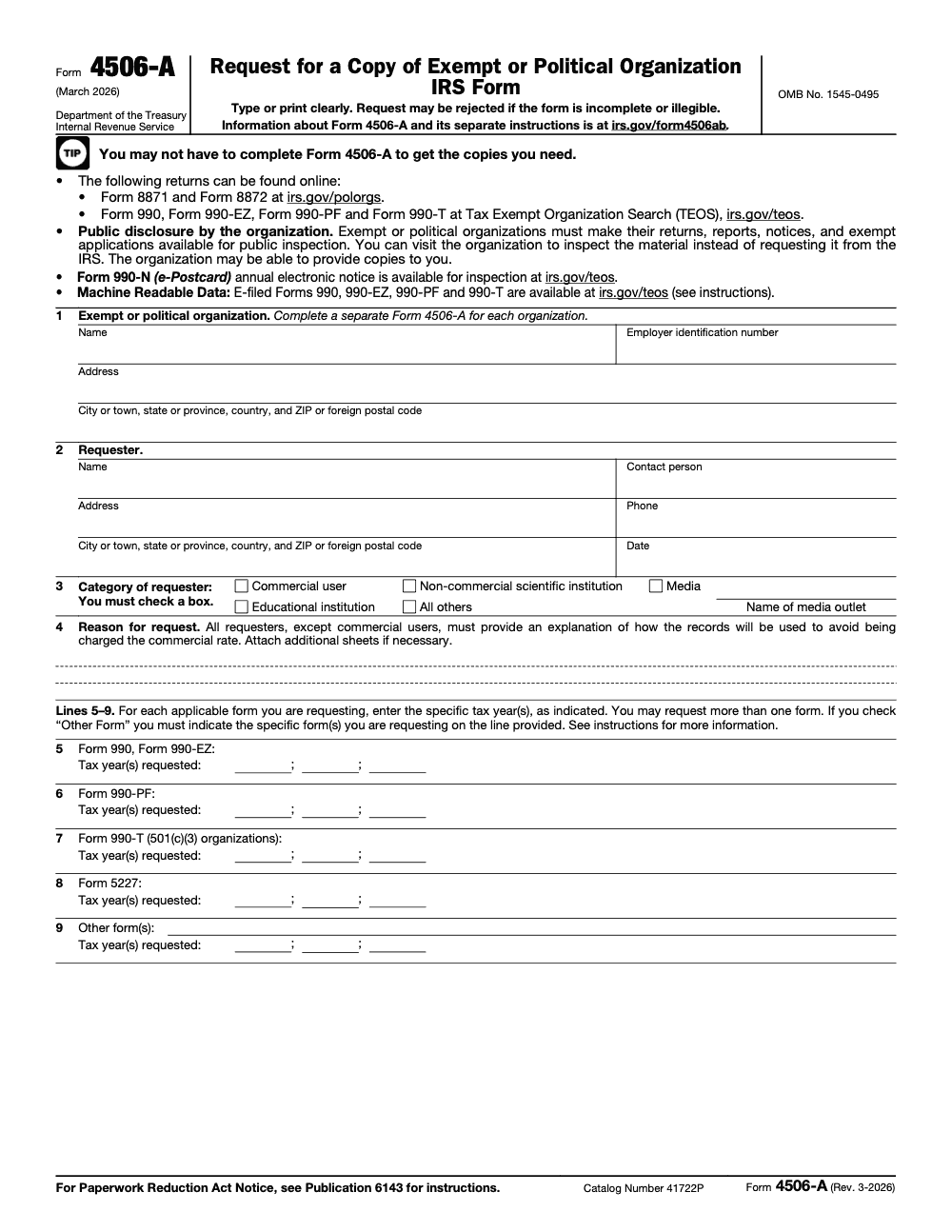
- Line 1: enter organization name, EIN, and full mailing address exactly as listed in TEOS.
- Line 2: enter requester name, contact person, address, phone, and request date.
- Line 3: check exactly one of the five categories (Commercial user, Non-commercial scientific institution, Media, Educational institution, All others); Media requesters add the outlet name.
- Line 4: write the explanation of intended use unless you checked Commercial user; attach an extra sheet if needed.
- Lines 5 through 8: enter specific tax years (up to three per line) for 990/990-EZ, 990-PF, 990-T (501(c)(3) only), and 5227.
- Line 9: identify any additional exempt-organization form types not pre-printed on Lines 5 through 8.
- File one Form 4506-A per organization; do not bundle organizations.
- Do not enclose payment; the IRS bills after fulfillment under the FOIA fee schedule.
Tracking and follow-up
- Log the submission date, fax confirmation, or certified mail receipt in the engagement file.
- Calendar a 60-day follow-up from the IRS receipt date per the Form 4506-A instructions.
- If a prepayment notice arrives because the estimated cost exceeds the IRS threshold, route to billing immediately to avoid a stall.
- On receipt of copies, verify each requested year and form type is in the package.
- If anything is missing, send a follow-up letter referencing the original request rather than refiling from scratch.
- File the IRS invoice with the engagement record once paid.
Keep 4506-A Season From Stalling
Nonprofit audit season packs into a narrow window. Form 990, 990-EZ, and 990-PF are due on the 15th day of the 5th month after the organization's accounting period closes, which lands on May 15 for calendar-year filers, with a 6-month automatic extension available via Form 8868 (per IRS Publication 557). When your audit team needs a counterparty's prior 990 mid-fieldwork, a stalled Form 4506-A request can push the engagement past deadline by up to 60 days.
The fix is a tight intake protocol that decides between TEOS, a direct request to the organization, and Form 4506-A before anyone touches the paper form. The Form 4506-A instructions (Rev. March 2026) make this hierarchy explicit, and every step you skip on intake adds days to the request cycle.
- Run an IRS Tax Exempt Organization Search on the EIN as step zero; 2017-and-later 990 series filings post free there and arrive in seconds.
- Send a written request to the organization itself for the three most recent annual returns, which the organization must fulfill within 30 days under §6104(d).
- Reserve Form 4506-A for pre-2017 returns, missing TEOS records, or counterparties that insist on an IRS-stamped copy, and budget up to 60 days per the instructions.
- File one 4506-A per organization, list specific tax years on Lines 5 through 9, and skip Line 7 for any entity that is not a 501(c)(3).
- Always include a use statement on Line 4 when claiming a non-commercial category; the FOIA fee schedule caps copies at $0.10 per page for black-and-white with the first 100 pages free, but only with that explanation in place.
Standardize this intake into your nonprofit and audit SOPs and 4506-A stops being a partner-attention item. Our U.S. tax outsourcing teams handle TEOS pulls, organization-direct requests, and 4506-A drafting inside the same engagement workflow, so the documentation lands when the reviewer needs it.
FAQs
It is the form you use to ask the IRS for public inspection copies of exempt or political organization filings, most often the 990 series. You use it when TEOS does not have the year or item you need, or when a counterparty insists on an IRS sourced copy.
No. For filings the IRS received in 2017 or later, you can usually download the 990 series free on TEOS. Only file 4506‑A when TEOS does not have it or you specifically need an IRS mailed copy.
Inspection at IRS offices is free. Paper copy charges can apply, the FOIA fee schedule lets non-commercial requesters get the first 100 pages free, then $0.10 per page for black-and-white photocopies ($0.20 per page for color) (and only if you explain on Line 4 how the records will be used – checking a non-commercial category alone will not protect you from the commercial rate). If the estimated cost exceeds 250, you may be asked to prepay. The IRS bills for copies, so do not include a check unless instructed.
The instructions say it may take up to 60 days from receipt. Allow more time during peaks. If timing is tight, confirm whether TEOS already has what you need.
Mail or fax to the IRS RAIVS Unit at Ogden, UT as listed in the instructions. Keep your fax confirmation or certified mail receipt with the engagement documents.
No, the IRS no longer provides returns on DVD. Use TEOS for online access or submit 4506‑A if the item is not posted.
Other forms this guide names
- Form 990: Nonprofit Tax Return Filing Guide 2025
- Form 990‑T: UBTI Filing Guide, Schedule A, Deadlines, E‑file
- Form 4506‑B: How to Request IRS Determination or Affirmation Letters
- Form 990‑EZ: Eligibility, Deadlines, E‑File, Schedules
- Form 990‑PF: Filing Guide, Payout, E‑File
- Form 4506: Request Copy of Tax Return, $30 Fee, 75 Days
Summarize this article with AI
About this guide
Accountably helps US CPA, EA, and accounting firms hire trained accountants and tax preparers in India.
About us Reviewed byJugal Thacker, CPAFounder and CEO at Accountably
A US-licensed CPA with 7+ years inside US firms – PwC, a real-estate tax practice, then a full-service firm, rising from reviewer to manager to advisory. This article was reviewed against current IRS guidance for the 2025 tax year and updated for filers preparing late returns, amendments, and 2026 estimates.
View profile →How we research, review, and update this guide
Every Accountably guide is researched against primary IRS sources, reviewed by a U.S. CPA, and refreshed as guidance evolves. Read our Editorial Guidelines to see how we source, fact-check, and update our content.




