
Summarize this article with AI
In Brief
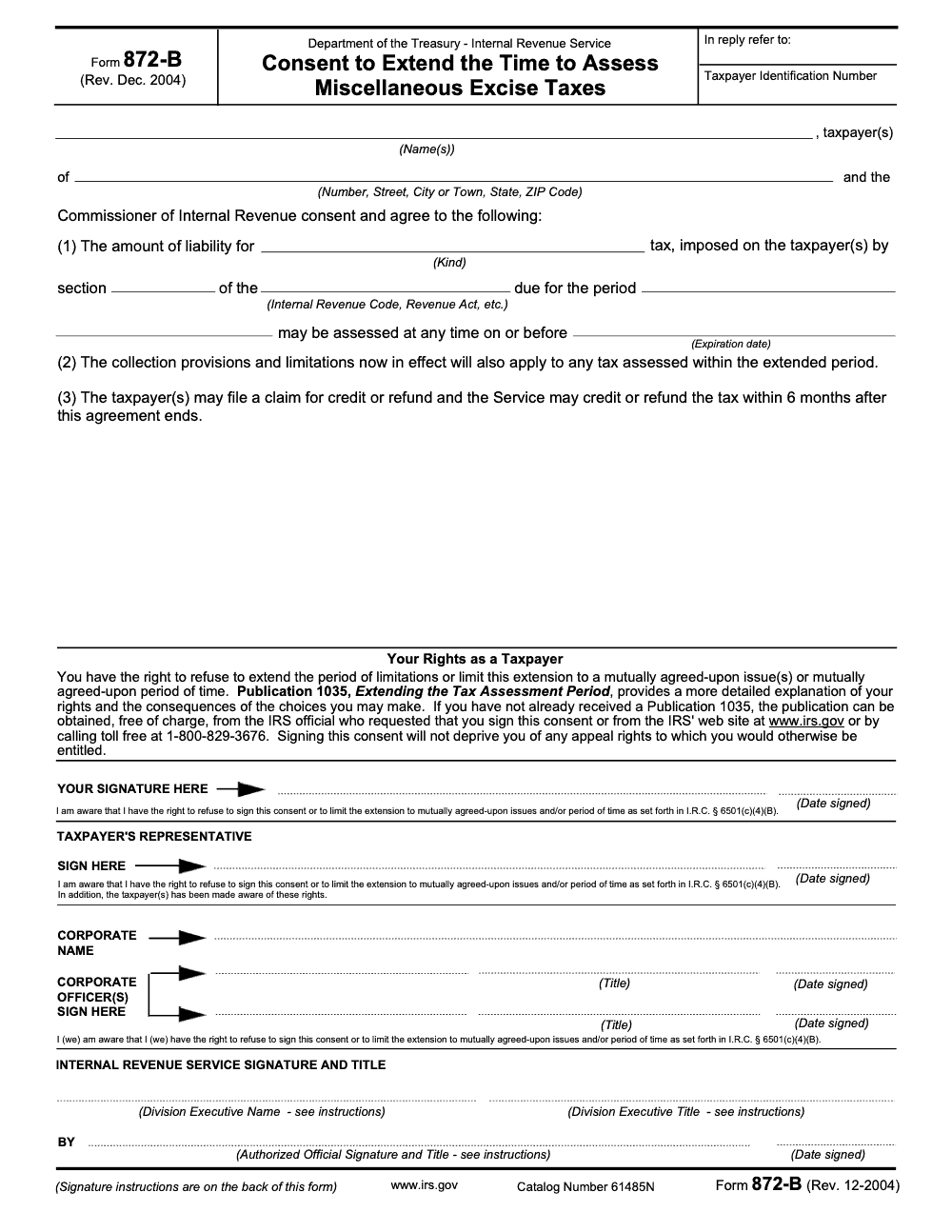
Form 872-B is the IRS consent to extend the time to assess miscellaneous excise taxes under IRC § 6501(c)(4). The December 2004 revision (Catalog 61485N) remains the operative version in tax year 2025. Signing is voluntary: under IRC § 6501(c)(4)(B) the taxpayer can refuse the consent outright or negotiate a restricted version limited to specific issues, a specific period, or both. After the consent ends, both the taxpayer and the IRS have 6 months to file or process a refund claim, per Publication 1035 (available on IRS.gov). For income, gift, and most other taxes use Form 872 instead, and pair an open excise exam with a structured tax execution workflow so the consent and the underlying records track on the same calendar.
The first reaction to a Form 872-B request is rarely about what the form says. It is whether the taxpayer has to sign at all. Form 872-B is the IRS consent to extend the time to assess miscellaneous excise taxes under IRC § 6501(c)(4), and signing is voluntary: you can refuse, or you can negotiate a restricted version limited to specific issues, a specific period, or both.
The risk is signing an open-ended consent when a scoped one would do. The form has to name the specific excise tax and code section and show the periods as an inclusive date range. It usually arrives with Letter 907 and Publication 1035, it is distinct from the income-tax consents Form 872 and Form 872-A, and after it ends both sides have 6 months to file or process a refund claim. We treat the review checklist as the SOP to run before any pen touches paper.
Key Takeaways
- Form 872‑B is the IRS consent used to extend the time to assess miscellaneous excise taxes, most commonly those reported on Forms 720, 2290, 730, and 11‑C. It is not a partnership consent, and it is not the form for income, gift, or most other taxes (those use Form 872 without the suffix).
- The form must name the specific excise tax and code section, and the periods are shown as an inclusive date range, for example, January 1, 2023 through December 31, 2023.
- IRS typically sends Letter 907 with Publication 1035 when requesting any statute extension. You can refuse, you can limit the issues, and you can negotiate the date.
- If the exam involves collectors of tax, for example air transportation or communications taxes, the IRS has model language you must use on the consent.
- Form 872‑B is different from the income tax consents, Form 872 and Form 872‑A, and different from the TEFRA partnership forms, Form 872‑P and 872‑O. Under modern practice, 872‑I is obsolete.
What Form 872‑B actually does
Form 872‑B is a written agreement between you and the IRS that extends the assessment statute for specific excise taxes. The Internal Revenue Manual calls it, “Consent to Extend the Time to Assess Miscellaneous Excise Taxes,” and it applies to taxes reported on Form 720, Form 2290, Form 730, and Form 11‑C. Think fuels, environmental, communications, air transportation, wagering, and heavy highway vehicle use taxes.
At its core, Form 872‑B buys time for both sides. The IRS can continue developing issues without racing the statute, and you keep the negotiation window open to resolve technical questions rather than face protective assessments. As with any consent, you are not required to sign. Letter 907 explains your right to refuse or to limit the consent to certain issues or to a specific date. Publication 1035 describes the process and your options in plain terms.
Which taxes does 872‑B cover
- Form 720, Quarterly Federal Excise Tax Return, for example retail truck and trailer excise under section 4051, indoor tanning, and certain environmental taxes.
- Form 2290, Heavy Highway Vehicle Use Tax.
- Form 730, Monthly Tax Return for Wagers.
- Form 11‑C, Occupational Tax and Registration for Wagering.
On the form, you must name the exact tax and code section. If the exam covers more than one tax on a single Form 720, list each tax and section separately. This small detail saves a lot of rework later.
Who signs and what authority is needed
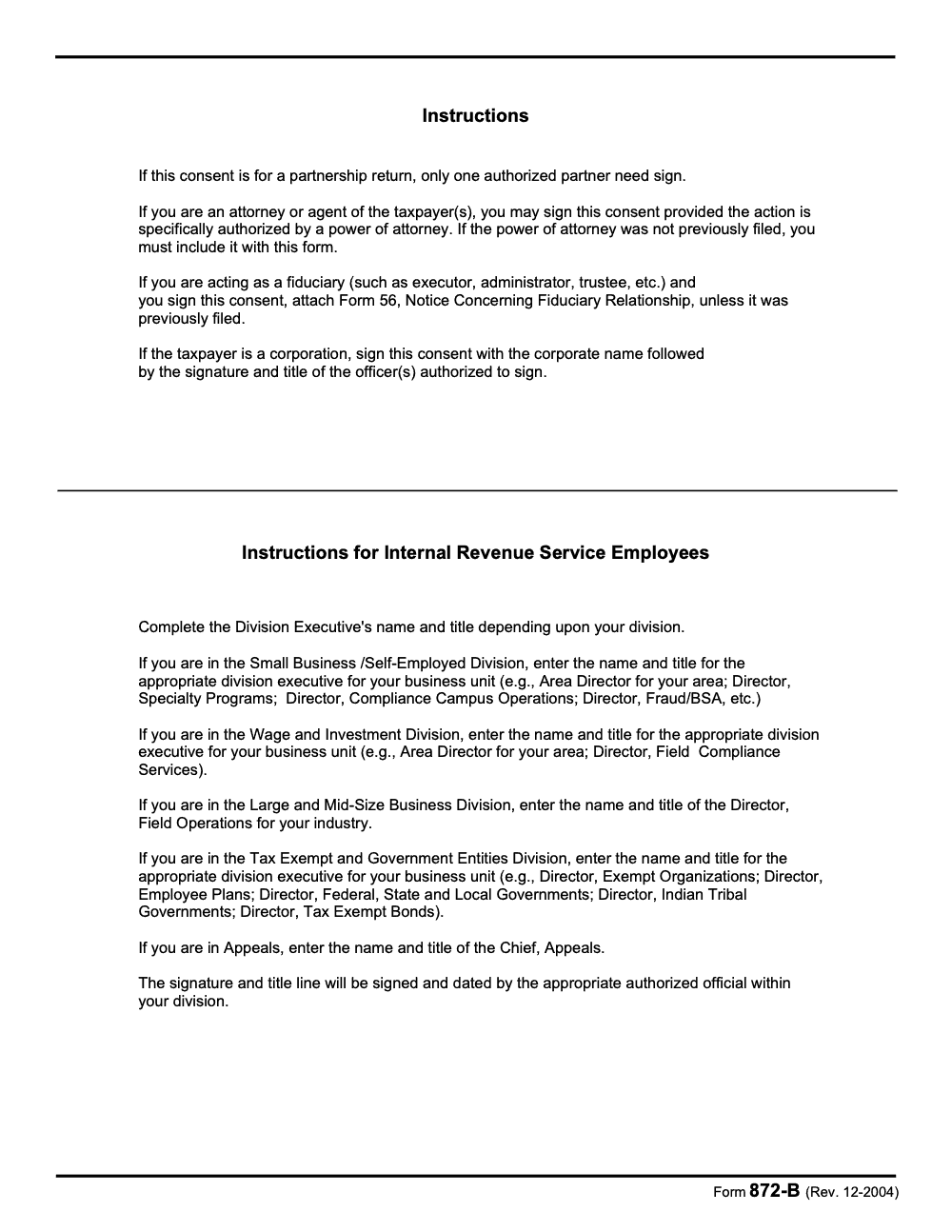
The consent must be signed by the taxpayer or a properly authorized representative, and the IRS signs through an employee with delegated authority (the consent is not effective until both signatures and dates are in place, per IRC § 6501(c)(4)). When the IRS requests any consent, they are instructed to send Letter 907 and Publication 1035 and to document that they explained your rights, including the right to refuse and the right to limit the consent. If you have a Power of Attorney, the Service also mails copies to your representative.
Pro tip from the trenches: confirm who is signing for entities with complex structures. If you operate through single‑member LLCs that are treated differently for excise purposes, match the signing authority to the entity that actually bears the excise tax liability for the period in question. The IRM treats some excise LLCs as corporations for administration, which affects who must sign.
Why people confuse 872‑B with partnership consents
The short answer, the numbers look similar, the rules do not. Form 872‑B is an excise tax consent. Partnership consents live in a different lane. Under the older TEFRA regime, IRS used Form 872‑P and Form 872‑O at the partnership level, and partner‑level protection could be handled with Form 872 or 872‑A that referenced partnership items. Form 872‑I, once used for partner‑level language, has been obsolete since October 29, 2009 because the partnership wording was added to Form 872 and 872‑A.
If your exam involves partnership items or BBA partnership procedures, you are not solving that with Form 872‑B. Keep these worlds separate so you do not extend the wrong statute by mistake.
How Form 872‑B compares to other statute consents
When the clock is ticking, it helps to see the landscape at a glance. Here is a quick comparison of the most common consent forms you will encounter.
| Form | Purpose | Typical use | Key notes |
| 872 | Fixed date extension for assessment | Income tax, partner‑level assessments, many return types | Can include partnership items language on modern revisions. |
| 872‑A | Open‑ended extension, ends 90 days after a termination notice | Income tax when issues need more time | Terminated with Form 872‑T, then 90 days to assess. |
| 872‑B | Excise tax consent | Form 720, 2290, 730, 11‑C | Must list tax and code section, periods shown as an inclusive range. |
| 872‑P / 872‑O | TEFRA partnership level consents | Extending partnership and affected items for all partners | 872‑O is open‑ended and can be terminated with 872‑N. |
| 872‑F | Converted partnership items under IRC 6231(b) | After items convert from partnership to non‑partnership | Limited to one partnership, multiple years allowed. |
| 2750 | Trust Fund Recovery Penalty consent | IRC 6672 cases | Extends assessment period for TFRP, often parallel to excise work. |
| 4016 | Transferee liability for employment or misc. excise taxes | Liquidations, reorganizations | Used when assessing against a transferee. |
When the IRS asks you to sign Form 872‑B
You will usually see Form 872‑B during an excise exam when the standard three‑year assessment window is getting tight. The IRM lists classic use cases, including Form 720 issues and section‑specific problems, like retail truck excise under section 4051, and it specifies the inclusive dating format that should appear on the consent. Expect Letter 907 and Publication 1035 with the request, and expect the case file to reflect that your rights were explained.
If the exam involves a collector of taxes, for example, an entity required to collect and remit air transportation or communications excise tax, the IRM provides the exact wording that must go on Form 872‑B. There are different model phrases depending on whether you collected tax from customers or paid the tax from your own funds. Communications excise under section 4251 has its own model entries as well. Your examiner will look for that specific language before they sign.
Air transportation examples
- If you collected the tax from customers, the consent should identify liability for collecting and remitting the tax under sections 7501 and 4291, with the correct reference to section 4261 or 4271, depending on persons or property.
- If you paid the tax yourself, the consent should refer directly to the tax imposed by section 4261 or 4271, again matching the right section.
Communications excise example
For communications taxes, the IRM instructs examiners to secure Form 872‑B and to include language that names the section 4251 tax, with separate wording if the case involves a collector and the Service is also protecting IRC 6672 penalty exposure with Form 2750.
How the statute of limitations works in practice
The IRS usually has three years to assess tax from the due date of your return, including extensions, or from the date you filed, whichever is later. That window can be extended by mutual consent, which is the point of Form 872‑B in an excise exam (the consent extends only the IRC § 6501 assessment statute, not the separate 10-year IRC § 6502 collection period that begins running after assessment). Publication 1035 explains the process, your options to refuse or limit, and what happens next.
For 872‑B, the IRM requires you to show an inclusive period on the face of the form, not just a single tax year. For example, “January 1, 2022 through December 31, 2024.” If the exam covers multiple excise taxes reported on Form 720, each tax and its code section should be listed on the consent. This lets both sides see exactly what is covered.
Field note, the fastest way to create review churn is to forget the code section or to list the wrong period edges. Align your consent dates to the returns under exam, then have a second reviewer compare them against the IRS IDRs and workpapers before anything is signed.
Benefits and risks of signing Form 872‑B
Saying yes to a consent gives you time. That time can reduce hurried positions, clear up documentation, and keep negotiations alive. It can also increase exposure because interest and applicable additions continue to accrue while the clock is open. Use the consent to your advantage by narrowing scope and setting a date that matches your workplan, not the default that landed in your inbox.
Here is how I coach teams to think about it:
- Define the “why.” Are you waiting for carrier reports, vendor confirmations, or additional samples from the examiner, or are you using time to prepare a full technical memo? If you cannot name the reason, do not extend casually.
- Control the “what.” Limit the consent to the excise issues that are actually in play, and list every code section the examiner identified. If more issues surface later, the IRS can ask for a new consent.
- Pick the “when.” Tie the expiration to a real milestone on your side, for example 120 days after your last data delivery or 60 days after a scheduled closing conference.
Drafting Form 872‑B correctly, the details that matter
Form 872‑B is short, but the details are where teams stumble. Use this quick drafting guide before routing to the client for signature.
- Kind of tax and section, write the exact tax and the Internal Revenue Code section, for example, “liability for retail truck excise tax, section 4051.” If there are multiple Form 720 taxes, list each one with its section (a blanket consent that fails to identify the specific tax, Code section, or period is defective).
- Periods, show an inclusive date range that matches the returns and quarters under exam.
- Collectors, if the case involves tax you were required to collect and remit, use the model language the IRM provides and reference sections 7501 and 4291 as appropriate.
- Authority, verify the signer matches the taxpayer, confirm that any representative's power of attorney (typically Form 2848) specifically authorizes signing of statute-extension consents and is attached if not previously filed, and confirm any LLC treatment that affects excise tax administration.
- Transmittals, expect Letter 907 with Publication 1035. Keep a copy with your internal file notes on why you accepted or declined the extension.
Negotiation tips that keep you in control
- Ask the examiner to explain their date. Many default requests are set to the end of the next calendar quarter. Offer a date that aligns with your plan instead.
- Use issue limits when appropriate. If only section 4051 is in play, write only section 4051.
- Confirm what happens next. If you sign, ask for a timeline, the next IDR, and the planned closing conference window.
What if you decline to sign
Declining keeps the original statute date in place. If time is short, the IRS may protect the case by issuing notices or making protective assessments, which reduces room for collaborative resolution and can accelerate the process. If you plan to say no, be ready to receive and respond to formal actions on a tight schedule, and make sure your team, your client, and counsel are aligned on the timeline. Publication 1035 and the IRM emphasize your right to refuse and the Service’s duty to document that you were informed of those rights, so use that conversation to clarify the record.
Reality check, a firm that is already buried in production rarely gets more persuasive by compressing the calendar. If the facts support it, a narrowly drawn consent can be the difference between a thoughtful closing and a rushed standoff.
Step‑by‑step review checklist for Form 872‑B
| Step | What to check | Evidence to attach |
| 1 | Return types match the consent’s tax description | Copies of Form 720 or 2290 under exam |
| 2 | Code section is named for each tax | Draft consent with sections 4051, 4261, 4271, 4251, as applicable |
| 3 | Periods shown as inclusive dates | “Jan 1, 2022 through Dec 31, 2024” on the face of the form |
| 4 | Collector wording, if applicable | Model language for air or communications taxes from the IRM |
| 5 | Signer authority is correct | POA, officer titles, any LLC documentation |
| 6 | Transmittals in the file | Letter 907, Pub 1035, your internal memo on why you signed or declined |
How disciplined delivery helps you meet statute dates
When firms miss statute dates, it is rarely because partners cannot sell, it is because delivery is overloaded and workflows are inconsistent. The mechanics of a clean 872‑B, correct code sections, aligned periods, and the right signer, are simple on paper and fragile in the real world without structure. That is why we emphasize SOPs for consent drafting, standardized workpapers that surface code sections, live tracking for statute calendars, and a two‑step review before anything goes to the Service.
If you are scaling and your team is buried in production during peak season, a controlled offshore delivery setup can keep deadlines from slipping. At Accountably, we integrate trained offshore teams into your workflow so routine steps, like preparing 872‑B packages with the right exhibits, are handled on time and inside your systems. The point is not headcount, it is predictable turnaround, documented process, and review protection when the calendar is tight.
Conclusion and next steps
If a Form 872‑B just landed on your desk, slow the panic and move through a simple plan. Confirm the excise tax and code section, match the periods to the returns under exam, verify who signs, and negotiate a date that works for your timeline. Use Letter 907 and Publication 1035 as your playbook for rights and options, then memorialize your decision and keep a clean copy set.
Common Mistakes We See Every Season
Every time a Form 872-B crosses my desk I see the same handful of errors repeating, almost regardless of which excise tax is at issue. They are not exotic problems – they are paperwork problems that get expensive only because nobody slowed down to read the form.
Reusable Checklists
The three checklists below are designed to be pasted directly into firm SOPs and used the next time an excise exam opens with a Form 872-B request. They cover the three places where these consents typically go wrong: the moment the request arrives, the drafting of a restricted consent, and the post-signature calendar discipline.
Pre-signature review packet
- Confirm the underlying tax in the Kind of tax field is a miscellaneous excise tax, not income or gift.
- Pull the Code section cited in paragraph (1) and verify it imposes an excise tax; if it does not, switch to Form 872.
- Hand the client Publication 1035 (IRS.gov or 1-800-829-3676) and document that the right to refuse and the right to limit the consent were explained.
- Verify the period field names the specific tax period under exam, not a multi-year sweep.
- Check that the Expiration date is a defined calendar date, not blank or open.
- Confirm the Form 2848 on file specifically authorizes signing of statute-extension consents; refresh it if it does not.
- If a fiduciary is signing, confirm Form 56 is on file or attach a fresh one to Form 872-B (the will or trust is not a substitute).
- For corporate taxpayers, confirm the corporate name will appear above the officer signature and that the officer's title is recorded.
Restricted consent drafting
- List the specific issues actually under exam (for example, the communications excise computation for a named quarter) and propose those, and only those, as the scope.
- Set a discrete extension period rather than an open one and write the specific calendar date in the Expiration date field.
- Type the scope language onto the face of the consent so it travels with the form, not in a side letter.
- Confirm paragraph (1) names the kind of excise tax, the imposing Code section (and Act if not the Internal Revenue Code), and the tax period.
- Confirm the I.R.C. § 6501(c)(4)(B) right-to-refuse citation above the signature line is intact and legible.
- If the IRS requests a broader scope than your draft, get the position in writing before agreeing to widen it.
- Retain a clean, fully completed copy before any signature is applied, and version-control any subsequent edits.
Post-signature calendar and handoff
- Do not treat the consent as effective until the countersigned copy is received from the IRS authorized official with signature, title, and date.
- Calendar the new Expiration date in the firm tax-statute tracker as the assessment deadline.
- Calendar the 6-month refund window that opens after the consent ends, in addition to the regular IRC § 6511 refund deadline.
- Calendar the IRC § 6502 collection clock separately so it is not confused with the extended assessment date.
- File the signed consent, the matching Form 2848, and (if applicable) Form 56 together in the engagement folder.
- Tag the client file as "open excise consent" so any subsequent return or amendment routes through the exam coordinator first.
- Schedule a partner check-in approximately 60 days before the new Expiration date to decide whether to negotiate a further extension or let the consent lapse.
Keep 872-B Season From Stalling
Excise exam workload does not follow the calendar the way 1040 season does. A Form 872-B request can land midway through a fuel, communications, or wagering exam, and the expiration date written on the consent is the only deadline that actually controls timing. Publication 1035 (available on IRS.gov) is the IRS's own explanation of what the taxpayer is agreeing to, and IRC § 6501(c)(4)(B) makes refusal an explicit right, yet many teams treat the request as routine and sign whatever expiration date the examiner proposes.
The fix is not faster signing. It is a structured intake that treats every 872-B like a controlled document, with the excise tax type, Code section, period, and expiration date verified against the underlying return before the consent leaves the office. Build the workflow once, then run every excise exam through it.
- Log each request in a statute tracker keyed to the proposed expiration date, with the existing assessment period under IRC § 6501(a) and the requested extension side by side, so the team can see exactly how much time is being added.
- Verify the consent identifies the specific kind of excise tax, the imposing Code section, and the tax period. A blanket consent without those fields is defective per the form's own instructions and can be challenged later.
- Match the signature block to the right authority. An attorney or agent needs a Form 2848 that specifically authorizes signing of statute-extension consents, and a fiduciary signer must attach Form 56 unless one is already on file with the IRS.
- For a partnership return, confirm only one authorized partner is signing rather than every partner, and keep the partnership agreement reference inside the workpaper for review.
- Calendar the 6-month post-consent refund window the moment the IRS countersigns, so any claim for credit or refund is filed before paragraph (3) of the consent runs out.
When 872-B requests stack up alongside an open excise exam docket, a structured offshore intake keeps statute tracking, exhibit preparation, and review off the partner's desk. Accountably integrates trained delivery teams into existing case files and workflow through our tax execution services, so the consent paperwork, the underlying support, and the post-consent refund window all move on the same calendar.
FAQs
No. Form 872‑B is for excise taxes, not partnership items. Partnership consents use different forms, historically Form 872‑P or 872‑O at the TEFRA partnership level, and modern partner‑level consents use Form 872 or 872‑A with partnership language. Form 872‑I is obsolete.
You should receive Letter 907 and Publication 1035. The IRS must document that they explained your right to refuse or limit the consent and how the date was determined.
Generally three years from the due date of the return, including extensions, or from the day you filed, whichever is later. Exceptions apply, and a signed consent extends that period.
The IRM provides model wording that names the specific tax, and for collectors it references sections 7501 and 4291. Ask the examiner for the exact phrasing that fits your facts, then mirror it on the consent.
Other forms this guide names
Summarize this article with AI
About this guide
Accountably helps US CPA, EA, and accounting firms hire trained accountants and tax preparers in India.
About us Reviewed byJugal Thacker, CPAFounder and CEO at Accountably
A US-licensed CPA with 7+ years inside US firms – PwC, a real-estate tax practice, then a full-service firm, rising from reviewer to manager to advisory. This article was reviewed against current IRS guidance for the 2025 tax year and updated for filers preparing late returns, amendments, and 2026 estimates.
View profile →How we research, review, and update this guide
Every Accountably guide is researched against primary IRS sources, reviewed by a U.S. CPA, and refreshed as guidance evolves. Read our Editorial Guidelines to see how we source, fact-check, and update our content.




