
Summarize this article with AI
In Brief
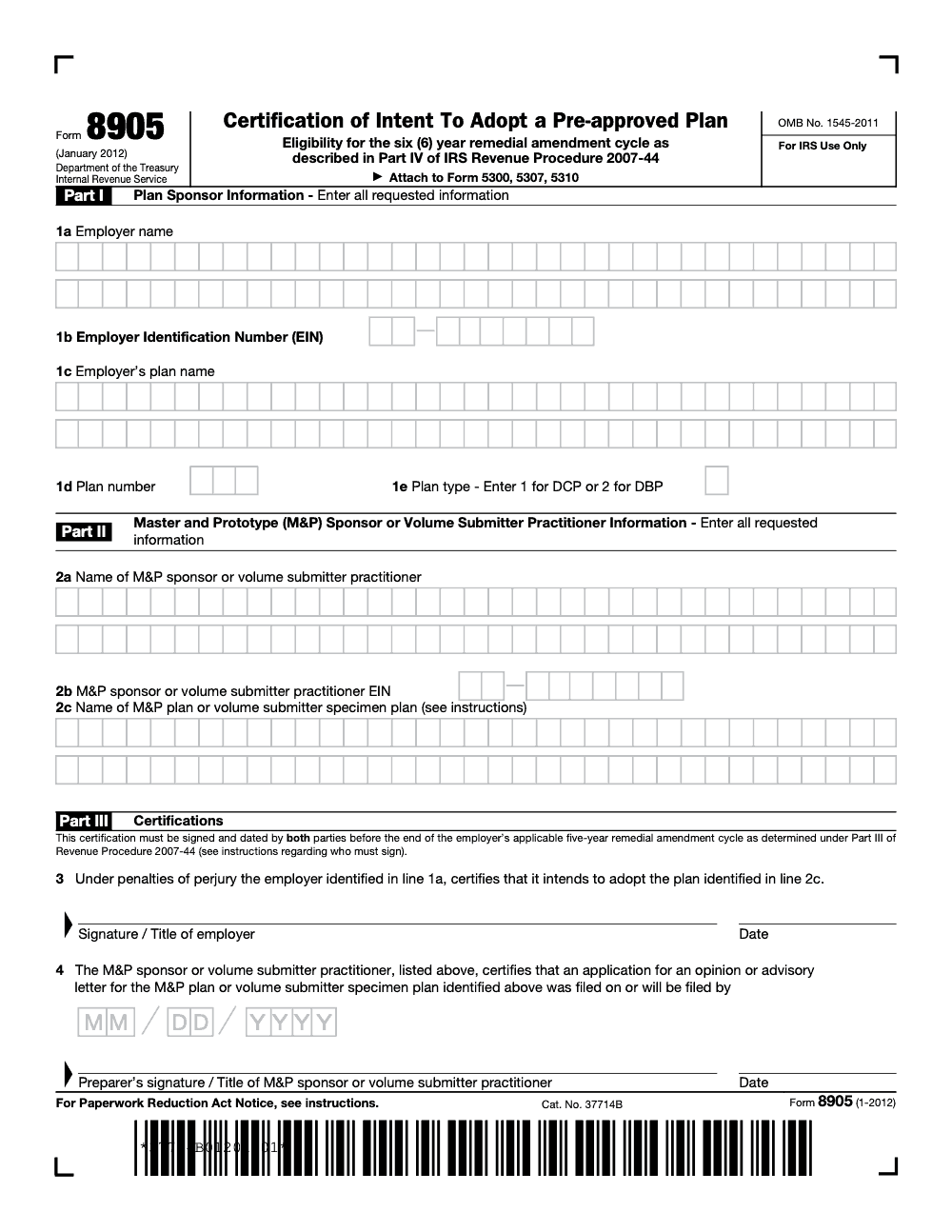
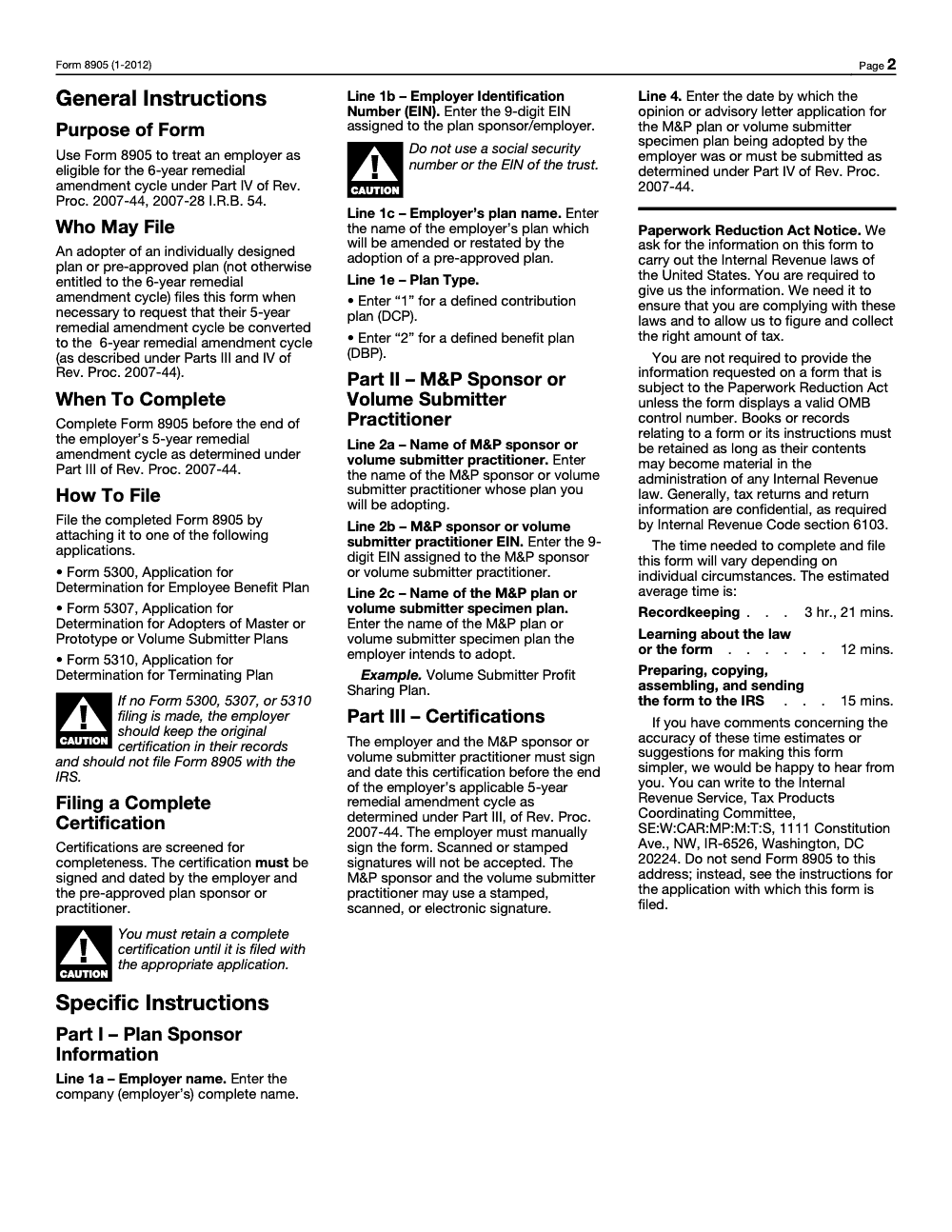
Form 8905, Certification of Intent To Adopt a Pre-approved Plan, lets an employer convert from the default 5-year remedial amendment cycle to the 6-year cycle under Part IV of Rev. Proc. 2007-44 (still the January 2012 revision, current for 2025 per the IRS About Form 8905 page). Attach the signed certification to Form 5300, 5307, or 5310 determination applications; if no application is filed, retain the original in plan records. Line 3 requires the employer's manual wet signature, while the M&P sponsor or volume submitter practitioner on line 2 may sign by stamp, scan, or electronic means.
Form 8905 looks like a one-line certification, and that is exactly why it gets signed late or signed by the wrong person. Line 3 needs the employer's wet signature, by hand. The sponsor or practitioner can use a stamped, scanned, or electronic signature, but the employer cannot.
Its job is narrow today: it certifies your intent to adopt a pre-approved plan so you can convert from the five-year to the six-year remedial amendment cycle when you are not otherwise entitled to six-year treatment. If you file a Form 5300, 5307, or 5310 determination application, attach a complete Form 8905. If you file no application, keep the fully executed original in your plan records, because that retained copy is your proof.
Key Takeaways
- IRS Form 8905 certifies your intent to adopt a pre‑approved plan so you can convert from a five‑year to the six‑year remedial amendment cycle when you are not otherwise entitled to six‑year treatment (the form itself does not amend, restate, or adopt the plan; the actual adoption happens later through the pre‑approved plan documents and any related determination application). See the IRS “About Form 8905” page.
- The employer must hand sign the form. The sponsor or practitioner can use a stamped, scanned, or electronic signature. Keep the original if you are not attaching it to a determination application.
- Since January 1, 2017, the IRS eliminated the staggered five‑year cycle for individually designed plans. Pre‑approved plans still run on six‑year cycles. This is why today, Form 8905 is mainly a timing and documentation tool for specific transition situations.
- Some plan types once considered “ineligible” are now allowed in the pre‑approved program, including ESOPs, cash balance plans, and non‑electing church plans, subject to program rules. Always check current IRS guidance before you label a plan ineligible.
- If you file Form 5300, 5307, or 5310, attach a complete Form 8905. If you do not file a determination application, retain the fully executed original in your plan records.
What Form 8905 does for you today
Form 8905 is the IRS certification that says, in plain English, “We intend to adopt a pre‑approved plan, so treat us on the six‑year cycle.” You use it if you are not otherwise eligible for the six‑year cycle and you need to convert from the old five‑year framework. The IRS still publishes and maintains the form, and the agency’s current page confirms its purpose and that you should attach it to determination applications or keep it on file if you do not file.
Here is the twist you might have missed. In 2017, the IRS shut down the five‑year remedial amendment cycle for individually designed plans. That change did not cancel six‑year cycles for pre‑approved plans. It only changed how individually designed plans stay compliant. That is why Form 8905 remains a niche but important tool, mostly for sponsors moving to pre‑approved documents who need to preserve six‑year treatment.
If you are moving from an individually designed plan to a pre‑approved document and you are not otherwise on a six‑year schedule, Form 8905 is your bridge.
The pre‑approved landscape you are operating in
A few structural updates matter for accuracy and audits.
- The IRS combined the old Master and Prototype and Volume Submitter programs into a single pre‑approved opinion letter program. Plans are now “standardized” or “non‑standardized,” yet Form 8905 still uses the legacy M&P or VS terms on its face. That is normal because the form itself is a 2012 revision that the IRS still uses.
- Pre‑approved plans continue on six‑year cycles. Defined contribution and defined benefit plans follow separate cadences, and adopting employers typically get a two‑year window after opinion letters issue to restate. Recent examples include the DC third cycle adoption deadline on July 31, 2022, and the DB adoption deadline on March 31, 2025.
Quick win, before you touch the form
Do a 15‑minute readiness check.
- Confirm your plan’s current document status and whether you already sit on a six‑year cycle by virtue of a prior pre‑approved adoption. If yes, you may not need Form 8905.
- If you are converting to a pre‑approved plan to gain six‑year status, pull your EIN, plan name and number, and the exact pre‑approved plan name and provider EIN. You will need all of these for Parts I and II.
- Calendar the employer hand signature and the sponsor or practitioner signature. Both must be dated before the end of your applicable five‑year cycle for the certification to be valid under the form’s instructions.
And if documentation, naming, and version control tend to slip during busy season, this is where a disciplined workflow saves you. At Accountably, we see CPA teams lose time hunting workpapers or re‑keying EINs that do not match. A simple SOP, one checklist, and a single owner for the form prevents most screening rejections. (If you already have strong in‑house controls, keep them. We are just underscoring the review rigor the IRS expects.)
Who needs Form 8905, and who probably does not
You likely need it if
- You are moving from an individually designed plan to a pre‑approved document and you are not otherwise entitled to the six‑year cycle, and you want to anchor your plan on that schedule.
- You want a clean paper trail that your intent to adopt was set before your old cycle ended, and you plan to attach the certification to a determination application.
You likely do not need it if
- You are already a prior adopter of a pre‑approved plan and on a six‑year cycle by rule. In that case, ensure you restate within the IRS adoption window for the current cycle, but Form 8905 usually is not required.
- You are not filing a determination application and you are already on six‑year timing. You can still keep a signed Form 8905 in your records if you want belt and suspenders.
Eligibility reality check, updated for 2026
A lot of older articles still say cash balance plans, non‑electing church plans, and ESOPs are ineligible for the pre‑approved program, which would make them ineligible for six‑year cycles. That is no longer accurate.
- ESOPs can be part of the pre‑approved program. Non‑standardized ESOPs may even include a 401(k) feature.
- Cash balance formulas are allowed within non‑standardized pre‑approved defined benefit plans, subject to guardrails such as how the interest crediting rate is set.
- Non‑electing church plans can now file for opinion letters within the pre‑approved program.
What about other plan types often called out as ineligible?
- Fully insured 412(e)(3) plans are not per se disallowed, but they carry special design limits within pre‑approved documents, and many will not qualify as standardized plans. Read your provider’s specs and, when applicable, the Form 5307 instructions.
- Multiemployer and multiple employer plans follow special determination procedures. Whether you use a pre‑approved or individually designed approach, treat these plans as their own compliance workstream and confirm filing posture against the latest determination program rules.
Snapshot table, what is generally in scope now
| Plan feature | Pre‑approved program today | Notes you should check |
| 401(k), profit sharing | Yes | Standardized and non‑standardized options exist. |
| ESOP | Yes, non‑standardized | May include a 401(k) feature. |
| Cash balance DB | Yes, non‑standardized | Interest crediting rules apply. |
| Non‑electing church | Yes | May seek opinion letters under the program. |
| 412(e)(3) fully insured | Sometimes, with limits | Often not standardized, confirm with provider and instructions. |
| 403(b) plans | Separate pre‑approved program and cycles | Governed by Rev. Proc. 2021‑37 and related guidance. |
Five‑year vs six‑year cycles, in plain terms
- Before 2017, individually designed plans followed staggered five‑year cycles by EIN digit. That schedule ended for individually designed plans on January 1, 2017, under Rev. Proc. 2016‑37.
- Pre‑approved plans continue on six‑year cycles. Recent adoption windows included July 31, 2022, for defined contribution plans and March 31, 2025, for defined benefit plans. Watch the IRS for the next windows and your provider’s specific instructions.
If you are converting and need the six‑year framework, Form 8905 is how you document that intent and timing, which is why the IRS still maintains the form and page today.
Rule of thumb, if you are already on a six‑year schedule because you use a pre‑approved document, focus on restatement windows and provider notices. If you are switching into that world, use Form 8905 to safeguard your timing.
How to complete Form 8905, line by line
You can fill this out in under ten minutes if you have the details at hand.
Part I, Plan sponsor information
- Line 1a, employer name, use the exact legal name.
- Line 1b, EIN, enter your 9‑digit employer EIN, never an SSN or trust EIN.
- Line 1c, plan name, match your plan document.
- Line 1d, plan number, usually 3 digits such as 001, 002.
- Line 1e, plan type, enter “1” for defined contribution, “2” for defined benefit (this 1 / 2 coding is specific to Form 8905, not the same as the Form 5500 Schedule R plan type coding).
Pro tip, match your entries to any determination filing you will attach. Screening rejections often trace back to a mistyped EIN or a plan name variant.
Part II, M&P sponsor or VS practitioner information
Even though the IRS combined programs in Rev. Proc. 2017‑41, the form still says “M&P sponsor or VS practitioner.” Use your pre‑approved plan provider’s current legal name and EIN and the exact name of the specimen plan you intend to adopt. Pull this from the provider’s opinion letter packet.
Line 4, the date that trips people up
Enter the date the opinion or advisory letter application for the plan you intend to adopt was, or must be, submitted. This is the provider’s submission date under the applicable cycle, not your restatement date and not the date the employer signed Form 8905. If the application has already been filed, use the actual date. If not, use the required submit‑by date provided by the sponsor. Mismatched dates are a common screening issue.
Part III, signatures that actually stick
The employer must sign by hand. Stamped, scanned, or electronic employer signatures are not accepted on Form 8905. The sponsor or practitioner may sign electronically.
Both signatures must be dated before the end of your applicable five‑year cycle for the certification to serve its purpose (the deadline is tied to the five‑year cycle you are exiting under Part III of Rev. Proc. 2007‑44, not to the six‑year cycle you are moving into). Treat this like a mini closing. Put it on the calendar, assign an owner, and store the original where you keep plan qualification evidence.
When to execute and how to file
- Timing, execute before the end of your applicable five‑year cycle, per the form’s instructions and Rev. Proc. 2007‑44 references on the face of the form.
- Filing with a determination application, attach the completed, fully signed Form 8905 to Form 5300, 5307, or 5310. If you will not file a determination application, keep the original in your records.
What if you are converting during a current pre‑approved cycle
Your provider will give you adoption instructions and deadlines tied to the latest opinion letters and employer adoption window. For example, defined benefit adopters had until March 31, 2025, to restate for the 2020 Cumulative List, and defined contribution adopters had until July 31, 2022, for the 2017 Cumulative List. Your dates will change as the IRS opens new cycles, so watch current announcements.
Recordkeeping that stands up in an audit
Keep the original wet‑signed Form 8905, copies of both signatures, the opinion or advisory letter date you used for Line 4, and the adoption documents that restate your plan. The IRS tells you to retain the complete certification if you are not filing it, and to keep books and records as long as their contents may be material under federal tax law. Store a scanned copy for disaster recovery, but do not lose the paper original.
Common mistakes and easy fixes
- Wrong EIN on Line 1b, fix by verifying against your Form 5500 and corporate tax records before you sign.
- Missing or non‑manual employer signature, fix by obtaining a fresh wet signature dated before your cycle end.
- Incorrect Line 4 date, fix by confirming the provider’s submission confirmation or instructions.
- Forgetting to attach to Form 5300, 5307, or 5310, fix by adding it to the package or, if not filing, filing it in your permanent plan records.
Latest cycles and dates you should recognize
- Defined contribution pre‑approved plans, last broad employer adoption window closed July 31, 2022, for the third six‑year cycle. Watch for the next opinion letter wave and employer window from your provider.
- Defined benefit pre‑approved plans, the employer adoption window for the third six‑year cycle closed March 31, 2025. Again, follow provider notices for the next wave.
- 403(b) pre‑approved plans run on their own cycles under Rev. Proc. 2021‑37, with adoption timing announced as each cycle closes. If you sponsor a 403(b), track that program’s schedules specifically.
Switching providers after you sign
You are not locked into a single vendor forever. Form 8905 documents your intent and timing. If you later adopt another pre‑approved document, you will rely on the new provider’s opinion letter and update schedule. Keep your original Form 8905 in the file as evidence of your conversion timing.
Where a disciplined delivery partner helps
If you run a CPA or EA firm, peak season can swamp plan document tasks. This is where structure matters more than headcount. At Accountably, our teams live inside your systems, standardize naming, and keep checklists tight so review teams are not stuck chasing EINs and dates. For Form 8905, that usually means one owner, a single source of truth for sponsor details, and a same‑day review loop so the employer wet signature is never the reason a filing bounces. Use us only where it is genuinely helpful. The goal is simple, you keep control of quality, timing, and client trust.
Common Mistakes We See Every Season
Form 8905 is short, but the rejection pattern is predictable. Almost every screening issue traces back to one of these signature, EIN, or filing-mechanics errors we see in client files every cycle.
Reusable Checklists
Three short SOPs your team can paste into the engagement file. All assume the client is moving to a pre-approved plan and is not otherwise on a 6-year cycle.
Pre-signature readiness
- Confirm the client is not already on a 6-year cycle by virtue of a prior pre-approved adoption.
- Pull the employer's 9-digit EIN from Form SS-4 or the latest Form 5500 Part I (not the trust EIN, not an SSN).
- Pull the employer's plan name and 3-digit plan number from current plan documents for lines 1c and 1d.
- Get the M&P sponsor or volume submitter practitioner's full legal name and 9-digit EIN in writing for lines 2a and 2b.
- Get the M&P or VS specimen plan name in the exact wording the sponsor uses (for example, Volume Submitter Profit Sharing Plan) for line 2c.
- Confirm whether line 1e is plan type code 1 (defined contribution) or 2 (defined benefit).
- Get the opinion or advisory letter application filing date from the sponsor in MM/DD/YYYY format for line 4.
- Identify and calendar the employer's applicable 5-year remedial amendment cycle end date under Part III of Rev. Proc. 2007-44.
Signature and execution review
- Line 3 is wet-signed by the employer in original ink (no stamp, no scan, no e-signature).
- Line 3 date is on or before the employer's 5-year cycle end date.
- The M&P sponsor or VS practitioner has signed and dated their certification block (stamped, scanned, or electronic signature is acceptable here).
- EIN on line 1b matches the EIN on the related 5300, 5307, or 5310 application, if one is being filed.
- Plan name on line 1c matches the employer's plan documents verbatim.
- Line 4 date is the provider's opinion or advisory letter application filing date, not the employer's signing date.
- Original signed form is scanned to the file and the wet-ink original is stored in the plan binder.
Filing or retention decision
- If filing Form 5300, 5307, or 5310: attach the complete signed Form 8905 to the determination application and ship to the address in that form's instructions.
- If no determination application is being filed: do not mail Form 8905 to the IRS. Retain the wet-signed original in plan records.
- Never use the DC Tax Products Coordinating Committee address (SE:W:CAR:MP:M:T:S, 1111 Constitution Ave., NW, IR-6526) for filing; that address is for comments only per Form 8905 instructions.
- Log retention in the firm's record index. Books and records relating to Form 8905 must be kept as long as their contents may be material under IRS administration.
- Open a follow-up task for the actual plan adoption; Form 8905 is intent only, the executed pre-approved plan documents come later.
Keep 8905 Season From Stalling
Form 8905 does not run on an April or January peak, but it has its own pressure points: the moment an employer's 5-year remedial amendment cycle is about to close, the moment a sponsor's opinion letter issues and the 2-year adoption window opens, and the moment a client commits to moving from an individually designed plan to a pre-approved document. Each window is short and unforgiving. The DC third-cycle adoption deadline was July 31, 2022, and the DB adoption deadline was March 31, 2025 (per IRS guidance under Rev. Proc. 2016-37 and Rev. Proc. 2017-41); plans that missed those windows had to re-engineer their compliance posture rather than file a clean certification.
The fix is treating Form 8905 as a documented workstream rather than a one-off form. Most failures we see at intake are not analytical. They are mechanical. Wrong EIN. Stamped employer signature. Line 4 misread as the signing date. Each error is cheap to prevent at engagement kickoff and expensive to clean up after the IRS completeness screen rejects the certification.
- Lock the employer's 5-year cycle end date and the sponsor's opinion letter dates into a single calendar at engagement kickoff, not three weeks before signing.
- Treat line 1b (employer EIN, 9 digits) and line 2b (sponsor or practitioner EIN, 9 digits) as paired entries pulled fresh from primary documents, never from prior workpapers.
- Require a wet-ink signing packet for line 3 with a single tabbed signature page; reserve stamped, scanned, or electronic execution for the sponsor's certification on line 2a only.
- Reconcile line 4 (opinion or advisory letter application filing date, MM/DD/YYYY) directly with the sponsor in writing before the employer signs.
- Decide upfront whether the certification is being attached to a Form 5300, 5307, or 5310 application or retained in plan records; never default to mailing 8905 standalone to the IRS.
This is the kind of low-volume, high-precision workstream where a structured offshore delivery team earns its keep. Accountably integrates plan-document SOPs and multi-layer review queues into your engagement workflow so 8905 packets clear IRS screening on the first pass; see how that sits inside our taxation services.
FAQs
Sometimes. If you are not otherwise entitled to six‑year treatment and you are converting to a pre‑approved plan, Form 8905 is how you document intent and preserve six‑year timing. The IRS page remains current in 2026.
Yes. The employer must manually sign. The sponsor or practitioner can sign electronically. Missing or non‑manual employer signatures trigger screening problems.
No. Those plan types can participate in the modern pre‑approved program, with limits and design rules you must follow. Old articles that say otherwise are outdated.
Use the date the opinion or advisory letter application for the plan you will adopt was, or must be, submitted. This is the provider’s filing date for the applicable cycle, not your adoption date.
Do not send it to the IRS. Retain the fully executed original in your plan records as long as its contents may be material under IRS recordkeeping standards.
Other forms this guide names
Summarize this article with AI
About this guide
Accountably helps US CPA, EA, and accounting firms hire trained accountants and tax preparers in India.
About us Reviewed byJugal Thacker, CPAFounder and CEO at Accountably
A US-licensed CPA with 7+ years inside US firms – PwC, a real-estate tax practice, then a full-service firm, rising from reviewer to manager to advisory. This article was reviewed against current IRS guidance for the 2025 tax year and updated for filers preparing late returns, amendments, and 2026 estimates.
View profile →How we research, review, and update this guide
Every Accountably guide is researched against primary IRS sources, reviewed by a U.S. CPA, and refreshed as guidance evolves. Read our Editorial Guidelines to see how we source, fact-check, and update our content.




