
Summarize this article with AI
In Brief
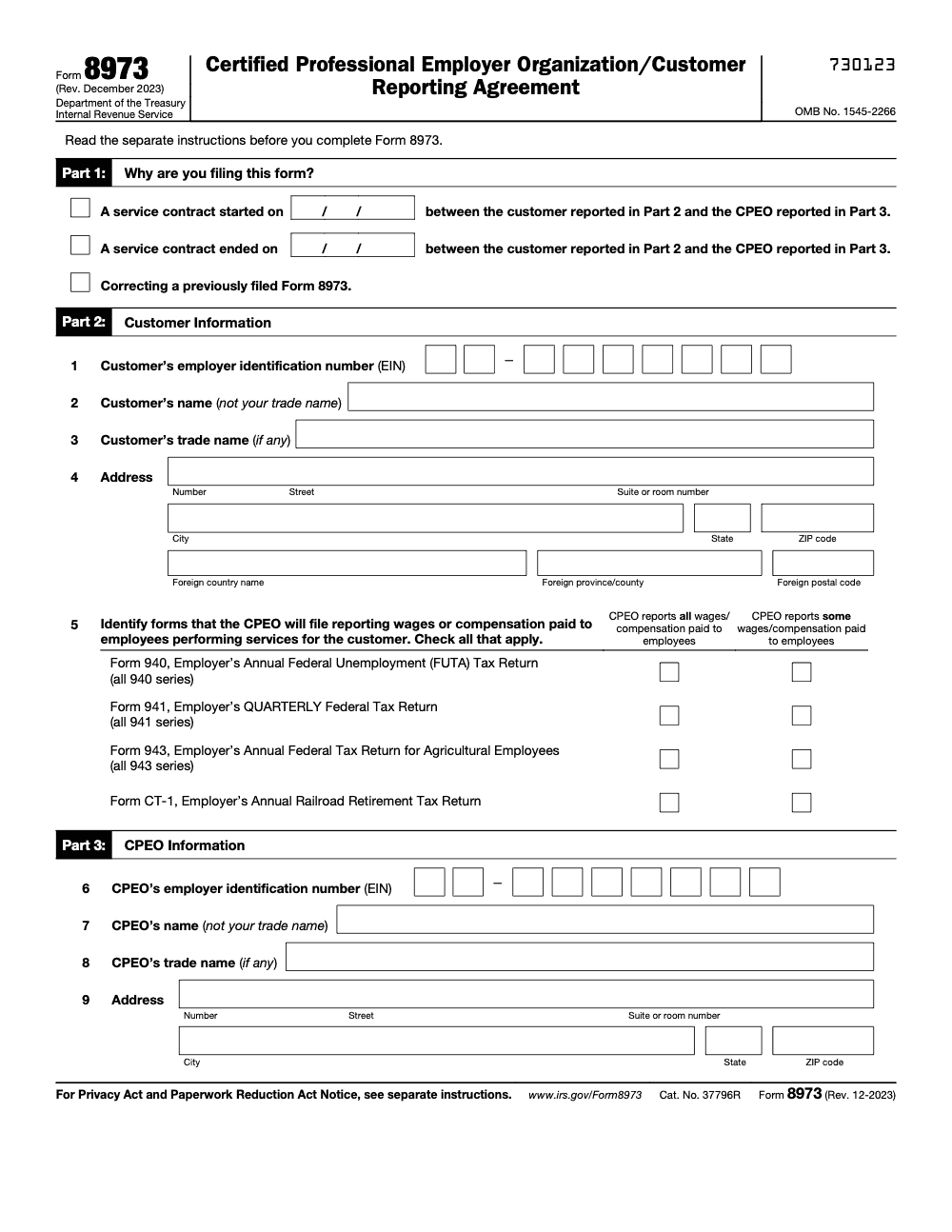
Form 8973 is the Certified Professional Employer Organization/Customer Reporting Agreement – the IRS form a CPEO uses to notify the agency when a service contract with a customer starts or ends, or to correct a prior filing (per Form 8973, Rev. December 2023). Line 5 identifies which employment-tax forms (940, 941, 943, CT-1) the CPEO will file for that customer's employees, and the form must be mailed within 30 days of the start or end date along with the required CPEO Consent to Disclosure of Tax Information page. See the IRS Form 8973 instructions before filing and our tax execution support for help running this at scale.
Picture a CPEO signing a new customer in the middle of a busy quarter. The contract starts, payroll runs, everyone moves on, and the IRS notification slips. Form 8973 is how a Certified Professional Employer Organization tells the IRS that a service contract has started or ended, and the clock on it is short.
You mail Form 8973 within 30 days of the contract's start or termination, to the Ogden address, with the required CPEO Consent to Disclosure attached. Newly certified CPEOs get a six month window to file for existing customers, measured from the notice of certification date. The IRS accepts electronic or digital signatures, but the form itself still goes by mail.
Key Takeaways
- Form 8973 is how a Certified Professional Employer Organization reports the start or end of a customer service contract to the IRS. It establishes who will report wages and employment taxes for that contract.
- File within 30 days of a contract’s start or termination. Newly certified CPEOs have a six month window to file for existing customers measured from the notice of certification date.
- Mail Form 8973 to IRS, Ogden, UT 84201‑0089. Use certified mail or an approved private delivery service for tracking.
- The IRS accepts electronic or digital signatures on Form 8973, however the form itself is still mailed. Maintain signature evidence in your records.
- A customer does not have to file Form 8973, though the customer may choose to file a termination notice on its own.
- For work site employees, the CPEO is generally solely liable for federal employment taxes. For non‑worksite employees, liability may be shared.
- Recent IRS page for “About Form 8973” shows no new developments as of January 21, 2025.
What Form 8973 Actually Does
Form 8973, formally the Certified Professional Employer Organization, Customer Reporting Agreement, tells the IRS that a CPEO contract with a customer has started or ended. It links the parties by legal name and EIN and documents who will file employment tax returns for wages paid under that contract. This filing is what lets the IRS see the handoff in responsibility from the customer to the CPEO.
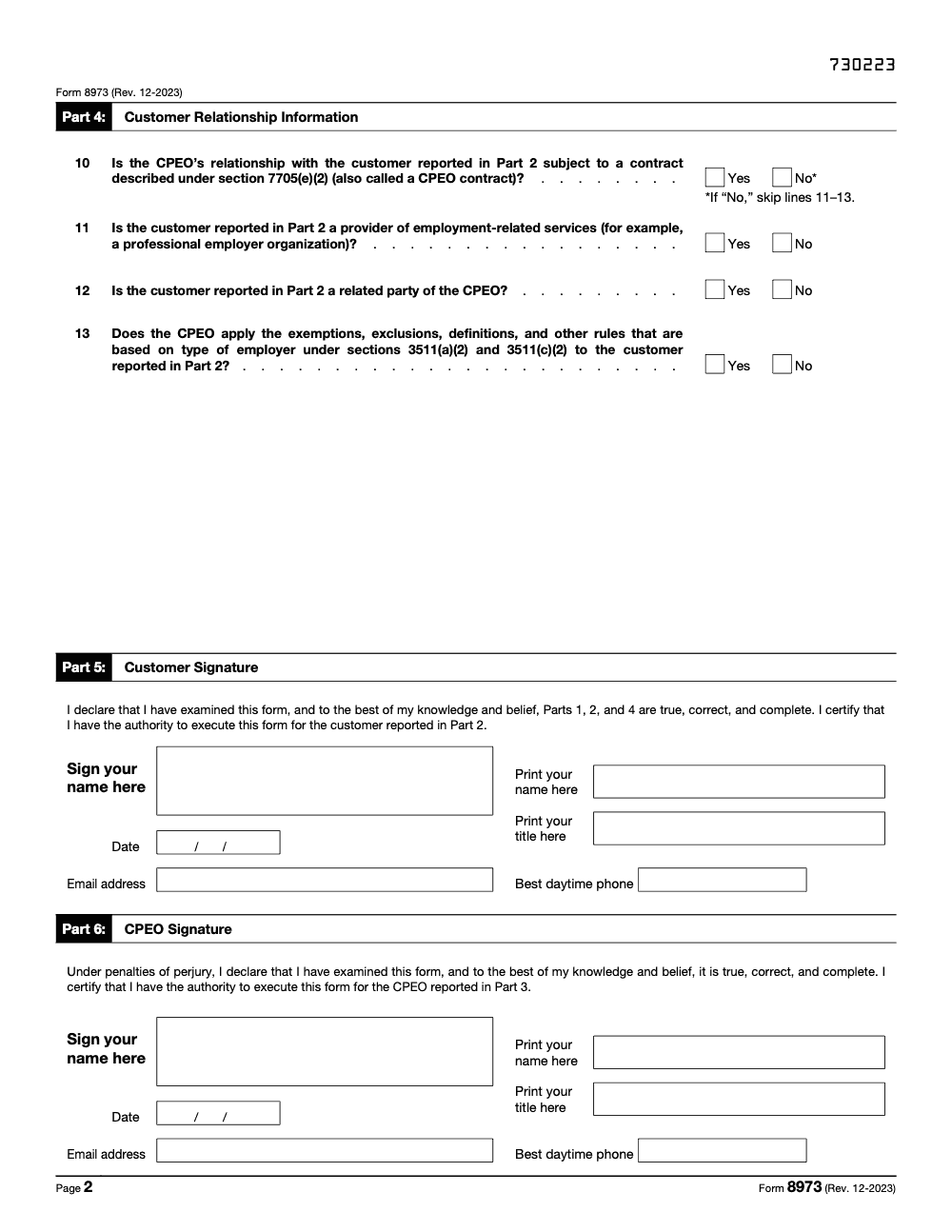
On a start filing, both sides attest, which confirms the relationship and sets the effective date (the customer's signature in Part 5 attests only to Parts 1, 2, and 4 being true, correct, and complete; the CPEO certifies the entire form under penalties of perjury in Part 6). On an end filing, the CPEO tells the IRS the contract is over. The instructions also note that a customer may separately send an end notice, useful when you want your own documentation trail.
Use exact legal names and EINs as they appear in IRS records. Most slowdowns begin with mismatched identity data.
Who Must File Form 8973
You file Form 8973 if you are the Certified Professional Employer Organization. You file at the start of a CPEO contract and again when the contract ends, and you use the form to correct prior submissions when necessary. Your customer does not file for starts, and is not required to file for ends, although the IRS allows a customer to submit its own termination notice if it wants to ensure the agency records the end date from both sides.
This filing is more than a courtesy. It underpins core tax treatment under IRC section 3511 for work site employees, where the CPEO is generally solely liable for federal employment taxes on wages it pays. For non‑worksite employees, both parties can be liable, which makes accurate Form 8973 timing and contents even more important.
Why this matters to you
- It protects your operating position, you tell the IRS exactly who reports and pays.
- It reduces penalty and audit risk, you avoid mixed reporting where both parties file in parallel.
- It preserves CPEO certification benefits for the customer, which supports client retention and trust.
Quick Glossary, so everyone is on the same page
- CPEO, a Professional Employer Organization the IRS has certified under IRC 7705 and section 3511.
- Work site employee, the employee profile that generally places federal employment tax liability solely with the CPEO for wages it pays.
- Non‑worksite employee, a category where liability may be shared by the CPEO and the customer.
In my experience, getting these definitions aligned early avoids messy conversations with clients when you explain who is responsible for what and why the IRS needs Form 8973 on time.
When You Must File Form 8973
The rule of thumb is simple, file within 30 days of the start date, and file within 30 days of the end date. The clock starts on the actual contractual effective date, not on a payroll cutover or first check date. Put the date in MM/DD/YYYY format.
If you are newly certified, you get a grace period. You have six months from the date of your IRS notice of certification to submit Forms 8973 for contracts with customers who were already with you before certification. This is a one‑time window that helps you cleanly convert an existing book of business to CPEO contracts.
A few timing edge cases to keep in mind:
- If you transfer a contract to an affiliate CPEO, the transferor files an end notice and the transferee files a start notice within 30 days.
- If the IRS writes you about an incorrect start date, you must file a corrected Form 8973 by the deadline in the letter. Keep your customer informed and provide them a copy of the corrected form.
Miss the deadline, and you increase exposure to penalties, processing delays, and disputes about who is responsible for federal employment taxes for a given period. File on time, and you avoid almost all of that noise.
What Information You Need Ready
Here is the minimum data set that keeps submissions clean.
Essential Identifiers
| Item | Who Provides | Why It Matters |
| Customer legal name | Customer | Must match IRS records exactly to avoid rejection |
| Customer EIN | Customer | Primary IRS match key for the customer |
| Customer address | Customer | Helps the IRS align to the correct entity record |
| CPEO name | CPEO | Identifies the certified filer |
| CPEO EIN | CPEO | Links the filing to your CPEO account |
You will also identify the employment tax forms the CPEO will file for the customer, for example Form 941 (Line 5 has two columns per form, you must indicate whether the CPEO reports ALL or only SOME of the wages or compensation paid for each form selected), and you will include signatures in the appropriate sections. Follow the instructions for Parts 1 through 6 and the related consent to disclosure section (the CPEO Consent to Disclosure of Tax Information page is required, not optional, and must be submitted with Form 8973 to maintain CPEO certification).
Dates and Purpose
In Part 1, select why you are filing, start, end, or correction, then enter the date in MM/DD/YYYY. Use the true contract effective date. Do not round or estimate. If you are converting an older service agreement to a CPEO contract after certification, your start date for the CPEO contract must be on or after your certification effective date.
Quick check, confirm the legal name and EIN against an IRS notice or prior return before you sign. Most delays come from identity mismatches, not from obscure technicalities.
Signatures and Consent
- Start filings include signatures from both the customer and the CPEO. The IRS permits electronic or digital signatures on Form 8973 when they meet IRM requirements. Keep evidence of the signing process with your records.
- End filings only require the CPEO’s signature. A customer may optionally send its own end filing.
- Renew the “CPEO Consent to Disclosure of Tax Information” before the end of the last period listed on the most recent consent if the contract is still in place. Track this date alongside your contract dates.
Data quality habits that prevent rework
- Copy legal names exactly as they appear on IRS records, including commas, Inc., LLC, and punctuation.
- Record contract dates directly from the signed agreement, then align your payroll cutover to those dates.
- Decide up front which forms you, as the CPEO, will file for the customer. Make sure your internal payroll and tax teams mirror that choice in their systems.
If you partner with an external operations team, ask them to standardize workpapers and naming conventions for Form 8973 packages. In my experience, that structure alone cuts review time and rescues month‑end crunches.
How To Submit Form 8973
- You will mail Form 8973 to the IRS at the Ogden processing center. The official mailing address in the instructions is:
- Department of the Treasury, Internal Revenue Service, Ogden, UT 84201‑0089.
- Use certified mail or a private delivery service so you have tracking. If you choose a private delivery service, send to the Ogden street address used for PDS deliveries, 1973 Rulon White Blvd., Ogden, UT 84201, and verify your carrier is on the IRS approved list.
Can you e‑file Form 8973?
The IRS instructions direct filers to mail the form. Some organizations collect signatures electronically, then assemble a paper package for mailing. That approach is consistent with the IRM, which allows electronic or digital signatures on Form 8973 as long as the e‑signature process meets IRS standards. Keep your e‑signature audit trail with the filed copy.
Formatting that helps the IRS process your filing
- Use the IRS fillable PDF, and follow the date format MM/DD/YYYY.
- Type entries clearly, and keep names and addresses consistent across Parts 2 and 3.
- Attach any clarifying statements if you are correcting a prior filing or documenting a transfer between related CPEOs.
Processing Times and What To Expect
Typical flow looks like this in practice.
- Internal review, you confirm identifiers, dates, forms to be filed, and signature readiness.
- Customer signing, if it is a start filing, then your signature.
- Mail and tracking, you keep proof of submission.
- IRS intake, the form is scanned and keyed. If identity elements do not match, you may receive a letter requesting a corrected filing with the proper start date or legal name and EIN. Respond by the deadline in the letter and provide the customer a copy of the corrected form.
I recommend calendaring a 30 day follow‑up from the mailing date and a second reminder on day 45. If you have not seen acceptance by then, review tracking, confirm addresses, and be ready to refile if the IRS requests an update.
Common Errors That Trigger Rejections
- Legal name and EIN mismatches for the customer or CPEO.
- Start dates that precede the CPEO’s certification effective date.
- Wrong purpose box, for example, marking “start” when filing a correction.
- Missing or incorrect signatures for a start filing.
- Dates not in MM/DD/YYYY.
A five minute pre‑flight that saves weeks
- Pull the most recent IRS notice that shows the customer name and EIN.
- Cross‑check your contract’s effective date against what you plan to enter.
- Confirm which employment tax returns you will file for the customer, and make sure payroll setup reflects the same forms.
- Save the signature evidence, then mail with tracking and keep the receipt.
Small teams often get swamped during onboarding. A simple SOP and a labeled folder for Form 8973 materials keeps everything findable during audits and renewals.
Benefits of CPEO Status, With One Important Nuance
When Form 8973 is filed correctly and on time, the IRS recognizes the CPEO as the filer for wages it pays to work site employees. That means the CPEO generally assumes sole federal employment tax liability for those wages and files aggregate returns under the CPEO’s EIN, a structure that simplifies year‑end reporting for the customer. For non‑worksite employees, both the CPEO and the customer may be liable, so align your filings and internal processes accordingly.
Stay current by checking the IRS “About Form 8973” page. As of January 21, 2025, that page lists no recent developments, which is good news for your playbook.
Practical compliance habits that pay off
- Keep a running log of start and end dates, consent renewals, and mail dates.
- Store the countersigned form, tracking proof, and any IRS correspondence together.
- Review naming conventions every quarter to catch changes like new DBAs.
Field‑Tested Checklist
- Confirm the customer’s legal name and EIN from an IRS notice.
- Verify your CPEO legal name and EIN.
- Lock the start or end date from the signed contract.
- Choose the forms you will file for the customer, for example Form 941.
- Collect signatures, electronic or ink, and keep evidence.
- Mail with tracking to Ogden, then calendar a 30 and 45 day follow‑up.
How Accountably Can Help, Briefly
If your firm or CPEO team is stretched thin, the fastest wins usually come from structure and documentation. At Accountably, our teams slot into your workflow to tighten SOPs, standardize workpapers, and build simple review guardrails, so forms like 8973 go out clean the first time. That means fewer corrections, fewer surprises, and faster approvals when every day counts.
Final Notes and Disclaimer
Use this guide to get Form 8973 right the first time, then reuse the checklist for every start and end. Keep your records clean, help the IRS match your filings quickly, and protect your clients and your program status.
This article is for general information only as of December 8, 2025. It is not tax or legal advice. For your specific situation, consult your tax advisor or counsel, and always verify the latest IRS instructions and addresses before you file.
Common Mistakes We See Every Season
Form 8973 looks short at three pages, but the same handful of mistakes show up at intake review every time. Each one is preventable with a tighter SOP.
Reusable Checklists
These are copy-paste ready for firm SOPs. Drop them into your CPEO playbook so the same prep runs on every contract start, end, or correction.
Pre-filing data prep
- Confirm Part 1 filing reason: contract start, contract end, or correction of a prior Form 8973.
- Capture customer EIN (Line 1), legal name not trade name (Line 2), trade name (Line 3), and full address (Line 4, including foreign country fields if applicable).
- Verify CPEO EIN (Line 6), legal name (Line 7), trade name (Line 8), and address (Line 9).
- For Line 5, mark each employment-tax form the CPEO will file (940, 941, 943, CT-1) and the reporting scope (all wages or some wages) in both columns.
- Answer Line 10 on whether the relationship is subject to a section 7705(e)(2) CPEO contract.
- If Line 10 is Yes, complete Lines 11 (employment-related services customer), 12 (related party), and 13 (§3511(a)(2) and (c)(2) rules). If No, leave Lines 11-13 blank.
Signature and consent
- Walk the customer through Parts 1, 2, and 4 before requesting the Part 5 signature.
- Capture customer Sign name, Print name, Print title, Date, Email address, and Best daytime phone in Part 5.
- Capture the same six fields in Part 6 from a CPEO officer signing under penalties of perjury for the entire form.
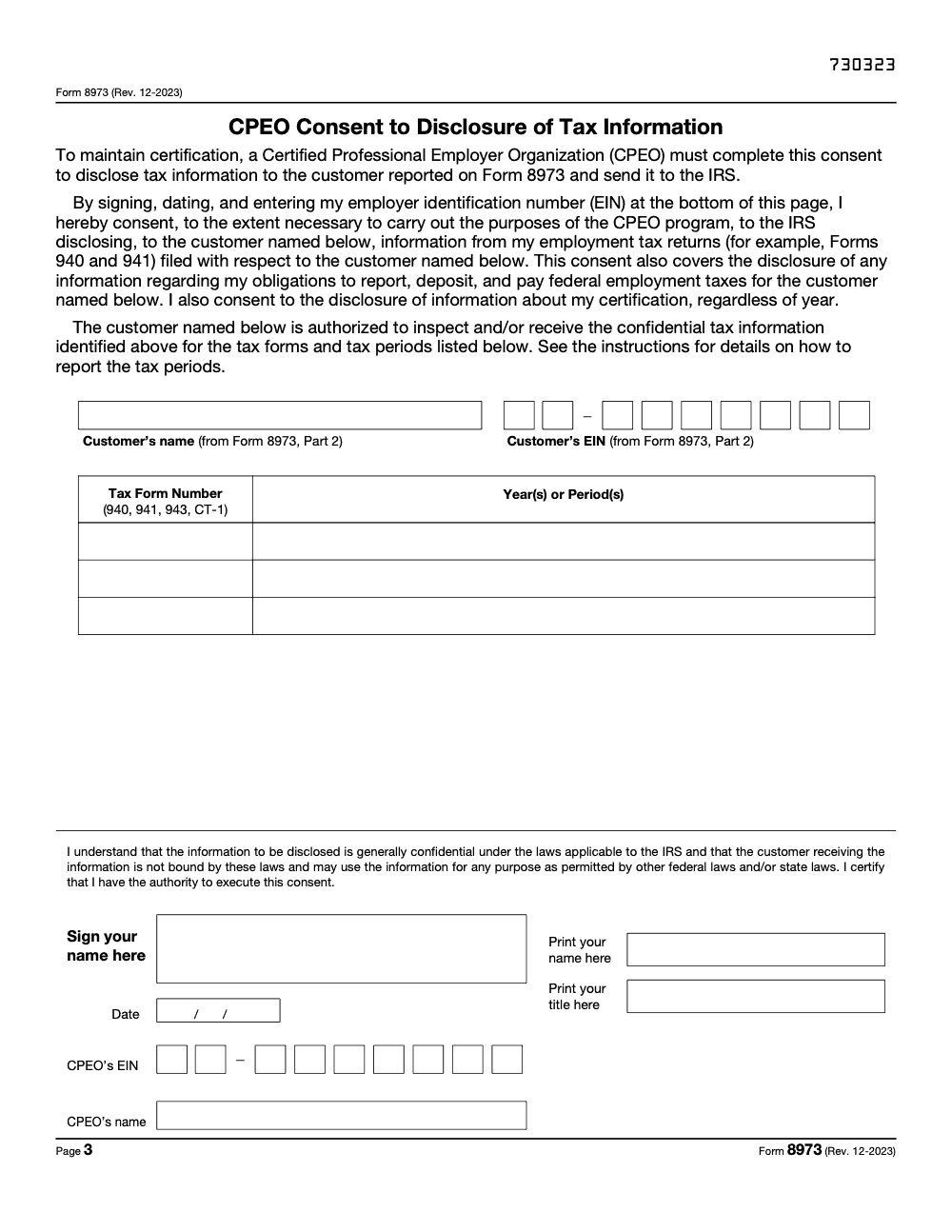
- Complete the CPEO Consent to Disclosure of Tax Information page on page 3 – this is required to maintain CPEO certification, not an optional attachment.
- On the Consent disclosure table, list each tax form number (940, 941, 943, CT-1) and the year(s) or period(s) per the separate instructions.
- Sign the Consent page with the same authorized officer who signed Part 6.
Mail and tracking
- Confirm filing is within 30 days of the contract start or end date (or within six months of the notice of certification for newly certified CPEOs filing for existing customers).
- Assemble the complete three-page Form 8973, which includes the signed CPEO Consent to Disclosure of Tax Information page on page 3.
- Mail to the IRS service center listed in the current Form 8973 instructions, using a trackable carrier.
- Capture tracking details (carrier, tracking number, mail date) in the customer file.
- Provide the customer a copy of the filed Form 8973 for their records.
- If a correction is needed later, reference the original filing's mail date and tracking on the corrected Form 8973.
Keep 8973 Season From Stalling
Form 8973 is event-driven, not annual – a contract start, end, or correction triggers a 30-day window to file with the IRS (confirm the current filing window against the IRS Form 8973 instructions before relying on this), and a missed window can put CPEO certification under IRC §7705 at risk. For a CPEO running dozens of customer contracts at once, the steady drip of starts and ends through the year competes for attention with quarterly Form 941 deposits, year-end Form 940 work, and the day-to-day payroll calendar (per the Form 8973 instructions, Rev. December 2023).
The fix is treating each Form 8973 filing as a triggered workflow built into your onboarding and offboarding SOPs, not a paperwork task that lives in a quarterly checklist. The same prep runs every time, the same owner is on the hook, and the 30-day clock starts on a known date – not when someone notices the calendar.
- Set a calendar trigger on every signed and terminated customer contract that opens a Form 8973 task within 24 hours, assigned to a named owner.
- Pre-populate a Form 8973 template per customer with Parts 2 (Customer Information) and 3 (CPEO Information) so only Part 1, Part 4, and the Part 5 and Part 6 signatures remain at filing time.
- Treat the CPEO Consent to Disclosure of Tax Information page as part of the form, not an attachment – the IRS requires it to maintain certification.
- For each Line 5 form (940, 941, 943, CT-1), confirm the reporting scope column (all wages vs. some wages) is marked before the package leaves your desk.
- Keep one tracker per customer that logs every Form 8973 filed for that contract (start, corrections, end) so a corrected filing can reference the prior one without delay.
Accountably integrates these triggers into structured offshore tax execution support so a contract change does not turn into a 30-day fire drill.
FAQs
You do, if you are the Certified Professional Employer Organization. You file for starts and ends, and you file corrections. A customer does not file starts and is not required to file ends, although the IRS allows a customer to send its own termination notice.
File within 30 days of a start or end date. If you are newly certified, you have six months from your notice of certification to file for existing customers.
Mail to the IRS in Ogden, UT 84201‑0089. If you use a private delivery service, send to 1973 Rulon White Blvd., Ogden, UT 84201, and keep tracking.
Yes, the IRS e‑Signature program permits electronic or digital signatures for Form 8973 when the signing process meets IRM standards. You still mail the form. Keep your e‑signature audit trail.
Follow the letter’s instructions and file a corrected Form 8973 by the stated deadline. Provide your customer a copy of the corrected form.
For work site employees, the CPEO is generally solely liable for federal employment taxes on wages it pays. For non‑worksite employees, liability may be shared.
Other forms this guide names
About this guide
Accountably helps US CPA, EA, and accounting firms hire trained accountants and tax preparers in India.
About us Reviewed byJugal Thacker, CPAFounder and CEO at Accountably
A Washington-licensed CPA with 7+ years inside US firms – PwC, a real-estate tax practice, then a full-service firm, rising from reviewer to manager to advisory. This article was reviewed against current IRS guidance for the 2025 tax year and updated for filers preparing late returns, amendments, and 2026 estimates.
View profile →How we research, review, and update this guide
Every Accountably guide is researched against primary IRS sources, reviewed by a U.S. CPA, and refreshed as guidance evolves. Read our Editorial Guidelines to see how we source, fact-check, and update our content.




