
Summarize this article with AI
In Brief
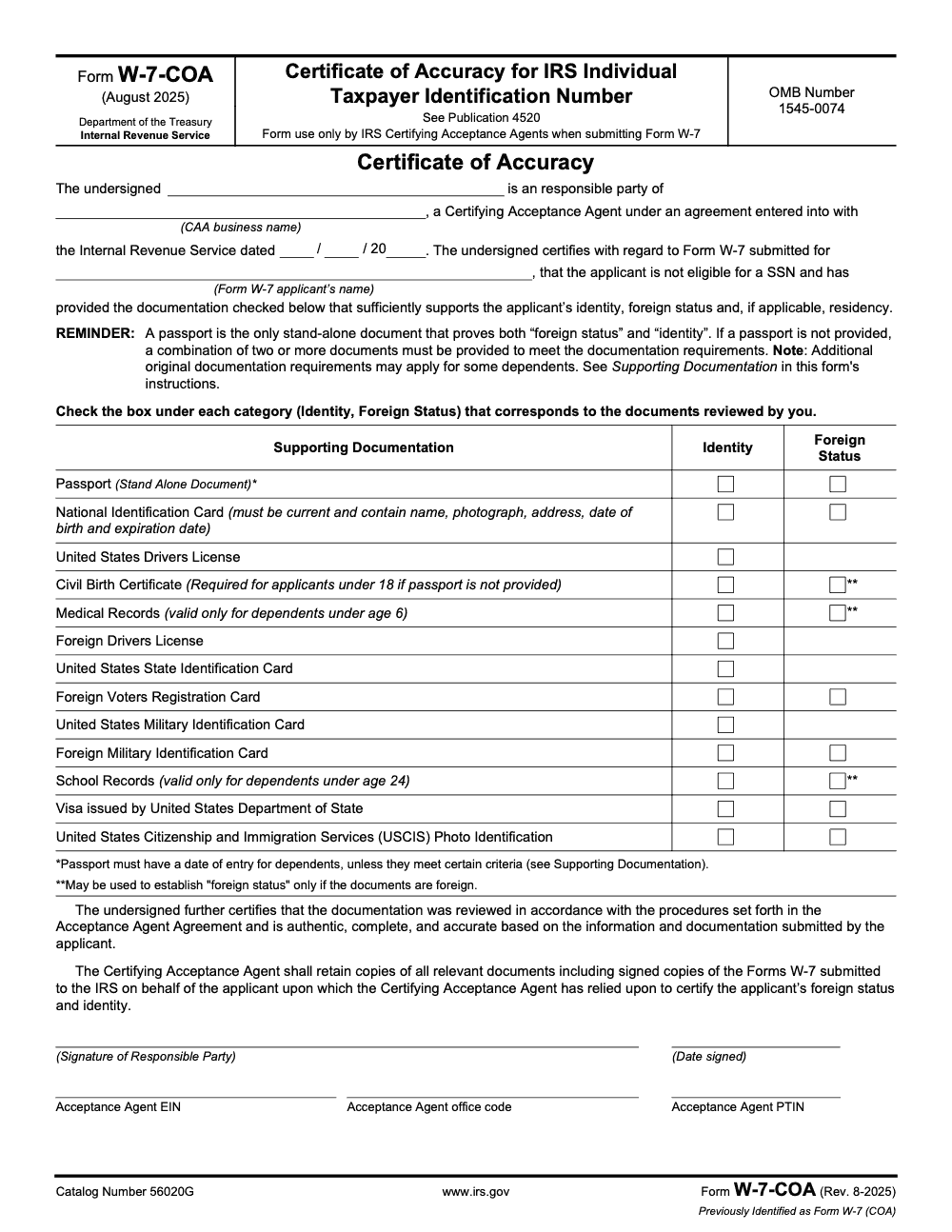
Form W-7-COA is the Certificate of Accuracy (Rev. August 2025, Catalog No. 56020G) that an IRS Certifying Acceptance Agent attaches to each Form W-7 when submitting certified ID copies instead of originals. One signed COA is required per Form W-7, only the CAA business's designated responsible party may sign it, and the form carries the CAA's EIN, office code, and PTIN (per the Form W-7-COA instructions, Rev. August 2025, and IRS Publication 4520). A passport is the only stand-alone document proving both identity and foreign status; without one, you must examine two or more documents. Browse the full IRS forms library or see our tax preparation service.
Plenty of people assume a Certifying Acceptance Agent can wave through any document an applicant brings in. The W-7-COA is where that assumption gets corrected. It is the one-page Certificate of Accuracy you attach to each Form W-7, certifying what you examined and how you verified identity and foreign status when you submit certified copies instead of originals.
The detail that trips agents up is the passport. It is the only stand-alone document that proves both identity and foreign status; without one, you have to examine two or more documents covering each separately. Get the certification disciplined and the IRS can rely on your work, which is what keeps the ITIN application from bouncing back.
Key Takeaways
- Form W-7-COA is the one‑page Certificate of Accuracy that CAAs attach to each Form W‑7 when submitting certified copies rather than originals. It documents what you examined and how you verified it.
- For primary and secondary applicants, attach a copy of the original documents or an issuing‑agency certified copy. For dependents, attach a copy of the passport or birth certificate, while all other dependent documents go to the IRS as originals or issuing‑agency certified copies.
- A separate, signed COA must accompany every Form W‑7, only the CAA business's designated responsible party may sign it, and you must keep copies of all relevant documents, including signed Form W‑7 copies, per your Acceptance Agent Agreement.
- A passport is the only stand-alone document proving both identity and foreign status. Without one, you must examine two or more documents, one covering identity and one covering foreign status.
- A Foreign Drivers License, U.S. State Identification Card, and U.S. Military Identification Card prove identity only; they cannot establish foreign status, so pair them with a foreign-status document.
What Form W-7-COA is and why it matters
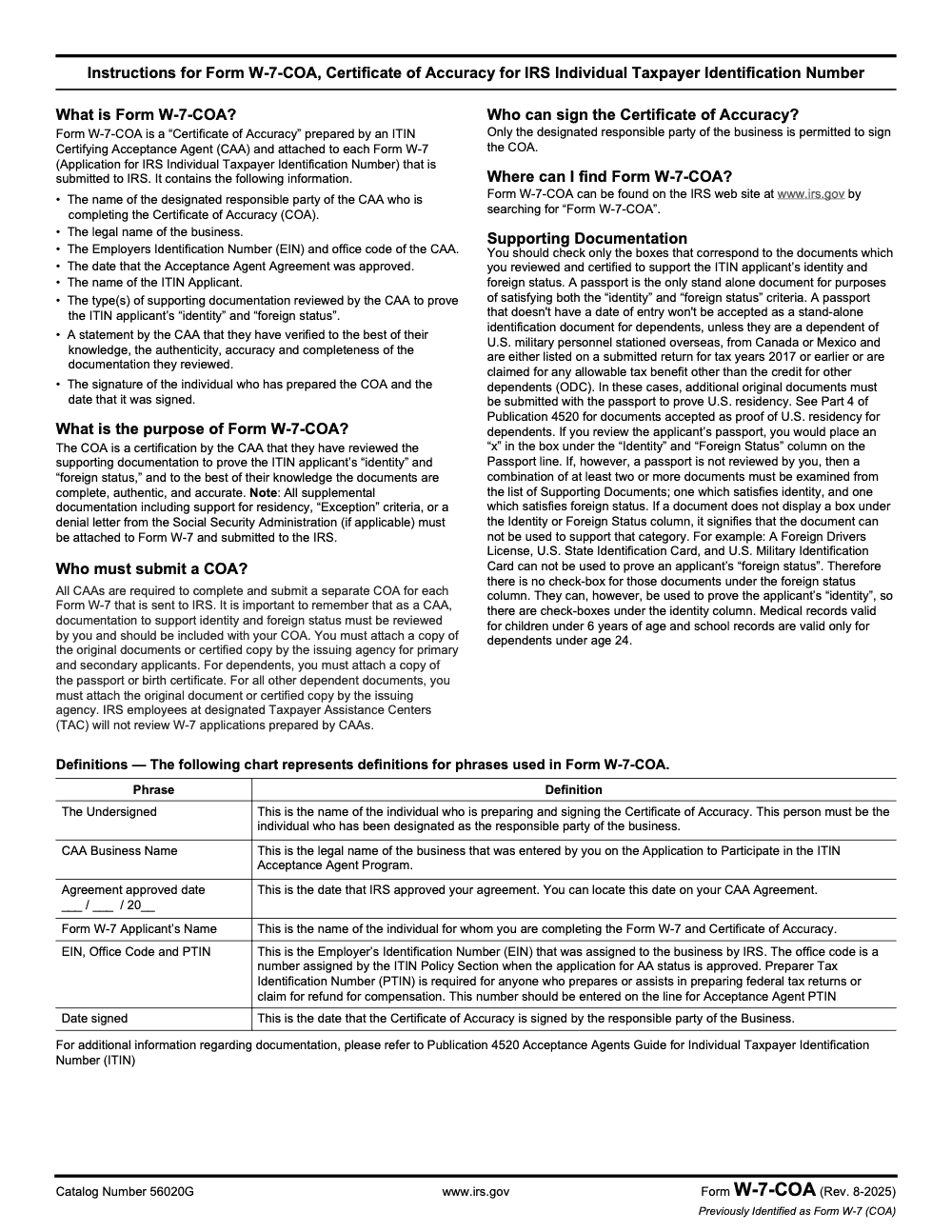
The COA does one job very well, it lets the IRS rely on your due diligence so applicants do not have to mail originals. That keeps passports and vital records safe, improves turnaround predictability, and reduces follow‑up mailings. The form captures your CAA details, the applicant’s information, a list of each document examined, and your signature. The Form W-7-COA instructions (Rev. August 2025) require CAAs to complete and submit a separate COA for each Form W‑7 sent to the IRS, and they set the signature and completion standards that make a COA valid.
From a workflow standpoint, the COA brings order to a process that can get messy during peak months. When you standardize how you name files, cross‑reference the COA to the W‑7, and log your interview details, reviewers waste less time reconciling what was seen versus what was sent. That structure becomes your safety net when the IRS requests clarification.
When you must use the COA, and when you should not
Use the COA whenever you submit certified copies with a client’s W‑7 instead of mailing originals. List each document you reviewed, note how you verified it, and sign and date the form. Keep in mind that IRS employees at designated Taxpayer Assistance Centers will not review W‑7 applications prepared by CAAs, so your certification on the COA is the review. The CAA-prepared package goes to the IRS ITIN processing operation, not back through a TAC for a second look.
Quick compliance facts
- For dependents, attach a copy of the passport or birth certificate. Other dependent documents go to the IRS as originals or issuing‑agency certified copies.
- A passport is the only stand-alone document that proves both identity and foreign status; without one, examine two or more documents that together cover both.
- A separate, signed COA is required for each Form W‑7, and only the CAA business's designated responsible party may sign it.
Who can use the COA, and how this differs from AAs and TACs
Only IRS‑authorized Certifying Acceptance Agents can use the COA. Acceptance Agents help applicants complete the W‑7 but do not certify documents the same way a CAA does. Taxpayer Assistance Centers handle in‑person service, but they will not review W‑7 applications prepared by CAAs. These roles matter because they control which path you take for each case and whether the COA is even appropriate.
AA vs CAA vs TAC, a quick comparison
| Role | Can authenticate docs | Uses COA | Good for | Limitations |
| AA | No | No | Basic help completing W‑7 and mailing originals | Must send originals or issuing‑agency certified copies for all applicants |
| CAA | Yes, certifies identity and foreign status; for dependents, only passports and birth certificates are attached as copies | Yes, one per W‑7 when sending certified copies | Keeping originals with the family while submitting verified copies | Other dependent documents must go to the IRS as originals or issuing‑agency certified copies |
| TAC | In‑person IRS service for taxpayers | No | Walk-in or appointment IRS assistance | Will not review W‑7 applications prepared by CAAs |
- Citations for the table facts, see the Form W-7-COA instructions (Rev. August 2025) and IRS Publication 4520, the Acceptance Agents Guide for ITIN.
- Tip from our files, because TACs will not review CAA-prepared W‑7s, route your certified packets straight to the IRS ITIN operation rather than expecting a second look in person.
- (General information only, not tax advice. Always confirm the latest IRS instructions and Publication 4520 before you file.)
Documentation standards and acceptable IDs
When you fill a COA, the details matter. The IRS relies on your review and your process, so check only the boxes for the documents you actually reviewed and certified, and certify that the documentation is authentic, complete, and accurate based on what the applicant submitted. That attestation language comes straight from the COA itself, so treat the form as a verification record, not a cover sheet.
Acceptable identity documents, what you can authenticate
For primary and secondary applicants, attach a copy of the original documents or an issuing‑agency certified copy of each document you reviewed. A passport is the only stand-alone document that proves both identity and foreign status; without one, examine a combination of two or more documents, one that satisfies identity and one that satisfies foreign status. For dependents, attach a copy of the passport or birth certificate, though a dependent’s passport without a U.S. date of entry is not accepted as a stand-alone document unless the dependent is a dependent of U.S. military personnel stationed overseas, is from Canada or Mexico and listed on a return for tax years 2017 or earlier, or is claimed for an allowable tax benefit other than the credit for other dependents, and even then additional original documents are required to prove U.S. residency. Any other dependent documents must be submitted as originals or issuing‑agency certified copies with the package.
Here is a quick reference to what each supporting document can establish on the COA.
| Document type | Proves identity | Proves foreign status | Notes |
| Passport | Yes | Yes | The only stand-alone document; for dependents it needs a date of entry unless a narrow exception applies |
| National ID card | Yes | Yes | Must be current and show name, photograph, address, date of birth, and expiration date |
| Foreign Voters Registration Card | Yes | Yes | Carries check-boxes under both columns on the form |
| Foreign Military Identification Card | Yes | Yes | Carries check-boxes under both columns on the form |
| Visa issued by U.S. Department of State; USCIS Photo ID | Yes | Yes | Both establish identity and foreign status |
| Foreign Drivers License, U.S. State ID, U.S. Military ID | Yes | No | Identity only; there is no Foreign Status check-box for these |
| Civil birth certificate | Yes | Only if foreign-issued | Required for applicants under 18 when no passport is provided |
| Medical records, school records | Yes (dependents only) | Only if foreign-issued | Medical records: dependents under 6. School records: dependents under 24 |
The dependent passport rule and the identity-only documents trip up many first‑time CAAs, so build them into your intake script and your COA checklist.
Dependent document rules, a simple two‑part script
- For dependents, attach a copy of the passport or birth certificate only.
- For any other dependent document, include originals or issuing‑agency certified copies in the submission to the IRS, not your own photocopies and not a notarized copy (a notary public certifies a signature, not the document, and is not the issuing agency).
- If no passport is provided for a dependent under 18, a civil birth certificate is required, and it establishes foreign status only when it is foreign-issued.
Say it out loud, for your protection and your client’s. “For your child, I can attach a copy of the passport or civil birth certificate. Anything else must go to the IRS as an original or issuing‑agency certified copy.”
The COA, step‑by‑step with a practical checklist
You will develop your own rhythm, but this sequence consistently prevents rework and missing data during busy weeks.
- Pre‑interview prep
- Open a new W‑7 case folder, name it YYYY‑MM‑DD_LastFirst_W7.
- Print or preload your COA template with your business name and EIN.
- Confirm the applicant category on Form W‑7, reason boxes and exception documentation if any.
- Document review
- Review the supporting documents and confirm each one is current and complete (for a National ID card, check name, photograph, address, date of birth, and expiration date).
- Inspect security features, spellings, birth dates, expiration dates, and watch for name variations that can break matching.
- Record exactly what you examined, for example Passport, Country, Number, Issue and Expiration dates.
- COA completion
- Enter the applicant’s name exactly as it will appear on the W‑7.
- Check only the boxes for the documents you reviewed and certified.
- Fill your CAA business name, EIN, office code, PTIN, and your printed name.
- Have the designated responsible party sign and date the COA on the same day you finalize the packet.
- Build the packet
- Pair one signed COA with one Form W‑7. Do not combine applicants on a single COA.
- Attach the tax return or exception documentation when required.
- Include copies of all documents you authenticated for primary, secondary, and eligible dependents, and for ineligible dependent IDs include originals or issuing‑agency certified copies.
- Quality control before mailing
- Cross‑check names, dates of birth, and document numbers across the W‑7, COA, and attachments.
- Confirm the mailing address on the Form W‑7 so any originals can be returned to the right place.
- Use a trackable mail service and log the tracking number in your case notes.
Practical formatting tips that speed reviews
- Match names across all forms, including hyphens and accents.
- Use a standard naming convention for your workpapers, for example 01_COA.pdf, 02_W7.pdf, 03_Passport.pdf, 04_BirthCert.pdf.
- If the applicant has multiple names across documents, add a one‑line note in your COA notes section that explains which is the legal name for the W‑7.
- Keep scans sharp and legible, color where possible, and avoid shadows near security features that might trigger questions.
A disciplined approach like this shortens review time and cuts down on follow‑up calls. If you manage a team, turn the list above into a one‑page job aid and place it at the front of every W‑7 case file. For firms that run busy seasonal cycles, a structured workflow with checklists, layered review, and standardized file naming keeps the COA process consistent across preparers and reviewers. This is where a trained team working to a standard, not just extra hands, makes the difference.
Common errors and how to avoid them
Even strong CAAs get tripped up by the same handful of mistakes. A little front‑end discipline saves weeks on the back end.
- Missing or stale signatures. The COA must be signed and dated by the person authorized under your Acceptance Agent Agreement, which is specifically the designated responsible party of the business (other Acceptance Agents or office managers within the CAA firm are not permitted to sign). Sign the day you finalize the packet, not days later. The IRS treats the COA like a verification record, not a cover sheet.
- Bundling more than one applicant under a single COA. A separate, signed COA is required for each Form W‑7 sent to the IRS, so reconcile your COA count to your W‑7 count before mailing.
- Certifying the wrong dependent documents. For dependents, attach a copy of the passport or birth certificate only. Other dependent documents must be sent as originals or issuing‑agency certified copies with the package.
- Treating a foreign drivers license, a U.S. State ID, or a U.S. Military ID as proof of foreign status. These prove identity only; pair them with a foreign-status document such as a foreign passport, a national ID card, or a foreign voter registration card.
- Over-checking the COA. Check only the boxes for documents you actually reviewed and certified; a box must not be checked merely because the document type exists in the file.
- Name mismatches across the W‑7, COA, and IDs. Accents, hyphens, and order of names matter. Add a one‑line note in your workpapers when documents show variants.
- Omitting your CAA business name, EIN, office code, or PTIN on the COA. These fields tie your verification to your agreement and are not optional.
- Letting the wrong person sign. Only the designated responsible party of the CAA business may sign the COA, even when another agent ran the review.
- Vague document descriptions. Record the document type, issuing country, number, and issue and expiration dates. It speeds internal reviews and avoids IRS questions.
Quick reminder, one COA per W‑7. Never combine applicants on a single certificate. The COA is your verification record for that one application.
A pre‑mailing quality pass that catches 95 percent of issues
- Names match across W‑7, COA, IDs, and the tax return.
- Reason for applying on the W‑7 matches the attachments.
- You checked only the boxes for documents you reviewed and certified on the COA.
- Dependent evidence follows the passport or civil birth certificate rule.
- Signature of the designated responsible party and date present on the COA and W‑7.
- Mailing address confirmed and a trackable service used, tracking number recorded.
- One signed COA pairs with one Form W‑7; no applicants combined on a single certificate.
- Copies in the packet are clear, full color where helpful, no shadows on security features.
- Supplemental documents, residency support, Exception evidence, or an SSA denial letter, are attached to the Form W‑7.
- You saved a PDF set with a standard file naming convention to your secure archive.
Example, how to write a clean COA line entry
- “Passport, Mexico, No. G12345678, issued 2023‑06‑15, expires 2033‑06‑14, original in CAA custody at interview, security features examined under natural and LED light.”
- “Civil birth certificate, India, Registration No. 2021‑04‑98765, issued 2021‑04‑22, translation reviewed, copy certified by issuing authority, verified against raised seal.”
This level of detail keeps reviewers and IRS staff from guessing and protects you during program monitoring.
Recordkeeping, supplemental documents, and follow‑up
- Keep a complete file for each case. The Certifying Acceptance Agent must retain copies of all relevant documents, including signed copies of the Forms W‑7 submitted to the IRS, that the CAA relied on to certify the applicant's foreign status and identity. Your retention obligations flow from your Acceptance Agent Agreement and the CAA guide, IRS Publication 4520.
- Attach supplemental documents to the Form W‑7, not just your file. All supplemental documentation, including support for residency, "Exception" criteria, or a denial letter from the Social Security Administration if applicable, must be attached to Form W‑7 and submitted to the IRS.
- For residency documentation on dependents, see Part 4 of Publication 4520 for the documents accepted as proof of U.S. residency.
- Set client expectations on timing. ITIN processing takes several weeks and runs longer during peak filing season or when an applicant applies from overseas, so confirm current timeframes on IRS.gov.
- Confirm the applicant is not eligible for an SSN before you certify. The COA includes the CAA's certification that the applicant is not eligible for a Social Security Number, so an SSN-eligible person must apply for an SSN, not an ITIN.
- Note, this article is general information, not tax advice. Always confirm the latest IRS instructions and Publication 4520 before you file.
A cleaner COA workflow, how we build it in busy firms
If you run a seasonal practice, the bottleneck is rarely demand, it is delivery. In my experience standing up COA workflows for multi‑office firms, the winning pattern is simple, standardize intake, centralize document custody, add one internal review, and name files the same way every time. That small set of habits removes most rework, and it scales without burning out your seniors.
Accountably only steps in where it helps the work, not the hype. When a firm wants to keep originals with families, yet submit hundreds of clean ITIN packets on time, we help implement SOPs for interviews, create a COA job aid, and layer a preparer to senior to quality pass so partners stay out of review loops. The result is steadier turnaround and fewer IRS callbacks, which means you keep promises and margins at the same time.
The right structure beats heroics. A disciplined COA process turns April from chaos into a predictable queue.
If you want a hand building that structure, our team can help you set up the checklists, templates, and accountability loops that keep your COAs clean at scale. Use it with your own staff or with a dedicated team working inside your systems. Your clients keep their passports, your calendar keeps its sanity.
Conclusion
You are the last mile between a client and their ITIN, and the COA is how the IRS relies on your review. Keep the rules tight, especially the dependent passport and date-of-entry rules and the identity-only documents that cannot prove foreign status. Check only the boxes you reviewed and certified. Have the designated responsible party sign and date the form, and pair one signed COA with each Form W‑7. Most of all, build a routine so every COA looks the same on your best day and your busiest day. Do that, and you will spend less time fixing avoidable rejections and more time serving clients who are counting on you.
Note, this guide is general information, not tax advice. Confirm the latest IRS instructions and Publication 4520 before you submit.
Common Mistakes We See Every Season
From my side of the desk, most COA rejections trace back to a short list of repeat offenders, and almost all of them are catchable at intake. Here are the ones my team flags most often, with the fix we build straight into the SOP.
Reusable Checklists
These are copy-paste ready for your firm's SOP binder. Drop them at the front of every W-7 case file and tick the boxes as you work the packet.
Pre-interview COA packet
- Confirm the applicant is not eligible for a Social Security Number before you start.
- Open a W-7 case folder named YYYY-MM-DD_LastFirst_W7.
- Preload the COA template with your CAA business name, EIN, office code, and PTIN.
- Confirm the reason-for-applying box on Form W-7 and gather any Exception documentation.
- Verify you physically hold the original IDs or issuing-agency certified copies for the interview.
Document review and COA completion
- For a passport, mark both the Identity and Foreign Status columns; it is the only stand-alone document.
- Without a passport, examine two or more documents covering both identity and foreign status.
- For dependents, authenticate only a passport or civil birth certificate; route other IDs as originals or issuing-agency certified copies.
- For a national ID card, confirm it is current and shows all five required elements.
- Check only the boxes for documents you personally reviewed.
- Have the designated responsible party sign and date the COA the day you finalize the packet.
Pre-mailing and retention
- Pair one signed COA with one Form W-7; never combine applicants on a single certificate.
- Attach any SSA denial letter, residency support, or Exception evidence to the Form W-7, not just your file.
- Cross-check names, dates of birth, and document numbers across the W-7, COA, and attachments.
- Mail with a trackable service and record the tracking number in your case notes.
- Retain copies of all relevant documents and signed Form W-7 copies, per Publication 4520.
Keep W7COA Season From Stalling
The COA workload never arrives evenly. Most W-7 packages ride alongside a Form 1040, so the certificate crunch lands in the same March-to-April window when your seniors are already buried. Because the IRS requires a separate signed Certificate of Accuracy for every Form W-7 (per the Form W-7-COA instructions, Rev. August 2025), one family of five can mean five COAs, five interviews, and five document-custody chains in a single appointment.
The fix is not more hands, it is a repeatable lane. When intake, document custody, COA completion, and the quality pass each follow the same script, reviewers stop reconciling what was seen against what was sent, and avoidable rejections fall away.
- Standardize the COA line entry, document type, issuing country, number, plus issue and expiration dates, so reviewers never have to guess.
- Lock the signer rule into the workflow: only the designated responsible party signs, and the EIN, office code, and PTIN are pre-filled.
- Flag dependent cases at intake, since you may authenticate only a passport or civil birth certificate and a dependent passport needs a date of entry.
- Reconcile COA count to W-7 count before mailing, one certificate per application, never a household.
- Attach supplemental documents, residency support, Exception evidence, or an SSA denial letter, to the Form W-7, and retain copies of everything you relied on.
That structure is what we build for practices running seasonal ITIN volume. Our tax preparation teams work inside your systems with documented SOPs and a layered review pass, so your COAs look the same on your busiest day as your quietest one, and clients keep their passports while clean packets go out the door.
FAQs
It is the Certificate of Accuracy that a Certifying Acceptance Agent completes and attaches to each Form W‑7 when submitting certified copies instead of original IDs. It lists the documents you examined and confirms you followed IRS verification standards.
Only the designated responsible party of the CAA business may sign and date the COA. Other Acceptance Agents, office managers, or junior preparers inside the same firm cannot sign it. Treat it like a verification record tied to your agreement.
No. IRS employees at designated Taxpayer Assistance Centers will not review W-7 applications prepared by CAAs. Your certification on the COA is the review, and the CAA-prepared package goes to the IRS ITIN processing operation.
You may authenticate only a dependent’s passport or civil birth certificate. Any other dependent IDs must be sent to the IRS as originals or issuing‑agency certified copies.
Yes. On Form W-7-COA a Foreign Military Identification Card carries check-boxes under both the Identity and Foreign Status columns, so it can support both. By contrast, a Foreign Drivers License, a U.S. State Identification Card, and a U.S. Military Identification Card prove identity only and cannot establish foreign status.
A passport is the only stand-alone document that proves both identity and foreign status. If a passport is not reviewed, you must examine a combination of at least two documents, one that satisfies identity and one that satisfies foreign status.
All supplemental documentation, including support for residency, Exception criteria, or a denial letter from the Social Security Administration if applicable, must be attached to the Form W‑7 and submitted to the IRS, not just kept in your file.
Form W-7-COA is available on IRS.gov by searching for Form W-7-COA, and the current mailing instructions are in the Form W‑7 instructions and IRS Publication 4520. Confirm the address there before you mail, and keep proof of delivery.
No. The COA includes the CAA's certification that the applicant is not eligible for a Social Security Number. An SSN-eligible person must apply for an SSN, not an ITIN, so confirm SSN ineligibility before you certify.
Other forms this guide names
- Form W-7: ITIN Application Guide, Requirements & Documents
About this guide
Accountably helps US CPA, EA, and accounting firms hire trained accountants and tax preparers in India.
About us Reviewed byJugal Thacker, CPAFounder and CEO at Accountably
A Washington-licensed CPA with 7+ years inside US firms – PwC, a real-estate tax practice, then a full-service firm, rising from reviewer to manager to advisory. This article was reviewed against current IRS guidance for the 2025 tax year and updated for filers preparing late returns, amendments, and 2026 estimates.
View profile →How we research, review, and update this guide
Every Accountably guide is researched against primary IRS sources, reviewed by a U.S. CPA, and refreshed as guidance evolves. Read our Editorial Guidelines to see how we source, fact-check, and update our content.




