
Summarize this article with AI
In Brief
Schedule LEP (Form 1040) is the voluntary Request for Change in Language Preference filed with Form 1040, 1040-SR, 1040-NR, or 1040-SS to ask the IRS for written communications in one of 20 alternative languages (codes 001–020), or to cancel a prior election with code 000, per the Schedule LEP (Rev. December 2024) instructions on IRS.gov. The election carries forward across tax years, and translated notices arrive only as the IRS completes its multiyear translation rollout that began in 2023, so English notices continue in the meantime.
A client of ours had been getting IRS letters in English for three years after a previous preparer told her he had filed for Spanish. The election was actually on file. The catch was that translated notices arrive only as the IRS finishes translating each specific communication under the multiyear rollout that started in 2023, so some system-generated letters still showed up in English.
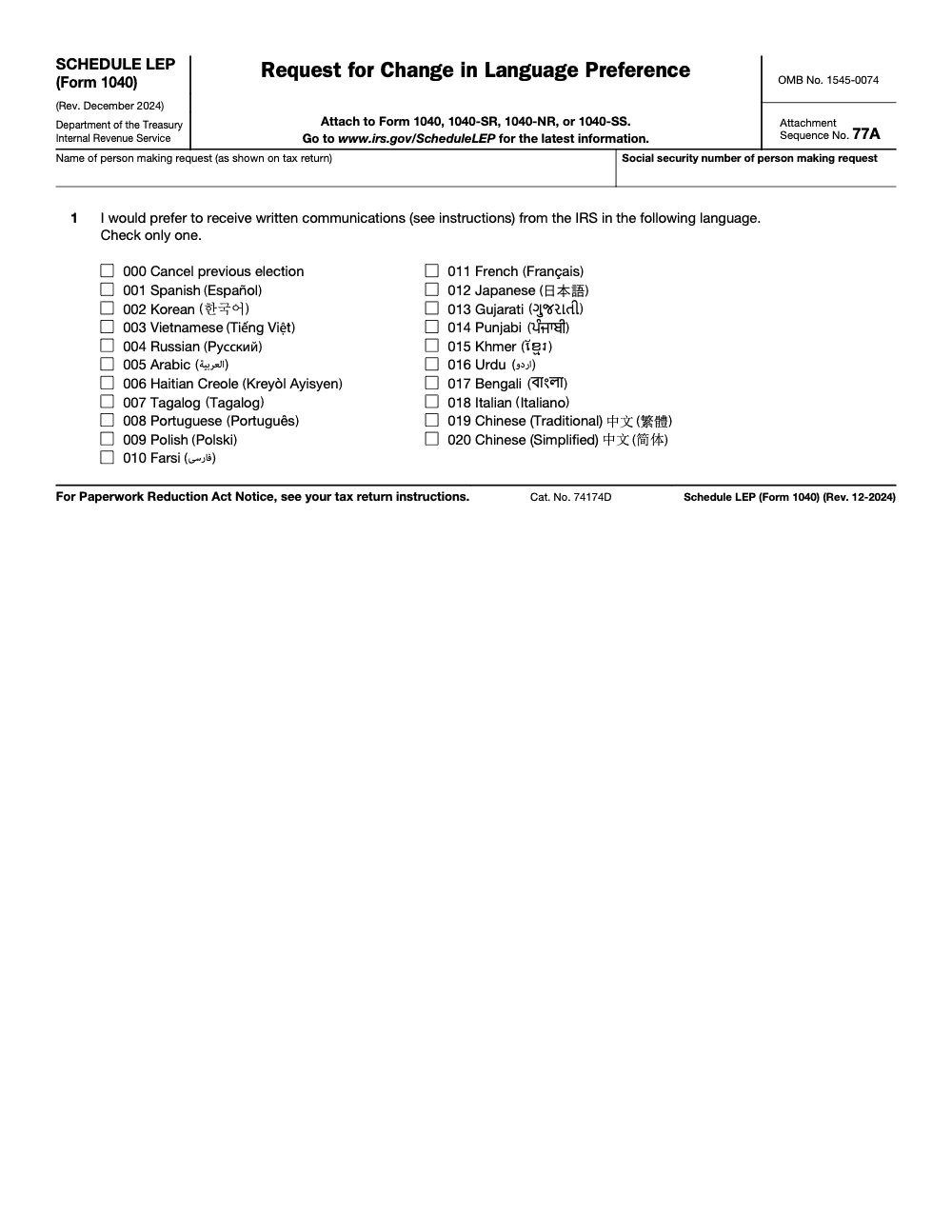
Schedule LEP is a preference you put on file with a three-digit code, not an instant switch. Code 000 cancels a prior election, and codes 001 through 020 map to the 20 languages listed on the form.
Key Takeaways
- Schedule LEP lets you choose a preferred language for future IRS written communications, such as notices, letters, and some forms and publications, when translations are available. It does not affect tax liability, and it does not apply to IRS phone calls or in-person interactions (those are governed by separate multilingual programs).
- The selection is made with a three‑digit code on the form. Code 000 cancels a prior election, codes 001 through 020 map to specific languages listed on the form.
- File Schedule LEP by attaching it to your 1040 series return. The IRS only processes Schedule LEP when it is attached to a return (Form 1040, 1040-SR, 1040-NR, or 1040-SS); it does not accept standalone Schedule LEP submissions.
- Updates are not instant. Translated notices arrive only as the IRS completes translation of each specific communication under its multiyear rollout that began in 2023. Some system‑generated letters may still arrive in English.
- Joint filers need separate Schedules if either spouse wants a non‑English language. Each spouse’s SSN and choice are recorded separately.
- If you have a Power of Attorney on Form 2848, the representative’s copy follows the taxpayer’s selected language according to IRS general counsel, shared via NSTP. Coordinate capacity to read and act on those notices.
What Schedule LEP Does, and Who Should Use It
Schedule LEP is your voluntary request for future IRS written communications in a language you choose, if the IRS has that item translated (no taxpayer is required to file it, even those with limited English proficiency). Think notices and letters first, then forms, instructions, or publications that the IRS has already translated. You file once, and your preference stays on file until you change it with a new schedule.
Use it if you:
- Prefer notices in Spanish, Chinese, or another supported language,
- Want each spouse on a joint return to set their own language,
- Need your representative’s copies to match your language so they can respond quickly.
A quick clarity check:
- This form is about communication, not tax calculations. Your balance due or refund does not change because you pick a language.
- Not every IRS letter exists in every language. When a translation does not exist, you may still receive English.
The Languages and Codes You Will Choose From
On page 1 of the current Schedule LEP, you select one code. Code 000 cancels a prior choice and returns you to English by default in the IRS letter workflow. Codes 001 through 020 map to the supported languages listed below.
Supported Language Codes on Schedule LEP
| Code | Language |
| 000 | Cancel previous election |
| 001 | Spanish |
| 002 | Korean |
| 003 | Vietnamese |
| 004 | Russian |
| 005 | Arabic |
| 006 | Haitian Creole |
| 007 | Tagalog |
| 008 | Portuguese |
| 009 | Polish |
| 010 | Farsi |
| 011 | French |
| 012 | Japanese |
| 013 | Gujarati |
| 014 | Punjabi |
| 015 | Khmer |
| 016 | Urdu |
| 017 | Bengali |
| 018 | Italian |
| 019 | Chinese, Traditional |
| 020 | Chinese, Simplified |
These codes appear exactly as checkboxes on the form. Keep a copy for your records after filing.
How the IRS Applies Your Preference
Here is what happens behind the scenes. When your Schedule LEP is posted, the IRS sets an LEP indicator on your account. If that indicator is a non‑zero code, staff are instructed to obtain or use a translated letter when one exists. If your indicator is blank or set to 000, English applies. System‑generated letters and some programs may still default to English even when a translation exists.
Expect a practical outcome, more translated notices where the IRS already offers them, and occasional English when a translation does not exist for that letter type.
Accountably note for firms: if your practice serves multilingual households, build a checklist step to confirm the client’s LEP code during onboarding and before sending a Form 2848, so your team and your POA notices stay aligned. Keep a copy of Schedule LEP and your e‑file acknowledgment in the client’s workpapers.
Filing Rules for Joint Returns and POA Coordination
When you file a joint return, the IRS treats each spouse’s language preference separately. That is why each spouse who wants a non‑English language must file a separate Schedule LEP with their own SSN. If only one spouse wants Spanish, file only for that spouse. If both spouses want Punjabi, file two forms, one per spouse. This ensures the IRS posts the correct code to each account.
Same Language, Two Forms
Even if you both choose the same language, send two Schedules. This prevents one spouse from continuing to receive English notices because no selection was posted to their SSN. I have seen that exact confusion during busy season, and it is easy to avoid with a two‑form habit.
Power of Attorney, Form 2848
If you authorize a practitioner, their copy of your notice will follow your chosen language. IRS general counsel confirmed this for tax pros, which NSTP published for the community. Coordinate early so your representative can read and act on notices in that language, or set a process to translate promptly.
Timing, Processing, and What To Expect
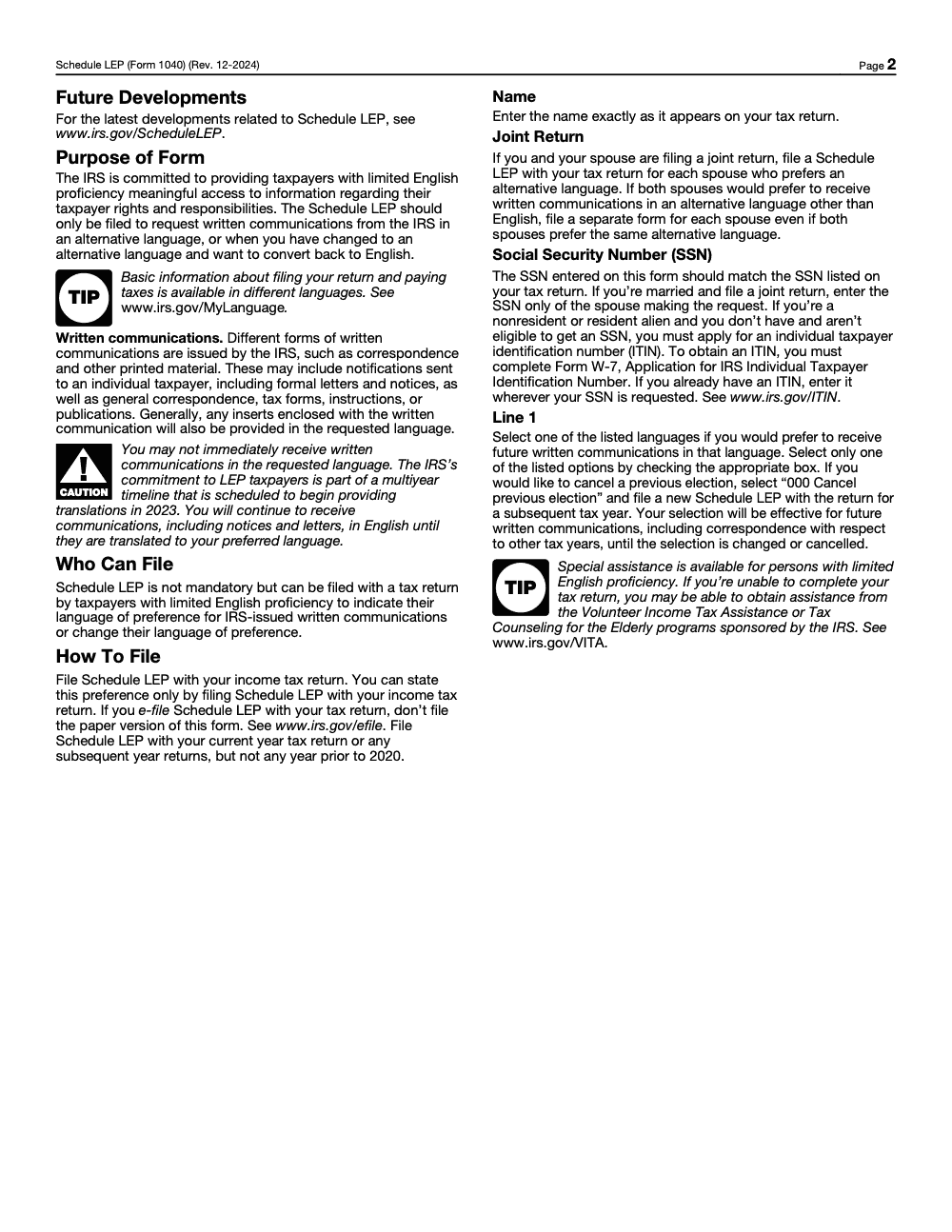
Schedule LEP can only be filed as an attachment to your income tax return (Form 1040, 1040-SR, 1040-NR, or 1040-SS); the IRS does not accept standalone Schedule LEP submissions. Once filed, your election is recorded on your account and applies to future written communications until you change or cancel it.
A few practical realities:
- The IRS continues to expand translated content, yet not every letter type is available in every language. When a translation exists, your LEP indicator tells staff to use it.
- The selection applies to future communications. It does not make the IRS resend old mail in your new language.
Save copies of your filed Schedule LEP and any e‑file acknowledgments so you can verify the change later.
Step‑by‑Step, How To Obtain and Complete Schedule LEP
- Get the current Schedule LEP PDF from the IRS. The latest posted version is Rev. December 2024, and it can be attached to Form 1040, 1040‑SR, 1040‑NR, or 1040‑SS.
- Enter your name exactly as it appears on your return and your SSN. For joint returns, each spouse files their own form with their own SSN.
- Pick one code from the list on page 1. Remember, 000 cancels a prior election. Select 001 through 020 for your language.
- Attach it to your e‑filed or paper return. If you already filed or you want to change your language later, attach a new Schedule LEP to your next year’s return; the IRS does not accept standalone Schedule LEP submissions outside of a return filing.
- Keep a dated copy with your records. If you work with a tax pro, make sure your engagement letter or intake workflow includes your chosen language code.
E‑Filing Notes For Practitioners
Most 1040 e‑file platforms include Schedule LEP in the personal information or basic info section, then pass the code with the return. If you cannot include it electronically, file a paper return with Schedule LEP attached; the IRS does not process standalone Schedule LEP submissions. Your software’s internal label for the schedule may differ from IRS schema names, so follow your vendor’s instructions.
Common Mistakes To Avoid
The same handful of errors come up every busy season, and almost all of them flow from treating Schedule LEP as an instant switch rather than a request on file.
Recordkeeping, Security, and Practice Operations
For individuals, keep a copy of your Schedule LEP and any e‑file confirmation for at least three years. For firms, store the PDF in your DMS and tag the client profile with the code so staff can see it during intake and notice response work. Always attach Schedule LEP to the taxpayer’s income tax return; the IRS only processes Schedule LEP when filed with a return. Note the return’s filing date in your workpaper so staff can reference the election on later notices.
Tip for firms, add a question to your onboarding checklist, “What language should IRS letters arrive in for you?” Then file Schedule LEP early in the engagement.
When you set a language preference, remember that some system‑generated letters may still be English only, and certain programs prioritize English where translations are not available. The internal IRM gives staff direction to use Spanish when an LEP indicator is blank but an account code shows Spanish-only materials, and to request translations when your LEP code is non‑zero. In short, the indicator helps, but it does not override every system letter.
Coordinating with Form 2848, Power of Attorney
If you have a POA, your practitioner’s copy should arrive in the language you selected. IRS general counsel confirmed this in guidance shared via NSTP. That is helpful for clients who want the practitioner to receive the same language version they receive. Align on expectations so nothing gets lost in translation.
Why This Matters For Advisory, Not Just Compliance
When clients understand what a notice says on the first read, you reduce back‑and‑forth and speed up responses. That keeps penalties and interest from snowballing. It also builds trust. As a practitioner, I have seen how a single translated CP letter can turn a tense phone call into a calm, productive one.
Timing and 2025 Filing Dates You Should Know
For tax year 2024 returns filed in 2025, the federal deadline was Tuesday, April 15, 2025. Extensions moved the filing deadline to October 15, 2025, but taxes were still due by April 15. If you missed April, file as soon as possible to limit penalties and interest. The IRS repeated this guidance throughout April 2025.
If you are filing late and also want to change your language preference, attach Schedule LEP to that late return; the IRS only records the election when Schedule LEP is filed with a tax return (Form 1040, 1040-SR, 1040-NR, or 1040-SS).
Quick Checklist You Can Share With Clients
- Pick one code from the Schedule LEP list on page 1.
- If you want English again later, file a new form and select 000 to cancel.
- For joint filers, file one Schedule per spouse who wants a non‑English language.
- If you have a POA, confirm they can read your selected language or build a translation plan.
- Keep copies of the filed schedule and any e‑file acknowledgments.
Sources, Trust, and a Short Note on Why This Exists
The IRS created Schedule LEP so taxpayers with limited English proficiency can get meaningful access to their rights and responsibilities. The form, instructions, and internal guidance outline how staff should use the LEP indicator and when translations apply. That includes the list of codes, the joint filing rule, and the reminder that not all letters are translated.
If something is time‑sensitive in your situation, do not wait for a translated version of a notice. Read and respond by the stated deadline, and ask a qualified professional for help if you need it.
Light Support From Accountably, When It Helps
If your firm serves multilingual households, it helps to build a simple process. At Accountably, we coach teams to standardize Schedule LEP collection, store the code in the client profile, and confirm that any Form 2848 matches the client’s language choice, so notices do not sit unread. This is part of placing trained offshore staff inside a firm’s workflow, not a sales pitch. If you want a template checklist or a sample SOP step for Schedule LEP, our team can share what we use internally.
Conclusion
You deserve IRS mail you can read on the first pass. Schedule LEP makes that possible for many notices. Choose the right code, file it once per person, and keep a copy. Expect translations when they exist, and English when they do not. If you work with a practitioner, align on your language choice and how notices are handled. That single step reduces stress, speeds responses, and protects you from small issues turning into big ones.
Reusable Checklists
These three checklists are copy-paste ready for firm SOPs and intake packets. Each list is built from the Schedule LEP (Rev. December 2024) instructions and the joint-return, POA, and cancellation rules covered above.
Schedule LEP intake checklist
- Confirm the client wants written IRS communications in an alternative language, not just oral assistance.
- Confirm the underlying return is Form 1040, 1040-SR, 1040-NR, or 1040-SS for tax year 2020 or later.
- Select one language code from 001–020 with the client and document the choice in the engagement file.
- Match the name on Schedule LEP exactly to the name on the attached return.
- Enter the requesting filer's SSN; on joint returns, never enter both spouses' SSNs on one form.
- If the filer lacks an SSN and is ineligible to obtain one, queue Form W-7 for the ITIN application and use that ITIN on Schedule LEP.
- If e-filing, do not also mail a paper Schedule LEP.
Joint return Schedule LEP checklist
- Ask each spouse separately whether they want an alternative-language preference.
- Prepare a separate Schedule LEP for every spouse who answers yes.
- Enter only the requesting spouse's SSN on that spouse's Schedule LEP.
- Confirm only one language box is checked on each Schedule LEP.
- If both spouses want the same language, still file two separate Schedule LEPs.
- Attach both Schedule LEPs to the same joint return.
- Note in the workpaper which spouse's election is on file (elections are individual, not household).
Cancel or change election checklist
- Confirm the client wants to revert to English or switch to a different language.
- Prepare a fresh Schedule LEP for the current tax year (cancellation cannot be done by phone or letter).
- For a full cancel, check box 000 (Cancel previous election).
- For a language switch, check the new language code; do not also check 000.
- Attach the new Schedule LEP to the current-year return.
- Set the client expectation that English notices may resume only as the IRS processes the change.
Keep 1040-LEP Season From Stalling
Schedule LEP rarely creates the same March-April capacity spike that Form 1040 does, but it creates a different kind of delivery friction: intake errors that surface months after the return is filed. The IRS issued the current Schedule LEP under the December 2024 revision and runs translations on a multiyear rollout that began in 2023, so the lag between a filed election and a translated notice is real, and most client confusion shows up at notice time, not filing time.
The fix is not more reviewers on the Schedule LEP itself. The form has one numbered line. The fix is upstream: intake discipline, joint-return handling, and client expectation-setting at the moment the return goes out.
- Standardize a single drop-down of the 20 language codes (001–020) plus code 000 in the intake workpaper, so preparers never type the language by hand.
- Tag joint-return clients with a two-row Schedule LEP slot, one per spouse, so the "one form per couple" mistake never reaches review.
- Add an ITIN flag to intake; if the client has no SSN and is ineligible to obtain one, queue Form W-7 alongside Schedule LEP so the SSN field is populated correctly.
- Build a one-paragraph client-facing note that explains the multiyear translation rollout and sets expectations about continued English notices.
- For returning clients, add a "LEP status" check to the annual rollover so a code 000 cancellation or a language switch is caught before the new return is assembled.
This is the kind of intake and SOP discipline our U.S. tax outsourcing teams build into every engagement, so Schedule LEP gets filed correctly the first time and the post-notice phone calls stop.
FAQs
It is a one‑page form you file with your 1040 series return to tell the IRS your preferred language for future written communications, such as notices and some forms or instructions when translations exist. Your selection does not change your tax due or your refund. It applies to future mailings and stays on file until you change it.
No. It steers future written communications. Old notices stay as originally issued.
On the form, 000 is “Cancel previous election.” In IRS account logic, a canceled or blank indicator results in English. If you want to switch back to English, select 000 on a new Schedule LEP.
No. Schedule LEP must be attached to a tax return (Form 1040, 1040-SR, 1040-NR, or 1040-SS); the IRS does not accept standalone Schedule LEP submissions. To change your language preference after filing, attach a new Schedule LEP to your next year’s return.
According to IRS general counsel, shared via NSTP, yes, the representative’s copy follows the taxpayer’s LEP selection. Coordinate with your practitioner so they can handle that language promptly.
Other forms this guide names
- Form 1040: Filing Guide for 2025 Returns (AGI, Deductions, Deadlines)
- Form 1040‑NR: Filing 2025, Nonresident Taxes Made Simple
- Form 1040-SR: Standard Deduction, Schedules, E-file Tips
- Form 1040‑SS: U.S. Territories Self‑Employment Tax Guide
- Form 2848: Guide to Line 3, Filing, and Rules
- Form W-7: ITIN Application Guide, Requirements & Documents
About this guide
Accountably helps US CPA, EA, and accounting firms hire trained accountants and tax preparers in India.
About us Reviewed byJugal Thacker, CPAFounder and CEO at Accountably
A Washington-licensed CPA with 7+ years inside US firms – PwC, a real-estate tax practice, then a full-service firm, rising from reviewer to manager to advisory. This article was reviewed against current IRS guidance for the 2025 tax year and updated for filers preparing late returns, amendments, and 2026 estimates.
View profile →How we research, review, and update this guide
Every Accountably guide is researched against primary IRS sources, reviewed by a U.S. CPA, and refreshed as guidance evolves. Read our Editorial Guidelines to see how we source, fact-check, and update our content.




