
Summarize this article with AI
In Brief
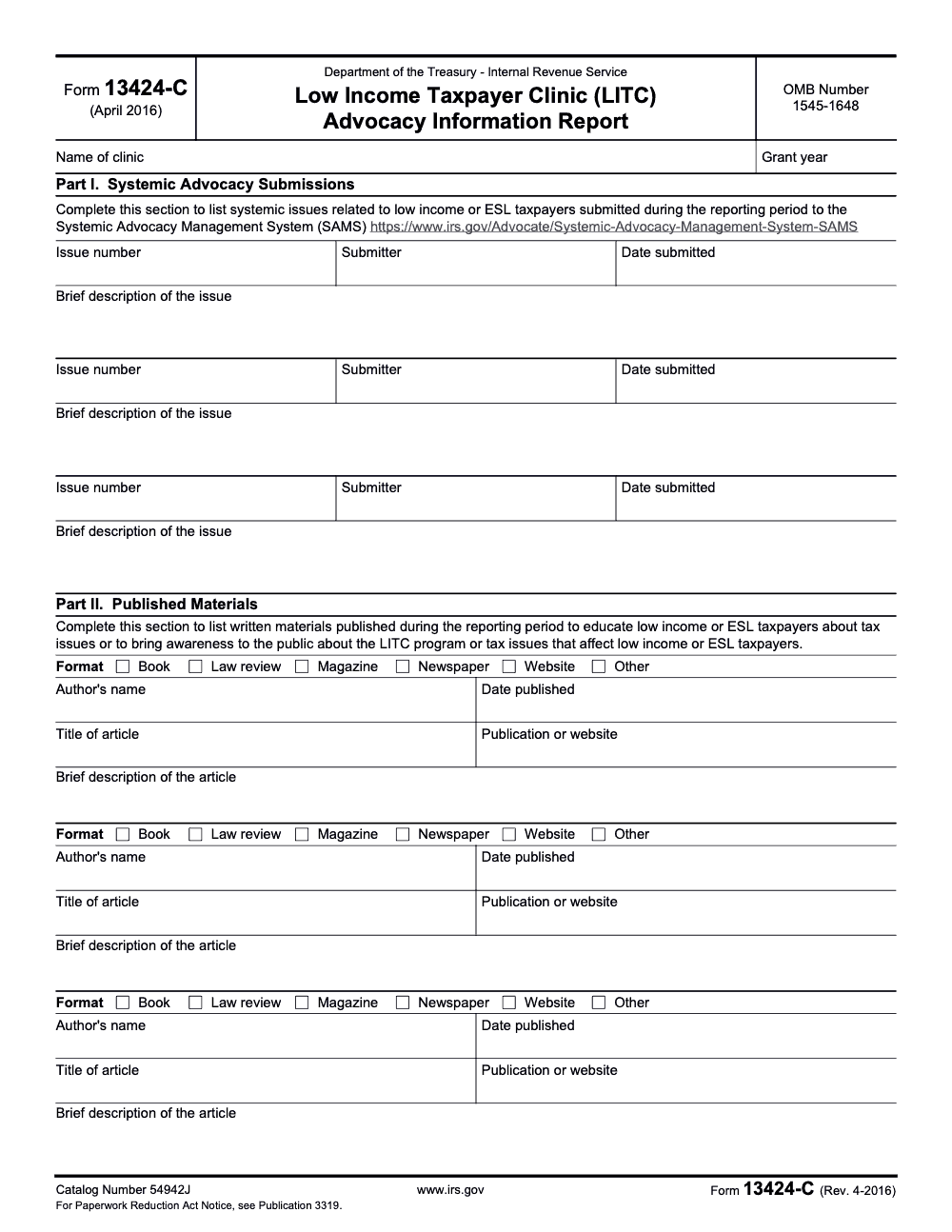
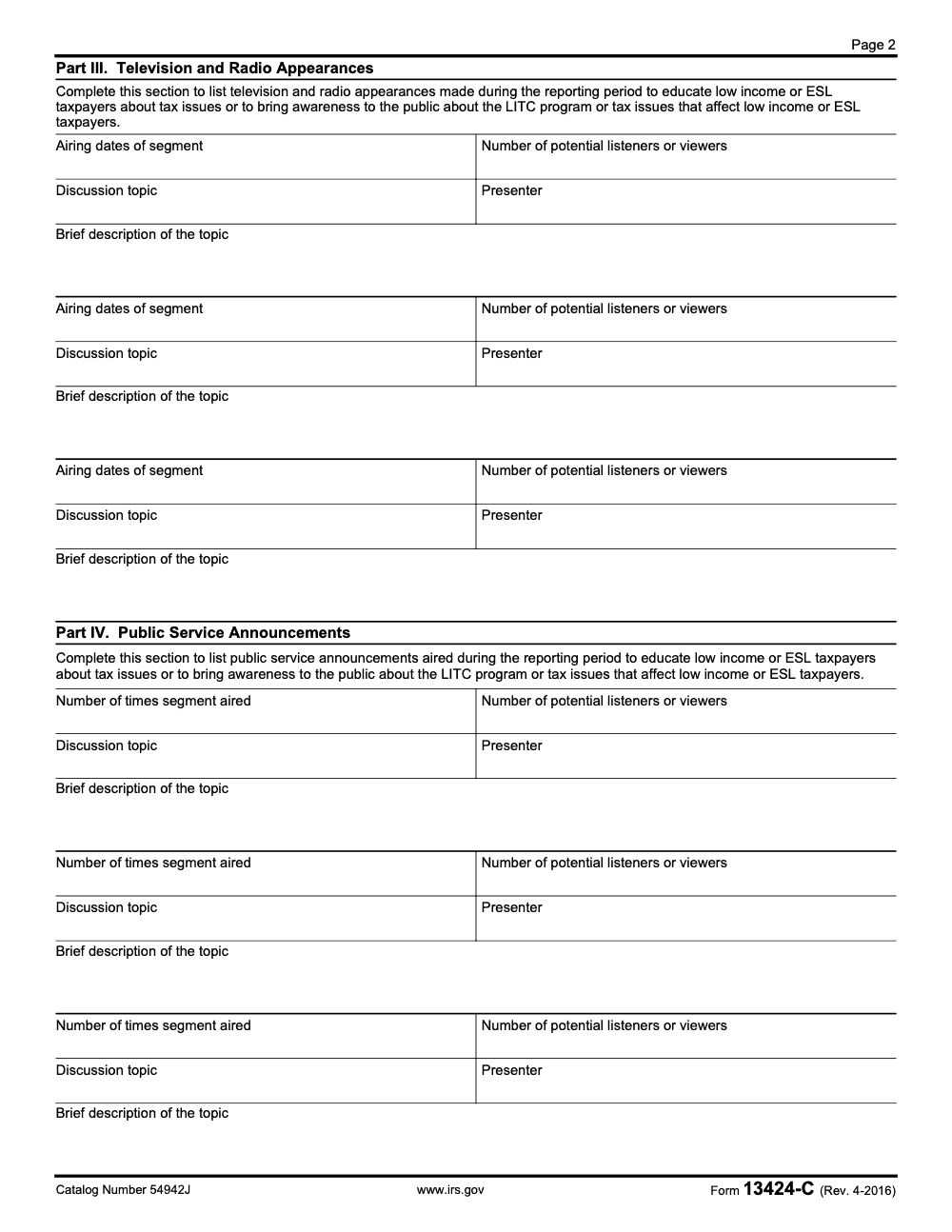
Form 13424-C is the Low Income Taxpayer Clinic (LITC) Advocacy Information Report (Rev. April 2016), filed by every LITC grantee twice per grant year to document systemic advocacy submissions, published materials, broadcast appearances, and public service announcements aimed at low-income or English as a Second Language taxpayers (per the Form 13424-C instructions and IRS Publication 3319). The Interim Report covers January 1 to June 30 and the Year-End Report adds July 1 to December 31; each of the four Parts gives you three pre-printed entry slots, and any overflow moves to the Form 13424-N program narrative.
A clinic director called the week her Interim Report was due, certain she had nothing to put on Form 13424-C. Then she remembered three SAMS submissions, two newspaper columns, and a radio segment that nobody had written down all spring. The work was real; it just lived in scattered emails until the deadline forced a reconstruction.
That is the recurring trap with this form. Form 13424-C is the LITC Advocacy Information Report, and it captures systemic advocacy and outreach rather than individual client cases: SAMS submissions, published materials, broadcast appearances, and public service announcements. The Interim window runs January 1 to June 30 and the Year-End covers the full year, and the April 2016 revision is still the one to use.
Key Takeaways
- Form 13424-C is not a client case report. It captures systemic advocacy and outreach-type activities, not individual taxpayer matters.
- You’ll report four buckets of work: SAMS submissions, published materials, TV/radio appearances, and public service announcements.
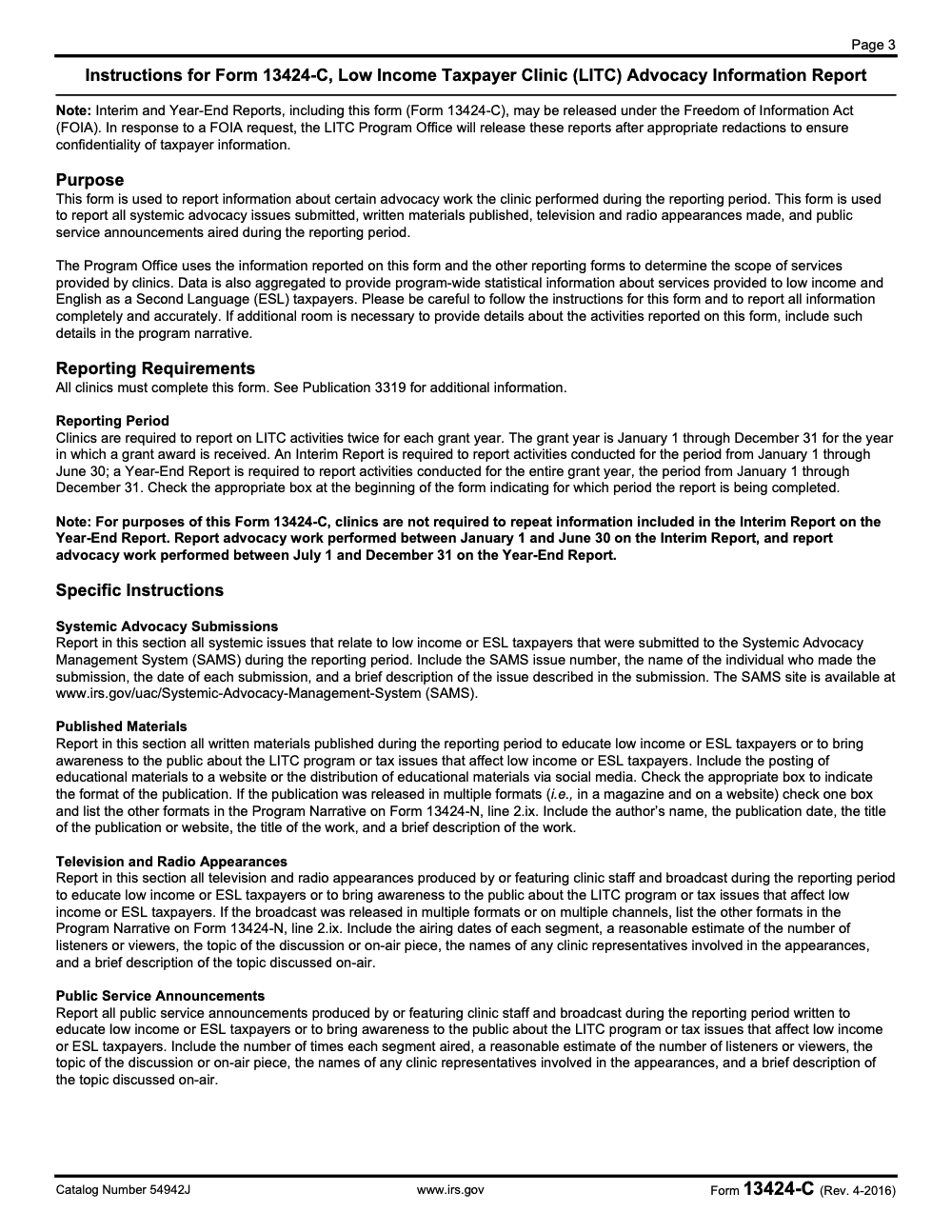
- The form instructions warn that Interim and Year-End Reports, including Form 13424-C, may be released under FOIA, with redactions to protect taxpayer confidentiality. That should shape what you write and how you store backup.
- The form instructions define the reporting windows: Interim covers January 1 to June 30, and Year-End covers January 1 to December 31, with a note that you don’t need to repeat Interim items again on Year-End for this form.
- Form 13424-C has not been revised since April 2016. The Rev. 4-2016 version is the current form used to report grant-year activities, so refer to it as Form 13424-C (Rev. April 2016) even for the current grant year.
What Is Form 13424-C (Really), and Who Uses It?
Form 13424-C is the LITC Advocacy Information Report. It’s designed to capture advocacy and education activities like:
- systemic issue submissions made through SAMS
- educational or awareness materials you published
- media appearances
- public service announcements
That’s straight from the form’s “Purpose” section and the specific instructions.
Quick clarification: Form 13424-C vs Form 13424-K
A lot of confusion comes from mixing up the LITC forms:
- Form 13424-K is the one tied to case information.
- Form 13424-C is about advocacy information (systemic issues, publications, media).
If your draft notes talk about “each client matter separately,” “case ID,” “resolution/status,” or “pro bono hours,” those items generally belong somewhere else in the LITC reporting stack, not inside 13424-C itself. (This is a super common mix-up when teams are juggling multiple forms at once.)
LegalServer’s LITC help page also separates these concepts, listing Advocacy Information (Form 13424-C) separately from controversy/case reporting.
What You’ll Need Before You Start (So You Don’t Stop Mid-Form)
If you want this to go smoothly, collect your “evidence trail” first. In my experience, the form itself is not the hard part. The hard part is hunting down dates, titles, links, and counts.
Here’s what I’d pull together before you open the PDF:
- A list of SAMS submissions, including issue numbers, submitter names, and submission dates
- A simple log of published materials (title, author, date, where it was published, and what it was about)
- Notes on TV/radio appearances (airing dates, estimated audience size, presenter, topic)
- Notes on public service announcements (times aired, estimated audience, topic, presenter)
- A quick check of whether you’re completing an Interim or Year-End report, because the form instructions tell you how to split reporting across the year
Small but important: the instructions say if you need extra room, you can include details in the program narrative (Form 13424-N) rather than stapling extra sheets or additional Form 13424-C pages to your submission.
Where to Get Form 13424-C (and Why Version Matters)
The version that’s widely referenced is Form 13424-C (Rev. 4-2016) with catalog number 54942J.
You’ll see it listed under the LITC grant application package documentation, tied to OMB 1545-1648 and IC ID 246979.
One note on versions: Form 13424-C has not been revised since April 2016, so the Rev. 4-2016 version remains the current form used to report grant-year activities. Refer to it as Form 13424-C (Rev. April 2016) even when discussing the current grant year.
How to Fill Out Form 13424-C Step by Step (Plain English)
Open Form 13424-C (Rev. 4-2016) and start at the top:
Step 1: Fill in clinic identification details
You’ll enter:
- Name of clinic
- Grant year
- and you’ll indicate whether the report is Interim or Year-End (the instructions discuss both reporting periods and how to split work between them).
The instructions are very direct about timelines:
- Interim Report: January 1 through June 30
- Year-End Report: January 1 through December 31
- For this specific form, you do not have to repeat Interim items again on the Year-End report. You report Jan 1 to June 30 in Interim, then July 1 to Dec 31 in Year-End.
If your internal tracker doesn’t mirror those windows, fix that first. The grant year is always the calendar year January 1 through December 31, regardless of your clinic’s accounting fiscal year, so don’t align this reporting to a non-calendar fiscal year. It will save you a painful reconciliation later.
Step 2: Part I, Systemic Advocacy Submissions (SAMS)
This is where you list systemic issues you submitted to the Systemic Advocacy Management System (SAMS).
The form asks for:
- Issue number
- Submitter
- Date submitted
- Brief description of the issue
The instructions tell you to include the SAMS issue number, submitter name, date, and a brief description, and they point to the SAMS site for reference.
Practical tip (from the trenches): Write the description like you’re explaining it to a smart person who wasn’t in the meeting. Two or three tight sentences usually beats a vague one-liner.
Step 3: Part II, Published Materials
Here you list materials published during the reporting period to educate low-income or ESL taxpayers, or to raise awareness about the LITC program or tax issues affecting those communities.
You’ll complete fields including:
- format (book, law review, magazine, newspaper, website, other)
- author’s name
- date published
- title of article
- publication or website
- brief description
The instructions also say that posting educational materials on a website or distributing via social media counts, and if something is released in multiple formats, you pick one and note other formats in the program narrative.
Step 4: Part III, Television and Radio Appearances
If clinic staff did TV or radio appearances, list:
- airing dates
- estimated number of listeners/viewers
- discussion topic
- presenter
- brief description
The form asks for a “reasonable estimate” of audience size. You’re not expected to be perfect, but you should be consistent in how you estimate. Just don’t leave the listeners or viewers field blank when you can’t get exact counts; the instructions ask for a reasonable estimate, not an exact figure.
Step 5: Part IV, Public Service Announcements (PSAs)
For PSAs, you’ll report:
- number of times the segment aired
- estimated number of listeners/viewers
- discussion topic
- presenter
- brief description
Again, think consistency. If one PSA has exact station metrics and another is a guess, note that in your backup documentation so your internal story matches your submitted story.
Quality Control Checklist (Before You Submit)
If you want to avoid last-minute rewrites or awkward follow-up questions, run this quick checklist:
- Did you split the year correctly (Interim vs Year-End) and avoid double-reporting items on this form?
- Did you include all four sections (even if the answer is “none this period” for one section)? Every LITC grantee must file Form 13424-C regardless of activity volume, so nil entries are fine but skipping the form is not.
- Are your dates complete and consistent (especially airing dates and publish dates)?
- Are audience estimates reasonable and not wildly inflated?
- Are descriptions specific enough that someone outside your clinic can understand the activity?
FOIA reality check (write like it could be read)
The instructions include an important note: Interim and Year-End Reports, including Form 13424-C, may be released under FOIA, with appropriate redactions to protect taxpayer confidentiality.
That means two things for you:
- Don’t include taxpayer-identifying information, even casually.
- Keep your language professional and factual, even when you’re describing frustrating systemic issues.
Can You Submit Form 13424-C Electronically?
This is where older advice online gets messy.
OMB’s instrument listing for IC 246979 shows “Available electronically” and “Can be submitted electronically,” with “Fillable Fileable.”
At the same time, many clinics do their reporting through grant systems tied to program guidance. Publication 3319 has historically pointed grantees to submit reporting forms through GrantSolutions, at least in older packages.
So what should you do?
- If your grant-year instructions tell you to submit in a portal (commonly GrantSolutions), follow that.
- If your instructions allow upload of the PDF, use the official PDF version and keep a copy of the final submitted file.
What Changed in 2025 (and Why You Should Not Ignore It)
If you only take one “updates” point from this post, take this one:
Form 13424-C has not been revised since April 2016. The Rev. 4-2016 version remains the current form used to report grant-year activities, including the current grant year.
So if you’re searching “Form 13424-C” because:
- you’re onboarding new staff,
- you’re reviewing older grant-year reporting,
- you’re cleaning up reporting history,
- or you’re comparing “how we used to report” vs “how we report now,”
then this article will still help.
If your real question is “What do I submit for my current grant year?”, you complete Form 13424-C (Rev. April 2016) and confirm the current requirements with Publication 3319 and your program office.
This is one of those compliance moments where being “mostly right” still causes a mess. The wrong form can trigger follow-ups, rework, and deadline stress that you did not need.
Common Mistakes Clinics Make on Form 13424-C
I see the same handful of slips on Form 13424-C every grant cycle, and almost all of them come from treating an advocacy report like an afterthought. Here are the ones worth catching before you submit.
A Simple Tracking System That Makes This Form Easy
You do not need fancy software to make Form 13424-C painless. You need a habit.
Here’s a practical setup that works:
- One shared spreadsheet (or database) with four tabs:
- SAMS
- Publications
- Media appearances
- PSAs
- Standard columns that mirror the form fields (date, title/topic, presenter/author, link, notes)
- A monthly reminder for 10 minutes of updates
This is the same idea you see in well-run operations everywhere: structure beats heroics. (It’s also the mindset we bring at Accountably when we talk about delivery structure: you get better outcomes when the process is clear and repeatable, instead of living in last-minute scramble mode.)
Conclusion
Form 13424-C is one of those compliance tasks that feels “small” until the day it’s due. Then it suddenly becomes the center of your week.
If you take the time to (1) track advocacy work as you go, (2) follow the form’s reporting windows, and (3) write descriptions with FOIA in mind, you’ll turn this into a routine process instead of a deadline fire drill.
Reusable Checklists
These are copy-paste ready for your clinic's reporting SOP, so the next person who owns Form 13424-C is not starting from a blank page.
Ongoing advocacy log
- Log every SAMS submission with its issue number, submitter, and date submitted (Part I).
- Record each published material with format, author, date published, title, and outlet (Part II).
- Capture every TV or radio appearance with airing dates, topic, presenter, and an audience estimate (Part III).
- Track each public service announcement with air count, audience estimate, topic, and presenter (Part IV).
- Confirm each entry targets low-income or ESL taxpayers before it goes on the log.
- Keep backup that could survive a FOIA redaction without exposing any taxpayer.
Interim Report packet (January 1 to June 30)
- Check the Interim Report box at the top of Form 13424-C.
- Confirm the clinic name and grant year header fields are complete.
- Enter up to three items per Part and move overflow to the Form 13424-N narrative.
- Check one format box per Part II entry and list extra formats at line 2.ix of Form 13424-N.
- Add a reasonable listeners or viewers estimate to every Part III and Part IV entry.
- Verify each Brief Description is FOIA-safe before submission.
Year-End Report packet (July 1 to December 31)
- Check the Year-End Report box, not the Interim box.
- Pull only July 1 to December 31 activity so Interim items are not repeated.
- Re-confirm the header fields and grant year match the Interim filing.
- Apply the same three-slot, single-format, and audience-estimate rules as the Interim packet.
- Route anything beyond three entries per Part to the Form 13424-N narrative.
- Have a second reviewer scan descriptions for taxpayer-identifying detail before you submit.
Keep 13424-C Season From Stalling
Form 13424-C does not have a tax-season spike, but it has its own quiet pressure: two reporting deadlines a grant year, four separate categories of activity to reconstruct, and a hard three-slot limit per Part that pushes everything else onto the Form 13424-N narrative (per the Form 13424-C instructions and IRS Publication 3319). When the advocacy log lives in someone's memory, the Interim and Year-End windows turn into a scramble.
The fix is not more software. It is a repeatable intake habit, so that by the time a window closes the report is already most of the way written.
- Maintain a running file with one tab per Part: SAMS submissions, published materials, TV and radio appearances, and public service announcements.
- Capture the required fields at the moment of the activity, including the audience estimate that Part III and Part IV demand.
- Flag any item that ran in more than one format so the secondary format lands on Form 13424-N line 2.ix instead of a second format box.
- Reconcile the July 1 to December 31 cut before the Year-End filing so Interim entries are never duplicated.
- Review every Brief Description for FOIA exposure before it reaches the form.
Structure beats heroics on recurring compliance like this, and that is the same discipline we build into client work. If your team is stretched thin on documentation and review cycles, our tax and accounting delivery teams bring the SOPs and second-review layer that keep reports like this on schedule.
FAQs
The form instructions describe two reporting windows: Interim (January 1 to June 30) and Year-End (January 1 to December 31). For this form, you generally report Jan 1 to Jun 30 on Interim, then Jul 1 to Dec 31 on Year-End, without repeating the Interim items again.
Form 13424-C is used to report SAMS submissions, published materials, TV/radio appearances, and public service announcements. If you’re trying to report individual taxpayer case work, that belongs in other LITC reporting, not here.
The instructions say that Interim and Year-End reports, including Form 13424-C, may be released under FOIA after appropriate redactions to protect taxpayer confidentiality. That’s a good reason to keep descriptions factual and to avoid including anything that could identify a taxpayer.
Yes. Form 13424-C has not been revised since April 2016, and the Rev. 4-2016 version remains the current form used to report grant-year activities. Every LITC grantee must complete it twice per grant year, an Interim Report and a Year-End Report.
Other forms this guide names
- Form 13424-N: LITC Program Narrative Report Guide 2025
- Form 13424‑K: Guide for LITC Case Reporting, Pub 3319
About this guide
Accountably helps US CPA, EA, and accounting firms hire trained accountants and tax preparers in India.
About us Reviewed byJugal Thacker, CPAFounder and CEO at Accountably
A Washington-licensed CPA with 7+ years inside US firms – PwC, a real-estate tax practice, then a full-service firm, rising from reviewer to manager to advisory. This article was reviewed against the current Form 13424-C (Rev. April 2016) instructions and IRS Publication 3319 for LITC grantees preparing Interim and Year-End advocacy reports.
View profile →How we research, review, and update this guide
Every Accountably guide is researched against primary IRS sources, reviewed by a U.S. CPA, and refreshed as guidance evolves. Read our Editorial Guidelines to see how we source, fact-check, and update our content.




