
Summarize this article with AI
In Brief
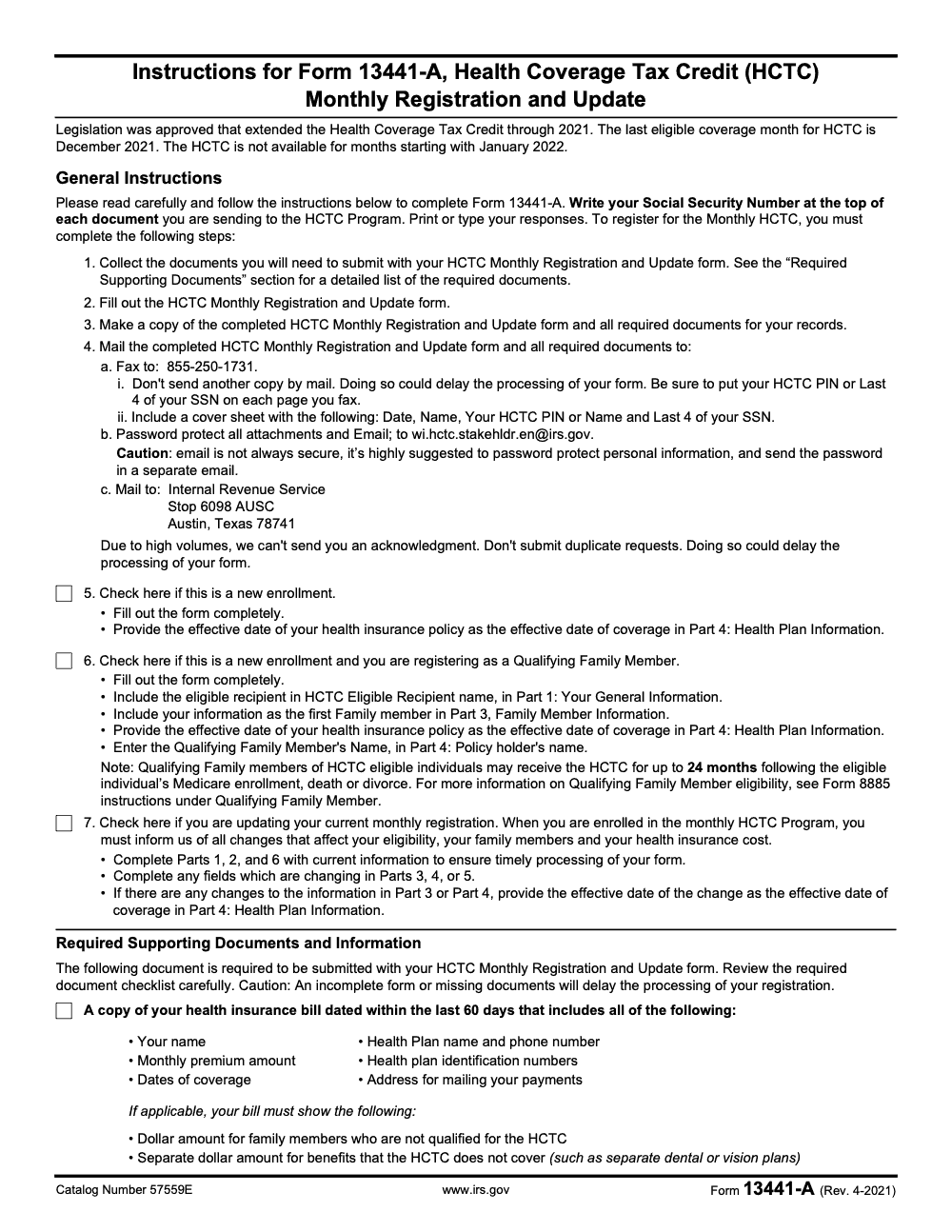
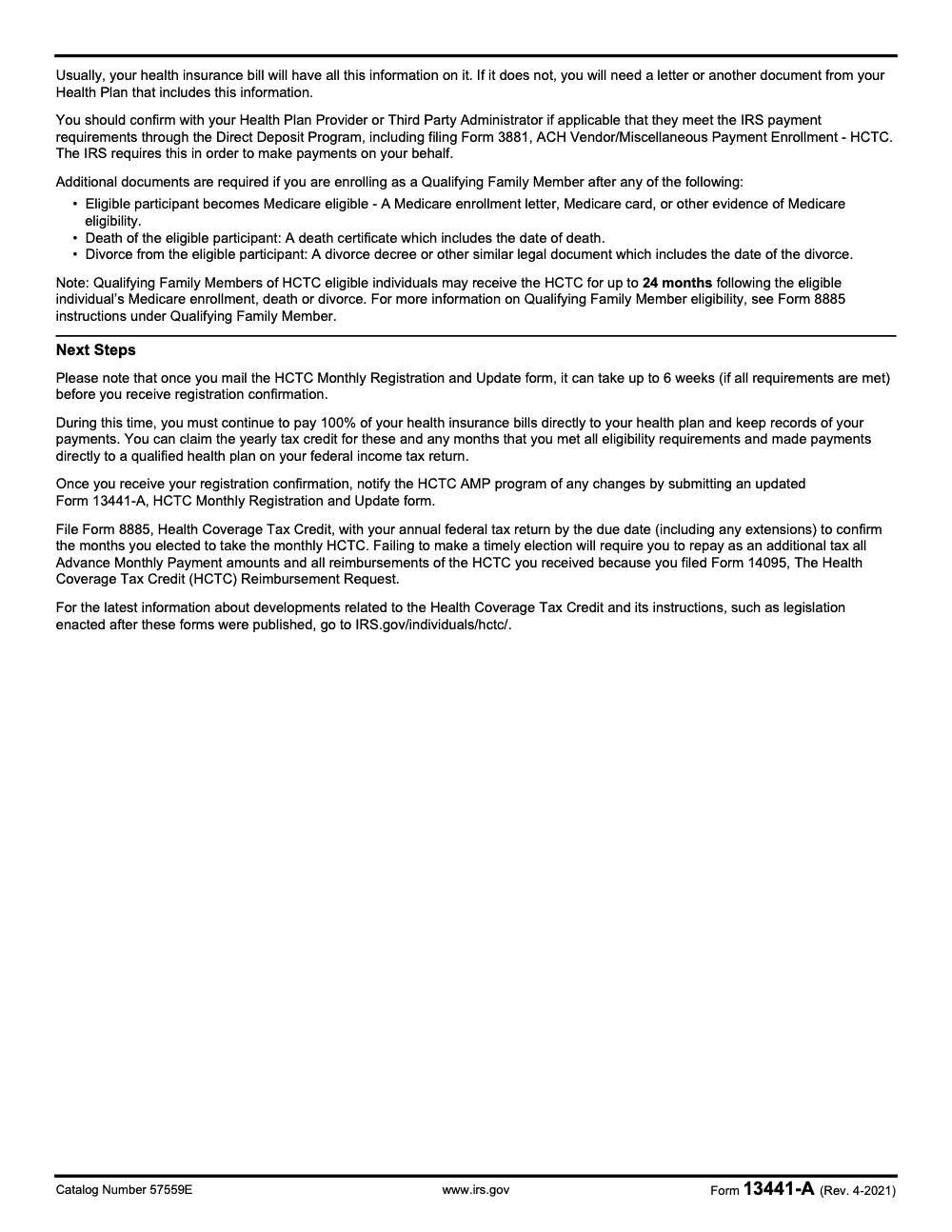
Form 13441-A was the HCTC Monthly Registration and Update form (Catalog 57559E, last revised April 2021). The Health Coverage Tax Credit expired after December 2021 and is not available for any month of tax year 2025 (per IRS Form 13441-A instructions, Rev. 4-2021). For current-year health-coverage tax help, see the Premium Tax Credit on Form 8962, not this form, and route any new VITA/TCE site question through IRS e-Services and the tax compliance workflow.
A nonprofit board tells its volunteer coordinator she needs Form 13441-A to e-file at the VITA site. Form 13441-A was the HCTC Monthly Registration and Update form, last revised April 2021, and the Health Coverage Tax Credit it served expired after December 31, 2021; it is not a VITA or TCE e-file form.
To participate as a VITA or TCE e-file site, a nonprofit applies in IRS e-Services as an Authorized IRS e-file Provider and completes the VITA/TCE Sponsor Agreement, Form 13533, and it needs a valid Site Identification Number. A current-year health coverage question points to the Premium Tax Credit on Form 8962, and anyone keeping a 13441-A copy for records can fill, sign, flatten, and store the PDF.
Key Takeaways
- Form 13441-A is the HCTC Monthly Registration and Update, not a VITA/TCE e-file form. The HCTC expired after December 31, 2021. No new enrollments are accepted.
- If you still need a Form 13441-A copy for your records, you can fill a saved PDF, sign it electronically, flatten, and store it securely. Faxed, digital, or photocopied signatures were acceptable on this form.
- To participate as a VITA/TCE e-file site, you do not use 13441-A. You apply in IRS e‑Services as an Authorized IRS e‑file Provider and complete the VITA/TCE Sponsor Agreement, Form 13533.
- If your nonprofit selects VITA or TCE in the e-file application, you will need a valid Site Identification Number, SIDN.
- Treat taxpayer data carefully. Use encryption at rest, role-based access, version control, and finalized, flattened PDFs to reduce edit risk.
What Form 13441-A Actually Is
Form 13441-A, Health Coverage Tax Credit, HCTC, Monthly Registration and Update, was used to enroll or update participant details for monthly HCTC payments. The IRS Internal Revenue Manual, IRM, lays out how submissions were received, batched, screened, and keyed. It also explains that signatures could be faxed or digital and must sit under the jurat. This matters if you are validating an old file for an audit.
Quick history check The HCTC program ended for tax years beginning after 2021. If someone is asking you to “submit” a new 13441-A today, pause and verify the request. It is likely a records issue, not a current filing.
How Form 13441-A Was Structured
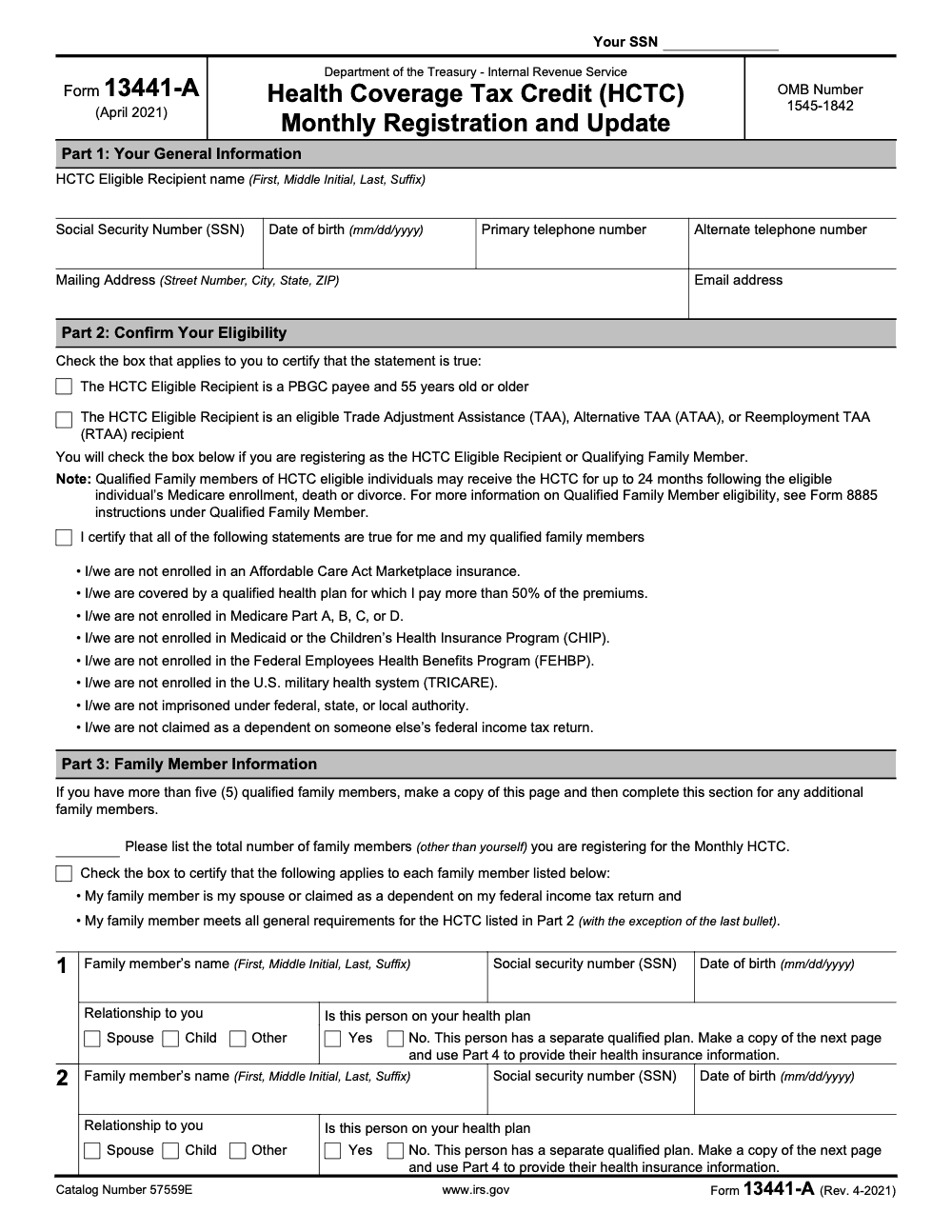
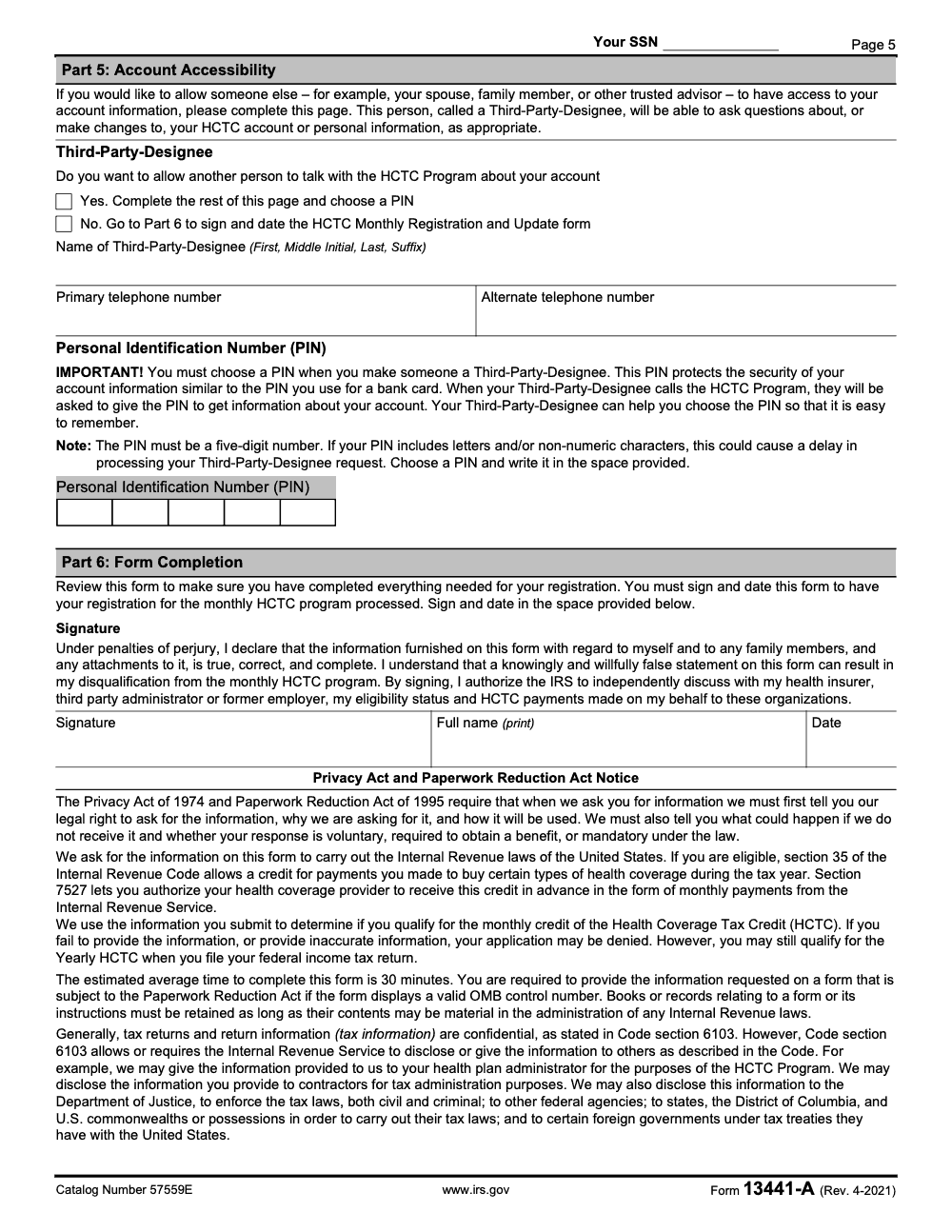
If you are cleaning up archives or responding to a records request, it helps to know the original parts. The IRM describes the form in six parts and how data was captured.
The six parts at a glance
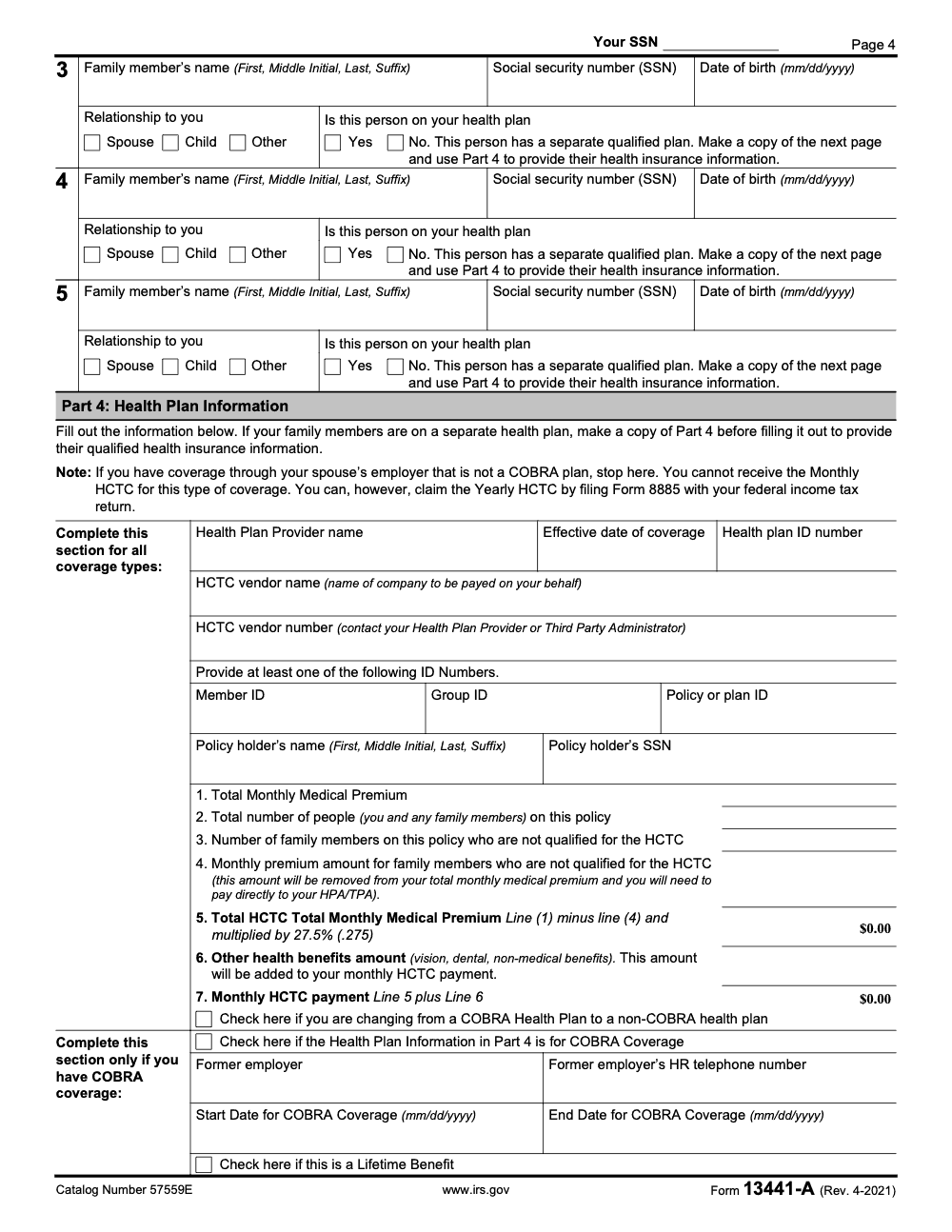
| Part | What you enter | Notes that still matter for records |
| Part 1, Your General Information | Participant identification and contact info | If the TIN was an ITIN or IRSN, the applicant was ineligible for HCTC. |
| Part 2, Confirm Your Eligibility | Eligibility self-certification, special situations | Included rules for qualifying family members and Medicare-related changes. |
| Part 3, Family Member Information | Family members covered | Ensured the database reflected each covered person accurately. |
| Part 4, Health Plan Information | Health plan administrator, premiums, IDs | Vendor verification steps were used for new or changed enrollments. |
| Part 5, Account Accessibility | Optional third-party access via a 5-digit numeric PIN (letters or non-numeric characters delayed processing) | Entered only if the participant allowed another person to discuss the account. |
| Part 6, Form Completion | Signature under the jurat | Faxed or digital signatures were acceptable if correctly placed under the jurat. |
If You Still Need to Complete or Retain a 13441-A PDF
You might maintain or amend a historical file, or respond to an insurer or auditor. Here is a safe, simple path for PDF handling in 2025:
- Locate the correct revision in your archive. Confirm page count and that the signature area, jurat, is intact.
- Enter only what is necessary. Do not change IRS language, labels, or jurat text.
- Apply an electronic signature that places the signer’s name under the jurat and above the Privacy Act notice, then date it. This mirrors how the IRS verified placement.
- Flatten, then lock the PDF to reduce accidental edits.
- Store in a secure folder with encryption at rest and a clear file name, for example, 13441A_LastFirst_TIN4_YYYYMMDD_Final.pdf.
- Keep an audit note, who edited, who signed, when, and where the source copy lives.
If your firm works in shared drives, add a short readme in the folder with the retention reason and the policy citation, for example, “HCTC records, program expired after 2021.”
The Important Distinction, VITA/TCE and e-file Provider Status
If your goal is to run a VITA or TCE site and transmit returns, you do not touch 13441-A. You become an Authorized IRS e-file Provider in e‑Services, choose Not for Profit, then select your business activity as VITA or TCE, which requires a valid Site Identification Number, SIDN. Your team also signs Form 13533, VITA/TCE Sponsor Agreement. The IRS outlines these steps in the e‑file IRM and SPEC guidance.
In short, 13441-A was about the HCTC. VITA/TCE e-file participation runs through the e‑file application and the VITA/TCE program’s sponsor agreement, security plan, and site standards.
Step-by-Step, Completing a Historical Form 13441-A PDF
If you have a legitimate reason to finalize a historical 13441-A for your files, use this careful process. I have used this same checklist with operations teams when cleaning up legacy archives.
Prepare the workspace
- Work on a secure device, then save to a folder that enforces encryption and role-based access.
- Verify you are using the correct revision from your archive. Note the revision year in your records note.
- Open the PDF in a reputable editor, then confirm that form fields and the jurat area display correctly.
Enter data cleanly
- Type data precisely, avoid abbreviations unless the original form space is designed for them.
- If you must correct an entry, replace the value cleanly instead of overwriting.
- Keep IRS wording intact. Do not alter labels or help text.
Sign and date correctly
- Add the signature under the jurat and above the Privacy Act and Paperwork Reduction Act notice.
- Use a dated e-signature. The IRM allowed faxed, digital, or photocopied signatures, provided they appeared in the correct place.
Flatten, lock, and store
- Flatten the PDF so form fields convert to static text.
- Apply a permissions password if you must share, and remove it before internal archiving according to your policy.
- Name the file consistently, for example, 13441A_Smith_John_1234_20210305_Final.pdf.
Document your actions
- Add a simple text file or document note with who made the edits, when, and why.
- Record the retention policy and the fact that the HCTC expired after 2021. This makes reviews faster and reduces back‑and‑forth.
What If You Actually Need VITA/TCE e-file Participation?
Here is the correct path, since this is where many teams mix things up.
- Create or access an IRS e‑Services account, then start a New e‑file Application.
- Choose your provider options and set Service Type to Not for Profit, then select your business activity as VITA or TCE. You will need a valid Site Identification Number, SIDN.
- Complete the VITA/TCE Sponsor Agreement, Form 13533, and follow SPEC guidance for annual security plans and volunteer standards.
If you want a quick sanity check, the IRS’s Site Coordinator Corner and VITA/TCE forms list are reliable places to confirm which documents are current for a given season.
Practical PDF Tips That Save Review Time
- Keep font sizes readable and consistent with the original boxes.
- Use standard date formats, for example, MM/DD/YYYY.
- Avoid freehand annotations. If you must comment, add a short sticky note rather than altering official text.
- Record the source of any supporting document, for example, “Health plan bill dated within 60 days,” which the IRM used as a validation item during enrollment review.
Security Checklist You Can Adopt Today
Even for historical forms, data protection matters. As a firm, you can adopt these minimums:
- Encryption at rest for all folders that hold taxpayer data.
- Role-based access, only those who need the record can view it.
- Multi-factor authentication on the system that stores the PDFs.
- No local desktop copies. Work from your secured drive, then purge caches.
- Finalize, flatten, and lock the PDF you share externally, then store the unlocked archival copy internally with version history.
Where Accountably fits, lightly
If you are a CPA or accounting firm and want to tighten delivery, our team builds disciplined offshore delivery with SOPs, structured workpapers, and layered reviews, so sensitive forms move quickly while staying protected. If you need help standardizing how PDFs are named, signed, flattened, routed, and retained, we can review your workflow and suggest a simple control plan. Keep the brand mention here, and keep the work focused on your process.
What-How-Wow, The Short Version
- What, Form 13441-A was the HCTC Monthly Registration and Update, now historical.
- How, handle a saved PDF carefully, sign under the jurat, flatten, lock, and store with clear naming.
- Wow, avoid the common mix-up with VITA/TCE. For e-file participation, use the IRS e‑file application and Form 13533, not 13441-A.
Compliance Notes and Sources
- The HCTC expired after December 31, 2021. The IRS confirms this and discontinued Form 8885 for 2022 and later.
- The IRM describes how Form 13441-A was processed, including signature placement, acceptable signature types, and the purpose of each part of the form.
- VITA/TCE participation and e-file provider status flow through the IRS e‑file application in e‑Services and require the Sponsor Agreement, Form 13533, plus program standards.
Common Mistakes We See Every Season
The 13441-A patterns I see in 2025 are records and routing problems, not filing problems. The mistakes below are the ones that pull a senior reviewer back into a file that should have closed.
Reusable Checklists
Copy these into your firm SOPs. Each block is structured so a junior preparer can work a routine 13441-A request without pulling senior reviewer time.
Historical 13441-A PDF handling
- Confirm the request is records-only, with no coverage month after December 2021.
- Locate the correct revision in your archive (Form 13441-A Rev. 4-2021 is the final issued version).
- Verify the package matches the 5-page total: 2 instruction pages plus 3 form pages.
- Open the PDF in a reputable editor and confirm the jurat area and Privacy Act notice display correctly.
- Place the signature under the jurat and above the Privacy Act notice, per the IRM signature-placement rule.
- Flatten the PDF so form fields convert to static text.
- Save with a consistent name, for example 13441A_LastFirst_TIN4_YYYYMMDD_Final.pdf.
- Log who edited, who signed, when, and the retention reason in a folder readme file.
VITA/TCE intake routing
- Confirm the requester is asking about e-file site setup, not HCTC records.
- Direct them to create or access an IRS e-Services account.
- Walk them through a New e-file Application with Service Type set to Not for Profit.
- Confirm whether the site needs a valid Site Identification Number (SIDN) for VITA or TCE selection.
- Hand off Form 13533, VITA/TCE Sponsor Agreement, plus the SPEC security plan template.
- Remove Form 13441-A from any onboarding doc that still references it for e-file purposes.
- Point the site coordinator to the Site Coordinator Corner to confirm current-season Pub 5166 and Site Review tools.
HCTC reconstruction for closed files
- Confirm every coverage month falls on or before December 2021. Months from January 2022 onward are not HCTC-eligible.
- Pull the matching year's Form 1040 to verify dependent status for every Part 3 family member.
- Strip standalone dental and vision premiums from the monthly bill before applying the subsidy calculation.
- Apply Part 4 Line 5 as (Line 1 minus Line 4) multiplied by 27.5%.
- Confirm no disqualifying coverage: Medicare Part A, B, C, or D, Medicaid, CHIP, FEHBP, TRICARE, or any ACA Marketplace plan.
- For Qualifying Family Member months, confirm the 24-month cap from the triggering event was not exceeded.
- Verify Form 8885 was filed with the annual return by the due date, including extensions. A missing 8885 triggers full repayment of advance monthly payments as additional tax.
- Document the reconstruction note with source citations to the IRS Form 13441-A instructions (Rev. 4-2021).
Keep 13441-A Season From Stalling
Form 13441-A no longer drives an active filing cycle, but the work around it has not gone away. Teams still field requests for historical PDFs, get pulled into VITA/TCE site setup questions that get conflated with this form, and inherit retention duties for HCTC records that filers held for years. Per the IRS Form 13441-A instructions (Rev. 4-2021), the Paperwork Reduction Act notice pegs the estimated completion time at 30 minutes per filer, and the registration processing window ran up to 6 weeks – multiply that by every legacy client packet sitting in a folder and the cleanup quietly eats reviewer hours.
The fix is not to throw bodies at it. It is to draw the right line between live work (Form 8962 Premium Tax Credit for current health-coverage clients, IRS e-Services applications for new VITA/TCE sites) and legacy work (signed, flattened, encrypted PDFs in records). When the workflow knows which bucket a 13441-A question belongs to, response time collapses from days to minutes and senior review stays on current-year returns.
- Tag any incoming HCTC question with a coverage month from January 2022 onward as a records-only request, then route it to the historical-PDF SOP instead of starting a Part 4 line 1 through line 7 calculation.
- Keep one canonical signed copy per filer with the signature placed under the jurat and above the Privacy Act notice, per the IRM signature-placement rule for Form 13441-A.
- When a VITA or TCE site coordinator asks about Form 13441-A, redirect to the IRS e-file application in e-Services and the Sponsor Agreement (Form 13533) before any conversation about HCTC eligibility.
- For any filer who paid premiums directly to a qualified plan in an eligible month before January 2022, confirm a yearly HCTC claim was filed on Form 8885 by the return due date – missed elections require repayment of every advance monthly payment as additional tax.
- Strip standalone dental and vision premiums from any HCTC reconstruction; per the form instructions, those amounts were never HCTC-eligible even when they appeared on the same bill.
This is exactly the kind of low-frequency, high-precision work that consumes senior review hours without adding billable revenue. Accountably's trained offshore teams handle the legacy reconstructions, the records retention, and the VITA/TCE intake routing so your senior reviewers stay on current-year returns. See tax services for how the delivery model works.
FAQs
No. The HCTC expired for tax years beginning after 2021, and no new HCTC enrollments are accepted. Keep or organize historical copies only if you need them for records.
No. You apply through IRS e‑Services to become an Authorized IRS e‑file Provider and complete the VITA/TCE Sponsor Agreement, Form 13533. If you select VITA or TCE in the application, you will need a valid SIDN.
Use the IRS VITA/TCE forms and publications page and the Site Coordinator Corner to confirm current-year items like Pub 5166, Form 13533, and the Site Review tools.
For historical files, the IRM allowed faxed, digital, or photocopied signatures, provided the signature appears under the jurat and above the Privacy Act notice. If you are responding to a records request, this placement detail helps.
Pause and verify. The HCTC program sunset means new enrollments are not a thing. If a third party is asking for the form, it is likely for documentation only. Confirm the request’s purpose, then handle the PDF securely.
Create or access an IRS e‑Services account, file a New e‑file Application, select Not for Profit, choose VITA or TCE, enter your SIDN, and ensure your sponsor agreement and security plan are on file.
Other forms this guide names
Summarize this article with AI
About this guide
Accountably helps US CPA, EA, and accounting firms hire trained accountants and tax preparers in India.
About us Reviewed byJugal Thacker, CPAFounder and CEO at Accountably
A US-licensed CPA with 7+ years inside US firms – PwC, a real-estate tax practice, then a full-service firm, rising from reviewer to manager to advisory. This article was reviewed against current IRS guidance for the 2025 tax year and updated for filers preparing late returns, amendments, and 2026 estimates.
View profile →How we research, review, and update this guide
Every Accountably guide is researched against primary IRS sources, reviewed by a U.S. CPA, and refreshed as guidance evolves. Read our Editorial Guidelines to see how we source, fact-check, and update our content.




