
Summarize this article with AI
In Brief
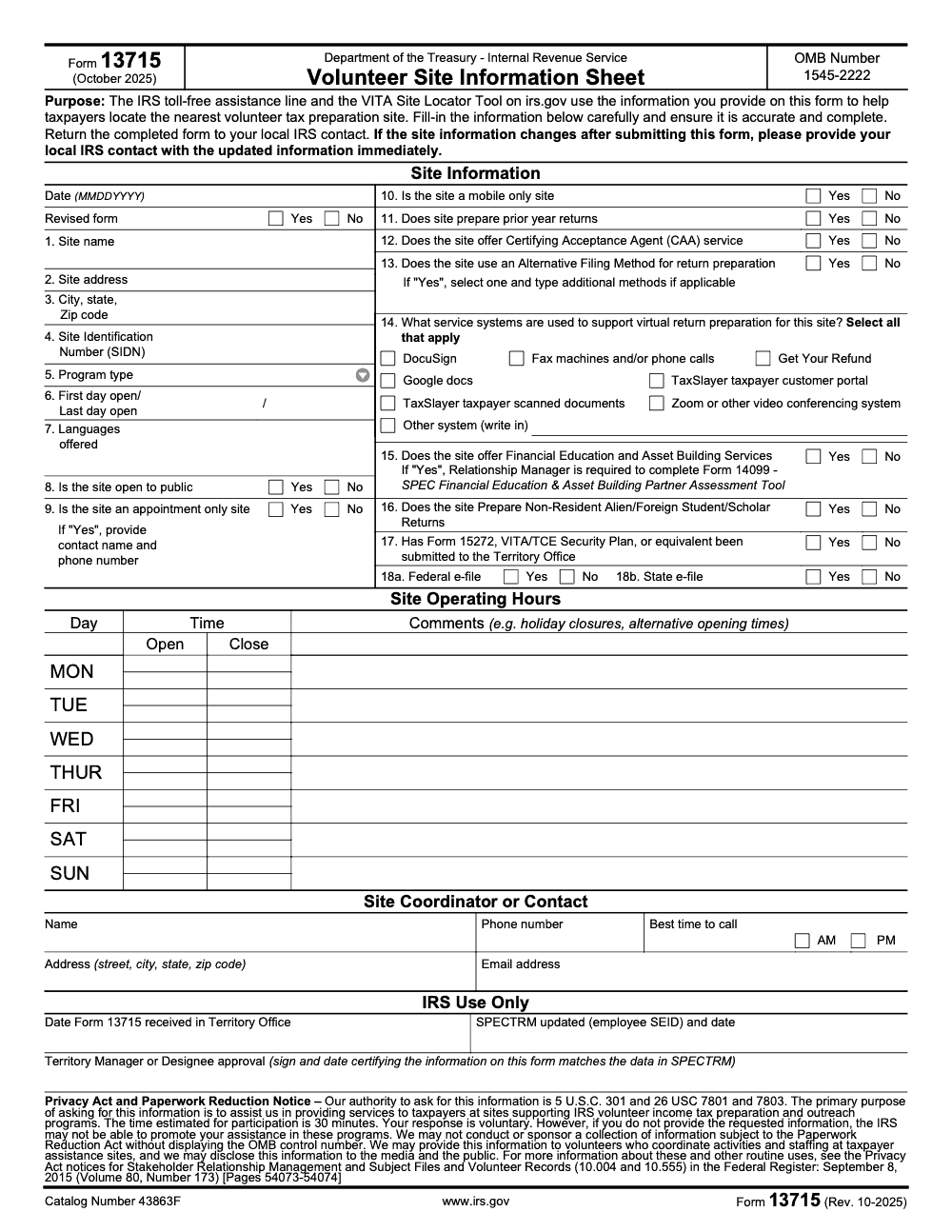
Form 13715, the Volunteer Site Information Sheet (Rev. 10-2025, OMB 1545-2222), is how VITA and TCE site coordinators register a site so it appears in the IRS VITA Site Locator – it is an administrative registration form, not a tax return. Enter the SIDN on Line 4, mark Federal e-file on Line 18a and State e-file on Line 18b separately, then return the completed form to your local IRS SPEC contact rather than a service center.
A VITA site can vanish from the IRS locator a week before opening day, and the cause is almost always a Form 13715 that never reached the local SPEC contact or one still listing last season's hours. This is the Volunteer Site Information Sheet, an administrative registration form, not a tax return, and it is what powers the public VITA Site Locator.
The spots coordinators trip on are small and specific. Enter the SIDN on Line 4, and mark Federal e-file on Line 18a and State e-file on Line 18b separately rather than treating them as one box. When the form is complete, it goes back to your local IRS SPEC contact, not a service center. If you need paper copies or accessibility support, the IRS line is 800-829-3676.
Key Takeaways
- Form 13715 is the Volunteer Site Information Sheet the IRS uses to power the VITA Site Locator and toll‑free assistance. Fill it accurately, then submit it to your local IRS contact.
- The latest version is Form 13715, Rev. 10‑2025, OMB 1545‑2222. Download the official PDF from IRS.gov, or submit details through the IRS online wizard. Always check the footer and revision date.
- You must enter essentials, site name, full address, operating dates and hours, public or appointment status, languages, services, and coordinator contact. The form now also captures virtual workflows and security planning.
- After you submit, IRS SPEC staff input your data into SPECTRM, the internal system that feeds the public locator. Keep your Relationship Manager updated whenever details change.
- If you need paper copies or accessibility support, the IRS provides mail fulfillment and Alternative Media options, and you can call 800‑829‑3676 during listed hours.
What is IRS Form 13715
Form 13715 is the one‑page Volunteer Site Information Sheet that tells the IRS, and therefore the public, exactly how to find and use your VITA/TCE site. It is an administrative VITA/TCE site‑registration form, not a tax return, so no income is reported and no tax is calculated on it. The IRS uses what you submit to update the VITA Site Locator and to brief phone agents, so accuracy here directly affects real families trying to reach you.
As of October 22, 2025, the current edition is Rev. 10‑2025 with OMB control number 1545‑2222. You can download the PDF or submit details via the IRS web form wizard. If you already have processes for updates, still check the footer on the file you circulate, it should read “Form 13715 (Rev. 10‑2025).”
Who Should Use Form 13715
You should complete Form 13715 if you coordinate any public‑facing VITA or TCE site, whether hosted by a library, community center, faith group, college, or nonprofit. Paid preparers and commercial tax offices do not file Form 13715; it is exclusively for IRS‑sanctioned volunteer sites. New sites use it to register, returning sites use it to confirm and update details each season and any time something changes, for example moving rooms, switching to appointment‑only days, or adding Saturday hours. Your SPEC Relationship Manager relies on this form to validate what goes into SPECTRM, the system that powers the IRS locator.
Where To Get the Latest Form
- Download the official PDF, “Form 13715 (Rev. 10‑2025),” from IRS.gov. This is the version referenced in the IRS Forms and Publications index and displayed as the October 2025 revision.
- Prefer a guided experience, use the IRS online wizard that lets you enter details, review, submit electronically, and download a copy for your records.
If you need printed copies or accessible formats, the IRS offers mail order and Alternative Media support. Call 800‑829‑3676 during posted hours to request help, or see the IRS pages covering accessible products.
What the 2025 Revision Captures
The 2025 form keeps the familiar one‑page layout and expands clarity around virtual preparation and security readiness. In addition to site name, address, dates, hours, and languages, you will record whether you are public or appointment‑only, mobile only, whether you prepare prior‑year returns, whether you operate as a CAA, what virtual systems you use, for example DocuSign, GetYourRefund, TaxSlayer portals, Zoom, and whether you submitted a VITA/TCE Security Plan, Form 15272, to your Territory Office.
Quick check, if you offer virtual intake, drop‑off, or hybrid options, list the exact tools you use and any limits on service hours. The IRS wants taxpayers to have real expectations, not guesses.
How To Complete Form 13715, Step by Step
Start simple, fill the date first in MMDDYYYY. This helps coordinators track which copy is the latest if multiple versions circulate. Then work top to bottom without skipping fields.
Step‑By‑Step Fields You Will See
1. Site Information
- Site name, write the public name taxpayers will see.
- Site address, include city, state, and ZIP. If you are inside a campus or multi‑building complex, add clear location notes in your outreach materials too.
- Site Identification Number (SIDN), enter the S plus eight digits (the SIDN identifies the volunteer site itself, not the EFIN used to authorize e-file).
- Program type, VITA, VITA Grant, Military, AARP, TCE.
- Operating dates, first day open and last day open for the season.
- Languages offered, list every language you can support reliably.
- Public or appointment status, mark Yes or No for public, then Yes or No for appointment‑only and give the appointment contact if applicable.
- Mobile only, mark if your site is a mobile pop‑up.
- Prior‑year returns, indicate if you prepare them.
- CAA service, mark if you offer Certifying Acceptance Agent support.
- Alternative filing method and virtual systems, select all that apply (not just the primary one) to match your intake and preparation model, for example DocuSign, GetYourRefund, TaxSlayer portals, Zoom, or write in another system.
- Financial education and asset building, mark if offered, then your RM completes Form 14099 as required.
- Nonresident returns, indicate if you prepare returns for foreign students or scholars.
- Security plan, confirm whether Form 15272 was submitted.
- e‑file, mark Federal and State status separately, since a site can offer one without the other (Federal is Line 18a, State is Line 18b).
- Site Operating Hours
- List hours for each day you open, including comments for holiday closures or seasonal variations. Precision saves taxpayers wasted trips.
- Site Coordinator or Contact
- Enter the coordinator’s name, mailing address, phone, best time to call, and email. Use a monitored inbox, not a personal account that might go unattended during breaks.
Compact Field Reference
| Field group | Required entries | Practical tip |
| Date and status | MMDDYYYY, revised yes/no | Date every update so your team knows the latest copy |
| Site identity | Name, full address, SIDN, program type | Use the exact public‑facing name used on signage |
| Season window | First and last day open | Match outreach and locator timing |
| Access model | Public, appointment‑only, mobile only | Give a working phone or URL for scheduling |
| Services & scope | Prior‑year returns, CAA, e‑file | Spell out limits early, for example no self‑employment |
| Virtual workflow | Alternative methods and systems | Check every platform you actually use |
| People & safety | Languages, security plan, nonresident returns | Confirm Form 15272 status with your RM |
| Hours | Mon–Sun open and close times, comments | Add holiday notes to prevent lineups |
| Coordinator | Name, address, phone, email, best call time | Use a shared mailbox your team can access |
Pro tip, complete a draft in your internal template, then copy clean data into the IRS wizard or PDF to reduce typos. Keep your local naming conventions consistent across your flyer, website, and the form.
Operating Hours and Services, Getting Specific
Your hours are a promise. If you open 10 a.m. to 2 p.m. on Wednesdays only, write exactly that. If you add two Saturday clinics in March, include those dates in comments and update the form once they are confirmed. Clear hours keep clients from showing up frustrated and help SPEC present accurate guidance.
In Services, list what you actually provide this season, for example basic returns, e‑file, EITC screening, ITIN help, CAA. If you support virtual intake or preparation, check the systems you use and note any appointment limits for virtual days. Then, document language access, including ASL interpreters or Over‑the‑Phone Interpreter options available through your program’s channels.
Accessibility and Language Access
- Record the languages your volunteers can cover with confidence.
- If your venue is wheelchair accessible or offers curbside drop‑off, add that in comments.
- For accessible materials or alternate formats, the IRS Alternative Media Center provides multiple options, and callers can use 800‑829‑3676 to request help.
Simple rule, promise only what you can deliver consistently, then keep your RM in the loop when anything changes mid‑season.
How To Submit and Confirm Your Listing
You have two reliable paths, use the IRS web wizard to submit electronically and download your PDF for records, or complete the PDF and send it to your local IRS contact by the approved channel, email, fax, mail, or hand delivery. Ask your Relationship Manager which method they prefer for your territory.
After you submit, SPEC staff use your input to update SPECTRM, the internal system that feeds the IRS VITA Site Locator and informs phone agents. If your hours, location, or appointment policy change, send your RM an updated Form 13715 right away and date it so they know they have the newest version.
Quick verification habit, check the public locator the week you open, and again after any change, to confirm your listing reflects the latest update.
What Your Relationship Manager Does With Your Form
- Receives your Form 13715 or equivalent document.
- Inputs your data into SPECTRM correctly.
- Secures territory approval and tracks copies by season.
- Updates SPECTRM mid‑season when you send an updated, dated form.
Quality, Security, and Documentation Practices
Form 13715 itself does not collect taxpayer SSNs, but your internal packets might. The site details the form does capture are intentionally disclosable to the public through the VITA Site Locator, so the form holds no sensitive personnel data that needs shielding. Treat anything that contains PII with care. If you bundle coordinator rosters or screenshots with contact details for your submission, apply true PDF redaction to remove sensitive data, then export a flattened file and test that the text is no longer searchable or selectable.
Secure Sharing Options That Fit VITA Programs
- Encrypted email to your RM’s official address.
- Secure portal upload if your territory supports it.
- Time‑limited links with role‑based access in your document platform.
- Fax, if requested by your territory office. Keep your confirmation page.
Keep one unredacted master in encrypted storage with access logs and follow your VITA/TCE security plan, Form 15272. If you have not filed that plan yet, coordinate with your RM promptly to complete it, since the 2025 Form 13715 asks you to confirm its status.
Common Mistakes And How To Avoid Them
I see the same handful of slips every season, and each one quietly keeps a site off the locator or stalls approval. These are the ones worth scripting into your review.
Version History And What Changed In 2025
Form 13715 has been around for years, and you may still have a copy labeled Rev. 10‑2022 in your folders. The IRS released a new revision in October 2025, now the benchmark for the 2026 filing season. The 2025 edition preserves the one‑page layout and clarifies fields for virtual preparation methods, service systems like DocuSign or GetYourRefund, and security plan confirmation. If you support mobile or hybrid sites, these updates make your listing clearer to taxpayers.
Bottom line, confirm the footer reads “Form 13715 (Rev. 10‑2025)” before you onboard volunteers or publish outreach. It takes thirty seconds and prevents a month of confusion.
When Accountably Can Help
If your firm supports a community VITA clinic alongside client work, you already know that operations can make or break the season. Accountably’s strength is building clear SOPs, naming conventions, and review checklists that keep deadlines on track. If you want help turning Form 13715 updates into a simple recurring workflow your team can run, we are happy to share the templates we use with partner firms.
Wrap‑Up And Next Steps
- Download the current Form 13715, Rev. 10‑2025.
- Fill it completely, date it, and use the IRS wizard or your territory’s preferred submission channel.
- Tell your RM about any change, even small ones, and confirm your locator listing after updates.
- Keep a dated copy in a shared folder and include the update step in your coordinator SOP.
Your site runs smoother when the basics are buttoned up. Form 13715 is one page, but it is the front door for the families you serve.
Disclosure
Key facts, the current IRS revision and resources cited above, were verified against IRS.gov.
Reusable Checklists
These checklists are copy-paste ready for your coordinator binder or firm SOP. Drop them in, adapt the wording to your territory, and run them every season.
Pre-submission field check
- Confirm the footer reads Form 13715 (Rev. 10-2025) before you circulate the file.
- Date the form in MMDDYYYY and mark the Revised form box Yes or No.
- Enter the exact public-facing site name, full address, and the SIDN on Line 4.
- Set the first and last day open on Line 6, then list every language your volunteers cover.
- Mark public, appointment-only, and mobile-only status honestly; add the contact name and phone if appointment-only.
- Select all virtual systems on Line 14, not just the primary one.
- Set Federal e-file (Line 18a) and State e-file (Line 18b) separately.
- Confirm the Form 15272 security plan status on Line 17.
Submission and locator confirmation
- Ask your RM which channel they prefer: online wizard, secure email, fax, mail, or hand delivery.
- Return the form to your local IRS SPEC contact, never to a service center.
- Save a dated PDF copy in your shared, encrypted folder.
- Check the public VITA Site Locator the week you open.
- Re-check the locator after any mid-season change.
Mid-season change control
- Note the change: hours, room, appointment policy, languages, or services.
- Update the form and re-date it in MMDDYYYY.
- Resend the dated form to your RM immediately, not at year-end.
- Confirm SPECTRM and the locator reflect the update within a few days.
- Log the change in your coordinator SOP.
Keep 13715 Season From Stalling
Form 13715 looks like a thirty-minute job, and the IRS Paperwork Reduction Act notice on the form estimates exactly that. The reality for a busy coordinator is messier: eighteen numbered items, a seven-row operating-hours grid, multi-select virtual systems, and a security-plan confirmation, all of which have to stay current as your site’s hours and services shift through the season.
The fix is not more hours, it is a repeatable process. When the same fields get captured the same way every time, updates take minutes and nothing slips off the locator.
- Standardize how you record the SIDN (Line 4) and program type (Line 5) so every copy of the form matches your signage and outreach.
- Keep one source of truth for operating dates (Line 6) and the seven-day hours grid, then sync it to the form whenever you add a clinic.
- Maintain a quick checklist for the Line 14 virtual systems and the Federal and State e-file boxes on Lines 18a and 18b.
- Assign one owner to resend a dated form to your SPEC Relationship Manager the moment anything changes.
That is the same delivery discipline we build for clients every day. If you want documented SOPs, structured review, and dependable turnaround behind your filings, see how our tax execution support keeps recurring work on schedule.
FAQs
The site coordinator or program lead completes the form and submits it to the local IRS SPEC contact, usually your Relationship Manager or Territory Office channel. Ask your RM which submission method they prefer, electronic wizard, email with PDF, fax, mail, or hand delivery.
Your RM updates SPECTRM after receiving your revised, dated form, and the locator reflects changes after IRS processing. If you change hours mid‑season, send the update immediately, then check the public listing within a few days to confirm.
Mark “mobile only” if that fits your model and use the operating dates and comments fields to show when and where you will be open. Coordinate with your RM for the best way to display rotating locations in the locator.
Yes. The IRS Form 13715 online wizard lets you enter details, review, submit electronically, and download a PDF for your records. Many coordinators prefer it to reduce typos and ensure all required fields are complete.
Use IRS Forms and Publications by mail and the Alternative Media resources. You can call 800‑829‑3676, Monday through Friday during posted hours, to request assistance or mailed forms.
Other forms this guide names
- Form 15272: VITA/TCE Site Security Plan Guide and Checklist
Summarize this article with AI
About this guide
Accountably helps US CPA, EA, and accounting firms hire trained accountants and tax preparers in India.
About us Reviewed byJugal Thacker, CPAFounder and CEO at Accountably
A US-licensed CPA with 7+ years inside US firms – PwC, a real-estate tax practice, then a full-service firm, rising from reviewer to manager to advisory. This article was reviewed against current IRS guidance for the 2025 tax year and updated for filers preparing late returns, amendments, and 2026 estimates.
View profile →How we research, review, and update this guide
Every Accountably guide is researched against primary IRS sources, reviewed by a U.S. CPA, and refreshed as guidance evolves. Read our Editorial Guidelines to see how we source, fact-check, and update our content.




