
Summarize this article with AI
In Brief
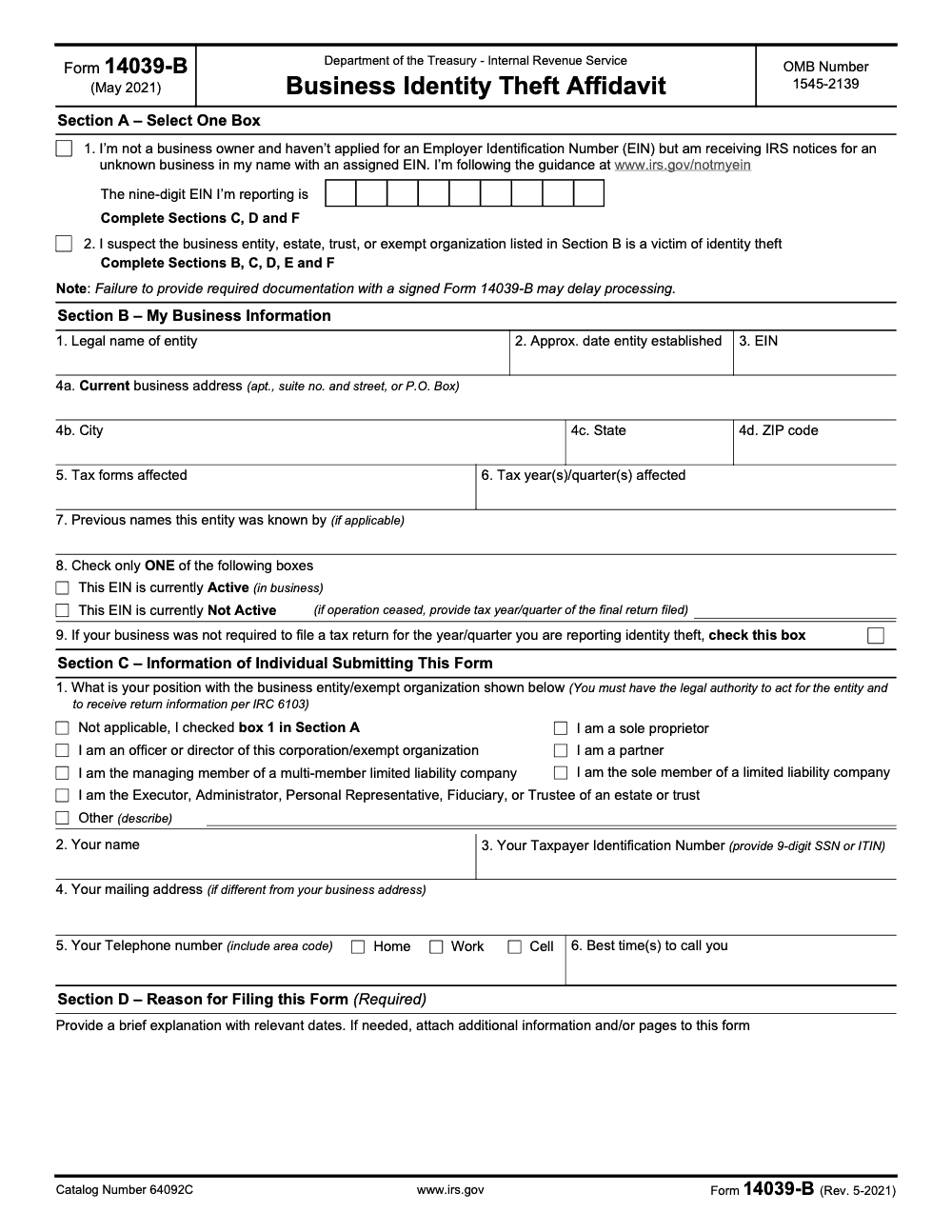
Form 14039-B is the IRS Business Identity Theft Affidavit – filed when a business EIN or name has been misused, or when an individual receives an IRS notice for an EIN they never applied for. Per the IRS Form 14039-B instructions (Rev. May 2021, Catalog 64092C, OMB 1545-2139), the filer selects Section A Box 1 (individual, complete Sections C, D, F) or Box 2 (business victim, complete Sections B, C, D, E, F), then mails the form to the address on the IRS notice, to Internal Revenue Service, Ogden, UT 84201 if no notice was received, or faxes it toll-free to 855-807-5720.
People reach for this form too early. A vendor data breach lands in the news, panic sets in, and someone wants to file Form 14039-B because customer records were exposed. That is the wrong trigger. The Business Identity Theft Affidavit is built for tax activity you did not authorize, not for every data incident.
The right cause is concrete: a business e-file rejected because a return is already on file, an unfamiliar W-2, a notice about a return you never filed, or a balance you do not recognize tied to your EIN or business name. If there is an IRS notice, you submit using the address or fax on it; if there is none, the form goes to Internal Revenue Service, Ogden, UT 84201, or by fax to 855-807-5720. Preparer misconduct or PTIN misuse belongs on Form 14157 instead.
Key Takeaways
- Use Form 14039-B to report business identity theft tied to IRS activity, for example a rejected e‑file because a return is already on file, unfamiliar W‑2s, a notice about a return you did not file, a balance you do not owe, or an EIN you never requested.
- Do not file it for non-tax data incidents when there is no evidence of fraudulent returns or W‑2 filings. The IRS is explicit about this boundary.
- You can submit after an IRS notice using the address or fax on that notice. If there is no notice, mail to Internal Revenue Service, Ogden, UT 84201 or fax to 855‑807‑5720. Some businesses can also submit Form 14039‑B online after signing in with ID.me.
- Gather proof of identity and authority, plus business‑linking documents, and sign under penalties of perjury. The IRS expects legible, complete copies.
- For preparer misconduct or PTIN misuse, use Form 14157, not Form 14039‑B.
When To Use IRS Form 14039-B
File Form 14039‑B promptly if your business, trust, estate, or exempt organization experiences any of the following:
- Your e‑filed return is rejected because the IRS already has a return on file for that same period.
- You receive an IRS notice about a tax return that you did not file.
- You learn that Forms W‑2 were filed with the Social Security Administration that you did not submit.
- You receive a notice of balance due that you do not owe.
- You receive a notice tied to a business you never applied for, and an EIN was assigned. All of these are direct IRS triggers to submit Form 14039‑B.
If you were assigned an EIN you did not request and you rule out any legitimate reason someone requested it for you, the IRS now allows you to send Form 14039‑B online after signing in with ID.me, or you can mail or fax it.
Situations That Do Not Require Form 14039-B
Not every incident is tax identity theft. You should skip the affidavit if you had a non‑tax data breach and there is no sign of returns, W‑2s, or balances created in IRS or SSA systems. Example, a compromised workstation with no fraudulent filings detected does not call for Form 14039‑B. Focus on whether there is tax misuse.
If you suspect or confirm tax return preparer misconduct or PTIN misuse, do not use Form 14039‑B. File Form 14157, Return Preparer Complaint instead, following the IRS submission options on that page.
Quick Reference, File Or Don’t File
| Scenario | File 14039‑B? | Why |
| E‑file rejected because a return already exists | Yes | IRS considers this a primary indicator of business ID theft. |
| IRS notice about a return you did not file | Yes | Direct trigger to submit the affidavit. |
| Unfamiliar W‑2s filed with SSA under your EIN | Yes | Listed by IRS as a filing indicator. |
| Balance due you do not owe | Yes | Treat as identity theft indicator. |
| System intrusion with no tax misuse found | No | Non‑tax breach, monitor but do not file. |
| Preparer misconduct, PTIN misuse | No | Use Form 14157, not 14039‑B. |
What Form 14039‑B Actually Does
Form 14039‑B alerts the IRS Business Master File identity theft function that your entity data, including your EIN, may have been used to file returns or wage reports without authorization. This is the business affidavit; personal income-tax identity theft involving a stolen SSN requires Form 14039, not 14039‑B. Submitting a complete, legible package increases the odds of a fast acknowledgment and proper account blocking, which can include IRS letters confirming receipt and requests for any missing pieces.
You should submit the form only if you are authorized to act for the entity and can provide the documentation the IRS lists for that entity type. In practice, that means identity, a document linking you to the business, proof the entity exists, plus written authority if the signer is not already on record.
Who Should Submit Form 14039‑B
Only someone legally authorized to receive the entity’s tax information should sign. That includes officers or authorized agents for corporations and LLCs, fiduciaries for estates or trusts, and authorized officials for exempt organizations. Bookkeepers, employees, and outside preparers without a documented power of attorney do not qualify under IRC 6103. Estates, trusts, and exempt organizations use the same form when they see the same indicators, for example a rejected e‑file, false W‑2s, or an unexpected balance due.
Eligibility And Authority At A Glance
| Eligible entity | Typical trigger event | Who signs |
| Corporation or LLC | Rejected e‑file, false W‑2s, or notice about a return you did not file | Officer or authorized agent with documented authority |
| Partnership | Return or W‑2 filings you did not authorize | General partner or authorized agent |
| Estate or Trust | Rejected e‑file under the EIN or IRS notice mismatch | Fiduciary, executor, or trustee |
| Exempt organization | Balance due or return you did not file | Authorized official per organizing documents |
Your signature certifies the facts under penalties of perjury, so make sure the authority document matches exactly how you list your title and entity name on the form. The IRS stresses complete, legible copies, and they acknowledge receipt in writing unless they can close the case within 30 days.
Get The Latest Form And Instructions
Always download the most current Form 14039‑B from IRS.gov before you file (the current version is Rev. 5-2021, Catalog Number 64092C, and no newer revision has superseded it for tax year 2025). The IRS maintains a central business identity theft page that shows when to file and what counts as evidence. Use that page to double check eligibility and any process updates before you finalize your packet.
If you received a letter from the IRS, follow the submission method and destination on that letter for priority handling. If no letter exists, the IRS provides a default mail and fax channel, and in certain scenarios, an online submission option after ID.me sign in.
Where And How To Submit, 2025 Update
- If you received an IRS letter, use the address or fax number in that letter.
- If you did not receive a letter, you may mail to Internal Revenue Service, Ogden, UT 84201 or fax to 855‑807‑5720. Include a confidential cover sheet and keep transmission proof.
- In some cases, you can submit Form 14039‑B online after signing in with ID.me. If a letter instructs mail or fax, the letter controls.
- For in‑person help or to present originals, schedule at an IRS Taxpayer Assistance Center by calling 844‑545‑5640, Monday through Friday, 7 a.m. to 7 p.m. local time. Bring your original (not a photocopy) government-issued photo ID with signature and your supporting documents.
Submission Methods Compared
| Method | Best when | What to know |
| Address or fax on an IRS notice | You received a specific CP or LTR notice | The notice route is prioritized, follow it exactly. |
| Mail to Ogden, UT 84201 | No notice was issued | Send legible copies only, keep mailing proof. |
| Fax to 855‑807‑5720 | No notice was issued and you want speed | Use a confidential cover sheet and save confirmation. |
| Online via ID.me | Especially when you received an EIN you did not request | Available in select scenarios, sign in required. |
| In person at a TAC | You prefer face to face or need originals reviewed | Appointments required at 844‑545‑5640, 7 a.m. to 7 p.m. local time. |
What To Prepare Before You File
Put together a tidy, legible packet. The IRS Business Master File identity theft unit calls out three must‑haves, and they reject or delay cases when copies are blurry or incomplete:
- Proof of identity, for example a government issued ID.
- Proof that the entity exists, for example articles of organization, trust or estate instruments, or a corporate officer statement on letterhead.
- Proof that the signer is authorized to act for the entity. Expect an acknowledgment letter within about 30 days unless the case can be closed quickly.
Sole Proprietor Checklist
- Document A, a valid federal or state photo ID with signature, for example a driver’s license or passport.
- Document B, a business‑linking document that shows your name and the business name or address, for example a utility bill, lease, bank or mortgage statement, or recent invoice. Submit clear copies by mail or fax, never originals unless you are at a TAC appointment.
Completing The Form, Section By Section
The design of Form 14039‑B uses Section A to route your case, then the remaining sections confirm entity details, authority, reasons, evidence, and signature.
Section A, Pick The Right Box
- Check Box 1 only if you are not a business owner and have not applied for an EIN, but are receiving IRS notices for an unknown business EIN assigned in your name (per the guidance at www.irs.gov/notmyein). With Box 1 you will complete only Sections C, D, and F. Skip Sections B and E because you are not the business owner and the form instructions reserve those sections for Box 2 filers.
- Check Box 2 if you suspect the listed business entity, estate, trust, or exempt organization is a victim of identity theft. With Box 2 you will complete Sections B through F. This Box 1 or Box 2 structure appears in the IRS form itself, including the Spanish version the IRS publishes.
Pro tip, match the filer. If you are an individual receiving IRS notices for an EIN you never applied for, Box 1 applies. If you represent a business entity, estate, trust, or exempt organization that is the identity theft victim, Box 2 fits, regardless of whether a notice triggered the case.
Section B, Entity Facts That Anchor The Case
Work line by line and mirror how the IRS and SSA know you.
- Legal name, exactly as on IRS records.
- Month and year established.
- Nine digit EIN, or write N/A if none exists.
- Current mailing address, plus physical address if different.
- All affected forms, for example 941, 1120, W‑2.
- Tax years or quarters at issue.
- Any prior business names or EINs.
- Whether the EIN is still active or not active (Line 8 requires you to check only one box, and if Not Active, include the tax year or quarter of the final return filed) and whether filing was not required for listed periods.
Accuracy here saves time later. The IRS emphasizes completeness and legibility because the BMF identity theft team relies on these lines to locate and secure the right account.
Sections C Through F, Authority, Reason, Evidence, Signature
- Section C, Authority. Indicate why you are authorized to receive the entity’s tax information, for example officer or fiduciary. Fill in your full name, TIN, contact details, and good call times.
- Section D, Why You Are Filing. State it plainly, for example, “Received CP notice for 1120 we did not file for TY 2024,” or, “E‑file rejected, return already on file.” Attach an extra page if needed.
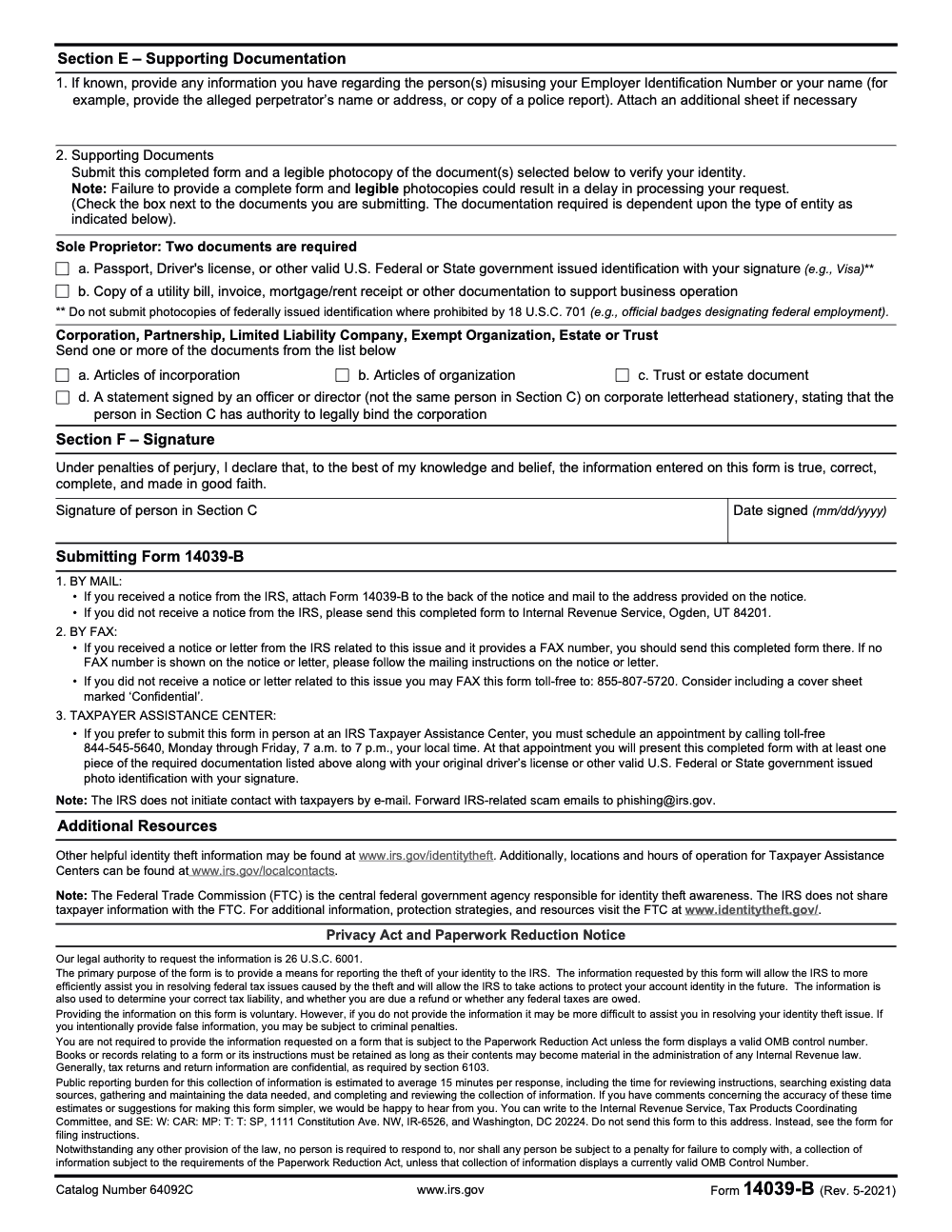
- Section E, Evidence. List any known perpetrators or related contacts (perpetrator information is required only if known, so do not delay filing if you cannot identify who misused the EIN), and check the document boxes that you are including.
- Section F, Signature. Sign and date under penalties of perjury. No notarization is required.
If your packet is complete and legible, the IRS will either acknowledge within about 30 days or use a combined request or closing letter when they can resolve quickly.
Required Supporting Documentation
Different entities provide different proofs, but the standard is the same, give the IRS clear, readable copies that prove identity, prove the entity exists, and prove the signer can act.
Sole Proprietors, What To Include
- A government issued photo ID with signature.
- A business‑linking document that shows your name and the business name or address, for example a utility bill, bank statement, lease, mortgage statement, or recent invoice. These are the examples the IRS uses in its BMF identity theft procedures.
Entities, Show Existence And Authority
Provide entity formation or governing records, for example:
- Articles of incorporation or organization.
- Partnership agreement.
- Trust or estate documents.
- A corporate statement on letterhead, signed by an officer other than the signer on the form, that grants the signer authority to legally bind the entity and receive tax return information.
Submission Copy Standards
- Copies must be easy to read. If faxing, increase contrast and use large, dark text on any added pages.
- Check the document boxes in Section E so IRS staff can inventory fast.
- Never send originals by mail or fax, bring originals only to an in‑person TAC appointment.
- Include a confidential fax cover sheet and keep transmission or mailing proof.
Common Filing Mistakes I See, And How To Avoid Them
- Filing for a non‑tax data incident with no W‑2 or return misuse, which wastes time and creates confusion. Confirm tax impact first.
- Skipping authority documents because the signer is “well known” internally. The IRS still needs proof.
- Faxing light, low‑resolution scans that are hard to read. The IRS may put your case on hold until legible copies arrive.
- Mixing preparer misconduct with identity theft. Send Form 14157 for PTIN or preparer issues.
How To File, Mail, Fax, In Person, Or Online
Pick one primary channel and follow IRS instructions exactly.
- Mail or fax per your IRS notice. If you have a CP or LTR notice, use the address or fax on that notice, since IRS routes those cases for priority handling.
- No notice. Mail to Internal Revenue Service, Ogden, UT 84201, or fax to 855‑807‑5720, mark the cover “Confidential,” and keep proof.
- Online, where available. If you received an EIN you did not request, or you qualify through the IRS portal, you can submit Form 14039‑B online after signing in with ID.me. If a letter tells you to mail or fax, the letter controls.
- In person. Schedule an appointment at a Taxpayer Assistance Center by calling 844‑545‑5640, Monday through Friday, 7 a.m. to 7 p.m. local time. Bring your completed form, your original government-issued photo ID with signature (a photocopy is not accepted at an in-person TAC appointment), and supporting documents.
If you also need to update your business address or responsible party, use Form 8822‑B. This form is mailed, and the IRS page lists the current revision and how to use it. You can also update in writing or via your next return, depending on your situation.
Address And Contact Summary
- Default mail, if you have no notice, Internal Revenue Service, Ogden, UT 84201.
- Default fax, if you have no notice, 855‑807‑5720.
- TAC appointments, 844‑545‑5640, hours 7 a.m. to 7 p.m. local time, Monday to Friday.
- Follow any specific address or fax number shown on your IRS notice first.
Final Checklist Before You Send
- Confirm you have a true tax identity theft indicator.
- Choose Box 1 or Box 2 correctly in Section A.
- Include legible identity, entity existence, and signer authority documents.
- Use the notice’s address or fax, or the default Ogden mail or 855‑807‑5720 fax if you have no notice.
- Keep copies and proof of submission.
- If the issue involved a preparer, consider Form 14157 as well.
Common Mistakes We See Every Season
After a few years handling 14039-B submissions through tax season and the off-cycle months, the same misfires keep showing up. Each one costs weeks of delay or kicks the file back to the start, so I treat these as standing items in our identity theft response SOP.
Reusable Checklists
These checklists are formatted for paste-into-SOP use. Each item maps to a specific Section A, B, C, D, E, or F step in the IRS Form 14039-B instructions (Rev. May 2021), so a preparer can run a clean submission without rebuilding the decision tree from scratch.
Section A decision packet
- Confirm the filer is either (a) an individual receiving an IRS notice for an EIN they never applied for, or (b) authorized to act for a business entity, estate, trust, or exempt organization that is the identity theft victim.
- Map filer to Box 1 (individual) or Box 2 (business victim) – exactly one box, never both.
- If Box 1, plan to complete only Sections C, D, and F.
- If Box 2, plan to complete Sections B, C, D, E, and F.
- Verify the Section C signer holds documented legal authority under IRC 6103 (officer, director, partner, sole proprietor, managing member, trustee, or executor).
- Capture the tax forms and tax years or quarters affected so Section B Lines 5 and 6 can be completed cleanly.
- Note whether the entity is currently Active or Not Active (Section B Line 8) and, if Not Active, capture the final-return tax year or quarter.
- Draft the Section D reason narrative with relevant dates before the signing step.
Required documents bundle (by entity type)
- Sole proprietor: government photo ID with signature (passport, driver's license, or other valid U.S. federal or state ID).
- Sole proprietor: business operation proof (utility bill, invoice, mortgage or rent receipt).
- Corporation, partnership, LLC, exempt organization, estate, or trust: at least one of articles of incorporation, articles of organization, trust or estate document, or letterhead authorization statement.
- If using the letterhead option, confirm a different officer or director (not the Section C signer) signed it.
- Confirm all documents are legible photocopies; check that no federal-employment badge or other 18 U.S.C. 701 prohibited ID is included.
- Section E Line 1: include any known perpetrator information or a police report, or note clearly that the perpetrator is unknown.
- Section D: written reason for filing with relevant dates (notice received, theft discovered, related correspondence).
Submission and proof packet
- Determine destination: address on the IRS notice (if one was received), Internal Revenue Service, Ogden, UT 84201 (no notice), or toll-free fax 855-807-5720 (no notice).
- If faxing without a notice, mark the cover sheet "Confidential" before sending.
- If filing in person, schedule a Taxpayer Assistance Center appointment via 844-545-5640 (Monday through Friday, 7 a.m. to 7 p.m. local time).
- For TAC visits, prepare the original (not photocopy) photo ID, the signed form, and at least one supporting document.
- Capture submission proof: certified mail return receipt, fax confirmation page, or TAC appointment record.
- File submission proof and a redacted copy of the form in the client file with a 30-day diary follow-up.
- If no acknowledgment letter arrives within 30 days, place a follow-up call before filing duplicates.
- If the FTC also needs a record of the theft, file a separate report at identitytheft.gov; the IRS does not share Form 14039-B data with the FTC.
Keep 14039-B Season From Stalling
Business identity theft does not respect filing calendars. When a fraudulent return hits the IRS under a client's EIN, or a notice arrives for an EIN they never applied for, the response window opens immediately and stays open until Section F is signed and the package is in the mail or fax queue. Per the IRS Form 14039-B instructions (Rev. May 2021), the agency estimates 15 minutes per response, but in practice the form sits on a corner of someone's desk for weeks because the legal authority question, the document gathering, and the destination address all have to align before submission.
The fix is treating 14039-B response as a standing workflow, not a one-off scramble. The destination depends on whether an IRS notice arrived. The section set depends on whether the filer is an individual receiving notices for an unknown EIN (Section A Box 1, Sections C, D, F) or a business victim (Section A Box 2, Sections B, C, D, E, F). Supporting documents vary by entity type. Each branch has a known answer, and a documented branch table saves rebuilding the decision tree under deadline pressure.
- Lock the Section A decision early (Box 1 or Box 2) and route the file to the matching document checklist – Box 1 needs only Section C identity proof, Box 2 needs entity formation papers or a different-officer letterhead statement.
- Confirm the Section C signer holds documented legal authority under IRC 6103 before drafting; bookkeepers and unauthorized employees cannot sign Section F.
- For corporate filers using the letterhead authorization option (document d), have a different officer (not the Section C signer) sign the statement – the same-person signature is one of the most common rework triggers we see.
- Route to the correct destination: the address on the IRS notice if one was received, Internal Revenue Service, Ogden, UT 84201 if no notice, or toll-free fax 855-807-5720 with a cover sheet marked Confidential.
- Keep proof of submission in the client file – certified mail receipt, fax confirmation, or TAC appointment record – because the acknowledgment window referenced in IRS guidance is not a hard SLA and follow-up calls are common.
This is the kind of structured, repeatable response that our tax delivery teams handle inside client workflows: documented Section A branching, pre-built document checklists by entity type, and submission proof captured the same day, so an identity theft incident does not become a slow leak across the engagement.
FAQs
The IRS identity theft function reviews your affidavit, may block additional filings, and will contact you if they need more information. When your submission is legible and complete, you should get an acknowledgment or a combined request or closing letter, often within about 30 days.
Sometimes. If you received an EIN you did not request, the IRS allows online submission after ID.me sign in. If you received a letter that specifies mail or fax, use that method.
No. Use Form 14157 to report return preparer misconduct or PTIN issues. The IRS page provides fax and mail instructions.
Download the current form and instructions from the IRS business identity theft page. Check the “last reviewed or updated” date to confirm you are using the latest guidance.
The IRS indicates Form 8822‑B is for mailing, while there are other ways to notify the IRS of an address change, such as a written statement or on your next return. Review the IRS “Address changes” page for options and steps.
Other forms this guide names
- Form 14157: Report Tax Preparer Misconduct, Step-by-Step
- Form W‑2: Deadlines, E‑File Rules, Boxes, and W‑2c Corrections
- Form 8822-B: IRS Change of Address and Responsible Party Guide
- Form 1120: Corporation Tax Return Guide
Summarize this article with AI
About this guide
Accountably helps US CPA, EA, and accounting firms hire trained accountants and tax preparers in India.
About us Reviewed byJugal Thacker, CPAFounder and CEO at Accountably
A US-licensed CPA with 7+ years inside US firms – PwC, a real-estate tax practice, then a full-service firm, rising from reviewer to manager to advisory. This article was reviewed against current IRS guidance for the 2025 tax year and updated for filers preparing late returns, amendments, and 2026 estimates.
View profile →How we research, review, and update this guide
Every Accountably guide is researched against primary IRS sources, reviewed by a U.S. CPA, and refreshed as guidance evolves. Read our Editorial Guidelines to see how we source, fact-check, and update our content.




