
Summarize this article with AI
In Brief
Form 14568-D (Schedule 4) is the IRS model schedule for describing SIMPLE IRA plan failures and proposed corrections within a Voluntary Correction Program submission under EPCRS. Use the July 2023 revision (Rev. 7-2023), file it as part of a complete VCP package with Forms 8950 and 8951 on Pay.gov, and follow the controlling rules in Revenue Procedure 2021-30 (per the IRS.gov EPCRS overview).
One SIMPLE IRA cleanup landed on my desk after a client realized a part-time hire had earned a modest amount the prior year and never got the chance to defer, with several years of missed deferrals behind it and a second qualified plan the sponsor had opened in the same year. That is Schedule 4 work, not a panic. Form 14568-D is the IRS model schedule for SIMPLE IRA failures inside a VCP submission, and you use the current version without changing its format or language.
The schedule captures the facts, the affected participants, and your correction method with earnings calculations for missed deferrals, contribution errors, excess amounts, or late deposits. Your single package runs through Pay.gov with Form 8950 and the user fee process on Form 8951, kept under 15 MB with overflow faxed under the Tracking ID. If someone will represent the sponsor, include Form 2848; if you only want copies of correspondence, use Form 8821.
Key Takeaways
- Form 14568-D, Schedule 4 is the IRS model schedule for SIMPLE IRA failures within a VCP submission, and you must use the current version without changing its format or language.
- Your single VCP package runs through Pay.gov with Form 8950 and the user fee process on Form 8951. Keep your combined attachment under 15 MB, or fax overflow with the Pay.gov Tracking ID.
- Use 14568-D to disclose facts, identify affected participants, and document your correction method and earnings calculations for missed deferrals, employer contribution errors, excess amounts, or late deposits.
- Follow Rev. Proc. 2021-30 for ordering, required narratives, and single-PDF rules. The Pay.gov Tracking ID becomes your IRS control number for the file.
- If someone will represent the sponsor, include Form 2848. If you only want copied correspondence, use Form 8821.
What Form 14568-D does, and why it matters
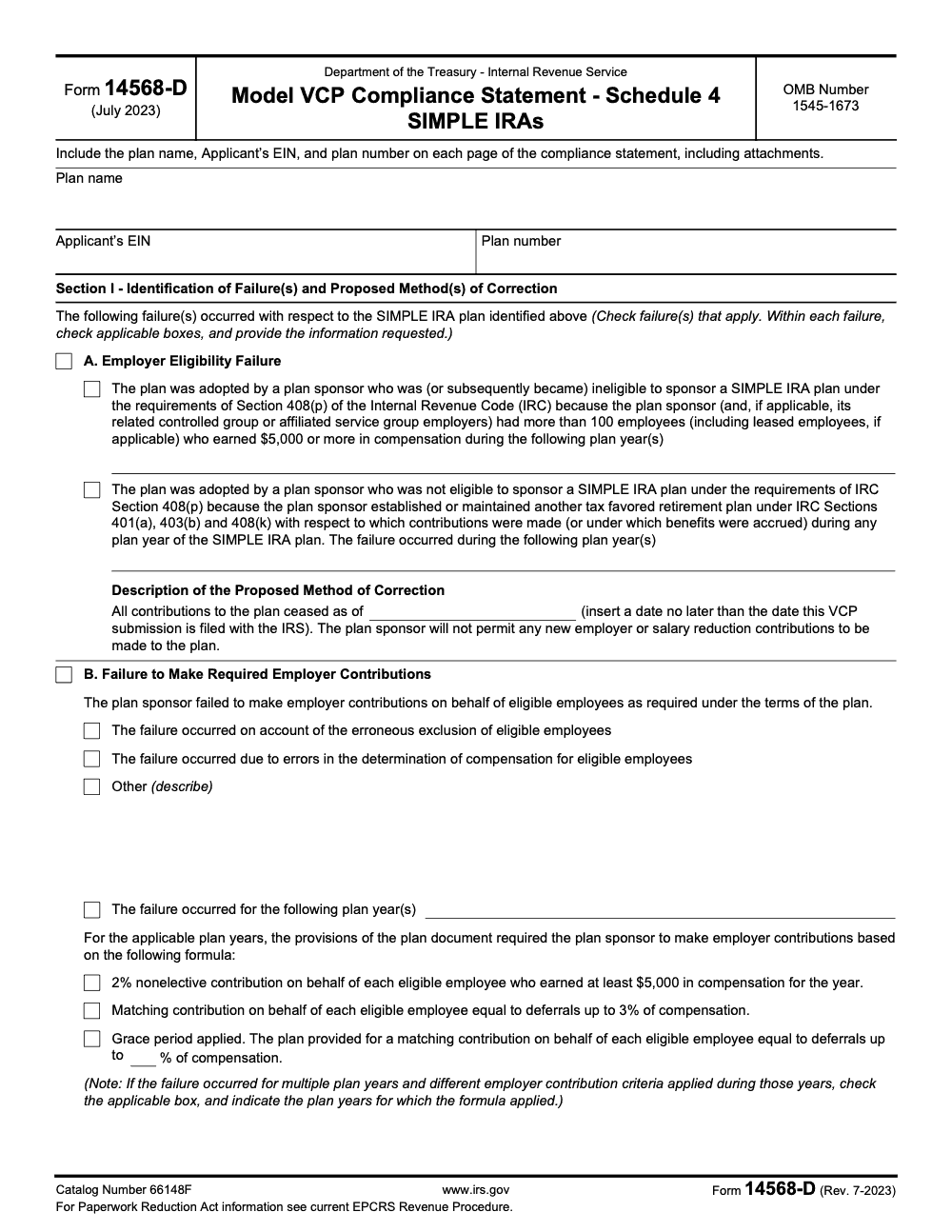
Form 14568-D is the IRS model VCP schedule for SIMPLE IRAs. It gives you a fixed structure to describe the failures, document the math behind corrections and earnings, and state the procedural fixes you are putting in place so the problem does not recur. The IRS allows you to pair this schedule with the core Model VCP Compliance Statement, Form 14568, or use the schedule on its own inside your VCP package, but either way you must use the current, unmodified version.
Behind the scenes, EPCRS in Rev. Proc. 2021-30 sets the playbook for VCP submissions. It requires a single combined PDF of your attachments, uploaded through Pay.gov with Form 8950, and it outlines the evidence the IRS expects to see, from narratives to worksheets to signatures. If your bundle is larger than 15 MB, the IRS instructs you to fax the overflow to the dedicated number and reference the Pay.gov Tracking ID on your cover sheet.
Put simply, 14568-D is how you talk to the IRS about a SIMPLE IRA failure in a way that is complete, consistent, and easy to review.
When to use Schedule 4 for SIMPLE IRAs
Use Form 14568-D when your VCP submission involves a SIMPLE IRA and you need to correct operational or document failures. The schedule covers common SIMPLE mistakes, including employer eligibility failures, missed or misapplied nonelective or matching contributions, failure to give employees the chance to defer, excess amounts, and document updates. The IRS’s own SIMPLE IRA Fix‑It Guides steer sponsors to 14568-D for these scenarios.
A few practical notes:
- Even if you are not using the core Form 14568, you can still use Schedule 4 to standardize your facts and fix. The IRS encourages it.
- Consider whether SCP applies first, but if a failure is significant or outside SCP limits, VCP with 14568-D is the safer path to formal IRS sign‑off.
- For sponsor ineligibility, the Schedule requires you to cease new contributions as of a date no later than your VCP filing date. Plan years must be listed clearly.
Build a complete VCP submission, step by step
The core forms
Your submission starts on Pay.gov with Form 8950. You attach a single PDF that contains your narratives, the signed penalty-of-perjury statement when applicable, Form 14568-D and any schedules you use, plan and payroll evidence, and other exhibits. You pay the Form 8951 user fee inside Pay.gov, and the site emails you a confirmation showing the Tracking ID the IRS uses as your control number. Keep that email and PDF receipt with the working file.
The 15 MB rule, and what to do if you exceed it
As of January 2025, the file you attach to Form 8950 cannot exceed 15 MB. If you have more documentation, fax the overflow to the IRS at 855‑203‑6996 and include the EIN, Applicant Name, Plan Name, and Pay.gov Tracking ID on the cover sheet. The IRS calls out this step in the Form 8950 instructions.
Narrative and ordering
Rev. Proc. 2021-30 tells you to combine all required items into a single PDF and follow the suggested ordering in section 11. That means facts first, then failures, then method of correction, participant impact, calculations, and changes to procedures. Treat 14568-D as the standard framework, and map your narrative to it so every number in your worksheets ties to a line on the schedule.
The data 14568-D captures, and how to present it
Think of Schedule 4 as your cover grid for the entire correction. You start with the plan name, EIN, and a three‑digit plan number. For SIMPLE IRAs, the IRS guidance often uses “990” when a plan number does not exist, and it expects the identifiers on 14568-D to match what you enter on Form 8950. Consistency across forms makes intake easier and reduces back‑and‑forth with the reviewer.
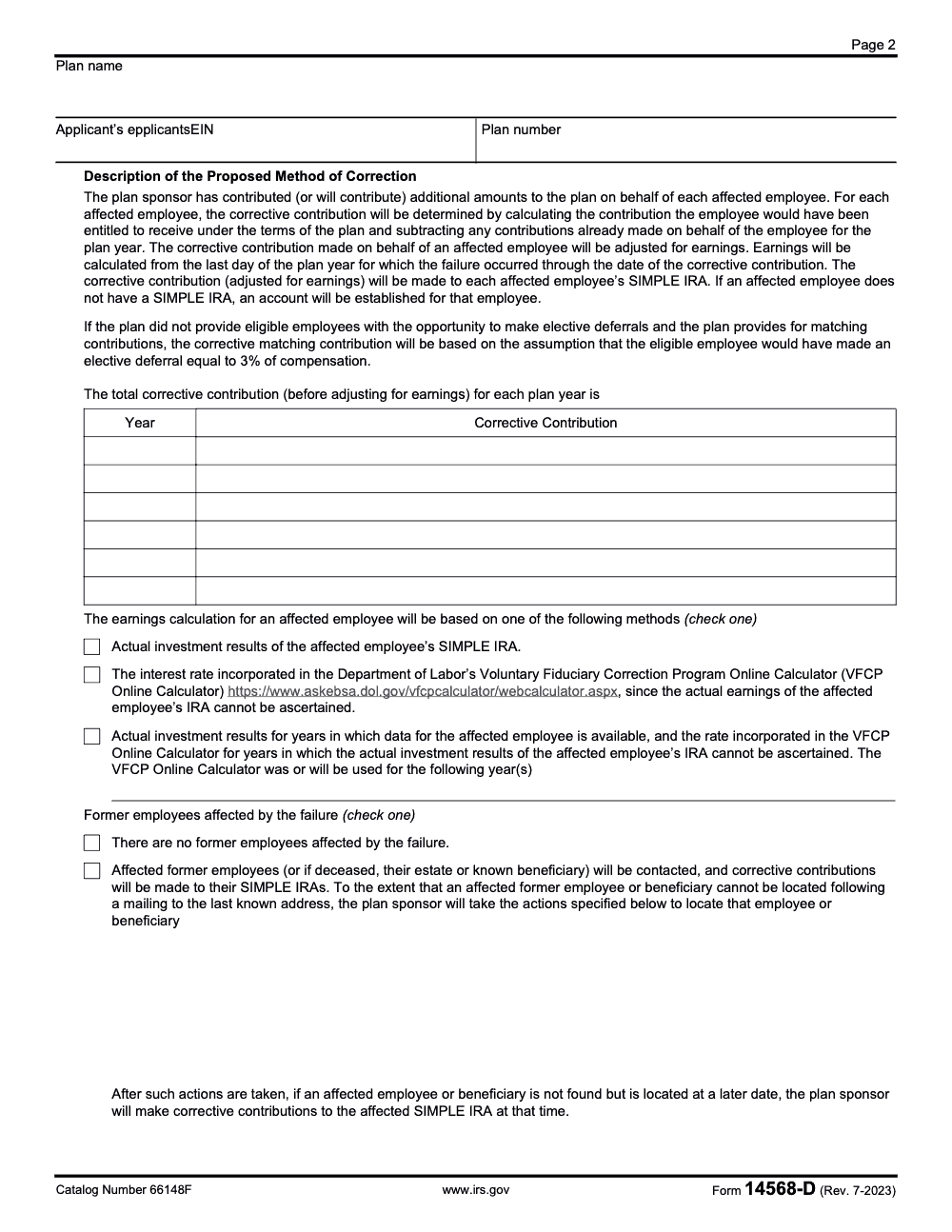
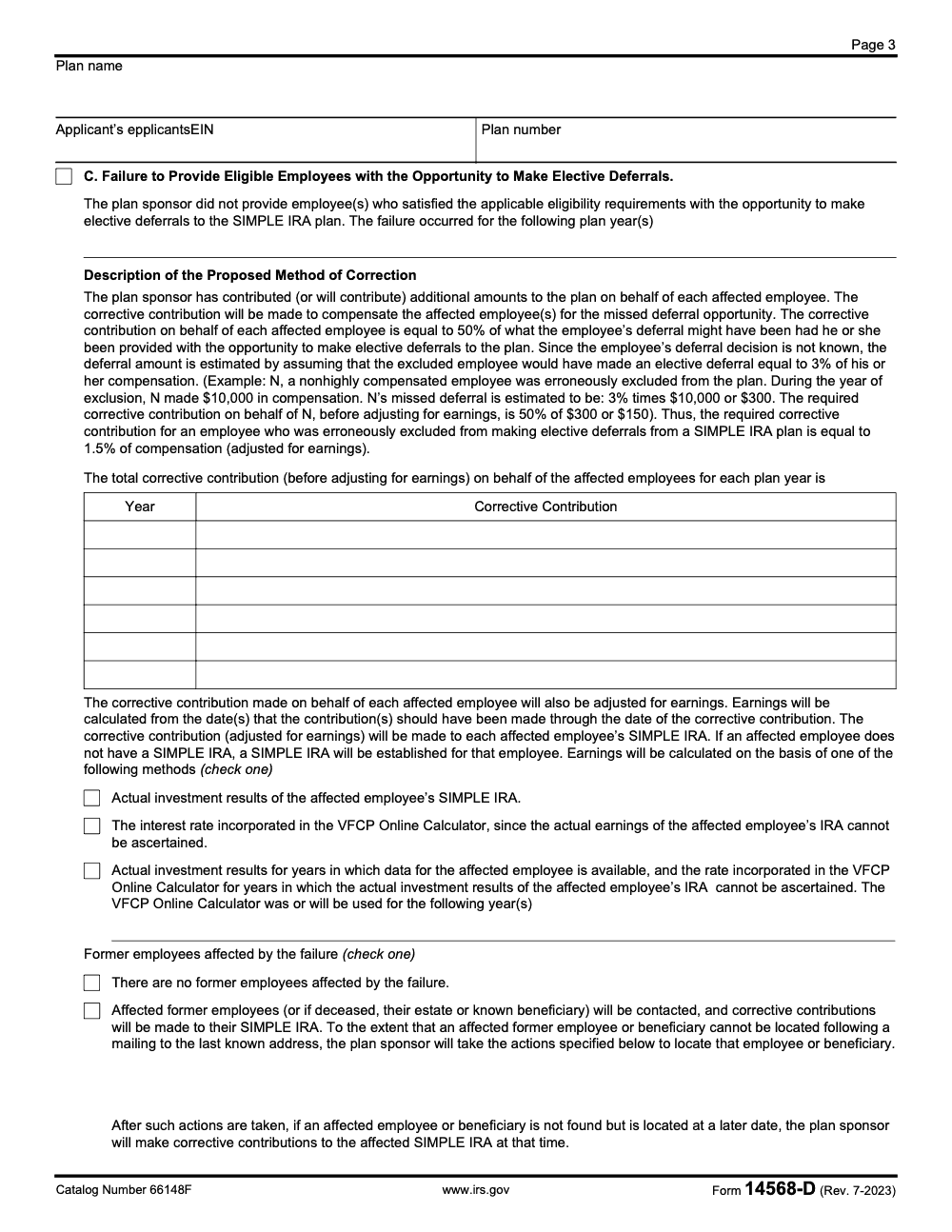
Next, describe the failures and list the plan years, the population affected, and the correction you will make. When you correct missed employer contributions or missed deferral opportunities, the schedule points you to standard methods, including a 3 percent assumed deferral when employees were denied the chance to contribute and a 50 percent missed‑deferral make‑up contribution for that specific failure, all adjusted for earnings through the deposit date. These are built into the schedule’s text.
Be precise about participants. In your attachments, include each affected person’s name, identifying details, compensation period, what should have happened, what did happen, and the difference. Then tie your math to payroll, custodian confirms, and worksheet totals. The IRS Fix‑It pages also remind sponsors to attach the signed SIMPLE plan document that applied during the failure years, for example Form 5304‑SIMPLE or 5305‑SIMPLE, if you used the IRS model.
The reviewer should be able to re‑create your totals from your worksheets without opening your payroll system. If they can do that, your submission moves faster.
Describing failures clearly without extra words
Use plain, dated statements. Cite the plan clause that applied, the date the failure began, and the date you discovered it. For employer eligibility failures, check the box and list the years when the 100‑employee rule (counting only employees, including leased employees if applicable, who earned $5,000 or more in compensation, aggregated across the controlled or affiliated service group) or “other plan” rule (sponsoring any IRC §401(a), §403(b), or §408(k) plan in the same year) was violated. For missed employer contributions, check the correct formula box, such as 2 percent nonelective or match up to 3 percent, and show the plan years that formula applied. The schedule is designed to hold those details and your totals.
Include a short chronology in your narrative attachment. Explain how you discovered the issue, the steps you took to verify it, and the dates you completed each corrective deposit. The IRS’s kits and Fix‑It Guides are unambiguous about using 14568‑D and following Section 11 of the revenue procedure when you build your package.
A simple summary table you can reuse
| Metric | Amount or Count | Notes |
| Affected participants | [number] | Cross‑foot to worksheets |
| Employer contributions missed | [$/years] | Show by year and formula |
| Missed deferral make‑up base | [$/years] | Use 3 percent assumption where applicable |
| Earnings added | [$/years] | Method noted below |
| Total corrective deposits | [$/years] | Ties to custodian confirmations |
Document your earnings method. The current 14568‑D lets you use actual SIMPLE IRA investment results, the Department of Labor’s VFCP online calculator rate when actual returns cannot be determined, or a combination of actual and VFCP for missing periods. Pick one approach, apply it consistently, and say which years it covers.
Correction methods that the IRS expects to see on 14568‑D
Missed deferral opportunity
When eligible employees were not offered the chance to defer, 14568‑D directs you to fund a make‑up equal to 50 percent of the estimated missed deferral (not 100 percent, which some sources incorrectly suggest), with the estimate based on an assumed defer rate of 3 percent of compensation, plus earnings through the correction date. This is a standardized method on the form, so write your worksheets to mirror that language and calculation.
Employer match or nonelective shortfalls
For missed employer contributions, compute what should have been contributed under the plan formula, subtract what was actually deposited, and fund the shortfall with earnings from the last day of the plan year to the correction date (this start date applies to missed employer contributions only; missed-deferral corrections instead run earnings from the date(s) the contribution should have been made). If you denied deferrals and the plan provided a match, the form assumes the employee would have deferred 3 percent, which drives the corrective match. Again, tie it to the form’s lines and add your year‑by‑year totals.
Excess amounts and late deposits
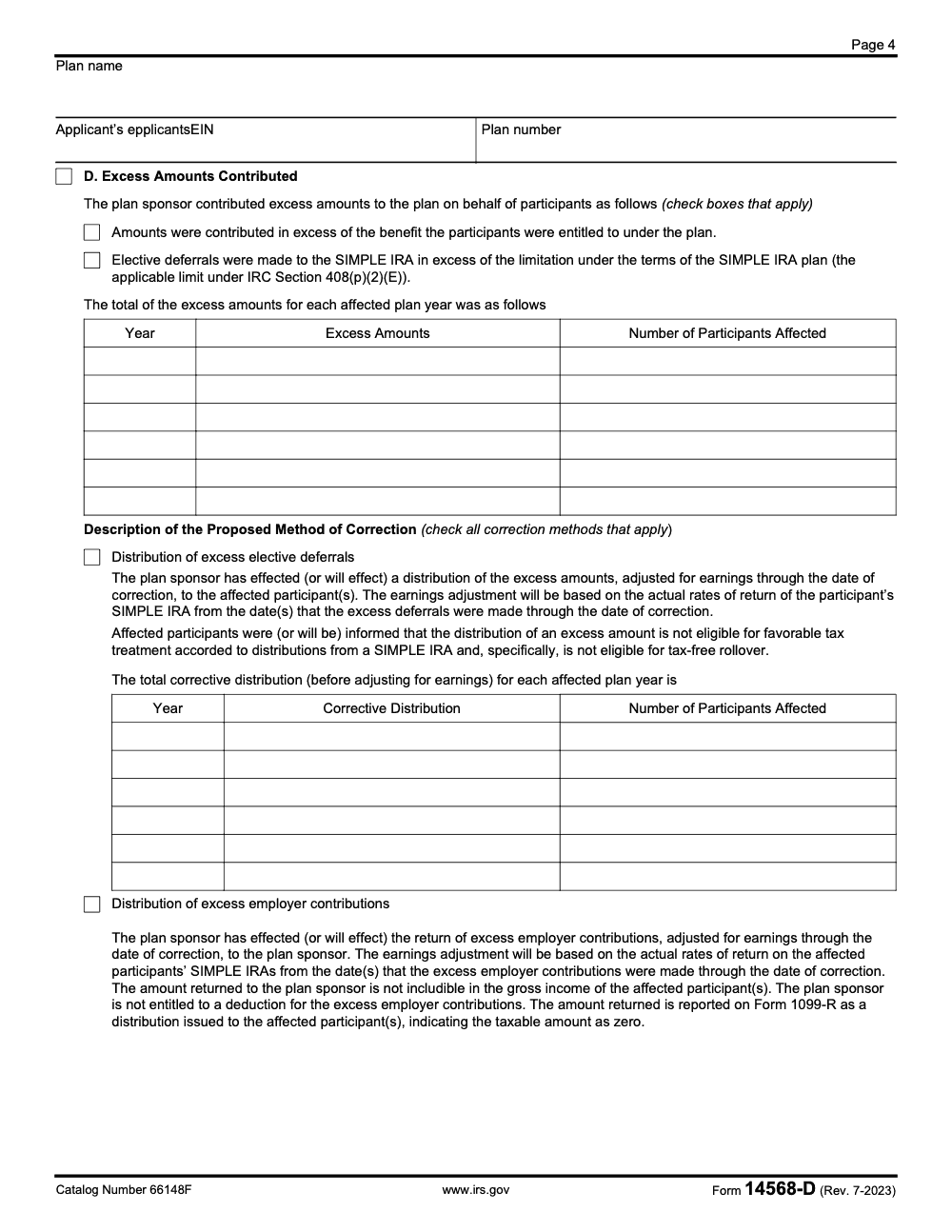
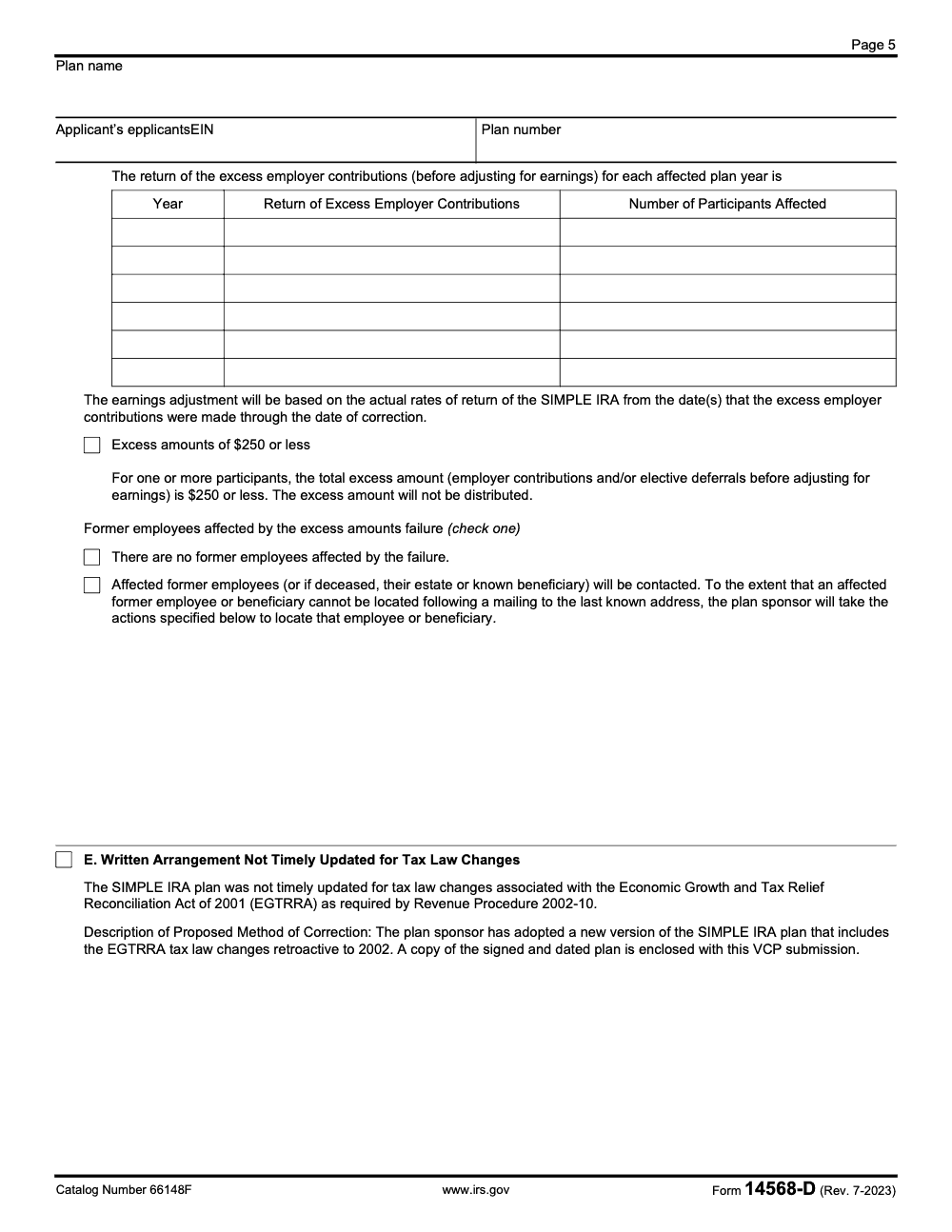
If you contributed excess amounts, 14568‑D includes checkboxes and language for distributing excess deferrals with earnings (with required notice to affected participants that the distribution is not eligible for tax-free rollover), returning excess employer contributions with appropriate reporting, and applying the small $250 or less excess rule where allowed under EPCRS (the $250 test is applied to the total excess amount before earnings adjustment, not after). For late deposits, calculate and deposit lost earnings using your chosen method and show the proof of posting from the custodian.
Tip, especially during peak season: batch confirmations from your custodian by plan year, then attach the batch to your worksheet packet so the IRS can verify totals quickly.
Filing logistics with Forms 8950 and 8951 on Pay.gov
Your VCP journey starts on Pay.gov. You will upload a single non‑fillable PDF that contains your entire submission package in the order the IRS expects, then you will pay the user fee tied to Form 8951. Keep your process clean so intake is smooth and you avoid preventable delays.
Step by step, from desktop to Pay.gov
- Prepare the forms
- Complete Form 8950 and your Form 14568-D (Schedule 4).
- If you are using the base Form 14568 Model Compliance Statement, finish it and any other schedules.
- If someone will act on the sponsor’s behalf, include a signed Form 2848. If you only want copied correspondence, include a signed Form 8821.
- Assemble one non‑fillable PDF
- Print each completed form to PDF so the file is non‑fillable.
- Merge your documents in this order: cover letter, narratives, Form 14568-D and any schedules, Form 14568 if used, plan documents or amendments, payroll and custodian evidence, signed statements, Form 8950, and fee exhibit.
- Aim for clear file names, for example 01_Cover, 02_Narrative, 03_14568D, 04_Worksheets, 05_Evidence, 06_8950.
- Upload and pay on Pay.gov
- Create or sign in to your Pay.gov account.
- Start the Form 8950 submission, attach your single PDF, and pay the fee by ACH, debit, or credit.
- Save your Tracking ID confirmation as a PDF. Keep it with your working papers.
- Handle size and overflow the right way
- Keep the combined PDF at or under 15 MB.
- If you must send overflow, fax the remainder and include the EIN, plan name, applicant name, and Pay.gov Tracking ID on the cover.
- Log what went by upload and what went by fax. Keep all send receipts.
Tip for peak season, use a simple index page at the front of your PDF, then bookmark each section. It cuts IRS review time and lowers the odds of a follow‑up letter asking for basics you already included.
Representation and correspondence, 2848 vs 8821
You decide who can speak for the plan sponsor and who simply receives copies. That choice determines whether you file Form 2848, Form 8821, or both.
| Scenario | Use this form | What it allows |
| You want a representative to discuss terms, sign agreements, and receive mail | Form 2848 | Full representation and confidential info access |
| You only want a third party to get copies of letters and emails | Form 8821 | Information access, no authority |
| You want a rep to act, and a separate team to get copies | Both | 2848 controls representation, 8821 handles copies |
Practical details that save time
- List the tax matter as “VCP, employee retirement plan,” include the EIN and plan years.
- Make sure authorized signers sign and date each form.
- If you submit both forms, remember that 2848 authority governs any overlap.
Sample timelines and implementation milestones
Most firms move from scoping to filing in 60 to 90 days. That window gives you time to inventory failures, draft narratives, create worksheets, get signatures, and collect source evidence from payroll and the custodian.
Pre‑submission preparation, a realistic plan
- Weeks 1 to 2, discovery and scoping Map failures by type and year, identify affected participants, pull the plan document and any amendments for those years, and export payroll data by pay period.
- Weeks 3 to 5, calculations and drafts Build worksheets, choose your earnings method, and draft the schedule narratives. If employer eligibility is an issue, set the cease date for new SIMPLE contributions and prepare the amendment path.
- Weeks 6 to 7, assembly and signatures Complete Form 14568-D, finish the narrative package, print everything to non‑fillable PDF, and obtain sponsor signatures. Prepare Form 8950 and confirm the user fee.
- Week 8, Pay.gov filing Upload the single PDF, pay the fee, and archive the Tracking ID. If you have overflow, fax it the same day and keep the transmission report.
- Weeks 9 to 12, intake and follow‑ups Track for IRS acknowledgment. Respond quickly if the reviewer asks for clarifications. Keep your project file current so answers are at hand.
A simple milestone table you can copy
| Milestone | Target date | Evidence kept |
| Discovery complete | [Date] | Issue log, failure map |
| Worksheets finished | [Date] | Excel or PDF workpapers |
| Sponsor signatures | [Date] | Signed statements, 14568-D |
| Pay.gov submission | [Date] | Tracking ID receipt |
| Overflow faxed | [Date] | Fax cover and confirmation |
| IRS intake confirmed | [Date] | Acknowledgment email or letter |
Reality check, if payroll exports take longer than expected, do not stall the entire project. Lock your narrative, list the missing periods, and file quickly. You can send supplemental exhibits if the reviewer asks for them.
Correction action steps the IRS expects to see
Your schedule and narrative should show a clean sequence from discovery to deposit confirmations. The structure below works well for SIMPLE IRA VCP cases and fits the way Form 14568-D is organized.
Sequence your work with dated checkpoints
- Discovery and scope
- Note the failure types, list plan years, and identify affected participants.
- Pull plan clauses that applied in each year.
- Calculations and method
- Choose the earnings approach, actual returns or an approved proxy.
- Calculate missed deferral opportunity make‑ups, employer match or nonelective shortfalls, and any excess corrections.
- Execute corrections
- Deposit all corrective amounts with earnings to each person’s SIMPLE IRA.
- For excess amounts, process distributions with proper reporting.
- Verify and document
- Collect custodian confirmations and bank proofs.
- Reconcile totals to worksheets and list the final correction date.
- Prevent recurrence
- Update procedures, train staff, and add a control to catch the same issue early next time.
Handling missed deferral opportunity
When someone was denied the chance to defer, make a missed deferral make‑up using the schedule’s standardized approach. The form assumes a 3 percent deferral for estimating the base when no election existed, then you fund 50 percent of that amount, plus earnings through the deposit date. Document how you computed the base and show the period used for earnings. Keep the math simple enough for the reviewer to trace without your payroll system open.
Fixing employer match and nonelective shortfalls
Start with the plan formula that applied in each year, for example match up to 3 percent or 2 percent nonelective. Compute what should have been contributed, subtract what was posted, and fund the shortfall with earnings from the due date to the correction date. If employees never had a chance to defer, use the 3 percent assumed deferral base to compute the missed match. Show totals by year and by person.
Late deposits, excess amounts, and special cases
- Late deposits Calculate and deposit lost earnings to each affected SIMPLE IRA. Attach custodian confirmations and show the earnings method.
- Excess amounts Return excess deferrals or excess employer contributions with proper reporting (for returned excess employer contributions, the Form 1099-R reports the taxable amount as zero; it is informational, not a taxable distribution to the participant). If a participant already took a distribution, document how you handled earnings to make them whole or how you corrected reporting.
- Closed or transferred SIMPLE IRAs If an account was closed, coordinate with the participant and the custodian to direct the corrective deposit to an active SIMPLE IRA or a permissible rollover destination. State what you did and include proof.
Quick win, batch your custodian confirmations by year and label them to match your worksheet tabs. The cleaner the trail, the faster the close.
Post‑approval monitoring that actually sticks
- Within 30 days of IRS approval, finish any remaining deposits, send participant notices that explain the fix, and save confirmations.
- Within 90 days, complete a mini audit. Confirm that the plan document and notices are up to date, payroll settings match the plan formula, and your remittance timing control is working.
- For months 3, 6, 9, and 12, review a one‑page checklist. Record the control owners, spot check a pay period, and confirm no late remittances.
- Keep your VCP file for six years. If the IRS asks later, you will have exactly what they need.
Required narrative attachments and enclosures
Use a simple checklist and do not skip signatures.
- Problem summary and chronology with dates
- Plan document or model form used in each failure year, for example 5304‑SIMPLE or 5305‑SIMPLE
- Participant list with amounts, by period
- Calculation worksheets that reconcile to totals
- Custodian confirmations and bank proofs
- Signed penalty‑of‑perjury statement if required
- Form 2848 or Form 8821 if applicable
- Form 8950 and fee details
- Index page, bookmarks, and clear file names
How Form 14568‑D aligns with Rev. Proc. 2021‑30
Think of the revenue procedure as your instruction manual and 14568‑D as your template. Section ordering in the procedure maps to the way the schedule is built. That is why you should:
- Keep the single PDF, non‑fillable format.
- Follow a clear, sequential narrative.
- Tie every number in your worksheets to a line on the schedule.
- Include the signatures that make your statements binding.
A quick Accountably note, only where it helps
If your internal team is buried in peak season, you can still meet tight VCP timelines with a disciplined delivery setup. At Accountably, we integrate trained offshore teams into your workflow with SOPs, standardized workpapers, and multi‑layer reviews, so pulling payroll, building worksheets, and compiling exhibits does not pull partners into all‑night sessions. Use us when structure and throughput matter, not for resume farming.
A short case story, from backlog to approval
A 45‑person service firm realized in February that two payroll cycles from the prior spring never posted. The team was stuck between commitments and a short support staff. We helped them map failures by participant and period, use the schedule’s standardized methods for missed deferral and match, batch custodian confirmations, and assemble a clean single PDF with bookmarks. The reviewer accepted the math as filed and issued an approval letter without a second document request. The partner told me it was the first time a correction did not eat their entire weekend.
Quick checklist you can print
- Identify failure types, plan years, and affected participants
- Pull plan documents, amendments, and notices for the years at issue
- Choose earnings method and build worksheets that reconcile to totals
- Complete Form 14568‑D and any other schedules needed
- Prepare Form 8950, add Form 2848 or Form 8821 if applicable
- Assemble a single non‑fillable PDF with a clear index and bookmarks
- Upload on Pay.gov, pay the fee, and save the Tracking ID
- Send overflow by fax the same day, keep the confirmation
- Monitor for intake, answer questions quickly, and retain the full file for six years
Final thoughts and next step
If you follow the structure in this guide, your SIMPLE IRA VCP filing will read like a professional workpaper set, not a mystery novel. You will show what went wrong, who was affected, how you fixed it, and how you will keep it from happening again. If your team needs reliable production help to assemble the package, or you want standardized workpapers that cut partner review time, we can plug in without disrupting your tools or your templates. Either way, you now have a clear, human plan to get Form 14568‑D across the finish line.
Common Mistakes We See Every Season
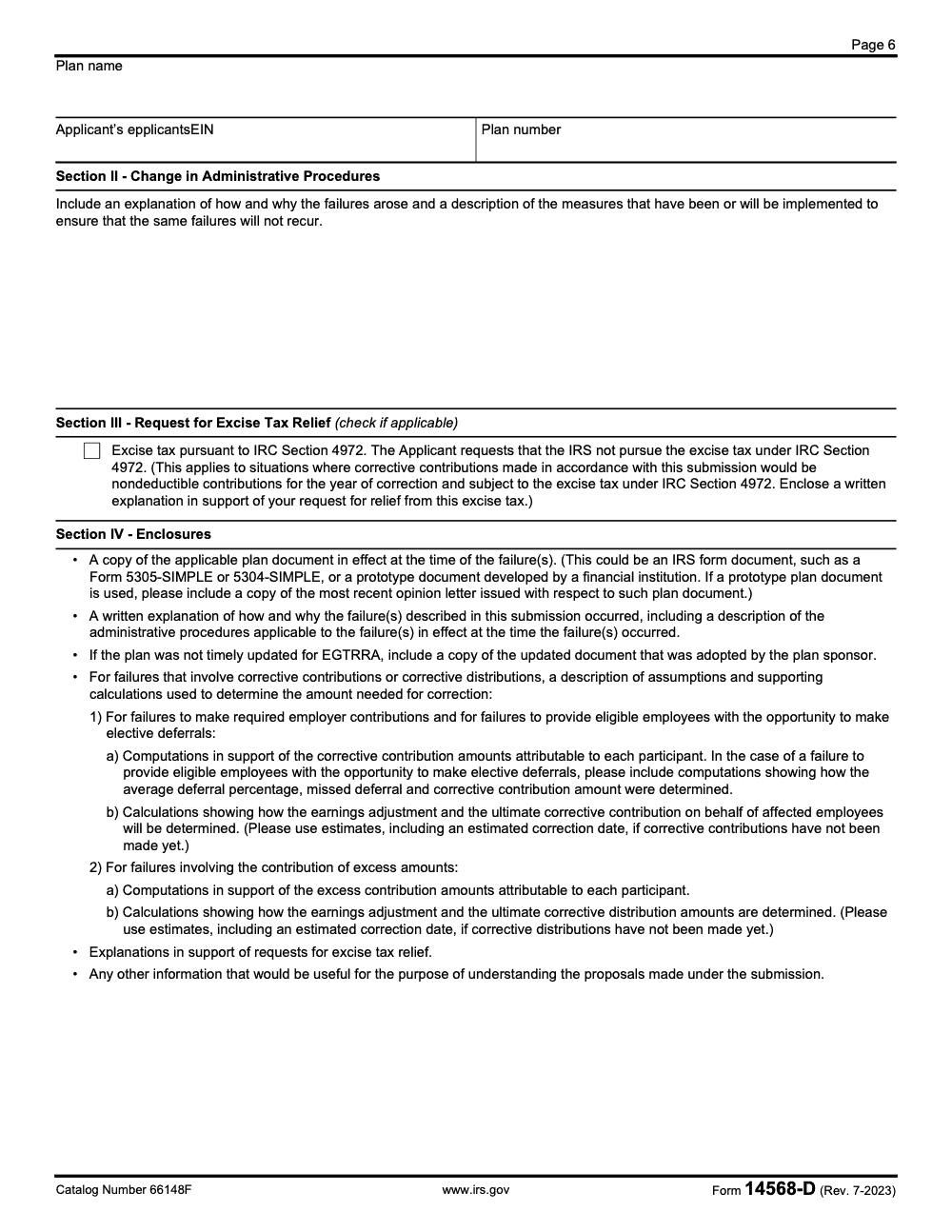
VCP work does not wait for a clean quarter. Sponsors usually surface a SIMPLE IRA failure mid-cycle: a payroll audit catches a missed deferral going back three plan years, a reviewer flags that the sponsor also funded a 401(k) in the same year, or the EGTRRA update was never signed (Revenue Procedure 2002-10 required that retroactive to 2002, per the IRS.gov EPCRS overview). The package then has to thread Sections I through IV of Form 14568-D, a written narrative, earnings computations, a plan document, and Forms 8950 and 8951, all stacked into one non-fillable PDF for Pay.gov.
The teams that move fast on Schedule 4 are not faster typists. They have decided the sequence in advance, and the reviewer sees a package that answers the next question before it is asked.
- Lock the failure category before drafting Section I. The five categories in the July 2023 revision (A through E) drive the entire correction story, and switching mid-package forces a rewrite of the narrative and the math.
- Build the earnings worksheet with two start dates, not one. Category B (missed employer contribution) runs from the last day of the failure plan year; Category C (missed deferral) runs from the date the corrective contribution should have been made. Confusing the two is the most common reviewer pushback we see.
- Pre-compute the 1.5% of compensation figure for every missed-deferral participant before drafting Section II. The form's worked example ($10,000 compensation, $300 assumed deferral at 3%, $150 corrective contribution at 50%) is the template the reviewer will trace against your spreadsheet.
- Run the $250 de minimis test on the unadjusted excess total, not on the earnings-adjusted figure, so the distribution and exclusion list matches the rule the reviewer applies.
- Stack Section IV enclosures in this order: plan document in effect at the failure (Form 5305-SIMPLE, 5304-SIMPLE, or prototype with the most recent opinion letter), EGTRRA update document if applicable, written explanation of how and why the failures occurred, and the per-participant computation file. Page-identify every attachment with plan name, applicant EIN, and plan number on every page.
That kind of disciplined assembly is delivery work, and that is exactly what our U.S. accounting and tax outsourcing teams are built to handle. We draft the Schedule 4 package, document the earnings math, and keep the reviewer on the front foot so the compliance statement gets countersigned without a second round of questions.
Reusable Checklists
The blocks below are copy-paste ready for firm SOPs and engagement letters. Each item persists locally as a checkbox, so a reviewer can work through a package and resume where they left off.
Pre-filing failure scope
- Identify which of the five failure categories (A through E in the July 2023 revision of Form 14568-D) applies to each issue, and write the category labels at the top of the working file.
- Confirm employer eligibility: verify the controlled-group head count of employees earning $5,000 or more did not exceed 100 in any covered year (per IRC §408(p)).
- Confirm no IRC §401(a), §403(b), or §408(k) plan was also maintained in any year the SIMPLE IRA was in effect, including leased-employee and affiliated-service-group entities.
- Pull the SIMPLE IRA plan document in effect for each failure year: Form 5305-SIMPLE, Form 5304-SIMPLE, or a prototype document with the most recent opinion letter.
- List every affected employee and former employee, including beneficiaries where a participant is deceased.
- For each former employee, document the last-known-address mailing and the additional search steps taken before the search is treated as exhausted.
- Page-identify every working file with plan name, applicant EIN, and plan number, including every attachment.
Corrective math, Sections I and II
- For missed-deferral failures (Category C), compute 1.5% of compensation per participant (50% of the assumed 3% deferral) and adjust for earnings from the date the contribution should have been made.
- For missed employer contributions (Category B), compute the contribution the participant would have received under the plan and adjust for earnings from the last day of the failure plan year.
- For excess employer contributions, calculate the return amount with earnings using the participant's actual rate of return, and prepare Form 1099-R with a taxable amount of zero.
- For excess elective deferrals, calculate the distribution with earnings using actual rates of return, and notify the affected participant in writing that the distribution is not eligible for tax-free rollover.
- Apply the $250 de minimis test on the unadjusted excess total per participant, before any earnings adjustment.
- Pick one earnings method (actual investment results, the DOL VFCP Online Calculator rate, or the documented hybrid) and apply it consistently across the schedule.
- Tie every per-participant figure to a single computation file so each line of Section I has a worked-paper trail behind it.
Section IV enclosures and Pay.gov submission
- Plan document in effect at the time of the failure: Form 5305-SIMPLE, Form 5304-SIMPLE, or prototype document with the most recent opinion letter.
- EGTRRA-update plan document where the original was not timely updated, retroactive to 2002 per Revenue Procedure 2002-10.
- Written explanation of how and why the failures occurred and the administrative procedures in place at the time the failures occurred.
- Per-participant computation file with columns for compensation, assumed deferral, missed deferral, corrective contribution, earnings method, and earnings adjustment.
- If excise tax relief is requested under IRC §4972, attach the separate written explanation supporting that request in Section III.
- Combine Form 14568-D, the Section II narrative, the computations, the plan documents, and Forms 8950 and 8951 into one non-fillable PDF with bookmarked sections in the order the reviewer will read them.
- File via Pay.gov, save the Tracking ID, and store the user fee confirmation in the same file as the package.
- Send any oversize attachments by fax the same day with a cover sheet referencing the Pay.gov Tracking ID, and retain the transmission confirmation.
Keep 14568-D Season From Stalling
VCP work does not arrive on a clean cycle. A SIMPLE IRA failure surfaces during a payroll audit, a custodian reconciliation, or a transition between plan documents, and the team then has to scope five possible failure categories (A through E in the July 2023 revision of Form 14568-D), build per-participant earnings computations, draft the Section II narrative, decide whether to request excise tax relief under IRC §4972, stack the Section IV enclosures, and assemble Forms 8950 and 8951 into a single non-fillable PDF for Pay.gov, usually mid-quarter and on top of existing client work (per the IRS.gov EPCRS overview, the current Revenue Procedure 2021-30 governs the correction).
The slowdown is rarely in the math. It is in coordination: which year's plan document applied, which participants are former and need a documented search, which earnings start date governs each failure, and whether the 100-employee, $5,000-compensation count was measured at the controlled-group level. Teams that ship a clean Schedule 4 lock those decisions before drafting and hand the reviewer a package that answers the next question before it is asked.
- Scope failure categories in writing before drafting Section I. A package that mixes Category B (missed employer contribution) and Category C (missed deferral) without separate earnings worksheets is the most common reviewer pushback we see.
- Pre-compute the 1.5%-of-compensation figure for every missed-deferral participant (50% of the assumed 3% deferral) so Section II reconciles to the per-participant computation file before the reviewer asks.
- Build the Section IV enclosure stack in the order the reviewer reads it: plan document in effect at the failure, EGTRRA-update document where applicable (retroactive to 2002 under Revenue Procedure 2002-10), written explanation of how the failures occurred, and per-participant computations.
- Page-identify every attachment with plan name, applicant EIN, and plan number. A single attachment missing the identifier line is enough for a reviewer to issue a second document request and reset the review clock.
- Run the $250 de minimis test on the unadjusted excess total before the earnings adjustment, not after. Reversing the sequence changes who appears on the distribution list and contradicts the rule the reviewer applies.
Disciplined Schedule 4 assembly is delivery work, not a typing exercise. Our tax outsourcing and offshoring teams draft the Section I categorization, build the earnings worksheets, stack the Section IV enclosures in the order the IRS reads them, and assemble a single bookmarked PDF for Pay.gov so the compliance statement gets countersigned on the first pass without a second round of questions.
FAQs
Use the form. The IRS designed 14568‑D to standardize SIMPLE IRA corrections in VCP. You can attach a narrative for details, but Schedule 4 is the expected format and it speeds review.
An individual authorized to sign for the plan sponsor, usually an officer or owner. Confirm authority under your governing documents and keep the signed statement in the same PDF as the forms.
Sometimes. If the failure qualifies for self‑correction under EPCRS and you meet the timing and significance limits, SCP may be available. If the error is significant, long‑running, or you want formal IRS sign‑off, file VCP with 14568‑D.
Use actual investment results if you can. If not, use an acceptable proxy listed in the current instructions and apply it consistently from the failure date to the correction date. Document the method and keep your math reproducible.
Work with the participant and custodian to direct the corrective deposit to an active SIMPLE IRA or an eligible rollover destination. Explain what you did in your narrative and attach confirmations.
Use Form 2848 if you want a representative to negotiate, sign, and receive IRS communications. Use Form 8821 if you only want a person or firm to receive copies of correspondence. You can file both if roles differ.
Plan for several weeks for intake, then additional time for review. Response times vary with season. Keep your package clean so the reviewer has what they need on the first pass.
All forms, narratives, worksheets, and evidence belong in one non‑fillable PDF so the reviewer can open, read, and archive it without field conflicts. Print to PDF, set the order, and bookmark sections for easy navigation.
Other forms this guide names
- Form 8950: Complete VCP Filing Guide on Pay.gov
- Form 2848: Guide to Line 3, Filing, and Rules
- Form 8821: Tax Information Authorization
- Form 8951: VCP User Fee for EPCRS Submissions
- Form 14568: VCP Compliance Statement Guide 2025
- Form 1099‑R: Box 7 Codes, Rollovers, 2025 Filing Guide
Summarize this article with AI
About this guide
Accountably helps US CPA, EA, and accounting firms hire trained accountants and tax preparers in India.
About us Reviewed byJugal Thacker, CPAFounder and CEO at Accountably
A US-licensed CPA with 7+ years inside US firms – PwC, a real-estate tax practice, then a full-service firm, rising from reviewer to manager to advisory. This article was reviewed against current IRS guidance for the 2025 tax year and updated for filers preparing late returns, amendments, and 2026 estimates.
View profile →How we research, review, and update this guide
Every Accountably guide is researched against primary IRS sources, reviewed by a U.S. CPA, and refreshed as guidance evolves. Read our Editorial Guidelines to see how we source, fact-check, and update our content.




