
Summarize this article with AI
In Brief
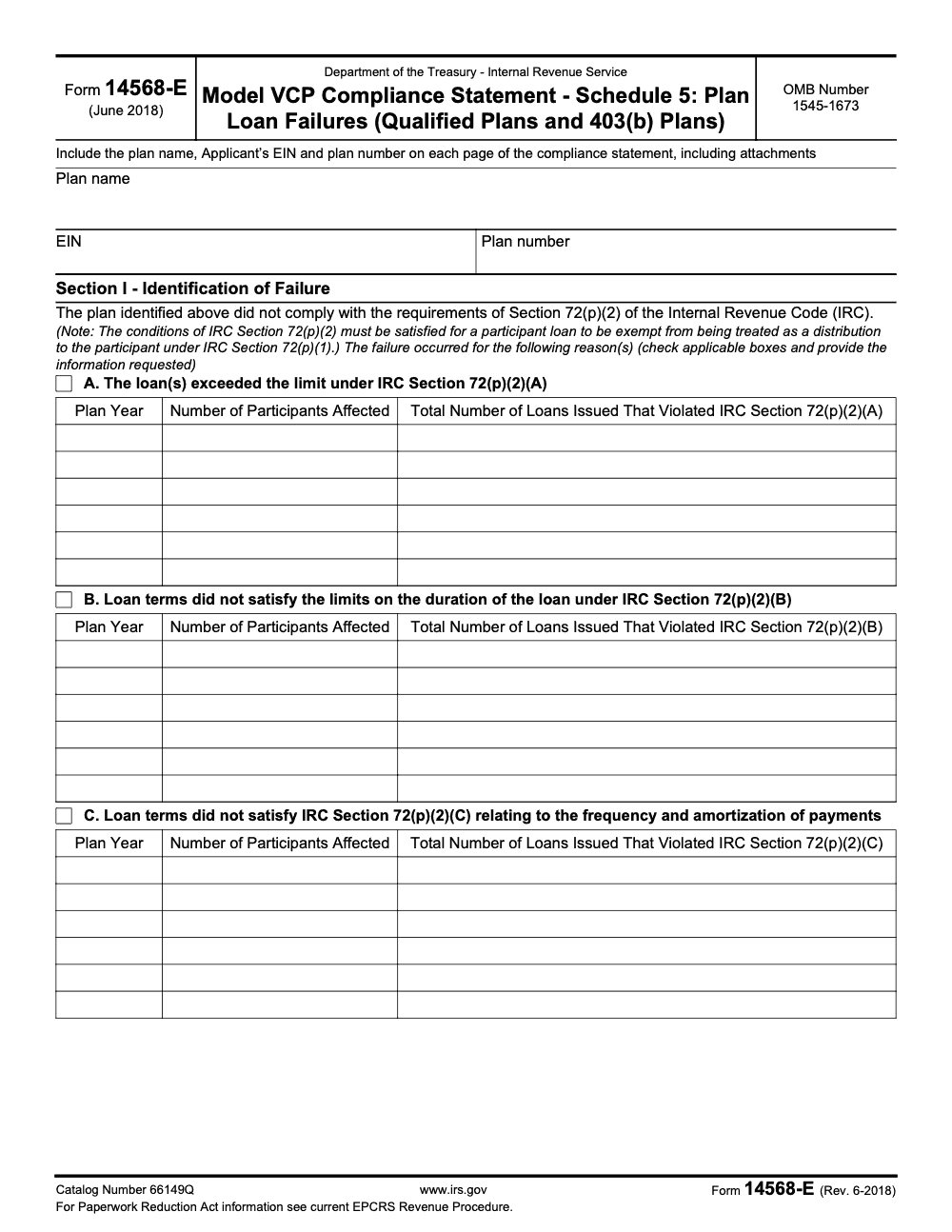
Form 14568-E (Schedule 5) corrects participant-loan failures under IRC §72(p)(2) for qualified plans and 403(b) plans (per the IRS Model VCP Compliance Statement, Form 14568-E, Rev. 6-2018, OMB 1545-1673). It attaches to Form 14568 as part of a Voluntary Correction Program application filed on Form 8950, walks the sponsor through four failure types (excess loan amount, duration, amortization/frequency, default) across seven numbered sections, and ends in year-of-correction deemed-distribution reporting on Form 1099-R when reformation is not pursued.
A participant loan drifts off its amortization schedule, or runs past the allowed term, and it stops meeting the rules in IRC §72(p)(2). Form 14568-E, Schedule 5, is the model VCP compliance statement for that exact problem in qualified plans and 403(b) plans. Revision 6-2018 walks the sponsor through four failure types, excess loan amount, duration, amortization or frequency, and default, across seven numbered sections.
It attaches to Form 14568 inside a Voluntary Correction Program application filed on Form 8950, with the whole filing handled electronically on Pay.gov, user fees included. What carries a submission is the support behind it: a clean narrative, loan documents, amortization schedules, repayment history, correction calculations, and the controls that keep the failure from coming back, all ordered so a reviewer can follow it without hunting.
Key Takeaways
- Form 14568-E (Rev. 6-2018) is the IRS model VCP compliance statement for Schedule 5 plan loan failures in qualified plans and 403(b) plans.
- You use it when loans weren’t administered to meet IRC §72(p)(2) requirements (amount limits, term, level amortization, defaults).
- It’s intended for failures affecting employees who are not key employees and not owner-employees/self-employed (with a limited exception for a specific reporting-relief request).
- Your VCP filing process is electronic through Pay.gov for Form 8950 and related attachments, and user fees are paid there as part of submission.
- A strong submission includes a clean narrative, loan documents, amortization schedules, repayment history, correction calculations, and prevention controls, organized so a reviewer can follow it fast.
What Form 14568-E (Schedule 5) Is, in Plain English
Form 14568-E is a model statement you attach in a VCP submission when you’ve had plan loan failures. It’s essentially your “here’s what happened and here’s how we corrected it” document, built around IRS checkboxes and structured sections.
It lives inside the IRS “Form 14568 series,” which the IRS encourages you to use because it standardizes what they need to see. The IRS also states you may not modify the format and content of these model forms.
Who typically uses it
You’ll usually see Form 14568-E used by:
- Plan sponsors (employers) fixing operational loan issues
- TPAs and benefits administrators preparing the VCP package
- ERISA counsel or tax professionals supporting the correction strategy
- Payroll and HR teams providing repayment data and process context
If you’re a CPA firm supporting these clients, this is one of those filings where your quality control matters. A lot.
When a Plan Loan Failure Triggers 14568-E Under IRC §72(p)(2)
A participant loan avoids being treated as a distribution only if it meets the requirements under IRC §72(p)(2). When it doesn’t, the loan can become a deemed distribution under IRC §72(p)(1).
Schedule 5 is built to address common failures, including:
- Loans over the legal limit (IRC §72(p)(2)(A))
- Terms that exceed permitted duration (IRC §72(p)(2)(B))
- Payments that aren’t level or aren’t at least quarterly (IRC §72(p)(2)(C))
- Defaults, even when the original loan terms were compliant
The eligibility limitation that trips people up
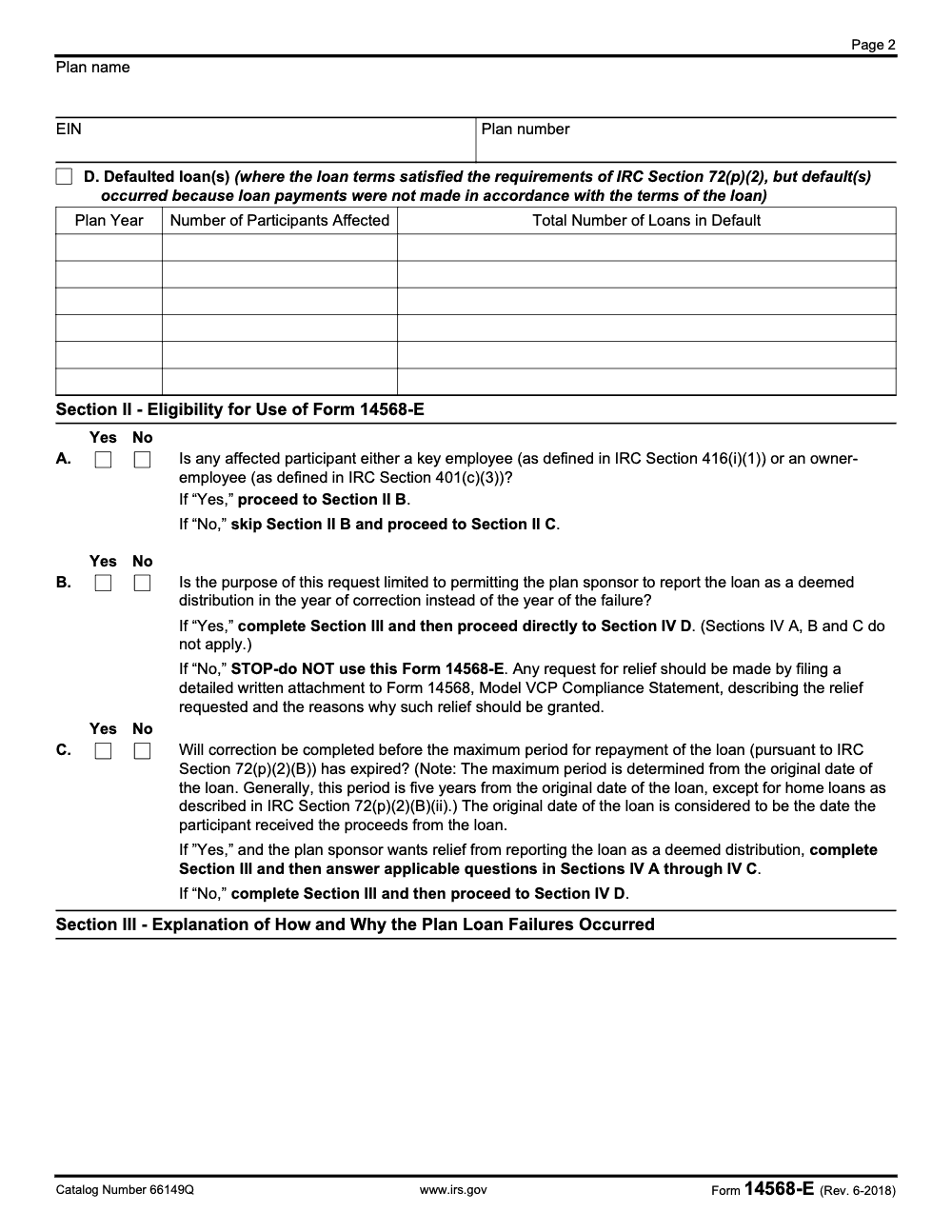
Form 14568-E has an entire eligibility section for a reason. You generally use it when the failure relates only to employees who are not key employees and not owner-employees. If that’s not your fact pattern, the form itself tells you to stop and use a different approach (usually a detailed attachment to Form 14568), unless the only relief you’re asking for is to report the loan as a deemed distribution in the year of correction instead of the year of failure – Schedule 5 still permits that narrow relief even when key employees or owner-employees are affected.
That limitation is not a technicality. It’s one of the first things an IRS reviewer will check.
Where to Get Form 14568-E and What Else You’ll File With It
You can pull Form 14568-E (Schedule 5) from the IRS “Correcting plan errors” VCP forms page, along with the core Form 14568 and other schedules.
The VCP filing backbone, Forms 8950 and 8951
- Form 8950 is the VCP application, and as of April 1, 2019, it must be submitted electronically through Pay.gov, along with the user fee.
- Form 8951 is used for an additional user fee payment for an open VCP submission (you’ll see it when the IRS indicates an extra fee is due).
So, practically, you’re preparing a tight PDF package, then submitting through Pay.gov in the format the instructions require.
How to Complete Form 14568-E (Schedule 5) Step by Step
This is the part where teams lose time, not because they can’t do it, but because the work gets messy across payroll, HR, recordkeepers, and whoever last touched the plan’s loan policy.
Here’s a clean sequence that keeps you in control.
Step 1: Identify the failure type and check the right boxes (Section I)
Schedule 5 makes you categorize the failure first. You’ll check one or more boxes for:
- Excess loan amount
- Term/duration problems
- Payment frequency or amortization problems
- Defaulted loans
Tip: If multiple loan issues exist, resist the urge to lump them into one blob. Separate them by failure type and keep your exhibit references consistent (same naming logic, same order, same identifiers).
Step 2: Confirm eligibility (Section II), then pick your path
Section II is basically a gatekeeper. It asks if any affected participant is a key employee or owner-employee, and depending on your answer, it tells you what you can and can’t do inside this form.
If you’re only requesting permission to report a deemed distribution in the year of correction instead of the year of failure, the form routes you to the right section and tells you which correction descriptions do not apply.
Step 3: Explain how and why it happened (Section III)
This is where most submissions get weak.
A strong explanation is short, specific, and believable. For example:
- A payroll deduction code was not activated after a leave
- A loan policy existed, but staff didn’t follow it consistently
- A merger introduced a new recordkeeper and repayment monitoring broke
- Loans were issued, but amortization schedules weren’t created correctly
You’re not writing a novel. You’re giving the IRS a clear chain of events.
Step 4: Describe the correction method (Section IV)
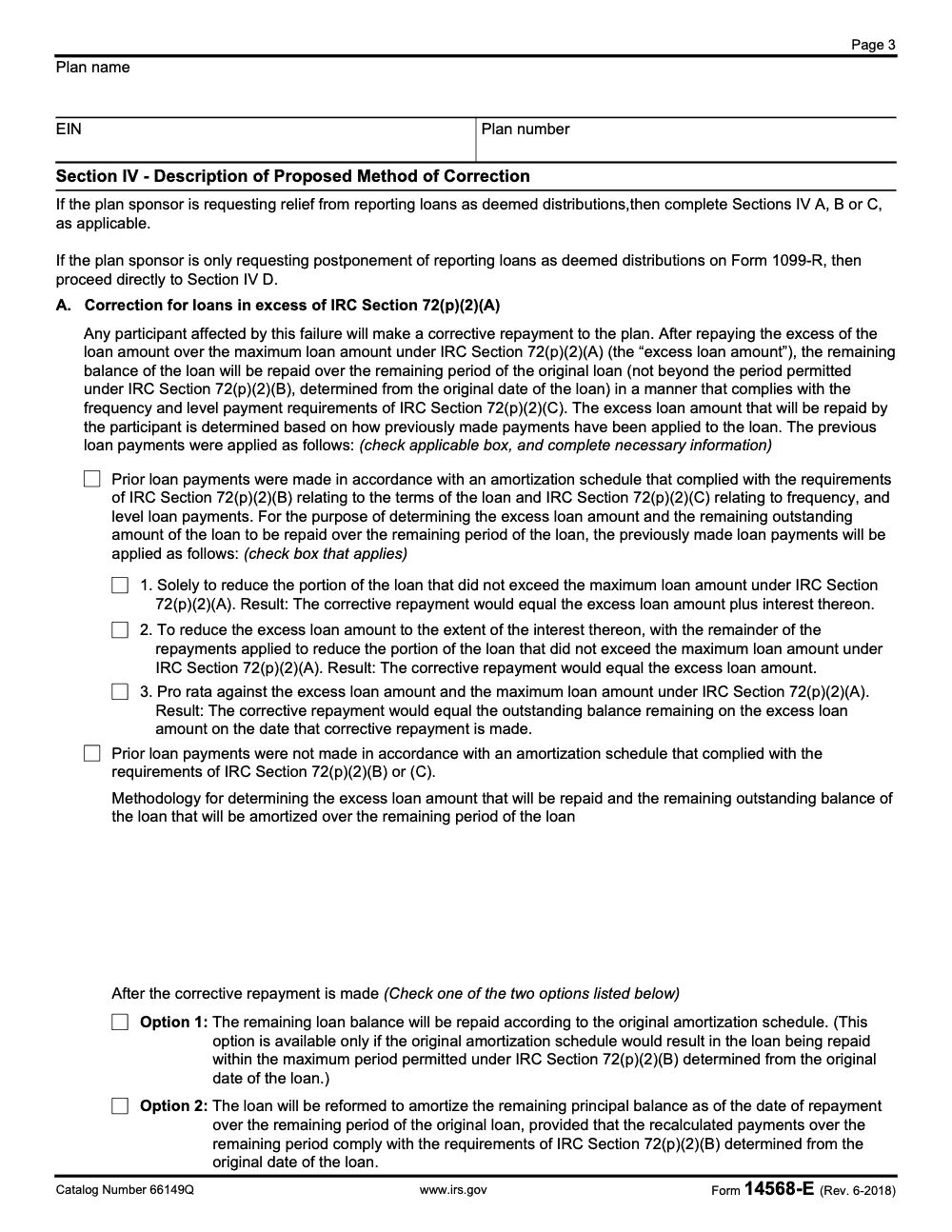
Section IV is where you lay out the fix, and Schedule 5 gives you structured correction language.
Here’s what the form covers for correction approaches:
- Excess loans: participant repays the excess, and the remaining balance is repaid over a compliant schedule
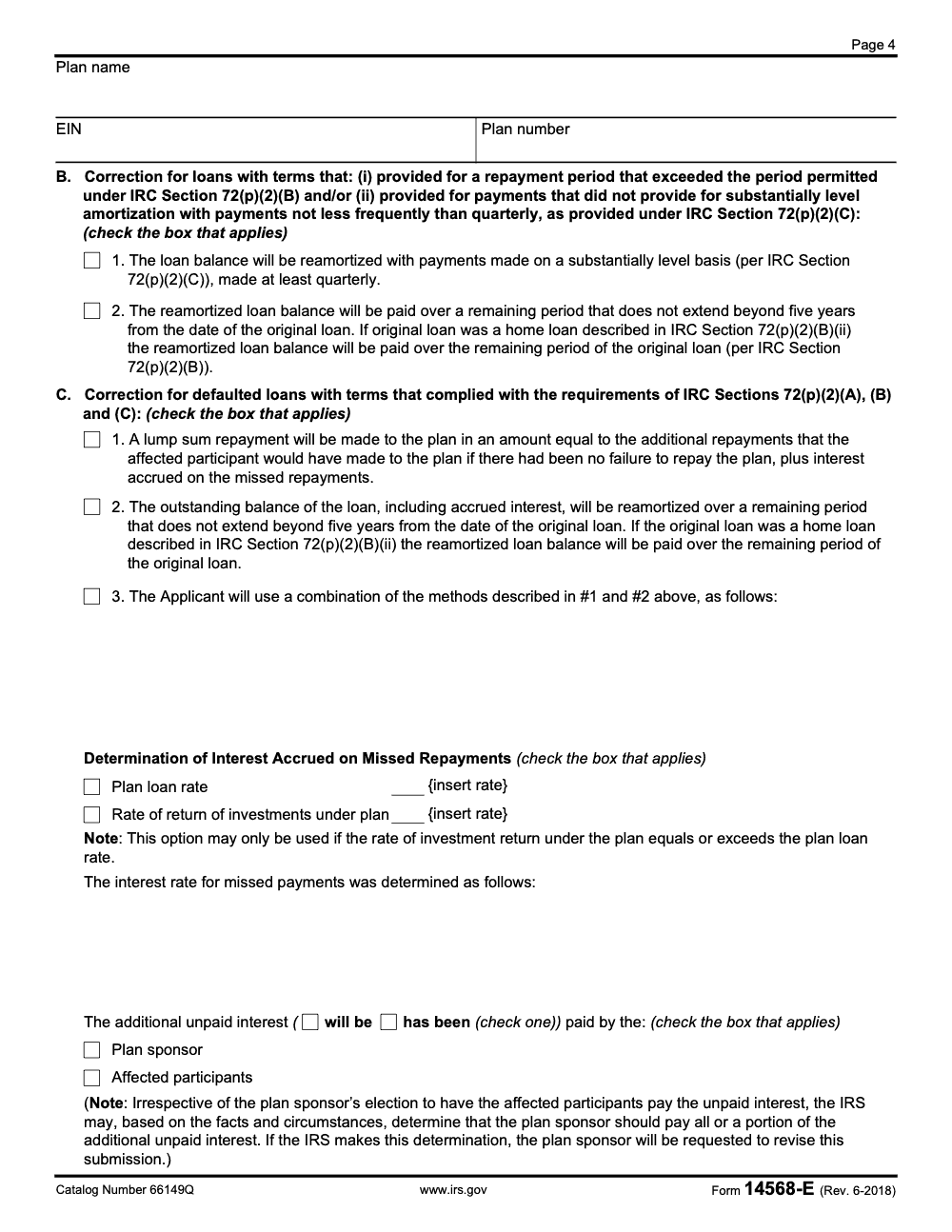
- Bad terms or amortization: reamortize so payments are substantially level and meet frequency rules
- Defaults: lump-sum catch-up or reamortization, plus how you calculate missed-interest
- Deemed distributions: proposal to report in year of correction (with required withholding paid, when applicable)
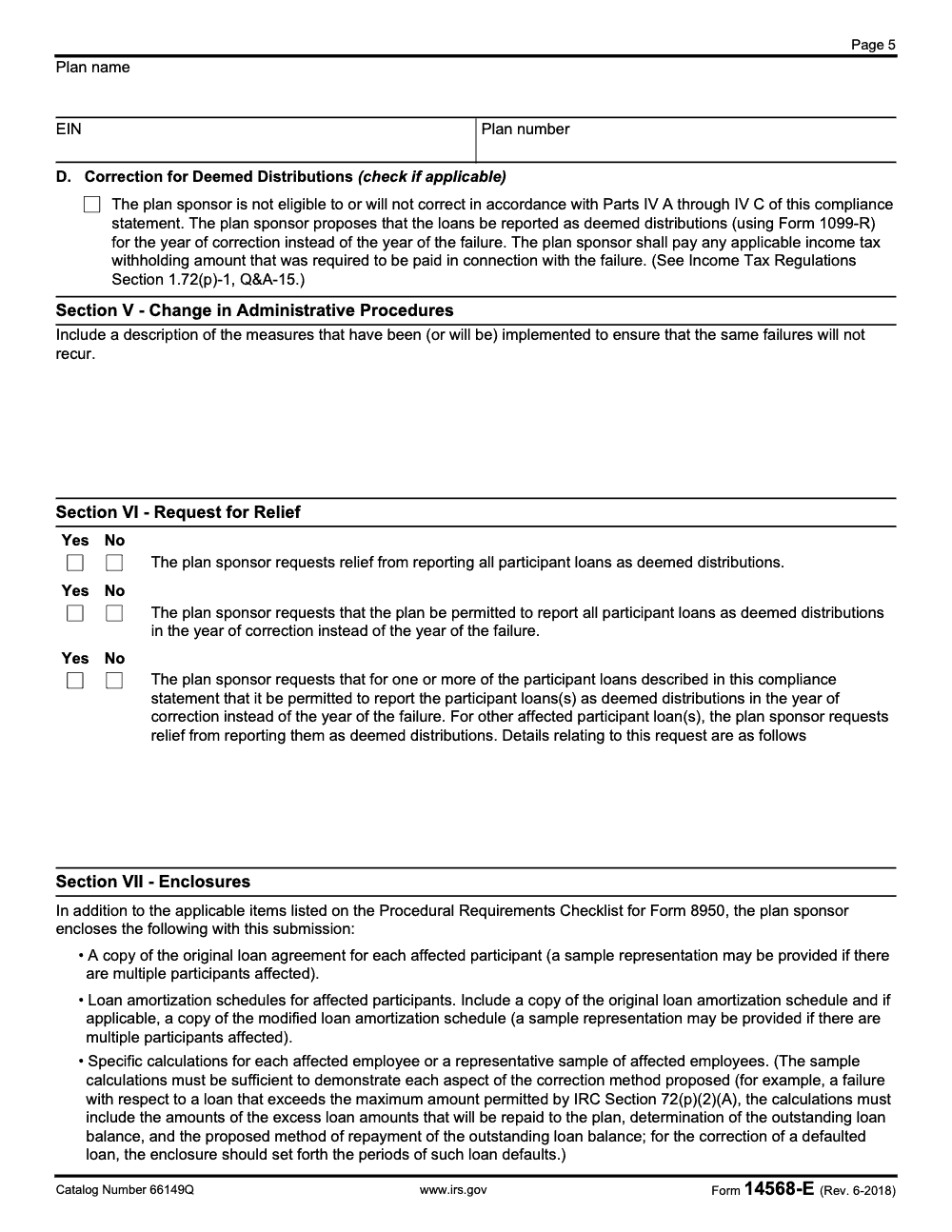
Step 5: Document prevention controls (Section V)
If you want fewer IRS questions, don’t say “we will improve procedures” and leave it there.
Give specifics like:
- A repayment monitoring report runs monthly
- Payroll/recordkeeper reconciliation happens quarterly
- A loan checklist is required before issuing funds
- A single owner is assigned to loan compliance
This “how we’ll prevent recurrence” section often makes the difference between a smooth review and a long back-and-forth.
Required Attachments Checklist (What IRS Reviewers Expect to See)
Schedule 5 lists enclosures right on the form. Build your package around those requirements so nothing gets buried.
Include:
- Original loan agreement for each affected participant (or a representative sample, if many)
- Original amortization schedule, plus any modified schedule after correction
- Specific calculations for each affected employee (or a representative sample that proves the method)
- Repayment history and payroll support that ties to “what actually happened”
A simple exhibit structure that keeps you sane
Use a naming system that’s boring and consistent, for example:
- Exhibit A: Loan policy and procedures
- Exhibit B: Participant loan listing (masked identifiers)
- Exhibit C: Loan notes and amortization schedules
- Exhibit D: Payment history and payroll proof
- Exhibit E: Correction calculations and reamortization schedules
- Exhibit F: Prevention controls and monitoring plan
This is the same idea we preach in delivery operations work, consistent structure reduces review time. If your firm handles submissions like this at volume, it’s the exact kind of workflow discipline Accountably is built around. One mention is enough, the point is the method.
Common Mistakes That Delay VCP Approval (and How You Avoid Them)
These three checklists are copy-paste ready for your plan-correction SOP. Drop them into your VCP playbook so the next preparer is not rebuilding the wheel for every Schedule 5 file.
Pre-VCP Packet – Facts You Need Before Drafting Schedule 5
- Plan name, applicant EIN, and three-digit plan number for the header on every page and every attachment.
- Original loan agreement(s) and any modified amortization schedules for each affected participant.
- Date the participant received loan proceeds for each loan (NOT the agreement-signing date) – this anchors the IRC §72(p)(2)(B) five-year clock.
- Outstanding balance per loan, plus the highest aggregate outstanding balance during the prior 12 months for the §72(p)(2)(A) limit check.
- Whether any affected participant is a key employee under IRC §416(i)(1) or an owner-employee under IRC §401(c)(3).
- Plan loan interest rate and the plan investment-return rate for the failure period (Section IV.C may need both).
- Description of the administrative procedure that failed and the new control going into Section V.
Section I-IV Walkthrough – Failure Type to Correction Method
- Section I: tick every failure type that applies – A (excess loan), B (duration), C (amortization or frequency), D (default). A single loan can hit more than one box.
- If any affected participant is a key or owner employee, confirm the relief requested is limited to year-of-correction deemed-distribution reporting before continuing; broader relief routes back to a written attachment to Form 14568.
- Section IV.A: for §72(p)(2)(A) excess-loan failures, elect one of three payment-application methods (compliant portion only, interest-first then compliant, or pro rata). If prior payments were not made on a compliant schedule, supply your own methodology instead.
- Section IV.A Option 1 (continue original amortization) is available only if continuing it would still satisfy §72(p)(2)(B) measured from the original loan-proceeds date. Otherwise use Option 2 (reamortize).
- Section IV.B: for noncompliant terms, reamortize with substantially level payments made at least quarterly and clear the balance within five years of the original loan date (longer for principal-residence loans under §72(p)(2)(B)(ii)).
- Section IV.C: pick lump-sum, reamortization, or a combination. Use the plan loan rate for interest on missed payments – the investment-return rate is permitted only if it equals or exceeds the plan loan rate.
- Section IV.D fallback: when reformation is not pursued, report the loan as a deemed distribution on Form 1099-R for the year of correction and still pay the income-tax withholding that was required at the time of the failure (per Treas. Reg. §1.72(p)-1, Q&A-15).
Section VII Enclosures – What IRS Reviewers Expect to See
- The signed Form 8950 Procedural Requirements Checklist.
- Original loan agreement(s) – attach a representative sample if the affected population is large.
- Original amortization schedules AND any modified schedules used in the proposed correction.
- Per-participant calculations showing the excess loan amount, outstanding balance, and repayment method (for defaults, the periods of default and the interest computation).
- Plan name, EIN, and plan number repeated on every attachment to prevent misfiling during review.
- Section V administrative-procedures narrative describing the corrective controls (mandatory, not optional commentary).
- Section VI relief selections – one Yes or No on each of the three relief options – signed by the plan sponsor.
14568-E vs Other Model VCP Schedules (A–I): How to Choose the Right One
You use Form 14568-E (Schedule 5) when you’re correcting plan loan failures and you plan to use the loan correction approaches described in Schedule 5. The IRS keeps all the model documents together, and it’s worth confirming you’re not accidentally forcing a loan problem into the wrong schedule.
Here’s a quick comparison to make that decision easier.
| Issue you’re correcting | Use this schedule | Why |
| Loan exceeds limit, bad term, bad amortization, or default | 14568-E (Schedule 5) | It’s designed specifically around IRC §72(p)(2) loan failures. |
| 403(b) plan document failures | 14568-A | Different failure category (document-based). |
| Nonamender failures for 401(a) plans | 14568-B | Focused on amendment failures, not loan administration. |
| Excess deferrals over §402(g) limit | 14568-G | Not loan-related. |
| RMD failures | 14568-H | Not loan-related. |
If you’re unsure, start with the IRS model forms page and the EPCRS guidance it points you to, then match the failure type before you write anything.
A Practical “Do This First” Workflow (Especially Helpful for CPA and Admin Teams)
Before you write your narrative or fill checkboxes, do these three things.
- Build the participant loan list
- Loan origination date, original principal, outstanding balance
- Failure date and failure type
- What correction method applies
- Prove the story with documents
- Note, amortization schedule(s), and payment history that ties out
- Payroll evidence for missed deductions and catch-up
- Decide what your “prevention controls” really are
- Who runs monitoring, how often, and what report is used
- What happens when a payment is missed for one cycle
This is where “delivery” becomes the ceiling or the advantage. When your workflow is tight, the compliance work stops feeling like a fire drill.
Conclusion
Form 14568-E is straightforward on paper. In real life, it’s only straightforward when your documentation, calculations, and review process are disciplined.
If you keep the narrative tight, match every claim to an exhibit, and clearly show both the correction and the prevention controls, you give the IRS what they need in a format they already recognize. That’s how you protect the plan, reduce the risk of deemed distributions showing up in the wrong year, and stop the submission from dragging on longer than it should.
Reusable Checklists
Plan-loan failures rarely surface on a tidy schedule. They show up during 5500 prep, a mid-year plan audit, or a recordkeeper migration – and the IRC §72(p)(2)(B) five-year clock keeps running from the original loan-proceeds date regardless of when the failure is discovered (per Form 14568-E, Rev. 6-2018). That mismatch – delivery pressure on one side, a five-year statutory window on the other – is what stalls so many VCP submissions before they reach a reviewable state.
The fix is sequencing. Most teams treat Schedule 5 as a writing task; it is a calculation task with a writing wrapper. If the per-participant exhibits, Section IV election rationales, and Section V controls are built first, the Sections I, VI, and VII selections fill themselves.
- Pin the original loan-proceeds date for every affected participant before touching Section I – not the agreement-signing date and not the plan-approval date (per Treas. Reg. §1.72(p)-1).
- Build per-loan exhibits that tie out to Section IV before any box is ticked: excess-loan exhibits show which of the three §72(p)(2)(A) payment-application methods was elected; defaulted-loan exhibits show interest computed at the plan loan rate (unless the investment-return rate equals or exceeds it).
- Screen for key-employee (IRC §416(i)(1)) and owner-employee (IRC §401(c)(3)) status in Section II.B before drafting anything else – broader relief disqualifies the streamlined Schedule 5 path and routes back to a Form 14568 attachment.
- Treat Section V administrative procedures as a required deliverable: describe the specific controls preventing recurrence, including payroll-integration changes and a quarterly amortization audit cadence.
- Repeat the plan name, EIN, and three-digit plan number on every attachment and every exhibit page so a reviewer cannot misfile a calculation mid-review.
That kind of pre-work – calculations first, narrative second, header discipline throughout – is what our offshore tax delivery teams run on every VCP packet before a single Schedule 5 cell is typed. It shortens the IRS review and keeps the year-of-correction relief on the table.
Keep 14568-E Season From Stalling
VCP submissions don't have a recurring filing season; they surface in waves whenever a plan-loan exception turns up during a year-end review, an IRS exam, or a sponsor's internal audit. The pressure point on Schedule 5 is packet quality on a tight clock – the year-of-correction relief under Section IV.D is only available if the correction is completed before the IRC §72(p)(2)(B) maximum repayment period has run, measured from the date the participant received the loan proceeds. Per Form 14568-E (Rev. 6-2018), as published on IRS.gov, the form spans seven numbered sections and four discrete failure types under IRC §72(p)(2).
The slowdown is rarely the IRC analysis. It's the assembly: identifying which of the four Section I failure types (excess loan, duration, amortization, or default) actually applies to each affected loan; picking among the three payment-application methods for an excess-loan correction; and producing the three categories of enclosures Section VII expressly requires – the loan agreement(s), original and modified amortization schedules, and per-participant calculations. Skip one, and the IRS pushes the packet back for supplementation while the 5-year correction window keeps ticking.
- Map every affected loan to one of the four Section I failure types before drafting. Defaults (Type D) get Section IV.C corrections, not Section IV.B reamortization, and a loan with compliant terms but missed payments should never be classified as a 72(p)(2)(B) or (C) terms failure.
- Pre-compute corrective repayments before electing a Section IV.A option. Option 1 (continue the original amortization schedule) is only available if continuing it would still close the loan within the 72(p)(2)(B) period measured from the proceeds-receipt date; otherwise Option 2 (reamortize) is the mandatory path.
- When key-employee or owner-employee participants are in scope, screen Section II.B first and confine Section VI to year-of-correction deemed-distribution relief. Broader relief requires a separate written attachment to Form 14568, not Schedule 5.
- Build the Section VII enclosure binder in parallel with the drafting work: original loan agreement(s) (or a representative sample), original and modified amortization schedules, and sample calculations showing the excess amount, outstanding balance, repayment method, and any periods of default.
- Repeat the plan name, applicant's EIN, and three-digit plan number on every page of the compliance statement and every attachment so a reviewer cannot misfile a calculation mid-review.
That assembly discipline – mapping failures, sequencing the correction elections, and pre-staging the Section VII binder before a single cell is typed – is what our tax outsourcing teams handle on every VCP packet. The reviewer reads a clean story, the year-of-correction relief stays on the table, and the sponsor's internal clock stops bleeding into discovery.
FAQs
Form 14568-E (Schedule 5) is used in a VCP submission to correct plan loan failures under IRC §72(p)(2) for qualified plans and 403(b) plans. It helps you document the failure type, correction method, and prevention steps using an IRS standard format.
Yes. The IRS PDF for Form 14568-E shows Form 14568-E (Rev. 6-2018) and “June 2018” on the document itself.
No. Form 8950 and the VCP submission documents are filed electronically through Pay.gov, and the user fee is paid through Pay.gov as part of that process. Paper submissions generally aren’t accepted for Form 8950.
Form 8950 is the actual VCP application. Form 8951 is used to make an additional user fee payment on an open VCP submission when needed.
The big ones are the loan agreement(s), amortization schedules (original and modified if applicable), and calculations that show the correction works. Schedule 5 also expects enough supporting documentation to prove the facts and the correction method.
Other forms this guide names
- Form 8950: Complete VCP Filing Guide on Pay.gov
- Form 14568: VCP Compliance Statement Guide 2025
- Form 8951: VCP User Fee for EPCRS Submissions
Summarize this article with AI
About this guide
Accountably helps US CPA, EA, and accounting firms hire trained accountants and tax preparers in India.
About us Reviewed byJugal Thacker, CPAFounder and CEO at Accountably
A US-licensed CPA with 7+ years inside US firms – PwC, a real-estate tax practice, then a full-service firm, rising from reviewer to manager to advisory. This article was reviewed against current IRS guidance for the 2025 tax year and updated for filers preparing late returns, amendments, and 2026 estimates.
View profile →How we research, review, and update this guide
Every Accountably guide is researched against primary IRS sources, reviewed by a U.S. CPA, and refreshed as guidance evolves. Read our Editorial Guidelines to see how we source, fact-check, and update our content.




