
Summarize this article with AI
In Brief
Form 14568-F is the IRS Model VCP Compliance Statement, Schedule 6 (Rev. 3-2020), used only to correct employer eligibility failures in 401(k) and 403(b) plans where the sponsor was never eligible to maintain that plan type (per the form instructions and the current EPCRS Revenue Procedure, Rev. Proc. 2021-30 as updated for 2025). You file it as part of a complete VCP submission on Pay.gov with Form 8950, and all contributions under the plan must have ceased no later than the date the VCP submission is filed.
Sometimes the failure is not a missed amendment or a math error; the sponsor was never eligible to maintain that plan type in the first place. Form 14568-F, Schedule 6 of the Model VCP Compliance Statement, revision 3-2020, exists for that employer eligibility failure in 401(k) and 403(b) plans, and contributions under the plan must have ceased no later than the date the VCP submission is filed.
You use the IRS model format without changing the language or layout, and you file the application on Pay.gov with Form 8950, with Form 8951 reserved for additional payments on an open case. The attached PDF carries Form 14568, the relevant schedules including 14568-F, and the narratives and exhibits in the order the IRS specifies, kept under 15 MB. One date worth remembering: anonymous VCP filings ended on January 1, 2022, and a complete submission typically takes about four to six months.
Key Takeaways
- Form 14568-F is the IRS Model VCP Compliance Statement, Schedule 6, for employer eligibility failures in 401(k) and 403(b) plans, and you must use the IRS model format. Do not change the language or layout.
- File your VCP application electronically on Pay.gov using Form 8950, attach your PDF package, and pay the fee there. If the fee later needs an adjustment on an open case, Pay.gov uses Form 8951 for additional payments, not for the initial filing.
- The attached PDF should include Form 14568, the relevant 14568 schedules like 14568-F, and all narratives and exhibits, in the order the IRS specifies. Keep the combined file under 15 MB or fax overflow items with the Pay.gov Tracking ID.
- EPCRS remains governed by Rev. Proc. 2021-30, and the IRS continues to promote using the model 14568 series. Anonymous VCP filings ended on January 1, 2022, although you can request an anonymous pre-submission conference.
- Typical processing time for a complete VCP submission is about four to six months. Track status using your Pay.gov Tracking ID, the IRS control number for your case.
What Form 14568-F is, and when you should use it
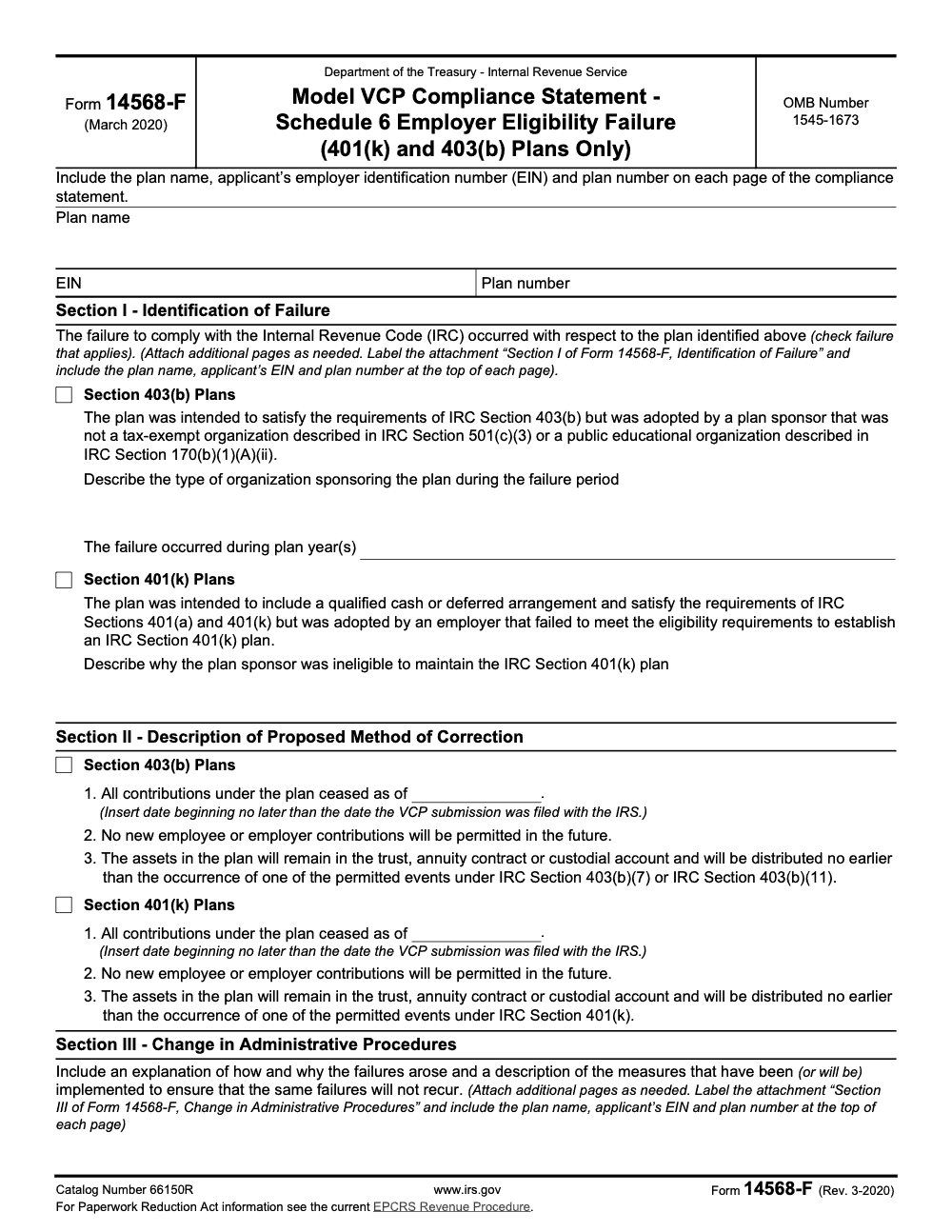
Form 14568-F, Revision 3-2020, is Schedule 6 of the IRS model VCP compliance statement. It exists for one narrow mission, to correct employer eligibility failures in 401(k) and 403(b) plans. In other words, the sponsor did not meet the statutory criteria to maintain the plan. The schedule spells out the IRS-prescribed correction, so your write-up should follow the schedule rather than offer a custom cure.
You will pair 14568-F with the base Model Compliance Statement on Form 14568, plus narrative attachments that describe the facts, the correction, how you will locate former employees, and what you will change operationally so this does not recur. The IRS is clear, Schedule 6 must accompany the base Form 14568 as part of a complete VCP submission, and you may not modify the model forms.
Which plans and which failures qualify
Schedule 6 applies only to 401(k) and 403(b) plans. Do not use it for defined benefit plans, SEPs, SIMPLE IRAs, or SARSEPs. The form itself frames two categories, a 403(b) sponsored by a non 501(c)(3) or non public education organization, and a 401(k) adopted by an employer that did not meet the eligibility requirements to establish a 401(k). If that is your fact pattern, you are in the right place.
Common real world triggers include mergers where the successor’s status was never verified, a misidentified plan sponsor in the adoption documents, or multi-entity groups where controlled group or affiliated service group rules were never analyzed, so the true employer was not the entity named on the plan. The fix runs through 14568-F’s correction method, not a homegrown alternative.
How to file your VCP package in 2025 without backtracking
You no longer mail anything to open a VCP case. You sign in to Pay.gov, complete Form 8950 online, attach one consolidated PDF that contains your 14568 series forms and all exhibits, and pay the user fee. The Pay.gov receipt shows a Tracking ID, and the IRS uses that as your control number. If your PDF is larger than 15 MB, fax the overflow to the IRS with the Tracking ID on the cover.
The IRS’s own HOW-TO pages and submission kits echo the same instructions, including the 4 to 6 month expectation for a complete submission. If you are missing items or your package is substantially incomplete, the case may be returned, which adds weeks. Build it right, the first time.
What to include, and what not to include
- Include Form 14568 and, for employer eligibility failures, Schedule 6 on Form 14568-F, plus your narratives and supporting documents in the order the IRS wants.
- Include Form 2848 if you want a representative to act for you, or Form 8821 if you only want someone copied on correspondence.
- Do not attach an old paper Form 8951. Initial user fees are paid through Pay.gov when you submit Form 8950. If you owe an additional fee for an open case later, Pay.gov provides a special Form 8951 for that purpose only.
A quick note on fees and the governing guidance
The user fee is determined by the current Employee Plans fee schedule referenced in the 8950 instructions. The EPCRS framework itself continues to be set by Rev. Proc. 2021-30, with IRS web guidance reinforcing model form usage and the end of anonymous VCP submissions as of January 1, 2022. Always check the IRS EP pages for any fee or procedural updates before you click submit.
When to choose Schedule 6, and the scenarios we see most often
You should reach for Schedule 6 when the plan sponsor was never eligible to sponsor the 401(k) or 403(b) plan in the first place. Two patterns are common.
- 403(b) plans, adopted by organizations that are neither 501(c)(3) charities nor public educational organizations. That includes well meaning entities that believed their tax status qualified but did not, for example a 501(c)(4) social welfare organization or a nonprofit that is not 501(c)(3).
- 401(k) plans, adopted by employers that did not meet the eligibility rules for setting up a 401(k) (most commonly state or local governmental units, which generally cannot sponsor a 401(k) plan absent a grandfathered arrangement adopted before May 6, 1986). Think of cases where an entity name changed, a shell company was used, or the employer on the documents was not the real common law employer.
Edge cases to avoid
If you are dealing with loans, missed RMDs, or excess deferrals, different schedules apply, not Schedule 6. For SIMPLE IRAs, the IRS has a separate Schedule 4 and even a step by step VCP kit. Staying in your lane matters for speed and acceptance.
Build a clean, complete VCP package
Here is a practical checklist our team uses when we assemble Schedule 6 submissions during peak season. It keeps partners out of review loops and protects turnarounds.
Packaging checklist
- One PDF up to 15 MB that includes, in order, Form 14568, Form 14568-F, required narratives for Sections I through III, plan documents, adoption and amendment pages, and any calculations or participant listings that support your statements.
- Pay.gov Form 8950 completed and electronically signed by an authorized person, with the fee paid and the Pay.gov Tracking ID saved to your case file.
- If a representative will act for you, include Form 2848. If you only want someone copied on correspondence, include Form 8821.
- Overflow documents faxed to the IRS with the EIN, plan name, and Pay.gov Tracking ID on the cover, if your combined PDF would exceed 15 MB.
- Internal sign off that confirms you have not edited any IRS model language or formatting on the 14568 series forms.
2848 vs 8821, what each one does
Use the power of attorney when someone needs to represent you and speak for the plan sponsor. Use the information authorization when you just need the IRS to share correspondence with a third party.
| Form | What it allows | Who signs | CAF number needed at filing? |
| Form 2848, Power of Attorney | Representation before the IRS for the matters listed | Taxpayer, and representative accepts | If no CAF yet, enter “None,” the IRS issues one and you use it going forward |
| Form 8821, Tax Information Authorization | Information sharing only, no representation | Taxpayer | Not required to already have one when filing |
The IRS instructions confirm how to enter CAF details on 2848 if none exists, and the IRS’s CAF pages explain how CAF numbers are assigned the first time you file a third party authorization.
What happens after you submit
After a completeness check, the IRS assigns your submission to a specialist. On approval, the IRS countersigns your model compliance statement, meaning the version of Form 14568, with your Schedule 6 and narratives incorporated, becomes the official compliance statement. Expect roughly four to six months from submission to receipt, and use the Pay.gov Tracking ID if you need to call for status. Keep the signed statement and proof of corrections in your permanent file.
Avoid the three delays that bite during busy season
- Unlabeled exhibits or mismatched plan numbers across forms.
- A PDF that exceeds 15 MB with no follow up fax, which stalls the case file.
- Editing the model form text or formatting to “tidy up,” which risks a return.
E-E-A-T in action, how we keep partner time out of review
In my experience supporting CPA firms that are slammed from January through April, the fastest wins come from discipline, not heroics. We use a two person prep and quality check pattern for VCP packages, a standardized naming convention for the entire 14568 set, and a standing rule that every narrative cross references the document title and page number where evidence lives. That simple structure reduces back and forth, and it keeps partner time focused on the judgment calls only.
Using Schedule 6 step by step for 401(k) and 403(b) cases
Schedule 6 tells you exactly what the correction looks like. For both 403(b) and 401(k) cases, you cease contributions as of a date no later than the VCP filing date, you do not permit new contributions, and plan assets remain in the existing trust, annuity, or custodial account until a permitted distribution event occurs under 403(b) or 401(k), as applicable. Your narrative then explains how and why the failure arose and what will change operationally so it does not happen again.
Map your facts to the form
- Section I, identify the failure precisely, including the years affected and the sponsor’s status.
- Section II, adopt the prescribed correction steps for your plan type and insert the correct cease contribution date.
- Section III, document administrative changes, including governance, checks, and evidence you will retain.
Internal control upgrades the IRS actually appreciates
You do not need a novel control library. You need three practical safeguards that auditors and IRS reviewers can follow.
- Eligibility verification, a one page checklist for new or successor sponsors, signed by counsel or the plan’s internal admin, before any adoption or restatement.
- Controlled group review, a simple worksheet that documents the analysis and the conclusion, with the people who ran the test and the date.
- Naming and filing discipline, a standard for workpaper titles and version control tied to the plan name, EIN, and plan number.
These sound basic because they are, and they cut the risk of repeat submissions.
Access the right form, and skip third party pitfalls
Pull Form 14568-F directly from IRS.gov so you are certain you have Rev. 3-2020 in the official format. If a vendor site is down or provides an editable version, do not substitute it for the IRS PDF. The IRS hosts the current 14568-F and the full set of fill in VCP forms on its retirement plan pages.
If your browser balks at the PDF, clear cache, try another browser, and retry. If the IRS web pages are temporarily unavailable, wait and try again rather than using altered templates.
Final word, and where Accountably helps
You fix employer eligibility failures by following the model. Use the IRS schedule as written, file on Pay.gov with the right attachments, and give reviewers exactly what they need. If your team is buried in production and reviews are piling up, we can help you standardize the package, keep partners out of the weeds, and protect deadlines without losing control of quality or security. When you are ready, we will work inside your workflow and tools, with documented SOPs, named workpapers, and layered reviews that make VCP submissions repeatable.
Common Mistakes We See Every Season
The same handful of errors push Schedule 6 cases into return-for-resubmission queues every season. Most come from forcing the form to do something it was not designed to do, or from skipping the page-identifier and packaging mechanics that the IRS reviews first.
Reusable Checklists
These checklists are copy-paste ready for your firm SOP. Drop them into the engagement template, tie them to the Pay.gov Tracking ID, and reuse them across every Schedule 6 case so the same eligibility traps do not resurface mid-review.
Pre-submission eligibility scan
- Confirm the failure is an employer eligibility failure, not an operational error, by comparing the fact pattern to the Form 14568-F instructions.
- For 403(b) cases, verify sponsor status under IRC Section 501(c)(3) or IRC Section 170(b)(1)(A)(ii), and document the year status was lost or never established.
- For 401(k) cases, document why the sponsor did not meet IRC Section 401(a) and 401(k) eligibility (for example, a state or local governmental unit without a grandfathered plan).
- List every plan year during which the failure occurred for Section I of the form.
- Run a controlled-group and affiliated-service-group analysis to confirm the true common-law employer and rule out a misnamed sponsor.
- Rule out an alternate schedule (Schedule 4 for SIMPLE IRA issues, other 14568 schedules for operational failures) before drafting Section II.
- Save the analysis as the source document for your Section I narrative.
VCP package assembly
- Form 14568 (base Model VCP Compliance Statement), unedited.
- Form 14568-F (Schedule 6), unedited, with the correct failure-type checkbox marked in Section I.
- Section II correction method box matched to the plan type, with the cease-contribution date stated and asset-retention language kept verbatim.
- Section III narrative explaining how and why the failure arose and the administrative procedures that will prevent recurrence.
- Plan name, applicant's EIN, and plan number on every page, including all attachments.
- Continuation pages labeled "Section I of Form 14568-F, Identification of Failure" or "Section III of Form 14568-F, Change in Administrative Procedures".
- Form 8950 completed on Pay.gov with the user fee paid and Pay.gov Tracking ID saved to the engagement file.
- Form 2848 attached if a representative will act, or Form 8821 if you only need someone copied on correspondence.
- One consolidated PDF under 15 MB; overflow exhibits faxed to the IRS with the Tracking ID, plan name, and EIN on the cover sheet.
Post-filing tracking
- Save the Pay.gov Tracking ID as the IRS control number in the engagement file.
- Calendar a 4 to 6 month follow-up window per the IRS submission timing expectation.
- Confirm payroll is frozen as of the cease-contribution date stated in Section II, with no new employee or employer contributions posting after that date.
- Hold plan assets in the existing trust, annuity contract, or custodial account; restrict distributions to permitted events under IRC Section 401(k), 403(b)(7), or 403(b)(11).
- Retain documentation of the Section III administrative changes inside the plan's permanent procedures binder.
- File the IRS-countersigned compliance statement and proof of corrections in the permanent client file once the case is closed.
Keep 14568-F Season From Stalling
VCP work does not run on a clean April or January cycle the way 1040 or 1099-NEC season does, but Schedule 6 cases pile up just as quickly. Employer eligibility failures often surface during plan audits, merger diligence, or restatement cycles, which means submissions land in waves on top of normal compliance deadlines. Per the current EPCRS Revenue Procedure (Rev. Proc. 2021-30 as updated for 2025), the IRS expects a complete VCP package on Pay.gov in one consolidated PDF under 15 MB, and the form itself prescribes a fixed correction method in Section II that does not bend for partial drafts.
The fix is structure, not heroics. Treat every Schedule 6 the same way regardless of when it lands: a fixed package order, named narratives mapped to the form's three sections, and a quality check tied to the page-identifier rule (plan name, applicant's EIN, plan number on every page).
- Lock the Section I failure-identification narrative to a single template that lists affected plan years, sponsor status, and the controlling IRC citation (Section 401(a) and 401(k), or Section 501(c)(3) and 170(b)(1)(A)(ii)).
- Standardize Section II language so the cease-contribution date and asset-retention rule never drift away from the IRS model text on Form 14568-F (Rev. 3-2020).
- Build a Section III procedural-change library covering eligibility verification, controlled-group review, and plan-document version control, reusable across clients with the same root cause.
- Run a two-person quality check before the Pay.gov upload: page identifiers on every page, correct failure-type and correction-method checkboxes, attached Form 2848 or Form 8821 if applicable, and combined PDF size under 15 MB.
- Capture the Pay.gov Tracking ID, user fee paid, and cease-contribution date in a single engagement summary so partners can answer status questions without re-reading the package.
When VCP volume crowds out partner review time, structured offshore execution lets package work continue without diluting the judgment calls. We integrate trained offshore teams into your Schedule 6 workflow with documented SOPs, named workpapers, and layered reviews that fit inside your existing engagement model.
FAQs
Use Form 14568-F (Schedule 6) only for an employer eligibility failure in a 401(k) or 403(b) plan, where the sponsor was never eligible to maintain that plan type. If you are correcting loans, missed RMDs, or excess deferrals, a different 14568 schedule applies. Schedule 6 is narrow on purpose, so staying in your lane speeds acceptance.
The form prescribes the correction, so you follow the model rather than design your own. For both 401(k) and 403(b) cases, all contributions cease as of a date no later than the VCP filing date, no new employee or employer contributions are permitted, and plan assets remain in the existing trust, annuity contract, or custodial account until a permitted distribution event occurs under IRC Section 403(b)(7) or 403(b)(11), as applicable.
No. Form 14568-F is part of the IRS model VCP compliance statement series, and you may not change the language or layout. Schedule 6 must accompany the base Form 14568 as part of a complete VCP submission, with the plan name, applicant EIN, and plan number on each page. Lock Section II to the IRS model text so the cease-contribution date and asset-retention rule never drift.
No. You open a VCP case on Pay.gov using Form 8950, you attach your package there, and you pay the initial user fee there. If, later, an additional user fee is owed on an open case, Pay.gov provides Form 8951 for that purpose.
Other forms this guide names
- Form 14568: VCP Compliance Statement Guide 2025
- Form 8950: Complete VCP Filing Guide on Pay.gov
- Form 8951: VCP User Fee for EPCRS Submissions
- Form 2848: Guide to Line 3, Filing, and Rules
- Form 8821: Tax Information Authorization
Summarize this article with AI
About this guide
Accountably helps US CPA, EA, and accounting firms hire trained accountants and tax preparers in India.
About us Reviewed byJugal Thacker, CPAFounder and CEO at Accountably
A US-licensed CPA with 7+ years inside US firms – PwC, a real-estate tax practice, then a full-service firm, rising from reviewer to manager to advisory. This article was reviewed against current IRS guidance for the 2025 tax year and updated for filers preparing late returns, amendments, and 2026 estimates.
View profile →How we research, review, and update this guide
Every Accountably guide is researched against primary IRS sources, reviewed by a U.S. CPA, and refreshed as guidance evolves. Read our Editorial Guidelines to see how we source, fact-check, and update our content.




