
Summarize this article with AI
In Brief
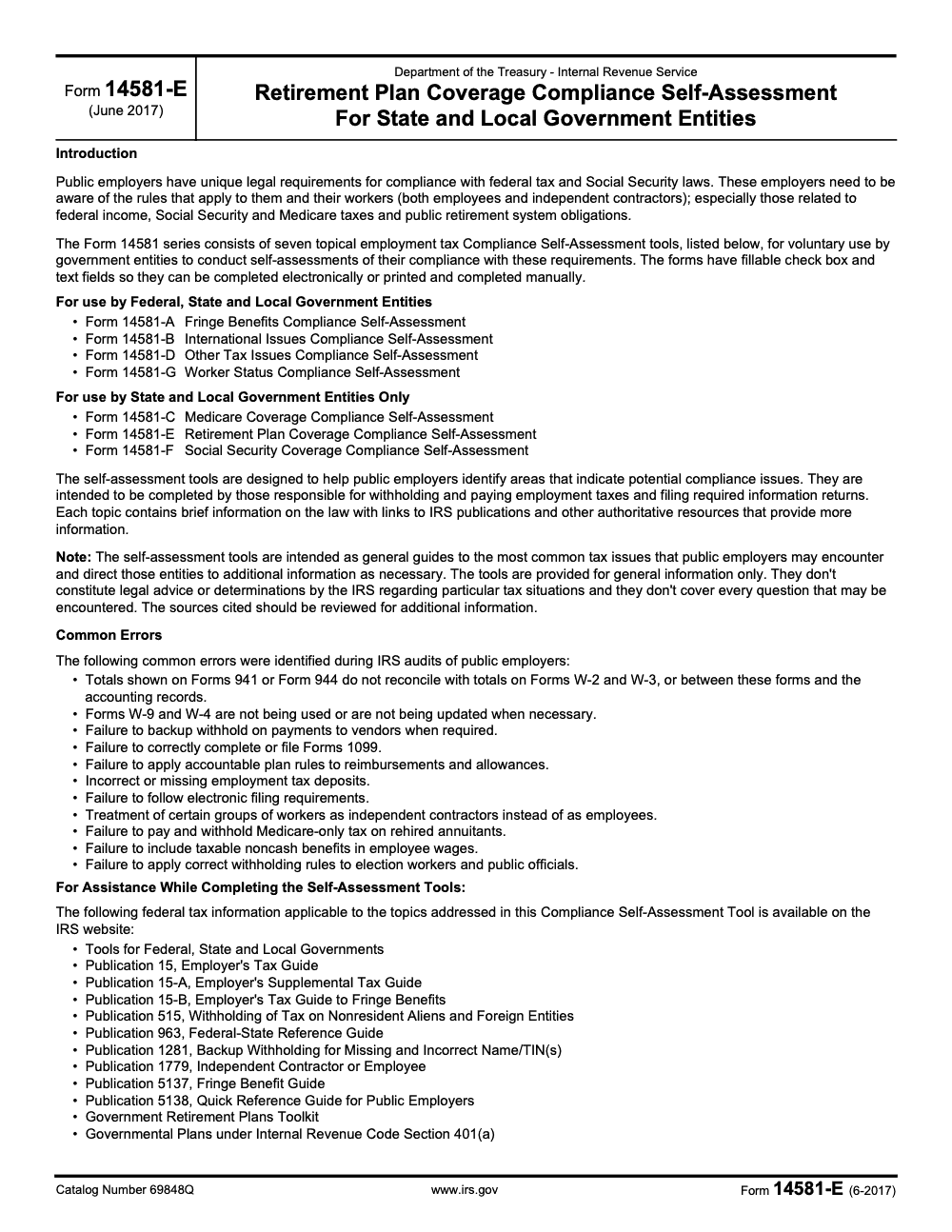
Form 14581-E is the IRS Retirement Plan Coverage Compliance Self-Assessment for State and Local Government Entities (Rev. June 2017, Catalog Number 69848Q). It is a voluntary three-page worksheet that public employers complete and keep, not a return filed with the IRS, and it works through three coverage questions while pointing to Publication 963, the Federal-State Reference Guide (Chapter 6), with no filing deadline and no penalty attached.
Form 14581-E is the IRS Retirement Plan Coverage Compliance Self-Assessment for state and local government entities. It is a voluntary three-page worksheet that public employers complete and keep, never a return filed with the IRS, and it works through three coverage questions while pointing to Publication 963, the Federal-State Reference Guide, Chapter 6.
One detail worth settling up front, because it confuses people: the PDF itself is the June 2017 revision, and that is still the current version in the IRS forms library. The page that lists the tool was reviewed in 2025, so the edition has not changed even though the listing has. There is no filing deadline and no penalty attached, so the practical move is to run it annually and after any major plan change, then save a dated copy with your evidence.
Key Takeaways
- Form 14581‑E is a three page, fillable IRS self‑assessment for state and local government retirement plan coverage. It is guidance for internal use, not a submission to the IRS.
- There are no deadlines or penalties tied to the form. Use it annually and after major changes to confirm eligibility, inclusion practices, and coverage thresholds.
- Ideal users include plan administrators, HR and payroll, finance or tax leads, and public sector advisors who support compliance.
- Download the official fillable PDF from irs.gov, complete it with your plan documents, payroll, and participant data, then save a dated copy with evidence for audit trails.
- The tool helps you spot coverage gaps early, align stakeholders, and document corrective actions before an audit.
What is IRS Form 14581‑E?
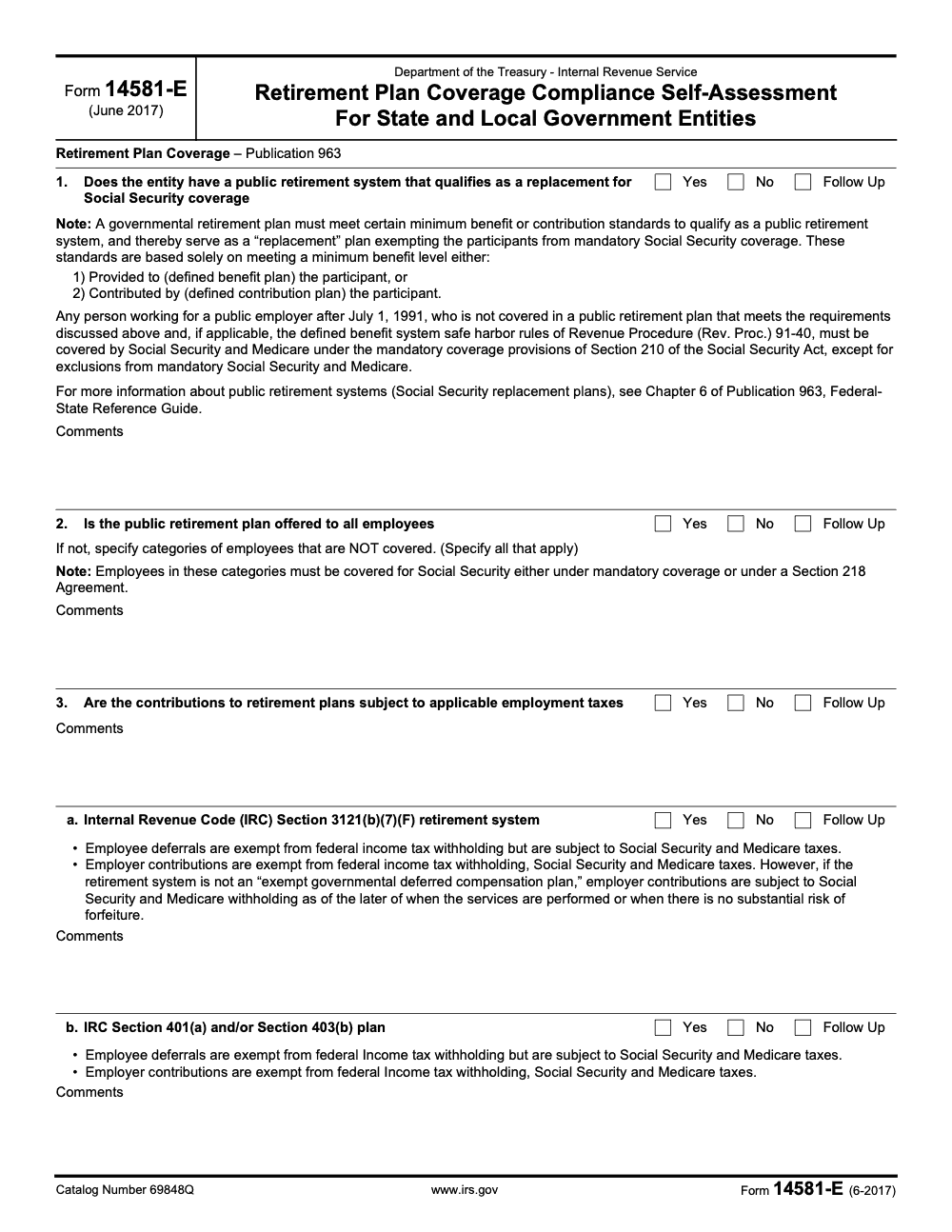
Form 14581‑E is titled, “Retirement Plan Coverage Compliance Self‑Assessment for State and Local Government Entities.” Think of it as a checklist with yes, no, or follow up boxes, plus space for notes. The questions walk you through coverage rules, treatment of different employee groups, and how contributions should be taxed. The form links out to IRS publications so you can confirm definitions while you answer.
Here are the essentials in plain English:
- It is a self‑assessment, not a return. You keep it with your records.
- It is meant for state and local government employers, not private companies or federal agencies.
- It focuses on coverage, for example whether your plan qualifies as a Social Security replacement plan (which only happens when it meets the minimum benefit or contribution standards, not simply because it is a governmental pension) and whether similarly situated employees are treated consistently.
- The IRS still groups this form with the other 14581 tools on its government employers page, which it reviewed in 2025.
Your goal with 14581‑E is simple, confirm who should be covered, show how you decided, and prove it with clean records.
Why this matters now
Coverage questions often surface when hiring patterns change, when part time or seasonal roles expand, or when you introduce a new plan option. Add payroll system changes and staff turnover, and you can see why small gaps appear. A short annual check keeps you from discovering those gaps during an audit window or when a worker challenges eligibility. The IRS designed this tool to help public employers spot issues early, with direct links to the right references.
Quick compliance snapshot
- You can download Form 14581‑E directly from irs.gov and complete it electronically. The file is fillable and printable.
- The IRS lists the 14581 series for government employers on its “Compliance self‑assessment tool available” page, last reviewed April 17, 2025.
- The forms index shows the entry for Form 14581‑E with the June 2017 edition, which remains current.
Practical tip, treat the completed form and your backup as part of your plan’s internal control evidence. It is a small investment of time that avoids bigger work later.
Who should use Form 14581‑E?
If you run or oversee a retirement plan for a state or local government entity, this form is for you. It is specifically designed for public employers to review plan coverage, with prompts that line up with IRS references for government plans. In practice, you will want a small working group, for example the plan administrator, an HR or payroll lead, and a finance or tax point person. If you use an external advisor, loop them in for the final review.
Eligible government entities
Use the form if you are any of the following and you maintain a retirement plan for employees:
- States, departments, agencies, and instrumentalities
- Counties, cities, towns, and special districts
- Public schools, colleges, and authorities that fall under state or local control
Private employers and federal agencies are out of scope for this specific tool. The 14581 suite covers multiple topics, but 14581‑E is targeted to state and local retirement plan coverage questions.
What you will confirm with the form:
- Whether your plan qualifies as a public retirement system that can replace Social Security coverage for certain employees
- Whether coverage is offered consistently to eligible employees, including part time, seasonal, and rehires
- How contributions are treated for federal income tax withholding, Social Security, and Medicare
Advisors and administrators, who does what
Most teams see the best results when they define roles up front, keep evidence current, and set one owner for the yearly check. Use this quick mapping to assign responsibilities.
| Role | Primary use of the form | Desired outcome |
| Plan administrator | Validate coverage decisions against plan terms and statutes | Fewer exceptions and cleaner eligibility calls |
| HR and payroll | Reconcile eligibility lists with payroll and hours data | Consistent treatment across job classes |
| Finance or tax lead | Confirm tax handling of contributions and withholdings | Fewer reporting errors and good audit footing |
| External advisor | Independent check and guidance on edge cases | Documented controls and remediation notes |
These roles map directly to how the IRS describes who should complete the tool, the people responsible for withholding and filing. Keep the circle small enough to move quickly, but wide enough to catch errors before they spread.
When I recommend you use it
- At least once a year, shortly after plan year end
- After any plan amendment that changes eligibility
- After payroll system conversions, vendor changes, or major reorganizations
- When the IRS updates guidance that affects coverage
I have seen small timing changes, for example onboarding seasonal workers two weeks earlier than last year, create eligibility patterns you would not expect. A short self‑assessment right after the change will save you hours later.
Form 14581‑E, key facts at a glance
- Format, three pages, fillable PDF, editable and printable for your records.
- Purpose, spot retirement plan coverage risks for state and local employers and link you to the right law and guidance.
- Status as of January 16, 2026, listed on the IRS government employer self‑assessment page reviewed April 17, 2025, and in the forms index with the June 2017 edition.
- Submission not required, you retain the form with your files.
- Best practice complete it annually and keep evidence side by side, for example your adoption agreement, amendments, and payroll reports.
Think of 14581‑E as a speed check for your plan. It is short, it is practical, and it points you to the exact place in the IRS references when you need more depth.
What you need before you start
A smooth review starts with the right files open on your screen. Get these ready first, then open the PDF.
- Plan documents, adoption agreement, summary plan description, and all amendments
- Payroll and census data for the assessment period, including hire dates, hours, wages, and job classes
- Lists of part time, seasonal, temporary, and rehired workers
- Any collective bargaining agreements that affect eligibility
- Prior self‑assessments and notes on past corrective actions
- Links to IRS references you rely on most, for example Publication 963 and your state statutes
I like to set up a simple folder with a naming convention and a log that lists who reviewed what, on what date, and where the support lives. That small step pays off when you need to show your process to an auditor.
Eligibility and scope, define your population
Before you tick a single box, define exactly which workers and plans are in scope. Align on the plan year, the EIN, and the plan names you are testing. Reconcile your participant list to payroll for the period, then check how you handled:
- Part time or seasonal roles
- Transfers between departments or entities
- Rehires within the year
- Employees covered by collective bargaining
For plans that intend to serve as Social Security replacement plans, confirm that your plan meets the minimum benefit or contribution standards the IRS references for a public retirement system. Publication 963 explains how this standard works for state and local employers and why it matters for mandatory Social Security coverage.
Red flag, any time similarly situated employees are treated differently without a documented reason, stop and document the variance before you move on.
Documents and access, give yourself a head start
Even well‑run teams stall when data is scattered. Centralize access for your working group, and add read‑only access for anyone who only needs to follow along. Include:
- Current plan documents and amendments
- Payroll detail covering the entire assessment period
- Prior year filings you may need to cross check
- A short contact list for quick questions with HR, payroll, and legal
If you work with an outside CPA or advisor, decide early who will write the summary of findings and who will own any corrective actions. The IRS built the 14581 series for people responsible for withholding, paying employment taxes, and filing information returns, so it is normal for HR, payroll, and tax to share the work.
Where to download the fillable PDF
Get the official file directly from the IRS. From the government employers self‑assessment page, select the link for Form 14581‑E, which opens the three page PDF. Save a local copy, then complete it in your secure environment. The file is fillable, so you can type your answers and notes, then print or save to your records.
- Verify that the link is on irs.gov before you download.
- Use a standard file name, for example “14581‑E_[Entity]_[YYYY‑MM‑DD].pdf.”
- Store the file with your support documents and restrict access to authorized staff.
As of January 16, 2026, the current PDF is the June 2017 edition. The IRS listing confirms the edition and the self‑assessment page remained current through April 17, 2025.
Complete Form 14581‑E, step by step
Save your copy first so your metadata reflects the right date and owner. Then work top to bottom.
| Step | What you do | Tips |
| 1 | Complete the header, entity name, EIN, plan name, and contact | Tie the form to the exact plan and plan year |
| 2 | Answer each yes, no, or follow up question | Keep your answers short and specific |
| 3 | Add notes with references to documents, for example “SPD §3.1” or “Payroll report 2025‑12‑31” | Cite the exact place a reviewer can verify |
| 4 | Flag potential issues, for example inconsistent coverage of part time roles | Add a short corrective action and the owner |
| 5 | Save, lock, and file with your supporting evidence | Keep a copy where auditors will expect to find it |
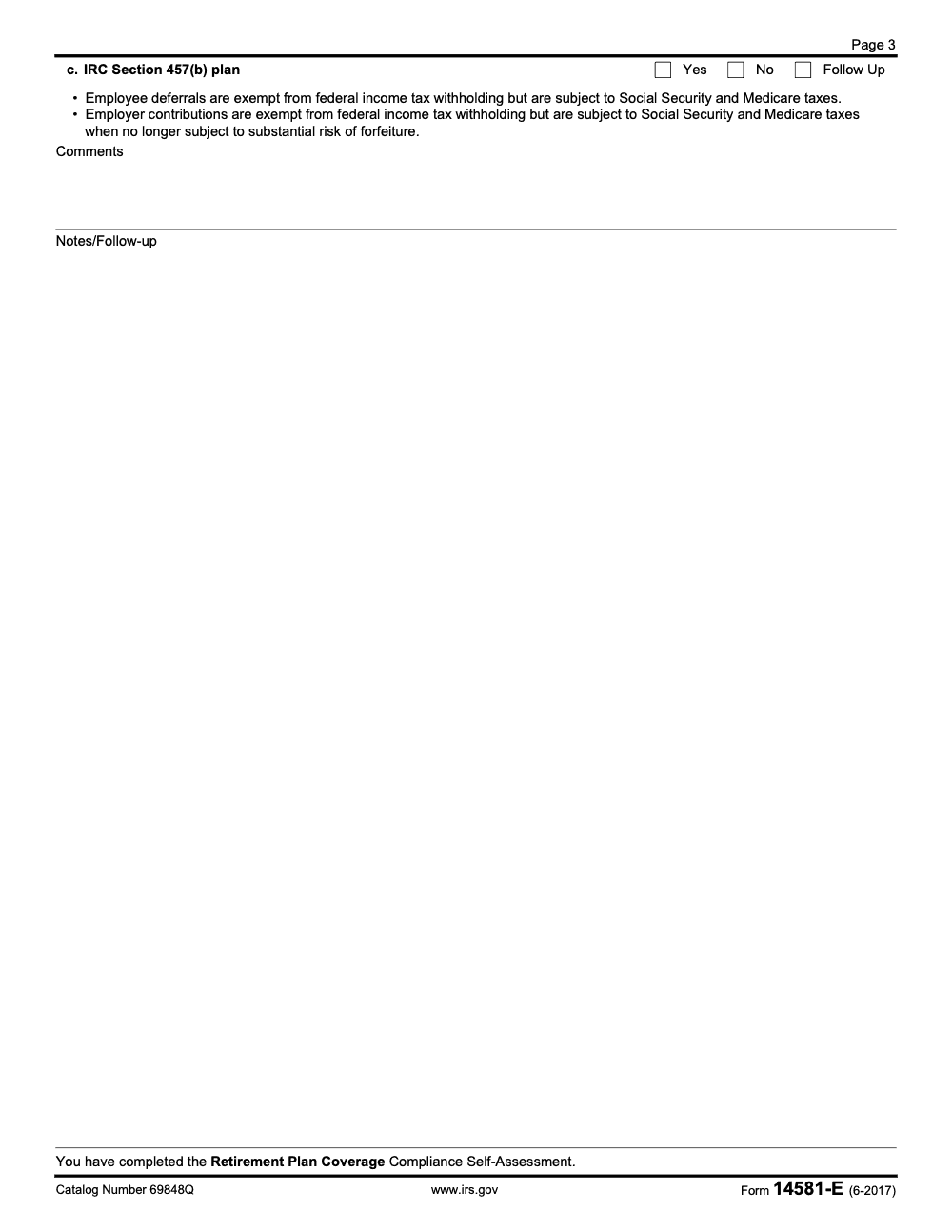
The questions center on three things, whether your plan qualifies as a public retirement system that can replace Social Security coverage, whether coverage is offered to all eligible employees, and how contributions are taxed for different plan types, for example 401(a), 403(b), and 457(b). The form includes short notes and points you to Publication 963 and other IRS resources for detail.
How the form exposes coverage risks
Here is what I see most in the field:
- Different treatment of similar part time roles in two departments, with no written exception
- Rehires coded as new hires, which resets eligibility timing by mistake
- Seasonal workers included in the wrong plan because job classes shifted mid year
- 457(b) contributions handled correctly for income tax but not for Social Security or Medicare at the right time
Form 14581‑E pushes you to check those exact fault lines and points to the right sections of IRS guidance when you need to confirm definitions. It is intentionally short so you can finish it and move on to fixes, not get stuck in a long essay.
Use a simple rule, if you cannot prove a decision with a document, you do not have a decision you can defend.
Example, part time coverage consistency
Say your parks department and your library both hire part time workers. One group enters the plan after 12 months, the other after 24. If the plan document allows both patterns, keep clear citations and a rationale. If not, you have a coverage inconsistency. Note it on the form, attach the citations, and assign a fix, for example a plan amendment or a change to onboarding procedures.
Example, 457(b) timing
A 457(b) employer contribution may be exempt from income tax withholding, but it can become subject to Social Security and Medicare when the substantial risk of forfeiture ends. If your payroll system did not handle that shift, you will see a timing gap. The form’s notes remind you to check this, then send you to the detailed reference.
When to complete Form 14581‑E each year
The most reliable pattern is to schedule the self‑assessment right after the plan year closes. That way you use final payroll and census data, not estimates.
Optimal annual timing
- Complete the review within 30 to 90 days after plan year end
- Reconcile late payroll adjustments before you sign off
- Put the task on your compliance calendar with named owners
If your plan runs on a calendar year, aim for January or February. If you use a different fiscal year, run the review as soon as the year closes. The key is to capture the full year’s eligibility and contribution activity in one clean pass.
Triggering events that deserve a fresh check
Do a quick 14581‑E review after events that change eligibility or the data you rely on:
- Plan amendments or bargaining agreements that change coverage
- Payroll system conversions and vendor changes
- Mergers or reorganizations that move employees between units
- Large hiring waves, new seasonal programs, or new job classes
- IRS guidance updates that affect governmental plan coverage
These are the moments where small inconsistencies sneak in. A short check keeps you from carrying errors forward.
Coordinate with audits
If you expect an audit, complete your self‑assessment early. Keep the last few years of forms, your notes, and your corrective actions together. Auditors want to see that you have a process, not just a one time scramble. The IRS designed the 14581 series to help public employers keep a steady handle on withholding, reporting, and plan coverage duties.
Form 14581‑E vs required IRS filings
Keep this straight. Form 14581‑E is a voluntary self‑assessment tool. It does not replace required returns like the W‑2 and 1099 series or your employment tax filings. There is no submission, no deadline, and no penalty tied to this form. You keep it as internal documentation to support your coverage decisions and your control environment.
Common mistakes to avoid
In my experience, the errors on this form are rarely about the boxes themselves. They come from treating coverage and contribution rules as settled when the plan, the payroll system, or the workforce has quietly changed. Here are the five I flag most often.
IRS resources linked in the form
The form includes links to the IRS references you will use most, including Publication 963 for governmental plans and other employer guides. The idea is simple, see the question, click the reference, confirm the rule, then record your answer with a citation. This helps you move quickly without guessing.
| Topic area | Linked source type | How it helps |
| Government plan coverage | Publication and toolkit | Confirms definitions and replacement plan standards |
| Withholding and reporting | Employer guides and instructions | Clarifies tax treatment and timing across plan types |
| Information returns | Forms and instructions | Keeps filings aligned with your eligibility calls |
Where to get help
Start with the IRS government employers page that lists the self‑assessment tools, then open the 14581‑E PDF for the detailed prompts. If you are a practitioner supporting a government employer, you can also use the Practitioner Priority Service for account related questions. The PPS phone line is 866‑860‑4259, with weekday hours published by the IRS. Check the current page for the most recent updates and service limits.
If you need judgment on edge cases, pull in an ERISA or benefits attorney or a CPA who works with public sector plans. Keep your advisor’s notes with your annual self‑assessment so your record tells a complete story.
Keep the circle small, move fast on fixes, and document everything once, in the right place.
Recordkeeping after you complete the form
Treat the signed and dated PDF as a core compliance record (note that Form 14581-E itself has no IRS signature line or jurat, so this is an internal reviewer sign-off you retain for your files, not a return signed under penalty of perjury or filed with the IRS). Save it with your support for the full retention period your jurisdiction requires, many teams use six years as a practical standard. Keep a simple log that lists the reviewer, the date, any exceptions, and how you resolved them. Restrict access, back it up, and record your version history so you can show when changes were made and by whom.
Where Accountably can help, without adding noise
If your team struggles to keep documents clean, turn workpapers quickly, or assign clear owners, outside help can be useful. Accountably works with firms that need disciplined delivery, standard workpapers, and predictable turnaround, which can support the annual 14581‑E cycle without giving up control or security. Use us when you want structure, not resumes.
Conclusion
You do not need a thick manual to prove your plan covers the right people. You need a short, reliable process that you repeat every year. Download the three page PDF, gather your payroll and plan data, answer the questions, and save a dated copy with your support. If you spot a gap, fix it, document it, and move on. That is how you stay audit ready and earn trust with your employees and stakeholders.
Reusable Checklists
These checklists are copy-paste ready for your compliance SOP. Drop them into your annual 14581-E review file and assign one owner to each block.
Pre-assessment data packet
- Pull current plan documents, the adoption agreement, the summary plan description, and every amendment.
- Gather payroll and census data for the plan year, with hire dates, hours, wages, and job classes.
- List all part-time, seasonal, temporary, and rehired workers separately.
- Collect any collective bargaining agreements that affect eligibility.
- Add prior 14581-E assessments and notes on past corrective actions.
- Open Publication 963, the Federal-State Reference Guide, and your governing state statutes.
- Confirm the plan year, EIN, and exact plan names in scope.
Coverage and replacement-plan test (Questions 1 and 2)
- Confirm whether the plan is meant to serve as a Social Security replacement plan.
- For a defined benefit plan, verify the Revenue Procedure 91-40 safe harbor is met.
- For a defined contribution plan, verify the minimum 7.5% total contribution standard per Publication 963.
- Reconcile the participant list to payroll for the full period.
- Identify every employee category excluded from the plan.
- Tie each excluded category to mandatory Social Security coverage after July 1, 1991 or a Section 218 Agreement.
- Document any case where similarly situated employees are treated differently.
Contribution tax-treatment review (Question 3)
- Separate federal income tax withholding treatment from Social Security and Medicare for each plan type.
- For 3121(b)(7)(F) systems, confirm whether the plan is an exempt governmental deferred compensation plan.
- For 401(a) and 403(b) plans, confirm employee deferrals stay in Social Security and Medicare wages.
- For 457(b) plans, flag vesting events that turn employer contributions into FICA wages.
- Check rehired annuitants for Medicare-only coverage under IRC 3121(u).
- Reconcile contribution wages to Form 941 or 944 and to Forms W-2 and W-3.
Keep 14581-E Season From Stalling
Form 14581-E does not have a filing-season spike, but it has a quiet capacity squeeze. Public employers tend to run the review right after the plan year closes, the same stretch when year-end payroll reconciliation and W-2 production are already competing for the same staff. The form's Common Errors list names 11 recurring employer audit findings, and the broader 14581 series spans 7 self-assessment tools, so coverage rarely gets a clean, uninterrupted look.
The answer is not more hours in that window, it is structure that makes the review repeatable. When the data packet, the coverage tests, and the contribution treatment each have a defined owner and a standard workpaper, the annual pass stops depending on one person's memory of last year's edge cases.
- Standardize the Question 1 replacement-plan test so the Revenue Procedure 91-40 safe harbor or the 7.5% contribution basis is documented the same way every year.
- Build a Question 2 exclusion log that ties each uncovered category to mandatory coverage or a Section 218 Agreement.
- Template the Question 3 contribution review so 3121(b)(7)(F), 401(a), 403(b), and 457(b) treatment is split between income tax withholding and FICA every time.
- Set a vesting-event tripwire for 457(b) employer contributions so the FICA wage event is caught in the year forfeiture risk lapses.
- Reconcile contribution wages to Forms 941, W-2, and W-3 before the file is locked.
This is the kind of repeatable, documented execution we build at Accountably. If your team wants standard workpapers, layered review, and predictable turnaround behind the annual 14581-E cycle, our tax execution support can carry the production work while your reviewers keep final control.
FAQs
Yes. The IRS lists Form 14581‑E on its government employers self‑assessment page that was last reviewed on April 17, 2025, and the current PDF is the June 2017 edition hosted at irs.gov.
No. It is a voluntary self‑assessment tool. You keep it with your records to show your coverage decisions and supporting evidence.
People responsible for withholding, paying employment taxes, and filing information returns for your government entity, often the plan administrator with HR, payroll, and finance or tax. Advisors can assist.
Use the IRS page for government employer self‑assessments and click Form 14581‑E. That link opens the official fillable PDF on irs.gov.
Other forms this guide names
Summarize this article with AI
About this guide
Accountably helps US CPA, EA, and accounting firms hire trained accountants and tax preparers in India.
About us Reviewed byJugal Thacker, CPAFounder and CEO at Accountably
A US-licensed CPA with 7+ years inside US firms – PwC, a real-estate tax practice, then a full-service firm, rising from reviewer to manager to advisory. This article was reviewed against current IRS guidance for the 2025 tax year and updated for filers preparing late returns, amendments, and 2026 estimates.
View profile →How we research, review, and update this guide
Every Accountably guide is researched against primary IRS sources, reviewed by a U.S. CPA, and refreshed as guidance evolves. Read our Editorial Guidelines to see how we source, fact-check, and update our content.




