
Summarize this article with AI
In Brief
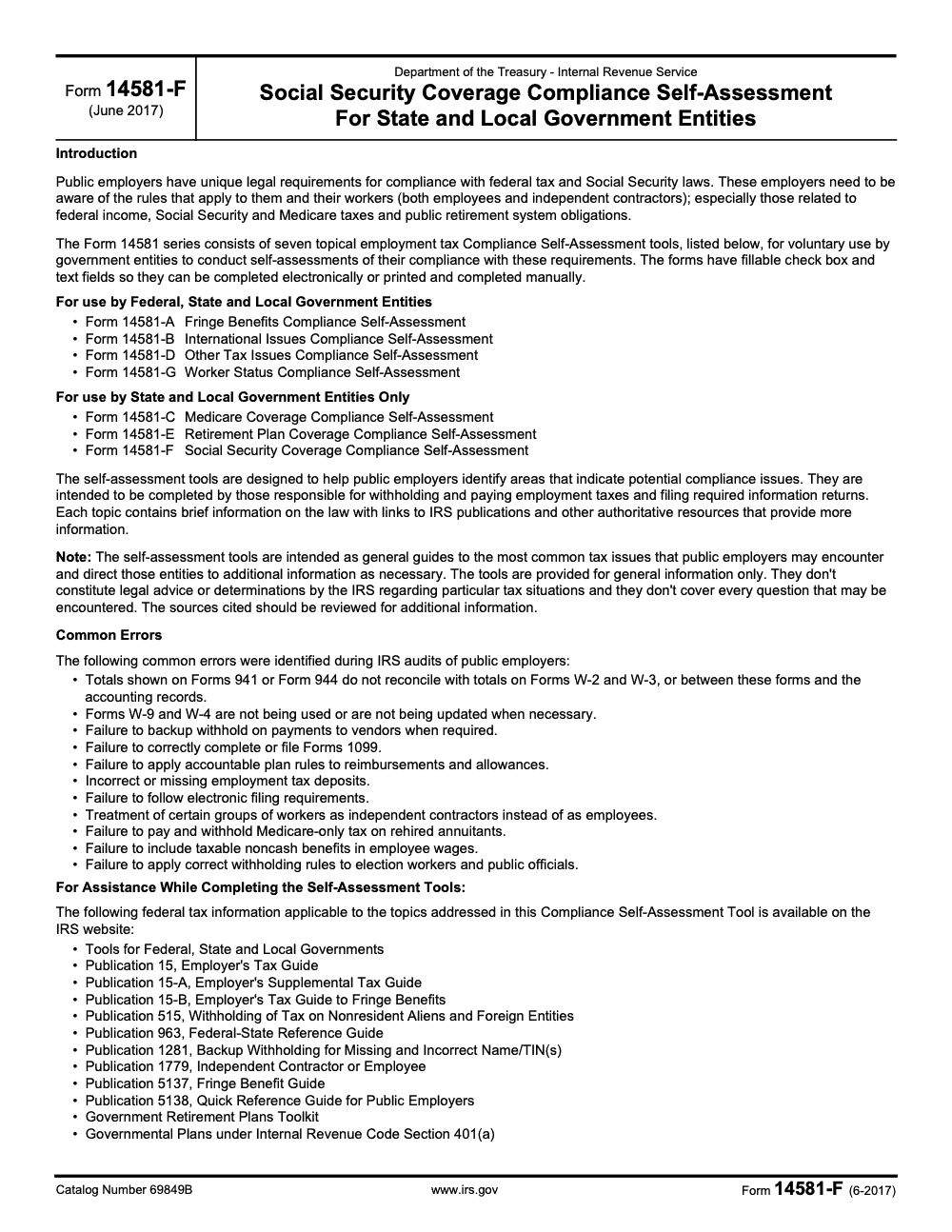
Form 14581-F is the four-page Social Security Coverage Compliance Self-Assessment that state and local government entities use to document Section 218 Agreement coverage, exclusions, and mandatory Social Security under IRC 3121(b)(7)(F). It is voluntary, never filed with the IRS, and retained internally as audit-ready evidence (per IRS Publication 963, Federal-State Reference Guide, and the June 2017 form revision). Pair it with the official fillable PDF and our U.S. tax delivery support for clean execution.
The Section 218 conversation almost always starts the same way: an auditor flags a class of part-time workers, and nobody on staff can find the original Section 218 Modification on file. Form 14581-F is the four-page Social Security Coverage Compliance Self-Assessment that lets a city, district, or special-purpose authority show its work on coverage, exclusions, and mandatory Social Security under IRC 3121(b)(7)(F) before that question turns into a scramble.
It is voluntary and never filed with the IRS, retained internally as audit-ready evidence per Publication 963. One limit to keep in mind: only the Social Security Administration decides whether a position is actually covered under a Section 218 Agreement, so treat your completed form as documentation and a prompt for action, not a determination. Run it annually and after triggering events, and keep your employment tax records at least 4 years next to the signed copy.
Key Takeaways
- Form 14581‑F is a four‑page IRS self‑assessment for state and local government entities to review Social Security coverage, exclusions, and documentation tied to Section 218 Agreements and modifications.
- The current posted PDF is the June 2017 revision and is still the version listed by the IRS in its self‑assessment tools directory as of April 17, 2025.
- Use the form annually and after triggering events, then retain the signed form with supporting evidence to handle audits, SSA questions, and payroll reconciliations.
- Only the Social Security Administration decides whether a position is covered under a Section 218 Agreement, so treat your self‑assessment as documentation and a prompt for action, not an official determination.
- Keep employment tax records at least 4 years after the date the tax becomes due or is paid, whichever is later. Pair your completed 14581‑F with those records for a complete file.
What Form 14581‑F is and who needs it
Quick definition and purpose
Form 14581‑F, Social Security Coverage Compliance Self‑Assessment for State and Local Government Entities, walks you through the core questions that determine whether your people are covered by Social Security via your Section 218 Agreement or by mandatory coverage, and where exclusions apply. The PDF is fillable, so you can complete it electronically, save it, and attach your supporting documents.
In plain terms, the form helps you do four things:
- Identify whether you are under a Section 218 Agreement or modification.
- List groups that are included or excluded, with reasons and effective dates.
- Check if any workers are covered by mandatory Social Security because they are not in a qualifying public retirement system.
- Record notes, follow‑ups, and sources, so you have an audit‑ready trail.
Who should use it
- Finance, payroll, and HR leaders at cities, counties, school districts, utilities, special districts, and other public employers.
- CPAs and advisors who support public entities and need a clean, repeatable file to show how coverage decisions were made.
- Administrators who recently changed job classes, created seasonal programs, or reworked benefits and want proof that Social Security withholding matches the rules.
You can access the official, fillable PDF directly from the IRS self‑assessment tools page. Always confirm you are using the IRS PDF rather than an outdated template from elsewhere.
How Form 14581‑F fits with Section 218 Agreements
Your Section 218 Agreement is the legal backbone for coverage decisions. Form 14581‑F maps each employee class to the agreement or modification, and it prompts you to document why a class is covered, excluded, or subject to mandatory coverage. The form also points you to Publication 963 and to your State Social Security Administrator if you need help or certification copies.
Here is the practical flow you will follow:
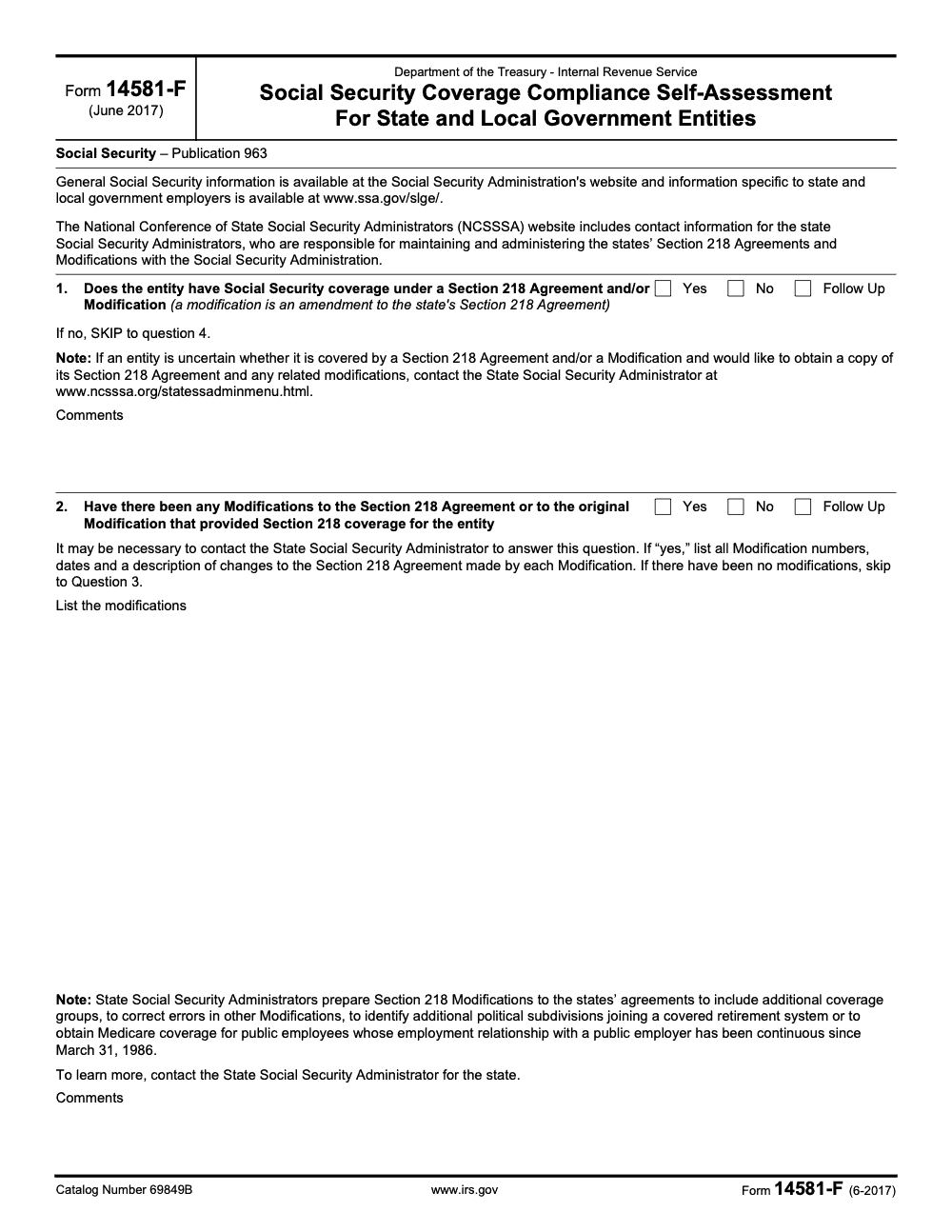
- Confirm whether your entity has a Section 218 Agreement or later modifications, and list the modification numbers and dates.
- Identify employee groups excluded under 218 rules, then re‑check whether any of those workers are actually covered under mandatory Social Security because they are not in a qualifying retirement plan.
- Capture notes, supporting citations, and follow‑ups for anything unclear, especially when job duties or plan participation changed during the year.
Important guardrail: Only the SSA can determine if a position is covered under a Section 218 Agreement. Use the form to document your understanding and to flag items for your State Social Security Administrator when you need a formal answer.
Why this matters for payroll today
When coverage is misapplied, it tends to repeat until someone files a claim or an audit begins. The IRS warns that assumptions based on another agency’s practice are risky, since coverage varies widely even within a single state. A short, documented assessment once a year usually prevents years of rework later.
If you run a CPA or accounting firm that supports public employers, this is where process saves the day. Clean workpapers, predictable review notes, and a single source of truth for coverage decisions keep year‑end calm and cut review time. That is the same discipline we emphasize when we integrate structured offshore support for firms that need consistent production without losing control.
Determining coverage status with confidence
Think of coverage like a decision tree. Form 14581‑F gives you the branches and the questions, then you add the facts from your payroll and your 218 documents.
The “what” to decide
- Do you have a Section 218 Agreement on file, and have there been any modifications?
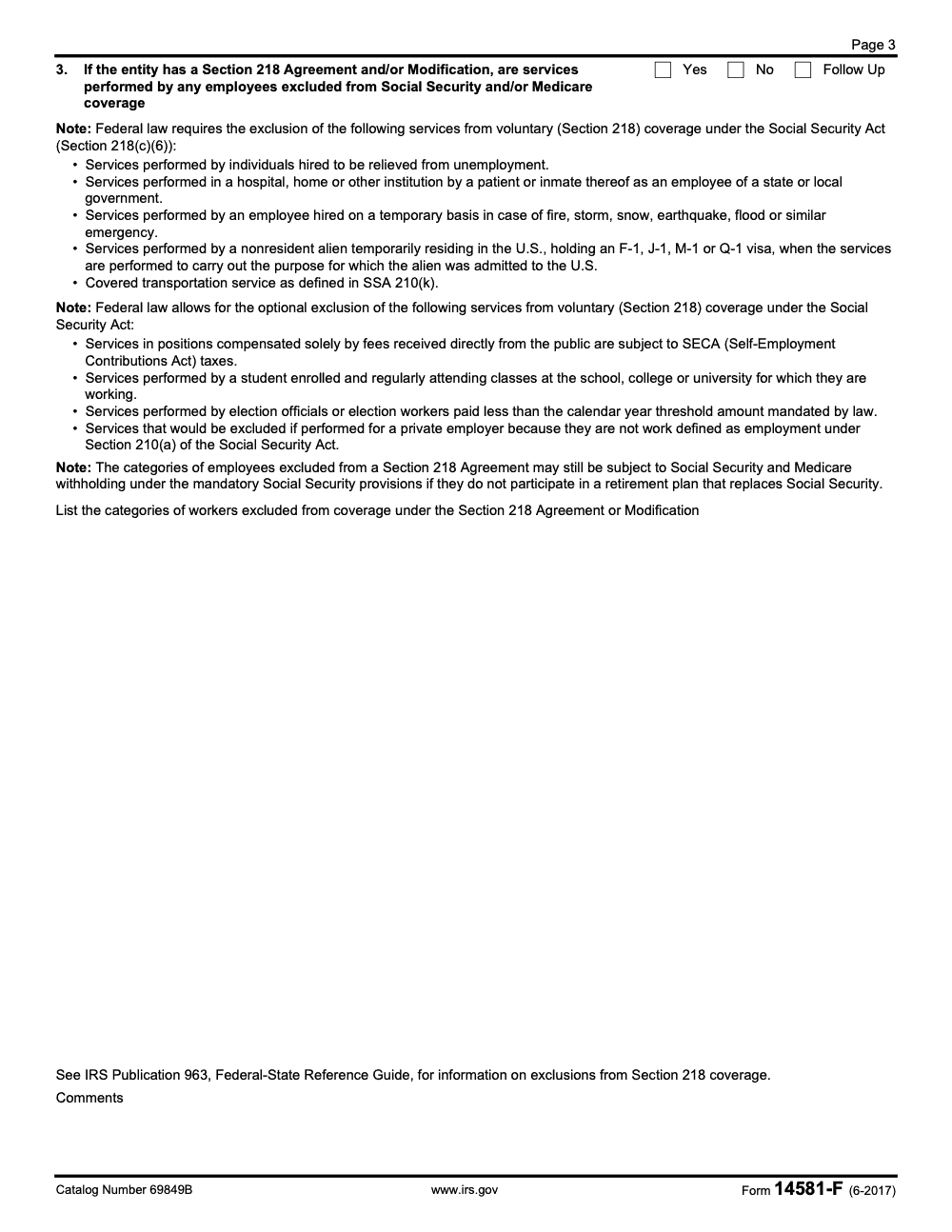
- Which employee classes are covered under that agreement or modification, and from what effective dates?
- Which classes are excluded under 218, and are any of those workers pulled into mandatory coverage because they are not in a qualifying retirement system?
The “how” to work it
- Pull the official 218 agreement and any modifications. If you are missing them, your State Social Security Administrator can help you locate copies.
- List employee classes by position, not by name. Tie each class to the agreement language or modification schedule.
- Note specific exclusions, for example student workers or election workers under the annual pay threshold, then consider whether mandatory rules apply.
- Capture follow‑ups where the facts or documents are thin, and assign an owner and date.
Pro tip: Keep a running “change log” for titles, duties, retirement plan eligibility, and bargaining units. You will thank yourself when you revisit coverage next year.
Mandatory vs optional coverage, explained
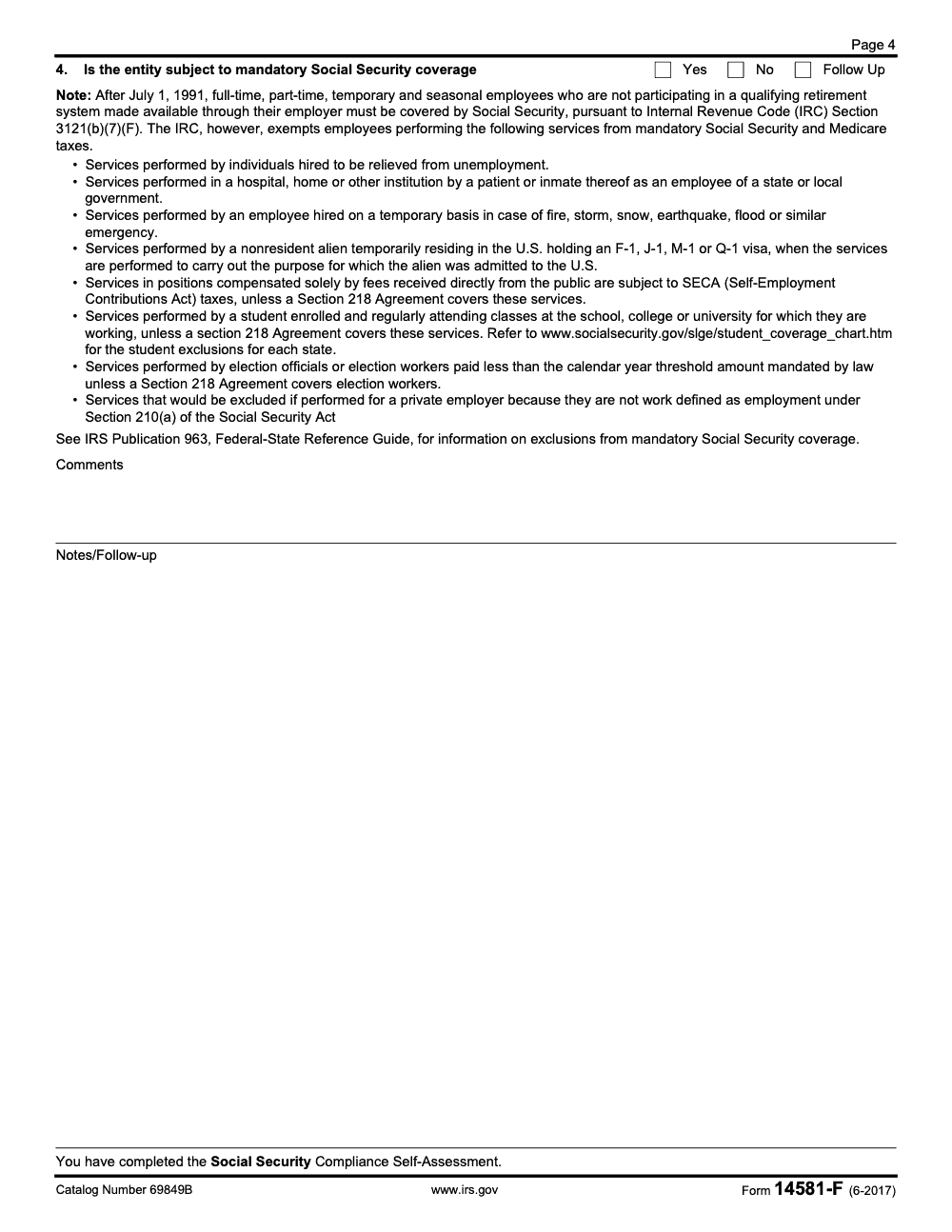
- Mandatory coverage applies to full‑time, part‑time, temporary, and seasonal employees who are not participating in a qualifying public retirement system, for services after July 1, 1991, unless a specific exception applies. Payroll must withhold Social Security and Medicare in these cases.
- Section 218 coverage is voluntary coverage elected by the state through the SSA. Your agreement or modification lists covered groups and any optional exclusions permitted by law. If you rely on 218 coverage, document the legal basis and the effective dates.
Examples that come up often
- A parks department hires seasonal recreation aides. If those roles are not in a qualifying retirement system, they are typically subject to mandatory Social Security, unless a specific exclusion applies. Document the class, dates, and payroll impact.
- A university employs student workers. If your agreement or state rules allow the student exclusion, those wages may be excluded from 218 coverage. Check whether any mandatory rule overrides that in your state, then record the basis on the form.
- Election workers paid less than the annual threshold may be excluded from coverage, depending on your agreement and state rules (the threshold exclusion is the default, but if your Section 218 Agreement specifically covers election workers it overrides the threshold and pulls all election-worker pay into FICA). Track the threshold and include it in your notes.
When to use Form 14581‑F each year
Tie the form to your year‑end close and to any midyear changes that affect coverage. The repeated rhythm builds trust with auditors and with employees who depend on accurate reporting.
Annual compliance timeline
- Closeout, verify that job classifications in payroll match your 218 coverage lists and retirement eligibility.
- Documentation, attach the agreement and any modifications, and list each covered or excluded class with effective dates.
- Certification, finish the fillable PDF, sign, and store with your payroll and tax records. Plan a short internal review so a second set of eyes catches gaps.
Triggering events checklist
Use the form again when things change. The grid below helps you act quickly.
| Triggering event | Required action |
| New or reclassified positions, substantial duty changes | Reassess coverage with 14581‑F, update payroll withholding and notes |
| New 218 Agreement or modification | Validate inclusions and exclusions, record effective dates |
| Mergers, consolidations, outsourcing, or insourcing | Confirm employer of record and coverage path for each group |
| Retirement plan or policy changes | Reevaluate mandatory coverage and exclusions, update payroll controls |
What happens if you discover a past mistake? The IRS explains how retroactive 218 modifications work and how to handle back employment taxes, typically going back up to five years, with steps for open and closed statute years. Talk to counsel before you move.
If you lead an accounting firm that serves public entities, tight workflow matters here. A standardized change checklist, clear naming in workpapers, and predictable review cycles keep you on schedule during peak season. A partner that slots trained staff into your workflow, rather than handing you resumes, helps you keep that discipline when the calendar gets loud.
What to gather before you start Form 14581‑F
You will finish faster if you assemble your proof first. Think of this as your coverage file. When an auditor asks why a class is covered or excluded, this is the folder you open.
Core identifiers
- Legal name of the government entity, any DBAs, and the exact employer type
- EIN and fiscal year dates
- Contact person who can answer follow‑up questions
Section 218 source documents
- Your Section 218 Agreement and every Modification, with effective and termination dates
- Any state statutes, ordinances, or board actions that interact with coverage
- Prior correspondence with your State Social Security Administrator or SSA
Payroll and HR evidence
- Position lists by class, codes, pay groups, and bargaining units
- Hire, termination, and transfer dates for the review period
- Retirement system eligibility and participation records
- Prior‑year Form W‑2 samples and payroll registers that show OASDI and Medicare withholding
- An internal change log that notes duty changes, reclassifications, seasonal programs, or new benefits
Aim for a file that a new payroll manager could understand in under 15 minutes. Clear names, clear dates, clear support.
Form 14581‑F, step by step
You can complete Form 14581‑F in one sitting, although most teams gather a detail or two afterward. Plan 60 to 90 minutes for the first pass, then a short follow‑up to finalize.
Step 1, pull the correct PDF
Use the fillable, four‑page June 2017 revision. Confirm the title and the revision month in the header. If a newer version is released, use that instead and note the switch in your change log.
Step 2, complete the header
Fill in your legal name, EIN, mailing address, and a reachable phone number. If you are a political subdivision, make sure the entity type box matches how you report payroll.
Step 3, capture your coverage landscape
- Indicate whether you have a Section 218 Agreement and list modification numbers and dates
- Identify each employee class by position, not by individual name
- Mark each class as covered, excluded, or needs review, and write the reason you made that call
- Note whether any class is in mandatory coverage because there is no qualifying retirement system
Step 4, wages and reporting
Form 14581-F itself does not ask for wage totals – the four questions on the form focus on Section 218 Agreement coverage, Modifications, exclusions, and mandatory Social Security under IRC 3121(b)(7)(F). Treat this step instead as the payroll reconciliation that sits behind the form: pull total wages subject to OASDI and Medicare for the period and tie them back to each coverage answer in your supporting file. If you use multiple payroll systems, document each system in your coverage folder as supporting evidence behind the form, and confirm they produce consistent OASDI and Medicare totals for covered classes.
Step 5, certification and storage
Have the authorized official sign and date the form. Save the fillable version, then keep a signed copy. File it with your payroll year‑end workpapers and put a copy in your coverage folder.
Tip from practice, finish with a 10‑minute “red flag” scan. If any class is marked “needs review,” assign an owner, a due date, and the exact document or determination you still need.
Accessing a fillable form without the headaches
If you prefer online editing, a number of document libraries host a fillable copy of the June 2017 revision. That can be convenient for quick typing, cloud saves, and downloads. A few reminders help you avoid confusion.
Safe access checklist
- Confirm the revision line says “Rev. June 2017” and the title matches the official name
- Download a clean PDF copy, save it to your secure drive, and add your entity name to the file name
- If an online editor mentions auto‑deleting files after 24 hours, download immediately and keep your own copy
- When in doubt, get the current PDF from an official government source and replace older templates
Offline editing option
Many payroll teams prefer a controlled desktop workflow. Download the PDF, edit it locally in a trusted PDF tool, and save the fillable version for future updates. When you print for signatures, test print one page to confirm fields render correctly.
Completing required sections with care
Header accuracy matters
Auditors match your entity name and EIN to payroll and tax filings. Use the exact legal name on your EIN letter and current tax returns. If you use an umbrella unit for payroll, clarify the relationship in your notes.
Coverage determination, the heart of the form
- List the position class, the headcount, and the coverage status
- Cite the coverage basis, “Section 218 Modification 2005‑3” or “Mandatory coverage, no qualifying retirement system”
- Note effective dates, for example “covered effective 01‑01‑2012”
- If you need a ruling or document copy, write “Pending confirmation from State SSA Administrator” and assign a due date
Wages and reporting consistency
Spot check totals for a few covered classes. Pull a payroll register for a pay period, confirm OASDI and Medicare were taken, then match year‑to‑date totals to your quarterly employment tax filings. Keep those screenshots or PDFs in the same folder as the form.
Certification and retention
Have an authorized official sign, print their title, and date the form. Keep the signed PDF and a scanned image. Store your support behind it in the same folder, including position lists, 218 documents, and any email determinations. That way, your future self can retrace exactly how you made each call.
Determine mandatory coverage with Form 14581‑F
Form 14581‑F is not a legal ruling, it is your structured way to test facts and record conclusions. Use the checklist to confirm whether each position is covered by your agreement, excluded, or falls into mandatory coverage.
Three practical checks
- Map every position to governing authority. That can be a specific Section 218 Agreement schedule, a modification, or the mandatory coverage rule when there is no qualifying retirement system.
- Check for changes in hours, duties, or retirement eligibility. A role that moves into or out of a retirement plan can cause a coverage change.
- Flag gray areas for counsel or your State Social Security Administrator. If a title changed and the language in your agreement is ambiguous, write it down, ask for clarity, and keep the response in your file.
Keep your language factual. Replace “probably covered” with “covered per 218 Mod 2011‑2, effective 07‑01‑2011, payroll group 21.”
Identify positions under a Section 218 Agreement
Coverage under a 218 Agreement is position‑based, not name‑based. Tie each job class to the exact language in the agreement or modification.
Positions covered criteria
- Match the job title or class code to the schedule in the agreement or modification
- Confirm employment type, full‑time, part‑time, temporary, or seasonal, because some schedules name categories
- Validate the effective date and check for any local exceptions that your state permitted at the time of election
- Confirm the payroll system that pays the class, especially if you have multiple systems in play
Documentation tips that save time later
- Screenshot or PDF the relevant 218 page, highlight the position class, and save it with the form
- Keep a short index of common titles and where they appear in the 218 schedule
- If a title is new but the job aligns to an older class, document the mapping and keep HR’s job description in the file
Excluded roles, with clear examples
Exclusions must be applied consistently. Start with your 218 agreement language, then consider common categories that often trip teams up.
Common exclusions to evaluate
- Elected officials, depending on how your agreement or state rules treat those positions
- Student workers, where your agreement or state policy permits a student exclusion (the exclusion varies state by state and can be overridden by your state's Section 218 Agreement, so check the SSA student-coverage chart for your state)
- Police and fire in a qualifying public retirement system that excludes Social Security
- Certain judicial officers covered by state retirement systems
- Independent contractors and volunteers who should not be treated as employees
How to write an exclusion that stands up in review
- Identify the role and the exact legal basis for the exclusion
- Note the dates the exclusion applies and any thresholds that must be tracked
- Add the payroll control used to prevent withholding, for example a position‑level tax profile or pay group setting
- Keep eligibility and election records when your exclusion depends on worker‑level facts, such as student status
Examples from the field
A county adds a temporary records project every summer. Historically, payroll toggled Social Security off because “they are temps.” The form forces a better question, are they in a qualifying retirement plan, or does mandatory coverage apply because they are not? The answer changed the setup in the payroll system and prevented years of quiet errors.
A school district expanded tutoring roles for college students. The district documented the student exclusion under its 218 modification, added a student status control to payroll, and saved a sample of status proof each term. Review time dropped because the facts and the basis were easy to read.
When you discover a misclassification, do not rewrite history without advice. Document the facts, estimate exposure, and talk to counsel about corrective steps.
Handle dual, seasonal, and part‑time positions without guesswork
These categories create the most debate during reviews. The clean approach is to treat each appointment as its own analysis.
Dual appointments
If an employee holds two jobs, analyze each position separately. A covered position does not pull a second excluded position into coverage, and an excluded position does not block a covered one. Document both, list the payroll group for each, and confirm tax setup matches your conclusion.
Seasonal employees
Write down your seasonal definition, for example a recurring summer program or a winter maintenance team. Check your 218 language and your retirement plan rules. If the job is outside a qualifying retirement system, mandatory coverage likely applies. Add a short checklist for rehiring the next season so you do not re‑decide the same facts every year.
Part‑time roles
Coverage is about the class, not the hours. A low‑hour job can still be covered if the class is covered in your agreement or if mandatory rules apply. Tie the job to the governing authority and stop relying on “part‑time so probably excluded.”
Common Form 14581‑F mistakes to avoid
A little discipline prevents most issues. These are the problems we see most often in reviews.
Skipping the annual cadence
Do the assessment every year, sign and date it, and keep it with your payroll close file. If you only run the form when something breaks, you miss slow changes that turn into big corrections.
Vague coverage notes
“Follows city policy” is not a basis. Write “Covered per 218 Mod 2009‑1, effective 01‑01‑2009” or “Mandatory coverage, not in qualifying retirement system.” Name the document, the provision, and the date.
Missing support
If you mark a class as excluded, show the legal basis and the payroll control that enforces it. Keep a sample of proof, for example a student status confirmation or an election record.
Keeping only a paper copy
Store a signed PDF and a fillable version. If you ever need to update a note or attach a new document, you will not have to start over.
A quick comparison you can reuse
| Topic | Section 218 coverage | Mandatory coverage |
| Basis | State’s voluntary agreement or modification | Applies when there is no qualifying public retirement system and no exclusion |
| Who decides | Ultimately the Social Security Administration | Federal law and facts about retirement plan participation |
| Effective date | Listed in the agreement or modification | Based on service dates and plan eligibility dates |
| Payroll setup | Follow agreement details and any exclusions you elected | Withhold OASDI and Medicare per law for covered services |
| Documentation | Agreement pages, modification numbers, effective dates | Retirement plan eligibility records, payroll screenshots, internal memo |
Use this table as the first page in your coverage folder. It sets context for whoever reads your file next.
How to fill out Form 14581‑F online for free
Many teams prefer a browser‑based editor. Open the fillable PDF, type directly in the fields, and save your progress to a secure location.
Clean online workflow
- Open the fillable June 2017 PDF and confirm the title and revision date
- Enter entity identifiers, then list coverage groups and exclusions
- Cross‑check payroll classifications, retirement participation, and prior determinations
- Answer conditional questions, write “N/A” only when instructions allow
- Review for completeness and route for signature
Online editors can be convenient, but they might purge files after a short time. Download immediately and store your copy in your secure drive.
Offline workflow that most auditors prefer
- Download the PDF and save it with a clear file name that includes the fiscal year
- Complete the form in a trusted PDF tool and save the fillable version
- Print for signature, then scan the signed copy and store it alongside your support
Save, print, and download your completed form
You are almost done. Do not lose your work at the finish line.
Verification steps
- Open the downloaded file and scroll through each page to ensure fields display correctly
- Cross‑check every entry against source documents, then re‑save
- Keep the fillable version for easy edits later, and keep a signed PDF for your official record
Archival steps
- Save a PDF/A version or a high‑resolution scan of the signed copy
- Store the file in your coverage folder next to your Section 218 documents and payroll evidence
- Add a short readme note that lists what changed this year, for example “added seasonal aides, student exclusion confirmed”
Keep records safe, retention and security
Protecting the form is part of compliance. Treat it like payroll and tax records.
Practical retention plan
- Keep employment tax records for the required period in your jurisdiction, often at least four years after the tax becomes due or is paid
- Retain the completed 14581‑F, the signed copy, and all supporting documents for the same or longer period, especially if a dispute or claim could arise
- If your entity uses longer record schedules, align to those to keep the file intact
Security baseline
- Store digital copies in encrypted cloud storage, use multi‑factor authentication, and schedule backups
- Restrict access to authorized staff, log who opens and edits the file, and review access quarterly
- For disposal, use a data wiping standard that fits your policy, and use cross‑cut shredding for paper copies
One small habit pays off. Keep all coverage materials under a single folder with subfolders for Agreements, Modifications, Payroll Proof, and Annual 14581‑F. Consistency is what makes audits calm.
When to get legal or tax help
Bring in help when a decision changes money or benefits. If a coverage call could shift FICA withholding or retirement eligibility, get a formal view before you implement.
Good moments to call counsel or your State Social Security Administrator
- You cannot locate an official copy of your 218 Agreement or a modification
- A new job class does not match any listed category and retirement eligibility is unclear
- You discovered a past misclassification that could require retroactive corrections
- You plan to request or rely on a retroactive modification
What your CPA team does best
- Reconcile payroll coding for OASDI and Medicare against your coverage map
- Build workpapers that connect positions to governing authority and show math for any corrections
- Document a remediation plan with dates, contacts, and next actions
Where to get the fillable Form 14581‑F PDF
You can obtain the fillable PDF from official government sources. Some document libraries also host the June 2017 revision, which can be useful for quick editing. No matter where you start, confirm the revision and title, then save a clean copy to your secure drive. If your state or the SSA posts an updated version, use the newer form and note the change in your file.
| Assurance | Risk |
| Fast access to a fillable PDF | Using an outdated or modified template |
| Cloud editing convenience | Temporary file retention and version drift |
| Easy download and print | Forgetting to save the fillable source for later edits |
When in doubt, check your State Social Security Administrator’s site or the SSA and IRS pages that cover state and local coverage. Match the revision date before you proceed.
Common Mistakes We See Every Season
The recurring pattern across public-employer engagements is the same: people treat Form 14581-F like a payroll routine instead of a coverage audit, and the signed PDF ends up missing the supporting evidence an examiner actually wants. The traps below are the ones we see every cycle.
Reusable Checklists
These checklists are built to drop straight into your SOP library or the support folder behind a signed Form 14581-F. Print them, paste them, or hand them to a new payroll lead on day one.
Pre-assessment evidence packet
- Certified copy of the state Section 218 Agreement and every Modification, sourced from the State Social Security Administrator.
- Roster of all coverage groups, with effective dates pulled from each Modification.
- Current qualifying retirement system plan documents covering each employee class.
- Most recent four years of Form 941, Form W-2, and Form W-3 reconciled to general ledger payroll accounts.
- Headcount snapshot covering full-time, part-time, temporary, and seasonal workers, with retirement-system enrollment status flagged.
- NCSSSA contact card for your state, with date of last conversation.
- SSA student-coverage chart printout for your state, dated.
Question-by-question completion workflow
- Question 1: Confirm Section 218 Agreement and Modifications on file. If No, apply skip logic straight to Question 4.
- Question 2: List every Modification number, effective date, and a one-line description of the change. If No, skip to Question 3.
- Question 3: Split exclusions into required (SSA Section 218(c)(6)) and optional (fee-basis, students, threshold election workers, SSA Section 210(a)), with the Modification number cited for each optional election.
- Question 4: Walk the full headcount, including part-time, temporary, and seasonal workers, against IRC 3121(b)(7)(F) and the eight statutory exemptions.
- Sign and date the form, then attach evidence sourced under the pre-assessment packet.
- Open a follow-up log for every Question marked Follow Up, with owner and target close date.
Retention and audit-prep file
- Store the completed Form 14581-F with employment tax records for at least four years after the date the tax becomes due or is paid, whichever is later, per IRS Publication 15.
- Restrict access to the coverage folder to payroll lead, HR director, and external CPA only.
- Maintain a year-over-year change log noting new job classes, reorganizations, retirement plan changes, and any Modification activity.
- Schedule annual review inside the year-end payroll close packet, with a trigger to rerun the form after any qualifying event.
- Cross-reference the file with Form 941, Form 944, Form W-2, and Form W-3 reconciliations from the same period.
Keep 14581-F Season From Stalling
The Form 14581-F cycle does not look like a tax-season spike, it looks like a slow grind across the year that quietly stalls when a payroll lead leaves or an auditor opens a coverage question mid-year. Public employers in our portfolio average more than 70 coverage groups across cities, districts, and special-purpose authorities, and the recurring delivery problem is the gap between the signed self-assessment and the Section 218 Modification history sitting in a filing cabinet at the State Social Security Administrator office. Per IRS Publication 963, those Modifications drive every Question 3 exclusion answer, yet the entity rarely owns the source documents.
The fix is treating Form 14581-F as a production workflow with named owners, source-document SLAs, and a review handoff, not a checklist someone fills in once a year.
- Run Question 1 and Question 2 sourcing as a standing quarterly task with the State Social Security Administrator, so the Modification roster is current before the form is opened.
- Split Question 3 review between a payroll preparer who lists exclusions and a senior reviewer who validates each one against SSA Section 218(c)(6) and SSA Section 210(a).
- Wire Question 4 into the headcount system so part-time, temporary, and seasonal hires trigger a mandatory-coverage check at onboarding, not at year-end.
- Reconcile the signed form against Form 941, Form W-2, and Form W-3 totals every quarter, so coverage decisions tie back to deposit and reporting math.
- Lock the four-year retention window per IRS Publication 15 into the records calendar, with a documented destruction date once the period clears.
This is where Accountably plugs in. Trained U.S.-led offshore teams handle the Modification sourcing, the question-by-question completion workflow, and the Form 941, W-2, and W-3 reconciliation in the background, so internal leads keep their focus on coverage decisions and audit response. Learn more at our U.S. taxation services.
FAQs
No. You complete and retain it as part of your compliance records. It documents how you applied Section 218 rules and mandatory coverage to your workforce during the period.
Run it once a year and after any triggering event, for example a new job class, a reorganization, or a retirement plan change. Add it to your year‑end payroll checklist.
Contact your State Social Security Administrator for certified copies. Until you have them, treat uncertain classes as “needs review,” document the facts, and hold payroll changes that would reduce withholding.
Often yes. Your 218 agreement or state rules may specify exclusions for certain roles, and some roles may be in a qualifying retirement system that changes coverage. Verify the legal basis and document it.
Usually. Work with counsel to determine the correction path, the lookback period, and how to handle employee communications and payroll adjustments. Keep your findings and fixes in the coverage folder.
Other forms this guide names
Summarize this article with AI
About this guide
Accountably helps US CPA, EA, and accounting firms hire trained accountants and tax preparers in India.
About us Reviewed byJugal Thacker, CPAFounder and CEO at Accountably
A US-licensed CPA with 7+ years inside US firms – PwC, a real-estate tax practice, then a full-service firm, rising from reviewer to manager to advisory. This article was reviewed against current IRS guidance for the 2025 tax year and updated for public employers documenting Section 218 coverage, exclusions, and mandatory Social Security.
View profile →How we research, review, and update this guide
Every Accountably guide is researched against primary IRS sources, reviewed by a U.S. CPA, and refreshed as guidance evolves. Read our Editorial Guidelines to see how we source, fact-check, and update our content.




