
Summarize this article with AI
In Brief
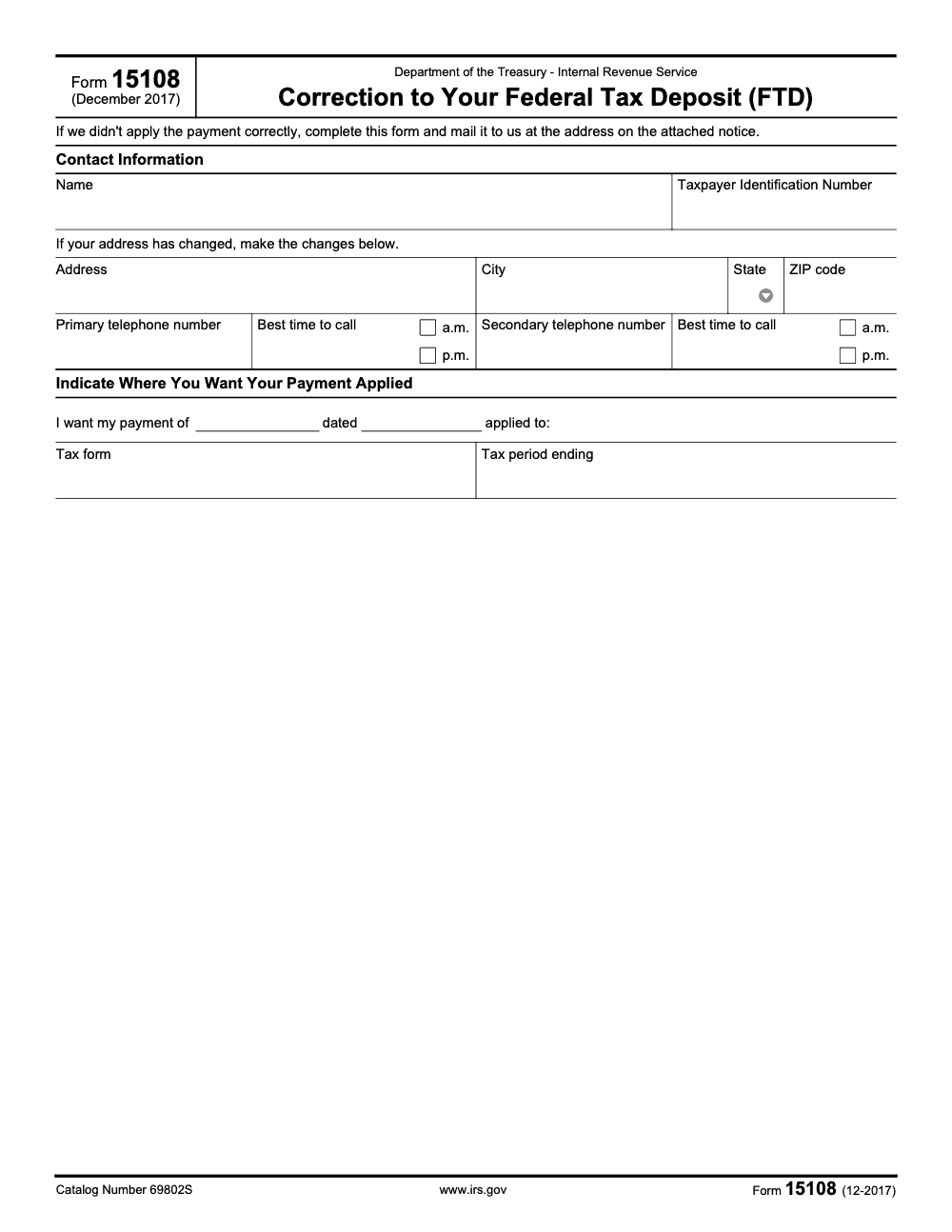
Form 15108 is the IRS correction form attached to a CP108 notice when a Federal Tax Deposit (FTD) lands on the wrong period or return. The current revision is dated December 2017 (catalog number 69802S, per the IRS Form 15108 footer), and the completed form must be mailed to the address printed on the IRS notice that prompted it, not a generic IRS service center. For ongoing FTD review and notice response, see our tax outsourcing services.
A CP108 notice tends to land at the worst moment, right before a deposit deadline or in the middle of close. The payment was made and the EFTPS confirmation is sitting in the inbox, but the IRS cannot match the deposit to a return, so the module shows a balance due and the penalty math keeps running. Form 15108 is about placement, not whether you paid.
Titled Correction to Your Federal Tax Deposit, it goes out attached to that CP108 when a deposit lands on the wrong period or return. Start in your IRS Online Account to verify the posting date, amount, and tax period, line it up against your EFTPS confirmation, then complete the form with the right target form and period and mail it to the address printed on the notice, not a generic service center.
Key Takeaways
- Form 15108 shows up with a CP108 when the IRS cannot determine the right form or tax period for your payment. It is about placement, not whether you paid.
- Form 15108 is titled Correction to Your Federal Tax Deposit (FTD), and the IRS lists it on its official forms page.
- Start with your IRS Online Account to verify the posting date, amount, and tax period, then match it to your bank or EFTPS confirmation.
- If the payment was placed in the wrong period or module, call the toll‑free number on your notice or send a brief letter with proof of payment to the address shown on the notice.
- If normal channels stall and you have hardship or repeated delays, contact the Taxpayer Advocate Service at 877‑777‑4778 or file Form 911.
What Form 15108 Means for Your Tax Account
Form 15108 often rides with CP108. CP108 means the IRS received your money but could not figure out the correct tax form or period to use, so it needs your direction. The Form 15108 attachment is the IRS’s way to collect that direction and fix the posting.
This combination is common when electronic payments carry the wrong tax type, the wrong period, or a truncated identifier. As of August 27, 2025, the IRS page for CP108 confirms this workflow, and the Internal Revenue Manual notes that CP108 provides Form 15108 to return if the payment posted incorrectly.
If your notice details April 2024 and $2,005.15, treat those as anchor points. Your goal is to show the IRS where that exact payment belongs. If the notice already shows a correct match, you can stand down. If it does not, you will verify, document, and ask the IRS to move it.
Who typically gets CP108 with Form 15108
- Employers that made federal tax deposits with the wrong tax period or type.
- Individuals who paid electronically, selected the wrong year, or used a mismatch in name or TIN.
- Businesses with multiple modules, for example, 941 payroll versus 940 FUTA, where the payment landed on the wrong module.
The IRS guidance is consistent. If the posting is right, do nothing. If it is wrong, call or write, and include proof, so the payment can be re-applied to the correct period or form.
How to Verify Where Your Payment Landed
Your first stop is your IRS Online Account. You want three things, the posting date, the amount, and the tax period the system shows. If you are an individual, you can sign in and see up to five years of payment history, including pending items. If you are a business, you will often rely on transcripts and EFTPS records, or you will work with your tax professional to pull the right data. As of September 26, 2025, the IRS says Online Account shows balances, payments, and payment activity, which is exactly what you need for a quick check.
Next, compare your Online Account details to your bank statement or EFTPS confirmation. EFTPS and Direct Pay both give confirmation numbers, and the IRS advises you to keep them. If you used Direct Pay, the IRS notes you can see pending and processed payments and lookup details later with your confirmation number.
Use the table below as your mini audit checklist, then save screenshots to build a tidy paper trail.
Mini Payment Audit Table
| Item | What you should see |
| Amount | $2,005.15 |
| Posting date | IRS transaction date from Online Account or transcript |
| Tax period | April 2024 |
| Module or return | 1040, 941, 940, 1120, or other, as applicable |
| Confirmation | EFTPS or Direct Pay reference number |
Monitor your account for a few weeks until you see the corrected entry or a note from the IRS. If nothing changes and you confirmed a mismatch, move to a phone call or a short letter. The CP108 page explains that you should call the number on your notice or mail your response to the address shown.
Quick note on transcripts
If you need more detail, order an Account Transcript. The IRS confirms that Online Account can access tax records and transcripts, and the Internal Revenue Manual explains how transcripts appear through Online Account after the Get Transcript Online retirement in July 2024.
Fixing a Misapplied Payment Fast
When your payment is in the wrong month or on the wrong form, you have two practical paths, a call or a letter. The notice tells you which number to dial and which address to use. The IRS CP108 page is clear, if the payment was applied incorrectly, let the IRS know where it belongs, by phone or in writing.
Call the IRS, use the notice number
- Call the toll‑free number on the top right of your CP108.
- Say you received CP108 with Form 15108 and you need to review your account.
- Have ready, the amount $2,005.15, the intended period April 2024, the date paid, your SSN or EIN, and your confirmation number.
- Keep a log with the date, time, the rep’s name, and any reference or case number.
- If the notice line is swamped, you can also try 800‑829‑1040 and follow the prompts that route you to personal income tax and payment history. Menus change, so be ready to adapt.
The IRS’s CP108 guidance confirms these basics, including what to say when you call, and that you should have the notice and return in front of you.
Send a short letter if phones are jammed
If you cannot get through, mail a concise correction to the address on your CP108. Include:
- A one-paragraph explanation that your $2,005.15 payment meant for April 2024 posted to the wrong period.
- Your full name, address, SSN or EIN, the CP108 notice number and date.
- Proof of payment, for example, EFTPS or Direct Pay confirmation, or a copy of the canceled check.
- A clear instruction, for example, “Please reapply $2,005.15 to 941 for April 2024.”
- Your signature, date, and a daytime phone.
Send copies, not originals. Use certified mail with tracking. The IRS CP108 page confirms that mailing a response to the address on your notice is an acceptable way to correct a misapplied payment.
What Form 15108 actually is
Form 15108 is titled Correction to Your Federal Tax Deposit (FTD). The IRS forms index lists it, and the Internal Revenue Manual explains that CP108 generates when EFTPS payments cannot be matched to a tax type or period, and that CP108 supplies Form 15108 to return if the payment posted incorrectly. This is your simple tool to tell the IRS where the money goes (it does not transmit a new Federal Tax Deposit, those still flow through EFTPS). As of October 1, 2025, that language appears in IRM 21.7.11.4.1.
Using Your IRS Online Account to Monitor and Request Fixes
Online Account is your dashboard. As of September 26, 2025, the IRS says you can view balances, up to five years of payment history, pending and scheduled payments, and certain digital notices. That means you can confirm when the misapplied payment moves to the correct period.
- Sign in, review Payment Activity, and confirm the posting date and tax period.
- Save screenshots that show the wrong placement and the corrected entry later.
- If your account offers secure messaging or document upload for a payment issue, use it to attach your letter and proof.
- Check weekly for status changes.
If you paid with Direct Pay and only need to look up a single payment, you can use your confirmation number. The IRS explains how to look up Direct Pay payments and confirms that both Direct Pay and EFTPS issue confirmations that you should keep.
Documentation You Should Keep
Strong documentation shortens the fix. Keep:
- Your CP108 and any Form 15108 pages.
- EFTPS or Direct Pay confirmation showing $2,005.15, the date, and your identifier.
- Bank statement showing the withdrawal.
- Filed return pages, for example, 941 for April 2024, or a transcript that supports the intended period.
- A call log with dates, times, rep names, and case numbers.
- Copies of letters you mailed, plus USPS tracking and delivery confirmations.
If you work inside a firm, store this in your client’s permanent file. If you are a business owner handling your own account, save everything in a secure folder. This gives you a clean audit trail if penalties or interest appear later.
What if the IRS removed the payment entirely
Occasionally, if the IRS decides a payment does not belong on your account, you may see a different notice, for example CP260 or CP60. Both involve misapplied or removed payments and the next step is the same, call the number on the notice, have proof ready, and request a review. The IRS pages for CP260 and the TAS guide for CP60 confirm this approach.
Penalties and interest tie back to where the money should have been applied, so thorough proof helps the IRS correct both placement and any downstream charges.
When to Escalate to the Taxpayer Advocate Service
If you have tried normal channels and nothing moves, or if you face real hardship, call the Taxpayer Advocate Service at 877‑777‑4778 or file Form 911. TAS is an independent organization inside the IRS that helps when you have economic harm, repeated failed attempts to resolve a problem, or when a process is not working as it should. As of May 29, 2025, the IRS pages confirm who qualifies and how to request help.
- Gather your CP108, any Form 15108 pages, your proof of payment, and your call log.
- Explain the issue in one paragraph, for example, “Payment of $2,005.15 for April 2024 posted to the wrong period, repeated calls and a letter did not resolve.”
- Ask TAS to coordinate a correction and provide a timeline.
- Keep monitoring your IRS Online Account so you can confirm when the fix posts.
A Firm-Level Tip, reduce repeat issues with clean process
If you run a firm, build a simple playbook, a two-minute check of tax type and period before payment, a quick confirmation save, and a same‑week Online Account match. For complex payroll or multi‑entity structures, a standard workpaper and a shared proof folder help your team answer a CP108 in minutes, not hours. If your team is stretched and you need consistent, well-documented execution support inside your own systems and templates, Accountably can integrate trained offshore staff into your workflow so you keep control of process while your team gains time for client strategy. Use this when you want stability and clear accountability, not resume stacks.
Conclusion
You now have a clear path. Verify the posting in your IRS Online Account, match it to your EFTPS or Direct Pay confirmation, and, if needed, call the notice number or send a short letter with proof. Watch for the corrected entry, then save a final screenshot for your records. If progress stalls and you face hardship or ongoing delays, call the Taxpayer Advocate Service or file Form 911 for help.
Common Mistakes We See Every Season
We see the same handful of CP108 missteps every quarter, and each one stretches the correction cycle by weeks. Catch them upfront and the response packet ships the same day the notice arrives.
Reusable Checklists
Two checklists my team uses to close out a CP108 fast, plus one for post-submission tracking. Copy them into your firm SOP so the response packet ships the same day the notice arrives.
CP108 first-response packet
- Confirm the notice number is CP108 and Form 15108 is attached.
- Pull the EFTPS or Direct Pay confirmation that matches the payment amount and date on the notice.
- Log in to the IRS Online Account and screenshot the module showing the misapplied or missing deposit.
- Verify the taxpayer's name, TIN, and current address against IRS records before drafting the form.
- Identify the correct target tax form (941, 940, 944, 943, 945, 1120, 1042, or other) and tax period ending date.
- Save the response address printed on the CP108 notice for the envelope.
- Set a calendar reminder to recheck the IRS Online Account 14 days after mailing.
Form 15108 completion
- Enter taxpayer name and TIN exactly as they appeared on the original deposit.
- Complete address, city, state, and ZIP code in the Contact Information section.
- Enter the primary phone with the best time to call (a.m. or p.m.); secondary phone is optional.
- Enter the payment amount and payment date from the EFTPS or Direct Pay confirmation.
- Specify the target tax form and the tax period ending date for the module the deposit should sit in.
- Sign and date the form, then scan a copy to the client file.
- Mail to the address printed on the CP108 notice, not a generic IRS service center.
- Use certified mail and archive the certified receipt with the scanned response packet.
Post-submission tracking
- Day 7: confirm IRS receipt via the certified mail tracking number.
- Day 14: recheck the IRS Online Account for the corrected posting in the target module.
- Day 30: if no movement, call the number on the CP108 notice with the EFTPS confirmation and the scanned Form 15108 in hand.
- Day 45: request abatement of penalties and interest tied to the misapplication once the deposit has been reposted.
- Escalate to the Taxpayer Advocate Service or file Form 911 if hardship or repeated delays continue past 60 days.
- Archive the final Online Account screenshot showing the corrected entry as proof for the engagement file.
Keep 15108 Season From Stalling
CP108 notices arrive throughout the year, with concentrated volume around the quarterly Form 941 and annual Form 940 deposit cycles. A misapplied Federal Tax Deposit parks cash in the wrong module, triggers a downstream balance-due letter, and pulls senior reviewers away from return production to chase a fix that often stretches multiple weeks. The form itself is a single page (per the IRS Form 15108 footer, revision 12-2017, catalog number 69802S), but the workflow around it is where the time goes.
The bottleneck is not the form, it is the operational discipline around the response. CP108 cycles slip when intake is informal, the EFTPS confirmation lives in a client inbox no one searched, and no one is tracking the IRS response window. A documented response packet shortens the cycle and keeps every CP108 from defaulting to a senior reviewer.
- Build a CP108 intake template that captures notice date, target form, tax period ending date, and the misapplied payment amount in one place.
- Pull the EFTPS or Direct Pay confirmation the same day the notice lands, before the original payment receipt gets buried.
- Route Form 15108 to the response address printed on the CP108 notice, never to a generic IRS service center address pulled from a prior letter.
- Track the 14-day, 30-day, and 45-day checkpoints in the workflow tool so an unaddressed CP108 cannot sit silently in a senior staff queue.
- Pair each Form 15108 submission with a penalty and interest abatement request once the IRS confirms the reposting in the Online Account.
Trained offshore staff can own CP108 intake, evidence collection, Form 15108 drafting, and post-submission tracking inside your existing workflow tools, so the response packet ships without pulling senior reviewers off return production. Learn more about our tax outsourcing services.
FAQs
No. Form 15108 is a correction form that appears with CP108. You use it to tell the IRS where to put a payment when the IRS cannot determine the correct form or period. You generally do not file it unsolicited, if you think a deposit went astray without an IRS notice, call the IRS or use EFTPS to reapply the payment instead.
Phone fixes can be quick if your proof is ready, written requests can take several weeks. Watch your Online Account for the corrected entry and save screenshots. The IRS confirms you can see payment activity and digital notices in your account.
If the IRS placed your payment incorrectly, it can adjust related penalties and interest after reapplication. Call the number on your notice and ask for a review once the payment is moved. The CP108 page instructs you to contact the IRS if the payment was applied incorrectly.
CP108 is about a payment the IRS cannot match to the right period or form and often includes Form 15108. CP260 tells you a payment was misapplied and removed. In both cases, call or write with proof of payment.
Individuals can see their own payment history in Online Account. For business modules, you may rely on EFTPS records, business transcripts, or authorized access by your tax professional. The IRS outlines what Online Account covers and how transcripts are accessed.
Call the number on the notice with proof of payment and the correct EIN or form. If phones fail and you face hardship or repeated delays, contact TAS or file Form 911.
Always double check tax type, period, and identification before you submit. Keep the confirmation number and match it to your Online Account within a few days. If you use Direct Pay or EFTPS, the IRS provides confirmation and lookup tools.
Other forms this guide names
About this guide
Accountably helps US CPA, EA, and accounting firms hire trained accountants and tax preparers in India.
About us Reviewed byJugal Thacker, CPAFounder and CEO at Accountably
A Washington-licensed CPA with 7+ years inside US firms – PwC, a real-estate tax practice, then a full-service firm, rising from reviewer to manager to advisory. This article was reviewed against current IRS guidance for the 2025 tax year and updated for filers preparing late returns, amendments, and 2026 estimates.
View profile →How we research, review, and update this guide
Every Accountably guide is researched against primary IRS sources, reviewed by a U.S. CPA, and refreshed as guidance evolves. Read our Editorial Guidelines to see how we source, fact-check, and update our content.




