
Summarize this article with AI
In Brief
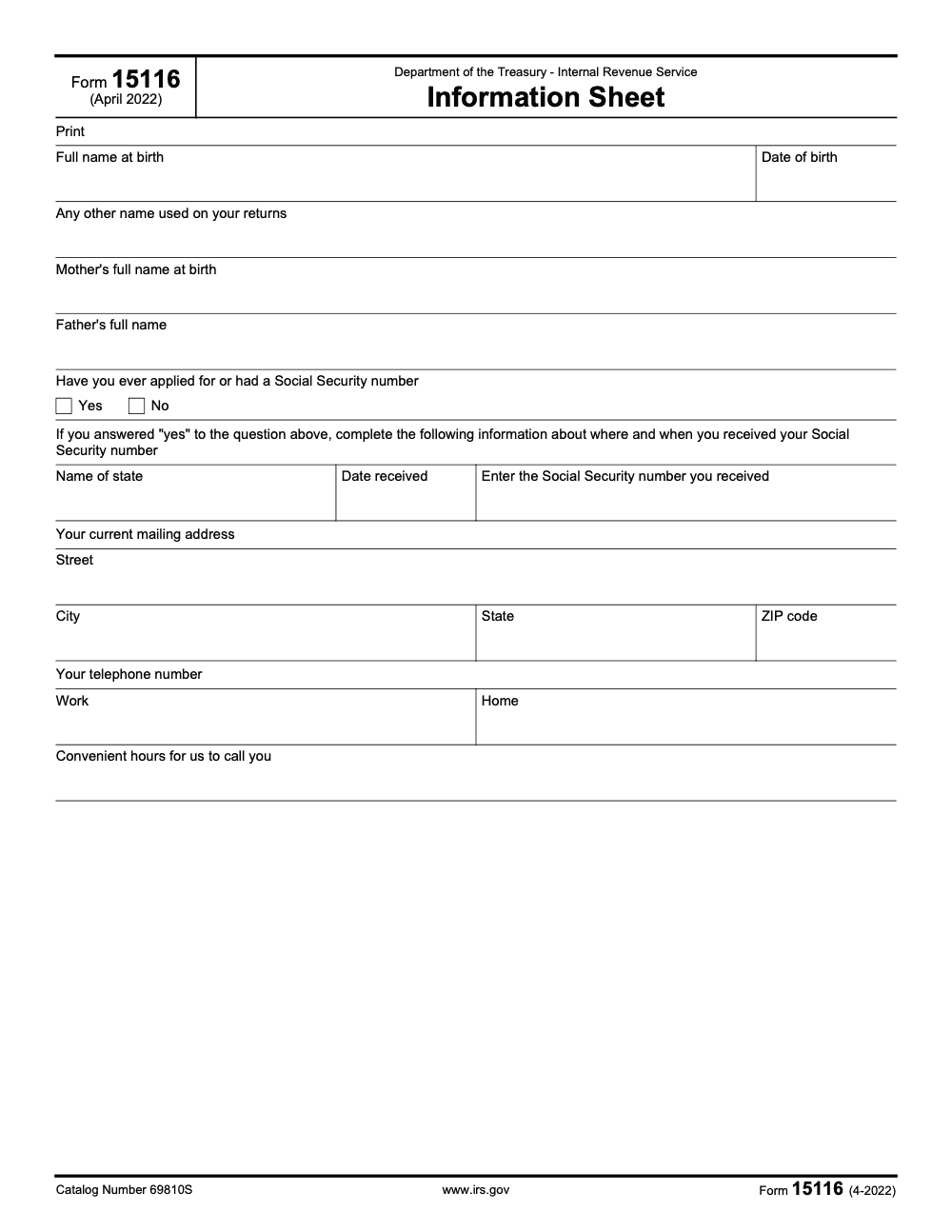
Form 15116 is the IRS Information Sheet (Catalog 69810S, April 2022 revision) used to collect a taxpayer's identifying details: full name at birth, date of birth, any other names used on prior returns, both parents' full names, Social Security number history, mailing address, and work and home telephone numbers (per IRS Form 15116, Information Sheet, April 2022). The form carries no tax year, no filing deadline, no monetary thresholds, and no signature line on its face, so the April 2022 revision is used as-is for tax year 2025 returns and beyond; the surrounding return continues through your standard U.S. tax services workflow.
Form 15116 looks like the start of an annual filing, and that read sends people down the wrong path. It is the IRS Information Sheet, Catalog 69810S, April 2022 revision, and it carries no tax year, no filing deadline, no monetary thresholds, and no signature line on its face. Treat it as identity-verification correspondence, not as a return packet.
The form collects a short list of identifying details: full name at birth, date of birth, any other names used on prior returns, both parents' full names, Social Security number history, mailing address, and work and home telephone numbers. The one place people stumble is the Social Security number block, which is conditional. You answer a printed Yes or No question first, and only a Yes opens the fields for the state, the date received, and the number itself. You return the completed sheet with the IRS notice that requested it, following any date that notice specifies.
Key Takeaways
- Form 15116 is the IRS Information Sheet (Catalog 69810S, April 2022 revision). The IRS uses it to collect a taxpayer's identifying details when it sends a written request.
- The form collects five top-of-page identity entries: full name at birth, date of birth, any other name used on your returns, mother's full name at birth, and father's full name (per IRS Form 15116, Information Sheet, April 2022 revision).
- The Social Security number block is conditional. You answer a printed Yes/No question first; only if Yes do you enter the name of the state, the date received, and the number itself.
- The form carries no tax year, no filing deadline, no monetary thresholds, and no signature line on its face. You return it with the IRS notice that prompted it, following any date that notice specifies.
- Because the April 2022 revision has not been re-issued, the same form is used as-is for tax year 2025 work and beyond. Treat it as identity-verification correspondence, not as an annual return packet.
What Form 15116 Is, and What It Is Not
Form 15116 is the IRS Information Sheet (Catalog 69810S, April 2022 revision), used to collect a taxpayer's identifying details when the IRS sends a written request. It is a single-page form that fits its header, fields, and footer on one page (per IRS Form 15116, Information Sheet, April 2022 revision). It is not an annual return, and it does not compute tax. The IRS uses it to confirm who a taxpayer is when records need clarification.
What the form is not: it is not a tax return, it carries no tax-year designation, and it prints no deadline or penalty schedule on its face. There is no monetary calculation anywhere on the sheet. Reading it as an annual return prompts staff to chase year-specific values the form simply does not collect.
Why the confusion happens
- The form's number sits close to other IRS form numbers, so a misread is easy in a stack of correspondence.
- Because it asks for identity details, some readers expect a signature line and a deadline; the April 2022 revision prints neither.
- Busy teams treat it like a return and queue it behind production work, when it is really notice-driven correspondence that needs a quick, accurate turnaround.
Who Receives and Completes It
You complete Form 15116 when the IRS sends it to you, typically alongside a notice asking you to confirm your identity or clarify your records. The taxpayer named in the request is the one who provides the information. There is no separate filing obligation that triggers the form on its own; it arrives because the IRS asked for it.
If you are completing the form for a client, work straight from the client's primary identity documents. The form's five top-of-page entries map to a birth certificate or similar record: full name at birth, date of birth, any other name used on prior returns, mother's full name at birth, and father's full name (per IRS Form 15116, Information Sheet, April 2022 revision). Confirm the printed title, the (4-2022) revision footer, and catalog 69810S before you begin, so you are working from the right form.
A quick note for firm owners
If you run a practice, this is where delivery pressure creeps in. An identity-verification request lands with whoever is on intake that week, and it can sit in a queue while year-end and quarterly production take priority. Logging the request the moment it arrives, with the accompanying notice number, removes noise and shortens response time. In my work building controlled offshore delivery programs, that simple intake discipline is often the first win, it reduces rework and protects turnaround.
Documents You Will Need
Before you touch the form, assemble a clean packet of identity records. This saves you, and your reviewer, a lot of back and forth.
- A primary identity document, birth certificate, passport, or driver license, to confirm the full name at birth and date of birth.
- Records showing both parents' full names, since the form prints two separately labeled lines: mother's full name at birth, and father's full name.
- Prior returns to capture any other names used, including maiden names and joint-return spelling variants.
- Social Security number history, if the client has ever applied for or held an SSN.
- The IRS notice that requested the form, so you can return the completed sheet with it.
Keep the supporting identity documents next to you when you enter data, so each field on the form can be cross-checked against a primary source before the file goes to the partner.
Identity details checklist
| Item | Purpose | Must Match |
| Government ID | Identity confirmation | Current legal name and address |
| SSN or ITIN | IRS matching | Exact number with no transposed digits |
| Proof of residence | Address validation | USPS format for street, city, state, ZIP |
The form's address block has four sub-fields, street, city, state, and ZIP code, and two telephone fields labeled work and home (per IRS Form 15116, Information Sheet, April 2022 revision). Enter the current mailing address in USPS format and double-check the digits, since the IRS uses this information to match the taxpayer to its records.
Step by Step, Filling the Information Sheet
Here is a practical flow my team uses. The form is short, so the work is in getting each entry exactly right against a primary source.
- Top-of-page identity entries
- Enter the full name at birth, the date of birth, any other name used on prior returns, the mother's full name at birth, and the father's full name.
- Treat the two parent lines as independent required entries; do not fill one and skip the other.
- Cross-check each name and date against the client's birth certificate or other primary identity document.
- Social Security number Yes/No gate
- Answer the printed question, have you ever applied for or had a Social Security number, first. If No, leave the three sub-fields blank.
- If Yes, enter the name of the state where the number was issued, the date received, and the Social Security number itself.
- Contact details and return
- Complete the mailing address across street, city, state, and ZIP code, and the work and home telephone fields.
- Return the completed sheet with the IRS notice that requested it, and log the date it left your office.
Pro tip, label files with a simple convention, LastName_Form15116_Date.pdf. Reviewers move faster when names are obvious.
Where and How to Return It
Form 15116 is notice-driven, so the return path follows the IRS request that delivered it. Use this quick comparison to keep the steps clear.
| Step | What you do | Why it matters |
| Match the form to the notice | Confirm the printed title, the (4-2022) footer, and catalog 69810S match the request | Avoids mixing up adjacent IRS form numbers in a stack of correspondence |
| Complete the fields | Fill the identity entries, walk the SSN Yes/No gate, then the address and phone fields | Each entry has to match a primary identity source |
| Return with the notice | Send the completed sheet back using the method the IRS notice specifies | The notice, not the form, sets the return channel and any date |
| Log the response | Record the date the form left your office in your internal tracker | The form prints no IRS receipt acknowledgement, so your log is the audit trail |
Because the form itself prints no deadline, follow any date the accompanying IRS notice specifies. If the notice is unclear, confirm the return method and timing against the notice before you send anything that contains tax identifiers.
Timing and the IRS Notice
- The form prints no filing deadline on its face (per IRS Form 15116, Information Sheet, April 2022 revision). Timing is driven by the IRS notice that accompanied it.
- The April 2022 revision has not been re-issued, so the same form is used as-is for tax year 2025 work and beyond. There is no annual version to track.
- Respond promptly to the IRS notice that requested the form; delays in identity verification can hold up the underlying matter the IRS is working.
- If the notice specifies a response date, calendar it and treat that date as the controlling deadline.
When the notice is unclear about timing, confirm the requested response window against the notice itself before you return the form. The Information Sheet has no schedule of its own to fall back on.
What the form does not carry
- No penalty schedule. The form prints no deadline or penalty language on its face (per IRS Form 15116, Information Sheet, April 2022 revision); any penalty exposure sits on the underlying tax matter, not on the Information Sheet.
- No monetary thresholds or tax computations. The sheet collects identity details only, with no amounts to calculate (per IRS Form 15116, Information Sheet, April 2022 revision).
- No signature line on its face. Return the completed sheet with the IRS notice that requested it, and keep an internal log of the response date.
Practical move, respond to the notice on time even while you gather the supporting identity documents. A prompt, accurate response keeps the IRS matter moving and avoids a second request.
Corrections and Updated Information
If you discover that an entry on a returned Form 15116 was wrong, for example a transposed Social Security number or a misspelled name, send a corrected Information Sheet referencing the same IRS notice, with a short note explaining what changed. Keep the original copy and all correspondence in the same folder as the corrected version. Because the form prints no signature line and no receipt acknowledgement, your internal log of when each version left the office is the audit trail.
Recordkeeping That Saves You During Review
- Keep a single folder with the completed Form 15116, the IRS notice that requested it, and the supporting identity documents.
- Save your internal log entry showing the date the form left your office, since the form carries no IRS receipt acknowledgement.
- Retain the primary identity documents used to fill each field, so any later look-back can be reconciled to a source.
- Keep the file in the client's permanent record rather than a single-year folder, since the form has no tax-year designation.
Where Accountably fits for firm owners
When practices hit peak season, the bottleneck is not leads, it is delivery. If your team keeps losing time to mismatched IDs and notice-driven requests that arrive without warning, you can standardize the flow and reduce partner review time by running a disciplined intake checklist with SOPs for file naming, review notes, and turnaround targets. If you choose to add offshore capacity, do it as a controlled delivery system, not resume supply. That means SOP driven execution, structured workpapers, and layers of review so you protect quality and turnaround. Use a partner only where it serves your clients and your workflow, not as a quick staffing patch.
How to Complete Form 15116 Accurately, A Quick Walkthrough
- Pull the client's primary identity documents. You need the full name at birth, date of birth, and both parents' full names.
- Enter the five top-of-page identity fields, keeping the mother's and father's name lines as separate required entries.
- Add any other name used on prior returns, including maiden names and joint-return spelling variants.
- Answer the Social Security number Yes/No question; if Yes, enter the state, the date received, and the number.
- Complete the mailing address and the work and home telephone fields, then return the sheet with the IRS notice.
If transcription is where you lose time, build a short SOP that includes a Yes/No-gate check for the SSN block, a second preparer review for name and number transcription, and a standard naming convention for the completed PDF. That single change trims review questions and prevents back and forth with the client.
Returning the Form Safely
Because Form 15116 contains identity details and Social Security number history, handle it as sensitive correspondence. Return it only through the method the IRS notice specifies, and confirm you are responding to the notice that actually requested the form. Never send the completed sheet to a general inbox that the notice did not direct you to use.
Security first, keep the completed form, the supporting identity documents, and the IRS notice together, and restrict access to the staff who own notice intake. When you are unsure of the correct return channel, confirm it against the notice before you send anything that contains tax identifiers.
Simple Checklist You Can Reuse
- Confirm the form's printed title, the (4-2022) footer, and catalog 69810S match the IRS notice.
- Fill the five identity entries from primary documents, keeping both parent lines separate.
- Walk the SSN Yes/No gate; only populate the three sub-fields when the answer is Yes.
- Complete the address and phone fields, return the sheet with the notice, and log the response date.
Compliance Note and Sources
- Form fields, revision, and catalog number, see IRS Form 15116, Information Sheet (April 2022 revision, Catalog 69810S).
- The conditional Social Security number block, see the printed Yes/No instruction on the form face.
- Response timing, follow the IRS notice that accompanied the form, since the form prints no deadline of its own.
When You Need Extra Hands
If your team is staring at a queue of notice-driven requests and identity-verification correspondence during peak weeks, you have a delivery problem, not a sales problem. The fix is structure, standard workpapers, and a review shield that keeps partners out of loops that a senior can own. If you decide to add offshore capacity, look for a U.S.-led partner that integrates into your workflow, trains teams on U.S. standards, and runs SOP driven execution with layered review. That is how you increase throughput without trading away quality or security.
Conclusion
You now have a clear map. If you receive an IRS request for Form 15116, complete the Information Sheet (April 2022 revision, Catalog 69810S) using the client's primary identity documents, walk the Social Security number Yes/No gate carefully, and return the sheet with the IRS notice that prompted it. Keep your file tidy, respond on the notice's timeline, and log the response date. If complexity pops up, get professional help early.
Common Mistakes We See Every Season
The same handful of slips surface every time Form 15116 passes across the desk. Most of them come from treating the form like an annual return instead of the static identifier sheet it actually is.
Reusable Checklists
These checklists are written to copy straight into a firm SOP. They cover the three stages a Form 15116 typically moves through: identity pre-fill, the conditional SSN block, and submission with recordkeeping.
Identity pre-fill packet
- Pull the client's full name as printed at birth; the form treats this as a separate field from the current legal name.
- Capture date of birth from a primary identity document (birth certificate, passport, or driver license).
- Note any other names the client has used on prior tax returns, including maiden names and joint-return spelling variants.
- Record mother's full name at birth as a standalone entry in its own line.
- Record father's full name as a standalone entry in its own line.
- Cross-check the catalog number 69810S and the (4-2022) revision footer on the form face before any pre-fill goes to the partner.
SSN history Yes/No gate
- Confirm whether the client has ever applied for or held a Social Security number.
- If Yes: capture the Name-of-state where the SSN was issued, the Date-received, and the Social Security number itself.
- If No: leave the Name-of-state, Date-received, and SSN columns blank; the form does not require them.
- Document the source for the Yes/No answer (Social Security Administration record, prior W-2, or prior return) in the workpaper.
- Flag any client who switches the Yes/No answer between engagements; that needs partner review before submission.
Contact, submission, and recordkeeping
- Capture current mailing address across four sub-fields: street, city, state, and ZIP code.
- Capture two phone numbers labeled work and home, matching the form's printed layout.
- Specify the convenient hours window the client wants the IRS to use for any telephone follow-up.
- Confirm the revision footer reads (4-2022) and the catalog number reads 69810S before submitting.
- File the completed form alongside the IRS notice that requested it, so staff can sort it from Form 15117 or other adjacent correspondence on later look-back.
- Note the date the form left your office; the form prints no IRS receipt acknowledgement, so your internal log is the audit trail.
Keep 15116 Season From Stalling
Form 15116 does not arrive on a fixed calendar. It shows up when the IRS sends an identity-verification request, and the work hits whoever is on intake that week. Because the form carries no printed deadline and no tax-year designation (per IRS Form 15116, Information Sheet, April 2022 revision), these requests tend to sit in a queue while year-end and quarterly production take priority.
The fix is treating the form as a documented intake stream, not as an interruption to whatever else is on the desk. Standardize the moment the form arrives, the supporting identity documentation, and the moment it goes back out.
- Log the IRS notice number that accompanied the request, the form's catalog 69810S, and the (4-2022) revision footer at intake, so staff can sort the request from Form 15117 or other adjacent correspondence at a glance.
- Pull the five identity entries (full name at birth, date of birth, any other names used on prior returns, mother's full name at birth, father's full name) into a single identity sheet before the partner picks up the file.
- Walk the SSN Yes/No gate before touching the SSN columns; only when the answer is Yes do you populate the three conditional sub-fields (Name-of-state, Date-received, Social Security number).
- Capture both phone numbers labeled work and home, plus the convenient hours window the client wants the IRS to call, so any follow-up call lands in working hours.
- File the completed form, the IRS notice that requested it, and the supporting identity documents together in the client's permanent record, since the form prints no signature line on its face (per IRS Form 15116, Information Sheet, April 2022 revision); IRS receipt-acknowledgement behavior is not specified on the form itself, so treat your internal log as the audit trail.
The cleaner the intake and the supporting documentation, the shorter the response cycle. When firms wire that intake into their existing engagement workflow, the IRS request stops competing with planned production work; that is the kind of structured execution our U.S. tax delivery team builds into the day-to-day file flow.
FAQs
Form 15116 is the IRS Information Sheet (Catalog 69810S, April 2022 revision). The IRS sends it to collect a taxpayer's identifying details: full name at birth, date of birth, any other names used on prior returns, both parents' full names, Social Security number history, mailing address, and work and home telephone numbers.
No. Form 15116 carries no tax year, no filing deadline, and no monetary thresholds on its face. You complete it and return it with the IRS notice that requested it, following any date the notice itself specifies.
Only if you answer Yes to the printed question asking whether you have ever applied for or held a Social Security number. If Yes, you enter the name of the state, the date received, and the number. If No, you leave those three sub-fields blank.
The April 2022 revision of Form 15116 prints no signature line on its face. Return the completed Information Sheet alongside the IRS notice that requested it, and keep an internal log of when it left your office as your audit trail.
About this guide
Accountably helps US CPA, EA, and accounting firms hire trained accountants and tax preparers in India.
About us Reviewed byJugal Thacker, CPAFounder and CEO at Accountably
A Washington-licensed CPA with 7+ years inside US firms – PwC, a real-estate tax practice, then a full-service firm, rising from reviewer to manager to advisory. This article was reviewed against the current IRS Form 15116 (Information Sheet, April 2022 revision, Catalog 69810S), which is a static information-collection form used as-is regardless of tax year.
View profile →How we research, review, and update this guide
Every Accountably guide is researched against primary IRS sources, reviewed by a U.S. CPA, and refreshed as guidance evolves. Read our Editorial Guidelines to see how we source, fact-check, and update our content.




