
Summarize this article with AI
In Brief
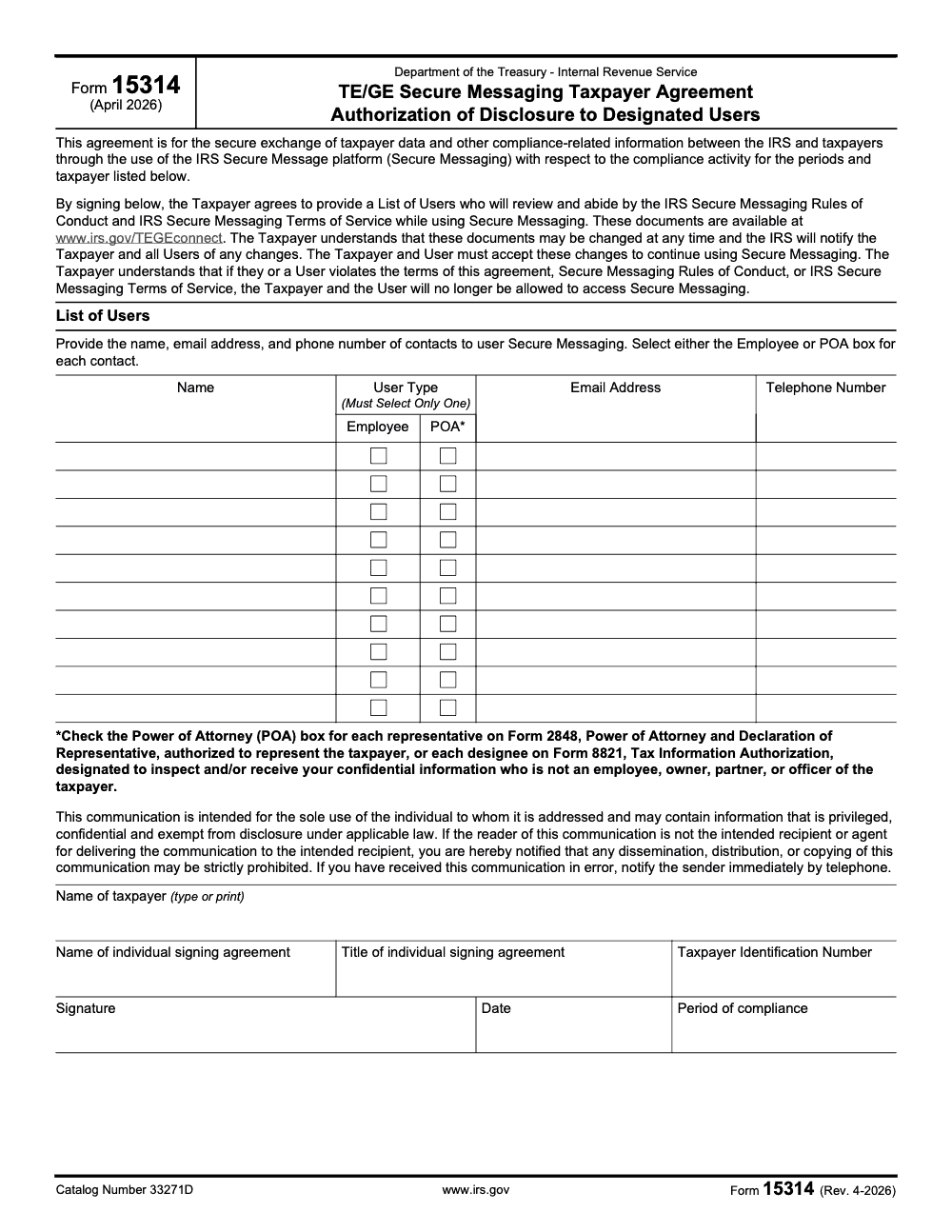
IRS Form 15314 (Rev. 4-2026, catalog number 33271D) is the TE/GE Secure Messaging Taxpayer Agreement – a one-page authorization that lets the IRS Tax Exempt and Government Entities division exchange case information with named users through the Secure Messaging platform for the specific compliance activity and period listed on the form. The List of Users table provides ten pre-printed rows, each requiring name, user type (Employee or POA), email, and telephone; external Form 2848 representatives and Form 8821 designees are marked as POA per the form text, and the controlling Rules of Conduct and Terms of Service are published separately at www.irs.gov/TEGEconnect. See our tax services for how we handle TE/GE access onboarding end to end.
TE/GE case conversations have a way of scattering across mail, fax, and unsecured email. Form 15314 pulls them into one secure inbox. It is the TE/GE Secure Messaging Taxpayer Agreement, a one-page authorization that lets the Tax Exempt and Government Entities division exchange case information with named users for a specific compliance activity and period.
The List of Users table gives you ten pre-printed rows, each needing name, user type of Employee or POA, email, and telephone, and you attach a supplemental list in the same four columns if you outgrow it. Every designated user must already have a valid Form 2848 or Form 8821 on file and accepted by the IRS before they can read a single message. Work from the April 2026 revision and download it from IRS.gov.
Key Takeaways
- Form 15314 is the TE/GE Secure Messaging Taxpayer Agreement, it authorizes the IRS to share case‑specific information with your named users inside the secure messaging portal.
- Participation is by invitation, optional, and messages are kept as a digital record of your communications. Notification emails contain no taxpayer identifying information.
- Each designated user must already have a valid Form 2848 or Form 8821 on file and accepted by the IRS before they can view messages.
- You list designated users in the List of Users table, which has ten pre-printed rows; attach a supplemental list using the same four columns (Name, User Type, Email, Telephone) if you need more. You may update or revoke access later.
- The current form revision is April 2026 (Rev. 4-2026). Always download the official fillable PDF from IRS.gov.
What is IRS Form 15314
Form 15314 is a short agreement that turns on TE/GE Secure Messaging for a specific compliance activity. By signing it, you allow TE/GE to disclose case information to the users you name, and you agree to use the secure portal, not standard email, for that case. The IRS keeps those messages as the official digital record.
In practice, you authorize the IRS to message you and your approved representatives inside a web‑based inbox, then you respond and attach files right there.
A few details matter. Form 15314 works only when TE/GE invites you, it applies only to the defined activity and periods you identify, and you can stop later with written notice. Because the agreement is tied to that specific compliance activity, access ends when the case closes or you notify the IRS in writing.
Who should use this form
If you are in a TE/GE exam or compliance check and want faster, traceable exchanges, Form 15314 is for you. You opt in after an IRS employee invites you, then you list the users who need access. The IRS verifies that each user already has Form 2848 or 8821 on file, then creates accounts and sends setup instructions.
TE/GE participants
Use Form 15314 when your TE/GE contact offers Secure Messaging and you prefer a secure inbox over mail or fax. You will get email alerts with a link, never with identifying data, then you sign in to read or reply. Everything stays inside the portal, which keeps an auditable trail for your case.
Authorized representatives
If you are a POA or an information designee (and you are not also an employee, owner, partner, or officer of the taxpayer, in which case you belong in the Employee user type regardless of your professional credential), make sure your authorization is on file first, then have the taxpayer add you to the List of Users table. Without Form 2848 or 8821 accepted by the IRS, you will not get access to the secure inbox.
TE/GE Secure Messaging, how it works
Think email, but in a locked room. IRS staff post a message or request, you get a neutral email alert, you log in, then you answer and attach documents. The portal can be briefly unavailable on Saturday evenings, so plan bulk uploads outside that window. The IRS page explains the account steps and confirms that Secure Messaging is invite‑only for taxpayers and authorized reps.
- Create your account after the invite and agreement.
- Work entirely inside the portal, not regular email.
- Expect all messages to be saved as part of your case record.
What Form 15314 authorizes, scope and limits
When you sign Form 15314, you consent to receive and send information for the listed compliance activity through Secure Messaging. It does not open the door to every matter on your EIN, it stays tied to the periods and issues you identify. Email alerts will never include taxpayer identifiers, they only point you to the portal, which is where the actual content lives.
The agreement takes effect when the IRS accepts it and remains in place for the duration of the case. You can stop at any time by notifying the IRS in writing, and access ends at case closure because the agreement is limited to the defined compliance activity and periods you list.
Designated users and access rules
Designated users are the specific individuals you list in the List of Users table on the form. Each one must be backed by an accepted Form 2848 or 8821 before the system grants access. The table has ten pre-printed rows, and you can attach a supplemental list using the same four columns when more users are needed. The IRS maintains the notification list and sends account instructions after setup.
| Item | Requirement |
| Eligibility | Listed in the List of Users table (ten pre-printed rows; attach a supplemental list if more are needed) |
| Authorization on file | Form 2848 or Form 8821 accepted by IRS |
| How alerts work | Neutral email points to the portal, no taxpayer data in the email |
| Where work happens | Messages and files stay inside Secure Messaging |
| Duration | Only for the defined compliance activity, until case closure or termination |
Why invitations matter
TE/GE staff introduce Secure Messaging during initial contact, include Publication 5295 with letters, and invite you to opt in. Once you submit Form 15314, TE/GE provisioning creates accounts for you and your representatives, then sends a welcome message with access details. These steps appear throughout the Internal Revenue Manual sections that govern TE/GE work.
How to enroll, step by step
- Wait for your TE/GE invitation.
- Review the Terms of Service and Rules of Conduct (these documents are not printed inside Form 15314 itself, they are published separately at www.irs.gov/TEGEconnect, and the IRS may change them at any time with notice to the taxpayer and users).
- Complete Form 15314, including the List of Users table for your users, then return it to your IRS contact.
- Watch for the IRS email with credentials, then create your Secure Messaging account.
- Log in, confirm your profile, and send a quick hello so both sides know access works.
Practical setup tips that save time
- Align names, emails, and telephone numbers in the List of Users table with what appears on Forms 2848 or 8821, mismatches delay access (all three contact fields are required per user, an omitted phone or email leaves the row incomplete).
- If you add a new representative later, submit updated authorization and a refreshed List of Users table right away.
- Use a shared team mailbox for alerts if turnover is common, then authenticate into the portal with named users only.
Benefits over mail or fax
You cut days from every exchange, you avoid fax image quality issues, and you gain a living record of who sent what and when. The IRS confirms that messages are stored as a digital record of your communications, which helps with internal reviews and future audits. Email notices are scrubbed of identifying information, so the sensitive content stays inside the portal.
From experience, teams feel the biggest relief during busy season, when a missing page or an unsigned schedule would have burned a week in the mail. In Secure Messaging, you upload the fix within minutes and keep momentum.
A secure inbox, predictable alerts, and a full message history make compliance work feel manageable instead of chaotic.
Power of Attorney and Form 8821, what you need on file
Form 15314 does not replace representation rules. It rides on top of them. Each user you add must already be cleared by Form 2848 or 8821. The TE/GE page spells this out, and the form text repeats it. No clearance, no access.
Quick comparison
| Purpose | Form 2848, Power of Attorney | Form 8821, Tax Information Authorization |
| What it allows | Representation and receipt of communications | Information disclosure only, no representation |
| Where it is used here | Grants the IRS authority to share case details with your representative and lets the rep act on your behalf | Grants the IRS authority to share case details with an info designee |
| Needed for Secure Messaging access | Yes, accepted by IRS before access | Yes, accepted by IRS before access |
If your case expands to cover new periods, the agreement text notes that the IRS must receive and accept updated authorization before a user can view those additional periods. Plan ahead when you see scope widening.
Security, privacy, and retention
Three guardrails protect you. First, email alerts do not carry taxpayer identifiers, they only include a link to the secure inbox. Second, you and your reps work inside the portal, which uses modern encryption and requires authentication. Third, the IRS keeps all messages as part of your official case record.
What to expect during outages or changes
The TE/GE page notes a short scheduled window on Saturday evenings when the system may be unavailable. Outages do not change statutory deadlines, so keep your timeline commitments in mind. If you decide Secure Messaging is not right for your case, send a message to your contact saying you want to opt out.
Terms, rules, and account updates
Before you start, you agree to the Terms of Service and Rules of Conduct (and to any future changes the IRS publishes, since continued use after the IRS notifies you of an update counts as acceptance, while refusal to accept the updated terms ends access). If you need to update the email where alerts are sent, use the Settings link in your secure inbox, or ask your IRS contact to update manual consent details. To add a new contact later, submit a new consent form.
Where this fits in the larger IRS picture
TE/GE is not the only area using Secure Messaging. The IRS also runs secure inbox programs in other contexts, and those programs use a form similar in spirit to 15314 to authorize messaging and designated users. This broader shift explains why many exam teams now introduce Secure Messaging during initial contact and attach Publication 5295 to their letters.
Expect your examiner to mention Secure Messaging during kickoff, include Publication 5295, and ask you to sign the agreement if you want to use it.
Step by step, filling and submitting Form 15314
- Download the official fillable PDF from IRS.gov.
- Complete the taxpayer and contact details.
- List your designated users in the List of Users table (ten pre-printed rows; attach a supplemental list if more are needed) and confirm each has a valid Form 2848 or 8821 on file.
- Review the scope, effective dates, and termination language.
- Sign and date, then return the form to your IRS contact as instructed.
- Watch for the account email, set your credentials, and send a quick test message.
Where to download the fillable PDF
Always pull the latest PDF from IRS.gov to avoid outdated copies. If you use a third‑party library for convenience, verify the revision matches April 2026 (Rev. 4-2026), and remember that only the IRS‑hosted form is authoritative.
Use the IRS link first. Third‑party sites can be helpful for quick previews, but they add disclaimers and are not official sources.
Participation rules and how to terminate
Form 15314 is voluntary. It takes effect when the IRS accepts it, it lasts through the case, and either side can end participation with written notice. Because the agreement is limited to the defined compliance activity and periods you list, access ends when the case closes. After closure, you cannot keep using the portal for that case.
From our team, practical workflow tips
- Create a short internal checklist for Secure Messaging, who monitors alerts, who drafts replies, who uploads supporting workpapers.
- Use clear file names, include period and description, for example, 2023‑Q4‑AP‑Reconciliation.pdf, so reviews move faster.
- Keep your POA and 8821 database current, expired authorizations are the number one reason access gets delayed.
Accountably supports firms that care about quality, controls, and meeting deadlines. We place trained offshore staff behind multi-layer review, so when you switch to Secure Messaging, your team can route requests, document decisions, and keep partner review time protected. Use whatever parts of this checklist help your process, even if you run everything in house.
Conclusion
If you handle TE/GE work, Form 15314 turns a slow process into a secure, searchable conversation. You decide who can see messages, you keep everything in one place, and you can stop when the case ends. The IRS confirms the program is invite‑only, optional, and built to preserve a digital record, which is exactly what most teams want during compliance. Download the current PDF from IRS.gov, complete the List of Users table carefully, and get your secure inbox set up before the next request lands.
Common Mistakes We See Every Season
Every TE/GE engagement season we see the same access-onboarding errors slip through, usually in the days right after the IRS invitation letter lands and the taxpayer rushes to designate users. Catching them at intake saves a delay loop later.
Reusable Checklists
Three checklists that paste straight into a TE/GE engagement SOP. Run them in order, from the moment the IRS invitation lands through the closing message.
Pre-signing readiness
- Confirm the TE/GE Secure Messaging invitation in writing from the IRS contact and capture the assigned compliance activity, periods, and case reference.
- Download the current Form 15314 (Rev. 4-2026, catalog number 33271D) from IRS.gov and verify the revision date in the footer matches.
- Pull the latest Rules of Conduct and Terms of Service from www.irs.gov/TEGEconnect and save a dated copy to the engagement file.
- Build the user roster, capturing name, relationship to the taxpayer, Form 2848 or Form 8821 status, email, and telephone for each prospective user.
- Confirm CAF acceptance of every Form 2848 and Form 8821 before any external user is added to the List of Users.
- Identify the signer for the taxpayer entity (officer, partner, or member with signing authority) and capture their title for the signature block.
List of Users completion
- For each row, mark exactly one user type, Employee for internal personnel and POA for external Form 2848 representatives or Form 8821 designees.
- Fill all three contact fields per user, name, email address, and telephone, since an omitted field leaves the row incomplete per the form text.
- Reclassify any owner, partner, or officer who holds a professional credential as Employee, the POA category excludes anyone internal to the taxpayer.
- If the count exceeds ten users, prepare a supplemental sheet using the same four columns and reference it on the printed form.
- Cross-check every listed email against the Form 2848 or Form 8821 on file, mismatched emails are the most common cause of access delay.
- Have every listed user acknowledge the current TEGEconnect Rules of Conduct in writing before the agreement is signed.
Post-signing access and lifecycle
- Send the signed Form 15314 and any supplemental list to the IRS contact through the route specified in the invitation letter.
- Watch each user's inbox for the IRS account-setup email and walk first-time users through the portal sign-in on the same day.
- Document the phone-only misdelivery protocol in the engagement file and brief every user on it before their first message.
- When a user leaves the engagement or the firm, file an updated List of Users with the IRS contact promptly to revoke access for that user.
- Re-pull the TEGEconnect Rules of Conduct whenever the IRS notifies of a change and re-confirm acceptance from each active user.
- At case closure, send a written termination notice to the IRS contact and archive the full Secure Messaging thread to the permanent engagement file.
Keep 15314 Season From Stalling
TE/GE compliance cycles do not move on tax-season time. An invitation to Secure Messaging can land mid-quarter, mid-audit, or in the middle of a Form 990 reporting push, and the access setup, with its Form 2848 and Form 8821 verification, ten-row List of Users, and binary user-type call per row, has to clear in days, not weeks. Per the form text, the agreement is tied to the specific compliance activity, the periods, and the taxpayer listed on the signed form, which means every missed step delays the whole case.
The fix is to treat Form 15314 (Rev. 4-2026) as a structured intake workflow, not a one-off signature. The form is a single page, but the work behind it spans authorization checks, user vetting, Rules-of-Conduct review, and a misdelivery protocol that has to be live before the first message lands. A repeatable SOP turns a multi-day scramble into a same-day turn.
- Build a standing intake template around the four columns on Form 15314, Name, User Type, Email, and Telephone, so every new TE/GE invitation starts from the same checklist.
- Pre-validate Form 2848 and Form 8821 acceptance for every recurring external user once a quarter, do not wait for an invitation to discover a stale CAF authorization.
- Keep a dated copy of the current TEGEconnect Rules of Conduct in the engagement file and re-pull it the day of signing, IRS updates bind the taxpayer and users on notice.
- Pre-write a one-paragraph misdelivery brief for every named user, the form requires telephone notification, not a reply email, when a message lands in the wrong inbox.
- Stage a supplemental List of Users template for engagements with more than ten authorized contacts, using the same four columns so the IRS contact can match it to the signed page.
That structure is what Accountably's tax delivery teams bring to TE/GE engagements, a documented intake SOP, version-controlled authorization tracking, and named owners for every step from invitation to closing message. The form takes minutes to sign; the system that surrounds it is what keeps the case moving.
FAQs
No. Secure Messaging is by invitation and optional. You can always use phone, mail, or fax if you prefer.
The List of Users table has ten pre-printed rows. If you need more, attach a supplemental list using the same four columns (Name, User Type, Email, Telephone). Each external user listed as POA must be backed by Form 2848 or Form 8821.
Form 2848 authorizes representation and communication. Form 8821 authorizes disclosure of information only. Both must be accepted by the IRS before the user can access the secure inbox.
Yes. Send a written message to your IRS contact saying you no longer wish to communicate through Secure Messaging. The agreement applies only to the defined compliance activity and periods you list, so participation ends at case closure.
No. Alerts are neutral and only contain a link to the portal. You must sign in to read messages or view files.
Yes. The IRS states that it saves all messages as a digital record of your communications.
No. System outages do not affect your obligations or statutory deadlines. Plan submissions accordingly.
Other forms this guide names
Summarize this article with AI
About this guide
Accountably helps US CPA, EA, and accounting firms hire trained accountants and tax preparers in India.
About us Reviewed byJugal Thacker, CPAFounder and CEO at Accountably
A US-licensed CPA with 7+ years inside US firms – PwC, a real-estate tax practice, then a full-service firm, rising from reviewer to manager to advisory. This article was reviewed against current IRS guidance for the 2025 tax year and updated for filers preparing late returns, amendments, and 2026 estimates.
View profile →How we research, review, and update this guide
Every Accountably guide is researched against primary IRS sources, reviewed by a U.S. CPA, and refreshed as guidance evolves. Read our Editorial Guidelines to see how we source, fact-check, and update our content.




