
Summarize this article with AI
In Brief
Form 2120, the Multiple Support Declaration, lets one person claim a qualifying relative as a dependent when two or more people together pay more than half of that person’s support, no single supporter pays more than half, and the claimant personally paid more than 10 percent (per IRS Publication 501 and Form 2120, Rev. December 2025). Every other contributor above 10 percent signs a waiver, you attach the one-page form to your Form 1040 or 1040-SR, and you keep the signed waivers in your files rather than mailing them; the 2025 gross income limit for the dependent is $5,200 (per Rev. Proc. 2024-40).
Three siblings split the cost of supporting an aging parent, together they cover more than half, and none of them pays more than half alone. Only one can claim the parent as a dependent, and Form 2120, the Multiple Support Declaration, is how that one person makes the claim stick.
The claimant has to have personally paid more than 10 percent of the total support, and every other contributor who also paid more than 10 percent signs a waiver giving up the claim for that year. You can list up to four contributors on the form, attach it to your Form 1040 or 1040-SR, and keep the signed waivers in your files rather than filing them. The parent still has to meet the qualifying relative rules, including the gross income test, which for tax year 2025 caps gross income at $5,200.
Key Takeaways
- You use Form 2120, Multiple Support Declaration, when two or more people together provide over half of someone’s support and no one person exceeds 50 percent.
- The person who claims the dependent must have paid more than 10 percent of the total support for the year.
- Every other eligible contributor who paid more than 10 percent must give you a signed statement waiving their right to claim the dependent for that tax year. You keep these waivers, you do not file them.
- You can list up to four contributors on Form 2120, and attach a statement if there are more.
- Attach Form 2120 to your Form 1040 or 1040‑SR for the year, then retain the signed waivers and support proof with your records.
- The person must meet the qualifying relative rules, including the gross income test. For tax year 2025, the gross income limit is $5,200.
What Form 2120 Is, and When You Use It
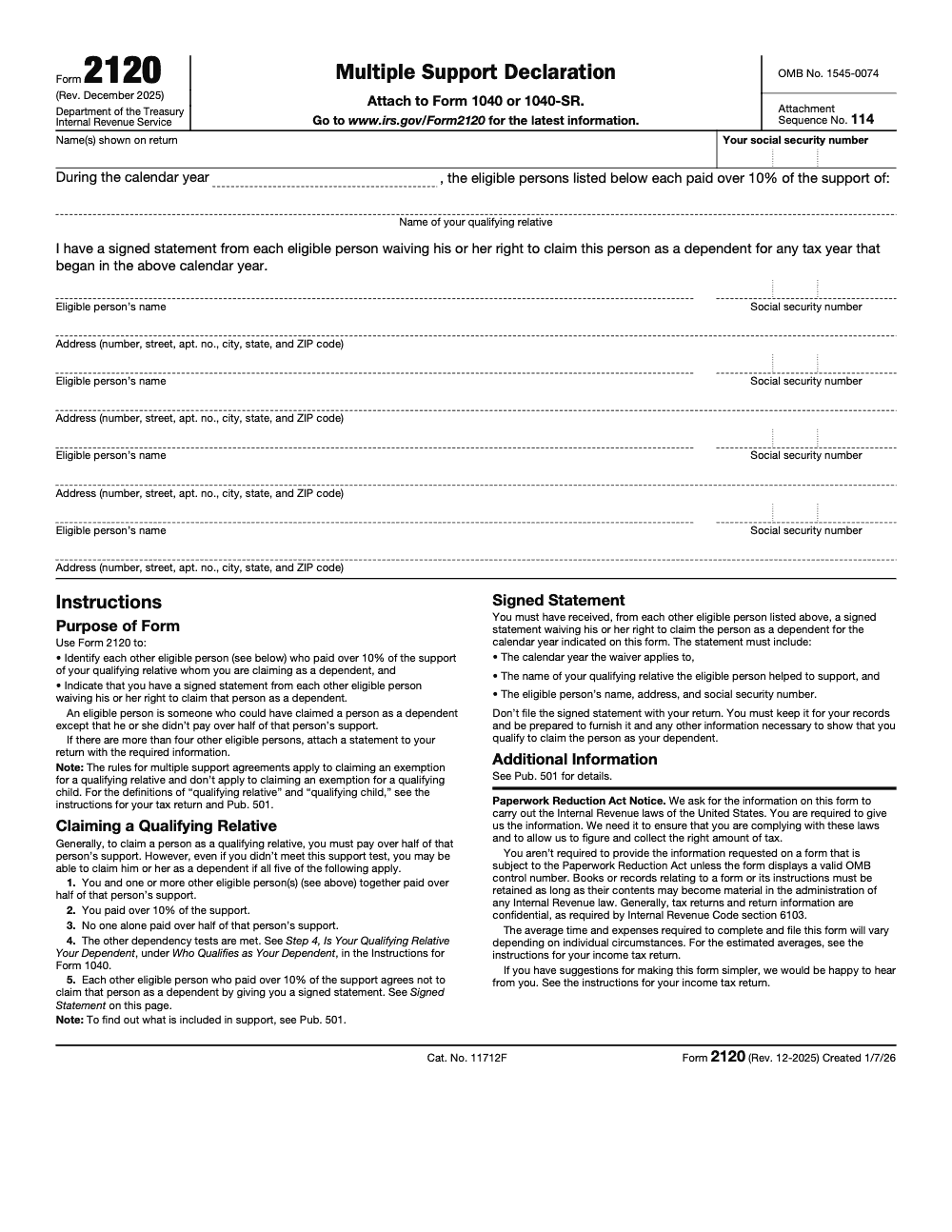
Form 2120 is the IRS document that lets one person claim a qualifying relative as a dependent when a group jointly provides more than half of that person’s support. The form identifies each other eligible person who paid more than 10 percent and confirms you hold signed waiver statements from them. In plain English, it is the IRS‑approved way to elect a single claimant when no one paid a majority of the support.
Here is the flow at a glance.
- Confirm the person meets the qualifying relative rules, including the gross income limit of $5,200 for 2025 and the support test.
- Make sure no single supporter paid more than half, and that you personally paid more than 10 percent.
- Collect signed statements from every other 10 percent contributor waiving their claim for the year. Keep those in your files.
- Complete Form 2120, list up to four contributors, attach a supplemental list if needed, and file the form with your tax return.
Why the paperwork split matters, the IRS requires you to attach the declaration itself to your return, and requires you to keep the signed waiver statements, ready to show if asked. That is how you prove consensus among contributors while avoiding duplicate claims.
Who This Guide Helps
- You are sharing support for a parent, grandparent, or other relative, and your group, not a single person, covers more than half of their total support.
- You paid more than 10 percent, but not more than 50 percent.
- You want a step‑by‑step plan, from eligibility to filing, plus examples and common pitfalls to avoid.
Small note on timing, this guide uses 2025 thresholds and the IRS’s most recent instructions as of January 23, 2026. Always confirm figures for the year you file.
Check If You Are Eligible for Form 2120
Before you print anything, walk through this quick checklist.
Step 1, Confirm a Qualifying Relative
A qualifying relative is not your qualifying child and must either be related to you in an allowed way or have lived with you all year, then pass the gross income and support tests. For 2025, the gross income limit is $5,200. If their gross income is at or above that amount, they usually cannot be claimed as your dependent under the qualifying relative rules.
Practical tip, “gross income” means taxable income, not gifts or most tax‑exempt benefits. Some Social Security benefits may be partially taxable, which can affect the calculation, so check Publication 501’s definitions if the person receives benefits or has mixed income.
Step 2, Check the Multiple Support Conditions
- Together, your group of eligible supporters, the people who could otherwise claim the person, paid more than half of the person’s total support for the calendar year. If unrelated outsiders who cannot claim the person provided more than half, no multiple support agreement is possible.
- No one person paid more than 50 percent.
- You personally paid more than 10 percent of total support.
If all three are true, you are on track to use Form 2120.
Step 3, Get Signed Waivers Before You File
Every other eligible contributor, anyone who paid more than 10 percent, must sign a statement waiving their claim to the dependent for that year. The test is strictly more than 10 percent, so a contributor at exactly 10 percent or below is not an eligible person and does not need to sign a waiver. You must secure these statements before you file, then keep them in your records. Do not mail the waivers with your return.
Step 4, Attach the Right Form
You attach Form 2120 to your Form 1040 or 1040‑SR for the same tax year. If there are more than four eligible contributors, you add a separate statement listing the extras with the required details.
Gather Required Information
Here is a short prep list to avoid back‑and‑forth.
- Your name as shown on your return and your SSN.
- The tax year you are claiming.
- The qualifying relative’s full name.
- A running total of the person’s support, plus who paid what.
- Each eligible contributor’s full name, address, and SSN, and the percentage or amount they paid.
- Signed waiver statements from every contributor who paid more than 10 percent, ready for your files.
Example, Siblings Supporting a Parent
Imagine you, Alex, and Priya support your mother in 2025.
| Contributor | Support percent | Eligible for waiver requirement |
| You | 40% | Yes |
| Alex | 35% | Yes |
| Priya | 25% | Yes |
- As a group, you paid 100 percent, and no one exceeded 50 percent.
- Any one of you who paid more than 10 percent can be the claimant if the other two sign waivers for 2025, but only one of you can claim the dependent, since the claim cannot be split between two people in the same year.
- You decide to claim. You collect signed statements from Alex and Priya, complete Form 2120 listing up to four contributors, and attach it to your return. You keep the waivers in your records.
Common Eligibility Mistakes to Avoid
- Forgetting to check the gross income test before doing anything else, the 2025 limit is $5,200.
- Failing to get a signed waiver from one sibling who crossed the 10 percent line.
- Listing more than four contributors on the form without attaching a supplemental statement.
- Assuming tie‑breaker rules for qualifying children apply, Form 2120 is for qualifying relatives and follows multiple support rules, including the waiver step.
My rule in practice, confirm the $5,200 gross income test first, then lock waivers, then fill the form. That sequence prevents almost every filing headache I see.
Complete Form 2120 Step by Step
Follow this simple order so you finish in one sitting.
- Top of the form Enter your name as shown on your return and your SSN. Enter the calendar year and the qualifying relative’s full name.
- Confirm the multiple support facts By signing, you are affirming that your group paid over half of the person’s support, that you paid more than 10 percent, and that no one paid over 50 percent.
- List eligible contributors Form 2120 has space for up to four other eligible persons. For each, include name, address, and SSN. If you have more than four, attach a separate statement with the same fields.
- Attach and retain Attach Form 2120 to your Form 1040 or 1040‑SR for that year. Keep the signed waiver statements from each eligible contributor in your files. Do not file the waivers with your return.
Identify Eligible Contributors
Eligible means the person could have claimed the dependent but for the support test, in other words they helped support the person, paid more than 10 percent, and did not exceed 50 percent. Simply paying support is not enough, an eligible person must also independently meet the other dependency tests, such as the relationship, gross income, joint return, and citizenship tests. If someone contributed 8 percent, they are not an eligible contributor and do not need to sign a waiver.
What Your Waiver Statements Must Include
Double‑check each statement before you file.
- The calendar year the waiver covers.
- The qualifying relative’s name.
- The eligible contributor’s name, address, and SSN.
- An explicit statement waiving the right to claim the person as a dependent for that year. Keep each signed statement with your records.
Multiple Support Agreement, Rules and Waivers, The 10 Percent Rule
Here is the rule in a sentence, if two or more people together pay more than half of someone’s support, any one person who paid more than 10 percent can claim the dependent, but only if every other 10 percent contributor agrees in writing and you attach the multiple support declaration to your return. Form 2120 is the IRS’s designated way to make that declaration.
Common Filing Errors We See
- Missing a waiver from one contributor who paid more than 10 percent. The IRS can disallow your claim if another person also claims the dependent.
- Mailing the waivers with your return. Keep them in your files, do not file them.
- Forgetting to attach Form 2120 at all. The declaration needs to be attached to your return.
- Listing contributors who exceeded 50 percent, multiple support does not apply if any single person paid more than half.
Quality Check Before You E‑file
- Confirm the dependent meets qualifying relative rules, including the $5,200 gross income cap for 2025.
- Recalculate the support percentage table from your receipts and statements.
- Verify each 10 percent contributor’s name, address, and SSN match their waiver.
- Confirm Form 2120 shows the same calendar year as the support table and the waivers.
Pro move, collect waivers in January while memories and documents are fresh, then e‑file with Form 2120 attached. It saves everyone time when April gets busy.
What Documents and Statements You Must Keep
You are building a small audit file. Keep these.
- Signed waiver statements from each contributor who paid more than 10 percent, with the year, the dependent’s name, and the signer’s name, address, and SSN. Do not file them with the return. Keep them for your records.
- Proof of support, receipts, canceled checks, bank or credit card statements, lease or housing records, medical bills, and any worksheets that show total support and each person’s share.
- Your completed Form 2120 and a copy of the filed return. The IRS expects you to retain books or records as long as their contents may become material. In practice, that usually means at least three years after filing, longer if you amend or have carryforwards, up to six years if there is a substantial understatement of income, and with no time limit at all in cases of fraud.
Sibling‑Supported Parent, A Quick Example
Say you cover 40 percent of your parent’s support, your two siblings cover 35 percent and 25 percent. Because no one paid more than half, any one of you who paid more than 10 percent can claim the dependent if the others sign waivers for that year. You attach Form 2120, you keep the waivers.
Download Form 2120 and Check the Revision
Always download the current one‑page Form 2120 directly from the IRS and check the revision. As of this writing, the form shows “Rev. December 2025” and it says to attach it to Form 1040 or 1040‑SR. Use the IRS “About Form 2120” page to confirm you have the latest version and read the short instructions.
Troubleshooting, Edge Cases, Audits, and Tie‑Breakers
- If there are more than four contributors, list four on Form 2120 and attach a statement with the extra names, addresses, SSNs, and confirmation of waivers.
- If one person actually provided more than 50 percent of the support, Form 2120 does not apply. That person is the claimant, assuming the other dependency tests are met.
- If the IRS questions your claim, present the filed Form 2120 and produce each signed waiver and your support records. The multiple support section of Publication 501 explains that you must attach the declaration and keep the signed statements.
Common Mistakes We See Every Season
After a few hundred of these declarations, the same errors resurface every filing season. These are the quiet ones that disallow a claim months after April.
Reusable Checklists
Paste these into your engagement SOP so every multiple support claim runs the same way, no matter who prepares it.
Support computation worksheet
- List every person who contributed to the dependent’s support for the calendar year.
- Value lodging at fair rental value and add food, clothing, medical, dental, education, and transportation (per IRS Publication 501).
- Compute each contributor’s share as a percentage of total support.
- Confirm the eligible contributors together paid more than half.
- Confirm no single person paid more than 50 percent.
- Confirm the claimant personally paid more than 10 percent.
Waiver collection packet
- Identify every contributor who paid more than 10 percent.
- Request a signed statement from each one before filing.
- Confirm each statement names the calendar year it covers.
- Confirm each statement names the qualifying relative supported.
- Confirm each statement shows the signer’s name, address, and SSN.
- Store the signed waivers in the client file. Do not attach them to the return.
Pre-file attachment review
- Verify the dependent meets the qualifying relative tests, including the $5,200 gross income limit for 2025.
- Confirm Form 2120 shows the current revision, Rev. December 2025.
- List up to four eligible contributors on the form, and attach a supplemental statement if there are more than four.
- Match the calendar year on Form 2120 to the support table and every waiver.
- Attach Form 2120 to the Form 1040 or 1040-SR.
- Retain the form, waivers, and support records for at least three years.
Keep 2120 Season From Stalling
Form 2120 rarely arrives in volume, but it arrives at the worst time. These declarations land in the March and April individual filing crunch, and each one drags a support table, a gross income test against the 2025 limit of $5,200 (per Rev. Proc. 2024-40), and signed waivers from several family members who are not all your clients.
That cross-party coordination is where the hours leak. The fix is not heroics in April, it is a standard intake that settles the support math and the waivers before the return is ever opened.
- Run the support table early, valuing housing at fair rental value, so the over-half and 10 percent thresholds are settled before the season peaks.
- Request waivers from every contributor above 10 percent in writing, each showing the year, the relative’s name, and the signer’s name, address, and SSN.
- Cap the form at four eligible contributors and pre-draft the supplemental statement the moment a fifth appears.
- Match the calendar year across Form 2120, the support worksheet, and each waiver in one review step.
- Keep the waivers in the file instead of attaching them, and tag the records for the retention window.
When the support math and the waivers run on a documented workflow, a multiple support claim stops competing with your higher-value returns for April attention. That is the kind of structured, reviewed execution our tax services team is built to run, so the declarations clear without stalling the rest of the season.
FAQs
It lets one person claim a qualifying relative as a dependent when several people together pay more than half of the support, no single person pays more than half, the claimant pays more than 10 percent, and the others sign waivers. You attach the form, you keep the waivers.
Under a multiple support agreement, any person who paid more than 10 percent can be the claimant if every other 10 percent contributor signs a waiver for that year. The 10 percent rule is measured against the person’s total annual support.
No. Keep the signed statements in your files and be prepared to furnish them if requested. Attach only Form 2120 to your 1040 or 1040‑SR.
Form 8332 is a different situation. It is used by a custodial parent to release claim to a child so the noncustodial parent can claim certain tax benefits. It does not replace Form 2120, which applies to qualifying relatives under multiple support rules.
Form 1120‑S is the income tax return for S corporations. It is unrelated to Form 2120 but often comes up in small business families juggling multiple filings. Keep it separate from your personal return documents.
Other forms this guide names
- Form 1040: Filing Guide for 2025 Returns (AGI, Deductions, Deadlines)
- Form 1040-SR: Standard Deduction, Schedules, E-file Tips
- Form 1120-S: Guide for S‑Corp Filing, K‑1, K‑2/K‑3, Deadlines
About this guide
Accountably helps US CPA, EA, and accounting firms hire trained accountants and tax preparers in India.
About us Reviewed byJugal Thacker, CPAFounder and CEO at Accountably
A Washington-licensed CPA with 7+ years inside US firms – PwC, a real-estate tax practice, then a full-service firm, rising from reviewer to manager to advisory. This article was reviewed against current IRS guidance for the 2025 tax year and updated for filers preparing late returns, amendments, and 2026 estimates.
View profile →How we research, review, and update this guide
Every Accountably guide is researched against primary IRS sources, reviewed by a U.S. CPA, and refreshed as guidance evolves. Read our Editorial Guidelines to see how we source, fact-check, and update our content.




