
Summarize this article with AI
In Brief
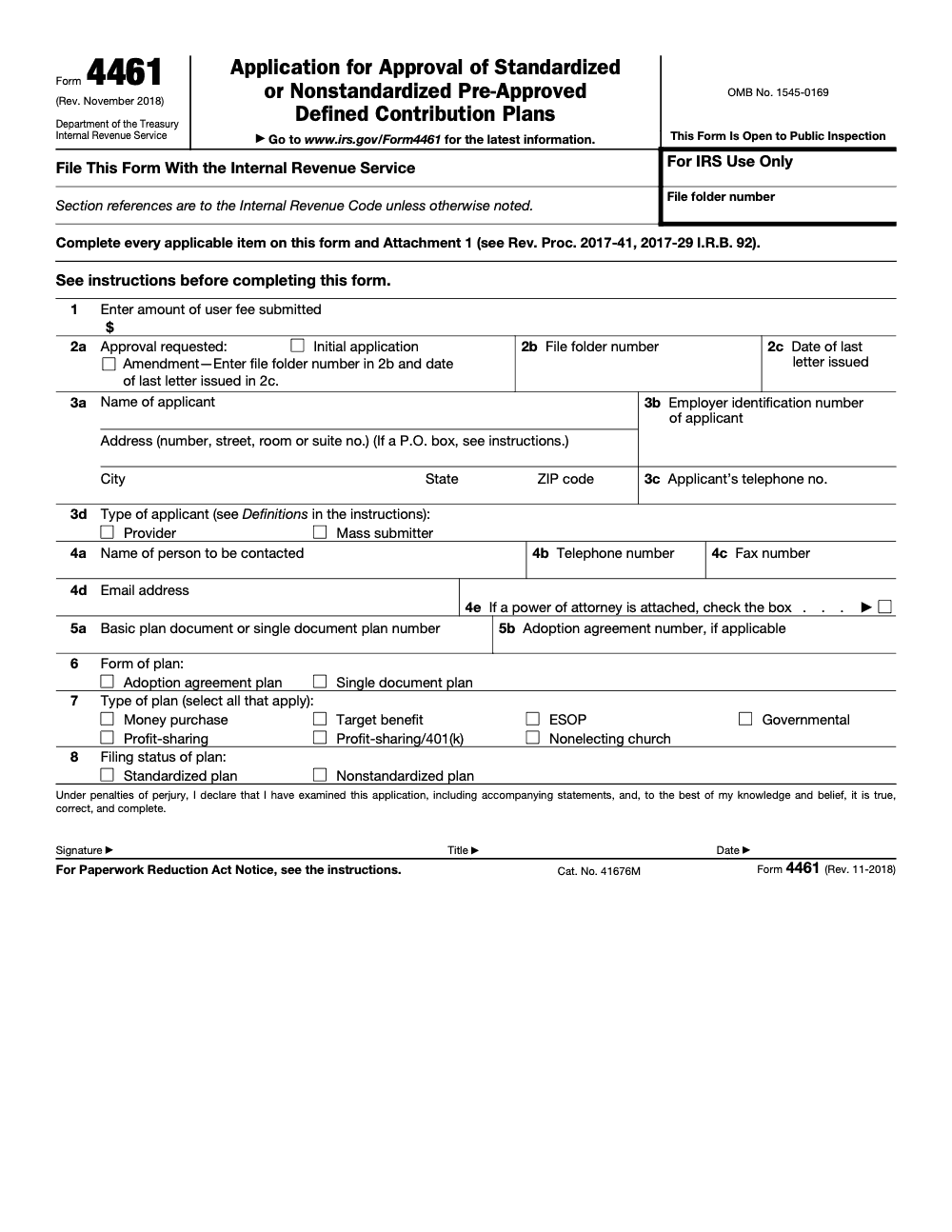
Form 4461 is the IRS application a provider or mass submitter files to obtain an opinion letter on a pre-approved defined contribution plan under Rev. Proc. 2017-41 (per the Form 4461 instructions, Rev. November 2018). Line 5a takes the two-digit basic plan document number (which must stay identical to your prior submission), Line 5b takes the three-digit adoption agreement number beginning with 001, every package must include a complete Attachment 1, and the response window for any IRS information request runs 30 days from the date printed on the letter, not the date you receive it. Adopting employers do not file Form 4461 – they adopt a plan that has already received an opinion letter via the provider's filing.
On Form 4461 the details that hold a package up are small ones: Line 5a, the two-digit basic plan document number, has to match the prior cycle to the digit, Line 5b carries the three-digit adoption agreement number beginning with 001, and Attachment 1 needs explicit entries rather than blanks. Form 4461 is how a provider or mass submitter requests an IRS opinion letter on a pre-approved defined contribution plan.
A few mechanics decide whether your filing clears review. You file on Pay.gov, one text-searchable PDF no larger than 15 MB, faxing any overflow to 844-255-4818 with your tracking ID. Opinion letter user fees rose on July 1, 2024 and still apply, and after you submit, the confirmation email is your acknowledgement, with no status inquiry until 60 days after the submission period ends or your filing date, whichever is later.
Key Takeaways
- You use Form 4461 to request an IRS opinion letter for a pre‑approved defined contribution plan, standardized or nonstandardized. File it on Pay.gov.
- Pay.gov allows one uploaded file per application, the PDF must be text‑searchable and no larger than 15 MB. If you exceed the limit, fax the overflow to 844‑255‑4818 and include your Pay.gov tracking ID, EIN, applicant name, and plan name.
- Opinion letter user fees for pre‑approved plans increased on July 1, 2024 and continue to apply in 2025. Typical amounts are $20,000 per basic plan document with one adoption agreement, $15,000 per additional adoption agreement, and $32,000 for a single document plan.
- After you submit, the Pay.gov confirmation email is your acknowledgement. Do not ask for status until 60 days after the end of the submission period, or 60 days after the date you filed, whichever is later.
- Cycle 4 for defined contribution pre‑approved plans ran from February 1, 2024 through January 31, 2025, and applications can still be filed after that window under Rev. Proc. 2023‑37.
What Form 4461 is and who actually files it
Form 4461 is the application a provider or mass submitter uses to obtain an IRS opinion letter on the form of a pre‑approved defined contribution plan under section 401(a). It is not a determination letter for a specific employer plan, it is the IRS’s view on the plan document you make available for multiple adopting employers. You access and file the current 4461 only through Pay.gov.
In plain terms, Form 4461 is how you get the IRS to bless your pre‑approved DC plan document before employers adopt it, which gives those adopters reliance on plan form.
Who files:
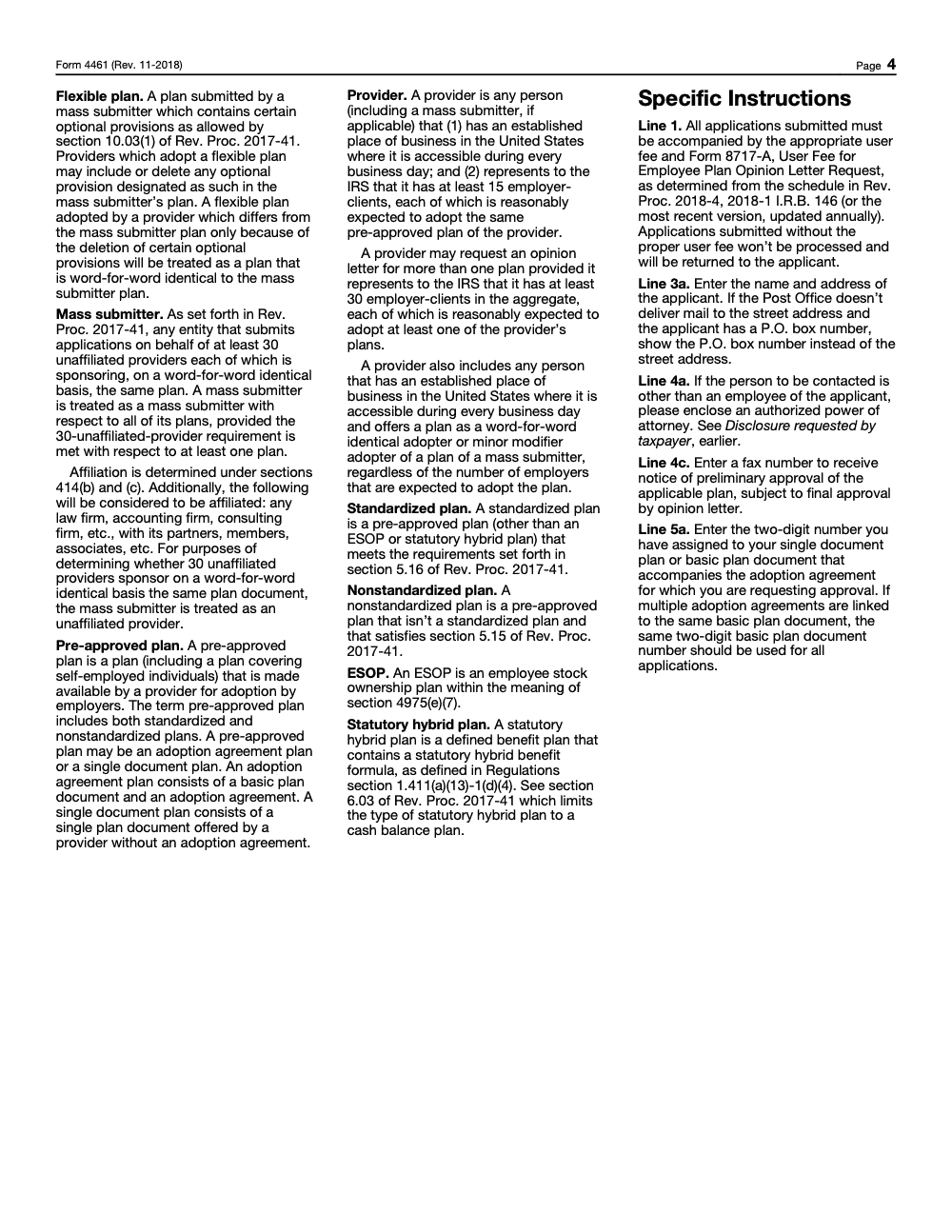
- Document providers that meet the provider definition in Rev. Proc. 2017-41.
- Mass submitters, including those filing on behalf of adopting providers using Form 4461‑B for the related adopter filings.
What changed recently, and what did not
Two things matter for your 2025 playbook.
- Electronic filing is now the rule. As of August 1, 2024, Form 4461 must be submitted electronically via Pay.gov. The site can accept only one PDF, and it must be within 15 MB. If you go over, you fax the extra material to 844‑255‑4818, and, if needed, you can ask EP Customer Service at 855‑224‑1311 to confirm the fax landed. Keep the Pay.gov tracking ID on every page you fax.
- Fees are higher than past cycles. For Rev. Proc. 2023‑37 pre‑approved 401(a) plans, the Appendix A schedule in Rev. Proc. 2024‑4 shows the fee for a basic plan document with one adoption agreement is $20,000, each additional adoption agreement is $15,000, and a single document plan is $32,000. The IRS also notes that a $32,000 single document fee cannot be paid by credit card on Pay.gov, use ACH or debit.
If you care about timelines, Cycle 4 for DC plans ran from February 1, 2024 through January 31, 2025. You can still file after that window, and the 60‑day status inquiry rule measures from the end of the submission period or your filing date, whichever is later.
Who this guide helps
If you are a plan document provider, a mass submitter, an ERISA attorney supporting providers, or the operations lead who actually assembles the filing package, this walkthrough is for you. I will show you how to avoid the common stumbles I see most often, messy file structures, wrong identifiers, and fees paid under the wrong category, so your opinion letter request moves cleanly.
The quick map, then the details
Here is the high‑level flow you will follow:
- Gather and label your documents, cover letter, plan document, adoption agreements, prior opinion letter if any, interim amendment certification, and POA if used. Combine to a text‑searchable PDF under 15 MB.
- Sign in to Pay.gov, search “4461,” complete the form fields, upload the single PDF, and pay the fee electronically.
- If you exceed the size cap, fax overflow to 844‑255‑4818 with the tracking ID, EIN, and applicant name on the cover. If you want delivery confirmation, fax EP Customer Service at 855‑224‑1311.
- Keep the Pay.gov confirmation email, then hold questions until the 60‑day mark.
Next, I will walk you through each step with the exact fields, IDs, and file specs that save time in review.
How to file Form 4461 on Pay.gov without rework
Step‑by‑step on Pay.gov
- Create or sign in to your Pay.gov account, then search “4461” and open the application. Enter the applicant’s legal name, street address, EIN, contact person, email, and phone. If you have a POA, check the box and include Form 2848.
- Upload a single, text‑searchable PDF, up to 15 MB, containing, in order, your concise cover letter, the core plan document, each adoption agreement, any prior opinion letter or a redline from the prior cycle if applicable, interim amendment certification, and any Form 2848 or 8821.
- Pay the user fee by ACH, debit, or credit card. For a $32,000 single document plan, Pay.gov restricts payment methods, use ACH or debit.
- Submit and save the confirmation email. That message, with the tracking ID and timestamp, is your acknowledgement.
Pro tip from the trenches, I set the PDF’s document properties with the applicant name and tracking ID before I upload, it makes reconciliations fast when you later split and fax overflow.
What to include in the PDF, and in what order
- Cover letter that summarizes the filing, identifies prior opinion letter details if any, and lists the contents.
- Current plan document. If the plan received an opinion letter in the prior cycle, include a redline highlighting changes.
- Each adoption agreement that accompanies the basic plan document.
- Certification regarding interim good faith amendments when applicable.
- Form 2848 or 8821 when you want the IRS to work with your representative.
- Prior opinion letter, if you have one.
If your attachments push you past 15 MB, remove the overflow and fax it to 844‑255‑4818. Add the Pay.gov tracking ID, EIN, and applicant name to the coversheet. If a faxed attachment would exceed roughly 150 MB, split it into smaller faxes to avoid silent delivery failures. If you want confirmation, fax EP Customer Service at 855‑224‑1311.
The fields that trip people up
Applicant, contact, and plan identification
- Applicant legal name and address must match your records. Use the EIN that appears on your federal filings.
- Contact person fields need a live email and phone, this is who the IRS will call for questions. If someone other than an employee should be contacted, include a signed POA.
- Assign IDs correctly:
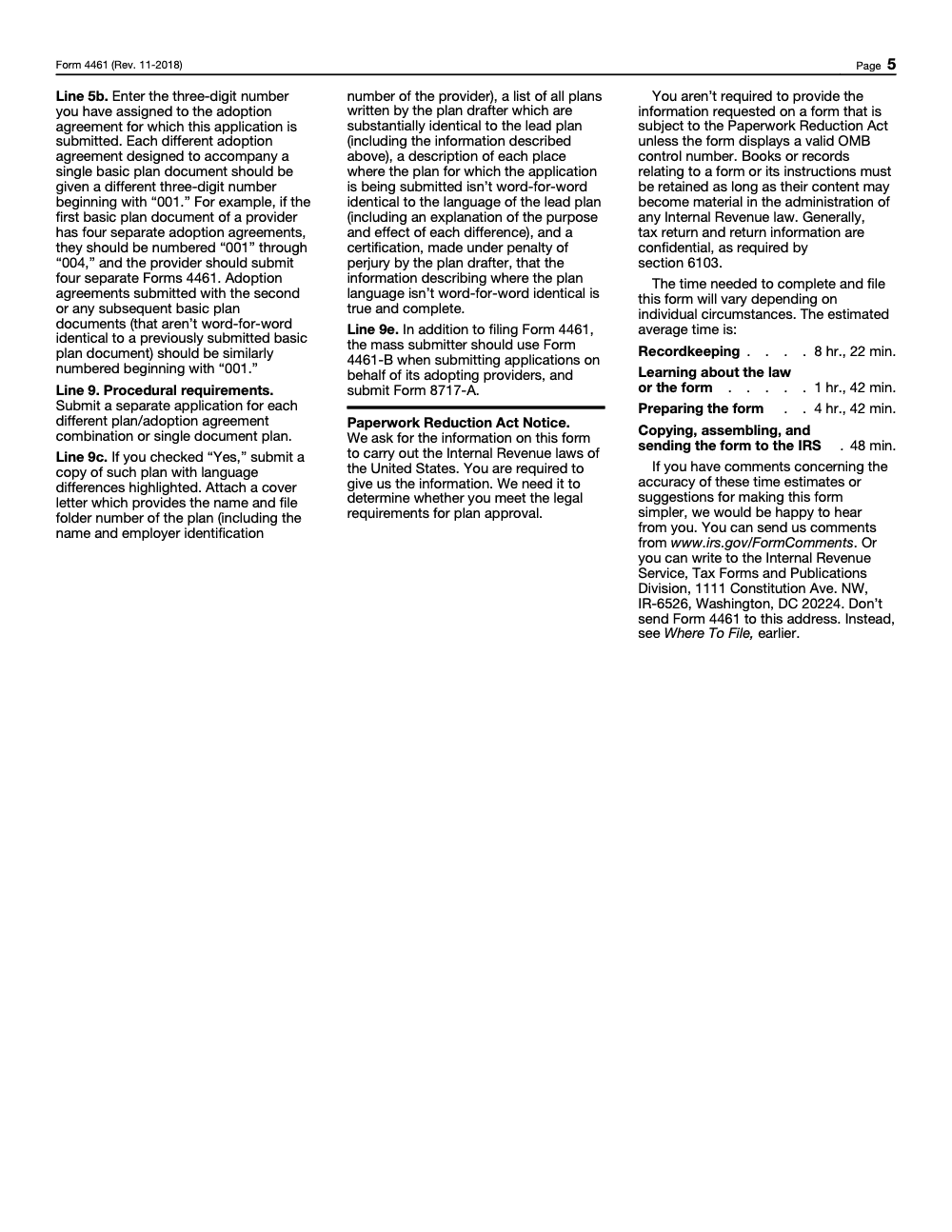
- Line 5a, two‑digit code for the basic plan document or single document plan (this number must remain identical to your prior submission, do not renumber the basic plan document across cycles).
- Line 5b, three‑digit code for each adoption agreement beginning with 001. Each different adoption agreement tied to the same basic plan document gets its own three‑digit code (if you later submit a second basic plan document that is not word‑for‑word identical to the first, restart the adoption agreement numbering at 001 for that new BPD, the count does not continue across BPDs).
Filing status and plan types, choose the right boxes
You will designate standardized or nonstandardized, and identify plan types. A standardized plan must meet Rev. Proc. 2017-41 section 5.16, and an ESOP is not standardized. Keep combinations within the rules in Rev. Proc. 2023‑37.
| Element | Code or rule | Purpose |
| Filing status | Standardized or Nonstandardized | Drives design constraints and reliance terms. |
| IDs | Line 5a, two digits, Line 5b, three digits | Ties basic document and each adoption agreement to the right application. |
| Usage, mass submitter | Word‑for‑word or minor modifier, per 4461‑B rules | Clarifies adopter characterization in mass submitter filings. |
| Plan types | Profit‑sharing and 401(k), money purchase, target benefit, governmental, defined benefit is not part of 4461 | Shows document scope, do not mark ESOP as standardized. |
Fees, payment, and receipts
Here is the current user fee picture for pre‑approved plans under Rev. Proc. 2023‑37 and the 2024‑4 fee schedule that remains applicable in 2025:
- Basic plan document with one adoption agreement, $20,000.
- Each additional adoption agreement, $15,000.
- Single document plan, $32,000.
- Assumption of sponsorship or word‑for‑word adoption events, $300 per basic plan document.
You pay fees on Pay.gov with your submission. Your confirmation email is your official receipt, so archive it with your workpapers. For the $32,000 single document plan, plan on ACH or debit, since Pay.gov does not support a credit card at that amount.
If a submission is missing the correct fee, the IRS can return the application without processing, which resets your timeline. Build a mini fee checklist in your cover letter to prevent that spike.
Confirmation, timing, and when to ask for status
After you submit through Pay.gov, you receive a confirmation email. Treat it as your only acknowledgement, there is no separate mailed notice for an electronic filing. For status, wait 60 days after the end of the submission period, or 60 days after your filing date, whichever is later, before you reach out. When you do need help, the IRS lists 877‑829‑5500 for Customer Service.
If you faxed overflow attachments, keep your fax confirmations. If you want the IRS to confirm they received the faxed materials, use the EP Customer Service fax line, 855‑224‑1311, and include your Pay.gov tracking ID, EIN, and applicant name on the coversheet to tie everything together.
Troubleshooting Pay.gov issues, quick triage
- If your single PDF exceeds 15 MB, compress it or move exhibits to fax with the identifiers on the cover.
- If your card is declined for a $32,000 single document plan, switch to ACH or debit, that fee cannot be paid by credit card.
- Keep a simple log of tracking IDs for all pending drafts and submissions in Pay.gov so your team can match names to tracking numbers quickly. The IRS notes that pending forms are identified by tracking number.
A simple, proven prep checklist
- Confirm the current cycle rules in Rev. Proc. 2017-41 and pull the user fee from the most recent annual update of Rev. Proc. 2018-4.
- Build the single, text‑searchable PDF under 15 MB, ordered cover letter, plan document, adoption agreements, certifications, POAs, prior letter or redline.
- Assign Line 5a and 5b IDs before you draft the cover letter, so your letter matches the form.
- Pay on Pay.gov, save the confirmation email, and set a 60‑day reminder before you consider a status check.
Clean files, correct IDs, paid fee, and patience for the 60‑day window, that is how opinion letter applications avoid avoidable friction.
Common Mistakes We See Every Season
Most Form 4461 returns aren't about plan design at all – they're about a handful of procedural slips that show up cycle after cycle. Here are the ones my team flags most often during pre-submission review.
Reusable Checklists
The checklists below are copy-paste ready for your engagement-management or document-drafting SOP. Each one maps to a different stage of the Form 4461 lifecycle.
Pre-submission package review
- Confirm Line 5a basic plan document number matches the prior cycle exactly (no renumbering between cycles).
- Confirm Line 5b adoption agreement number is three digits beginning with 001 for this BPD.
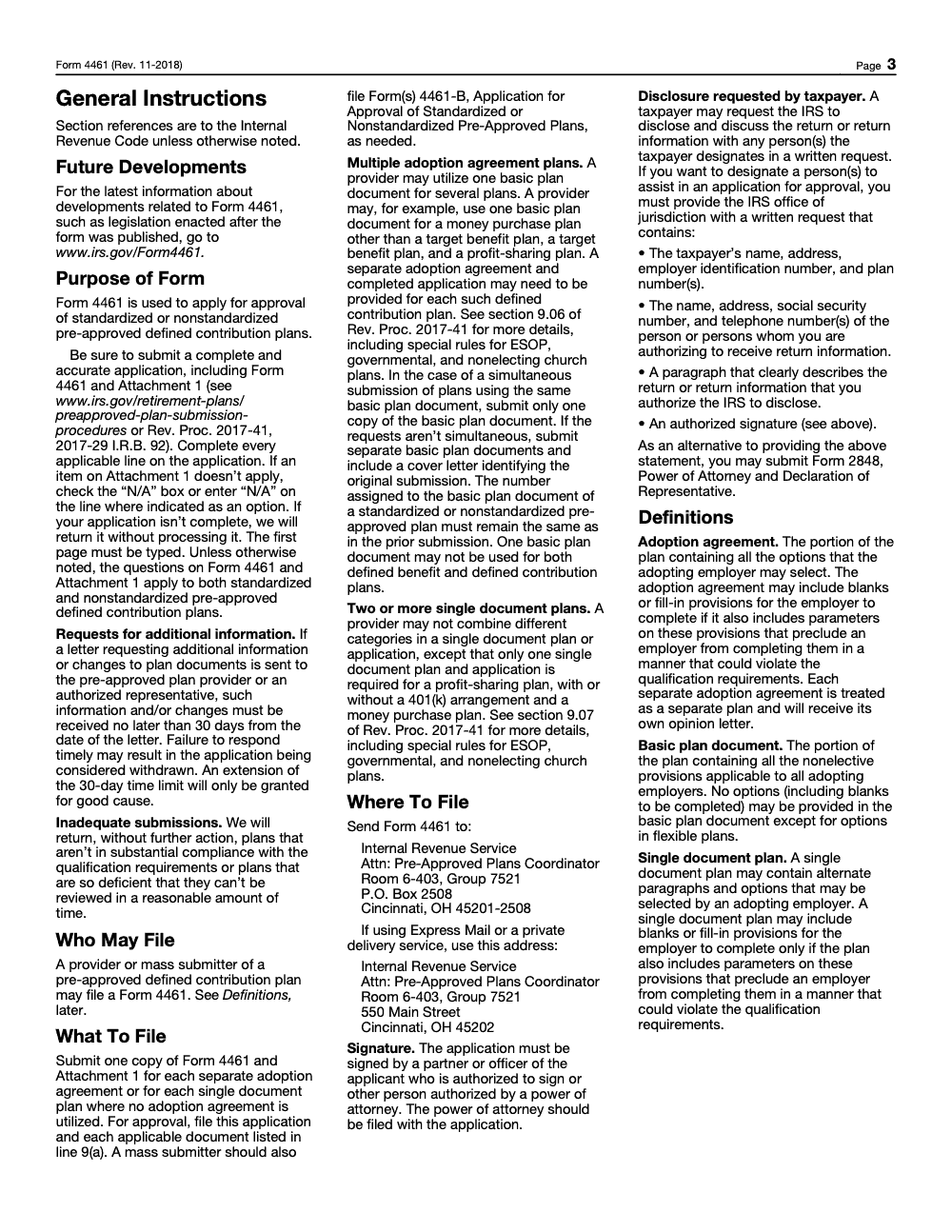
- Confirm the first page of the application is typed (per the Form 4461 instructions, Rev. November 2018).
- Confirm Line 3a uses the P.O. box if the Postal Service does not deliver to the street address.
- Attach Form 2848 if the Line 4a contact person is not an employee of the applicant.
- Verify Attachment 1 is complete with no blank items (mark "N/A" explicitly where an item does not apply).
- Verify Form 8717-A and the current-year user fee accompany the filing.
Line 9 supporting documentation
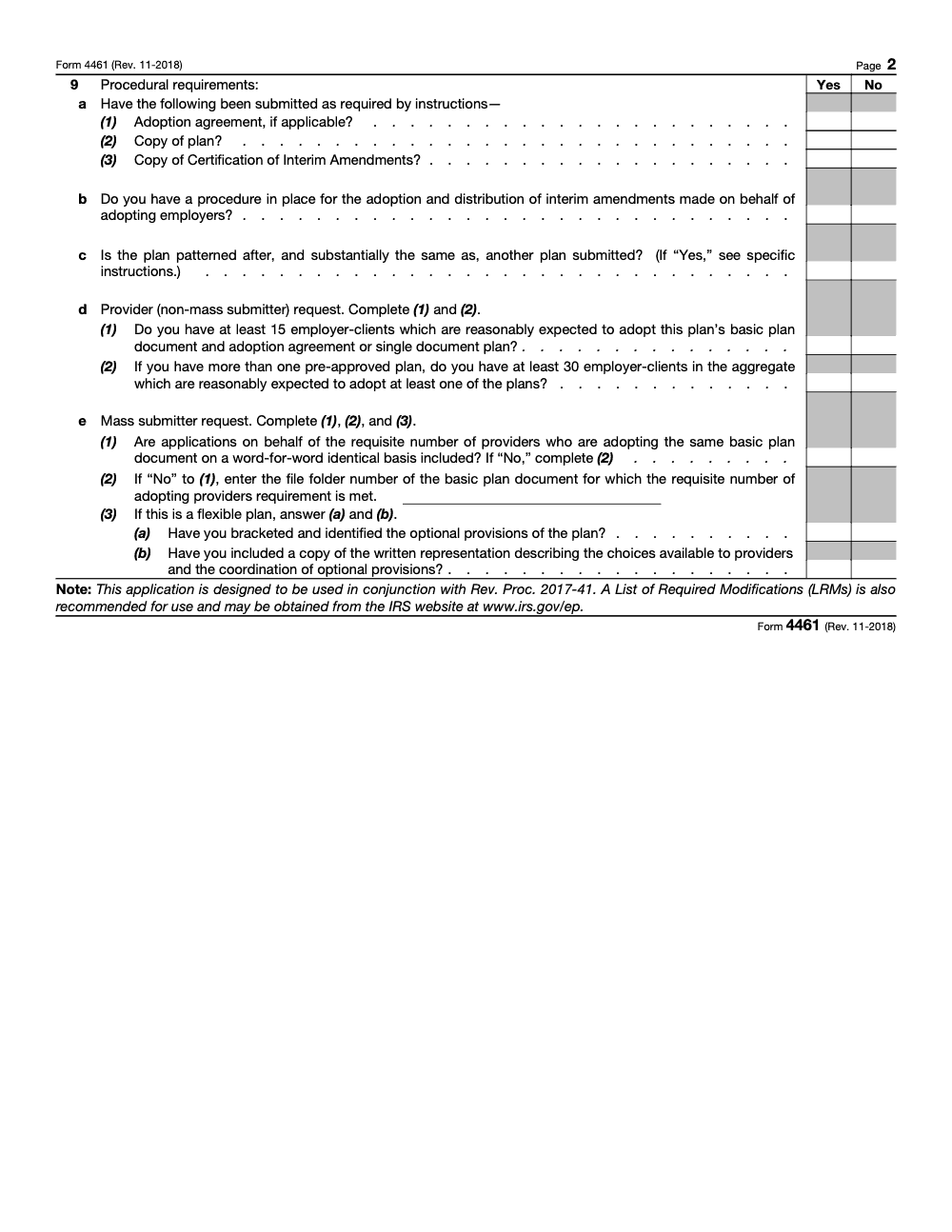
- If Line 9c is "Yes" (plan patterned after another submitted plan), attach the lead plan with language differences highlighted.
- Include a cover letter naming the lead plan, its file folder number, your provider EIN, and a list of substantially identical plans by the same drafter.
- Include a description of every non-word-for-word difference (with purpose and effect).
- Include the under-penalty-of-perjury certification by the plan drafter that the description of differences is true and complete.
- If filing as a mass submitter, confirm Form 4461-B accompanies the adopting-provider applications and Form 8717-A is enclosed.
- For flexible plans, confirm optional provisions are bracketed and identified, with a written representation describing the choices and coordination of those provisions.
30-day additional-information response
- Log the date printed on the IRS letter the moment it arrives (the 30-day clock runs from that date, not from receipt).
- Calendar a response-due-by date no later than 30 days from the letter date.
- Assign drafter and reviewer the same day the letter arrives.
- If an extension is needed, document the "good cause" rationale before requesting (mere convenience is not a sufficient standard).
- Submit the response promptly via the channel specified in the IRS request letter, and include the file folder number on every page.
- Confirm internally that failure to respond timely may result in the application being treated as withdrawn.
Keep 4461 Season From Stalling
Form 4461 is not a return that lands every quarter or every April – it is a once-per-cycle, multi-day document build. The Paperwork Reduction Act estimate alone is 8 hours, 22 minutes of recordkeeping, 1 hour, 42 minutes learning the law, 4 hours, 42 minutes preparing the form, and 48 minutes copying and assembling (per the Form 4461 instructions, Rev. November 2018). Multiply that across every basic plan document and every adoption agreement combination in your catalog, and the mid-cycle bottleneck explains itself.
The fix is rarely "work faster" – it's process control. Stalled 4461 packages almost always trace back to the same five or six items: a Line 5a number that drifted from the prior cycle, a Line 5b counter that wasn't reset for a new BPD, a stale user fee figure pulled from the original 2018 Revenue Procedure, missing Attachment 1 entries, or a 30-day response window that wasn't calendared from the letter date.
- Maintain a permanent BPD register that locks each two-digit Line 5a number and forbids reassignment between cycles.
- Reset Line 5b adoption agreement numbering to 001 the moment a new, non-identical BPD is opened, and document the boundary in your drafter notes.
- Pull the user fee from the most recent annual update of the Employee Plans user-fee Revenue Procedure and pair every Form 4461 with Form 8717-A.
- Confirm Attachment 1 is complete before any package leaves drafting (every non-applicable line marked "N/A" explicitly, no blanks).
- Log the date printed on every IRS additional-information letter the day it arrives so the 30-day clock is calendared from the letter date and not the receive date.
That is the kind of structured execution our offshore tax delivery teams build into the documentation lifecycle, so opinion letter packages move on schedule, fees match the current Revenue Procedure, and Line 5 identifiers stay clean across cycles.
FAQs
Providers and mass submitters file to obtain opinion letters on the form of pre‑approved defined contribution plans. Adopting employers rely on those opinion letters and generally do not file Form 4461.
No. As of August 1, 2024, Form 4461 must be filed electronically on Pay.gov. The platform accepts one PDF up to 15 MB.
For Rev. Proc. 2023‑37 pre‑approved 401(a) plans, the fees are $20,000 per basic plan document with one adoption agreement, $15,000 per additional adoption agreement, and $32,000 for a single document plan. Some small administrative items remain $300.
You can usually pay by credit card, ACH, or debit. For the $32,000 single document plan fee, use ACH or debit because the credit card option is not available at that amount.
Do not inquire until 60 days after the end of the submission period or 60 days after your filing date, whichever is later. Your Pay.gov confirmation email is your acknowledgement.
Keep each faxed file under about 150 MB to avoid silent delivery failures. Split large faxes and include the Pay.gov tracking ID, EIN, and applicant name on every coversheet. If you want confirmation, use EP Customer Service at 855‑224‑1311.
Other forms this guide names
- Form 2848: Guide to Line 3, Filing, and Rules
- Form 8717‑A: IRS Guide to Additional Opinion Letter Fees
- Form 4461‑B: Pay.gov Filing Guide for Providers
- Form 8821: Tax Information Authorization
Summarize this article with AI
About this guide
Accountably helps US CPA, EA, and accounting firms hire trained accountants and tax preparers in India.
About us Reviewed byJugal Thacker, CPAFounder and CEO at Accountably
A US-licensed CPA with 7+ years inside US firms – PwC, a real-estate tax practice, then a full-service firm, rising from reviewer to manager to advisory. This article was reviewed against current IRS guidance for the 2025 tax year and updated for filers preparing late returns, amendments, and 2026 estimates.
View profile →How we research, review, and update this guide
Every Accountably guide is researched against primary IRS sources, reviewed by a U.S. CPA, and refreshed as guidance evolves. Read our Editorial Guidelines to see how we source, fact-check, and update our content.




