
Summarize this article with AI
In Brief
Form 8717-A is the IRS top-up user fee form for pre-approved plan opinion letter applications filed on the Form 4461 series (4461, 4461-A, 4461-B, 4461-C). The August 2024 revision (OMB 1545-1772) is current for 2025. Initial fees go through Pay.gov; when the IRS flags a shortfall, complete line 5, attach a check or money order payable to 'United States Treasury,' and mail to the Cincinnati Pre-Approved Plans Coordinator (per the Form 8717-A instructions and the latest annual fee schedule, Rev. Proc. 2024-4, 2024-1 I.R.B. 247).
Form 8717-A comes into play after a pre-approved plan opinion letter application is already in. The initial user fee is paid on Pay.gov during the online Form 4461-series submission, and if you later learn the fee was short, Form 8717-A is the make-up payment, not a second Pay.gov payment for the same application.
When the IRS flags a shortfall, complete line 5, attach a check or money order payable to United States Treasury, and mail it to the Cincinnati address printed on the form. The August 2024 revision is the one to use.
Key Takeaways
- Form 8717‑A is now a top‑up tool. You use it only to send an additional user fee for a pre‑approved plan opinion letter application under the Form 4461 series after the initial Pay.gov payment.
- Initial applications for pre‑approved plans, including Forms 4461, 4461‑A, 4461‑B, and 4461‑C, must be submitted electronically on Pay.gov, with the user fee paid during that online submission.
- If you owe more after filing, you mail Form 8717‑A with a check or money order payable to “United States Treasury” to the Cincinnati addresses printed on the form.
- The small‑employer user fee exemption applies to determination letters, not to opinion letter user fees. Do not expect an exemption to cover a Form 8717‑A top‑up.
- Determination letter user fees and additional payments run through Pay.gov on the Form 8717 pathway, which has its own Pay.gov page and contact details.
What Form 8717‑A covers in 2025
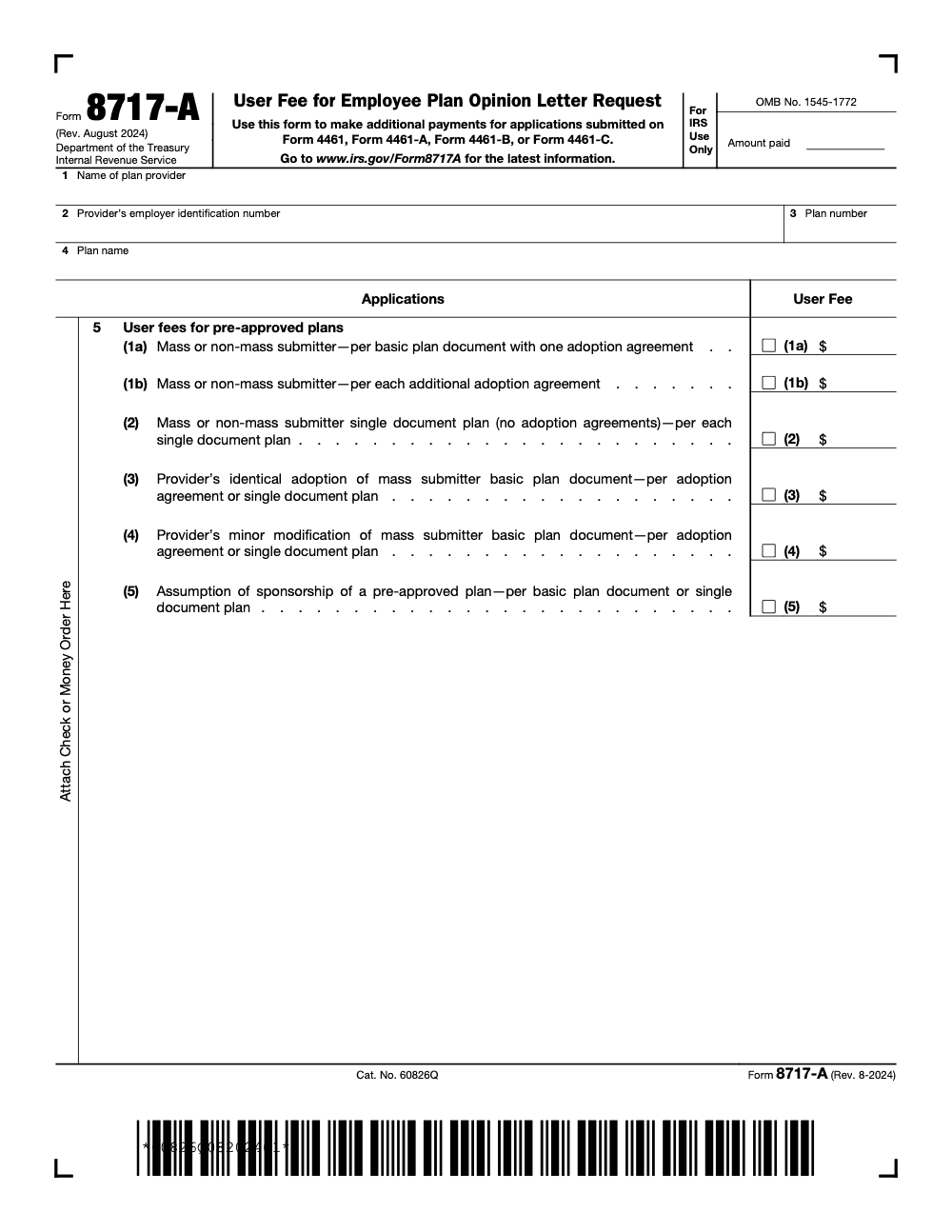
Form 8717‑A is titled “User Fee for Employee Plan Opinion Letter Request,” and the August 2024 revision reshaped its role. The IRS notes that Form 8717‑A “is now used only to make an additional payment when an insufficient user fee was paid” for an opinion letter application submitted on a Form 4461 series filing. Initial user fee payments are made as part of the Pay.gov application. In short, think “make‑up payment,” not “primary payment.”
Two important shifts sit behind this change:
- The Form 4461 series went electronic. As of mid‑2024, the IRS requires that pre‑approved plan opinion letter applications be filed through Pay.gov, with the user fee collected during the online process. Paper applications are no longer processed.
- The modern pre‑approved program relies on opinion letters only. The IRS combined the old master and prototype and volume submitter tracks into a single opinion letter program, simplifying document types while keeping user fees in place for providers and mass submitters.
When to reach for Form 8717‑A vs Pay.gov vs Form 8717
If you filed a Form 4461‑series application on Pay.gov and later learn that your user fee was short, you fix it with Form 8717‑A and a paper check or money order. You do not submit a second Pay.gov payment for that same application. The 8717‑A instructions explicitly tell you to attach payment to the form and mail it to Cincinnati.
By contrast, determination letter user fees, including additional payments after July 1, 2023, are handled through the Pay.gov “IRS Employee Plans Determination User Fee” form, which replaced most paper check scenarios and even lists the IRS contact for questions.
A quick story to make it stick
You file Form 4461 for a nonstandardized pre‑approved defined contribution plan on Pay.gov and pay the user fee. A few weeks later, the IRS flags a shortfall based on the fee schedule in the current revenue procedure. The right move is simple. Complete Form 8717‑A, check the correct fee line, write the additional amount, attach a check to “United States Treasury,” and mail it to the Pre‑Approved Plans Coordinator in Cincinnati. Keep copies and your mailing proof with the Pay.gov confirmation.
Why the old “advisory letter” references can trip you up
Many of us still remember advisory letters from the volume submitter days. The IRS retired that distinction. Today, providers and mass submitters request opinion letters only, under procedures updated in Rev. Proc. 2017‑41 and later consolidated in Rev. Proc. 2023‑37. If you see legacy language suggesting you submit Form 8717‑A with every application, check the publication date. The current rule is Pay.gov first, Form 8717‑A only for additional payments after a short fee.
The big picture, then the details
Who actually uses Form 8717‑A
- Pre‑approved plan providers and mass submitters who filed a Form 4461‑series application on Pay.gov and later owe an additional user fee.
- You will not use Form 8717‑A for initial payments. Those are collected during the Pay.gov application for Forms 4461, 4461‑A, 4461‑B, and 4461‑C.
Where to send it
Mail Form 8717‑A with your check or money order to the addresses printed on the August 2024 form:
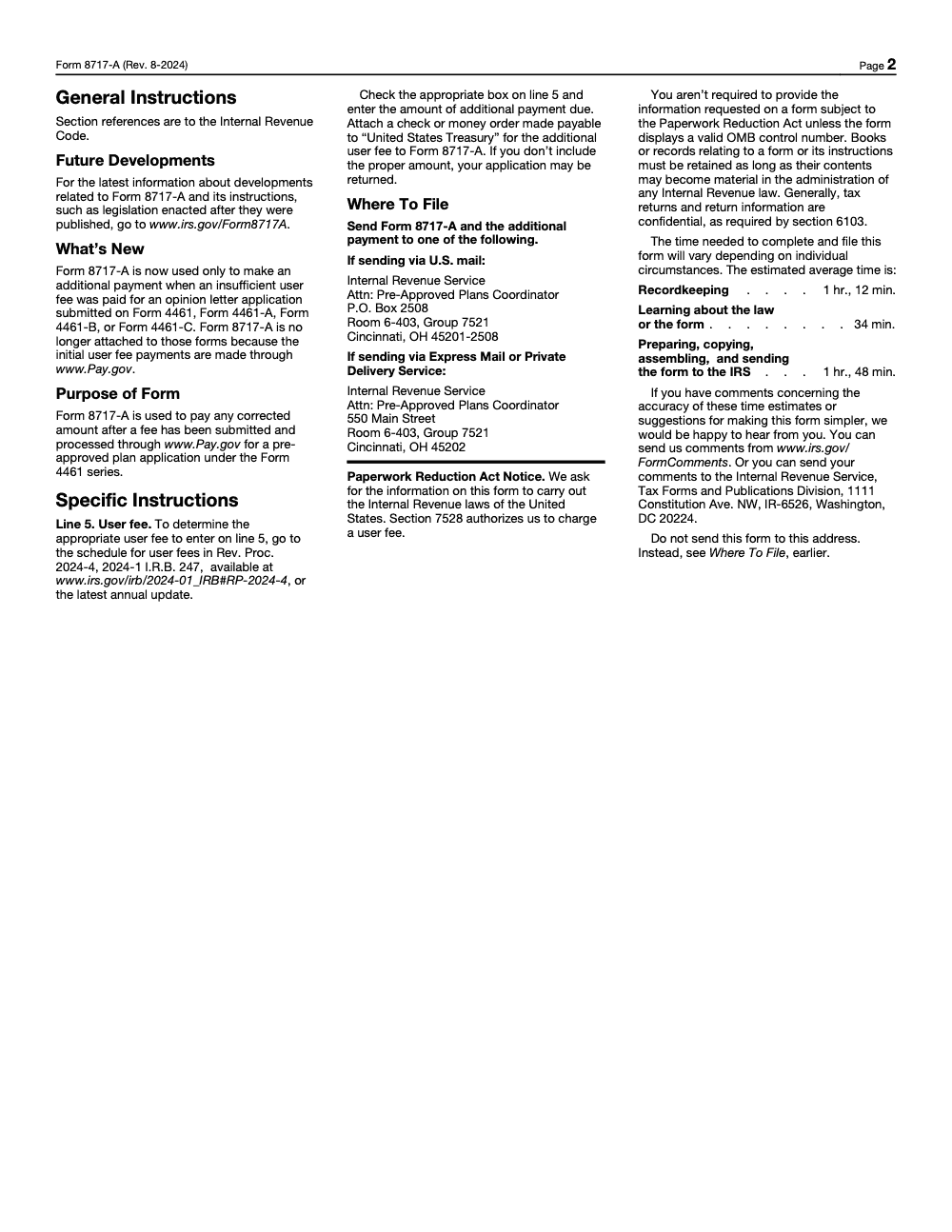
- USPS: IRS, Attn: Pre‑Approved Plans Coordinator, P.O. Box 2508, Room 6‑403, Group 7521, Cincinnati, OH 45201‑2508 (USPS only – FedEx, UPS, and other private delivery services cannot deliver to a P.O. Box, so use the street address below for those carriers)
- Express or PDS: IRS, Attn: Pre‑Approved Plans Coordinator, 550 Main Street, Room 6‑403, Group 7521, Cincinnati, OH 45202
Fee source of truth
To pick the right line and amount on 8717‑A, follow the user fee schedule in Rev. Proc. 2024‑4, or the latest annual update. The 8717‑A instructions point you to that schedule. If the schedule updates for 2026, use the newest table.
Form 8717‑A vs Form 8717 vs Pay.gov, side by side
| Purpose | You should use | How the money moves |
| Initial opinion letter application for a pre‑approved plan | Pay.gov Form 4461 series | Submit application and pay the user fee online at Pay.gov |
| Additional payment for that same opinion letter application | Form 8717‑A | Mail check or money order with Form 8717‑A to Cincinnati |
| Determination letter user fees and additional payments | Pay.gov Form 8717 (EP Determination User Fee) | Pay.gov collects the fee and provides a confirmation page with contact details if needed |
Sources: IRS instructions for the 4461 series and Pay.gov pages for 4461 and 8717 user fees.
Step by step, how to complete Form 8717‑A
- Pull your Pay.gov confirmation Have your Pay.gov tracking ID and the original Form 4461‑series details. You will need the provider name, EIN, plan number, and plan name to match the additional payment to the correct file.
- Complete the top section Enter the plan provider’s legal name, EIN, plan number, and plan name exactly as they appear on your Pay.gov filing. Consistency reduces follow‑ups and delays.
- Pick the correct fee line Line 5 lists pre‑approved plan fee categories. Check the right box, then write the additional amount you owe based on the current revenue procedure’s user fee schedule.
- Prepare payment Attach a check or money order payable to “United States Treasury” for the additional fee only. Do not attempt to pay this top‑up through Pay.gov.
- Mail to the correct address Use the USPS P.O. Box or the Express/PDS street address, as printed on the August 2024 form. Save tracking and delivery proof.
- Keep your records in one place File your Pay.gov confirmation, a copy of the completed Form 8717‑A, the check stub, and proof of delivery together. If an Employee Plans Specialist requests evidence, you can respond in minutes, not days. For DL additional payments, the Pay.gov Form 8717 confirmation page is what you send to your assigned EP Specialist.
Context you should know in 2025
- Pay.gov submission is mandatory for the Form 4461 series. The IRS will not process paper initial applications.
- Opinion letters replaced advisory letters in the pre‑approved program. That change has been in effect since the 2017 overhaul and remains the standard today.
If you see an old FAQ or article telling you to attach Form 8717‑A to every opinion or advisory letter request, check the date. The August 2024 form revision and the 2024 instructions moved initial payments to Pay.gov and kept 8717‑A only for additional payments.
Fees, exemptions, and what does not apply to 8717‑A
How fees are determined
The correct user fee depends on your pre‑approved plan category, for example mass submitter basic plan document, additional adoption agreements, single document plans, identical adopters, or minor modifiers. Use the current user fee schedule in the annual revenue procedure, which the 8717‑A instructions reference by citation. When in doubt, confirm the amount before you mail your check.
Do small‑employer exemptions help here?
Short answer, no. The small‑employer user fee exemption in IRC 7528 can apply to certain determination letter applications, and the IRS explains how the ten‑year testing rule works for that exemption. Opinion letters for pre‑approved plans still require user fees, and Form 8717‑A has no exemption certification to fill out. Treat your 8717‑A as a pure additional payment.
Addresses and payment method recap
- Attach a check or money order payable to “United States Treasury.”
- Mail the package to the Cincinnati addresses printed on the August 2024 form.
- Include any cover sheet or reference so the payment ties cleanly to your Pay.gov application.
Common pitfalls we see, and simple ways to avoid them
- Sending a second Pay.gov payment for a 4461‑series shortfall. The correct fix is Form 8717‑A with a check or money order.
- Using an outdated address. Use the addresses on the current 8717‑A PDF. Print the form fresh for each mailing.
- Guessing at the fee category. Match your plan type to the right line on Form 8717‑A and tie the amount back to the latest annual fee schedule. If the additional payment falls short, the IRS may return the underlying 4461‑series application instead of invoicing the difference, which restarts the review.
- Mixing determination and opinion letter rules. Determination letter user fees and additional amounts run through the Pay.gov “IRS Employee Plans Determination User Fee” flow, not through 8717‑A.
Quick checklist you can copy
- Verify you actually need an additional payment, not a new application
- Pull Pay.gov tracking ID and your 4461‑series submission details
- Download the current 8717‑A PDF and confirm the fee line and amount against the current revenue procedure
- Write a check or money order to “United States Treasury” for the difference
- Complete 8717‑A, attach payment, and mail to the correct Cincinnati address
- File copies of everything with your Pay.gov confirmation and delivery proof
What about determination letters and Form 8717 in 2025
If you are working on a determination letter, Pay.gov now handles both the application and the initial user fee. Beginning July 1, 2023, the IRS instructs you to use the Pay.gov 8717 flow only to make additional payments and to send that confirmation to your assigned EP Specialist. The Pay.gov page lists contact information, including the specialist phone line, if you run into issues.
A note on E‑E‑A‑T and your records
In our experience, the cleanest files share three traits. First, exact matches between Pay.gov details and your 8717‑A. Second, a short cover note that cites the specific line you are true‑ing up and the amount. Third, delivery proof clipped to the front of the internal file. If an IRS Employee Plans Specialist asks for evidence, you have everything ready in one place. For 4461 submissions, the IRS instructions also outline how to handle large attachments and fax overflow, which is useful if your consolidated PDF exceeds Pay.gov limits.
Practical example, start to finish
- You filed Form 4461‑A on September 18, 2025, through Pay.gov, uploaded your consolidated PDF, and paid the fee online. A week later, your EP Specialist emails that the correct fee for your category is higher.
- You complete Form 8717‑A, check the matching category on line 5, write the additional amount, attach a check to “United States Treasury,” and mail it to the Pre‑Approved Plans Coordinator at 550 Main Street, Room 6‑403, Group 7521, Cincinnati, OH 45202 by overnight delivery.
- You clip the Pay.gov confirmation, a copy of 8717‑A, the check stub, and delivery proof together in your file. If the Specialist asks for proof, you can send it immediately.
Helpful links you will actually use
- IRS instructions for Form 4461 and 4461‑A, including Pay.gov specifics, file size tips, and timing notes.
- Pay.gov portal pages for Form 4461 and the EP Determination User Fee.
- IRS overview of pre‑approved plan submission procedures.
- The current Form 8717‑A PDF, which lists the “What’s New,” fee categories, and the Cincinnati mailing addresses.
Light CTA, only if helpful
If you are a CPA or EA firm that juggles pre‑approved plan filings along with the rest of your compliance calendar, you know how fragile delivery can feel when the team is stretched thin. Accountably integrates trained offshore teams into your workflow so you gain capacity without losing control, structure, or quality. If you want to standardize how your firm handles Pay.gov submissions, top‑ups like Form 8717‑A, and supporting workpapers, our team can place trained offshore preparers inside your workflow with multi-layer review behind every file. No resume farming. Proof before your name is on the line. Not a fit in 45 days? We replace them free.
Common Mistakes We See Every Season
Most Form 8717-A errors are not arithmetic. They come from older guidance that treated the form differently before the August 2024 revision moved initial fees to Pay.gov. The patterns below repeat across plan providers, mass submitters, and TPA firms.
Reusable Checklists
The checklists below are copy-paste ready for firm SOPs and for the engagement folder you hand to a reviewer. Each item maps to a step in the Form 8717-A workflow so a junior preparer can run it without coaching.
Shortfall notice intake
- Confirm the IRS notice references a Form 4461, 4461-A, 4461-B, or 4461-C application (Form 8717-A does not cover Form 5300 or other plan filings).
- Pull the original Pay.gov confirmation and match the fee paid against the notice's stated shortfall.
- Identify the fee category checked on the original 4461-series application so line 5 will match.
- Locate the current annual user fee schedule (Rev. Proc. 2024-4, 2024-1 I.R.B. 247 for 2025 filings).
- Verify the Form 8717-A revision date (August 2024) and OMB number (1545-1772) on the blank PDF before use.
- Note the IRS contact, application docket, and deadline expectation in the engagement file.
Form 8717-A preparation
- Line 1: Name of plan provider, exact match to the underlying Form 4461 application.
- Line 2: Provider's EIN, no formatting marks.
- Line 3: Plan number assigned to the application.
- Line 4: Plan name as listed on the 4461 series filing.
- Line 5: Check the matching category box (1a, 1b, 2, 3, 4, or 5) AND enter the shortfall dollar amount.
- Leave the 'For IRS Use Only Amount paid' box blank.
- Cut a check or money order payable to 'United States Treasury' for the line 5 amount.
- Attach the payment to the form, not paper-clipped behind a cover letter.
Mail and track
- USPS route: Internal Revenue Service, Attn: Pre-Approved Plans Coordinator, P.O. Box 2508, Room 6-403, Group 7521, Cincinnati, OH 45201-2508.
- Express Mail or private delivery (FedEx, UPS, DHL): 550 Main Street, Room 6-403, Group 7521, Cincinnati, OH 45202.
- Confirm the carrier matches the address. FedEx and UPS cannot deliver to the P.O. Box.
- Save a scan of the completed form and the front and back of the check before mailing.
- Log the tracking number against the underlying Form 4461 docket so the reviewer can see when the payment landed.
- Calendar a 30-day follow-up to confirm the opinion letter review resumed.
Keep 8717-A Season From Stalling
Form 8717-A is a small piece of paper that can hold an opinion letter review in place for weeks. The IRS estimates the practitioner burden at 3 hours and 34 minutes per form across recordkeeping, learning the law, and preparation, per the Form 8717-A Paperwork Reduction Act notice. That number doubles or triples when a shortfall notice arrives mid-cycle and the team has to re-pull the original Pay.gov submission, the current Revenue Procedure fee schedule, and the underlying Form 4461 series workpapers from a different engagement folder.
The fix is not faster typing. It is a documented intake for shortfall notices that locks in the fee categorization, the carrier, and the payee instructions before the form leaves the office.
- Tie the line 5 category logic back to the underlying Form 4461 application file, not a fresh interpretation, so 1a, 1b, 2, 3, 4, and 5 always match the original submission.
- Keep the current Rev. Proc. reference in the SOP (Rev. Proc. 2024-4, 2024-1 I.R.B. 247 for 2025 filings) and rotate it the moment the IRS publishes the next annual update.
- Stock two pre-addressed envelopes in the production folder, one for USPS (P.O. Box 2508) and one for private delivery (550 Main Street), so the preparer cannot mix them.
- Standardize the payee line on the check production template as 'United States Treasury' and require a second-pair review before the check leaves the office.
- Calendar a 30-day post-mail check on every shortfall payment to confirm the opinion letter review resumed, so a quiet return notice does not surface only at the next status meeting.
If your firm handles pre-approved plan submissions alongside the rest of the compliance calendar, Accountably builds the production discipline around them. Our trained offshore teams plug into your existing 4461 workflow with documented SOPs, multi-layer review, and the same Pay.gov and 8717-A intake your senior reviewer would run. See our taxation services for how the engagement structure works.
FAQs
No. Initial user fees for opinion letter applications are paid during the Pay.gov filing for the Form 4461 series. Form 8717‑A is now used only to send an additional payment when the original fee paid was insufficient.
No. The August 2024 instructions direct you to attach a check or money order to Form 8717‑A and mail it to the Cincinnati address. Pay.gov is for the initial 4461‑series application and fee.
Use the current annual user fee schedule in the revenue procedure cited in the 8717‑A instructions. For 2024, that was Rev. Proc. 2024‑4. Check for the newest version before you mail payment.
No. The small‑employer exemption is a determination letter concept and does not waive opinion letter user fees. Form 8717‑A does not include an exemption certification.
Determination letter applications and fees are filed in Pay.gov. If you need to make an additional payment, use the Pay.gov “IRS Employee Plans Determination User Fee” pathway, then send the confirmation to your assigned EP Specialist.
Other forms this guide names
- Form 4461: IRS Opinion Letter: Pay.gov Filing Guide & Fees
- Form 4461-A: Pay.gov Guide for Pre‑Approved DB Plans
- Form 4461‑B: Pay.gov Filing Guide for Providers
- Form 4461‑C: IRS 403(b) Opinion Letter Guide
Summarize this article with AI
About this guide
Accountably helps US CPA, EA, and accounting firms hire trained accountants and tax preparers in India.
About us Reviewed byJugal Thacker, CPAFounder and CEO at Accountably
A US-licensed CPA with 7+ years inside US firms – PwC, a real-estate tax practice, then a full-service firm, rising from reviewer to manager to advisory. This article was reviewed against current IRS guidance for the 2025 tax year and updated for filers preparing late returns, amendments, and 2026 estimates.
View profile →How we research, review, and update this guide
Every Accountably guide is researched against primary IRS sources, reviewed by a U.S. CPA, and refreshed as guidance evolves. Read our Editorial Guidelines to see how we source, fact-check, and update our content.




