
Summarize this article with AI
In Brief
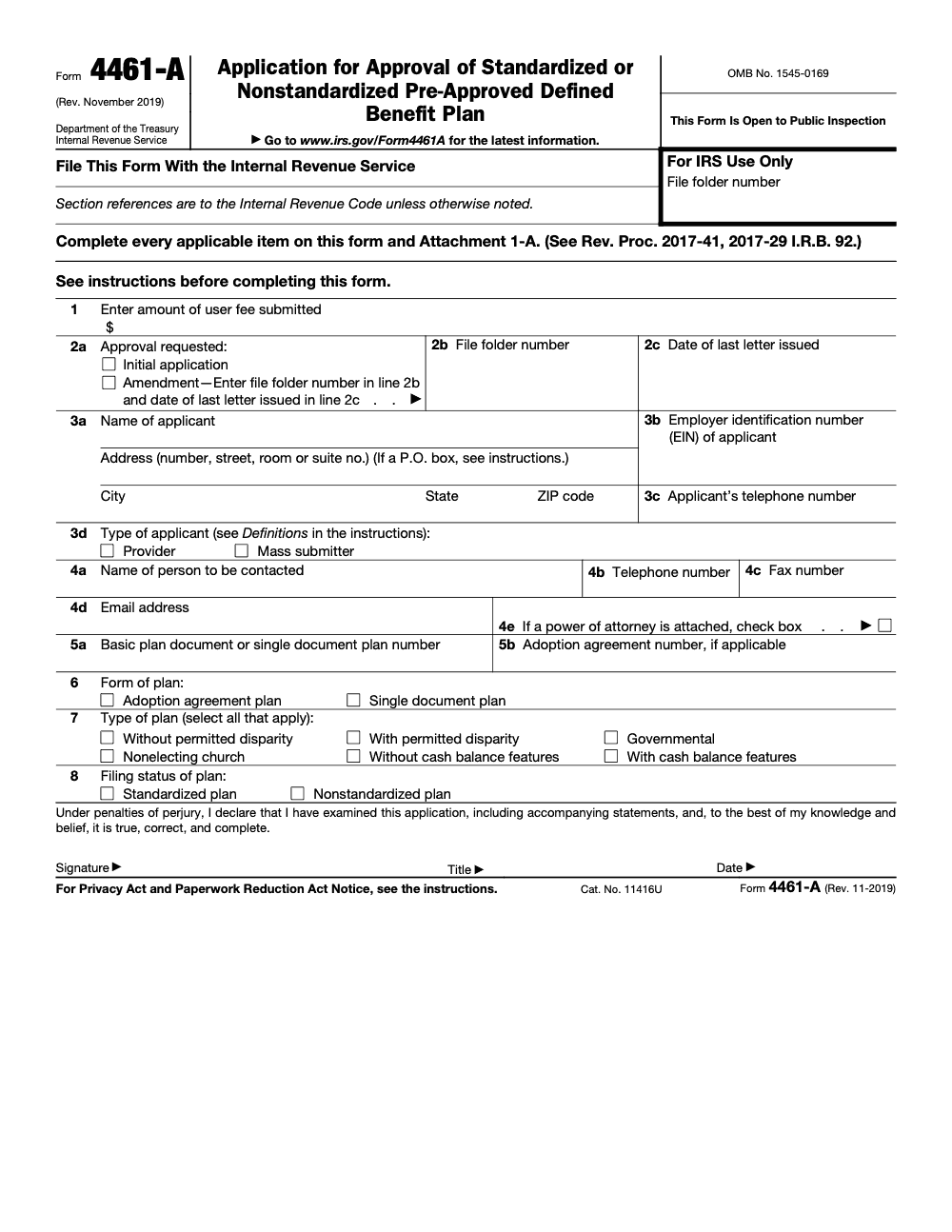
Form 4461-A is the application a provider or mass submitter files to request an IRS opinion letter on a standardized or nonstandardized pre-approved defined benefit plan; adopting employers rely on that letter and never file the form themselves (according to the IRS Instructions for Form 4461-A). Enter the user fee on Line 1, submit a separate Form 4461-A for each adoption agreement or single-document plan, and respond within 30 days if Employee Plans requests changes or more information.
Adopting employers often think they file Form 4461-A themselves, but the provider or mass submitter files it to request an IRS opinion letter on a pre-approved defined benefit plan, standardized or nonstandardized, and the adopting employers rely on that letter without ever touching the form.
Eligibility and fees are where filings stall. Providers need a U.S. place of business and a reasonable expectation of at least 15 employer-clients, while mass submitters file identical plans for 30 or more unaffiliated providers. Typical user fees run $32,000 for a single-document plan and $20,000 for a basic plan document with one adoption agreement, each plan needing its own Form 4461-A on Pay.gov. After you submit, keep the confirmation and wait 60 days before checking status.
Key Takeaways
- Form 4461-A is the application for an IRS opinion letter for pre-approved defined benefit plans, standardized or nonstandardized.
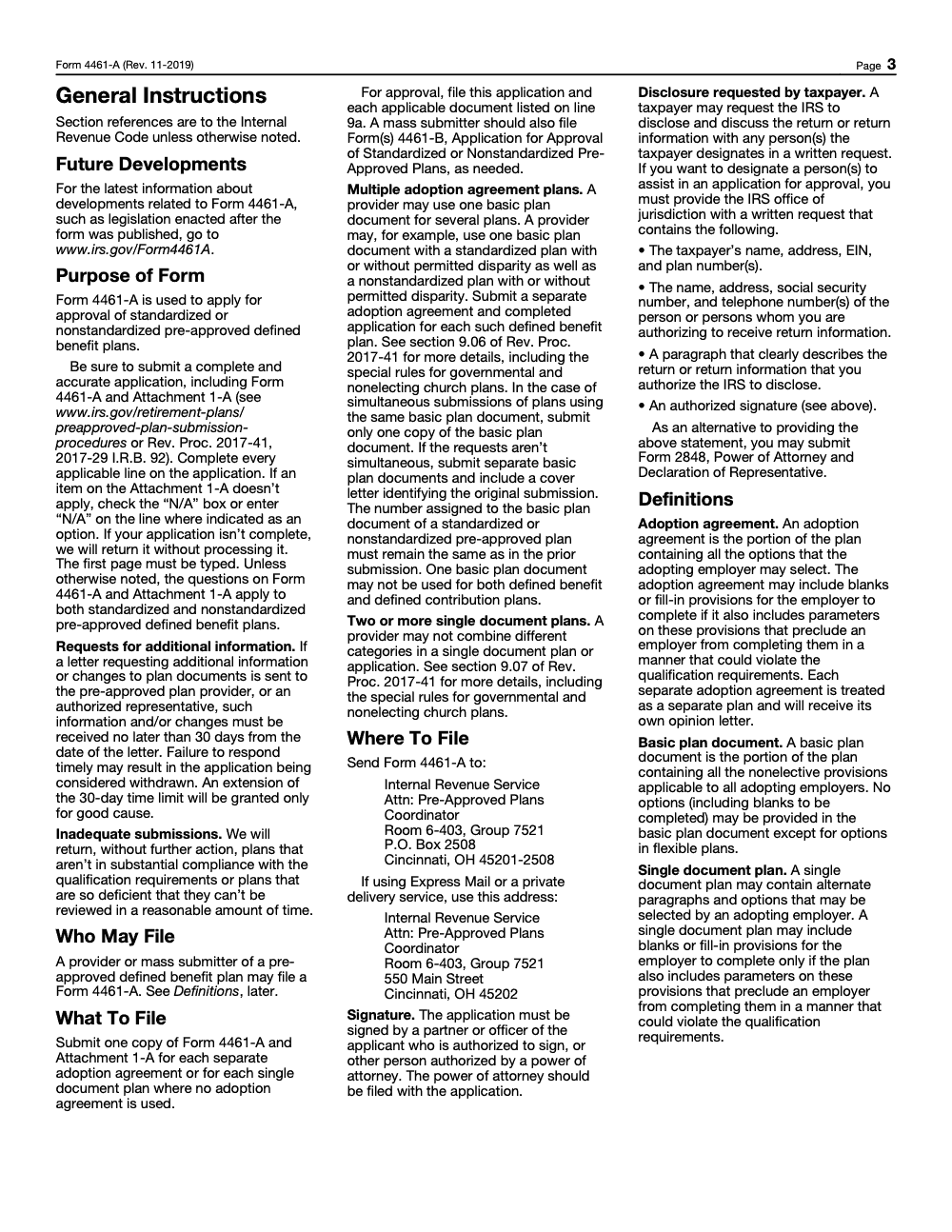
- You submit Form 4461-A electronically on Pay.gov. The IRS also publishes a paper channel to the Pre-Approved Plans Coordinator in Cincinnati, OH (P.O. Box 2508, Cincinnati, OH 45201-2508 by USPS, or 550 Main Street, Cincinnati, OH 45202 by private delivery). For an electronic filing, overflow goes by fax with your Pay.gov tracking ID on the cover sheet.
- Providers and Mass Submitters file this form. Providers need a U.S. place of business and a reasonable expectation of at least 15 employer‑clients. Mass Submitters file identical plans for 30 or more unaffiliated providers.
- Typical user fees in effect for this program are $32,000 for a single‑document plan, $20,000 for a basic plan document with one adoption agreement, $15,000 for each additional adoption agreement, $300 for certain provider actions, and none for a name or address change, entered on Line 1.
- Keep your filing confirmation as your acknowledgement. Do not contact the IRS until 60 days after the end of the submission period, or 60 days after the filing date, whichever is later.
What Form 4461-A Is For
Form 4461-A is the application you use to obtain an IRS opinion letter on the form of a pre‑approved defined benefit plan. Do not confuse it with Form 4461, which covers pre‑approved defined contribution plans, or with Form 4461-B, the mass submitter companion filing used alongside Form 4461-A. That opinion letter tells you whether the document form meets qualification requirements in the pre‑approved program. You submit the application, with every required attachment, electronically on Pay.gov (the IRS also publishes a paper channel to the Pre-Approved Plans Coordinator in Cincinnati, OH), and follow the instructions for redlines and prior letters when applicable.
Quick orientation: search “4461‑A” on Pay.gov, open the form page, sign in, and complete the application. Bring a single, organized PDF, include every required attachment, and be ready with your user fee and Form 8717-A.
Who Should File Form 4461-A
Only two filer types should be here, Providers and Mass Submitters. Adopting employers do not file Form 4461-A themselves; they rely on the opinion letter issued to the provider.
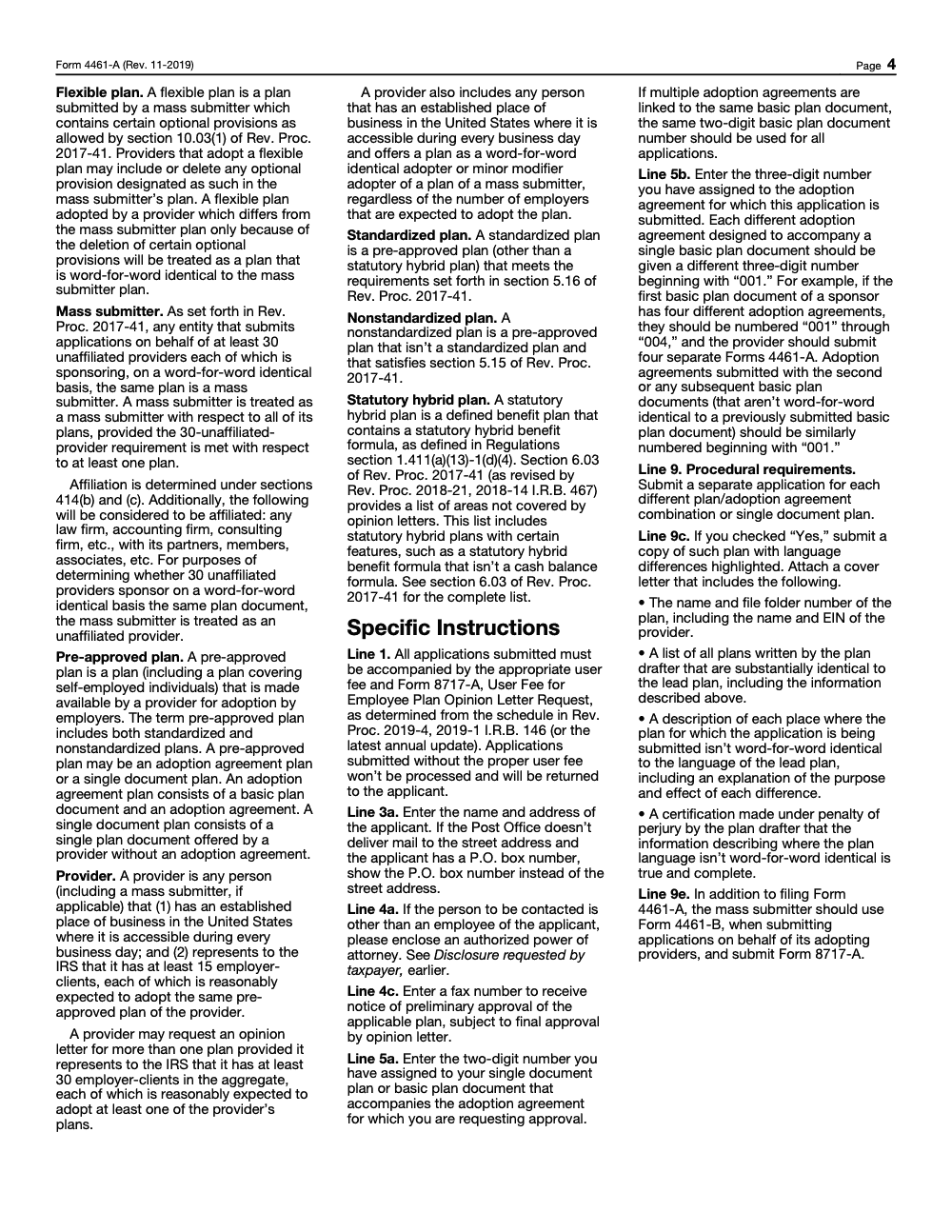
- Provider, any person with a U.S. place of business that is accessible every business day and that represents to the IRS it has at least 15 employer‑clients expected to adopt the same pre‑approved plan. Providers may also qualify via word‑for‑word or minor‑modifier adoption of a Mass Submitter plan.
- Mass Submitter, an entity submitting applications on behalf of at least 30 unaffiliated providers that are sponsoring, word‑for‑word, the same plan. Mass Submitter status applies across its plans once that threshold is met.
If you are weighing Provider versus Mass Submitter, confirm your counts and who actually offers the plan to employers. This choice affects Lines 3 and 5 in the application, your document bundle, and the user fee you enter on Line 1.
Standardized vs. Nonstandardized
- Standardized plans follow specific design rules set in program guidance, and a statutory hybrid plan cannot be filed as a standardized plan even if it would otherwise meet those rules.
- Nonstandardized plans allow more flexibility but still live inside the pre‑approved framework. Both are eligible for the opinion letter program if they follow the definitions in the instructions and Rev. Proc. 2017‑41.
How Filing Works On Pay.gov
Here is the simple path most teams follow.
- Find the form, on Pay.gov, search “4461‑A,” open the form page.
- Sign in, Pay.gov now requires sign‑in to submit this form. Create an account if you do not have one.
- Prepare one PDF, up to 15 MB, that includes your plan document, adoption agreement if used, cover letter, Form 2848 or 8821 if applicable, certification regarding interim good‑faith amendments if applicable, and your prior opinion letter. A redline is strongly encouraged when you had a prior‑cycle letter.
- Attach, pay, submit, and save the confirmation email with the tracking ID.
The IRS treats the Pay.gov confirmation email as your acknowledgement. Keep it with your file and add the tracking ID to any overflow faxes or follow‑ups.
Next up, we will walk you through the exact on‑page steps, the one‑PDF rules that trip up filers, and simple ways to prevent review delays.
Accessing the Online Form And Avoiding Common Missteps
Start at Pay.gov, sign in, and search “4461‑A.” The form page spells out what to include, the single‑PDF limit, the overflow fax line, and the 60‑day inquiry window after filing. The sign‑in requirement is not optional for submission, so create your Pay.gov account before you assemble attachments.
Pro move, set up your Pay.gov account and saved payment methods first, then build your PDF. This shortens that last mile when deadlines are tight.
Single PDF, File Size, And Overflow Faxing
Pay.gov will accept only one uploaded file for Form 4461‑A. That file cannot exceed 15 MB. If your supporting materials push you over the limit, trim the upload to the essentials and send the overflow by fax to 844‑255‑4818. Put the Pay.gov tracking ID, your EIN, and the applicant name on the cover sheet. If a single fax would generate an email attachment over about 150 MB on the IRS side, it will not deliver, so split large transmissions. If you want confirmation, fax the EP Customer Service line at 855‑224‑1311 and request verification of receipt.
What To Include In That One PDF
The Pay.gov page lists every core item. Use this list as your working checklist and keep the order logical for reviewers.
- Current plan document
- Adoption agreement, if the document uses one
- Concise cover letter that maps the contents
- Form 2848 or Form 8821, if you have a representative
- Certification Regarding Interim Good‑Faith Amendments, if applicable
- Prior opinion letter, if one exists
- Redlined copy highlighting changes from the last approved version, strongly encouraged for prior‑cycle plans
Single‑PDF Rules, At A Glance
| Item | What to do |
| Limit | Keep the PDF under 15 MB before you click submit. |
| Contents | Bundle plan, adoption agreement if used, cover letter, POA or 8821 if applicable, interim amendment certification if applicable, prior letter, and redline if you have a prior‑cycle letter. |
| Overflow | Fax extras to 844‑255‑4818 with tracking ID, EIN, and applicant name. Split into smaller faxes if needed. Confirmation on request via 855‑224‑1311. |
| Acknowledgement | Save the Pay.gov confirmation email with the tracking ID. Treat it as your receipt. |
All of those items are straight from the IRS sources and the Pay.gov 4461‑A page, so you can rely on them.
Redlines That Save Review Time
If your plan received an opinion letter in the prior cycle, include a redline that shows every edit since the last approved version. The IRS encourages redlines, and in practice, reviewers move faster when they can scan differences rather than compare full documents side by side. Place the redline immediately after the current plan in the PDF, and bookmark the sections.
Simple rule, when in doubt, include the redline and point to the exact pages in your cover letter. It prevents back‑and‑forth and protects your timeline.
What Happens After You Click Submit
You get a confirmation email from Pay.gov that includes your tracking ID. The IRS treats that message as your acknowledgement and does not send a second receipt. The agency asks you to wait 60 days after the end of the submission window, or 60 days after your filing date, whichever is later, before asking about status. Save the email, add the tracking ID to any overflow faxes, and keep your working folder tidy so you can respond quickly if the IRS requests changes or more information.
If The IRS Asks For More Information
If Employee Plans requests additional information or document changes, you generally have 30 days to respond, and an extension of that window is granted only for good cause, not on routine request. Missing that window can result in withdrawal of your application. Keep your PDF components handy so you can update, compress, and re‑fax as needed, with the tracking ID on the cover sheet.
In the next section, we will cover applicant types, exactly what to enter on key lines, and how fees and payment limits work so you can plan your path from draft to approval.
Applicant Types, Eligibility, And What To Enter
You will identify yourself on the form as a Provider or a Mass Submitter. Use the IRS definitions to avoid delays.
- Provider, you have a U.S. place of business and expect at least 15 employer‑clients to adopt your plan. You can aggregate across multiple plans, though the 30-employer-client aggregate threshold for submitting more than one plan is in addition to the 15-per-plan baseline rather than a replacement for it, and you can qualify as a word‑for‑word or minor‑modifier adopter of a Mass Submitter plan, in which case the 15-employer-client minimum does not apply regardless of how many employers are expected to adopt the plan.
- Mass Submitter, you submit on behalf of at least 30 unaffiliated providers that will sponsor the same plan, word‑for‑word. Once you meet that threshold for one plan, you are treated as a Mass Submitter for your plans.
Lines to prepare:
- Line 1, the correct user fee from the current Appendix A schedule. The instructions direct you to the annually updated revenue procedure for amounts.
- Line 3 and contact lines, your legal name, complete address, EIN, and a direct phone. If a representative should receive correspondence, include a properly executed Form 2848 or 8821 in the single PDF.
- Lines 5a and 5b, assign and enter your two‑digit basic plan document number and the three‑digit adoption agreement number, as applicable. Each adoption agreement tied to the same basic document gets its own three‑digit number starting with 001.
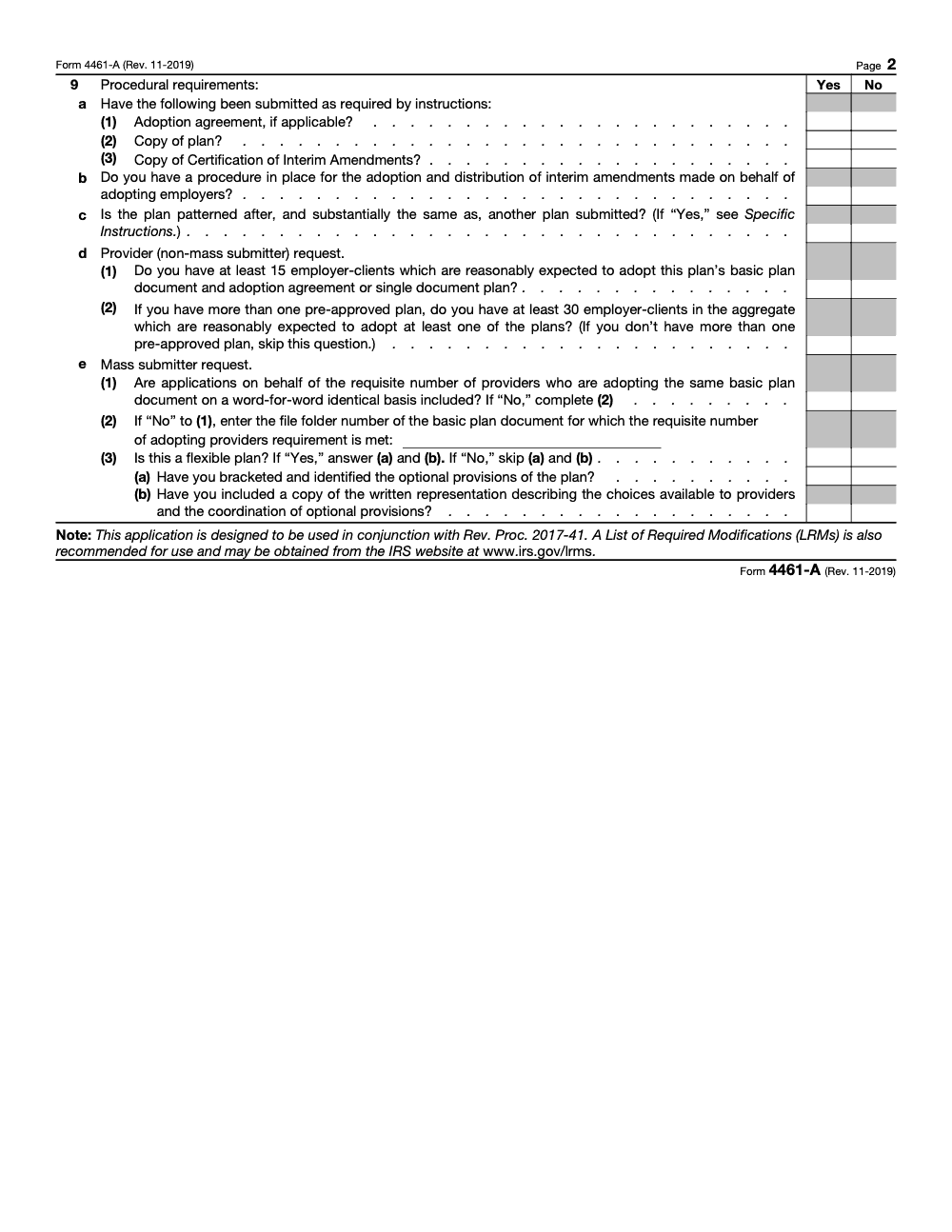
- Line 9, file a separate application for each single‑document plan or for each basic plan document and adoption agreement combination.
Fees And Payment Options
Here are the opinion letter user fees the IRS shows for pre‑approved plans, which have applied since increases that took effect in 2024 and remain in effect on the IRS fee schedule as of late 2025.
| Request type | User fee |
| Single‑document plan, per plan | $32,000 |
| Basic plan document with one adoption agreement | $20,000 |
| Each additional adoption agreement | $15,000 |
| Provider’s word‑for‑word adoption of a mass submitter’s plan, per adoption agreement or single document plan | $300 |
| Change in name or address of a provider, per basic plan document | $0 |
These amounts appear in Appendix A of the IRS revenue procedure for user fees and align with the IRS’s published guidance on pre‑approved plan submissions. Enter the exact fee on Line 1.
Payment methods on Pay.gov include ACH and cards, with important limits:
- Daily credit card limit is $24,999. A single‑document plan fee of $32,000 cannot be paid by credit card. Use ACH or debit for $32,000 fees, or coordinate with the IRS pre‑approved coordinators listed on the IRS site if ACH or debit is not workable.
- Pay.gov pulls an ACH debit from the bank info you enter. It does not accept ACH credit pushes. If your corporate account has a debit block, ask your bank to allow the agency’s merchant ID for this transaction.
Tip, submit large‑fee filings early in the day, confirm internal debit blocks with your bank, and keep a backup payment method on file in your Pay.gov account so you do not lose a day to card limits.
When And How To Ask About Status
The IRS spells this out on Pay.gov, the confirmation email is your acknowledgement, and the earliest inquiry window is 60 days after the end of the submission period, or 60 days after your filing date, whichever is later. Put the tracking ID in your notes and on any overflow faxes. For general account questions, the IRS lists 877‑829‑5500 on the Pay.gov form page. For fax receipt confirmation, the IRS directs you to fax the EP Customer Service line at 855‑224‑1311.
What If You Need To Correct A Small Error
If you catch a small clerical mistake right after filing, act quickly. Keep your confirmation email handy, correct your local records, and be ready to supply an updated attachment if the IRS requests it. The instructions also make clear that incomplete applications can be returned, so thorough packaging up front is the cleanest path; complete every applicable line and mark items that do not apply as N/A rather than leaving them blank.
In the next section, we will walk line‑by‑line through the form items that cause the most rework and share a pre‑submission checklist you can copy for your team.
Completing Key Lines Without Rework
Here is a focused walk‑through of form blocks that commonly slow teams down.
- Line 1, user fee. Pull the current amount from Appendix A of the annual revenue procedure and enter the exact figure. In 2025, the IRS schedule shows $32,000 for single‑document plans, $20,000 for a basic plan document with one adoption agreement, $15,000 per additional adoption agreement, $300 for specific provider actions, and none for a name or address change.
- Line 3 group, identity and contact. Enter the legal name, complete address, EIN, and a direct phone. If a non‑employee representative should receive notices, include Form 2848 or Form 8821 inside your one PDF.
- Lines 5a and 5b, numbering. Use a two‑digit number for the single document or basic plan document and a three‑digit number for each adoption agreement starting with 001. This numbering scheme helps IRS specialists sort simultaneous filings. On a resubmission, keep the same two‑digit basic plan document number you used in the prior submission; assigning a new number causes confusion in the IRS file system.
- Line 9, one filing per plan/adoption combination. If you have multiple adoption agreements linked to the same basic plan document, you still submit a separate application for each. For simultaneous submissions, you can include one copy of the basic plan document and identify the related applications in your cover letter.
Packaging That Speeds Reviews
- Use a clear cover letter. In one page, list what is in your PDF, include page numbers, and point to the redline location.
- Keep the redline tight. Show exactly what changed since the last approved version and put it right after the current plan. The IRS encourages redlines for prior‑cycle plans because it saves review time.
- Make the PDF searchable and bookmarked. The site requires only a single PDF, but searchable, well‑bookmarked files make requests for more information less likely.
When The IRS Asks For More Information
Employee Plans may request more information or changes. The instructions explain that you generally have 30 days to respond, with extensions only for good cause. Put those dates on your calendar the day you file, and keep your working files organized so replies are fast.
After You Submit, What To Expect
- Confirmation email, this is your acknowledgement. Save it, and note the tracking ID.
- Inquiry timing, do not contact the IRS until 60 days after the end of the submission window or 60 days after you filed, whichever is later.
- Overflow attachments, if you faxed extra pages because you exceeded 15 MB, include the tracking ID, EIN, and applicant name on the cover sheet. If you want confirmation, fax the EP Customer Service line at 855‑224‑1311 and request verification of receipt.
Keep one checklist that includes the Pay.gov tracking ID, plan document number, adoption agreement number, fee amount, and the date the 60‑day inquiry window opens. It keeps your team aligned.
Troubleshooting File Size And Structure
If your PDF is near 15 MB, compress images, remove unnecessary scans, and export to a clean PDF from source documents. If you still exceed 15 MB, upload the core set, then fax the remainder to 844‑255‑4818. Split large faxes into smaller batches to avoid hitting email attachment protections on the IRS side. Label every fax with the Pay.gov tracking ID, the EIN, and the applicant name.
Quick Pre‑Submission Checklist
- Pay.gov account active, payment method set
- Single PDF assembled, under 15 MB
- Cover letter with page map and redline pointers
- Form 2848 or 8821 included if needed
- Interim amendment certification included if applicable
- Prior opinion letter included and redline prepared when you have a prior‑cycle letter
- Overflow fax labeled with tracking ID, EIN, and applicant name, if needed
A careful package, entered once, is faster than a second submission. The rules are precise, but they are also predictable once you build your internal checklist around them.
Helpful Links And Source Materials
- Pay.gov Form 4461‑A page, single‑PDF rule, redline encouragement, 60‑day wait, and sign‑in requirement.
- IRS Instructions for Form 4461‑A, filer definitions, one‑PDF limit, overflow fax, plan numbering, and response timelines.
- IRS Pre‑Approved Plan Submission Procedures, payment tips, credit card limits, and contact details for large user fee issues.
- IRS Appendix A User Fees, opinion letter fees for pre‑approved plans, including $32,000, $20,000, $15,000, $300, and none for name or address changes.
When To Bring In Help
If your team already operates with tight SOPs and clean workpapers, you will cruise through 4461‑A. If you are growing fast and your specialists live in review loops, a structured handoff can save you weeks. Accountably occasionally supports firms with disciplined document assembly and review checklists for IRS e‑submissions, always inside your systems and templates. If that would help your timeline, we can sync on a light, process‑first workflow so you keep control and speed.
Final Notes And Key Dates
- Sign in to Pay.gov before you build momentum, the form requires it to submit.
- Keep your PDF under 15 MB, plan for overflow faxing, and label every page with your tracking ID if you fax.
- Respect the 60‑day inquiry window. Add a calendar reminder for your earliest inquiry date.
- Use the current fee schedule and payment guidance so your submission is not delayed for payment issues.
Common Mistakes We See Every Season
The same handful of slips send Form 4461-A applications back to the provider every cycle, and most of them are packaging problems rather than drafting problems. Here are the ones we flag most often.
Reusable Checklists
These are copy-paste ready for your firm SOPs. Drop them into your workflow tool and check items off as you build each Form 4461-A package.
Eligibility and packet check
- Confirm the applicant is a provider or mass submitter, not an adopting employer.
- Verify the provider has a U.S. place of business accessible every business day.
- Confirm at least 15 employer-clients are reasonably expected to adopt the plan.
- If you are submitting more than one plan, confirm at least 30 employer-clients in the aggregate.
- Decide whether the plan is standardized or nonstandardized before drafting.
- Include the correct user fee and Form 8717-A with the application.
- Enclose Form 2848 if a non-employee representative will receive correspondence.
- Type every entry on page 1; do not handwrite the first page.
Key line entries before you file
- Line 1: enter the exact user fee from the current annual revenue procedure.
- Line 3 group: legal name, complete address, EIN, and a direct phone number.
- Line 3d: mark whether the applicant is a provider or a mass submitter.
- Lines 5a and 5b: assign a two-digit basic plan document number and three-digit adoption agreement numbers beginning with 001.
- Line 9: file a separate application for each adoption agreement or single-document plan.
- Mark N/A on any line or Attachment 1-A item that does not apply.
- Confirm a partner or officer, or a representative authorized by power of attorney, signs under penalties of perjury.
Resubmission and review readiness
- Reuse the original two-digit basic plan document number from the prior submission.
- If you hold a prior opinion letter, include it and a redline of changes since the last approved version.
- Add a cover letter that maps the package contents and points to the redline.
- If the plan is patterned after another submitted plan, mark Line 9c Yes and attach the required certification and cover letter.
- Keep components staged to respond within 30 days if Employee Plans requests changes.
- Review the IRS List of Required Modifications (LRMs) before filing to reduce change letters.
Keep 4461-A Season From Stalling
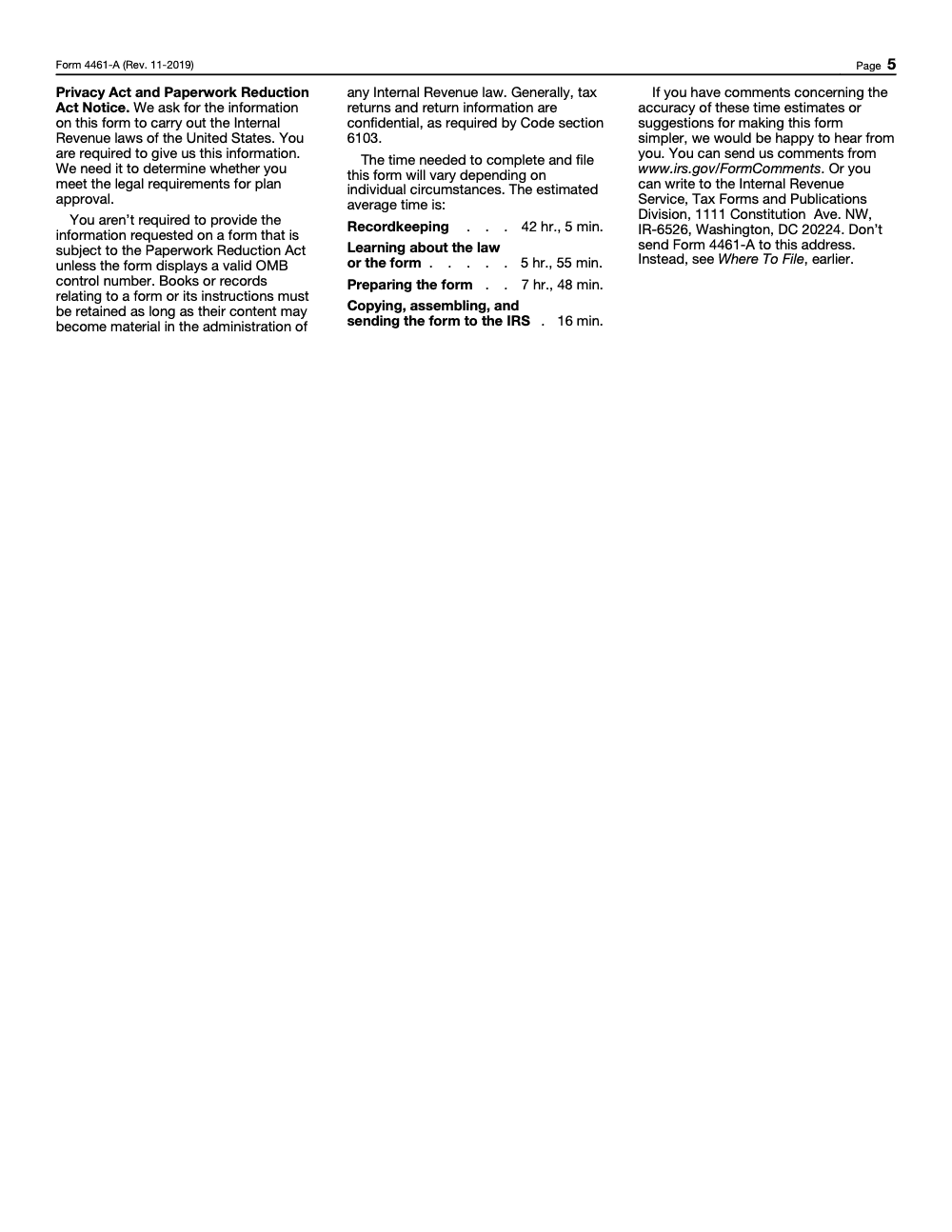
Form 4461-A is not a once-a-year return you can batch with everything else; it lands on the pre-approved plan submission cycle, and each adoption agreement built on the same basic plan document needs its own application, Attachment 1-A, user fee, and Form 8717-A. The IRS itself estimates roughly 42 hr., 5 min. of recordkeeping and 7 hr., 48 min. of preparation per Form 4461-A (per the Paperwork Reduction Act estimate printed on the form), so a provider filing several plans is looking at real hours before a single opinion letter arrives.
The pressure rarely comes from the drafting. It comes from packaging discipline, version control across a suite of adoption agreements, and the 30-day clock that starts the moment Employee Plans asks for a change. Teams that treat each application as a repeatable workflow, rather than a one-off scramble, keep that clock from turning into a withdrawn submission.
- Standardize basic plan document and adoption agreement numbering so Lines 5a and 5b stay consistent across the whole suite and across resubmissions.
- Keep a master log that ties each adoption agreement to its own Form 4461-A, Attachment 1-A, user fee, and Form 8717-A.
- Build a redline and cover-letter template so prior-cycle plans show every change at a glance.
- Track the 30-day response window per application, with components staged to update and resend.
- Mark N/A on every non-applicable line and Attachment 1-A item before submission so nothing returns as incomplete.
This is the kind of structured, repeatable execution we build at Accountably. Our tax preparation and review teams run the packaging, numbering, and response tracking on documented SOPs, so each application goes out complete the first time and the opinion letter is the only thing left to wait on.
FAQs
You must sign in to submit Form 4461‑A on Pay.gov. Create an account, then complete the form and payment steps. The form page explicitly states that sign‑in is required to submit.
Trim the upload to the essential items and fax the overflow to 844‑255‑4818. Put your Pay.gov tracking ID, EIN, and applicant name on the cover sheet. If the fax would create an email attachment over about 150 MB, split it into smaller transmissions. If you want confirmation that the fax arrived, use the EP Customer Service fax line at 855‑224‑1311 to request verification.
As of late 2025, the IRS fee schedule shows $32,000 for a single‑document plan, $20,000 for a basic plan document with one adoption agreement, $15,000 for each additional adoption agreement, $300 for certain provider actions, and none for a provider name or address change. Enter the exact fee on Line 1 and pay on Pay.gov.
No. Pay.gov’s daily card limit is $24,999, and the IRS notes that the $32,000 fee for a single‑document plan cannot be paid by credit card. Use ACH or debit instead, or contact the IRS coordinators listed on the submission procedures page for help if ACH or debit is not possible on your account.
Treat the Pay.gov confirmation email as your acknowledgement and wait 60 days after the end of the submission window, or 60 days after your filing date, whichever is later, before inquiring. Keep your tracking ID in your notes.
Other forms this guide names
- Form 2848: Guide to Line 3, Filing, and Rules
- Form 8821: Tax Information Authorization
- Form 8717‑A: IRS Guide to Additional Opinion Letter Fees
- Form 4461: IRS Opinion Letter: Pay.gov Filing Guide & Fees
- Form 4461‑B: Pay.gov Filing Guide for Providers
Summarize this article with AI
About this guide
Accountably helps US CPA, EA, and accounting firms hire trained accountants and tax preparers in India.
About us Reviewed byJugal Thacker, CPAFounder and CEO at Accountably
A US-licensed CPA with 7+ years inside US firms – PwC, a real-estate tax practice, then a full-service firm, rising from reviewer to manager to advisory. This article was reviewed against current IRS guidance for the 2025 tax year and updated for filers preparing late returns, amendments, and 2026 estimates.
View profile →How we research, review, and update this guide
Every Accountably guide is researched against primary IRS sources, reviewed by a U.S. CPA, and refreshed as guidance evolves. Read our Editorial Guidelines to see how we source, fact-check, and update our content.




