
Summarize this article with AI
In Brief
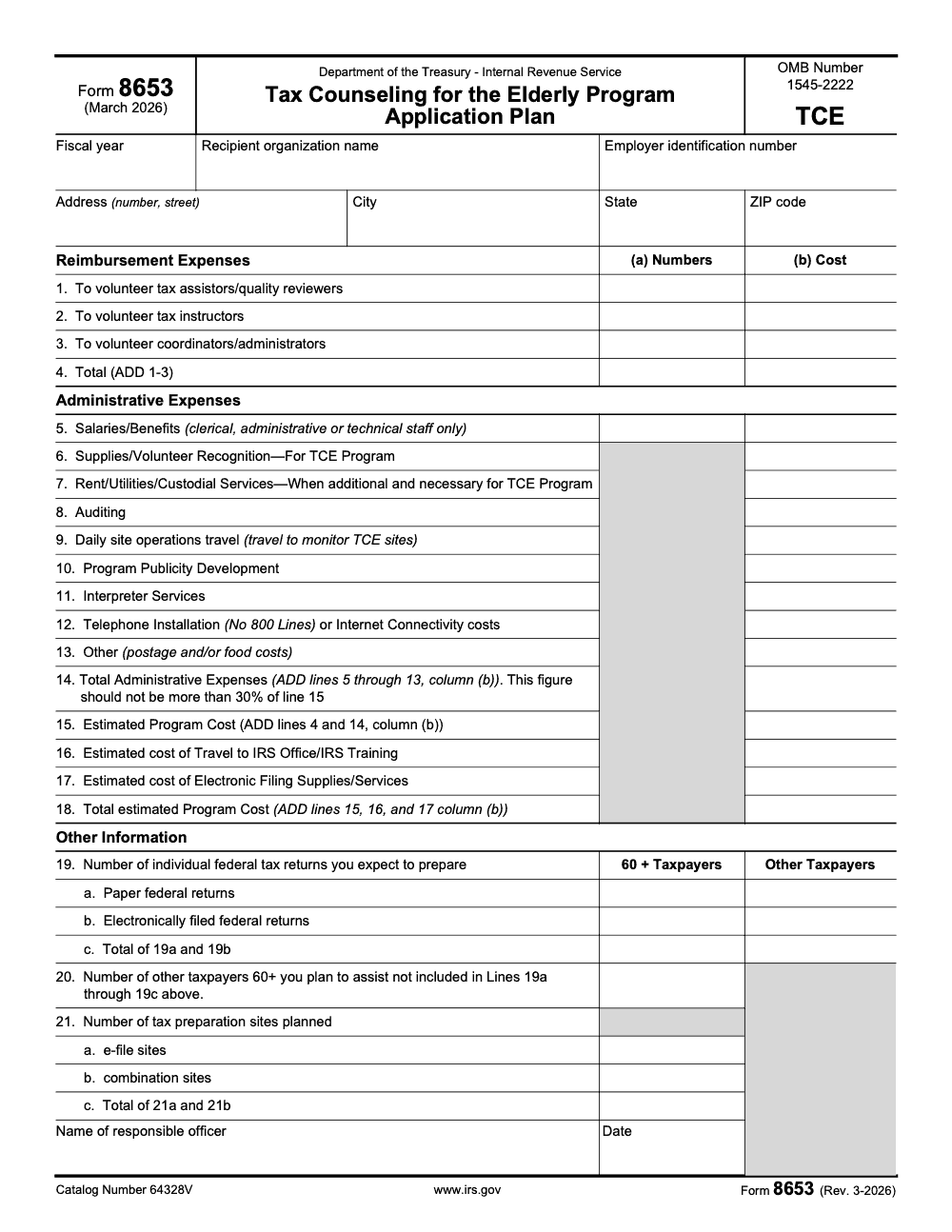
Form 8653 is the IRS Tax Counseling for the Elderly (TCE) Program Application Plan (OMB 1545-2222, Rev. March 2026) – the budget and plan form a sponsoring organization files to apply for a TCE grant, not a taxpayer income tax return. Total administrative expenses on Line 14 must stay at or below 30% of the estimated program cost on Line 15, and the application package must clear Grants.gov validation by May 31 (per IRS Form 8653 and the IRS “Applying for a TCE grant” guidance).
It is not a taxpayer consent form, it is not a power of attorney, and it does not attach to an individual income tax return. Form 8653 is the IRS Tax Counseling for the Elderly Program Application Plan, the budget and plan form a sponsoring organization files to apply for a TCE grant.
The line that quietly governs the whole application is the cap: total administrative expenses on Line 14 must stay at or below 30% of estimated program cost on Line 15. The package also has to clear Grants.gov validation by May 31, and grant records generally follow a 3-year retention baseline under 2 CFR § 200.334.
Key Takeaways
- Form 8653 is for the TCE grant application, not for individual tax returns or disclosure permissions.
- You’ll typically find TCE grant opportunities through Grants.gov, and the IRS points applicants to the TCE grant materials and Publication 1101 for requirements.
- The IRS lists Form 8653 as a required form in the TCE grant application package, along with other forms like Form 14204 and Form 14335.
- The IRS publishes a separate reporting form, Form 8654, used for semi-annual or annual reporting (it’s not the same thing as Form 8653).
- Recordkeeping matters. Federal grant records often follow a 3-year retention baseline under 2 CFR § 200.334, with exceptions (audits, litigation, written extensions).
What Form 8653 Is (In Plain English)
Form 8653 is the TCE Program Application Plan, and it supports your application for IRS TCE grant funding. The IRS version currently shown in its online system is Rev. 3-2026.
Think of it as the “how we’re going to run this program” budget and planning snapshot. It helps the IRS understand:
- What you expect to deliver (sites, service volume, operational plan)
- What you expect to spend (reimbursements, admin costs, other categories)
- Whether your plan looks realistic and accountable
The IRS’s official TCE program page explains the big picture: the TCE grant supports organizations providing free tax help to individuals age 60 or older, and grant recipients handle the real work of running the program, including volunteer management and operations.
Quick reality check: Form 8653 is not a tax “authorization” form
A lot of online form content gets muddled because IRS form numbers are easy to confuse. So here’s the clean line:
- Form 8653 = TCE grant application plan (program/budget planning)
- Form 8654 = TCE semi-annual/annual program report (reporting after you’re in the program)
If you came here expecting “consent to disclose tax return information,” you’re thinking of a different toolset entirely (often Form 8821 or Form 2848 depending on what you’re trying to authorize). The IRS explains the difference between those two clearly in its Internal Revenue Manual.
Who Needs to File Form 8653?
You’ll deal with Form 8653 if you’re part of an organization applying for the Tax Counseling for the Elderly (TCE) grant.
That typically includes:
- Nonprofits and community organizations running free tax help programs
- Agencies or partners coordinating TCE sites
- Program directors and grant administrators assembling the application packet
- Finance leads pulling together the numbers and documentation
- CPAs or finance advisors supporting a nonprofit client’s application
The IRS frames TCE as a cooperative agreement with eligible organizations to deliver the service, and the grant funds are used for program-related costs (for example, volunteer out-of-pocket reimbursements and certain support expenses).
Where Form 8653 Fits Inside the TCE Grant Application
If you’re building the application package, Form 8653 is one of the required pieces the IRS lists. On the IRS “Applying for a TCE grant” page, Form 8653 appears in the required forms checklist along with:
- Standard Form 424
- Form 14204
- Form 14335
- Other standard disclosures as applicable
The IRS also points applicants to Publication 1101 for eligibility criteria and detailed instructions.
The trap to avoid: treating Form 8653 like “just another PDF.”
In practice, it’s a planning document. If your numbers don’t match your narrative, or your categories don’t make sense for how you actually run sites, reviewers notice.
A delivery note (especially if you’re a firm supporting clients)
When we work with accounting teams, we see the same pattern again and again: the work doesn’t fail because people don’t know what to do, it fails because the workflow isn’t tight. Forms like 8653 punish fuzzy processes.
This is one of those moments where having a simple internal system helps, things like a checklist, version control, and one clear owner for final review. That “delivery discipline” is the same idea Accountably pushes in client work, keep execution clean so deadlines don’t turn into chaos.
Form 8653: When You File It, Where It Goes, and the Dates That Matter
When you’re staring at a grant deadline, the biggest risk usually isn’t “we forgot the form exists.” It’s that your team finishes the form, but it doesn’t line up with the rest of the application, or it gets submitted too late to pass validation. That’s the kind of delivery problem that quietly kills momentum.
Here’s the clean version of when Form 8653 is used and how it’s submitted, based on how the IRS describes the TCE grant process.
When to use Form 8653
You use Form 8653 as part of the TCE grant application package. The IRS lists it as a required form for TCE grant applications, alongside Form 14204 and Form 14335.
Form 8653 is also relevant for multi-year grant recipients who are going through an abbreviated continuation process, since the IRS references Form 8653 for proposed budget information in that context too.
Where to submit Form 8653
For the main application process, the IRS directs applicants to submit the completed application and required attachments through Grants.gov, and the submission must pass Grants.gov validation by May 31.
That matters because “we uploaded it on May 31” and “it passed validation by May 31” are not always the same thing.
TCE timeline you can plan around (use real dates, not vibes)
The IRS publishes a VITA/TCE grant timeline that lays out the annual rhythm. For TCE, it shows:
- Application period: May 1 to May 31
- Review/Evaluation/Ranking: June 1 to September 30
- Notification: October 1
- Period of performance: October 1 to September 30
The IRS also notes that acceptance or rejection notifications are scheduled for early October, and the “Applying for a TCE grant” page shows it was last reviewed/updated September 10, 2025, so these dates were still actively maintained as of late 2025.
Practical tip: Put “May 31 validation deadline” on your calendar two weeks earlier.
Not because you’re sloppy, but because Grants.gov and supporting docs have a way of surfacing issues when you can least afford it.
Before You Fill Out Form 8653: Set Up a Simple “Delivery System”
This is where the “delivery ceiling” shows up for real.
If multiple people are touching the budget plan, you want one basic workflow so you don’t get stuck in rework and review loops:
- One owner responsible for the final version
- One source of truth for expected site counts, expected returns, staffing assumptions
- One naming convention for files and drafts (so you’re not reviewing “final_v7_REALfinal.pdf”)
This is the same operational discipline we talk about in accounting firms when deadlines stack up. Structure first, then capacity. (That’s also why Accountably focuses on process control, not just “more hands,” but you don’t need a vendor to benefit from the mindset.)
How Form 8653 Is Structured (So You Know What You’re Walking Into)
The IRS provides Form 8653 in a guided, section-based format. At a high level, it includes:
- Instructions and privacy notice
- A confirmation question about whether you’re submitting a revised version of the plan
- Reimbursement expenses related to volunteers
- Administrative expenses (with limits and definitions)
- Other information such as expected return volume and site counts
- A review step where you can submit electronically or download the PDF
The IRS also warns that you cannot complete the mobile-friendly Form 8653 unless you have already completed and submitted your initial TCE grant budget plan with the initial TCE grant application.
That means revisions have rules, and you want to keep your records clean from day one.
How to Complete Form 8653 Step by Step (Without Creating Review Chaos)
Form 8653 is straightforward, but it’s not “casual.” The IRS uses it to understand how your program will operate and what you plan to spend. If your numbers look sloppy, reviewers notice.
Below is a practical, section-by-section walkthrough based on the current Form 8653 flow.
Step 1: Start with the “Important Things You Should Know” section
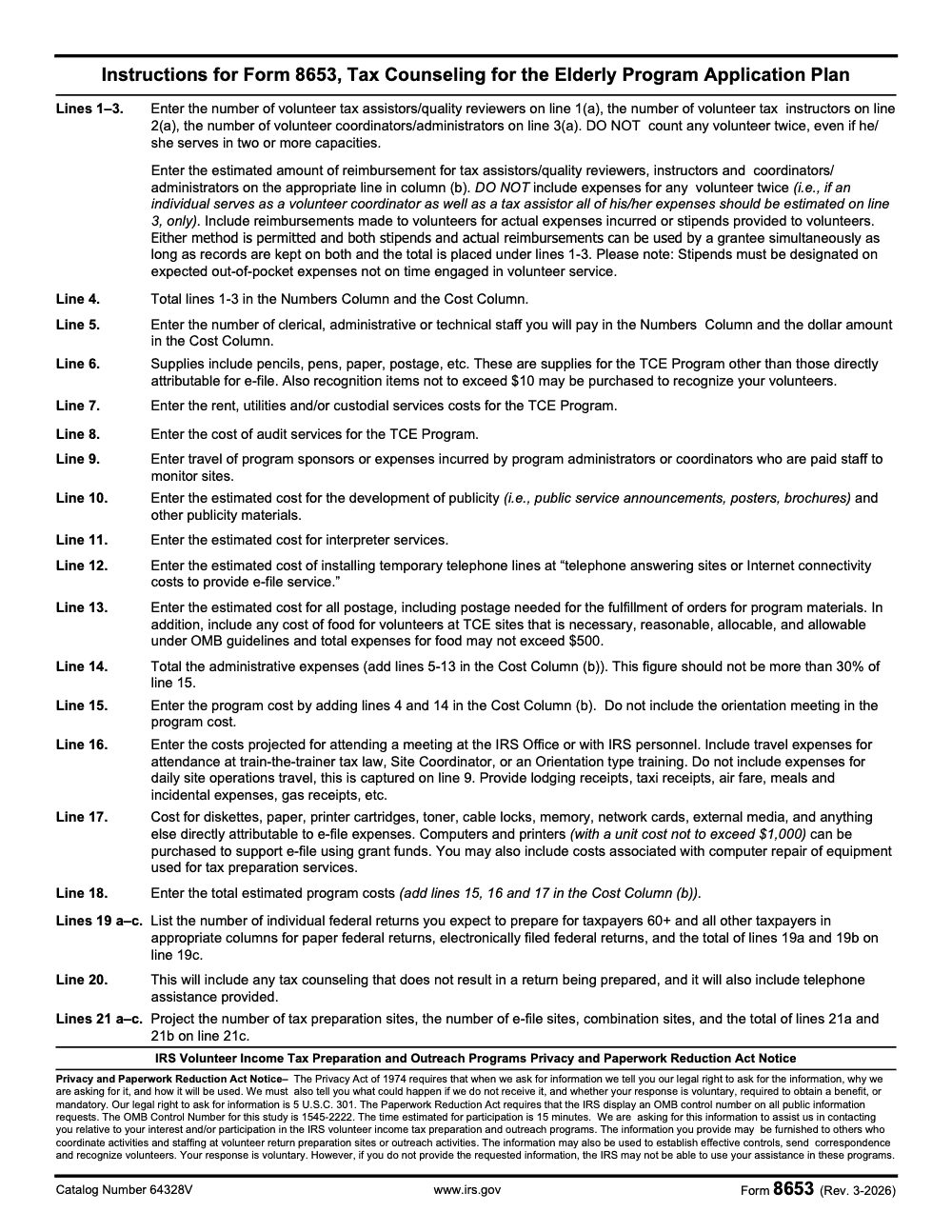
At the top, Form 8653 includes a Privacy Act and Paperwork Reduction Act notice and explains why information is collected, how it may be used, and what happens if you don’t provide it.
You don’t need to overthink this, but you do want to treat it like a compliance document, because that’s what it is.
Step 2: Answer the “revised version” question correctly
The form asks you to confirm whether this is a revised version of your TCE Program Application Plan or an original version.
This sounds small, but it’s a classic “paper cut” issue. If your organization has applied before, don’t guess. Confirm internally whether the version you’re submitting is an initial plan or a revision tied to a prior submission.
Step 3: Complete Reimbursement Expenses (Lines 1 to 4)
This section is about reimbursements or stipends for volunteer roles. Form 8653 breaks it out into:
- Volunteer tax assistors/quality reviewers
- Volunteer tax instructors
- Volunteer coordinators/administrators
- Total (add Lines 1 to 3)
For each role category, you’re typically entering:
- (a) Numbers of volunteers (with instructions not to double count people who serve in more than one capacity)
- (b) Cost estimates, with guidance about not double counting expenses and how stipends should be treated (stipends must be set on expected out-of-pocket expenses, not on time engaged in volunteer service)
What I see trip teams up here: everyone can agree on “we have around 40 volunteers,” but nobody agrees on how many are instructors vs coordinators, and the reimbursement logic gets counted twice.
A quick fix is to build a simple roster and assign each person one primary category for budget purposes.
Step 4: Complete Administrative Expenses (Lines 5 to 18)
This is where Form 8653 becomes a real planning tool. Administrative expenses include things like:
- Staff salaries and benefits (clerical, administrative, technical only)
- Supplies and volunteer recognition (with a note that each individual recognition item should not exceed $10, which is a per-item cap rather than a total per volunteer)
- Rent, utilities, custodial services (when additional and necessary)
- Auditing
- Travel to monitor sites (paid program staff travel; volunteer site-visit travel belongs in reimbursements on Lines 1 to 3)
- Publicity development
- Interpreter services
- Phone installation (no 800 lines) or internet connectivity costs for e-file service
- Other items like postage and food costs, with a note that food totals may not exceed $500, which is a cap for the whole program rather than a per-site or per-event limit
Form 8653 also includes calculated totals, including:
- A total administrative expense line that “should not be more than 30%” of another line (Form 8653 flags this directly in its instructions)
- An estimated program cost and a final total estimated program cost that combines program, travel/training, and e-file supply/service costs
A practical way to avoid rework: before you start typing numbers into the form, decide internally:
- Which costs are reimbursement vs administrative
- Which costs are general operations vs e-file specific
- Who owns backup support (quotes, prior-year actuals, policies)
Step 5: Complete “Other Information” (Lines 19 to 21)
Form 8653 asks for operational expectations, including:
- Number of individual federal tax returns you expect to prepare, split into paper and electronically filed, and split again between 60+ taxpayers and other taxpayers
- Number of other taxpayers 60+ you plan to assist that does not result in a return being prepared (including telephone assistance)
- Number of tax preparation sites planned, including e-file sites and combination sites
This is where your narrative, your staffing plan, and your budget need to match. If you’re projecting a big jump in e-file returns but no change in site count, reviewers may wonder how you’ll execute.
Step 6: Review, submit, and download a PDF copy
Form 8653’s review step allows you to submit electronically or download the PDF for fax or mail submission, and it notes you can still download the PDF after submitting for your records.
Even if you submit electronically, saving the final PDF is a smart move for internal continuity.
Record Retention, Common Mistakes, and Clean Compliance Practices
The same handful of Form 8653 errors surface every grant cycle, and almost all of them are misclassification problems rather than math problems. Catching them before submission is far cheaper than answering a reviewer question afterward, and a one-page line-mapping sheet (see how we structure tax delivery) prevents most of them.
Record retention (and what “3 years” actually means)
If you’re operating under federal grant requirements, there’s a widely used baseline rule in 2 CFR § 200.334:
- You must retain federal award records for 3 years from the date of submission of your final financial report, with variations for quarterly/annual reporting awards.
- If litigation, claims, or audit findings start before the 3-year period ends, you retain records until it’s resolved.
- Agencies can also notify you in writing to extend the retention period.
That means a blanket “keep it for three years” is a start, but you should tie retention to the specific reporting and closeout timeline of your award.
Compliance note (not legal advice): Always check your award terms, Publication 1101 guidance, and any written instructions from the IRS Grant Program Office for stricter requirements.
Common Form 8653 mistakes (and how to fix them fast)
Mistake 1: Double counting volunteers across categories
Form 8653 repeatedly warns not to count a volunteer twice if they serve multiple roles.
Fix: Create a roster with one primary role per volunteer for budgeting purposes, then track secondary roles separately for operational planning.
Mistake 2: Putting costs in the wrong bucket
Some costs belong in reimbursement, some in administrative, and some in e-file supplies/services. The form’s labels are clear, but teams still misfile expenses when they’re moving too fast.
Fix: Before filling the form, make a one-page mapping doc that lists each expected cost and the form section it belongs to.
Mistake 3: Administrative totals that violate the form’s built-in limit
Form 8653 explicitly notes that total administrative expenses should not exceed 30% of a referenced line.
Fix: If you’re above the limit, don’t “fudge” the math. Reassess categorization and confirm what truly counts as administrative under the program rules.
Mistake 4: Operational projections don’t match your plan
If you’re projecting high return volume with low staffing, or more e-file sites without budget support, it raises questions.
Fix: Use the “Other Information” section as your consistency check. The budget should tell the same story as your site plan.
A practical internal checklist you can copy
| Checkpoint | What you’re confirming | Owner |
| Volunteer roster | No double counting across categories | Program lead |
| Budget mapping | Costs assigned to correct section | Finance lead |
| Admin % check | Admin totals within form guidance | Finance lead |
| Volume logic | Return counts match sites and staffing | Program lead |
| Final version control | One final PDF saved, named, and stored | Grants admin |
Conclusion
Form 8653 isn’t hard because the math is scary. It’s hard because it exposes process gaps.
If you treat it like a planning document, lock down one owner, keep your numbers consistent, and retain records like you expect someone to ask for them later, you’ll save yourself a lot of late-night cleanup.
And if you’re supporting multiple programs or managing a high-volume compliance operation, the lesson carries further: capacity helps, but structure is what keeps the wheels from coming off.
Reusable Checklists
These checklists are copy-paste ready for your grant SOPs. Drop them into your application workflow so the Form 8653 line rules are enforced before the package ever reaches Grants.gov.
TCE budget mapping (Lines 1 to 18)
- Each volunteer is counted once, on the line matching their highest-tier role (Lines 1 to 3).
- Reimbursements recorded as actual costs, stipends, or both, with stipends based on expected out-of-pocket expense rather than hours.
- Line 5 holds only paid clerical, administrative, or technical staff, no volunteers or preparers.
- E-file supplies and equipment routed to Line 17; general supplies and recognition items on Line 6.
- Volunteer recognition items on Line 6 cost $10 or less each.
- Any computer or printer bought with grant funds is $1,000 or less per unit (Line 17).
- Food costs on Line 13 total $500 or less across the whole program.
- Line 14 administrative total is at or below 30% of the Line 15 estimated program cost.
Operations and travel cross-check (Lines 9, 16, 19 to 21)
- Daily site-monitoring travel by paid staff sits on Line 9.
- IRS-office and IRS-training travel sits on Line 16, backed by lodging, airfare, meals, and gas receipts.
- Orientation costs kept out of Line 15; orientation travel captured on Line 16.
- Line 19 return counts split by taxpayers 60 and older versus other taxpayers, and by paper (19a) versus e-file (19b).
- Line 20 includes counseling that does not produce a return and telephone assistance for taxpayers 60 and older.
- Line 21 sites split into e-file (21a) and combination (21b), with the total on 21c.
Submission and retention packet
- Responsible officer name entered and the form dated and signed.
- OMB control number reads 1545-2222 on the version you file.
- Application clears Grants.gov validation before the May 31 cutoff.
- Final PDF saved, named, and version-controlled after submission.
- Backup support (quotes, prior-year actuals, written policies) filed alongside the budget.
- Record retention tied to your award closeout timeline, with a 3-year baseline under 2 CFR § 200.334.
Keep 8653 Season From Stalling
The Form 8653 cycle is short and unforgiving. The TCE grant application window runs roughly May 1 to May 31, and the package has to clear Grants.gov validation by May 31 (per the IRS “Applying for a TCE grant” guidance), so the budget math, the volunteer roster, and the operational projections all have to land inside a few weeks. The form looks deceptively quick: the IRS pegs completion at about 15 minutes under the Paperwork Reduction Act notice on Form 8653, yet the reconciliation behind those line items is what actually consumes the calendar.
The fix is not more hours in May. It is a repeatable file structure that holds the line-level rules so nothing gets reclassified at the last minute.
- Lock a volunteer roster that counts each person once on Lines 1 to 3, on their highest-tier role, before any dollars are estimated.
- Keep a live mapping sheet that routes e-file supplies and equipment to Line 17 and general supplies to Line 6, so the Line 14 administrative total stays at or below 30% of Line 15.
- Separate daily site-monitoring travel (Line 9) from IRS-office and training travel (Line 16) on the day the expense is logged, not during final review.
- Reconcile the Lines 19 to 21 projections (returns split by age and filing method, sites split into e-file and combination) against the budget so the two tell the same story.
That is the kind of structured, review-ready execution we build at Accountably. Our tax and accounting delivery teams work inside documented SOPs and multi-layer review, so the reconciliation behind every line is handled before a deadline forces a shortcut.
FAQs
Yes, the IRS lists Form 8653 as a required form within the TCE grant application package.
The IRS directs applicants to submit the application package through Grants.gov, and it must pass validation by May 31. Form 8653 itself also mentions electronic submission or downloading a PDF for fax or mail in its workflow, so follow the instructions that apply to your specific submission context.
Form 8653 is the TCE Program Application Plan used in the application process. Form 8654 is the TCE Semi-Annual/Annual Program Report used to report budget expenditures and includes a narrative report requirement in grant operations.
The IRS shows an annual timeline with an application window of May 1 to May 31 and notification around October 1. The “Applying for a TCE grant” page also states applications must pass Grants.gov validation by May 31.
Other forms this guide names
- Form 8654: TCE Semi-Annual/Annual Program Report Guide
- Form 14204: TCE Checklist and Contact Sheet Guide
- Form 14335: IRS VITA and TCE Grant Contact Guide 2025
About this guide
Accountably helps US CPA, EA, and accounting firms hire trained accountants and tax preparers in India.
About us Reviewed byJugal Thacker, CPAFounder and CEO at Accountably
A Washington-licensed CPA with 7+ years inside US firms – PwC, a real-estate tax practice, then a full-service firm, rising from reviewer to manager to advisory. This article was reviewed against current IRS guidance for the 2025 tax year and updated for filers preparing late returns, amendments, and 2026 estimates.
View profile →How we research, review, and update this guide
Every Accountably guide is researched against primary IRS sources, reviewed by a U.S. CPA, and refreshed as guidance evolves. Read our Editorial Guidelines to see how we source, fact-check, and update our content.




