
Summarize this article with AI
In Brief
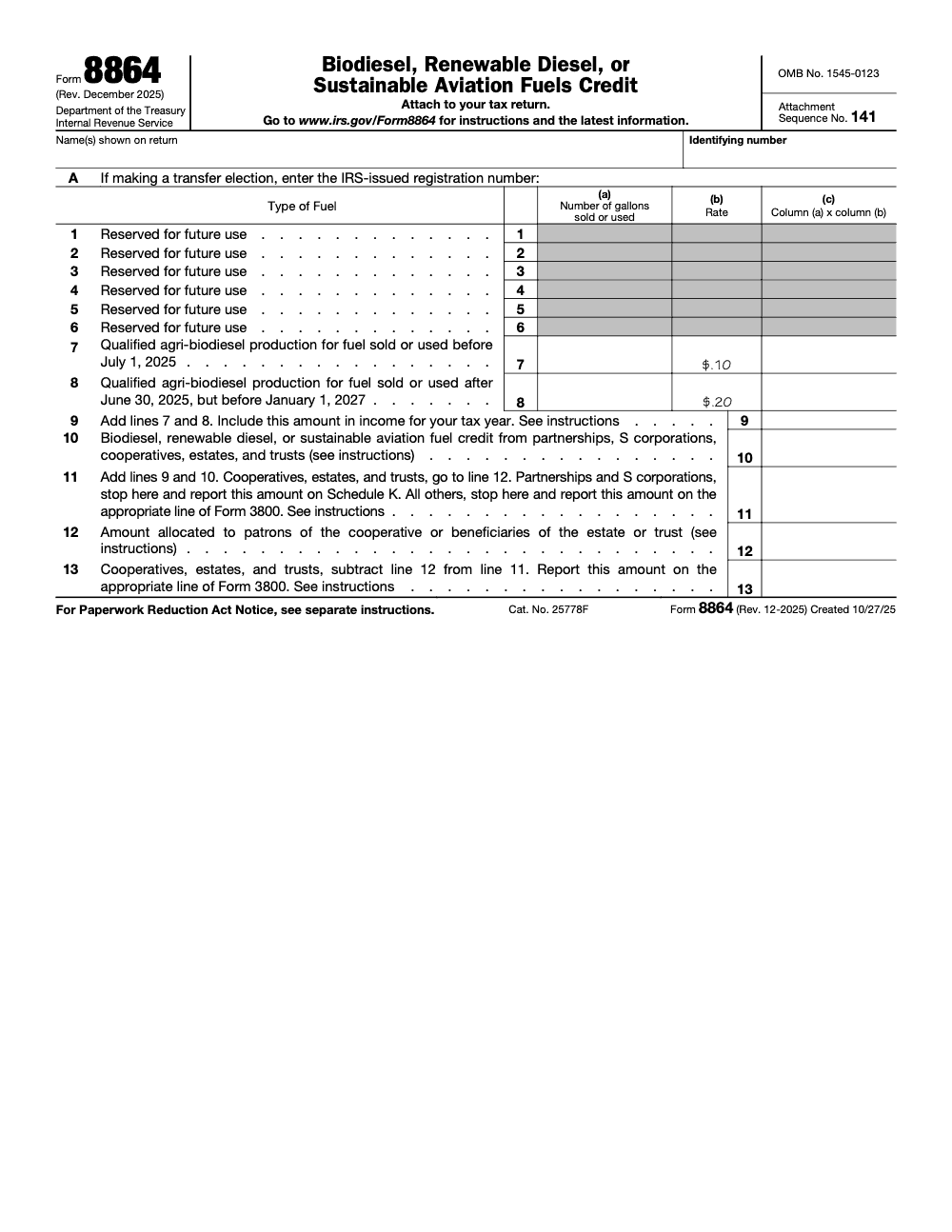
Form 8864 is the biodiesel, renewable diesel, or sustainable aviation fuels credit, attached to your income tax return rather than filed on its own (Attachment Sequence No. 141). On the December 2025 revision, qualified agri-biodiesel production goes on line 7 at $0.10 per gallon for fuel sold or used before July 1, 2025 and on line 8 at $0.20 per gallon for fuel sold or used after June 30, 2025 but before January 1, 2027; per the Form 8864 instructions, the line 11 total then carries to Form 3800.
The agri-biodiesel producer who computed one credit number for the whole year and dropped it on a single line is the call to watch for. On the December 2025 Form 8864 the rate changes mid-year, so the year has to be split. Gallons sold or used before July 1, 2025 go on line 7 at $0.10 per gallon, and gallons sold or used after June 30, 2025 but before January 1, 2027 go on line 8 at $0.20 per gallon.
Form 8864 is the biodiesel, renewable diesel, or sustainable aviation fuels credit, attached to your income tax return rather than filed on its own. Add lines 7 and 8 on line 9 and include that same amount in income, then carry the line 11 total to Form 3800, except partnerships and S corporations that stop at line 11 and report on Schedule K. Pull the sale-or-use date before you pull the gallons and the rest follows.
Key Takeaways
- On the December 2025 revision, Form 8864 covers only qualified agri‑biodiesel production. Lines 1 through 6 are reserved for future use, so the older biodiesel mixture, renewable diesel, and sustainable aviation fuel categories no longer go on this form.
- Report gallons by sale‑or‑use date: line 7 at $0.10 per gallon for fuel sold or used before July 1, 2025, and line 8 at $0.20 per gallon for fuel sold or used after June 30, 2025 but before January 1, 2027.
- Add lines 7 and 8 on line 9 and include that same amount in income for the tax year. The credit is not a pure non‑taxable benefit.
- Form 8864 attaches to your income tax return (Attachment Sequence No. 141); it is not filed on its own.
- Partnerships and S corporations stop at line 11 and report it on Schedule K. All others carry line 11 to Form 3800; cooperatives, estates, and trusts first allocate on line 12 and net on line 13.
- If you are making a transfer election, enter the IRS‑issued registration number in Item A at the top of the form before you file.
Who This Is For, And How To Use It
This guide is for managing partners, ops leads, senior tax managers, and software admins who want a calm, accurate 8864 workflow that holds up under review. You will get, in plain language, the timing rules, the line 7 and line 8 rate split, the line 9 income inclusion, and step‑by‑step entries in ProConnect Tax and TaxSlayer Pro. I will also show you simple ways to avoid common rework, for example mismatched gallons and a missed income add‑back that force last‑minute scrambles.
Why Delivery Breaks On 8864, And How To Avoid It
If your team is buried in compliance, it is easy for workpapers to get rushed and naming to drift. That leads to longer reviews and missed deadlines. Here is the simple fix.
- Define who pulls the sale‑or‑use dates, who ties out gallons to lines 7 and 8, who reconciles the line 9 income inclusion, and who confirms the Form 3800 carryover.
- Standardize file names and version control for the gallon ledger and the line 9 income computation.
- Use a short, repeatable checklist per return so reviewers do not hunt for the same items twice.
A quick note, some firms add structured offshore capacity for seasonal spikes. When done with SOPs, layered review, and strict security, it removes chaos instead of adding it. On Accountably.com, we only bring this up where it truly helps, a disciplined offshore delivery layer can keep 8864 attachments, naming, and SLAs tight inside your own systems so partners spend time on strategy, not file wrangling.
What Form 8864 Covers
On the December 2025 revision, Form 8864 covers a single category: qualified agri‑biodiesel production. The form lists two rate lines for it.
- Line 7, qualified agri‑biodiesel production for fuel sold or used before July 1, 2025, at $0.10 per gallon.
- Line 8, qualified agri‑biodiesel production for fuel sold or used after June 30, 2025 but before January 1, 2027, at $0.20 per gallon.
You file Form 8864 to quantify the qualifying gallons, apply the correct per‑gallon rate by sale‑or‑use date, total the credit, and carry it to your return. For most filers the line 11 total flows through Form 3800 as a general business credit rather than landing directly on the return’s credits line; partnerships and S corporations instead pass it through on Schedule K. If your only source is a passthrough K‑1, you report on Form 3800 rather than filing your own 8864.
One‑Credit Rule
You cannot claim two different credits on the same gallons. Coordinate 8864 with Forms 720, 8849, and 4136 so you do not double claim. Make that reconciliation part of your review checklist.
Timing, The Sale‑Or‑Use Date Controls The Rate
The sale‑or‑use date of each gallon does two jobs on the December 2025 form. It fixes the tax year of the claim, and it sets the rate. Gallons sold or used before July 1, 2025 take the $0.10 line 7 rate; gallons sold or used after June 30, 2025 take the $0.20 line 8 rate. Production dates, payment dates, and inventory movements do not control the claim or the rate. Passthrough owners align to the passthrough’s sale‑or‑use year shown on the K‑1.
Pro tip Put the sale or use date in your gallon tie‑out worksheet. When deadlines hit, that single column tells you both the year and which rate line each batch belongs on.
Lines 7 and 8, The Two Agri‑Biodiesel Rate Buckets
Lines 7 and 8 are where the work happens on the December 2025 form. Each line uses three columns: column (a) is the number of gallons sold or used, column (b) is the statutory rate, and column (c) is column (a) times column (b). Split your gallons into two buckets by sale‑or‑use date before you enter anything.
Line 7, Fuel Sold Or Used Before July 1, 2025
- Rate, $0.10 per gallon in column (b).
- Scope, qualified agri‑biodiesel production for fuel sold or used January 1 through June 30, 2025.
- Common snag, applying the higher second‑half rate to first‑half gallons. The rate is locked to the date the fuel was sold or used, not the date you file.
Line 8, Fuel Sold Or Used After June 30, 2025
- Rate, $0.20 per gallon in column (b), double the line 7 rate.
- Scope, qualified agri‑biodiesel production for fuel sold or used after June 30, 2025 but before January 1, 2027.
- Watchlist, fuel sold or used on or after January 1, 2027 does not qualify on line 8. The credit window closes at the end of December 31, 2026.
Line 9, Add Lines 7 And 8 And Include In Income
- Add lines 7 and 8 to get line 9.
- Include the line 9 amount in income for the same tax year. The form says so on its face, so it is not a pure non‑taxable benefit.
- Common snag, computing the credit but forgetting the income add‑back, which understates income on the underlying return.
Lines 10 And 11, Passthrough Credit And The Total
- Line 10, biodiesel, renewable diesel, or sustainable aviation fuel credit passed through from partnerships, S corporations, cooperatives, estates, and trusts. Take it from the K‑1; do not re‑enter gallons on line 7 or line 8.
- Line 11, add lines 9 and 10. Partnerships and S corporations stop here and report it on Schedule K. All others stop here and carry it to the appropriate line of Form 3800. Cooperatives, estates, and trusts continue to line 12.
Lines 1 Through 6 Are Reserved On The 2025 Form
If you prepared Form 8864 in prior years, the December 2025 revision will look different. Lines 1 through 6 are labeled “Reserved for future use.” The older biodiesel mixture, renewable diesel, biodiesel sold at retail, and sustainable aviation fuel categories that once sat there are gone from this form. Only qualified agri‑biodiesel production on lines 7 and 8 remains active.
What To Do With Non‑Agri‑Biodiesel Claims
- Do not force biodiesel mixture or renewable diesel gallons onto lines 1 through 6. Those entries are erroneous on this revision.
- Leave lines 1 through 6 blank.
- For any non‑agri‑biodiesel fuel claim for 2025, confirm the current treatment against the latest IRS guidance referenced on the form’s landing page at www.irs.gov/Form8864.
Blockquote The fastest way to lose review time on this form is to prepare it from memory of an older revision. Pull the December 2025 form first, confirm lines 1 through 6 are reserved, and work only lines 7 onward.
Who Must File Form 8864
File Form 8864 if you directly generate the qualified agri‑biodiesel production credit in the sale‑or‑use year, whether you are an individual, a C corporation, a partnership, an S corporation, a cooperative, an estate, or a trust. If your only source is a passthrough, report on Form 3800 and keep the K‑1 statements with your records.
Passthrough‑Only Reporting, The No‑Duplication Rule
- Do not file your own 8864 if the credit comes only from a passthrough.
- Carry the passthrough amount to Form 3800 so general business credit ordering and carryforward limits apply correctly.
- If you directly generate any portion of the credit, you must file Form 8864 for that portion.
When To Claim The Credit
The controlling rule, you claim the credit in the tax year the qualified agri‑biodiesel is sold or used, and the sale‑or‑use date also sets the line 7 or line 8 rate. Align your claim to the sale or use date even if production happened earlier.
Credit Timing Rules, A Simple Checklist
- Identify the sale or use date, then tag it to the tax year.
- File Form 8864 for that year if you are the entity that generated the credit, and attach it to that year’s income tax return; Form 8864 is filed with the return, not as a standalone filing.
- If e‑file will not carry PDFs, check the e‑file box to generate Form 8453 and mail the attachments.
- Retain all certificates and statements used to compute the claim.
Sale Or Use Date Examples
- You produced qualified agri‑biodiesel in December and sold it on January 3. The claim belongs in the year that includes January 3, and the rate follows that sale date.
- You produced agri‑biodiesel in May and sold it in August 2025. Because the August sale falls after June 30, 2025, those gallons go on line 8 at $0.20, not on line 7.
Passthrough Timing
Passthrough entities file Form 8864 for the year of sale or use and issue owner allocations on Schedule K‑1 for that same year. Owners report those amounts on their own Form 3800 for the same year. Do not duplicate the claim by also filing 8864.
Software Workflows, ProConnect Tax
You can generate and complete Form 8864 directly in ProConnect.
Where To Enter
- Open Input Return, then Credits, General Business and Vehicle Cr.
- Select the Energy or Fuel Production tab.
- Scroll to the Biodiesel, Renewable Diesel, or Sustainable Aviation Fuels Credit, 8864, section.
- Enter qualified agri‑biodiesel gallons in the line 7 field for fuel sold or used before July 1, 2025 and in the line 8 field for fuel sold or used after June 30, 2025. Leave the reserved lines 1 through 6 alone.
Confirm The Income Inclusion And The Form 3800 Carryover
After the software computes line 9, confirm that same amount is included in income on the underlying return. Then confirm the line 11 total carries to the appropriate line of Form 3800, since the credit reaches the return through Form 3800, not directly on the credits line.
Save, Re‑Open, Confirm
After populating the 8864 section, save the return, close the screen, and re‑open to confirm entries persisted and totals flow to the form. This tiny habit prevents the most common review surprise, empty fields after a refresh.
Blockquote Most rework on 8864 is not math, it is the gallon split and the income add‑back. Bucket the gallons by sale‑or‑use date, then enter, then reconcile line 9 to income. In that order.
Software Workflows, TaxSlayer Pro
If the credit comes directly from your activity, you will enter Form 8864 in TaxSlayer Pro rather than relying solely on Form 3800.
Where To Enter
- From the 1040 Main Menu, select Credits.
- Choose General Business Credits, then Current Year General Business Credits.
- In the Energy or Fuel Production area, select Form 8864.
- Enter qualified agri‑biodiesel gallons on line 7 (sold or used before July 1, 2025) and line 8 (sold or used after June 30, 2025), and leave reserved lines 1 through 6 blank.
Transfer Election And Item A
If you are electing to transfer the credit, enter the IRS‑issued registration number in Item A at the top of the form. Without that registration number, the transfer election cannot be perfected on the form. Obtain it before filing.
Accuracy Checks Before You File
- Run the accuracy check or diagnostics to confirm every required 8864 field is complete.
- Tie the line 7 and line 8 gallon entries to your sale‑or‑use date ledger.
- Confirm the line 9 amount is also included in income on the underlying return.
Attaching Form 8864 To Your Return
Form 8864 is not a standalone filing. The form says “Attach to your tax return,” and it carries Attachment Sequence No. 141, which controls its order in the stack of forms attached to the return. Treat the attachment step as a hard requirement, not an afterthought.
Records To Keep With The File
- Your gallon ledger tagged by sale‑or‑use date so the line 7 and line 8 split is supportable.
- The computation tying line 9 to the income inclusion on the underlying return.
- If a transfer election was made, a copy of the IRS‑issued registration number entered in Item A.
Confirm The Form Is In The Return Package
- Complete the line 7 and line 8 inputs first.
- Save the return, then confirm Form 8864 appears in the electronic return package with Attachment Sequence No. 141.
- Confirm the line 11 total has carried to the appropriate line of Form 3800.
- Re‑run diagnostics to confirm no required field is blank before you transmit.
Catalog And Landing Page
The December 2025 Form 8864 carries Catalog No. 25778F and OMB No. 1545-0123. For the current instructions and any mid‑season changes, the form points to www.irs.gov/Form8864 as its landing page.
Blockquote Confirm you are working the December 2025 revision before you start. The reserved lines 1 through 6 are the quickest signal that you have the right form in hand.
Reporting Credits On Form 3800 When You Do Not File 8864
If your only biodiesel, renewable diesel, or sustainable aviation fuel credit comes from passthroughs, go straight to Form 3800. You do not file Form 8864 yourself.
How To Report
- Use the passthrough’s K‑1 and attached statements to capture the credit amount allocated to you.
- Enter it on the appropriate Form 3800 line so general business credit ordering and carryforward rules apply correctly across all credits.
- Keep the K‑1 and allocation statements with your workpapers. The IRS can ask for them even when you do not file 8864.
Preventing Duplicates
Confirm whether the passthrough already claimed the credit on its own Form 8864. You should never duplicate the claim by filing 8864 yourself for the same gallons, and you should never re‑enter passthrough amounts as gallons on line 7 or line 8. Trace the amounts to your Form 3800 and document the year alignment in your binder.
What Changed On The December 2025 Form
You will see questions this season about what changed. Here is a simple way to frame it for clients and your team.
- The December 2025 revision reserves lines 1 through 6, removing the older biodiesel mixture, renewable diesel, and sustainable aviation fuel categories from this form.
- Qualified agri‑biodiesel production is the only active category, and it is split across two rate lines by sale‑or‑use date: line 7 at $0.10 before July 1, 2025 and line 8 at $0.20 after June 30, 2025.
- Train your reviewers to ask one question up front, what is the sale‑or‑use date of each batch. That single question fixes both the tax year and the rate line, and it prevents hours of rework.
Line 7 vs. Line 8, At A Glance
| Item | Line 7 | Line 8 |
| What it reports | Qualified agri‑biodiesel production sold or used before July 1, 2025 | Qualified agri‑biodiesel production sold or used after June 30, 2025 but before January 1, 2027 |
| Rate, column (b) | $0.10 per gallon | $0.20 per gallon |
| Window | First half of 2025 | Second half of 2025 through December 31, 2026 |
| Where the total goes | Line 9 (added to line 8), then line 11 to Schedule K or Form 3800 | Line 9 (added to line 7), then line 11 to Schedule K or Form 3800 |
Note, laws can change. Always check current IRS instructions for the exact return year you are filing and adjust your workflow accordingly.
Accuracy Checks And Saving Your Return
Accuracy is built on habits, not heroics. Use this quick loop before you move on.
- Verify the gallon split
- Confirm every batch is bucketed by sale‑or‑use date onto line 7 ($0.10) or line 8 ($0.20), with no gallons sold or used on or after January 1, 2027.
- Confirm the income inclusion
- Check that the line 9 amount is also included in income on the underlying return for the same tax year.
- Retain records
- Keep your gallon ledger, the line 9 income computation, and any Item A registration number in a clean folder with year and taxpayer labels.
Practical Examples, Micro Scenarios You Can Paste Into SOPs
Example 1, Agri‑Biodiesel Sold Before And After July 1
- Facts, you sold 100,000 gallons of qualified agri‑biodiesel in May 2025 and another 100,000 gallons in September 2025.
- Result, the May gallons go on line 7 at $0.10 ($10,000) and the September gallons go on line 8 at $0.20 ($20,000). Line 9 is $30,000, which you also include in income.
- Documentation, keep your gallon ledger tagged with each sale date so the line 7 and line 8 split is supportable.
Example 2, Production Date Earlier Than Sale Date
- Facts, you produced agri‑biodiesel in June 2025 but did not sell it until August 2025.
- Result, the rate follows the sale date, not the production date, so those gallons go on line 8 at $0.20.
- Documentation, tie the gallons to the August sale records, not the June production records.
Example 3, Passthrough Owner
- Facts, you receive a K‑1 from a cooperative with an agri‑biodiesel production credit allocated to you.
- Result, you do not file 8864. Report the allocated amount on Form 3800 for the same tax year shown on the K‑1.
- Documentation, retain the K‑1, the allocation statement, and a copy of the cooperative’s 8864 summary if provided.
Review Protection And Delivery Discipline
If your firm struggles with peaks, it is not a sales problem, it is a capacity problem. A clear SOP for 8864 keeps reviewers out of loops and protects deadlines.
- SOP‑driven execution, the same steps for bookkeeping, tax, and 8864 attachments every time.
- Structured workpapers, standard file names, clean version control, and a summary index page.
- Multi‑layer review, preparer, senior, quality, then partner, with each layer checking a different thing.
- Turnaround SLAs, predictable windows for certificate requests and final review.
- Escalation control, issues flagged early to avoid eve‑of‑filing surprises.
- Continuity plans, zero disruption if someone is out.
If you want help implementing that structure inside your own systems, Accountably can integrate trained offshore teams through a delivery architecture built for speed, review efficiency, and accountability. We mention it briefly here because it solves the exact pain points you see with 8864, missing attachments, unclear ownership, and rushed workpapers.
Additional Resources And Related Articles
| Resource | Purpose | Notes |
| IRS Instructions for Form 8864 | Eligibility, timing, and the line 7 and line 8 rates | Check the version for your filing year (Rev. December 2025) |
| IRS, general business credits, Form 3800 | Where the line 11 total flows for most filers | Carry the credit through Form 3800, not directly onto the return |
| Form 8453 | Paper attachment transmittal for e‑filed returns | Use only if a separate document must be mailed |
| ProConnect or Lacerte help | Where to enter line 7 and line 8 gallons | Confirm the line 9 income add‑back and Form 3800 flow |
| TaxSlayer Pro knowledge base | 8864 location and the agri‑biodiesel rate split | Follow current‑year guidance |
Conclusion
You are the pilot of this return, and Form 8864 is your flight plan. Keep timing tied to sale or use, treat documentation like a non‑negotiable, and make your software steps boring on purpose. When you do, reviews are faster, partner time shifts to advisory, and deadlines stop feeling risky. If your team wants production stability without chaos, bring delivery structure to your 8864 process, and, when you are ready to scale that structure, consider a disciplined offshore layer that runs inside your systems with clear SOPs, SLAs, and layered review.
Common Mistakes We See Every Season
A handful of Form 8864 errors come back every season, and most trace to two things: the mid-year rate change and the path the credit takes off the form. Here are the ones my team flags most, per the Form 8864 instructions (Rev. December 2025).
Reusable Checklists
These checklists are copy-paste ready for your firm SOPs, drawn straight from the Form 8864 instructions (Rev. December 2025). Drop them into your workpaper template and check items off as you go.
Sale-or-use date and rate split
- Confirm the revision in hand is Form 8864 (Rev. December 2025).
- Pull a sale-or-use date for every batch of qualified agri-biodiesel production.
- Bucket gallons sold or used before July 1, 2025 onto line 7 at $0.10 per gallon.
- Bucket gallons sold or used after June 30, 2025 and before January 1, 2027 onto line 8 at $0.20 per gallon.
- Enter gallons in column (a), the rate in column (b), and the product in column (c).
- Confirm no gallons sold or used on or after January 1, 2027 are included.
Line totals and Form 3800 flow
- Sum lines 7 and 8 on line 9.
- Add the line 9 amount to gross income on the underlying return for the same tax year.
- Enter any passthrough credit from a K-1 on line 10.
- Total lines 9 and 10 on line 11.
- If you are not a cooperative, estate, or trust, carry line 11 to the appropriate line of Form 3800.
- Verify Form 8864 is attached to the return with Attachment Sequence No. 141.
Passthrough, cooperative, and transfer checks
- Partnerships and S corporations: stop at line 11 and report it on Schedule K.
- Cooperatives, estates, and trusts: allocate the patron or beneficiary share on line 12.
- Subtract line 12 from line 11 on line 13 and report line 13 on Form 3800.
- For a transfer election, enter the IRS-issued registration number in Item A.
- Confirm passthrough credits are not re-entered as gallons on line 7 or line 8.
Keep 8864 Season From Stalling
Form 8864 does not have a single filing-day crunch like a payroll or 1040 cycle. Its pressure comes from timing precision. The December 2025 revision splits qualified agri-biodiesel production across two rates inside one tax year, $0.10 per gallon on line 7 before July 1, 2025 and $0.20 per gallon on line 8 after, and the credit window closes for fuel sold or used on or after January 1, 2027. Per the Form 8864 instructions (Rev. December 2025), the rate follows the sale-or-use date, so the real work is reconciliation, not data entry.
When the gallon records are clean, the form moves fast. When they are not, reviewers spend the back half of the engagement chasing which gallons were sold or used before July 1 and which after, then re-checking the line 9 income add-back and the Form 3800 carryover. The fix is to standardize the source data before anyone touches the form.
- Maintain a gallon ledger tagged by sale-or-use date so the line 7 and line 8 split is mechanical, not a judgment call.
- Reconcile the line 9 income inclusion against the underlying return before sign-off, since the credit is not a pure non-taxable benefit.
- Route passthrough amounts from K-1s straight to line 10, never re-entered as gallons on lines 7 or 8.
- For cooperatives, estates, and trusts, document the line 12 patron or beneficiary allocation and the line 13 net before it reaches Form 3800.
- Flag any transfer election early so the Item A registration number is in hand before filing.
This is exactly the kind of timing-sensitive, documentation-heavy work that benefits from a structured delivery system. Our tax preparation and review service keeps the gallon split, the income inclusion, and the Form 3800 handoff inside a documented workflow with layered review, so the credit is right the first time and your reviewers sign off faster.
FAQs
On the December 2025 revision, you use Form 8864 to claim the qualified agri‑biodiesel production credit. Report gallons by sale‑or‑use date on line 7 ($0.10 per gallon before July 1, 2025) and line 8 ($0.20 per gallon after June 30, 2025), add them on line 9 and include that amount in income, then carry the line 11 total to Schedule K or Form 3800.
Claim in the tax year the fuel is sold or used, and the sale‑or‑use date also sets the line 7 or line 8 rate. Production or purchase dates do not control. For passthroughs, align to the entity’s sale‑or‑use year shown on the K‑1.
On the December 2025 revision, lines 1 through 6 are reserved for future use. The older biodiesel mixture, renewable diesel, and sustainable aviation fuel categories were removed from this form. Leave lines 1 through 6 blank and report only qualified agri‑biodiesel production on lines 7 and 8.
Yes. Form 8864 is not a standalone filing. Attach it to your income tax return with Attachment Sequence No. 141. If you are making a transfer election, enter the IRS‑issued registration number in Item A before you file.
No. Reconcile Forms 720, 8849, and 4136 with 8864 so you do not double claim the same gallons. Use a reconciliation note in your workpapers so reviewers can sign off fast.
The December 2025 revision reserves lines 1 through 6 and leaves only qualified agri‑biodiesel production active. That production is split across two rate lines by sale‑or‑use date: line 7 at $0.10 before July 1, 2025 and line 8 at $0.20 after June 30, 2025 but before January 1, 2027.
Other forms this guide names
Summarize this article with AI
About this guide
Accountably helps US CPA, EA, and accounting firms hire trained accountants and tax preparers in India.
About us Reviewed byJugal Thacker, CPAFounder and CEO at Accountably
A US-licensed CPA with 7+ years inside US firms – PwC, a real-estate tax practice, then a full-service firm, rising from reviewer to manager to advisory. This article was reviewed against current IRS guidance for the 2025 tax year and updated for filers preparing late returns, amendments, and 2026 estimates.
View profile →How we research, review, and update this guide
Every Accountably guide is researched against primary IRS sources, reviewed by a U.S. CPA, and refreshed as guidance evolves. Read our Editorial Guidelines to see how we source, fact-check, and update our content.




