
Summarize this article with AI
In Brief
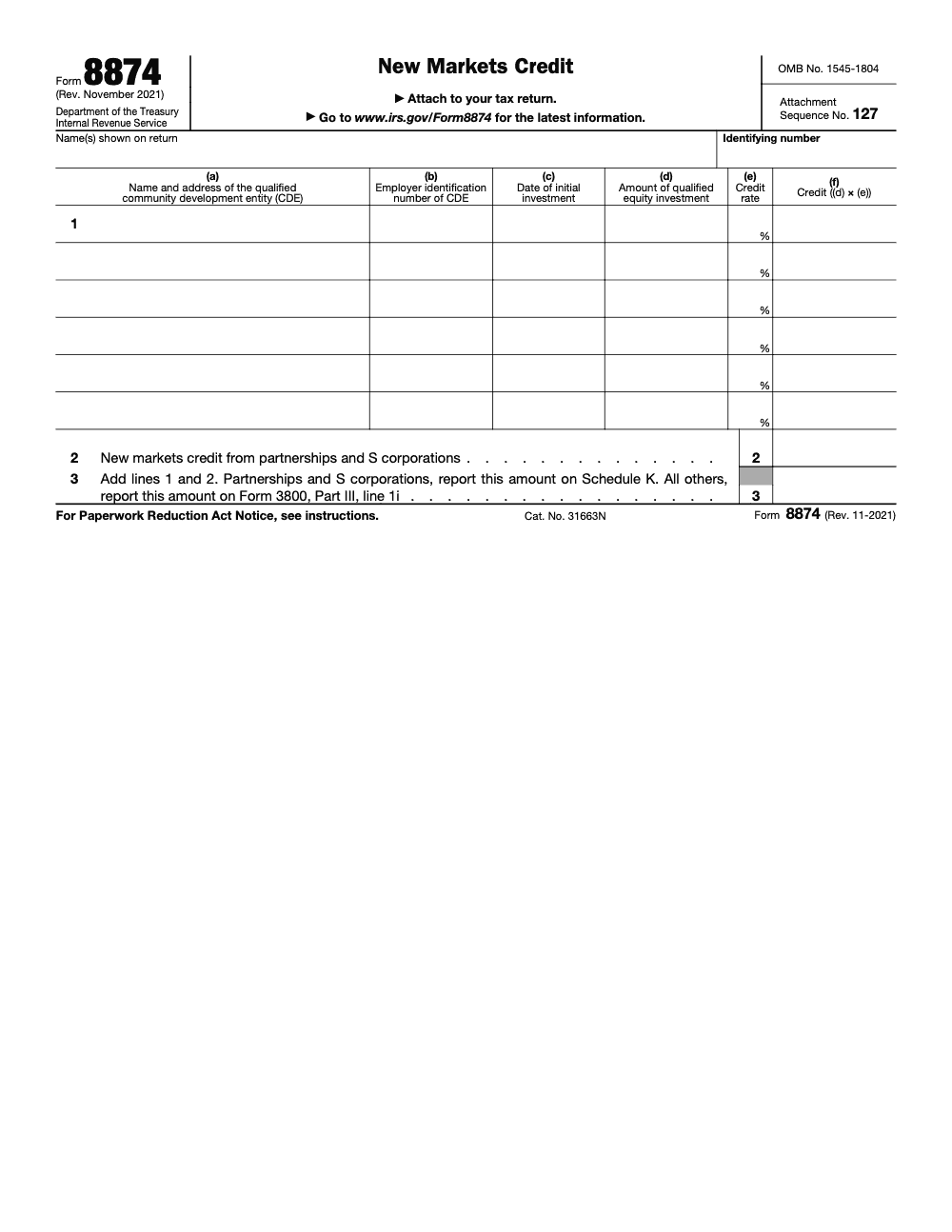
Form 8874 is how you claim the New Markets Tax Credit on a qualified equity investment in a Community Development Entity certified by the CDFI Fund. The credit equals 39% of the investment spread over a seven-year period (5% in years 1 to 3, then 6% in years 4 to 7), and the line 3 total flows to Form 3800, Part III, line 1i, per the Form 8874 instructions and Internal Revenue Code Section 45D. If your only New Markets Credit comes from a pass-through K-1, you can usually skip the form and report it directly on Form 3800; when the volume outgrows your team, our tax preparation services carry the prep and review.
Most clients meet Form 8874 the day a notice arrives from a Community Development Entity and a K-1 mentions a credit they have never heard of. One April a partner handed me a stack of those notices, certain the full 39% had landed in year one. It had not, and resetting that expectation took longer than the return did.
The misread is the rate schedule. Form 8874 claims the New Markets Tax Credit on a qualified equity investment in a CDE certified by the CDFI Fund, and the credit equals 39% spread over seven years, 5% in years 1 to 3 and 6% in years 4 to 7. The line 3 total flows to Form 3800, and recapture can bite if the CDE loses status or the investment is redeemed.
Key Takeaways
- You use Form 8874 to claim the New Markets Tax Credit when you hold a Qualified Equity Investment in a certified Community Development Entity. The credit is part of the general business credit and flows to Form 3800.
- The rate is 39% over seven years, split 5% in years 1 to 3 and 6% in years 4 to 7. Claim it on each credit allowance date, usually the investment anniversary (there are seven credit allowance dates in total: the date of the initial investment plus the next six anniversaries, not seven anniversaries after the investment).
- If your only source is a pass‑through K‑1, you typically report the credit on Form 3800 and may not need to file Form 8874 separately. Confirm per your facts and the software you use.
- Watch recapture. It can apply if the CDE loses status, your investment is redeemed, or proceeds stop funding qualified uses. A limited six‑month cure can apply once per investment.
- Keep your documentation tight, including the CDE notice, often Form 8874‑A, and any K‑1 attachments.
What Form 8874 Does, And Who Should File It
Form 8874 is the IRS form you complete to calculate and claim the New Markets Tax Credit from a qualified equity investment in a certified Community Development Entity. It documents the CDE, the investment date and amount, the applicable annual percentage, and whether the activity is passive or nonpassive. The form then feeds the result to Form 3800 under the general business credit limits on your return.
Not every taxpayer files Form 8874. If an individual or business only receives the NMTC via a Schedule K‑1 from a partnership or S corporation, standard IRS guidance and common software workflows direct you to report it on Form 3800. Your facts and software controls still matter, so follow the K‑1 instructions and your product’s prompts.
The Seven‑Year Credit Schedule At A Glance
Here is the statutory schedule you will apply each year you are eligible.
| Year of credit period | Percentage | Cumulative total |
| 1 | 5% | 5% |
| 2 | 5% | 10% |
| 3 | 5% | 15% |
| 4 | 6% | 21% |
| 5 | 6% | 27% |
| 6 | 6% | 33% |
| 7 | 6% | 39% |
These rates are set in section 45D and are still current for the 2025 filing season.
Basis Reduction You Should Not Miss
When you claim the NMTC, you must reduce the basis of the qualified equity investment by the credit amount allowed, even if part or all of that credit is not allowed in the current year and carries forward. Teams often forget to note this in workpapers, which later complicates exit or allocation discussions. Capture the basis adjustment at the same time you record the year’s percentage so you do not create a review surprise.
The “What, How, Wow” Summary
- What: Form 8874 calculates the New Markets Tax Credit on your qualified equity investment and routes it into your general business credit on Form 3800.
- How: Enter the CDE’s legal name, address, EIN, initial investment date, your investment amount, the correct annual rate, and passive status. Attach pass‑through amounts per K‑1 and align totals to Form 3800.
- Wow: Add controls that catch recapture risks early, track the one‑time six‑month cure window, and standardize file naming for faster multi‑layer review. These small steps save partner time and protect margins.
Why firms stumble on Form 8874
You likely do not struggle for lack of clients. You struggle when delivery bottlenecks hit, like unclear ownership of rate years, missing CDE notices, or inconsistent passive status calls. That creates slow reviews, deadline stress, and margin drag. A simple checklist, plus standardized workpapers, will keep 8874 moving smoothly and free partners to focus on advisory and client conversations.
Step‑By‑Step, Completing Form 8874 In Tax Software
Below is a concise workflow many teams use in TaxSlayer Pro. The menu names might vary slightly between desktop and ProWeb, yet the path is consistent. Always confirm the current year’s product guide.
Start the credit and route it to Form 3800
- Open the 1040 return, then go to Credits, then General Business Credit, then Current Year General Business Credits, then select Form 8874. This ensures the NMTC will land on Form 3800.
Shortcut reminder From the 1040 main menu, choose Credits, then Form 3800, then Current Year, then Form 8874, then New Markets Credit.
Create a record for each CDE investment
For each CDE, enter:
- Legal name, full address, and EIN.
- Initial qualified equity investment date.
- Investment amount tied to that QEI.
- Annual rate for the current credit year, 5% for years 1 to 3, 6% for years 4 to 7.
- Passive or nonpassive classification. These entries sync into the Form 3800 framework.
Add pass‑through credits from K‑1s
If the credit comes through a pass‑through, click New in the pass‑through area, enter the entity’s name and EIN, then key the credit amount exactly as shown on the K‑1. Mark passive or nonpassive. Retain the K‑1 and any attached statements that identify the qualified equity investment and the investment date.
Carrybacks and carryforwards
If applicable, enter carrybacks or carryforwards within the same 8874 flow so the totals reconcile to Form 3800. Use your 3800 detail schedules to confirm ordering and limitation impacts.
Recording recapture, when required
If a recapture event occurs, record the recapture tax in the Other Taxes section of your software, typically under Recapture of Other Credits, then select New Markets Credit recapture. This mirrors e‑CFR guidance to include the NMTC recapture on the line for recapture taxes and label it accordingly.
Required CDE Information You Will Need
Keep a standard intake list so your preparer is never hunting for basics.
- CDE legal name and complete mailing address.
- CDE EIN.
- Initial QEI date.
- QEI amount.
- Current year credit rate and year of the seven‑year period.
- Passive or nonpassive status supporting memo.
- The CDE’s notice of qualified equity investment, often Form 8874‑A.
Consistency matters. If you have multiple CDEs, repeat these fields with the same naming logic and tie totals back to the 8874 lines and Form 3800 detail. This avoids mismatches during review.
Documentation You Should Keep On File
- Form 8874‑A or equivalent CDE notice for each investment.
- The original subscription document or purchase confirmation.
- Annual allocation schedules and correspondence from the CDE.
- For pass‑throughs, the Schedule K‑1 and any statements that identify the QEI, credit year, and allocation.
- A workpaper that shows year‑by‑year credit percentages and the basis reduction applied.
Quick quality check Before routing to review, verify the anniversary date, confirm which year of the seven‑year cycle you are in, and re‑compute the percentage off the QEI amount. That three‑point check catches most mismatches.
Common Pitfalls We See, And How To Avoid Them
Picking the wrong year of the seven‑year cycle, which produces an incorrect 5% or 6% calculation. Tie every 8874 to a simple year tracker keyed off the initial QEI date.
Forgetting basis reduction in the investment workpaper. Add a standing line for basis change each year you claim the credit.
Treating a K‑1 NMTC like a direct CDE entry. Many filers should route K‑1 credits straight to the 3800 schedule per software instructions.
Not documenting passive status. Reviewers will ask, so log the rationale once and reuse it.
Waiting to research recapture until there is a problem. Train staff on the three recapture triggers and the one‑time six‑month cure so they know when to escalate.
Where Accountably can help If you are buried in production and review queues, structured SOPs, standardized workpapers, and a multi‑layer review process reduce rework and partner time. Our teams are trained on QuickBooks, Xero, UltraTax, CCH Axcess, Lacerte, Drake, Karbon, TaxDome, and Suralink, and we operate inside your templates with clear checklists and SLAs. Use us when you need disciplined delivery, not resumes.
Recapture Rules You Must Monitor
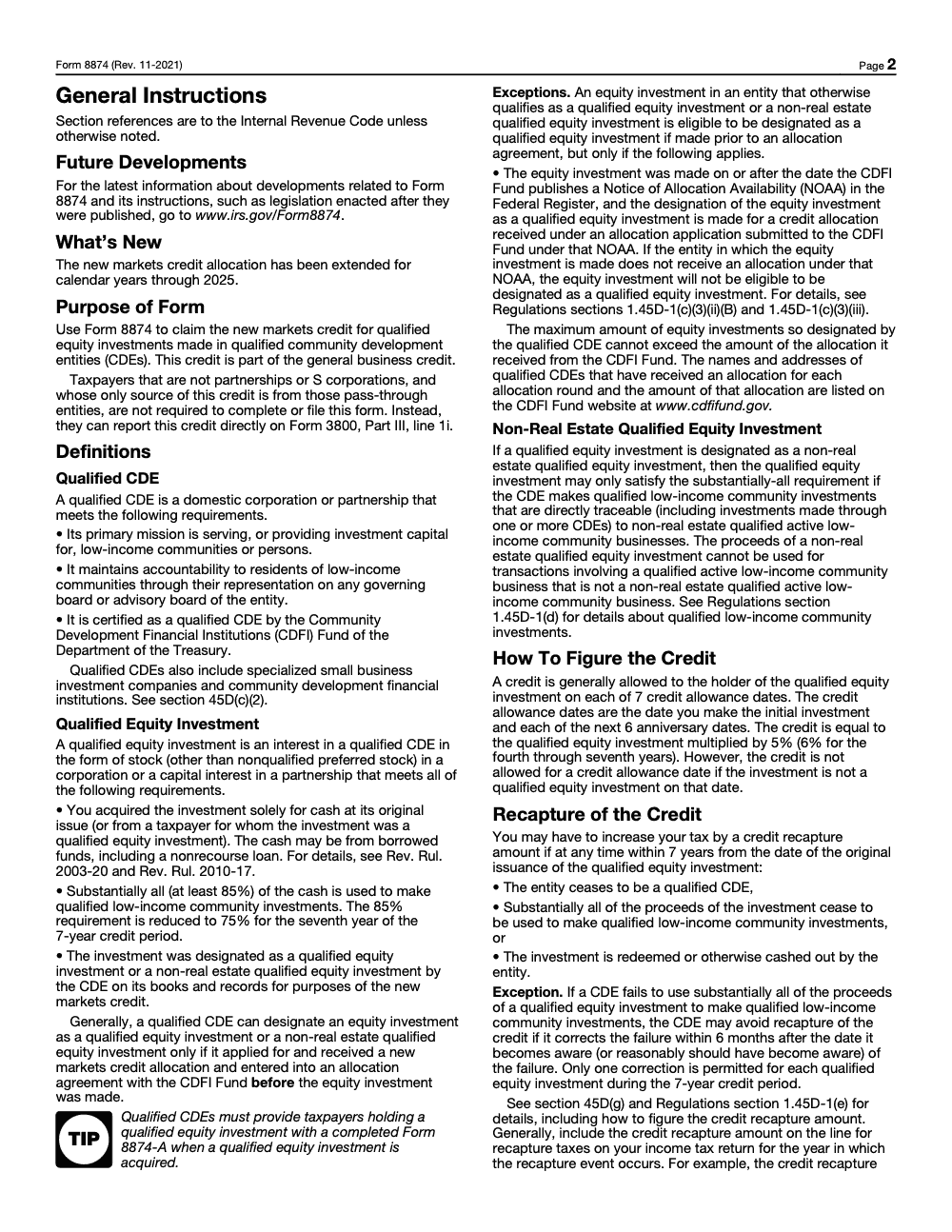
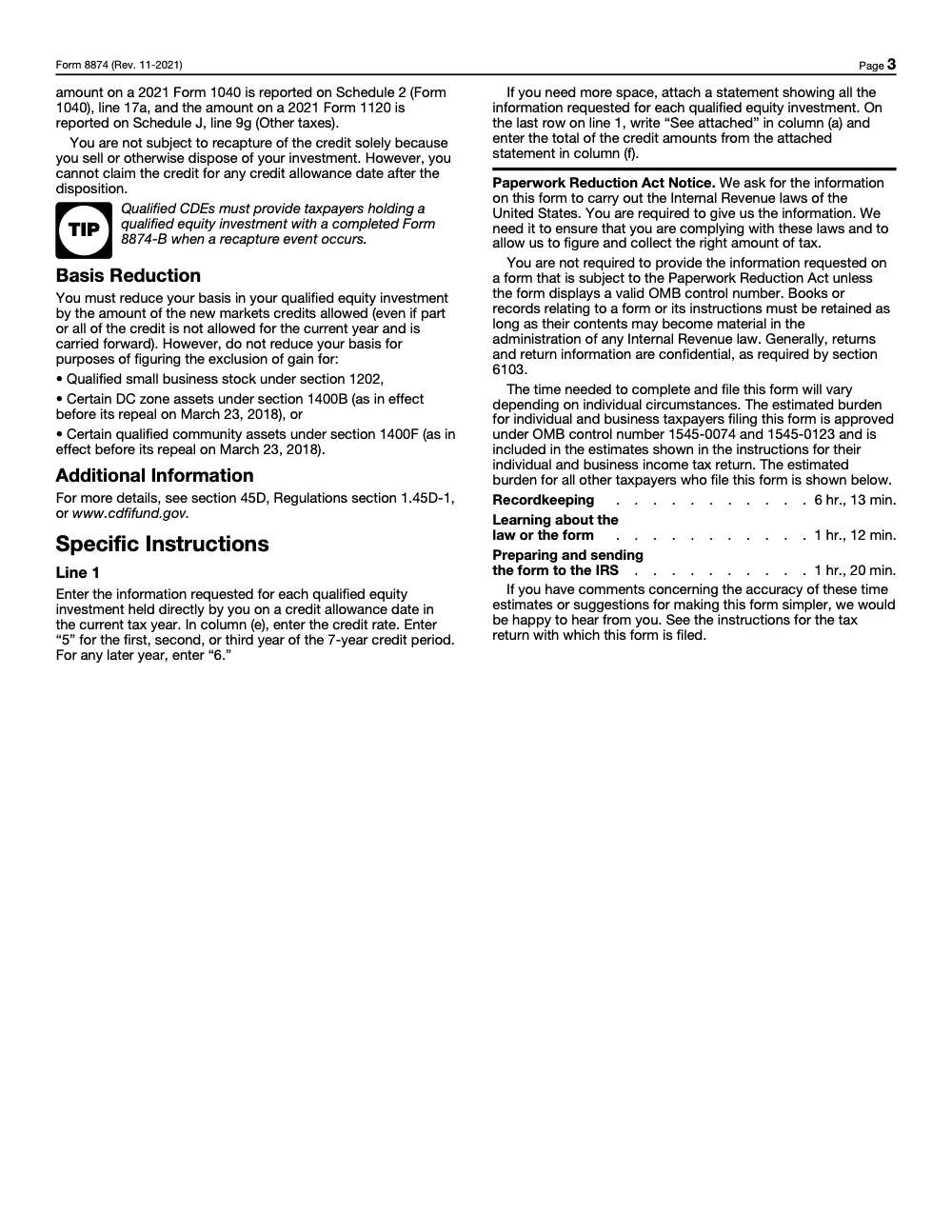
Recapture can increase your tax for the year of the event. It applies if, within seven years of the original issue date, the CDE ceases to qualify, the proceeds cease to be used for qualified low‑income community investments, or the investment is redeemed or cashed out. Note that these are entity-side events: selling or otherwise disposing of your own investment does not trigger recapture of credits already claimed, though it does end your ability to claim the credit for any allowance date after the disposition. The recapture amount equals the prior credits that would not have been allowed, plus underpayment interest. You report the increase as a recapture tax on your return and label it for NMTC.
The limited cure exception
There is a narrow exception. If “substantially all” of the proceeds fall out of compliance, the CDE may avoid recapture by fixing the failure within six months of when it knew, or should have known, about the failure. This cure can be used only once per qualified equity investment during the seven‑year period, so treat it as a safety valve, not a plan. Document dates and communications when you rely on it.
A Simple Review Checklist For Partners
- Confirm the anniversary date and year number in the seven‑year cycle, then confirm the correct 5% or 6% rate.
- Verify that the 8874 totals flow to Form 3800 and that carryforwards or K‑1 amounts reconcile to detail schedules.
- Check for basis reduction entries tied to the credit allowed.
- Look for recapture indicators, including CDE communications about status changes or redeptions. If yes, route to recapture workflow and label the tax properly.
- Ensure the CDE notice, often 8874‑A, is in the file.
Final Notes For 2025 Filings
As of January 23, 2025, the IRS page for Form 8874 confirms the purpose and related products, and the seven‑year 39% schedule remains the law in section 45D, though the new markets credit allocation authority is currently authorized only through calendar year 2025, and whether the CDFI Fund makes new allocations after 2025 depends on future legislation (allocations already issued keep generating credits over their full seven-year periods). Use current Form 3800 instructions for limitation computation and breakdown schedules. When in doubt, document your assumptions in the workpapers.
Common Mistakes We See Every Season
The same handful of errors come back every season, and most trace to treating Form 8874 like a one-line credit instead of a seven-year schedule. Here are the ones my team flags most often.
Reusable Checklists
These are copy-paste ready for your firm SOPs. Drop each block into your workpaper template and check items off as you go.
Qualified equity investment intake
- Collect the CDE notice, often Form 8874-A, confirming the original-issue investment qualifies.
- Confirm the CDE is certified by the CDFI Fund and held an allocation before the investment was made.
- Record the initial investment date, the CDE name and EIN, and the investment amount for line 1, columns (a) through (d).
- Verify the interest is stock other than nonqualified preferred stock, or a capital interest in a partnership.
- Note whether the cash came from borrowed funds; borrowed funds, including nonrecourse, still qualify.
- Flag whether the credit is direct or pass-through to decide if Form 8874 is even required.
Annual credit calculation
- Identify the year number in the seven-year credit period for each qualified equity investment.
- Apply 5% for years 1 to 3 and 6% for years 4 to 7, entering the bare integer in column (e).
- Compute column (f) as column (d) times column (e) and total to line 3.
- Add any pass-through New Markets Credit from partnerships and S corporations on line 2.
- Carry line 3 to Form 3800, Part III, line 1i, and attach Form 8874 using Attachment Sequence No. 127.
- Record the basis reduction for the credit allowed, including amounts carried forward.
Recapture monitoring
- Calendar all seven credit allowance dates per investment, from the initial date through the sixth anniversary.
- Watch for the three recapture events: CDE decertification, proceeds leaving qualified use, or redemption within seven years.
- Track the substantially-all test, 85% of cash deployed in years 1 to 6 and 75% in year 7.
- If the CDE reports a substantially-all failure, start the one-time six-month cure clock immediately.
- File the recapture amount on the recapture taxes line of the return for the year of the event, labeled for the New Markets Credit.
- Keep Form 8874-B and any CDE correspondence in the file to support the position.
Keep 8874 Season From Stalling
Form 8874 is not a one-and-done filing. Each qualified equity investment carries seven credit allowance dates and a seven-year recapture window, so a single client can generate review work every spring for most of a decade. The IRS pegs recordkeeping alone at more than six hours per filer, with over an hour each to learn the form and to prepare and send it (Form 8874 Paperwork Reduction Act estimates), and that is before anyone reconciles a CDE notice.
The stall point is almost always process, not difficulty. When the schedule lives in someone's head instead of a workpaper, the year-four rate change and the substantially-all test slip, and recapture exposure builds quietly.
- Map all seven credit allowance dates per investment so the 5% rate flips to 6% at year four without anyone guessing.
- Reconcile line 1, column (f) to each CDE notice and confirm column (e) carries the bare integer 5 or 6.
- Route pass-through K-1 credits to Form 3800, Part III, line 1i, and confirm whether a standalone Form 8874 is required at all.
- Monitor the substantially-all test (85% in years 1 to 6, 75% in year 7) and flag the one-time six-month cure window the moment a CDE reports a failure.
- Log basis reductions for credits allowed, including carryforwards, so each investment's basis stays right.
This is the kind of repeatable, multi-year monitoring that runs well on documented SOPs and a structured review layer. Accountably builds that structure into our tax services, so the schedule, the reconciliations, and the recapture watch happen on time without burning senior review hours.
FAQs
It is the form you file to claim the New Markets Tax Credit from a qualified equity investment in a certified Community Development Entity. It calculates the year’s percentage and feeds the result to Form 3800 under the general business credit rules.
Sometimes, yes, if they invested directly in a CDE. If the only source is a pass‑through K‑1, many filers report the amount directly on Form 3800 per software instructions, rather than filing 8874. Check the K‑1 and your software prompts.
A CDE uses Form 8874‑A to notify you that your original issue investment qualifies for NMTC. Form 8874‑B is used to notify of a recapture event. Keep these notices in your file to support your return and monitoring.
There is a limited cure if “substantially all” of the proceeds fall out of qualifying use, and the CDE fixes the failure within six months of awareness. It can only be used once per QEI. Build a calendar reminder for that six‑month window.
Form 8962 reconciles advance payments of the Premium Tax Credit with your allowable credit based on Form 1095‑A. It is unrelated to the New Markets Credit, yet it often appears in the same software sections. Keep workflows separate to avoid mix‑ups.
See section 45D of the Internal Revenue Code and the NMTC regulations at 26 CFR 1.45D‑1, which also explain how to report recapture tax on your return.
Other forms this guide names
- Form 3800: How to Claim the General Business Credit in 2025
- Form 8874‑A: NMTC Notice, 60‑Day QEI Rules for CDEs
- Form 8874-B: NMTC Recapture Notice Guide
- Form 1040: Filing Guide for 2025 Returns (AGI, Deductions, Deadlines)
- Form 8962: Premium Tax Credit Reconciliation Guide
- Form 8974: Guide to the Payroll R&D Credit for QSBs
Summarize this article with AI
About this guide
Accountably helps US CPA, EA, and accounting firms hire trained accountants and tax preparers in India.
About us Reviewed byJugal Thacker, CPAFounder and CEO at Accountably
A US-licensed CPA with 7+ years inside US firms – PwC, a real-estate tax practice, then a full-service firm, rising from reviewer to manager to advisory. This article was reviewed against current IRS guidance for the 2025 tax year and updated for filers preparing late returns, amendments, and 2026 estimates.
View profile →How we research, review, and update this guide
Every Accountably guide is researched against primary IRS sources, reviewed by a U.S. CPA, and refreshed as guidance evolves. Read our Editorial Guidelines to see how we source, fact-check, and update our content.




