
Summarize this article with AI
In Brief
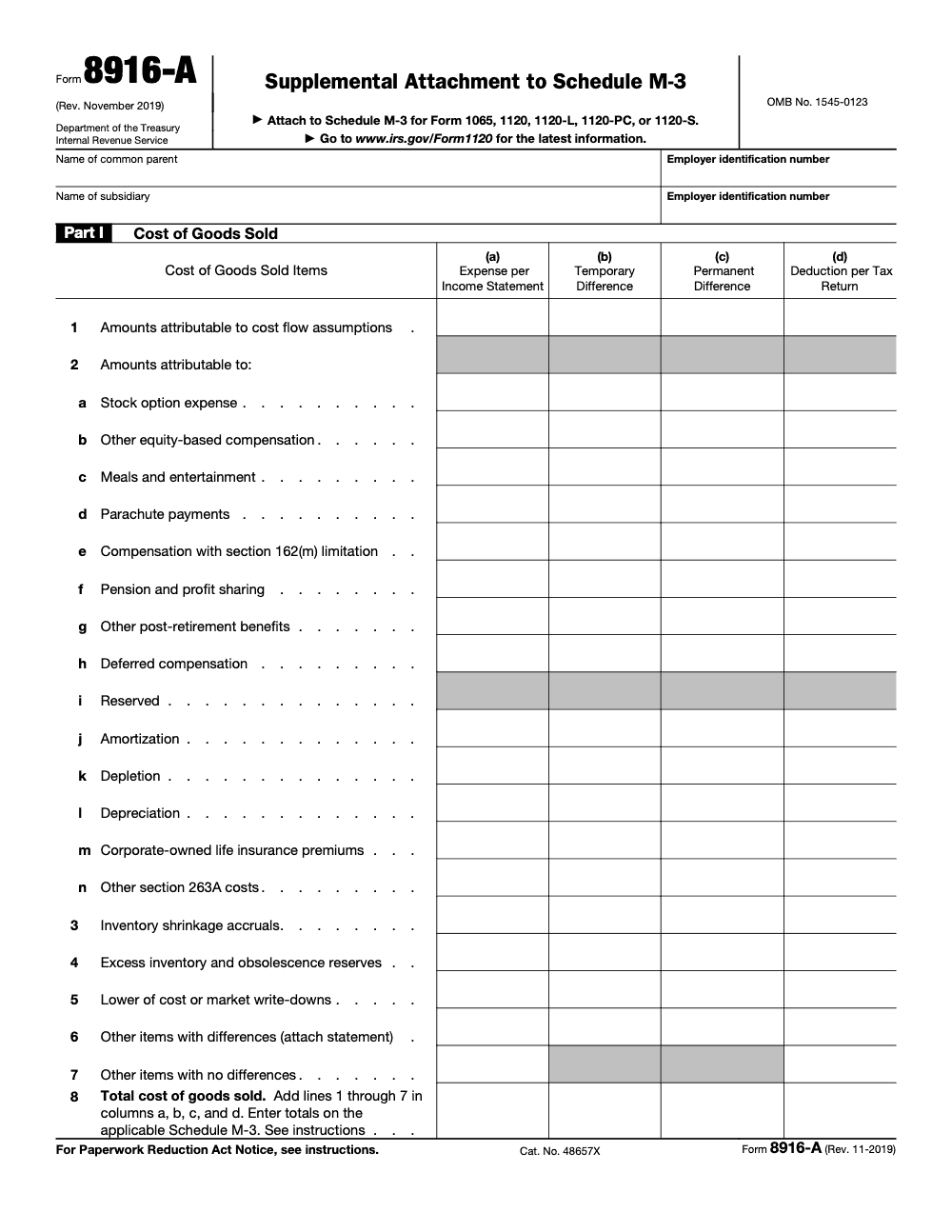
Form 8916-A is the Supplemental Attachment to Schedule M-3 that breaks out cost of goods sold, interest income, and interest expense (per the IRS About Form 8916-A page, Rev. November 2019). Part I line 8 must tie to Schedule M-3 (Form 1120) Part II line 17, and a separate entity filing Schedule M-3 with under $50 million in total assets is not required to file it, though all Form 1120-L and 1120-PC filers must.
Every M-3 season the same call comes in. A consolidated 1120 keeps bouncing back in e-file because Form 8916-A, Part I line 8, does not foot to Schedule M-3, Part II line 17, and nobody can find where the LIFO layer and the section 263A add-back drifted apart. The technical rules are not the hard part; keeping the columns reconciled before review is.
Form 8916-A is the supplemental attachment to Schedule M-3 that breaks out cost of goods sold, interest income, and interest expense. A separate entity filing Schedule M-3 with under $50 million in total assets is not required to file it, though all Form 1120-L and 1120-PC filers must. For consolidated groups, the parent handles the eliminations so the 8916-A and the M-3 stay in lockstep.
Key Takeaways
- Form 8916-A is the supplemental attachment to Schedule M-3 for three areas, Cost of Goods Sold, Interest Income, and Interest Expense. It gives the IRS a line of sight into how book amounts turn into taxable amounts.
- Schedule M-3 filing triggers vary by entity. Corporations generally trigger at total assets of at least $10 million, and those with at least $50 million must complete M-3 in full. Partnerships have additional tests, for example total receipts of $35 million or more. Form 8916-A is often required when M-3 is fully completed, but the IRS notes that filers under $50 million may not be required to file 8916-A, even if they file M-3.
- The current IRS page for Form 8916-A shows no recent developments as of January 29, 2025. The latest Section 508 listing shows the form’s current revision as “Rev. 11-2019.”
- You can transmit Form 8916-A electronically with an e-filed return when your software supports it. If you paper file, include Form 8916-A behind Schedule M-3. Software workflows like Lacerte provide dedicated screens to build and attach the form.
- For consolidated groups, the parent completes eliminations so the consolidated 8916-A and Schedule M-3 stay in lockstep. The instructions show multiple examples that require attaching Form 8916-A for specific lines.
What Form 8916-A is, and when you actually need it
Form 8916-A is the Schedule M-3 companion that breaks out three high-scrutiny areas, COGS, interest income, and interest expense. The form lets you show the IRS exactly how financial statement amounts connect to column D on M-3. The IRS “About” page is clear, you use it to provide detailed schedules that tie to the applicable M-3 lines.
Who triggers Schedule M-3, and therefore may need 8916-A?
- C corporations and 1120 consolidated groups, Schedule M-3 is required when total assets at year end are at least $10 million. Filers with at least $50 million must complete M-3 in full.
- Partnerships, Schedule M-3 applies if any test is met, for example total assets of $10 million or more, total receipts of $35 million or more, or a 50% reportable entity partner. Partnerships with at least $50 million in assets must complete M-3 in full.
- 1120-F filers, foreign corporations that file 1120-F trigger M-3 at $10 million in total assets, with full completion at $50 million or more.
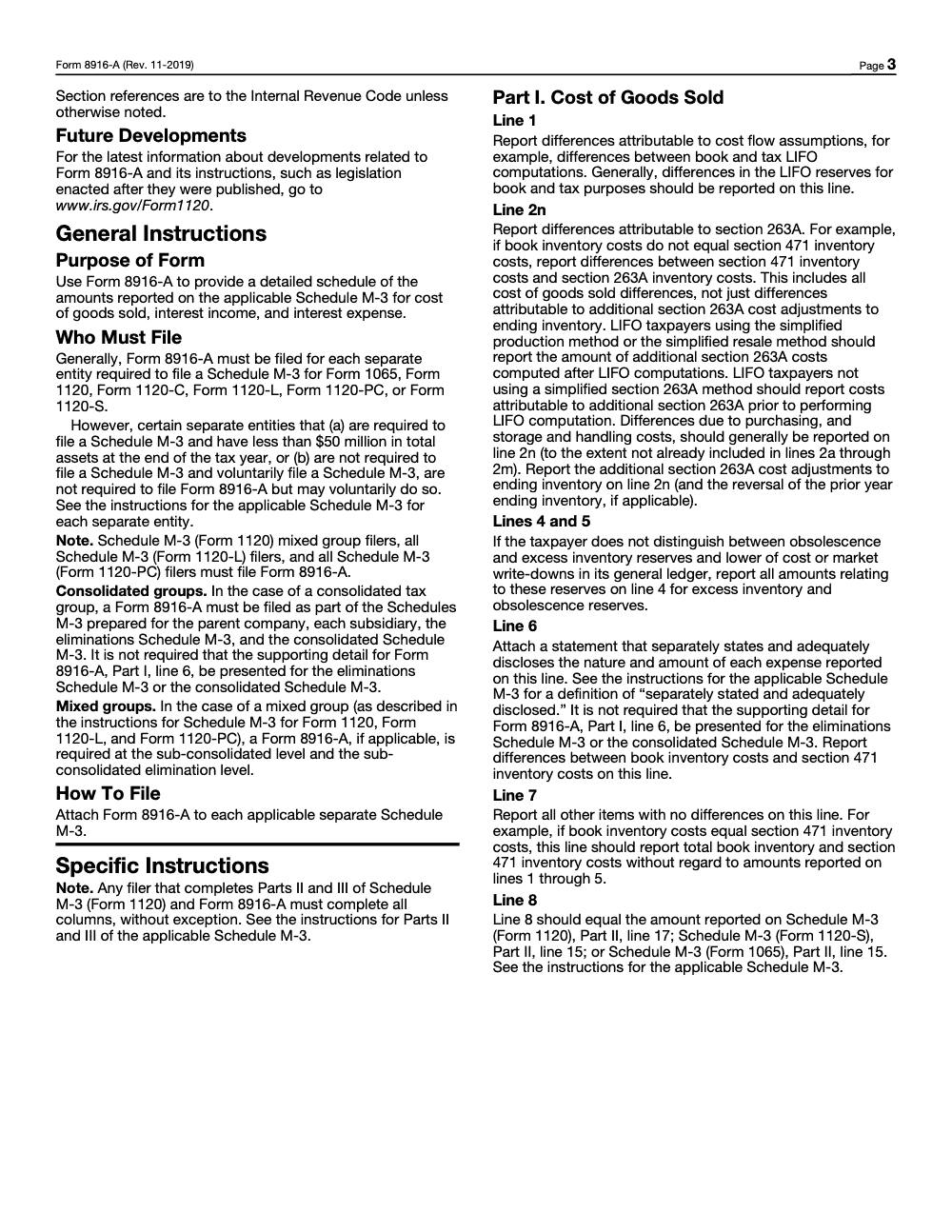
Important nuance that trips teams, the IRS notes that if you are required to file M-3 but have less than $50 million in assets at year end, you are not required to file Form 8916-A, although you may do so voluntarily. That exemption does not reach every filer, however, since Schedule M-3 (Form 1120) mixed group filers and all Form 1120-L and Form 1120-PC filers must file Form 8916-A regardless of total assets. That note appears in the 1120 and 1065 M-3 instructions. In practice, many large filers attach 8916-A for transparency and to follow the examples that direct you to “Attach Form 8916-A” for specific lines.
Quick reference, who files M-3 and when 8916-A applies
| Entity | M-3 trigger | Full M-3 threshold | 8916-A requirement signal |
| C corp, consolidated 1120 | Total assets ≥ $10M | Assets ≥ $50M complete all parts | Under $50M, not required, may attach; at or above $50M, follow line-by-line instructions, many lines direct “Attach Form 8916-A” |
| Partnership (1065) | Assets ≥ $10M, or receipts ≥ $35M, or 50% reportable entity partner | Assets ≥ $50M complete all parts | Under $50M, not required, may attach; use 8916-A when the instructions for lines direct it |
| 1120-F | Total assets ≥ $10M | Assets ≥ $50M complete all parts | Use 8916-A per line instructions where directed |
Sources, see IRS M-3 instructions for 1120 and 1065, and 1120-F.
The current form and what changed
As of January 29, 2025, the IRS “About Form 8916-A” page lists no recent developments. The form on the Section 508 index shows “Form 8916-A PDF, Rev. 11-2019.” So if your PDF does not show an obvious year in the filename, the operative revision is still the November 2019 version. Always check your software’s form pack and the IRS page before filing.
Keep a copy of the exact PDF and the instructions you relied on for the year you file. It helps reviewers retrace decisions during an exam or a quality review.
What the IRS expects to see on 8916-A
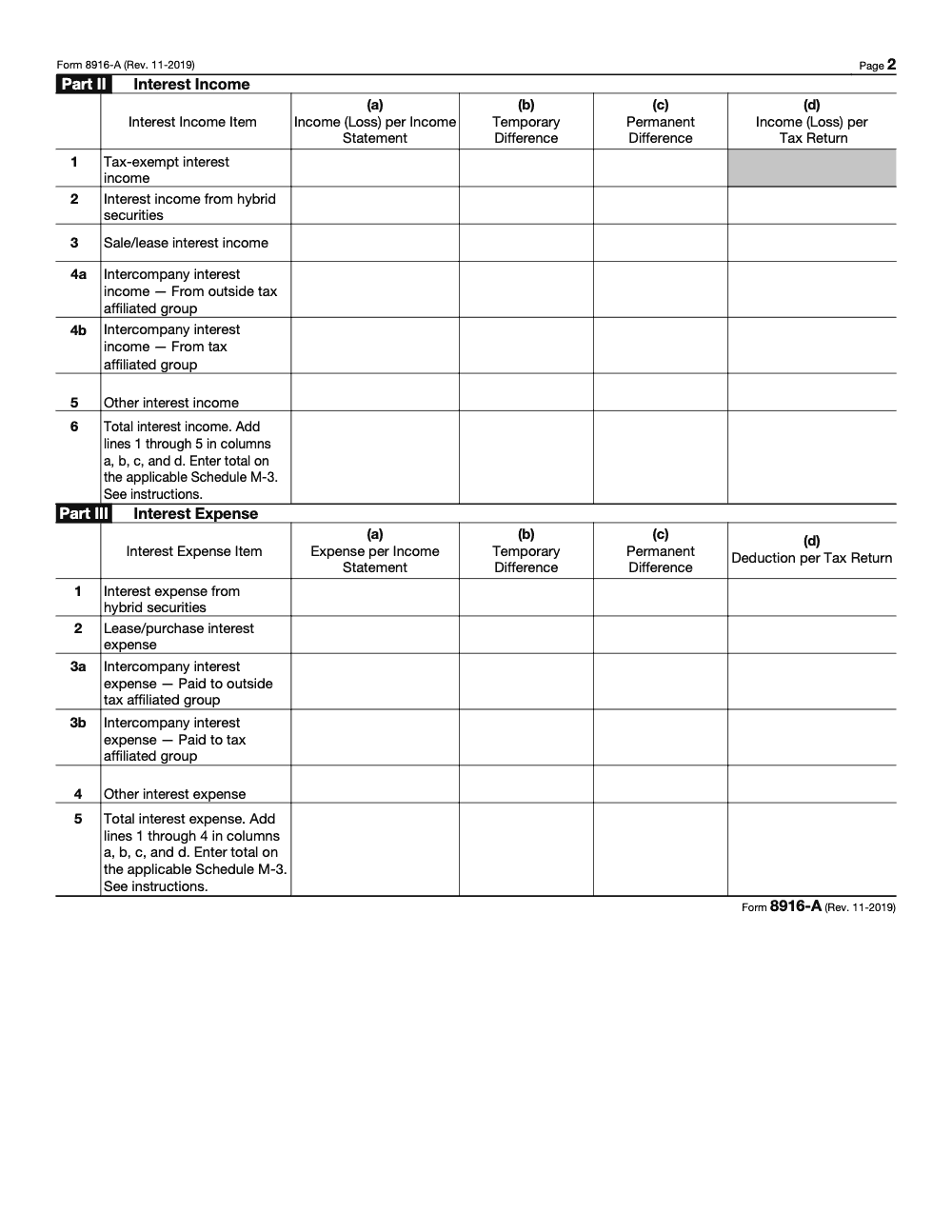
Form 8916-A has three parts:
- Part I, COGS details, including LIFO and section 263A capitalization, and the way you route depreciation or meals that are embedded in COGS. The 1120 instructions include worked examples that send certain COGS items to Form 8916-A and then to M-3 Part II, line 17.
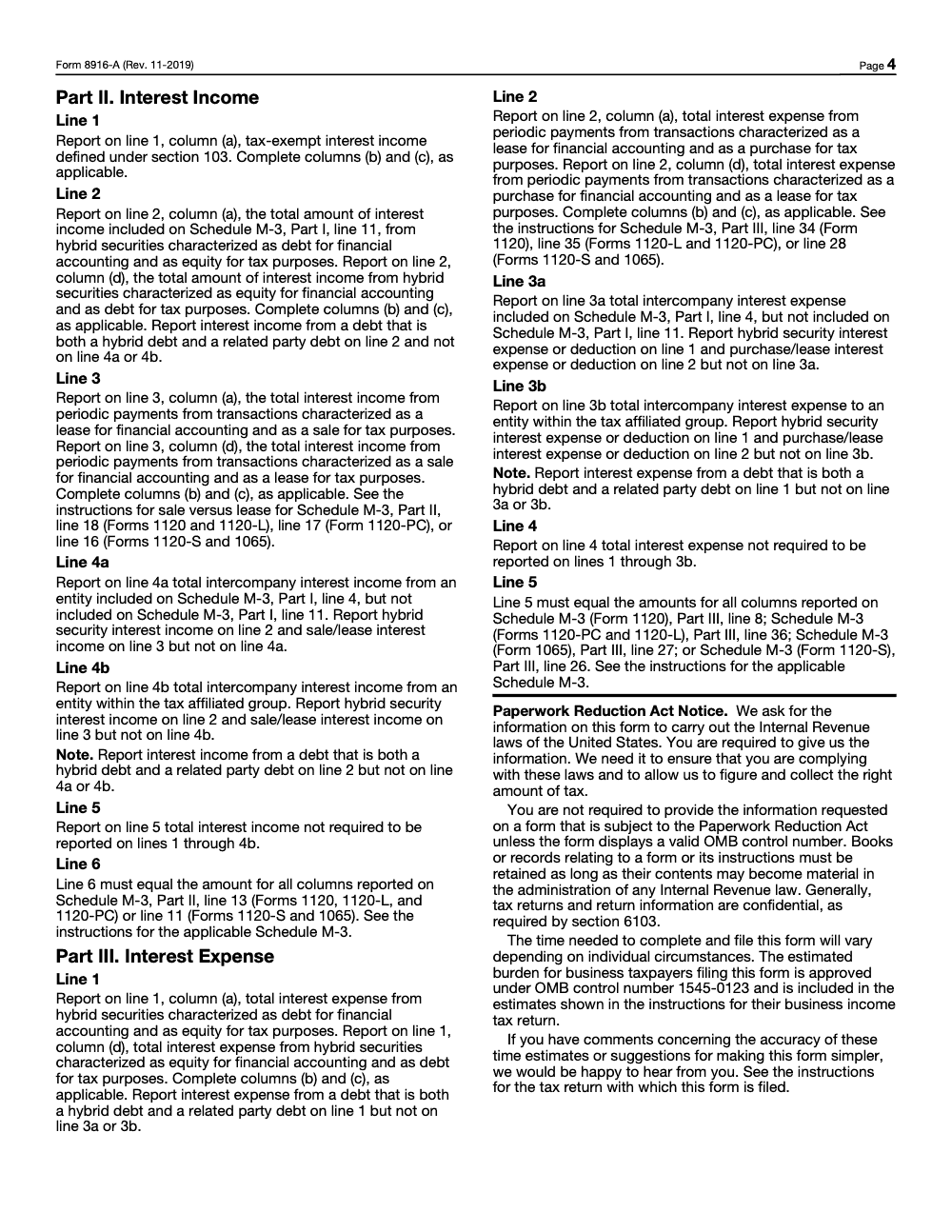
- Part II, Interest income, including intercompany items and hybrid features. The instructions explicitly say to complete 8916-A Part II and transfer the amounts to the corresponding M-3 line.
- Part III, Interest expense, with cross-references to the matching M-3 line for deductions. Where directed, the instructions say, “Attach Form 8916-A.”
For filers completing Parts II and III of M-3, current software guidance expects you to complete all four columns, A through D. That aligns with how modern e-file validation checks columns, and it avoids the partial-column pitfalls many teams remember from older practices. This is not only a software quirk: the Form 8916-A instructions require any filer who completes Parts II and III of Schedule M-3 and Form 8916-A to complete all columns without exception, so enter zero where there is no amount rather than leaving column B or C blank.
How to complete Part I, COGS, with less rework
When teams struggle with 8916-A, the trouble often starts in Part I. The fastest way to cut review time is to standardize inputs and descriptions so the math from column A to column D is obvious and repeatable.
A simple, repeatable flow for Part I
- Start with the income-statement COGS you actually used for Part I of M-3. If depreciation or meals were included in COGS for book, mirror that treatment here so column A reflects what was booked. The 1120 instructions include a worked example where depreciation and meals in COGS are split between Part II line 17 and Part III line 31 on M-3, with Form 8916-A carrying the detail.
- Layer in section 263A. Tie your 263A capitalization workpaper to the exact SKU, department, or cost pool. Use a short code in your description so reviewers can trace the adjustment to the schedule without opening a second binder.
- Address LIFO specifically. Show the LIFO layer change as a discrete line with the method name, for example “LIFO, IPIC, Retail.” If you changed pools or methods, reference the method change file in your description.
- Reconcile to column D. For each line you include, check that column A plus or minus columns B and C equals column D. Where your software requires it, complete all columns for any part you complete on M-3.
- Document the logic. If a variance is temporary, say so. If it is permanent, say that too. The M-3 instructions expect clear descriptions that explain what is in columns B and C and how you identified the amount in the records.
Reviewer-ready descriptions that pass the “skim test”
Use short, plain labels that name the book account and the tax treatment. Examples:
- “Depreciation in COGS, GAAP 50, tax 70, temp 20”
- “Meals in COGS, GAAP 100, 50% limit, perm (50)”
- “263A add, purchasing labor capitalized”
- “LIFO layer decrement, IPIC, pool A”
The official guidance emphasizes that descriptions should map back to your accounting records and support the adjustments in columns B and C. Keep each line self-contained so the reviewer does not hunt for a footnote.
Part I checklist
- We used the same income-statement source as M-3 Part I.
- LIFO and 263A entries are labeled and traceable to schedules.
- Embedded COGS items, for example depreciation, meals, are routed per the IRS example, with Form 8916-A carrying the detail that ties to M-3.
- Every line shows how column A gets to column D, and descriptions explain the temporary or permanent nature of the difference.
- Workpaper references are live links, and totals foot to the penny.
Pro tip, schedule a five-minute “COGS huddle” before reviews. One senior reads descriptions out loud. If anything is unclear, fix it together. That five minutes often saves thirty in review.
Completing Parts II and III, interest income and interest expense
Interest is where many book-tax gaps hide, especially with hybrids, related-party loans, or lease recharacterizations that move pieces between interest and depreciation. The IRS instructions explicitly route certain interest items to Form 8916-A and then to the corresponding M-3 lines.
Part II, interest income
- Start with total interest income per books in column A, then identify items that move for tax, for example OID, imputations, or reclassifications from hybrid instruments. The 1120 instructions direct you to complete Form 8916-A Part II and transfer the amounts to the Part II interest line on M-3.
- Intercompany interest should be split out onto lines 4a and 4b, especially for consolidated groups that will eliminate income and expense centrally. Keep hybrid security interest on line 2 and sale or lease interest on line 3, though, rather than sweeping those amounts into the intercompany lines.
Part III, interest expense
- Begin with total interest expense per books in column A. Recharacterizations, such as purchase-versus-lease, often move part of a payment into interest while the balance becomes depreciation. The instructions show this treatment in detail across Part III and related lines.
- Document any capitalization required, for example construction-period interest, and note thin-cap or limitation rules you applied outside the form.
Consolidated returns, eliminations, and tie-outs
If you file consolidated, you already know, one clean eliminations schedule can save an entire review day. The parent’s return governs the consolidation mechanics, and eliminations must flow through both the consolidated Schedule M-3 and the parent’s Form 8916-A so totals stay synchronized. The M-3 instructions walk through consolidation scenarios and repeatedly remind filers to attach Form 8916-A for certain lines. Build from that approach.
A practical playbook for consolidated groups
- Centralize eliminations at the parent, then mirror necessary context on member 8916-A schedules if your software requires separate entity attachments.
- Eliminate intercompany interest symmetrically. If the sub books interest income and the parent books interest expense, the parent-level eliminations must zero these out in the consolidated presentation, with the supplemental 8916-A supporting the detail.
- Remove intercompany profit from COGS where required. If you embed intercompany markups in inventory, show the adjustment in Part I so the consolidated M-3 line and total column D amounts are in step with tax.
- Keep a tie-out that connects each elimination line to the consolidation workbook and to the consolidated financials. Reviewers and exam teams look for that bridge.
Signs, columns, and common pitfalls
- Columns A through D must reconcile, and modern software expects full columns whenever you complete Parts II and III. If you used a “first-year columns B and C only” memory from older practice, update your approach. Today’s software guidance requires all columns when the part is completed.
- Do not generalize sign rules across lines. Follow the line-specific sign conventions in the instructions. In all cases, your descriptions should make the movement from A to D obvious.
Filing mechanics, e-file, and software setup
Good news, you do not have to print and mail Form 8916-A if you are e-filing and your software supports the attachment. Most professional platforms transmit Form 8916-A with Schedule M-3 as part of the electronic return. If you are paper filing, include the completed 8916-A immediately after Schedule M-3.
- In Lacerte, build 8916-A from the M-3 screens, for example Screen 39 for 1120, Screen 31 for 1120-S, Screen 27 for 1065. These inputs feed the supplemental attachment and keep the columns aligned with M-3.
- Be aware that some uncommon return profiles cannot be e-filed due to IRS restrictions. If your return falls into an ineligible category, plan for paper assembly and use the IRS address shown in the applicable instructions.
Documentation you should retain
- LIFO layers and 263A computations that support Part I.
- Intercompany loan schedules that support Parts II and III.
- Consolidation eliminations with cross-references to the financial statements.
- The exact IRS pages and instruction versions you relied on, including the “About Form 8916-A” page last reviewed January 29, 2025, and the Section 508 index showing Rev. 11-2019.
A short “supporting docs index” saved with the PDF set makes next year’s review, and any exam, far less painful.
Who must file and when it is not required, clarified
A few fast rules to reduce debate in busy season:
- Corporations filing 1120 must file Schedule M-3 when total assets are at least $10 million, and must complete M-3 fully at $50 million or more. The instructions also note that filers under $50 million that file M-3 are not required to file Form 8916-A, but may do so. That exemption has firm limits, though: it never reaches Schedule M-3 (Form 1120) mixed group filers, and it never reaches Form 1120-L or Form 1120-PC filers, all of whom must file Form 8916-A regardless of asset size.
- Partnerships must file M-3 when they meet any of several tests, for example assets of $10 million, receipts of $35 million, or a 50% reportable entity partner. Partnerships with at least $50 million in assets must complete M-3 entirely. For filers under $50 million who still file M-3, Form 8916-A is not required, but may be attached.
- 1120-F filers follow a similar pattern for the $10 million trigger and $50 million full-completion threshold.
A short, practical workflow you can copy
- Confirm your M-3 trigger and whether 8916-A is required for your facts.
- Build Part I from the COGS source you used in M-3, then add LIFO and 263A.
- Complete Parts II and III for interest, with clear intercompany labels.
- For consolidated groups, centralize eliminations at the parent and mirror where needed.
- Complete all columns when you complete Parts II and III to satisfy software validations.
- E-file with your software when eligible, otherwise paper file and follow the address in the instructions.
Where 8916-A season stalls, and how to keep it moving
When firms stall on Form 8916-A, it is rarely due to technical knowledge. It is a capacity problem, inconsistent workpapers, unclear reviews, and no single source of truth for eliminations. If your team is buried in production during peak season, that bottleneck chokes advisory growth and drains margins.
Accountably places trained offshore preparers and reviewers inside your workflow and your systems, with SOPs, structured workpapers, and multi-layer review, so partners spend less time in review and more time advising clients. The point is proof before your name is on the line: you see clean work first, then scale. Use us when you want stable capacity, stronger reviews, and consistent deadlines during heavy M-3 seasons, especially for consolidated groups with complex COGS and intercompany interest.
Compliance notes and sources
- This article is educational, not tax advice. Always consult the current IRS instructions and your software’s guidance for your facts.
- Key IRS sources used here:
- About Form 8916-A, page last reviewed January 29, 2025.
- Schedule M-3 instructions for 1120 and examples that direct you to attach Form 8916-A.
- Schedule M-3 instructions for 1065, including filing triggers and interest line cross-references to 8916-A.
- 1120-F M-3 instructions for foreign corporations.
- Section 508 index showing “Form 8916-A PDF, Rev. 11-2019.”
- Lacerte workflow article for generating Form 8916-A.
Final words
You can make Form 8916-A boring in the best possible way, predictable, well-labeled, and fast to review. Get the columns right, keep descriptions tight, and centralize eliminations. That is how you hit deadlines, protect client trust, and free partners to grow the firm.
Common Mistakes We See Every Season
The same handful of issues surface on Form 8916-A review after review. None are about technical knowledge; they are about discipline that a short SOP fixes.
Reusable Checklists
These are copy-paste ready for your firm SOP library. Drop them into your 8916-A workpaper template and check items off as the engagement moves.
Part I COGS tie-out
- Pull column (a) from the same income-statement COGS used on Schedule M-3 Part I.
- Report cost flow (book vs. tax LIFO) differences on line 1 with the method named.
- Route section 263A capitalization to line 2n, sequenced before or after LIFO per your method.
- Enter only on lines 2a-2h and 2j-2n; line 2i is reserved and line 2 is a heading row.
- Attach the separate statement for any other-difference items on line 6.
- Complete columns (a) through (d) on every line, entering zero where there is no amount.
- Confirm line 8 foots to Schedule M-3 Part II line 17 (1120), line 15 (1120-S), or line 15 (1065) on all four columns.
Parts II and III interest review
- Start columns (a) from total book interest income (Part II) and interest expense (Part III).
- Keep §103 tax-exempt interest on Part II line 1 out of column (d).
- Report hybrid security interest on Part II line 2 and Part III line 1, never on the intercompany lines.
- Split intercompany interest onto lines 4a/4b (income) and 3a/3b (expense), excluding hybrid and sale or lease amounts.
- Confirm Part II line 6 ties to Schedule M-3 Part II line 13 (1120/1120-L/1120-PC) or line 11 (1120-S/1065).
- Confirm Part III line 5 ties to Schedule M-3 Part III line 8 (1120), 36 (1120-L/1120-PC), 27 (1065), or 26 (1120-S).
Consolidated and filing handoff
- Decide whether the entity is exempt under the $50 million small-entity rule or must file (mixed group, 1120-L, 1120-PC).
- Prepare Form 8916-A for the parent, each subsidiary, the eliminations M-3, and the consolidated M-3.
- Skip the line 6 supporting detail only at the eliminations and consolidated M-3 levels.
- Eliminate intercompany interest symmetrically across income and expense.
- Save the current Rev. November 2019 PDF and the instruction version you relied on.
- Transmit 8916-A with Schedule M-3 in the e-file package, or place it behind M-3 when paper filing.
Keep 8916-A Season From Stalling
Form 8916-A lands at the worst possible moment in the corporate and partnership calendar, when consolidated returns, Schedule M-3, and a stack of book-tax reconciliations all come due at once. Schedule M-3 itself begins for corporations at $10 million in total assets and must be completed in full at $50 million or more (per the IRS Schedule M-3 instructions for Form 1120), so the larger and more complex the filer, the more 8916-A detail the team has to produce under deadline.
The bottleneck is rarely knowledge. It is repeatable structure: the same way of sourcing column (a), the same labels for temporary and permanent differences, and the same tie-out discipline so reviewers are not re-deriving the math late at night. A short, standardized 8916-A workflow removes most of that friction.
- Lock Part I column (a) to the Schedule M-3 COGS source, then layer LIFO on line 1 and section 263A on line 2n with named methods.
- Standardize the column (b) and (c) descriptions so every temporary or permanent difference traces to a workpaper without a second binder.
- Sort interest by character before touching the intercompany lines, keeping hybrids on Part II line 2 and Part III line 1.
- Pre-build the tie-outs: Part I line 8 to M-3 Part II line 17, and Part II line 6 and Part III line 5 to their matching M-3 lines.
- Centralize consolidated eliminations at the parent so the consolidated 8916-A and Schedule M-3 move together.
That structure is exactly what we build into engagements. Accountably integrates trained, U.S.-led offshore teams into your workflow with documented SOPs, structured workpapers, and layered review, so heavy Schedule M-3 seasons stay predictable. See how our tax preparation and review support keeps complex 8916-A work moving without adding headcount.
FAQs
Not always. The IRS notes that if you file Schedule M-3 and have less than $50 million in total assets at year end, you are not required to file Form 8916-A, though you may do so. That said, certain lines in the instructions still say “Attach Form 8916-A,” and many large filers attach it for clarity and consistency.
Columns A through D should be completed when you complete Parts II and III in current practice, and software guidance reinforces that approach. Columns B and C capture temporary and permanent differences, and the instructions expect descriptions that connect those differences to your books.
Follow the instructions’ example. If depreciation and meals are in COGS for book, you will often split the presentation across M-3 Part II line 17 and Part III line 31 while using Form 8916-A to carry the detail. The key is to make A, B, C, and D reconcile and to label the differences.
Yes, when your software supports it, Form 8916-A transmits as part of the e-file package with Schedule M-3. If you paper file, place the 8916-A behind M-3.
The Section 508 index shows “Form 8916-A PDF, Rev. 11-2019,” and the IRS “About” page lists no recent developments as of January 29, 2025. Always pull the latest PDF from the IRS site or your software’s current-year forms pack.
Other forms this guide names
- Form 1120: Corporation Tax Return Guide
- Form 1065: Guide, Deadlines, K‑1, K‑2/K‑3, E‑File
- Form 1065: Schedule K-2 and K-3 Guide 2025, one month date rules
- Form 1120‑F: Guide, Filing, Deadlines, Protective Return
- Form 1120-F: Schedule Q, QDD Filing Guide
- Form 1120‑L: Life Insurer Tax Return Guide, M‑3 & DAC
Summarize this article with AI
About this guide
Accountably helps US CPA, EA, and accounting firms hire trained accountants and tax preparers in India.
About us Reviewed byJugal Thacker, CPAFounder and CEO at Accountably
A US-licensed CPA with 7+ years inside US firms – PwC, a real-estate tax practice, then a full-service firm, rising from reviewer to manager to advisory. This article was reviewed against current IRS guidance for the 2025 tax year and updated for filers preparing late returns, amendments, and 2026 estimates.
View profile →How we research, review, and update this guide
Every Accountably guide is researched against primary IRS sources, reviewed by a U.S. CPA, and refreshed as guidance evolves. Read our Editorial Guidelines to see how we source, fact-check, and update our content.




