
Summarize this article with AI
In Brief
Form 8917 claimed the Tuition and Fees Deduction, an above-the-line adjustment available only for tax years 2018, 2019, and 2020 (per IRS Form 8917, Rev. January 2020). The deduction was capped at $4,000 when MAGI was $65,000 or less ($130,000 or less if married filing jointly) and $2,000 up to $80,000 ($160,000 MFJ), then posted to Schedule 1 (line 21 for 2019-2020, line 34 for 2018). It is not available for 2025, so current education benefits run through Form 8863 instead. If you are amending an older return, our tax preparation team can confirm the year and the math.
A client brings in a 1098-T from an old 2019 return and wants to know whether those tuition payments were ever deductible. The honest answer depends on the year. The Tuition and Fees Deduction on Form 8917 was an above-the-line adjustment available only for 2018, 2019, and 2020, capped at $4,000 or $2,000 depending on income, and it is not available for 2025.
So the work here is narrow and exact. You confirm the year is one of the three still on the table, subtract any tax-free aid before counting expenses, and make sure the same dollars are not also claimed on Form 8863. If the numbers still pencil out after that, you amend; if they do not, you leave it alone.
Key Takeaways
- The Tuition and Fees Deduction was available only for 2018, 2019, and 2020, up to $4,000 or $2,000 depending on income. It is not available for 2021 forward.
- You must subtract tax free aid and you cannot use the same expenses for both Form 8917 and education credits on Form 8863.
- Prepaid tuition for academic periods that began in the first three months of the next year could count in the year you paid it, never the year the term begins.
- For 2018 to 2020, your deduction flowed to Schedule 1 and reduced AGI as an above the line adjustment.
- The deduction ended beginning in 2021 and Congress increased the Lifetime Learning Credit phaseout ranges instead.
What Form 8917 Is, In Plain English
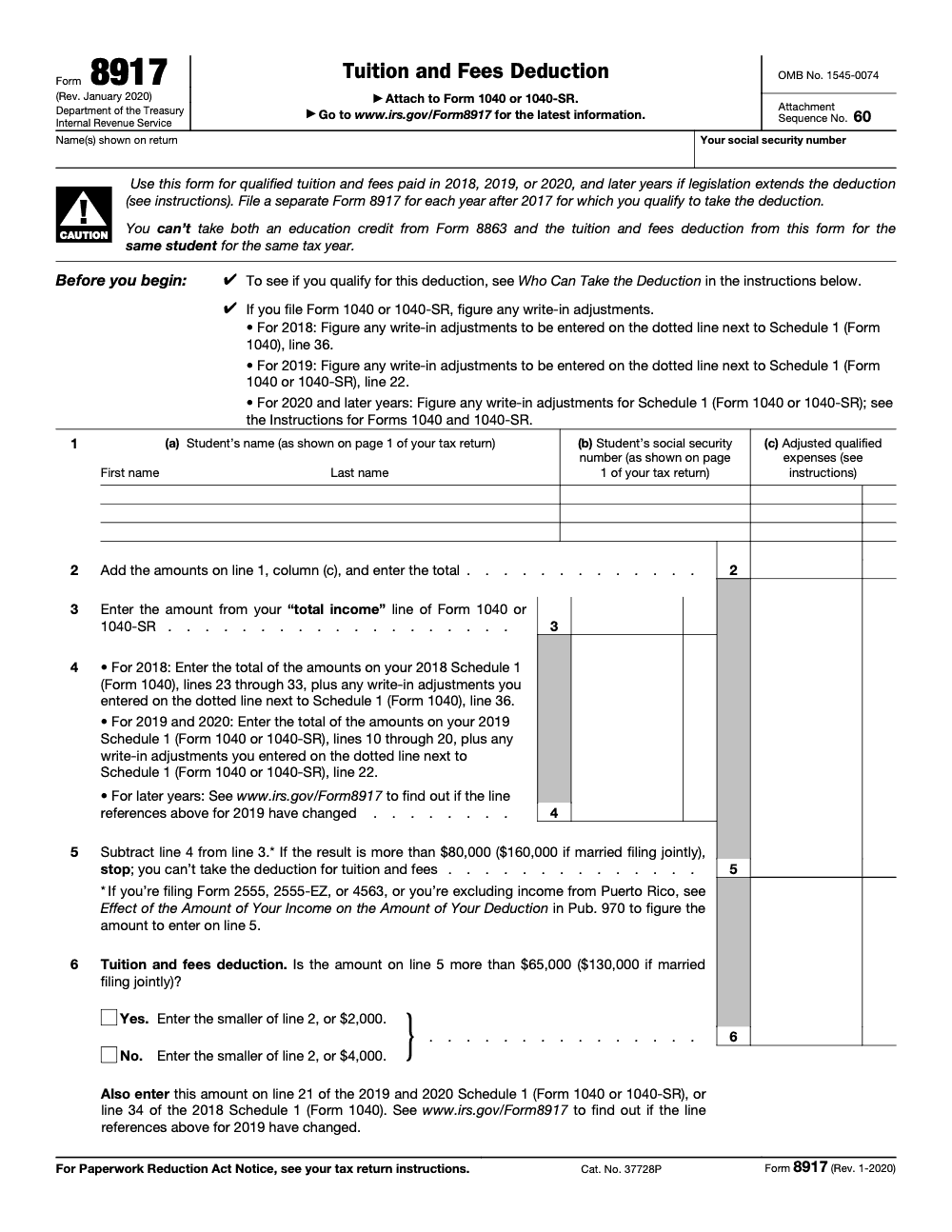
Form 8917 was the way to claim the now expired Tuition and Fees Deduction. For 2018, 2019, and 2020 only, you could lower your taxable income by up to $4,000 of qualified tuition and required enrollment fees you actually paid. The form lets you list each student, compute adjusted qualified expenses after subtracting tax free aid, test your income against the limits, and then take either a $4,000 or $2,000 deduction, capped by what you actually paid. After you finish the form, the amount moves to Schedule 1 and reduces AGI.
The IRS now treats Form 8917 as historical. Use it only for original or amended returns for 2018, 2019, or 2020.
Who Can Claim It
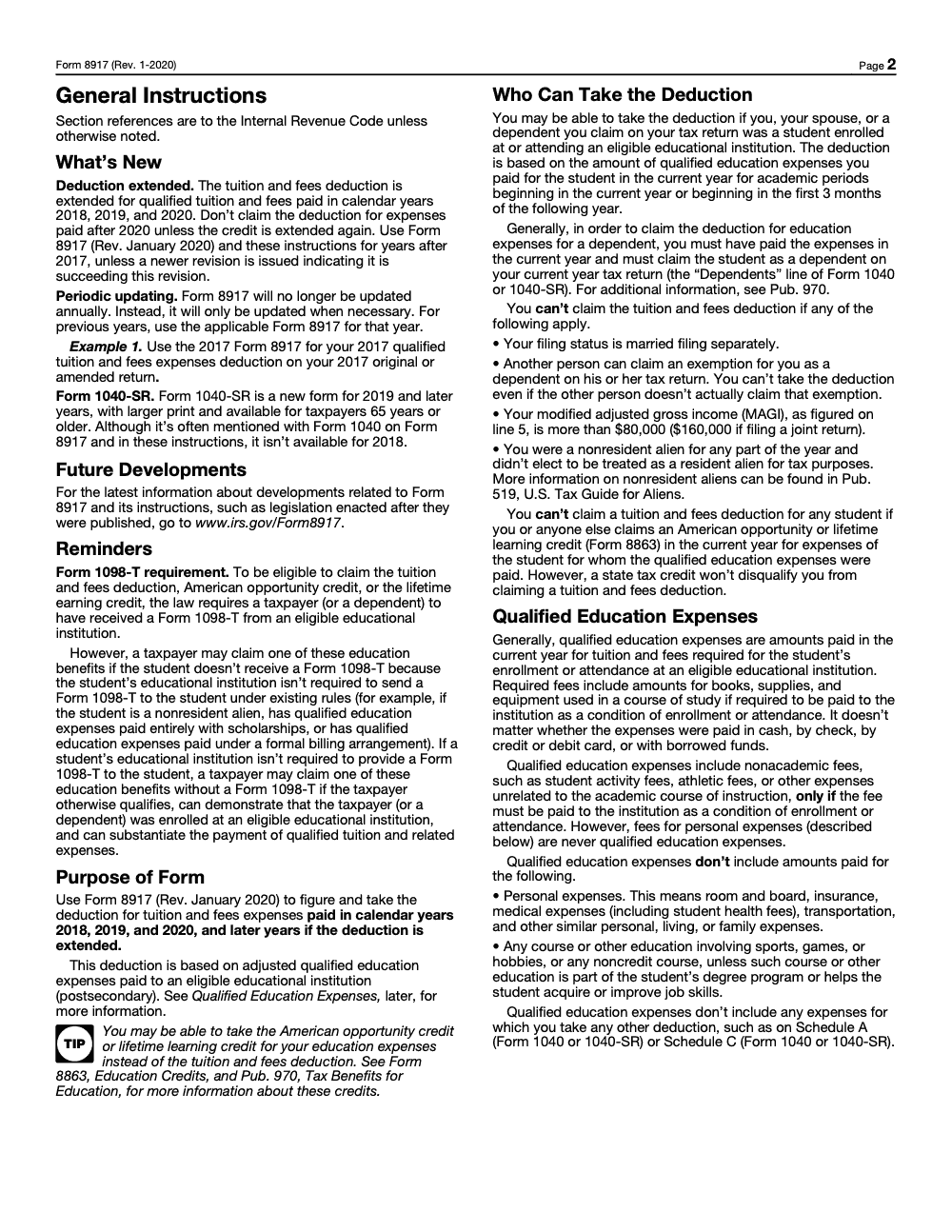
You can claim the deduction if you paid qualified tuition and required fees for yourself, your spouse, or a dependent who attended an eligible postsecondary school. You must use the year’s actual payments, subtract tax free aid, and you cannot double count expenses used for the American Opportunity Tax Credit or the Lifetime Learning Credit on Form 8863. You are out if you filed married filing separately, if someone else can claim you as a dependent (even if that person chooses not to claim you), or if you were a nonresident alien without a valid residency election. Finally, you must pass the income test described below.
A quick story to make it stick
If you paid 2,800 in December 2019 for a semester starting January 2020, that 2,800 belongs on your 2019 Form 8917, not 2020. If your student later received a scholarship that covered part of that semester, you have to subtract it. Clean records prevent headaches later.
Years You Can File Form 8917
Only three years qualify, and the IRS is clear about it. You may file or amend for 2018, 2019, or 2020 using the January 2020 revision of Form 8917. The IRS stopped updating the form annually after the law expired, and it labels Form 8917 as historical on its site.
- File the correct year’s Form 8917 for the return you are preparing. Prior year PDFs are posted on the IRS site.
- If you file an amended return today for 2019 or 2020, you still use that January 2020 revision.
Why It Ended, And What Changed Instead
Beginning in 2021, Congress eliminated the Tuition and Fees Deduction and permanently aligned the Lifetime Learning Credit income phaseouts with the American Opportunity Tax Credit. That trade off starts with 2021 returns and remains in effect for 2025 filing. If you are deciding how to treat education costs for 2021 or later, compare the credits on Form 8863, because Form 8917 no longer applies.
Practical tip, if you are a firm: when you amend older returns, keep a short checklist that forces the 2018 to 2020 date check and the no double benefit test. It reduces review time and prevents corrected notices later.
Income Limits, Phaseouts, And MAGI
Before you enter a single dollar, test your modified adjusted gross income. For these three years, Form 8917 used a two tier cap, with a full deduction available only to lower MAGI filers. Unlike the education credits, these limits work as cliffs, not gradual phaseouts: one dollar of MAGI over a threshold drops your cap to the next tier or to zero.
MAGI tiers and deduction caps for 2018–2020
| Filing status | MAGI at or below | Deduction cap | MAGI over, up to | Deduction cap | Above this MAGI |
| Single, HOH, QSS | 65,000 | Up to 4,000 | 65,000 to 80,000 | Up to 2,000 | > 80,000 not allowed |
| Married filing jointly | 130,000 | Up to 4,000 | 130,000 to 160,000 | Up to 2,000 | > 160,000 not allowed |
These thresholds and caps are printed on the 2020 Form 8917 and its instructions. The calculation also tells you where to post the final amount on Schedule 1 for those years.
How to compute MAGI on the form
- Start with total income from Form 1040 or 1040 SR.
- Subtract specific adjustments listed on Schedule 1 per the year’s lines.
- If the result is over 80,000 single or 160,000 married filing jointly, stop. You do not qualify. If it is over 65,000 single or 130,000 married filing jointly, your cap is 2,000. Otherwise, your cap is 4,000, limited by your actual net qualified payments.
What Counts As Qualified Education Expenses
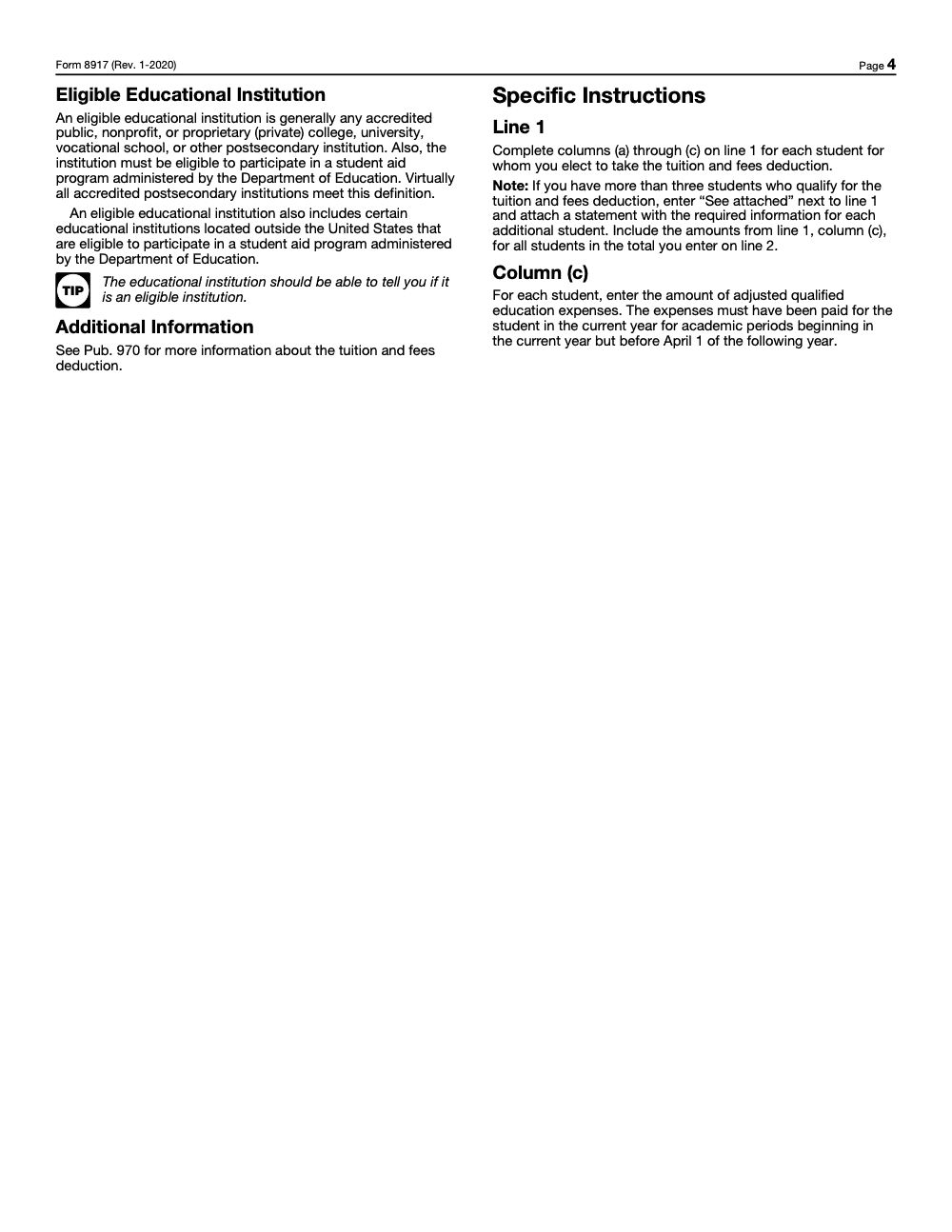
You can only deduct tuition and fees required for enrollment or attendance. Books and supplies count only if the school requires you to buy them from the institution as a condition of enrollment. Many common costs do not qualify, such as room and board, insurance, transportation, and most personal expenses. The IRS lists these definitions in both the Form 8917 instructions and in the Form 1098 T instructions used by schools.
Rule of thumb, if the school requires the fee to enroll or attend, it may qualify. If it is a living expense, it does not.
Items that usually qualify
- Tuition charged by an eligible postsecondary institution
- Mandatory enrollment or student activity fees required for attendance
- Books, supplies, or equipment only when the school requires you to purchase them from the institution
Items that do not qualify
- Room and board
- Insurance and medical fees, including student health fees, which look like required institutional charges but are personal expenses
- Transportation and parking
- Optional activity fees
- Most books or equipment bought from third party vendors (these can still count toward the American Opportunity Credit on Form 8863, but never for Form 8917)
Timing Rules That Trip People Up
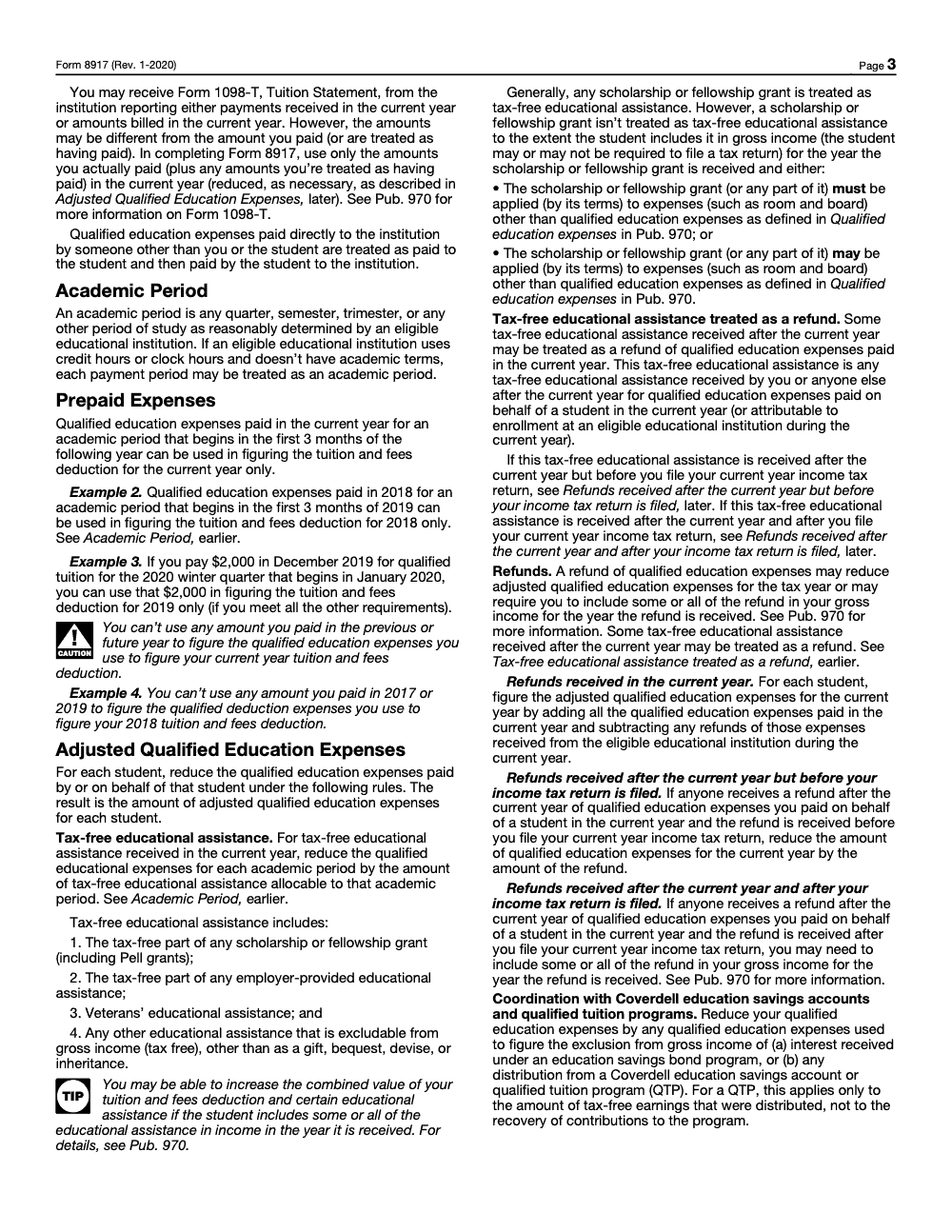
Form 8917 follows a simple timing rule. You include what you actually paid during the tax year, plus amounts you prepaid for an academic period that began within the first three months of the next year. If your school issues a refund before you file, you must reduce your qualified expenses by the refund. The official 2020 instructions include a plain example of the first three months rule.
- Pay in December for a semester that begins in January, February, or March of the next year, and that payment counts for the year you paid.
- Pay for a semester that begins in May, and it does not count for the prior year.
- If a scholarship or refund later covers part of the bill, subtract it before you compute the deduction.
Where Form 1098 T fits
Form 1098 T anchors your records, but it may not match your actual payments. Some schools report amounts billed, others report amounts received. The instructions for Form 8917 tell you to use what you actually paid, reduced by tax free aid, and to keep documents that show the timing and net amounts. Schools follow the separate 1098 T instructions for what they report. Your job is to reconcile those numbers to cash paid.
Keep the 1098 T, the bursar ledger, proof of payment, and award letters together. That packet is your audit shield.
For Firms Handling Many Amended Returns
If you are a partner or manager at a CPA or EA firm, you know how quickly these details create review loops. Two small moves help a lot. First, standardize a one page workpaper that shows net qualified expenses by student and a side by side “used for credits” column, so reviewers can see there is no double benefit. Second, flag the prepayment months up front, so AGI timing matches the correct year. Teams that work this way usually cut review time and reduce back and forth email.
Accountably note, brief and relevant. When firms need extra hands to clear 2018 to 2020 amendments, we slot trained offshore staff into your workflow and require standardized workpapers and multi layer review, which keeps partners out of the weeds and protects quality without creating chaos. Keep this in mind if your backlog spikes near filing deadlines.
Coordination With Scholarships, Grants, Employer Help, And Credits
Education benefits overlap fast, so your first job is to net out tax free aid and your second job is to choose between the deduction and the credits. You cannot claim both on the same dollars.
Subtract all tax free aid first
- Scholarships and Pell grants
- Employer provided educational assistance that is excluded from income
- Veterans benefits that pay tuition
- Any school refunds issued before you file
Only your out of pocket tuition and required fees remain. The IRS spells out these adjustments in the 2020 Form 8917 instructions.
No double dipping with Form 8863
If you use a dollar of tuition for the American Opportunity Tax Credit or the Lifetime Learning Credit, you cannot also use that same dollar for Form 8917. The block applies per student, per year, so in a household with more than one student, you can claim a credit for one student and the deduction for another. The IRS directs examiners to disallow duplicate claims when they see them, so keep a clear allocation workpaper.
Pick the better benefit. In many cases the American Opportunity Tax Credit wins because it is partly refundable, but you must run the numbers.
Step by Step, Completing Form 8917 For 2018–2020
- Gather documents
- Form 1098 T for each student, bursar statements, proof of payment, award letters, and any refund notices.
- List each student on line 1
- Enter the student’s name, SSN, and adjusted qualified expenses after subtracting scholarships, grants, employer assistance, and refunds.
- Total line 1 on line 2
- This is your combined qualified amount for all listed students.
- Compute MAGI on lines 3 to 5
- Pull total income from Form 1040, subtract the year’s adjustments, and stop if you are over the high threshold.
- Apply the cap on line 6
- If your MAGI is at or below the low threshold, your cap is 4,000.
- If your MAGI is above the low threshold but not over the high threshold, your cap is 2,000.
- Always compare the cap to your line 2 total and take the smaller number.
- Post to Schedule 1
- For 2019 and 2020, enter the result on Schedule 1 line 21. For 2018, use Schedule 1 line 34. These line references are printed on the 2020 form.
Where It Lands On Your Form 1040
For the three eligible years, Form 8917 flowed to Schedule 1 and reduced AGI as an above the line adjustment, not an itemized deduction on Schedule A, so you could claim it even if you took the standard deduction. For 2019 and 2020 returns, you placed the final amount on Schedule 1 line 21. For 2018 returns, you used Schedule 1 line 34. From there, tax software carries it into your AGI, which can influence other thresholds.
Software tips that prevent errors
- Enter the 1098 T details, then manually reconcile to actual payments.
- Confirm the year of the academic period, especially for December payments.
- Force the no double benefit check by listing how much you used for credits.
Common Mistakes We See, And How To Avoid Them
Across the amended 2018 to 2020 returns my team reviews, the same handful of errors show up again and again. Each one is avoidable with a quick check, and catching them early keeps an amended filing from bouncing back.
Planning Moves That Still Matter
Even though Form 8917 is retired, people still amend older returns, and the timing and allocation rules continue to matter for those years.
Compare credits vs the deduction for those years
- Run the American Opportunity Tax Credit first if the student was in the first four years of postsecondary education, since part of the credit can be refundable.
- If AOTC is not available, compare the Lifetime Learning Credit with the 8917 deduction when you are amending a 2018 to 2020 return. Remember, Congress raised the LLC phaseout ranges starting in 2021, which is relevant for later years where 8917 is not allowed.
Coordinate with 529 plans
529 plan distributions that were tax free for tuition cannot also support a deduction or a credit. Reconcile 1098 T, bursar ledgers, and 529 statements so you do not claim the same dollar twice. The 1098 T instructions explain what schools must report and what counts as qualified tuition and related expenses.
Final Checklist Before You File Or Amend
- Confirm the year is 2018, 2019, or 2020.
- Reconcile 1098 T to actual payments and subtract all tax free aid.
- Decide between credits and the deduction, no double benefit.
- Compute MAGI and apply the correct 4,000 or 2,000 cap.
- Post to the correct Schedule 1 line for that year and save your workpapers.
Small firm note. If your team is buried in amendments or busy season workpapers, structure beats heroics. Standardized naming, a two step reviewer checklist, and early escalation for missing 1098 Ts will cut rework and protect deadlines.
Accountably helps firms apply that structure without sacrificing control. We plug trained offshore teams into your exact workflow, require SOPs and layered reviews, and measure turnaround with SLAs. That way partners spend time on strategy while production stays predictable and accurate.
Compliance Notes And Sources
- IRS lists Form 8917 as historical and limits it to earlier years.
- The 2020 Form 8917 PDF shows the MAGI thresholds, the prepayment rule, and the Schedule 1 posting lines.
- The Form 1098 T instructions define qualified tuition and related expenses for schools.
- Congress eliminated the deduction beginning with 2021 and aligned LLC phaseouts with AOTC.
Reusable Checklists
These are copy-paste ready for your firm SOPs. Drop them into your workpaper template so every 2018 to 2020 amendment that touches Form 8917 gets the same review.
Eligibility and year check
- Confirm the tax year is 2018, 2019, or 2020.
- Verify the filing status is not married filing separately.
- Confirm no one else can claim the taxpayer as a dependent, even if they choose not to.
- Confirm the taxpayer was not a nonresident alien without a valid residency election.
- Confirm the school is an eligible postsecondary institution that participates in federal student aid.
- Use the January 2020 revision of Form 8917 for the year being amended.
Expense and aid reconciliation
- Collect Form 1098-T, bursar statements, and proof of payment for each student.
- Subtract tax-free scholarships, grants, and employer education assistance.
- Subtract any tuition covered by tax-free 529 or Coverdell distributions.
- Subtract refunds received during the year or before the return is filed.
- Include books and supplies only if the school required they be paid to the institution.
- Enter the net adjusted amount per student on line 1 and total it on line 2.
MAGI, cap, and posting
- Pull total income to line 3 and the year’s adjustments to line 4.
- Compute MAGI on line 5 (line 3 minus line 4).
- Stop if MAGI exceeds $80,000 single or $160,000 married filing jointly.
- Apply the $4,000 cap at or below $65,000 ($130,000 MFJ), otherwise the $2,000 cap.
- Take the smaller of the cap and the line 2 total on line 6.
- Post to Schedule 1 line 21 for 2019-2020 or line 34 for 2018, then save the workpapers.
Keep 8917 Season From Stalling
Form 8917 no longer has a live filing season, but it still generates work. Every batch of 2018 to 2020 amendments a firm picks up can carry a Tuition and Fees Deduction question, and the deduction ran for only three tax years before the Taxpayer Certainty and Disaster Tax Relief Act of 2020 repealed it (per IRS Form 8917, Rev. January 2020). That short window means the records are old, the 1098-Ts are buried, and the math often has to be rebuilt from scratch.
The fix is not heroics during crunch weeks. It is a repeatable process that treats each amendment the same way, so a reviewer can open any file and know exactly where every number came from.
- Standardize line 1 workpapers so each student’s adjusted qualified expenses tie back to a 1098-T and a payment record.
- Build a line 5 MAGI worksheet that flags the $65,000 and $80,000 thresholds ($130,000 and $160,000 MFJ) before anyone touches line 6.
- Keep a per-student log of which dollars went to Form 8863 credits so line 1 never double counts.
- Confirm the Schedule 1 posting line by year, line 21 for 2019-2020 and line 34 for 2018, as a final reviewer check.
That structure turns a messy pile of amendments into predictable, reviewable output. Accountably plugs trained offshore teams into your workflow with documented SOPs and layered review, so older returns get handled accurately without pulling partners off current work. See how our tax preparation support fits your process.
FAQs
Form 8917 delivered a deduction against income for 2018 to 2020. Form 8863 delivers education credits that directly reduce tax. You cannot use the same tuition for both. If credits use the dollars, skip Form 8917 for those dollars.
No. The IRS treats Form 8917 as historical, and the deduction ended after 2020. Consider the American Opportunity or Lifetime Learning Credit instead for those later years.
Books and supplies count only if the school required you to buy them from the institution as a condition of enrollment or attendance. Otherwise, they do not count for Form 8917.
You claim that payment in the year you paid, as long as the academic period began in the first three months of the next year. Keep proof of payment and the class start date.
For 2019 and 2020, it flowed to Schedule 1 line 21. For 2018, it was Schedule 1 line 34. From there it reduced AGI.
Other forms this guide names
- Form 1098: How to Read It and Claim Mortgage Interest
- Form 8863: Claim Education Credits in 2025, AOC or LLC
- Form 1040: Filing Guide for 2025 Returns (AGI, Deductions, Deadlines)
- Form 1098‑T: Guide: Read Boxes Correctly and Claim Credits
Summarize this article with AI
About this guide
Accountably helps US CPA, EA, and accounting firms hire trained accountants and tax preparers in India.
About us Reviewed byJugal Thacker, CPAFounder and CEO at Accountably
A US-licensed CPA with 7+ years inside US firms – PwC, a real-estate tax practice, then a full-service firm, rising from reviewer to manager to advisory. This article was reviewed against current IRS guidance for the 2025 tax year and updated for filers preparing late returns, amendments, and 2026 estimates.
View profile →How we research, review, and update this guide
Every Accountably guide is researched against primary IRS sources, reviewed by a U.S. CPA, and refreshed as guidance evolves. Read our Editorial Guidelines to see how we source, fact-check, and update our content.




