
Summarize this article with AI
In Brief
Form 921-M is the BBA-partnership consent fixing the period of limitation to make partnership adjustments tied to the alternative cost method under Rev. Proc. 92-29, executed under IRC §6235(b) (per the August 2021 revision, IRS catalog 38887R). The extension runs to one year after the return for the project-completion tax year is filed, deemed the unextended due date if that return is filed early; the longer §6235 period controls when it applies. Use Form 921-P for TEFRA-regime years, Form 921-I for investors of §6221(b) opt-out partnerships, and Form 921 for non-flow-through filers.
The first Form 921-M a developer's controller brought us looked clean, signed on the managing member line out of habit. The IRS came back and pointed out that the BBA Partnership Representative appointed for that tax year was someone else entirely. One signature line cost a full re-execution cycle. That is the failure this form invites when the wrong person signs.
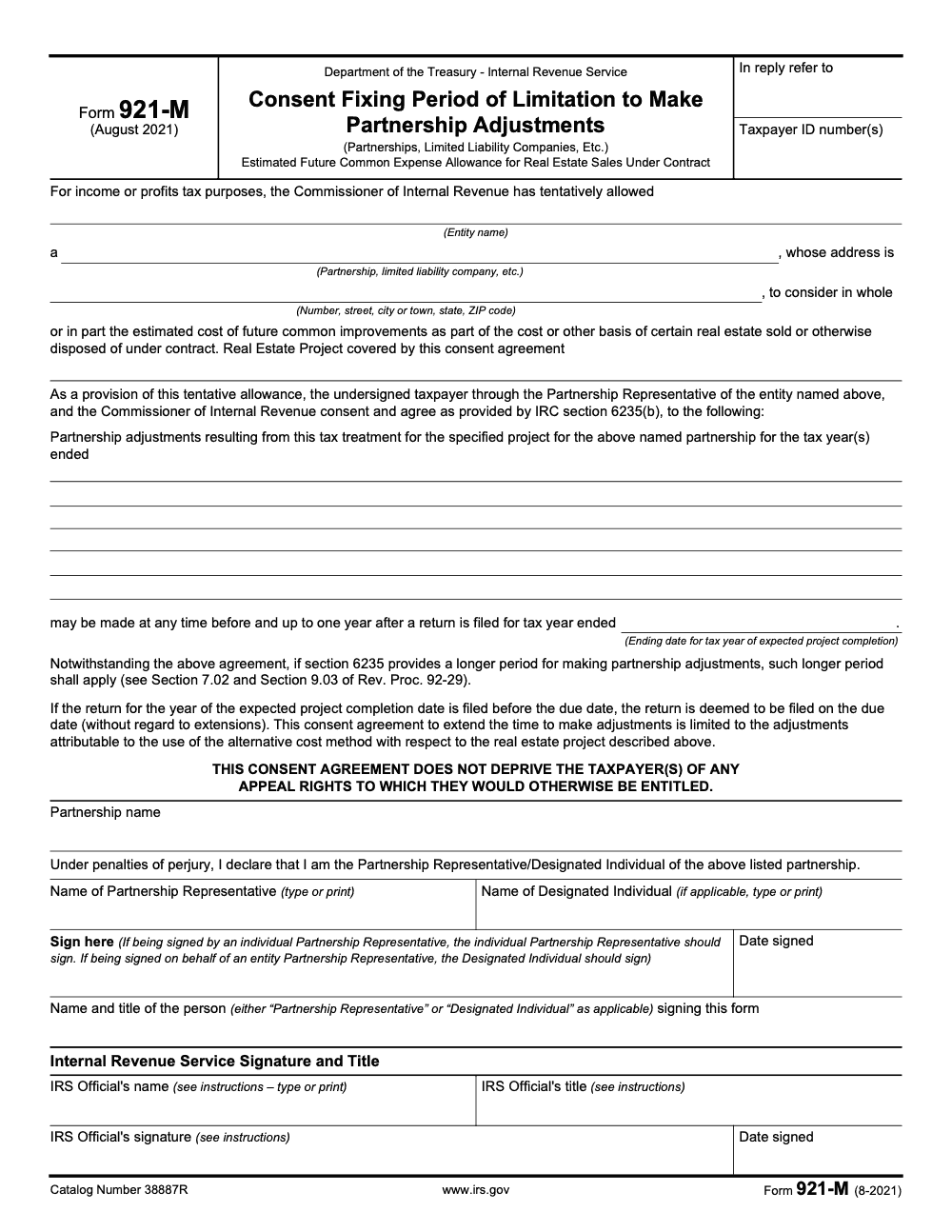
Form 921-M is the BBA-partnership consent fixing the period of limitation to make partnership adjustments tied to the alternative cost method under Rev. Proc. 92-29, executed under IRC section 6235(b). It is a two-page form, and it is not a CPAR reporting form, so do not confuse it with Forms 8985 and 8986. The narrow part is who signs and in what capacity, which is exactly where the routine consents go wrong.
Key Takeaways
- Form 921‑M is titled “Consent Fixing Period of Limitation to Make Partnership Adjustments.” You use it to agree with the IRS on an extended window to make partnership‑level adjustments tied to a specific real estate project, often when using the alternative cost method under Rev. Proc. 92‑29.
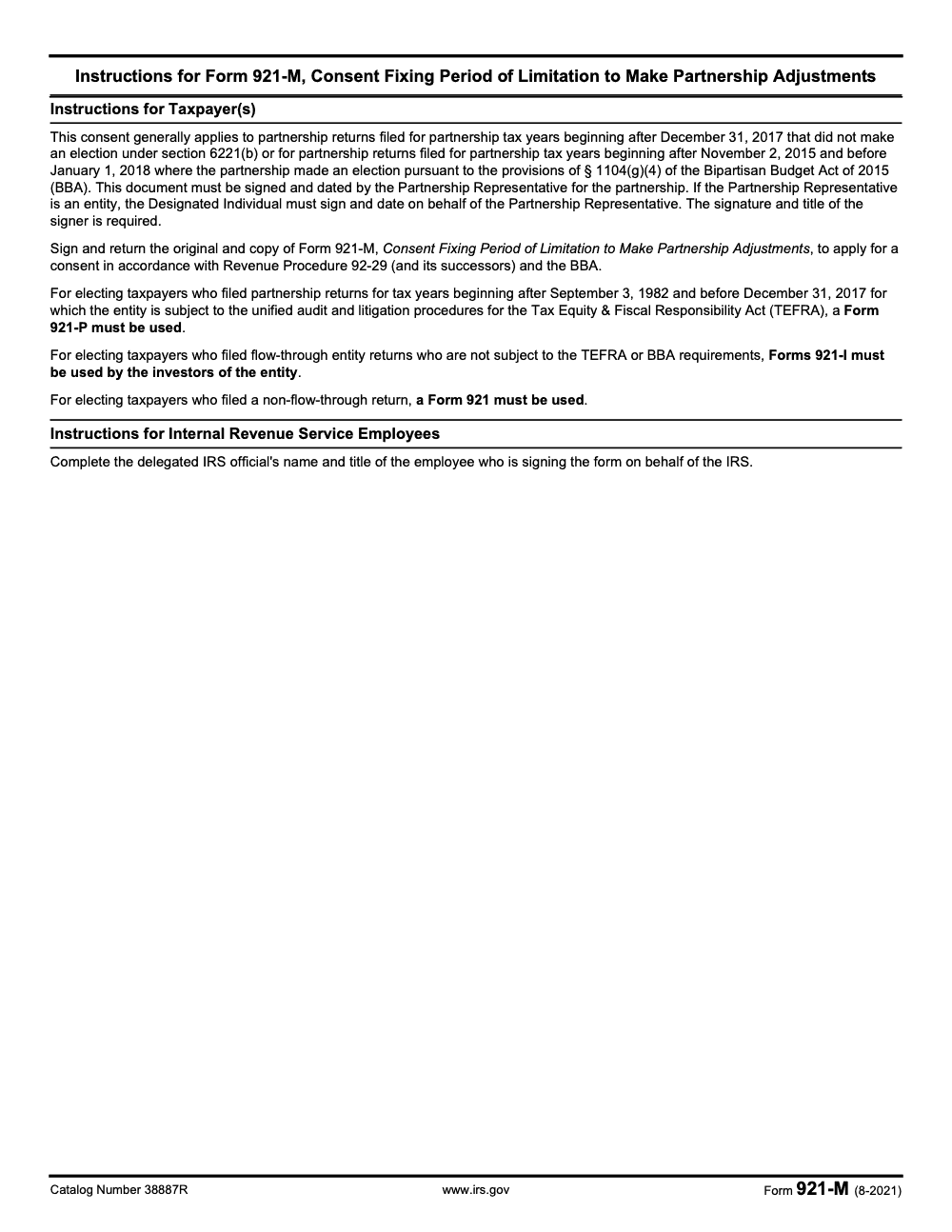
- It is a two‑page IRS form dated August 2021. Page 2 contains short instructions that clarify who signs and when 921‑M applies under the BBA, also called CPAR.
- 921‑M generally applies to partnership tax years beginning after December 31, 2017 that did not elect out of CPAR, and to certain 2015–2017 years if the partnership elected into the BBA rules.
- 921‑M is a consent, not a catch‑all CPAR reporting form. Do not confuse it with Forms 8985 and 8986, which handle partner‑level statements in BBA adjustments.
- The official, current PDF is hosted on IRS.gov. Verify you are using “Form 921‑M (8‑2021).”
What is IRS Form 921‑M
Form 921‑M, Consent Fixing Period of Limitation to Make Partnership Adjustments.
That is the exact title. In plain English, 921‑M is a written agreement between your partnership and the IRS that extends how long the IRS can make partnership‑level adjustments for a defined project. You will see it when a development or similar project uses the alternative cost method for future common improvements, and the Service wants a consent that lines up the timing of adjustments with the project’s expected completion year.
A few specifics you should know before you touch the form:
- It is two pages, released August 2021, with brief instructions that sit right on page 2.
- The instructions tie 921‑M to the BBA, also called the Centralized Partnership Audit Regime. They say it generally applies to BBA partnership years after 2017, and to certain 2015–2017 returns where the partnership elected into the BBA.
- The consent is limited in scope. It is only about adjustments attributable to the alternative cost method for the named project. It does not open the door to everything.
When 921‑M actually applies
You will typically see 921‑M in three situations:
- Your partnership is a BBA partnership for years beginning after 2017, you did not elect out, and the project uses the alternative cost method. The IRS wants a consent that syncs the statute with project completion.
- Your partnership elected into the BBA for a year after November 2, 2015 and before January 1, 2018, and the project facts are the same.
- An examiner references Rev. Proc. 92‑29 in an IDR, and your PR receives a draft 921‑M to sign along with the project details and the “tax year of expected project completion.”
If you validly elected out of the BBA for the year, or you are dealing with older TEFRA years, different 921 forms may apply, for example 921‑P for TEFRA partnerships or 921‑I for investors not under TEFRA or BBA. The 921‑M instructions say exactly that.
Common confusion, 921‑M is not a CPAR “reporting” form
Many teams mistake 921‑M for a way to “report partnership‑level adjustments.” That is not what it does. It fixes the period of limitation for making partnership adjustments linked to a specific real estate project. If you are handling partner statements for BBA adjustments, you are in Forms 8985 and 8986 territory, not 921‑M.
Quick anatomy of the form
- Header and identifiers, includes entity name, EIN, address, and the real estate project description.
- Consent language, it ties the extension to the year the project is expected to complete, and it states the consent is limited to adjustments from the alternative cost method for that project (if IRC §6235 itself provides a longer period for making partnership adjustments, that longer §6235 period still controls per Sections 7.02 and 9.03 of Rev. Proc. 92-29).
- Signatures, the Partnership Representative signs, or, if the PR is an entity, the Designated Individual signs. The IRS official signs on behalf of the Service (the consent is bilateral and not effective until the delegated IRS official has completed name, title, signature, and date). The instructions say exactly who must sign.
Why this matters to delivery
If you track this consent late, reviews stall, deadlines slip, and your partners stay stuck in loops with the examiner. The fix is process, not heroics. Lock a checklist for 921‑M into your workflow, name files consistently, and keep the project completion year and consent dates visible in your tracker. This is how you protect review time and keep client trust steady, even when the exam gets busy.
How to complete Form 921‑M correctly
Here is a clean, step‑by‑step flow you can drop into your tax ops SOP.
- Confirm applicability
- Is the year a BBA partnership year that did not elect out, or a 2015–2017 year with an election into BBA, and is the project using the alternative cost method under Rev. Proc. 92‑29, or its successors. If yes, you are in 921‑M scope.
- Gather project details
- Project name and description that matches your workpapers, developer agreements, and cost schedules (file a separate Form 921-M for each project; the consent is singular and cannot cover multiple projects on one form).
- The “tax year of expected project completion,” this drives the end of the consent window (enter the partnership’s tax-year-end date for the year of expected completion, not the project’s physical completion calendar date).
- Complete the consent language accurately
- Check that the extension period and language match the draft provided by the examiner. The form limits the consent to adjustments attributable to the alternative cost method for the described project.
- Get the right signature
- The Partnership Representative signs. If the PR is an entity, the Designated Individual signs on the PR’s behalf (a general partner, managing member, or TEFRA-era Tax Matters Partner cannot sign in lieu, and the signer’s title must be specified as either “Partnership Representative” or “Designated Individual”). Keep evidence of the designation in your files.
- Return both the original and a copy
- The instructions say to sign and return the original and a copy to apply for the consent. Log the dates in your tracker and store a scanned PDF in your exam folder.
Which 921 form should you use
Below is a quick reference. Use this as a review checklist before you route a consent for signature.
| Scenario | Form | Who signs | Reference |
| BBA partnership years after 2017 that did not elect out, or certain 2015–2017 years elected into BBA, project uses alternative cost method | 921‑M | Partnership Representative, or Designated Individual for an entity PR | |
| TEFRA partnership years | 921‑P | Tax Matters Partner or authorized person | |
| Investors in entities not under TEFRA or BBA | 921‑I | Investor or authorized rep | |
| Non‑flow‑through returns | 921 | Appropriate corporate officer or individual |
Common mistakes that slow reviews
- Treating 921‑M as a generic CPAR schedule rather than a consent that extends the period to make adjustments for a named project.
- Missing the Designated Individual signature when the PR is an entity. Keep the PR designation letter handy.
- Selecting the wrong form for older TEFRA years or non‑BBA situations, 921‑P or 921‑I may apply instead.
- Letting the “expected project completion” year get out of sync with the real project plan. Reconfirm dates before you sign.
CPAR mechanics to confirm before you sign
If your team is newer to BBA terminology, align on these before you send anything to the IRS:
- BBA partnership, most partnerships with tax years beginning after 2017 are in, unless they validly elected out under section 6221.
- Forms 8985 and 8986, used to report and furnish partner shares of adjustments for BBA AARs or audits when partners, not the partnership, take adjustments into account.
- Imputed underpayment, the CPAR concept you weigh when deciding whether to push out or pay at the partnership level.
Where to get the latest form
Always pull the PDF from IRS.gov so your title, date, and language are current. The IRS file listing shows “Form 921‑M (8‑2021),” and the PDF header confirms the same. Save the file in your exam folder with a standard name, for example “921‑M_[Project]_[YYYYMMDD].pdf.”
A quick timeline example
- March 12, 2026, examiner requests a signed 921‑M for the Lakeside project.
- March 14, 2026, your PR reviews the consent language, confirms the expected project completion tax year, signs, and returns original plus copy (note: if the completion-year return is filed before its due date, the one-year extension runs from the unextended due date, not the early-filing date).
- You update your tracker with the consent signed date and the project completion year so reviewers can see the limitation period at a glance.
Pro tip, keep the signed consent next to your Rev. Proc. 92‑29 workpapers and the development agreements. One click, and your reviewer has everything they need.
Workflow tips for firms
You do not need more late‑night scrambles. You need a calm process your team can run even on the busiest Tuesday.
- Build a short SOP for 921‑M, trigger it when a project uses the alternative cost method or when an IDR references Rev. Proc. 92‑29. Keep the SOP next to your CPAR checklist.
- Standardize file names, include project name and consent dates so reviewers and partners see the limitation period immediately.
- Train your team on the difference between consents like 921‑M and CPAR forms like 8985 and 8986. This single point reduces rework during reviews.
- Use a simple tracker that shows project completion year, consent signed date, PR and DI on record, and the examiner’s contact.
If you prefer to keep your partners out of review loops, a disciplined delivery model helps. At Accountably, we integrate trained offshore teams into firm systems with SOP‑driven execution, standardized workpapers, and layered review so these consents, statements, and deadlines do not get lost in the shuffle. Use help where it adds control, not noise.
Final checklist
- Confirm 921‑M is the correct consent for your facts.
- Align the expected project completion year with your workpapers.
- Route signature to the Partnership Representative, or the Designated Individual if the PR is an entity.
- Return original and copy as instructed, save a scanned PDF, and log dates in your tracker.
- For BBA adjustments and partner statements, use Forms 8985 and 8986 as applicable.
- If you are in TEFRA or non‑BBA situations, check 921‑P, 921‑I, or 921 instead.
Sources and update notes
- Official IRS PDF, “Form 921‑M (8‑2021), Consent Fixing Period of Limitation to Make Partnership Adjustments,” two pages with instructions. Last checked January 2, 2026.
- IRS static files directory listing for f921m.pdf and related 921 series forms. Last checked January 2, 2026.
- IRS Instructions touching BBA concepts and the role of Forms 8985 and 8986. Last checked January 2, 2026.
Common Mistakes We See Every Season
We see the same handful of slips on Form 921-M every cycle, and every one of them either delays the IRS countersignature or pulls the project out of the alternative cost method altogether.
Reusable Checklists
These checklists are copy-paste ready for firm SOPs. Drop them into your engagement playbook for any Rev. Proc. 92-29 partnership project.
Pre-execution data gather
- Confirm the partnership is BBA-regime for the tax year covered (post-12/31/2017 default, or a § 1104(g)(4) early election under the Bipartisan Budget Act of 2015 for tax years beginning after 11/2/2015 and before 1/1/2018).
- Confirm no §6221(b) opt-out election is in place for the year; if opted out, switch to Form 921-I per the form's instructions.
- Pull the Rev. Proc. 92-29 tentative allowance letter for the project and store it with the consent file.
- Write the 'Real Estate Project covered by this consent agreement' description to match the underlying contract or plat exactly.
- Identify the partnership tax-year end in which completion is expected, and translate any developer forecast into the matching partnership year-close date.
- Pull the partnership's TIN, entity type ('Partnerships, Limited Liability Companies, Etc.' per the form), and address from the most recently filed Form 1065.
Signer authority verification
- Pull the BBA Partnership Representative appointment from the most recently filed Form 1065 or a change-of-PR filing.
- If the PR is an entity, confirm the Designated Individual is appointed in writing and store the DI appointment in the file.
- Set the signer's title on the consent to 'Partnership Representative' or 'Designated Individual' exactly; do not list 'managing member', 'general partner', or 'tax-matters partner'.
- Confirm the signer understands the 'under penalties of perjury' standard before they sign.
- Prepare both the original and a copy for wet signature; do not photocopy after the PR or DI signs.
Post-submission tracking
- Log the consent on the partnership's compliance calendar with a fixed IRS countersignature follow-up date.
- Hold the project file open until the IRS-executed copy returns with the IRS Official's name, title, signature, and date completed.
- Record the project-completion tax-year end and the one-year statute-extension trigger date in your audit-statute tracker, treating the trigger as the unextended due date if the return is filed early.
- Flag any §6235 events (six-year exception, BBA suspension provisions) that would extend the IRS adjustment window beyond the consent floor.
- Note that signing Form 921-M preserves all appeal rights; record this where the engagement letter addresses statute extensions.
Keep 921-M Season From Stalling
Form 921-M work is not a quarterly grind, it is event-driven. Each consent shows up tied to a single Rev. Proc. 92-29 tentative allowance on a single real-estate project, and the partnership's window to act lines up with the delegated IRS official's countersignature schedule, not the firm's calendar. When a developer brings in three projects mid-year, the firm is on the hook for three separate consent packets, three signer-authority confirmations, and three sets of project-completion-year tracking, all at once.
The fix is structural. Treat every Rev. Proc. 92-29 file as a small standalone engagement with its own checklist, its own signer-authority gate, and its own countersignature follow-up. The work is narrow but it does not tolerate ambiguity.
- Open a separate Form 921-M packet per project, each with its own description in the 'Real Estate Project' field and its own ending date for the tax year of expected completion.
- Gate execution on the BBA Partnership Representative appointment. Pull the PR or Designated Individual from the most recent Form 1065 before any wet ink touches the form, and record the capacity on the signature line.
- Build the package as the original and one copy from the start, per the Form 921-M instructions. Sending only the original is the single most common reason a 921-M sits unprocessed.
- Calendar the project-completion tax-year end and the one-year extension trigger separately. The clock starts when the return for that year is filed, deemed the unextended due date if the return is filed early.
- Track §6235 events alongside the consent. If a longer statute under §6235 applies (for example the six-year fraud exception or BBA suspension provisions), the consent floor does not cap the IRS adjustment window.
That structure is the same one we run for partnership compliance work end-to-end. Our U.S.-led offshore tax delivery teams treat each Rev. Proc. 92-29 file as its own SOP, with a defined preparer, reviewer, and countersignature tracker, so consents do not get lost between the close of fieldwork and the IRS reply.
FAQs
No. You use 921‑M when the facts fit the form, typically when a project uses the alternative cost method and the IRS wants a consent that fixes the period for partnership adjustments tied to that project. It is not a universal CPAR requirement.
The Partnership Representative signs the consent. If the PR is an entity, the Designated Individual signs on the entity PR’s behalf – a general partner, managing member, or TEFRA-era Tax Matters Partner cannot substitute, and the title field must read either “Partnership Representative” or “Designated Individual.” The IRS official signs on behalf of the Service, and the consent is not effective until both sides have signed. The signature instructions appear on page 2.
Treat 921‑M as an agreement between your partnership and the IRS in the exam context. Follow the examiner’s instructions and the form’s direction to sign and return the original and a copy. Keep a scanned PDF in your records.
Different tools, different jobs. Push‑out mechanics and partner statements live in the 8985 and 8986 workflow under CPAR. 921‑M is about fixing the period to make partnership adjustments for the named project, not about furnishing partner statements.
If you validly elected out of the BBA under §6221(b) for that year, investors generally use 921‑I (or 921 if the filer is non‑flow‑through), not 921‑M. 921‑P is reserved for TEFRA partnership years (after September 3, 1982 and before December 31, 2017), not for BBA opt-outs. Use the 921‑M instructions as your routing map.
Other forms this guide names
- Form 921: Consent to Extend the Time to Assess Tax 2026
- Form 8985: BBA Partnership Adjustment Tracking Report Guide
- Form 8986: Partner Adjustment Statements Guide
- Form 921-P: 2026 Status, When It Applies, and Form 3115 Guidance
- Form 1065: Guide, Deadlines, K‑1, K‑2/K‑3, E‑File
- Form 1065: Schedule K-2 and K-3 Guide 2025, one month date rules
Summarize this article with AI
About this guide
Accountably helps US CPA, EA, and accounting firms hire trained accountants and tax preparers in India.
About us Reviewed byJugal Thacker, CPAFounder and CEO at Accountably
A US-licensed CPA with 7+ years inside US firms – PwC, a real-estate tax practice, then a full-service firm, rising from reviewer to manager to advisory. This article was reviewed against current IRS guidance for the 2025 tax year and updated for filers preparing late returns, amendments, and 2026 estimates.
View profile →How we research, review, and update this guide
Every Accountably guide is researched against primary IRS sources, reviewed by a U.S. CPA, and refreshed as guidance evolves. Read our Editorial Guidelines to see how we source, fact-check, and update our content.




