
Summarize this article with AI
In Brief
Form 940 Schedule R is the allocation schedule for aggregate Form 940 filers – IRS-approved section 3504 agents and Certified Professional Employer Organizations (CPEOs) that file one Form 940 covering multiple clients (per the Schedule R (Form 940) instructions, Rev. December 2024). Each client is listed by EIN, the grand totals on line 19 must equal the aggregate Form 940 lines 7, 9 or 10, 11, 12, and 13, and Schedule R is due with Form 940 on February 2, 2026 for tax year 2025 (February 10, 2026 if every FUTA deposit was made on time).
A CPEO's aggregate Form 940 once reached my team with every client keyed in by EIN on a supplemental spreadsheet rather than on Schedule R itself, so the schedule had to be rebuilt before review could start. Schedule R is the allocation schedule that aggregate filers, the section 3504 agents and CPEOs, use to break one Form 940 down to each underlying client.
Everything hinges on the totals: the line 19 grand totals have to equal the aggregate Form 940 lines 7, 9 or 10, 11, 12, and 13 exactly, and any discrepancy triggers an IRS notice. A regular employer filing its own Form 940 never files it. Schedule R is due with Form 940 on February 2, 2026 for tax year 2025, or February 10, 2026 if all FUTA deposits were timely.
Key Takeaways
- Schedule R is an allocation schedule required for aggregate Form 940 filers – specifically IRS-approved section 3504 agents and CPEOs that file a single Form 940 on behalf of multiple clients (a regular employer filing its own Form 940, and an uncertified PEO or an ordinary reporting agent, never file Schedule R).
- The schedule breaks down the total FUTA taxable wages, FUTA tax, and credit reduction amounts by each underlying client (identified by EIN).
- Only employers authorized to file aggregate returns – specifically those who have received IRS approval or operate under IRC §3504 agent authority – use Schedule R.
- Due date follows Form 940: for tax year 2025 that is February 2, 2026 (January 31, 2026 falls on a Saturday), or February 10, 2026 if all FUTA deposits were timely made.
- The most common error is failing to match the sum of all Schedule R rows exactly to the totals on Form 940 – any discrepancy triggers an IRS notice.
- Quick rule you can copy into your SOP: reconcile the Schedule R column totals to Form 940 lines 7, 9 or 10, 11, 12, and 13 before any partner review begins.
What Form 940 Schedule R Is and When to Use It
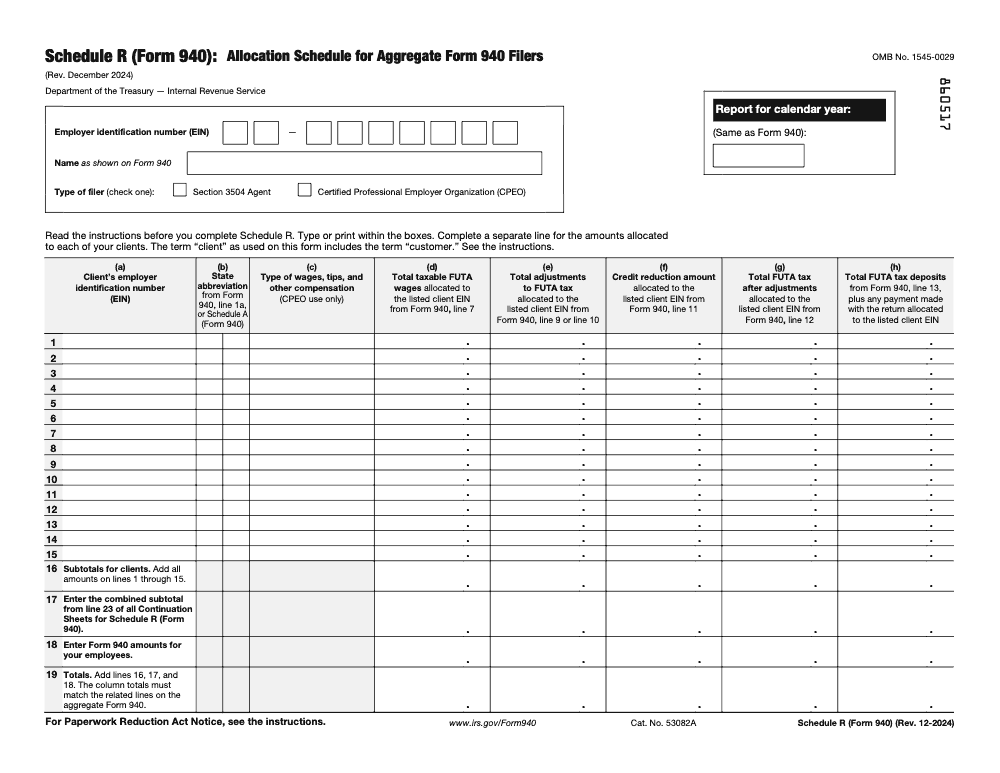
Form 940 Schedule R – “Allocation Schedule for Aggregate Form 940 Filers” – is used by organizations that file a single Form 940 covering multiple employer-clients. It is an attachment to the aggregate Form 940 and provides a client-by-client breakdown of the FUTA data that rolls up into the consolidated return.
The IRS requires Schedule R to maintain transparency in aggregate filing arrangements. Without it, there is no way for the IRS to verify that the aggregate return accurately reflects each underlying employer’s liability. Schedule R is the audit trail that makes aggregate 940 filing legally sound.
From my side of the desk, the form is straightforward in structure but demanding in precision. Every row must tie exactly to payroll records for that client, and the column totals must equal the Form 940 totals to the dollar. There is no rounding grace here.
Who Must File Schedule R
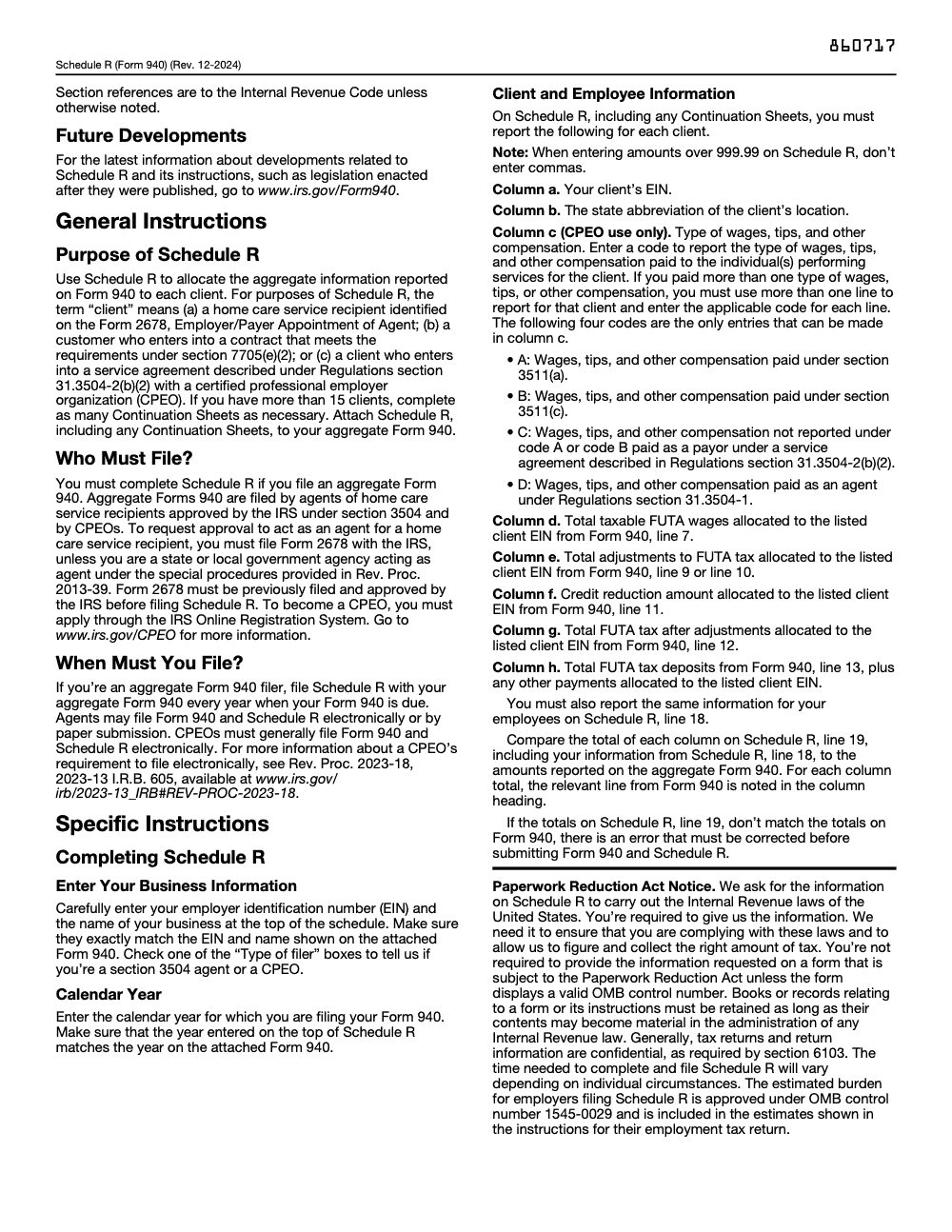
Schedule R is only for organizations that have been authorized or designated to file aggregate Form 940 returns. This includes: (1) agents filing under the authority of IRC §3504, designated by employer-clients via Form 2678; (2) Certified Professional Employer Organizations (CPEOs) approved by the IRS under IRC §7705. These are the only two categories of aggregate Form 940 filers. Standard payroll companies and CPA firms do not file aggregate 940s for clients – they file separate returns per client EIN.
How Schedule R Relates to Form 940
The aggregate Form 940 is the summary-level return. Schedule R is the supporting detail. The Form 940 totals represent the combined FUTA obligation for all clients, while each row on Schedule R represents one client’s share of that obligation. Think of it as a subsidiary ledger – the sum of all subsidiary balances must equal the control account (Form 940).
When You Do Not Need Schedule R
If you file a separate Form 940 for each employer you serve, Schedule R is not required. Schedule R is only triggered when a single Form 940 is filed aggregating multiple employer EINs. If you are uncertain whether your filing arrangement qualifies as aggregate, review the Instructions for Form 940 and confirm your agent or CPEO authorization status with the IRS.
How to Complete Form 940 Schedule R
Schedule R is a columnar form. Each row represents one employer-client identified by EIN and legal name. The columns collect FUTA data that must reconcile to the aggregate Form 940. Here is the column-by-column breakdown.
| Column | Data Required | Ties to Form 940 |
|---|---|---|
| (a) Client EIN | Employer Identification Number of each client | Must match IRS records for each client |
| (b) State abbreviation | State abbreviation of the client’s location | From Form 940 line 1a or Schedule A (Form 940) |
| (c) Type-of-wages code | Type-of-wages code A, B, C, or D (CPEO use only; section 3504 agents leave blank) | CPEO use only; not tied to a Form 940 line |
| (d) FUTA taxable wages | Total payments minus exempt payments, capped at $7,000/employee | Feeds into Form 940 Line 7 |
| (e) FUTA tax adjustments | Total adjustments to FUTA tax allocated to this client | Feeds into Form 940 line 9 or line 10 |
| (f) Credit reductions | Schedule A amounts for this client’s credit reduction states | Feeds into Form 940 Line 11 |
| (g) Total FUTA tax after adjustments | Total FUTA tax after adjustments allocated to this client | Feeds into Form 940 line 12 |
| (h) FUTA tax deposits | Total FUTA tax deposits plus any other payments allocated to this client | From Form 940 line 13 |
Completing the Header Section
Before the client rows, the schedule requires the aggregate filer’s own EIN, name, and the calendar year being reported. The aggregate filer’s name is the entity filing the Form 940, not the individual clients. Enter the tax year in the space provided and verify the aggregate filer’s EIN matches the Form 940.
Adding Client Rows
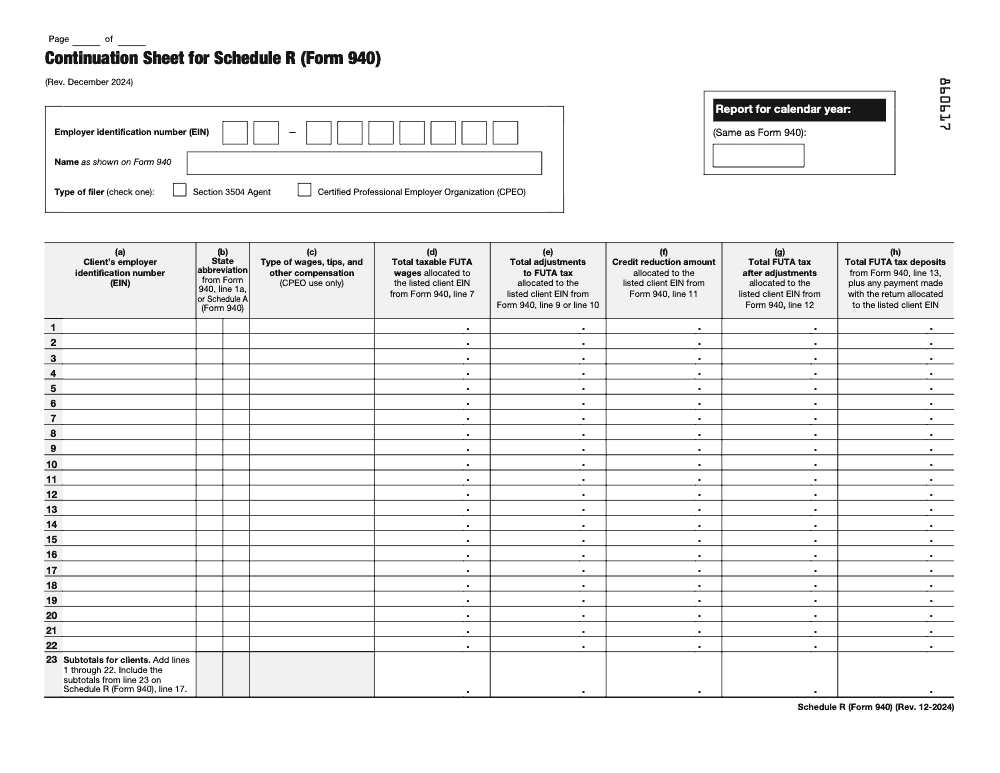
Enter one row per client (a CPEO that paid more than one type of wages, tips, or other compensation for the same client must use a separate line for each type and enter the applicable code A, B, C, or D). If you have more clients than the form has rows, continue on additional pages and number them sequentially. The IRS allows continuation pages with the same column structure. I recommend numbering pages in the header to make it easy to reference during any IRS inquiry.
Completing the Totals Row
The final row on Schedule R sums all client-level data. These column totals must match the corresponding lines on Form 940 exactly. Run a reconciliation macro or formula before printing – catching a mismatch at this stage is far easier than explaining it to the IRS after filing.
Deadlines, Penalties, and Filing Requirements
| Filing Event | Deadline | Notes |
|---|---|---|
| Aggregate Form 940 with Schedule R | February 2, 2026 | For tax year 2025 (January 31, 2026 falls on a Saturday) |
| Extended deadline if deposits were timely | February 10 | All required FUTA deposits must have been made on schedule |
| Quarterly FUTA deposits (if over $500) | April 30, July 31, October 31, January 31 | Applies to aggregate liability for all clients combined |
Penalty Structure for Aggregate Filers
Aggregate filers are held to the same penalty standards as individual employers. Late filing attracts a 5% per month penalty on unpaid FUTA tax, up to 25%. Failure-to-deposit penalties range from 2% to 15% depending on days late. Because aggregate filers often handle significant combined FUTA liabilities, the penalty exposure per missed deposit can be substantial. Small errors create big cleanup.
Electronic Filing for Aggregate Returns
The IRS requires electronic filing of aggregate Form 940 returns only from CPEOs; section 3504 agents may file Form 940 and Schedule R electronically or on paper. A CPEO that needs to paper file must first obtain a waiver, requested in writing through the IRS Online Registration System at least 45 days before the return due date. These filers typically use IRS-approved payroll software or an authorized e-file provider. Paper filing is generally unavailable to CPEOs absent an approved waiver, though section 3504 agents may still file their aggregate 940 and Schedule R on paper. Confirm your software vendor’s support for Schedule R before the January deadline.
Who Qualifies as an Aggregate Filer
The IRS restricts aggregate Form 940 filing to specific categories of entities. Filing an aggregate 940 without proper authorization is a compliance violation, so understanding the threshold is critical before adopting this approach for any client.
IRC §3504 Agents
Under IRC §3504, an employer can designate an agent to file returns and pay taxes on its behalf. The agent files Form 2678 (Employer/Payer Appointment of Agent) to obtain the designation. Once approved, the agent may file aggregate 940s covering all clients for whom they have agent authority. Each client employer-client retains ultimate liability for its own FUTA obligations.
Certified Professional Employer Organizations (CPEOs)
CPEOs are certified by the IRS under IRC §7705 and have specific rights to file aggregate employment tax returns, including Form 940. CPEOs go through an IRS approval process and must maintain certification requirements annually. The CPEO’s aggregate return covers clients in the CPEO arrangement, and each client’s data is allocated on Schedule R.
Standard Payroll Agents and CPA Firms
A CPA firm or payroll company that prepares and files 940s for clients without a §3504 or CPEO designation must file a separate Form 940 for each client EIN. They cannot aggregate those returns into a single 940. This distinction is important – I have seen firms try to file a single 940 for a group of related entities without proper authorization, which creates significant compliance exposure.
Allocation Mechanics and Credit Reductions on Schedule R
The credit reduction dimension of Schedule R adds complexity beyond simple FUTA wage allocation. If any of your aggregate clients operated in credit reduction states, each affected client must show the credit reduction amount on their Schedule R row, because employers in a credit reduction state cannot claim the full 5.4% state credit, which pushes the effective FUTA rate above 0.6% on those wages.
How Credit Reductions Flow Through Schedule R
If Client A had 20 employees in California (a historical credit reduction state) and Client B had no California employees, only Client A’s row on Schedule R carries a credit reduction amount in column (f). The aggregate Form 940 Line 11 then shows the sum of all client credit reductions. This allocation requires you to track not just aggregate FUTA wages but the state-level breakdown for each client – effectively maintaining the data from Schedule A at the individual client level.
Multi-State Clients on Schedule R
If a client has employees in multiple states, you still report that client as a single row on Schedule R, but the credit reduction amount in column (f) must account for all credit reduction states applicable to that client. Keep workpapers showing the state-level breakdown behind each Schedule R row. This is your audit defense if the IRS ever questions the credit reduction calculation.
Year-End Reconciliation Protocol
My standard practice is to build a reconciliation workpaper before finalizing the aggregate 940. The workpaper maps each Schedule R column total to the corresponding Form 940 line, shows any credit reduction detail by state and client, and confirms that the sum of all client FUTA deposits equals the aggregate return balance due. This takes about 90 minutes for a 20-client aggregate but catches errors that would otherwise generate IRS notices three months later.
Common Mistakes That Slow Things Down
Across the aggregate Form 940 filings my team reviews each winter, the same handful of Schedule R errors keep surfacing, and almost all of them are reconciliation or authorization problems rather than math problems.
Practical Checklists You Can Reuse
These are copy-paste ready for your aggregate Form 940 SOP. Drop them into your workpaper template and tick each item as you clear it.
Aggregate filer authorization check
- Confirm the filer type and check exactly one Type of filer box: section 3504 agent or CPEO.
- For each section 3504 agent client, verify Form 2678 is filed and IRS-approved, or that the Rev. Proc. 2013-39 exemption applies.
- For CPEO clients, confirm active IRS certification under section 7705.
- Verify the filer EIN and name on Schedule R match the aggregate Form 940 exactly.
- Confirm the calendar year on Schedule R matches the calendar year on Form 940.
- Confirm each client fits one of the three defined categories: home care recipient on Form 2678, CPEO customer under section 7705(e)(2), or service-agreement client under Regulations section 31.3504-2(b)(2).
Client row build
- Enter each client’s EIN in column a and the state abbreviation in column b (from Form 940 line 1a or Schedule A).
- For CPEOs only, enter the correct type-of-wages code (A, B, C, or D) in column c; section 3504 agents leave column c blank.
- Use a separate line per code when a CPEO paid mixed wage types for one client.
- Post taxable FUTA wages in column d (Form 940 line 7) and adjustments in column e (line 9 or 10).
- Post the credit reduction in column f (line 11) for any client with credit reduction state wages.
- Enter total FUTA tax after adjustments in column g (line 12) and deposits in column h (line 13 plus other payments).
- Enter amounts above 999.99 without commas.
- Start a Continuation Sheet once you pass 15 clients; each sheet holds 22 rows and rolls forward to line 17.
Reconcile and file
- Report the filer’s own employees on line 18, separate from the client rows.
- Sum lines 1 through 15 into line 16 and all Continuation Sheet line 23 subtotals into line 17.
- Confirm line 19 (lines 16 plus 17 plus 18) equals Form 940 lines 7, 9 or 10, 11, 12, and 13 to the dollar.
- Attach Schedule R and every Continuation Sheet to the aggregate Form 940; it is not a standalone return.
- CPEOs: e-file the return, or file under an approved waiver requested at least 45 days before the due date.
- File by February 2, 2026 for tax year 2025, or February 10, 2026 if all FUTA deposits were timely.
- Retain the supporting workpapers as long as their contents may be material in administering the Internal Revenue laws.
Keep 940 Schedule R Season From Stalling
Schedule R does not get its own calendar – it rides with the aggregate Form 940, so the entire client book lands in the same late-January window every year. For tax year 2025 that filing is due February 2, 2026, and the per-client reconciliation work scales with every EIN you add across lines 1 through 15 and onto each 22-row Continuation Sheet (per the Schedule R (Form 940) instructions, Rev. December 2024).
The bottleneck is rarely the FUTA math itself – the 6.0% gross rate on the first $7,000 of each employee’s wages is simple. The pressure comes from tying every client row back to its own payroll records and clearing line 19 to the aggregate Form 940 before a reviewer can sign off. When that work is unstructured, one mismatched EIN can stall an entire batch.
- Standardize one workpaper row per client EIN, mapping columns d through h to Form 940 lines 7, 9 or 10, 11, 12, and 13.
- Track quarterly FUTA deposits against the $500 threshold by client through the year so column h is not reconstructed in January.
- Flag credit reduction state clients early and pull each one’s Schedule A detail into column f.
- Keep the filer’s own employees on line 18 and any CPEO type-of-wages codes (A through D) in column c isolated from agent filings.
- Pre-stage CPEO e-file access or the 45-day waiver request so the filing method is settled well before the deadline.
This is the kind of structured, repeatable execution we build into client workflows. Our tax execution teams run aggregate Form 940 and Schedule R inside documented SOPs with multi-layer review, so the client-by-client reconciliation is finished and checked well before February 2 – no last-week scramble and no reconciliation gaps walking into partner review.
FAQs
Schedule R is used by aggregate Form 940 filers – such as §3504 agents and CPEOs – to allocate the FUTA tax information on the aggregate Form 940 back to each individual employer-client. It provides the IRS with a client-by-client breakdown of FUTA taxable wages, credit reductions, and total FUTA tax liability. The column totals on Schedule R must equal the corresponding lines on the aggregate Form 940.
Only organizations authorized to file aggregate Form 940 returns are required to attach Schedule R. This includes agents designated under IRC §3504 via Form 2678, and Certified Professional Employer Organizations (CPEOs) approved under IRC §7705. Standard payroll service providers and CPA firms that file individual 940s per client are not aggregate filers and do not use Schedule R.
Each row represents one employer-client and shows: the client’s EIN, the state abbreviation of the client’s location, a CPEO type-of-wages code (CPEO filers only), FUTA taxable wages (capped at $7,000 per employee), adjustments to FUTA tax, any credit reduction amount, total FUTA tax after adjustments, and FUTA tax deposits for that client. The row totals for all clients must reconcile to the aggregate Form 940.
Schedule R is filed as an attachment to the aggregate Form 940 and follows the same deadline as Form 940; for tax year 2025 that is February 2, 2026 (January 31, 2026 falls on a Saturday). The deadline extends to February 10 if all required FUTA deposits were made on time. Only CPEOs are required to file electronically; section 3504 agents may file Schedule R on paper or electronically.
A mismatch between Schedule R column totals and Form 940 lines will generate an IRS notice requesting reconciliation or adjustment. The IRS uses Schedule R as the verification mechanism for aggregate returns, so any discrepancy triggers a compliance inquiry. Always reconcile Schedule R to Form 940 before submission.
Other forms this guide names
Summarize this article with AI
About this guide
Accountably helps US CPA, EA, and accounting firms hire trained accountants and tax preparers in India.
About us Reviewed byJugal Thacker, CPAFounder and CEO at Accountably
A Washington-licensed CPA with 7+ years inside US firms – PwC, a real-estate tax practice, then a full-service firm, rising from reviewer to manager to advisory. This article was reviewed against current IRS guidance for the 2025 tax year and updated for filers preparing late returns, amendments, and 2026 estimates.
View profile →How we research, review, and update this guide
Every Accountably guide is researched against primary IRS sources, reviewed by a U.S. CPA, and refreshed as guidance evolves. Read our Editorial Guidelines to see how we source, fact-check, and update our content.




